Hard drive repair options

synthc

New member
Local time
12:16 PM
Messages
20
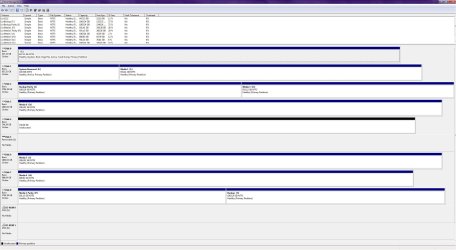
I have a 3 TB drive that I've been having trouble with (volumes dismount randomly and don't show up until restart). I recently replaced it and I decided to clean the drive in diskpart to see if I could get it working correctly; after cleaning it windows now sees only 746 GB (no ~2000 GB leftovers), this is not surprising for a 3 TB drive so I set it to GPT, but the other space still doesn't show up at all.

I'm guessing the other sectors are just dead, but its out of warranty and I hate to just throw away a 3 TB drive. I've tried the clean all command in diskpart as well as disconnecting and reconnecting the power. Does anyone have any suggestions on how to repair this drive? Or is it just garbage now?
 

My Computer My Computer

Computer type
PC/Desktop
Computer Manufacturer/Model Number
Custom Build
OS
Windows 7 Ultimate x64 SP1
CPU
i5 3570k @4.6GHz
Motherboard
ASUS P8Z77-V LK
Memory
G.Skill Sniper 8 GB @2472KHz — 11-13-13-31
Graphics Card(s)
MSI GTX 760
Sound Card
Auzentech Prelude 7.1
Hard Drives
2x Mushkin Chronos 240 GB SSDs in Raid 0
Antivirus
Microsoft Security Essentials
Browser
Firefox

My Computers My Computers

System One System Two

  • Computer type
    PC/Desktop
    Computer Manufacturer/Model Number
    ALWAYS UNDER CONSTRUCTION
    OS
    Windows 11 Pro
    CPU
    Ryzen 9 5900X
    Motherboard
    Asus X570 Crosshair Viii Hero
    Memory
    32GB G Skill DDR4-3600
    Graphics Card(s)
    EVGA RTX 3080 FTW 3 Ultra
    Sound Card
    On Board/Sennheiser PC37X Headset
    Monitor(s) Displays
    3 X Asus 27"
    Screen Resolution
    2560x1440
    Hard Drives
    2 X 1 TB NVME drives
    PSU
    EVGA 850
    Case
    Phanteks Eclipse P400A
    Cooling
    EVGA 280 AIO
    Keyboard
    Logitech G510s/ Logitech G13
    Mouse
    Logitech G502
    Internet Speed
    24/1
    Antivirus
    ESET/MBAM Pro/SAS Pro
    Browser
    Chrome/ Firefox/ Edge
  • Computer type
    Laptop
    System Manufacturer/Model Number
    Dell 16 Plus
    OS
    Windows 11 Pro
    CPU
    Intel Ultra 9 288V
    Memory
    32 GB LPDDR5X 8533
    Monitor(s) Displays
    16" Mini-LED HDR600 Touch 90 Hz
    Screen Resolution
    2560X1600
    Hard Drives
    1 TB NVME
Attached.
 

Attachments

  • Desktop_2014_02_27_16_37_36_096.jpg
    Desktop_2014_02_27_16_37_36_096.jpg
    266.1 KB · Views: 11

My Computer My Computer

Computer type
PC/Desktop
Computer Manufacturer/Model Number
Custom Build
OS
Windows 7 Ultimate x64 SP1
CPU
i5 3570k @4.6GHz
Motherboard
ASUS P8Z77-V LK
Memory
G.Skill Sniper 8 GB @2472KHz — 11-13-13-31
Graphics Card(s)
MSI GTX 760
Sound Card
Auzentech Prelude 7.1
Hard Drives
2x Mushkin Chronos 240 GB SSDs in Raid 0
Antivirus
Microsoft Security Essentials
Browser
Firefox
It appears you have a couple of 3 TB drives already, so you must be familiar with the NTFS file system limitations. I am not sure why your drive is showing up as only 746 GB. What I would suggest is to use diskpart again and use the clean all command. That will take several hours but should clean everything from the drive and make it ready to be formatted as GPT. Needless to say, if you have any data on the drive it will be lost by doing that.
 

My Computers My Computers

System One System Two

  • Computer type
    PC/Desktop
    Computer Manufacturer/Model Number
    ALWAYS UNDER CONSTRUCTION
    OS
    Windows 11 Pro
    CPU
    Ryzen 9 5900X
    Motherboard
    Asus X570 Crosshair Viii Hero
    Memory
    32GB G Skill DDR4-3600
    Graphics Card(s)
    EVGA RTX 3080 FTW 3 Ultra
    Sound Card
    On Board/Sennheiser PC37X Headset
    Monitor(s) Displays
    3 X Asus 27"
    Screen Resolution
    2560x1440
    Hard Drives
    2 X 1 TB NVME drives
    PSU
    EVGA 850
    Case
    Phanteks Eclipse P400A
    Cooling
    EVGA 280 AIO
    Keyboard
    Logitech G510s/ Logitech G13
    Mouse
    Logitech G502
    Internet Speed
    24/1
    Antivirus
    ESET/MBAM Pro/SAS Pro
    Browser
    Chrome/ Firefox/ Edge
  • Computer type
    Laptop
    System Manufacturer/Model Number
    Dell 16 Plus
    OS
    Windows 11 Pro
    CPU
    Intel Ultra 9 288V
    Memory
    32 GB LPDDR5X 8533
    Monitor(s) Displays
    16" Mini-LED HDR600 Touch 90 Hz
    Screen Resolution
    2560X1600
    Hard Drives
    1 TB NVME
Thanks for the reply. I have already used clean all. Even in diskpart, windows only sees the 746 GB; I'm familiar with data recovery programs, but I've never had an issue where windows won't actually see the whole drive at all. I guess what I'm looking for is some kind of program that might be able to repair the dead sectors.
 

My Computer My Computer

Computer type
PC/Desktop
Computer Manufacturer/Model Number
Custom Build
OS
Windows 7 Ultimate x64 SP1
CPU
i5 3570k @4.6GHz
Motherboard
ASUS P8Z77-V LK
Memory
G.Skill Sniper 8 GB @2472KHz — 11-13-13-31
Graphics Card(s)
MSI GTX 760
Sound Card
Auzentech Prelude 7.1
Hard Drives
2x Mushkin Chronos 240 GB SSDs in Raid 0
Antivirus
Microsoft Security Essentials
Browser
Firefox
Have you tried checking to see if a non-Windows OS (like say a distro of Linux) can see the full size of the HDD in question? If this is beyond your comfort zone you can safely ignore my inquiry, but it would help in isolating whether this problem is caused by the HDD itself or whether Windows is just being stupid.
 

My Computer My Computer

Computer type
PC/Desktop
Computer Manufacturer/Model Number
N/A (custom-built)
OS
Windows 7 Ultimate x64 SP1
CPU
Intel Core i7 2700K @ 3.5GHz (TurboBoost disabled)
Motherboard
ASUS P8Z68-V/GEN3
Memory
16GB (4x4GB) Kingston HyperX DDR3 1600MHz @ 1333MHz
Graphics Card(s)
Nvidia EVGA GeForce GTX 1060 6GB
Sound Card
Realtek High Definition Audio (motherboard integrated)
Monitor(s) Displays
NEC Multisync EX231W
Screen Resolution
1920x1080 @ 60Hz via DVI-D
Hard Drives
2x Western Digital 1TB SATA3 Caviar Black Internal HDD // 1x WD 500GB USB 3.0 "My Passport Essential" External HDD // 1x WD 1TB USB 3.0 "My Passport Essential" External HDD // 2x WD 2TB USB 3.0 "My Passport Essential" External HDD
PSU
Corsair Professional Series Gold AX850
Case
Antec 300
Cooling
Air-cooling
Keyboard
Steelseries 6Gv2
Mouse
Steelseries Sensei RAW Glossy, Logitech M500
Internet Speed
DSL (AT&T)
Antivirus
Microsoft Security Essentials
Browser
Pale Moon, Mozilla Firefox 12, Opera 12, Chromium, IE9
Other Info
Virtual Machines (VirtualBox):
* Japanese Windows XP Professional SP3
* Japanese Windows 7 Professional SP1
Yes, I'm sorry, in your first post I misread it and thought you had used the clean command. I don't know of anything that will repair bad sectors, The clean all will sometimes mark them for the drive not to write to them.

I would try the bootable Partition Wizard before burying it though. It can do a lot of things Disk management is not capable of. http://www.sevenforums.com/tutorials/93322-partition-wizard-use-bootable-cd.html

I wouldn't discount King Arthurs suggestion either of using a Live Linux distro to see either.
 

My Computers My Computers

System One System Two

  • Computer type
    PC/Desktop
    Computer Manufacturer/Model Number
    ALWAYS UNDER CONSTRUCTION
    OS
    Windows 11 Pro
    CPU
    Ryzen 9 5900X
    Motherboard
    Asus X570 Crosshair Viii Hero
    Memory
    32GB G Skill DDR4-3600
    Graphics Card(s)
    EVGA RTX 3080 FTW 3 Ultra
    Sound Card
    On Board/Sennheiser PC37X Headset
    Monitor(s) Displays
    3 X Asus 27"
    Screen Resolution
    2560x1440
    Hard Drives
    2 X 1 TB NVME drives
    PSU
    EVGA 850
    Case
    Phanteks Eclipse P400A
    Cooling
    EVGA 280 AIO
    Keyboard
    Logitech G510s/ Logitech G13
    Mouse
    Logitech G502
    Internet Speed
    24/1
    Antivirus
    ESET/MBAM Pro/SAS Pro
    Browser
    Chrome/ Firefox/ Edge
  • Computer type
    Laptop
    System Manufacturer/Model Number
    Dell 16 Plus
    OS
    Windows 11 Pro
    CPU
    Intel Ultra 9 288V
    Memory
    32 GB LPDDR5X 8533
    Monitor(s) Displays
    16" Mini-LED HDR600 Touch 90 Hz
    Screen Resolution
    2560X1600
    Hard Drives
    1 TB NVME
Both King Arthur and essenbe offer good advice about getting Windows out of the equation.

I'll add a System Repair disc to the mix - boot with that and launch a Command Prompt.
Then see what Disk part recognizes.

There's also two ACTIVE partitions in your disk Management screenshot (C: and E: ). I don't know if this would affect your system in the way you describe, but there should only be one partition marked ACTIVE. Dual boots should use the same one (I think).

Which one do you keep? An easy test assuming this is an external drive, would be to disconnect Disk 1 and restart your machine. If everything starts up fine, then keep C: as the ACTIVE partition and mark E: inactive in diskpart.

If the system refuses to start or complains, reconnect Disk 1 and restart.

Another member will have to help you if E: is the current ACTIVE partition and you want to make C: the current ACTIVE partition.

Bill
.

edit: It's not clear that there are 'dead' sectors. I'm guessing that all of the work in post# 1 was done in Windows. I've seen too many drives 'fail' and have a sneaking suspicion that Windows is part of the issue. There's that and the tsunami's wrecking drive factories a year or two ago.

The 'new' Advanced format (4k sector layout), plus emulation and the large capacity drives seem to be in that "transition is a bit.." mode. I don't have any definitive evidence, just a gut feeling.

By circumventing Windows, at least initially, you might get a better reading of the disk and be able to initialize the entire space.

Testdisk is a very good disk analysis, repair program, but it has a steep learning curve.
http://www.cgsecurity.org/wiki/TestDisk_Livecd

Make sure that any of the Live rescue CDs listed on the page above has a fairly recent version of Testdisk if you decide to go that route. I'd suggest waiting until you've had a chance to digest 60%-80% of the Testdisk documentation.

minitool Partition Wizard, as essenbe suggested, is also powerful but is easier to use and I think better documented.
 
Last edited:

My Computer My Computer

Computer type
Laptop
Computer Manufacturer/Model Number
HP Pavilion dv6-6c10us
OS
x64 (6.3.9600) Win8.1 Pro & soon dual boot x64 (6.1.7601) Win7_SP1 HomePrem
CPU
AMD A6-3420M APU with Radeon(tm) HD Graphics
Motherboard
Hewlett-Packard 1805
Memory
6.00 GB
Graphics Card(s)
AMD Radeon(TM) HD 6520G
Sound Card
(1) AMD High Definition Audio Device (2) IDT High Definiti
Monitor(s) Displays
HP W2072a 20" LCD (1600 x 900) @ 60 Hz
Screen Resolution
1366 x 768 x 32 bits (4294967296 colors) @ 60 Hz
Hard Drives
ST640LM0 00 HM641JI SATA Disk Device
Keyboard
Logitech k520 wireless KB
Mouse
Logitech m320 wireless mouse (bundled with KB)
Internet Speed
15/5 | 54 MB Wireless 'n'
Antivirus
Realtime: Defender or Avast | On-demand: Malwarebytes, ESET
Browser
IE 11 on Win8, IE 10 on win 7
Other Info
Media: [Gimp, Audacity, VLC] || Comm: [WEmail 2012, Skype] || Productivity: [OpenOffice,| Textpad] || Utils: [Sysinternals, cCleaner, Speccy, Defraggler]
E is an old system reserved partition, I guess I had a windows installation on that drive at some point. May as well delete it, but it's only 100 MB.

I have booted from my windows disk and tried using diskpart, but I got the same results.

I'm going to run some tests with partition wizard tonight and see what it says.
 

My Computer My Computer

Computer type
PC/Desktop
Computer Manufacturer/Model Number
Custom Build
OS
Windows 7 Ultimate x64 SP1
CPU
i5 3570k @4.6GHz
Motherboard
ASUS P8Z77-V LK
Memory
G.Skill Sniper 8 GB @2472KHz — 11-13-13-31
Graphics Card(s)
MSI GTX 760
Sound Card
Auzentech Prelude 7.1
Hard Drives
2x Mushkin Chronos 240 GB SSDs in Raid 0
Antivirus
Microsoft Security Essentials
Browser
Firefox
Are you using a dock for the HDDs?
 

My Computer My Computer

OS
Windows 7 Home Premium 32 bit
Are you using a dock for the HDDs?

I am, but I've tried connecting this one directly to the motherboard just in case it was a USB issue.
 

My Computer My Computer

Computer type
PC/Desktop
Computer Manufacturer/Model Number
Custom Build
OS
Windows 7 Ultimate x64 SP1
CPU
i5 3570k @4.6GHz
Motherboard
ASUS P8Z77-V LK
Memory
G.Skill Sniper 8 GB @2472KHz — 11-13-13-31
Graphics Card(s)
MSI GTX 760
Sound Card
Auzentech Prelude 7.1
Hard Drives
2x Mushkin Chronos 240 GB SSDs in Raid 0
Antivirus
Microsoft Security Essentials
Browser
Firefox
E is an old system reserved partition, I guess I had a windows installation on that drive at some point. May as well delete it, but it's only 100 MB.

I have booted from my windows disk and tried using diskpart, but I got the same results.

I'm going to run some tests with partition wizard tonight and see what it says.

The size of E: isn't what's important, it's the ACTIVE flag on the partition.
Deleting it would work too.

Ok, thanks - Windows install disk boot and diskpart gave the same information 746 GB instead of the expected 3 TB.

Partition Wizard (PW) results later - ok.

I'll sit back for a while, it's getting late here. There are some very good people on the thread already.

Good luck,

Bill
.
 

My Computer My Computer

Computer type
Laptop
Computer Manufacturer/Model Number
HP Pavilion dv6-6c10us
OS
x64 (6.3.9600) Win8.1 Pro & soon dual boot x64 (6.1.7601) Win7_SP1 HomePrem
CPU
AMD A6-3420M APU with Radeon(tm) HD Graphics
Motherboard
Hewlett-Packard 1805
Memory
6.00 GB
Graphics Card(s)
AMD Radeon(TM) HD 6520G
Sound Card
(1) AMD High Definition Audio Device (2) IDT High Definiti
Monitor(s) Displays
HP W2072a 20" LCD (1600 x 900) @ 60 Hz
Screen Resolution
1366 x 768 x 32 bits (4294967296 colors) @ 60 Hz
Hard Drives
ST640LM0 00 HM641JI SATA Disk Device
Keyboard
Logitech k520 wireless KB
Mouse
Logitech m320 wireless mouse (bundled with KB)
Internet Speed
15/5 | 54 MB Wireless 'n'
Antivirus
Realtime: Defender or Avast | On-demand: Malwarebytes, ESET
Browser
IE 11 on Win8, IE 10 on win 7
Other Info
Media: [Gimp, Audacity, VLC] || Comm: [WEmail 2012, Skype] || Productivity: [OpenOffice,| Textpad] || Utils: [Sysinternals, cCleaner, Speccy, Defraggler]
Are you using a dock for the HDDs?

I am, but I've tried connecting this one directly to the motherboard just in case it was a USB issue.

The problem could have originated when it was connected to an incompatible dock, a dock that could not handle 3 TB drives.

Till this problem is resolved please keep it connected as an internal drive and do all recommended procedures on that internal drive.

Also recommend that you disconnect the dock and all other external HDDs/pendrives so as not to get confused/confuse us :).This will avoid doing any operation inadvertently on a wrong drive.
 

My Computer My Computer

OS
Windows 7 Home Premium 32 bit
I ran a surface test and a partition scan in partition wizard, but they didn't find anything. I guess this drive is just going to be stuck as a ~750 GB drive :(
 

My Computer My Computer

Computer type
PC/Desktop
Computer Manufacturer/Model Number
Custom Build
OS
Windows 7 Ultimate x64 SP1
CPU
i5 3570k @4.6GHz
Motherboard
ASUS P8Z77-V LK
Memory
G.Skill Sniper 8 GB @2472KHz — 11-13-13-31
Graphics Card(s)
MSI GTX 760
Sound Card
Auzentech Prelude 7.1
Hard Drives
2x Mushkin Chronos 240 GB SSDs in Raid 0
Antivirus
Microsoft Security Essentials
Browser
Firefox
Back
Top