23 simultaneous RAID drivers; which are necessary for system stability

silentbob2002

New member
Local time
6:44 AM
Messages
8
Hi,

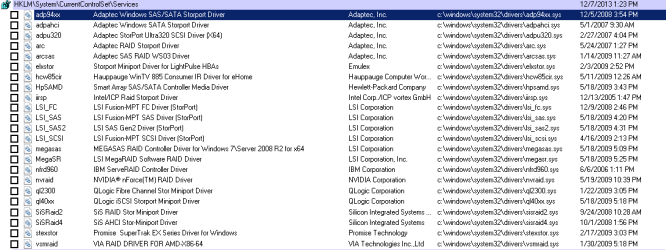
I'm trying to figure out which of these, if any, need to be checked (set to autorun on boot).

Please note that I am not even configured for RAID.. I just upgraded to 2x SSDs in my laptop.

My computer seems to be working better since I unchecked all these , except when it forgets what it's supposed to be doing. For example, I'll open my music folder, and it will show 0 items. When I check the folder properties, it says everything is there (xxxx files, xx GB). Or sometimes when I try to play an .mp3, it loads VLC, but won't play anything. I click the play button, but nothing happens. The mouse is still responsive, and I can still click on other things (open the calculator, for example). But 1 out of every 100 or so mouse clicks, and the computer doesn't register the command I just gave it. During this period, task manager always shows CPU usage very low, 0 to 2% (it's not as if it's freezing up because another process is taking up the CPU).

I have a feeling that I unchecked a box or two that are needed for system stability. ..Or do these issues sound like one of the new SSDs could be faulty? Your comments are appreciated.

Thanks
 

Attachments
  • disabled startup.png
    disabled startup.png
    13.8 KB · Views: 14

My Computer My Computer

Computer type
Laptop
Computer Manufacturer/Model Number
HP HDX-18T
OS
Windows 7 Home Premium x64
CPU
Core2Duo T9900 @ 3.06 GHz
Memory
8gb Corsair
Graphics Card(s)
1gb NVidia
Hard Drives
Samsung 840 Pro SSD x2
Browser
Mozilla Firefox
Do you still need assistance with this issue?
 

My Computer My Computer

Computer type
PC/Desktop
Computer Manufacturer/Model Number
Custome Built
OS
Microsoft Windows 7 Ultimate 64-bit 7601 Multiprocessor Free Service Pack 1
CPU
Intel(R) Core(TM) i7 CPU 950 @ 3.07GHz
Motherboard
ASUSTeK Computer INC. SABERTOOTH X58 (LGA1366)
Memory
16.0GB Dual-Channel DDR3 @ 534MHz (8-8-8-20)
Graphics Card(s)
1023MB NVIDIA GeForce GTX 650 (EVGA)
Sound Card
(1) NVIDIA High Definition Audio (2) High Definition Audio
Monitor(s) Displays
HP W2072a LED Backlit
Screen Resolution
1920x1080@60Hz
Hard Drives
(1) SAMSUNG MMCRE28G5MXP-0VB SCSI Disk Device
(2) ST1000DM 003-1CH162 SCSI Disk Device
(3) WDC WD10EURX-73FH1Y0 SCSI Disk Device
PSU
XION XON-1000P14F
Cooling
Fans
Antivirus
Windows Security Essentials
Browser
Mozilla Firefox
Other Info
BIOS Version/Date
American Megatrends Inc. 1402, 8/9/2012
SMBIOS Version 2.5
YES, please!

What I know so far, is if I re-enable all these, my computer takes a long time to startup and shut down. CPU usage (after everything is loaded) hovers around 30-33%. Available / free RAM is around 3 (of 8 GB).

When I disable all of them , my computer boots and shuts down extremely fast. CPU usage after boot hovers around 0-4 %. Available / free RAM boosts to almost 7 (of 8 GB).

There is no doubt in my mind that having these disabled is beneficial, except for when my computer forgets what its doing. Explorer itself doesn't seem to freeze up, it's always the programs within it. Sometimes it's Mozilla, sometimes VLC, sometimes the calculator.. When this happens , the CPU usage goes to 0%, as if the computer is finished loading. The system idle is at 99%.

When I go into a folder, sometimes it says all the files are there (under properties), but nothing will show up. The green progress bar at the top shows me that Windows is searching the folder for files. If I wait long periods of time, sometimes up to 20 minutes, everything finally shows up. Should I be concerned about losing data? The new SSDs I put in the laptop are Samsung 840 Pros, although they are only configured for SATA 2 on this laptop. Any information you have is appreciated..
 

My Computer My Computer

Computer type
Laptop
Computer Manufacturer/Model Number
HP HDX-18T
OS
Windows 7 Home Premium x64
CPU
Core2Duo T9900 @ 3.06 GHz
Memory
8gb Corsair
Graphics Card(s)
1gb NVidia
Hard Drives
Samsung 840 Pro SSD x2
Browser
Mozilla Firefox
If you are not using RAID, I do not know of a reason to engage those Services.
1. Can you preform the Error-checking on your drives to insure the drives are in good condition.
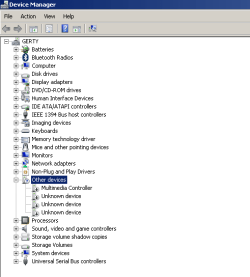
2. Please post an image of your Device Manager.

Thanks
 

My Computer My Computer

Computer type
PC/Desktop
Computer Manufacturer/Model Number
Custome Built
OS
Microsoft Windows 7 Ultimate 64-bit 7601 Multiprocessor Free Service Pack 1
CPU
Intel(R) Core(TM) i7 CPU 950 @ 3.07GHz
Motherboard
ASUSTeK Computer INC. SABERTOOTH X58 (LGA1366)
Memory
16.0GB Dual-Channel DDR3 @ 534MHz (8-8-8-20)
Graphics Card(s)
1023MB NVIDIA GeForce GTX 650 (EVGA)
Sound Card
(1) NVIDIA High Definition Audio (2) High Definition Audio
Monitor(s) Displays
HP W2072a LED Backlit
Screen Resolution
1920x1080@60Hz
Hard Drives
(1) SAMSUNG MMCRE28G5MXP-0VB SCSI Disk Device
(2) ST1000DM 003-1CH162 SCSI Disk Device
(3) WDC WD10EURX-73FH1Y0 SCSI Disk Device
PSU
XION XON-1000P14F
Cooling
Fans
Antivirus
Windows Security Essentials
Browser
Mozilla Firefox
Other Info
BIOS Version/Date
American Megatrends Inc. 1402, 8/9/2012
SMBIOS Version 2.5

My Computer My Computer

Computer type
PC/Desktop
Computer Manufacturer/Model Number
Home Built Desktop By DataTech
OS
Windows 7 Ultimate X64 SP1
CPU
Intel i5-2550K, Differing ~4.4-4.8GHz No built in GPU
Motherboard
ASUS P8Z68-V PRO/GEN3
Memory
16GB G.Skill Sniper 1866MHz @ 2133MHz 2x8GB
Graphics Card(s)
ASUS GTX650TIB-DC2OC-2GD5, (650TI Boost)
Sound Card
Onboard Realtek 5-1
Monitor(s) Displays
Samsung P2570HD
Screen Resolution
1920x1080
Hard Drives
Samsung 840 Pro 256GB SSD for OS, 500GB Seagate Constellation (Enterprise drive) for Data
PSU
Corsair HX650W
Case
Inwin Dragon Rider
Cooling
Hyper 212 EVO w/two Noctua fans, push-pull, @1300 RPM
Keyboard
E-Z Eyes, bright yellow keys with large characters
Mouse
steelseries SENSEI Laser Pro Gaming
Internet Speed
48-51Mbs Mbs down, 11 Mbs up Xfinity Cable
Antivirus
Norton Internet Security 2013
Browser
IE 10, Opera, Pale Moon if needed
Other Info
4 case fans, LG BluRay-RE, ASUS DVD-RW, Mr. Fusion power supply, 1.21 gigawatts.
Here is the CHKDSK log for both drives

Checking file system on C:
The type of the file system is NTFS.

A disk check has been scheduled.
Windows will now check the disk.

CHKDSK is verifying files (stage 1 of 5)...
179456 file records processed. File verification completed.
54 large file records processed. 0 bad file records processed. 0 EA records processed. 44 reparse records processed. CHKDSK is verifying indexes (stage 2 of 5)...
224242 index entries processed. Index verification completed.
0 unindexed files scanned. 0 unindexed files recovered. CHKDSK is verifying security descriptors (stage 3 of 5)...
179456 file SDs/SIDs processed. Cleaning up 361 unused index entries from index $SII of file 0x9.
Cleaning up 361 unused index entries from index $SDH of file 0x9.
Cleaning up 361 unused security descriptors.
Security descriptor verification completed.
22394 data files processed. CHKDSK is verifying Usn Journal...
34841208 USN bytes processed. Usn Journal verification completed.
CHKDSK is verifying file data (stage 4 of 5)...
179440 files processed. File data verification completed.
CHKDSK is verifying free space (stage 5 of 5)...
30323481 free clusters processed. Free space verification is complete.
CHKDSK discovered free space marked as allocated in the
master file table (MFT) bitmap.
CHKDSK discovered free space marked as allocated in the volume bitmap.
Windows has made corrections to the file system.

233857023 KB total disk space.
112186564 KB in 124639 files.
89380 KB in 22395 indexes.
0 KB in bad sectors.
287151 KB in use by the system.
65536 KB occupied by the log file.
121293928 KB available on disk.

4096 bytes in each allocation unit.
58464255 total allocation units on disk.
30323482 allocation units available on disk.

Internal Info:
00 bd 02 00 66 3e 02 00 03 51 04 00 00 00 00 00 ....f>...Q......
29 01 00 00 2c 00 00 00 00 00 00 00 00 00 00 00 )...,...........
00 00 00 00 00 00 00 00 00 00 00 00 00 00 00 00 ................


Checking file system on D:
The type of the file system is NTFS.
Volume label is DATA.

A disk check has been scheduled.
Windows will now check the disk.

CHKDSK is verifying files (stage 1 of 5)...
164352 file records processed. File verification completed.
889 large file records processed. 0 bad file records processed. 0 EA records processed. 0 reparse records processed. CHKDSK is verifying indexes (stage 2 of 5)...
171218 index entries processed. Index verification completed.
0 unindexed files scanned. 0 unindexed files recovered. CHKDSK is verifying security descriptors (stage 3 of 5)...
164352 file SDs/SIDs processed. Cleaning up 54 unused index entries from index $SII of file 0x9.
Cleaning up 54 unused index entries from index $SDH of file 0x9.
Cleaning up 54 unused security descriptors.
Security descriptor verification completed.
3434 data files processed. CHKDSK is verifying Usn Journal...
35255240 USN bytes processed. Usn Journal verification completed.
CHKDSK is verifying file data (stage 4 of 5)...
164336 files processed. File data verification completed.
CHKDSK is verifying free space (stage 5 of 5)...
4925796 free clusters processed. Free space verification is complete.
Windows has checked the file system and found no problems.

244196351 KB total disk space.
224187740 KB in 56860 files.
32896 KB in 3435 indexes.
0 KB in bad sectors.
272531 KB in use by the system.
65536 KB occupied by the log file.
19703184 KB available on disk.

4096 bytes in each allocation unit.
61049087 total allocation units on disk.
4925796 allocation units available on disk.

Internal Info:
00 82 02 00 93 eb 00 00 48 a9 01 00 00 00 00 00 ........H.......
13 48 00 00 00 00 00 00 00 00 00 00 00 00 00 00 .H..............
00 00 00 00 00 00 00 00 00 00 00 00 00 00 00 00 ................


Windows has finished checking your disk.
Please wait while your computer restarts.

--------------------

I don't use indexing. It is disabled, along with Windows Search. I use a third party program to search for files.

Thanks for your help with this.
 

Attachments

  • device manager.png
    device manager.png
    9.5 KB · Views: 25
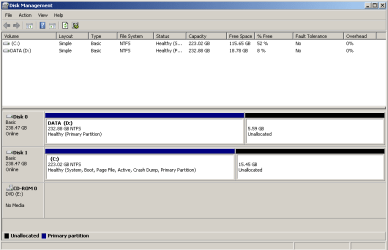
  • diskmgmt.png
    diskmgmt.png
    9.3 KB · Views: 3
Last edited:

My Computer My Computer

Computer type
Laptop
Computer Manufacturer/Model Number
HP HDX-18T
OS
Windows 7 Home Premium x64
CPU
Core2Duo T9900 @ 3.06 GHz
Memory
8gb Corsair
Graphics Card(s)
1gb NVidia
Hard Drives
Samsung 840 Pro SSD x2
Browser
Mozilla Firefox
Did you run the Rebuild Index?

Your C:\ drive should be in the slot so it is listed as Disk 0. You may have to set the BIOS to reflect this change.
 

My Computer My Computer

Computer type
PC/Desktop
Computer Manufacturer/Model Number
Home Built Desktop By DataTech
OS
Windows 7 Ultimate X64 SP1
CPU
Intel i5-2550K, Differing ~4.4-4.8GHz No built in GPU
Motherboard
ASUS P8Z68-V PRO/GEN3
Memory
16GB G.Skill Sniper 1866MHz @ 2133MHz 2x8GB
Graphics Card(s)
ASUS GTX650TIB-DC2OC-2GD5, (650TI Boost)
Sound Card
Onboard Realtek 5-1
Monitor(s) Displays
Samsung P2570HD
Screen Resolution
1920x1080
Hard Drives
Samsung 840 Pro 256GB SSD for OS, 500GB Seagate Constellation (Enterprise drive) for Data
PSU
Corsair HX650W
Case
Inwin Dragon Rider
Cooling
Hyper 212 EVO w/two Noctua fans, push-pull, @1300 RPM
Keyboard
E-Z Eyes, bright yellow keys with large characters
Mouse
steelseries SENSEI Laser Pro Gaming
Internet Speed
48-51Mbs Mbs down, 11 Mbs up Xfinity Cable
Antivirus
Norton Internet Security 2013
Browser
IE 10, Opera, Pale Moon if needed
Other Info
4 case fans, LG BluRay-RE, ASUS DVD-RW, Mr. Fusion power supply, 1.21 gigawatts.
Let's try the easiest fix. Click on each of the Other devices and delete them with the keyboard delete key.
Now reboot. Recheck the Device Manager. Is there a change to the Device Manager?
 

My Computer My Computer

Computer type
PC/Desktop
Computer Manufacturer/Model Number
Custome Built
OS
Microsoft Windows 7 Ultimate 64-bit 7601 Multiprocessor Free Service Pack 1
CPU
Intel(R) Core(TM) i7 CPU 950 @ 3.07GHz
Motherboard
ASUSTeK Computer INC. SABERTOOTH X58 (LGA1366)
Memory
16.0GB Dual-Channel DDR3 @ 534MHz (8-8-8-20)
Graphics Card(s)
1023MB NVIDIA GeForce GTX 650 (EVGA)
Sound Card
(1) NVIDIA High Definition Audio (2) High Definition Audio
Monitor(s) Displays
HP W2072a LED Backlit
Screen Resolution
1920x1080@60Hz
Hard Drives
(1) SAMSUNG MMCRE28G5MXP-0VB SCSI Disk Device
(2) ST1000DM 003-1CH162 SCSI Disk Device
(3) WDC WD10EURX-73FH1Y0 SCSI Disk Device
PSU
XION XON-1000P14F
Cooling
Fans
Antivirus
Windows Security Essentials
Browser
Mozilla Firefox
Other Info
BIOS Version/Date
American Megatrends Inc. 1402, 8/9/2012
SMBIOS Version 2.5
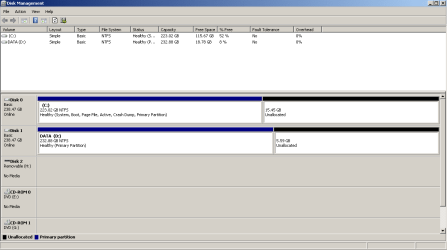
Oddly enough, when I ran diskmgmt.msc a second time, it showed the C drive as being Disk 0 (see photo). Upon rebooting a couple of times, and loading diskmgmt.msc again, it then showed drive D as Drive 0. It appears as though C and D keep switching places as Drive 1 and Drive 0.

The BIOS is really simple, the boot order is set properly (Notebook Internal Hard Drive first, then Internal CD-ROM, etc). There isn't much more to change other than system date/time and enabling/disabling a few unrelated things.

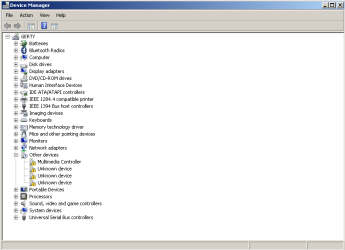
Also, upon deleting those entries in the device manager and restarting, they showed up again, but now with yellow !'s next to them (see photo #2). I believe at least one of them to be the TV Tuner card, which I don't use.

Thanks again
 

Attachments

  • device manager2.png
    device manager2.png
    11.8 KB · Views: 0
  • diskmgmt2.png
    diskmgmt2.png
    11.5 KB · Views: 1
Last edited:

My Computer My Computer

Computer type
Laptop
Computer Manufacturer/Model Number
HP HDX-18T
OS
Windows 7 Home Premium x64
CPU
Core2Duo T9900 @ 3.06 GHz
Memory
8gb Corsair
Graphics Card(s)
1gb NVidia
Hard Drives
Samsung 840 Pro SSD x2
Browser
Mozilla Firefox
  1. Click the Start Orb, type msinfo32 in the search box. Hit Enter
  2. Click the + sign next to Components to expand it
  3. Click Problem Devices. Anything appear?
  4. If yes, click on it, Ctrl-A to select all, Ctrl-C to copy it, Ctrl-V to paste into next post
  5. On the other hand, if no devices are listed, tell us so.
 

My Computer My Computer

Computer type
PC/Desktop
Computer Manufacturer/Model Number
Custome Built
OS
Microsoft Windows 7 Ultimate 64-bit 7601 Multiprocessor Free Service Pack 1
CPU
Intel(R) Core(TM) i7 CPU 950 @ 3.07GHz
Motherboard
ASUSTeK Computer INC. SABERTOOTH X58 (LGA1366)
Memory
16.0GB Dual-Channel DDR3 @ 534MHz (8-8-8-20)
Graphics Card(s)
1023MB NVIDIA GeForce GTX 650 (EVGA)
Sound Card
(1) NVIDIA High Definition Audio (2) High Definition Audio
Monitor(s) Displays
HP W2072a LED Backlit
Screen Resolution
1920x1080@60Hz
Hard Drives
(1) SAMSUNG MMCRE28G5MXP-0VB SCSI Disk Device
(2) ST1000DM 003-1CH162 SCSI Disk Device
(3) WDC WD10EURX-73FH1Y0 SCSI Disk Device
PSU
XION XON-1000P14F
Cooling
Fans
Antivirus
Windows Security Essentials
Browser
Mozilla Firefox
Other Info
BIOS Version/Date
American Megatrends Inc. 1402, 8/9/2012
SMBIOS Version 2.5
Multimedia Controller PCI\VEN_1131&DEV_7160&SUBSYS_10551461&REV_03\4&2B3E3E64&0&00E3 The drivers for this device are not installed.
Not Available ACPI\ENE0100\4&230F23E&0 The drivers for this device are not installed.
Not Available USB\VID_138A&PID_0001\5&F5E6D26&0&1 The drivers for this device are not installed.
Not Available ACPI\HPQ0004\2&DABA3FF&1 The drivers for this device are not installed.
 

My Computer My Computer

Computer type
Laptop
Computer Manufacturer/Model Number
HP HDX-18T
OS
Windows 7 Home Premium x64
CPU
Core2Duo T9900 @ 3.06 GHz
Memory
8gb Corsair
Graphics Card(s)
1gb NVidia
Hard Drives
Samsung 840 Pro SSD x2
Browser
Mozilla Firefox
For ACPI\HPQ0004\2&DABA3FF&1 see...
driver ACPI\HPQ0006\2&DABA3FF&0 - HP Support Forum - 1462437

Let's take this one step at a time.

After trying this fix, redo post 10 and post the results again. Hopefully, it will have one less unknown.
If the is the case, then we try for another item. Knock on wood.

I will leave the help Britton is providing to him. Please do not ignore his directions. I ask for his assist.
 

My Computer My Computer

Computer type
PC/Desktop
Computer Manufacturer/Model Number
Custome Built
OS
Microsoft Windows 7 Ultimate 64-bit 7601 Multiprocessor Free Service Pack 1
CPU
Intel(R) Core(TM) i7 CPU 950 @ 3.07GHz
Motherboard
ASUSTeK Computer INC. SABERTOOTH X58 (LGA1366)
Memory
16.0GB Dual-Channel DDR3 @ 534MHz (8-8-8-20)
Graphics Card(s)
1023MB NVIDIA GeForce GTX 650 (EVGA)
Sound Card
(1) NVIDIA High Definition Audio (2) High Definition Audio
Monitor(s) Displays
HP W2072a LED Backlit
Screen Resolution
1920x1080@60Hz
Hard Drives
(1) SAMSUNG MMCRE28G5MXP-0VB SCSI Disk Device
(2) ST1000DM 003-1CH162 SCSI Disk Device
(3) WDC WD10EURX-73FH1Y0 SCSI Disk Device
PSU
XION XON-1000P14F
Cooling
Fans
Antivirus
Windows Security Essentials
Browser
Mozilla Firefox
Other Info
BIOS Version/Date
American Megatrends Inc. 1402, 8/9/2012
SMBIOS Version 2.5
If I may.
Silentbob has two Samsung 840 Pro SSD's
Is their a Samsung Tool Box that should be used instead of check disk like stated in post #6 by Silentbob.
 

My Computer My Computer

Computer type
PC/Desktop
Computer Manufacturer/Model Number
Home made Desktop
OS
Windows 10 Pro. 64/ version 1709 Windows 7 Pro/64
CPU
Intel i7-6800K @ 4.3
Motherboard
ASUS X-99 Deluxe II
Memory
Corsair Platinum 16 gig @2400
Graphics Card(s)
EVGA GTX 1070 OC
Monitor(s) Displays
Asus 27" LED LCD/VE278Q
Screen Resolution
1920-1080 or 1280-720 HDMI
Hard Drives
INTEL SSD 730-240 Gb Sata 3.0/
PSU
EVGA Platium 1200W
Case
Phanteks Luxe Tempered Glass 8 fans/ one radiator
Cooling
XSPC/ Water Cooled CPU
Keyboard
Das 4 Professional
Mouse
Logitech M705/MX Anywhere 2-S
Internet Speed
100 mbits
Antivirus
Microsoft Security Essentials/ Malwarebytes Premium 3.0/ SAS
Browser
I.E. 11 default/Firefox/ ISP Time Warner Cable/Spectrum
Other Info
LG BluRay Burner/
Sound system-KLipsch-THX/
Icy Dock ssd Hot Swap bays.
Thanks Bear, I didn't know that. Can you provide a link to the Samsung Tool Box?
 

My Computer My Computer

Computer type
PC/Desktop
Computer Manufacturer/Model Number
Custome Built
OS
Microsoft Windows 7 Ultimate 64-bit 7601 Multiprocessor Free Service Pack 1
CPU
Intel(R) Core(TM) i7 CPU 950 @ 3.07GHz
Motherboard
ASUSTeK Computer INC. SABERTOOTH X58 (LGA1366)
Memory
16.0GB Dual-Channel DDR3 @ 534MHz (8-8-8-20)
Graphics Card(s)
1023MB NVIDIA GeForce GTX 650 (EVGA)
Sound Card
(1) NVIDIA High Definition Audio (2) High Definition Audio
Monitor(s) Displays
HP W2072a LED Backlit
Screen Resolution
1920x1080@60Hz
Hard Drives
(1) SAMSUNG MMCRE28G5MXP-0VB SCSI Disk Device
(2) ST1000DM 003-1CH162 SCSI Disk Device
(3) WDC WD10EURX-73FH1Y0 SCSI Disk Device
PSU
XION XON-1000P14F
Cooling
Fans
Antivirus
Windows Security Essentials
Browser
Mozilla Firefox
Other Info
BIOS Version/Date
American Megatrends Inc. 1402, 8/9/2012
SMBIOS Version 2.5
Gandalf,

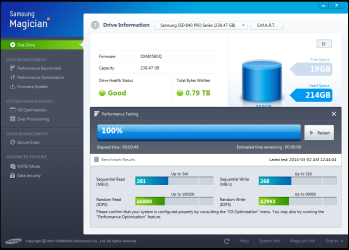
..didn't work :( I also tried looking up my computer's model number and OS version, scrolled down to the quick launch buttons under 'driver downloads,' but that installer didn't fix it either. I tried right-clicking in device manager and 'searching for drivers' to no avail. I will re-install Samsung Magician and run drive tests on the drives. Will post a screenshot of the results..
 

My Computer My Computer

Computer type
Laptop
Computer Manufacturer/Model Number
HP HDX-18T
OS
Windows 7 Home Premium x64
CPU
Core2Duo T9900 @ 3.06 GHz
Memory
8gb Corsair
Graphics Card(s)
1gb NVidia
Hard Drives
Samsung 840 Pro SSD x2
Browser
Mozilla Firefox

My Computer My Computer

Computer type
PC/Desktop
Computer Manufacturer/Model Number
Custome Built
OS
Microsoft Windows 7 Ultimate 64-bit 7601 Multiprocessor Free Service Pack 1
CPU
Intel(R) Core(TM) i7 CPU 950 @ 3.07GHz
Motherboard
ASUSTeK Computer INC. SABERTOOTH X58 (LGA1366)
Memory
16.0GB Dual-Channel DDR3 @ 534MHz (8-8-8-20)
Graphics Card(s)
1023MB NVIDIA GeForce GTX 650 (EVGA)
Sound Card
(1) NVIDIA High Definition Audio (2) High Definition Audio
Monitor(s) Displays
HP W2072a LED Backlit
Screen Resolution
1920x1080@60Hz
Hard Drives
(1) SAMSUNG MMCRE28G5MXP-0VB SCSI Disk Device
(2) ST1000DM 003-1CH162 SCSI Disk Device
(3) WDC WD10EURX-73FH1Y0 SCSI Disk Device
PSU
XION XON-1000P14F
Cooling
Fans
Antivirus
Windows Security Essentials
Browser
Mozilla Firefox
Other Info
BIOS Version/Date
American Megatrends Inc. 1402, 8/9/2012
SMBIOS Version 2.5

My Computer My Computer

Computer type
PC/Desktop
Computer Manufacturer/Model Number
Home made Desktop
OS
Windows 10 Pro. 64/ version 1709 Windows 7 Pro/64
CPU
Intel i7-6800K @ 4.3
Motherboard
ASUS X-99 Deluxe II
Memory
Corsair Platinum 16 gig @2400
Graphics Card(s)
EVGA GTX 1070 OC
Monitor(s) Displays
Asus 27" LED LCD/VE278Q
Screen Resolution
1920-1080 or 1280-720 HDMI
Hard Drives
INTEL SSD 730-240 Gb Sata 3.0/
PSU
EVGA Platium 1200W
Case
Phanteks Luxe Tempered Glass 8 fans/ one radiator
Cooling
XSPC/ Water Cooled CPU
Keyboard
Das 4 Professional
Mouse
Logitech M705/MX Anywhere 2-S
Internet Speed
100 mbits
Antivirus
Microsoft Security Essentials/ Malwarebytes Premium 3.0/ SAS
Browser
I.E. 11 default/Firefox/ ISP Time Warner Cable/Spectrum
Other Info
LG BluRay Burner/
Sound system-KLipsch-THX/
Icy Dock ssd Hot Swap bays.
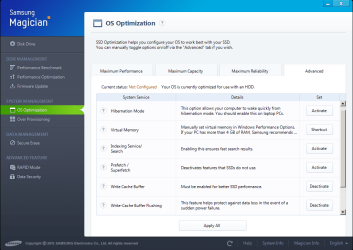
Here are the test results for both drives. I'm not sure how to interpret them though, since they're only running on SATA2.

Gandalf, alternatively, is there a way to permanently disable these 4 component conflicts?
I don't plan to use the quick start buttons or the TV tuner, and the Protect Smart software is only for HDDs. Or do you recommend that I install these drivers anyway? Thank you everyone
 

Attachments

  • samsung magician.png
    samsung magician.png
    56.9 KB · Views: 2
  • samsung2.png
    samsung2.png
    54.3 KB · Views: 1
  • samsung 3.png
    samsung 3.png
    46.7 KB · Views: 2

My Computer My Computer

Computer type
Laptop
Computer Manufacturer/Model Number
HP HDX-18T
OS
Windows 7 Home Premium x64
CPU
Core2Duo T9900 @ 3.06 GHz
Memory
8gb Corsair
Graphics Card(s)
1gb NVidia
Hard Drives
Samsung 840 Pro SSD x2
Browser
Mozilla Firefox
Did you run the Rebuild Index?

Britton, I don't have an indexing options tab listed under control panel. It must have disappeared once I turned off windows search and indexing. Is there an alternative way to accomplish this? Thanks
 

My Computer My Computer

Computer type
Laptop
Computer Manufacturer/Model Number
HP HDX-18T
OS
Windows 7 Home Premium x64
CPU
Core2Duo T9900 @ 3.06 GHz
Memory
8gb Corsair
Graphics Card(s)
1gb NVidia
Hard Drives
Samsung 840 Pro SSD x2
Browser
Mozilla Firefox
1. As far as the Magician, I hope Layback Bear will advise you as I do not have a SSD. I am concerned by the information that your OS is configured to use them as HDDs. I think this might be a BIOS issue, but again I will leave that to Bear's wisdom.

2. As for the 4 conflicts, you might try the Uninstall option in the Device Manager. Right click on the devices should show you the options. If upon rebooting, they reappear, you might try the Disable option.
 

My Computer My Computer

Computer type
PC/Desktop
Computer Manufacturer/Model Number
Custome Built
OS
Microsoft Windows 7 Ultimate 64-bit 7601 Multiprocessor Free Service Pack 1
CPU
Intel(R) Core(TM) i7 CPU 950 @ 3.07GHz
Motherboard
ASUSTeK Computer INC. SABERTOOTH X58 (LGA1366)
Memory
16.0GB Dual-Channel DDR3 @ 534MHz (8-8-8-20)
Graphics Card(s)
1023MB NVIDIA GeForce GTX 650 (EVGA)
Sound Card
(1) NVIDIA High Definition Audio (2) High Definition Audio
Monitor(s) Displays
HP W2072a LED Backlit
Screen Resolution
1920x1080@60Hz
Hard Drives
(1) SAMSUNG MMCRE28G5MXP-0VB SCSI Disk Device
(2) ST1000DM 003-1CH162 SCSI Disk Device
(3) WDC WD10EURX-73FH1Y0 SCSI Disk Device
PSU
XION XON-1000P14F
Cooling
Fans
Antivirus
Windows Security Essentials
Browser
Mozilla Firefox
Other Info
BIOS Version/Date
American Megatrends Inc. 1402, 8/9/2012
SMBIOS Version 2.5
Back
Top