
0x00000124 BSOD when browsing Internet, listening to music

adi9981

New member
Local time
7:38 AM
Messages
3
Hi. This is my first post on SevenForums :). I recently built myself a new PC. Since first boot, I've got welcomed by a BSOD with code 0x00000124. I have read about this code and figured out that's a hardware or driver problem. It happens while I'm browsing internet (rare in Firefox, but very often in Chrome), chatting on Teamspeak, but never when I play games, even the new and requiring ones. While I was writing this, I've BSOD'ed again and after a restart, exactly after 30 seconds, I've got another one. I said "That's it!" and started writing all over again :D. So yeah, there's my SF.zip file and PC specs :

CPU - AMD APU A8-6600K
RAM - 4,00GB Single-Channel DDR3 @ 672MHz (5-5-5-15)
MOBO - Gigabyte Technology Co., Ltd. F2A88XM-HD3 (P0) 33 °C
GPU (HD 7790 to be precise) - 2048MB ATI AMD Radeon HD 7700 Series (ASUStek Computer Inc)
HDD (yeah, I know :D) - 298GB Seagate ST332062 0AS SATA Disk Device (SATA)
DVD Drive - ATAPI iHAS124 B SATA CdRom Device
Audio - Realtek High Definition Audio

My system language is Polish, so if you have problems with not understanding things in SF.zip files, just ask me about it or translate it in Google :)
 

My Computer My Computer

At a glance

Windows 7 Ultimate x64AMD APU A8-6600K 3,8GOODRAM 1x4GBASUS Radeon HD7790 2GB DirectCU-II
Computer type
PC/Desktop
Computer Manufacturer/Model Number
Custom Built
OS
Windows 7 Ultimate x64
CPU
AMD APU A8-6600K 3,8
Motherboard
GIGABYTE F2A88XM-HD3
Memory
GOODRAM 1x4GB
Graphics Card(s)
ASUS Radeon HD7790 2GB DirectCU-II
Antivirus
Avast Free
Browser
Waterfox
Hi adi9981.

A stop 0x124 is basically a hardware error, but it is very common for the not-up-to-date systems. Install Service pack 1 and all other windows updates. Otherwise the system will remain vulnerable to threats.
Code:
Nazwa systemu operacyjnego    Microsoft Windows 7 Ultimate
Wersja    6.1.7600 Kompilacja 7600
Learn how to install Windows 7 Service Pack 1 (SP1)
Service Pack and Update Center - Microsoft Windows

Also take some hardware tests.....

Test your RAM modules for possible errors.
How to Test and Diagnose RAM Issues with Memtest86+
Run memtest for at least 8 passes, preferably overnight.
If it start showing errors/red lines, stop testing. A single error is enough to determine that something is going bad there.

Stress test the Graphics Card using Furmark.
Video Card - Stress Test with Furmark

Stress test the CPU.
Hardware - Stress Test With Prime95

Are you overclocking? As you are getting BSODs, you should stop overclocking and run all the hardware components like CPU, GPU and RAM to their default settings.

Is the computer hot? Report us the heat of the computer after a couple of hours of your normal usage. Upload a screenshot of the summery tab of Speccy. Alternatively, you can publish a Speccy snapshot too: http://www.sevenforums.com/tutorials/311593-speccy-publish-snapshot-your-system-specs.html .

Let us know the results.
____________________________________________
Code:
BugCheck 124, {[COLOR=Blue]0[/COLOR], fffffa8004c3d8f8, 0, 0}

Probably caused by : AuthenticAMD

Followup: MachineOwner
---------
 

My Computer My Computer

At a glance

Microsoft Windows 10 Pro Insider Preview 64-bitIntel(R) Core(TM) i3-4130 CPU @ 3.40GHzCorsair Vengence 4GB x2 (8.00GB Dual-Channel ...2047MB GeForce GTS 450 (ZOTAC International)
Computer type
PC/Desktop
Computer Manufacturer/Model Number
Self Assembled
OS
Microsoft Windows 10 Pro Insider Preview 64-bit
CPU
Intel(R) Core(TM) i3-4130 CPU @ 3.40GHz
Motherboard
Gigabyte Technology Co., Ltd. B85M-D3H
Memory
Corsair Vengence 4GB x2 (8.00GB Dual-Channel DDR3 @ 798MHz)
Graphics Card(s)
2047MB GeForce GTS 450 (ZOTAC International)
Sound Card
Onboard (Realtek High Definition Audio)
Monitor(s) Displays
LG Flatron E2040T
Screen Resolution
1600x900
Hard Drives
Western Digital 1 TB
Seagate 500 GB
PSU
Corsair VS550
Case
Cooler Master K380
Cooling
Cooler Master Seidon 120V Plus
Keyboard
Logitech MK260r
Mouse
Logitech MK260r
Internet Speed
PMPL Broadband
Antivirus
Windows Defender + MBAM
Browser
Firefox
Other Info
Dell Studio 15" Laptop
So, my computer gets hot after an 1 hour session of Battlefield 3. Also, I didn't overclock. I've been getting BSOD's since first boot. I think it's not my GPU, because no matter how much time I play, I get no BSOD's at all. Also, I don't get any of those when PC is idle. I will do some hardware test as well. Thanks, Arc :)

EDIT - I forgot to mention, that I installed all updates except SP1. Currently downloading it ;). And I'm also worried about my APU's temperature. Speccy showed 80°C-90°C after playing some games. I've heard that APU's sensors are not so accurate and temperature in Speccy means nothing, but I thought that I should tell you about that.
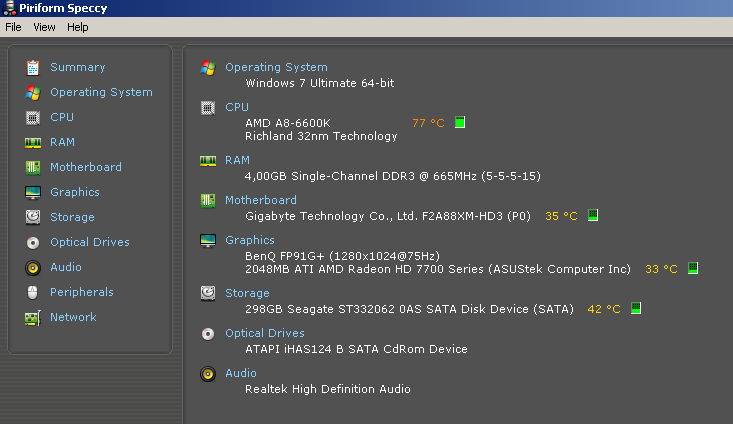
EDIT 2 - I've removed Speccy snapshot, and replaced it with a screenshot. The reason for this was that in this snapshot, people could see my IP, Windows Product code etc, so for my personal safety, I've removed it.

iNzWzYY.png
 
Last edited:

My Computer My Computer

At a glance

Windows 7 Ultimate x64AMD APU A8-6600K 3,8GOODRAM 1x4GBASUS Radeon HD7790 2GB DirectCU-II
Computer type
PC/Desktop
Computer Manufacturer/Model Number
Custom Built
OS
Windows 7 Ultimate x64
CPU
AMD APU A8-6600K 3,8
Motherboard
GIGABYTE F2A88XM-HD3
Memory
GOODRAM 1x4GB
Graphics Card(s)
ASUS Radeon HD7790 2GB DirectCU-II
Antivirus
Avast Free
Browser
Waterfox
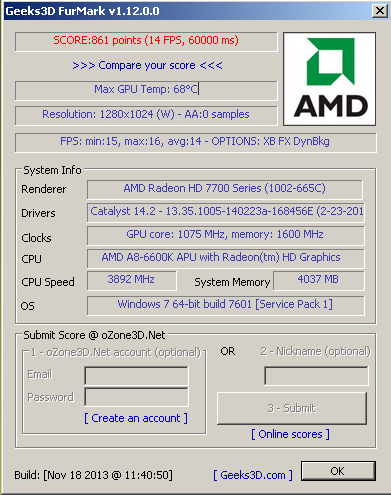
Hello again. So I ran a Memtest86+ for 6 hours and it didn't show any errors. I also ran Furmark and Prime95 - atleast I tried to run it because when Prime95 started working, Speccy showed 101°C at my CPU, so I panicked and instantly turned off my PC on the PSU switch. Here's a Furmark test screenshot :

ktjuqgJ.png


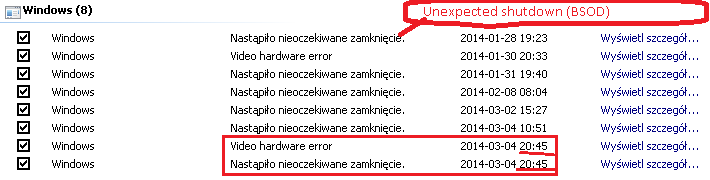
Also, I found this :

63YYZdX.png

Look at the dates at the lastest crash.

And I'm also a little worried about my APU's temperature. They're in previous post.

Here's an another information :

Code:
Wystąpił krytyczny błąd sprzętowy.

Składnik: mostek północny firmy AMD (AMD northbridge)
Źródło błędu: 3 (error source)
Typ błędu: 7 (error type)
Identyfikator procesora: 0 (processor ID)
 
Last edited:

My Computer My Computer

At a glance

Windows 7 Ultimate x64AMD APU A8-6600K 3,8GOODRAM 1x4GBASUS Radeon HD7790 2GB DirectCU-II
Computer type
PC/Desktop
Computer Manufacturer/Model Number
Custom Built
OS
Windows 7 Ultimate x64
CPU
AMD APU A8-6600K 3,8
Motherboard
GIGABYTE F2A88XM-HD3
Memory
GOODRAM 1x4GB
Graphics Card(s)
ASUS Radeon HD7790 2GB DirectCU-II
Antivirus
Avast Free
Browser
Waterfox
Hello again. So I ran a Memtest86+ for 6 hours and it didn't show any errors. I also ran Furmark and Prime95 - atleast I tried to run it because when Prime95 started working, Speccy showed 101°C at my CPU, so I panicked and instantly turned off my PC on the PSU switch. Here's a Furmark test screenshot :

ktjuqgJ.png
I'm also worried about my APU's temperature. Speccy showed 80°C-90°C after playing some games. I've heard that APU's sensors are not so accurate and temperature in Speccy means nothing, but I thought that I should tell you about that.

iNzWzYY.png
Dismantle the computer. Clean the air vents and fan grills so that it can blow the hot air out efficiently. Also apply new thermal paste to the CPU.


Take it seriously. You must do it. If you cannot do it yourself, take help of anybody who can do it.

Also, I found this :

63YYZdX.png

Look at the dates at the lastest crash.
If there is a Video hardware error and a BSOD is following it, then you need to change the GPU.

Here's an another information :

Code:
Wystąpił krytyczny błąd sprzętowy.

Składnik: mostek północny firmy AMD (AMD northbridge)
Źródło błędu: 3 (error source)
Typ błędu: 7 (error type)
Identyfikator procesora: 0 (processor ID)
Sorry, I dont know what does it mean. :(
 

My Computer My Computer

At a glance

Microsoft Windows 10 Pro Insider Preview 64-bitIntel(R) Core(TM) i3-4130 CPU @ 3.40GHzCorsair Vengence 4GB x2 (8.00GB Dual-Channel ...2047MB GeForce GTS 450 (ZOTAC International)
Computer type
PC/Desktop
Computer Manufacturer/Model Number
Self Assembled
OS
Microsoft Windows 10 Pro Insider Preview 64-bit
CPU
Intel(R) Core(TM) i3-4130 CPU @ 3.40GHz
Motherboard
Gigabyte Technology Co., Ltd. B85M-D3H
Memory
Corsair Vengence 4GB x2 (8.00GB Dual-Channel DDR3 @ 798MHz)
Graphics Card(s)
2047MB GeForce GTS 450 (ZOTAC International)
Sound Card
Onboard (Realtek High Definition Audio)
Monitor(s) Displays
LG Flatron E2040T
Screen Resolution
1600x900
Hard Drives
Western Digital 1 TB
Seagate 500 GB
PSU
Corsair VS550
Case
Cooler Master K380
Cooling
Cooler Master Seidon 120V Plus
Keyboard
Logitech MK260r
Mouse
Logitech MK260r
Internet Speed
PMPL Broadband
Antivirus
Windows Defender + MBAM
Browser
Firefox
Other Info
Dell Studio 15" Laptop
Back
Top