
No BSOD, but PC did restart itself, and did produce a bug report.

Defski

New member
Local time
7:14 PM
Messages
16
I am running Windows 8.1 with bootcamp on an early 2008 iMac.
Usually, my PC's screen shuts off by itself (a problem running for a few weeks now), and requires a hard reboot, but this particular time, it rebooted itself.
When the screen shuts off, the keyboard becomes unresponsive, but music will still play (if I had anything playing at the time!). Problem does not occur on the Mac side. This time, it produced a bug report.

Here is the report from event viewer: "The computer has rebooted from a bugcheck. The bugcheck was: 0x00000116 (0xffffe000038e7010, 0xfffff8000196ed84, 0xffffffffc00000b5, 0x000000000000000a). A dump was saved in: C:\Windows\MEMORY.DMP. Report Id: 030414-25375-01."

See attached for details!
 

My Computer My Computer

At a glance

Windows 8.1 64bit
OS
Windows 8.1 64bit
Internet Speed
Download: 9.35 Mbps Upload: 6.47 Mbps
Hi Defski.

Is the computer hot? Report us the heat of the computer after a couple of hours of your normal usage. Upload a screenshot of the summery tab of Speccy. Alternatively, you can publish a Speccy snapshot too: http://www.sevenforums.com/tutorials/311593-speccy-publish-snapshot-your-system-specs.html .

Check if the Power Supply Unit (PSU) supplying adequate power to the computer or not.
eXtreme Power Supply Calculator
Also let us know the wattage of the PSU.

Stress test the Graphics Card using Furmark.
Video Card - Stress Test with Furmark

Install the NVIDIA DRIVERS 314.22WHQL only, as a test.

  • Uninstall All nvidia items in Control Panel > Programs and features
    • 3D Vision Control Driver
    • 3D Vision Driver
    • Graphics Driver
    • HD Audio Driver
    • PhysX
    • nvidia Update
    (Are you using nvidia chipset drivers? If so, dont uninstall anything other than those are listed).
  • Now follow Drivers - Clean Left over Files after Uninstalling
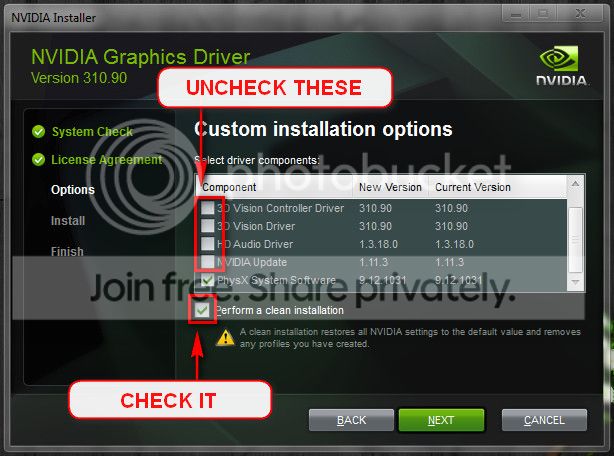
  • Download 314.22 WHQL. While installing, Select Custom (Advanced) install. In the next page, follow this settings:

Let us know the results.
__________________________________________________
Code:
*******************************************************************************
*                                                                             *
*                        Bugcheck Analysis                                    *
*                                                                             *
*******************************************************************************

Use !analyze -v to get detailed debugging information.

BugCheck 116, {ffffe000038e7010, fffff8000196ed84, ffffffffc00000b5, a}

Unable to load image \SystemRoot\system32\DRIVERS\nvlddmkm.sys, Win32 error 0n2
*** WARNING: Unable to verify timestamp for nvlddmkm.sys
*** ERROR: Module load completed but symbols could not be loaded for nvlddmkm.sys

Probably caused by : nvlddmkm.sys ( nvlddmkm+153d84 )

Followup: MachineOwner
---------
 

My Computer My Computer

At a glance

Microsoft Windows 10 Pro Insider Preview 64-bitIntel(R) Core(TM) i3-4130 CPU @ 3.40GHzCorsair Vengence 4GB x2 (8.00GB Dual-Channel ...2047MB GeForce GTS 450 (ZOTAC International)
Computer type
PC/Desktop
Computer Manufacturer/Model Number
Self Assembled
OS
Microsoft Windows 10 Pro Insider Preview 64-bit
CPU
Intel(R) Core(TM) i3-4130 CPU @ 3.40GHz
Motherboard
Gigabyte Technology Co., Ltd. B85M-D3H
Memory
Corsair Vengence 4GB x2 (8.00GB Dual-Channel DDR3 @ 798MHz)
Graphics Card(s)
2047MB GeForce GTS 450 (ZOTAC International)
Sound Card
Onboard (Realtek High Definition Audio)
Monitor(s) Displays
LG Flatron E2040T
Screen Resolution
1600x900
Hard Drives
Western Digital 1 TB
Seagate 500 GB
PSU
Corsair VS550
Case
Cooler Master K380
Cooling
Cooler Master Seidon 120V Plus
Keyboard
Logitech MK260r
Mouse
Logitech MK260r
Internet Speed
PMPL Broadband
Antivirus
Windows Defender + MBAM
Browser
Firefox
Other Info
Dell Studio 15" Laptop
Hi Defski.

Is the computer hot? Report us the heat of the computer after a couple of hours of your normal usage. Upload a screenshot of the summery tab of Speccy. Alternatively, you can publish a Speccy snapshot too: http://www.sevenforums.com/tutorials/311593-speccy-publish-snapshot-your-system-specs.html .

Check if the Power Supply Unit (PSU) supplying adequate power to the computer or not.
eXtreme Power Supply Calculator
Also let us know the wattage of the PSU.

Stress test the Graphics Card using Furmark.
Video Card - Stress Test with Furmark

Install the NVIDIA DRIVERS 314.22WHQL only, as a test.

  • Uninstall All nvidia items in Control Panel > Programs and features
    • 3D Vision Control Driver
    • 3D Vision Driver
    • Graphics Driver
    • HD Audio Driver
    • PhysX
    • nvidia Update
    (Are you using nvidia chipset drivers? If so, dont uninstall anything other than those are listed).
  • Now follow Drivers - Clean Left over Files after Uninstalling
  • Download 314.22 WHQL. While installing, Select Custom (Advanced) install. In the next page, follow this settings:

Let us know the results.
__________________________________________________
Code:
*******************************************************************************
*                                                                             *
*                        Bugcheck Analysis                                    *
*                                                                             *
*******************************************************************************

Use !analyze -v to get detailed debugging information.

BugCheck 116, {ffffe000038e7010, fffff8000196ed84, ffffffffc00000b5, a}

Unable to load image \SystemRoot\system32\DRIVERS\nvlddmkm.sys, Win32 error 0n2
*** WARNING: Unable to verify timestamp for nvlddmkm.sys
*** ERROR: Module load completed but symbols could not be loaded for nvlddmkm.sys

Probably caused by : nvlddmkm.sys ( nvlddmkm+153d84 )

Followup: MachineOwner
---------

It definitely is hot! I can touch the top of the Mac and feel the heat like a radiator.

CPU: 46 Celsius
Motherboard: 24 Celsius
Graphics: 55 Celsius


As for the NVIDIA installer... The installer says "This graphics driver could not find compatible graphics hardware."
 

My Computer My Computer

At a glance

Windows 8.1 64bit
OS
Windows 8.1 64bit
Internet Speed
Download: 9.35 Mbps Upload: 6.47 Mbps
It definitely is hot! I can touch the top of the Mac and feel the heat like a radiator.

CPU: 46 Celsius
Motherboard: 24 Celsius
Graphics: 55 Celsius
The heat readings are not saying it "that hot." :)
Upload a speccy after a couple hours of normal usage?

As for the NVIDIA installer... The installer says "This graphics driver could not find compatible graphics hardware."
It should not be the fact. Because:

View attachment 308999
 

My Computer My Computer

At a glance

Microsoft Windows 10 Pro Insider Preview 64-bitIntel(R) Core(TM) i3-4130 CPU @ 3.40GHzCorsair Vengence 4GB x2 (8.00GB Dual-Channel ...2047MB GeForce GTS 450 (ZOTAC International)
Computer type
PC/Desktop
Computer Manufacturer/Model Number
Self Assembled
OS
Microsoft Windows 10 Pro Insider Preview 64-bit
CPU
Intel(R) Core(TM) i3-4130 CPU @ 3.40GHz
Motherboard
Gigabyte Technology Co., Ltd. B85M-D3H
Memory
Corsair Vengence 4GB x2 (8.00GB Dual-Channel DDR3 @ 798MHz)
Graphics Card(s)
2047MB GeForce GTS 450 (ZOTAC International)
Sound Card
Onboard (Realtek High Definition Audio)
Monitor(s) Displays
LG Flatron E2040T
Screen Resolution
1600x900
Hard Drives
Western Digital 1 TB
Seagate 500 GB
PSU
Corsair VS550
Case
Cooler Master K380
Cooling
Cooler Master Seidon 120V Plus
Keyboard
Logitech MK260r
Mouse
Logitech MK260r
Internet Speed
PMPL Broadband
Antivirus
Windows Defender + MBAM
Browser
Firefox
Other Info
Dell Studio 15" Laptop
It definitely is hot! I can touch the top of the Mac and feel the heat like a radiator.

CPU: 46 Celsius
Motherboard: 24 Celsius
Graphics: 55 Celsius
The heat readings are not saying it "that hot." :)
Upload a speccy after a couple hours of normal usage?

As for the NVIDIA installer... The installer says "This graphics driver could not find compatible graphics hardware."
It should not be the fact. Because:

View attachment 308999

That's weird... It just ain't working. Tried it twice, and it still does not work even though I have Geforce 8800 GS.
Though how would it know? I've uninstalled all nvidia drivers like you said. I'm not sure how to check if I have chipset drivers, though.
 
Last edited:

My Computer My Computer

At a glance

Windows 8.1 64bit
OS
Windows 8.1 64bit
Internet Speed
Download: 9.35 Mbps Upload: 6.47 Mbps
Please do the tests Arc advised then we can go further. It can't fix itself unless you do some testing.
Your temperatures are OK.
 

My Computer My Computer

At a glance

Windows 7 Ultimate X64 SP1Intel i5-2550K, Differing ~4.4-4.8GHz No buil...16GB G.Skill Sniper 1866MHz @ 2133MHz 2x8GBASUS GTX650TIB-DC2OC-2GD5, (650TI Boost)
Computer type
PC/Desktop
Computer Manufacturer/Model Number
Home Built Desktop By DataTech
OS
Windows 7 Ultimate X64 SP1
CPU
Intel i5-2550K, Differing ~4.4-4.8GHz No built in GPU
Motherboard
ASUS P8Z68-V PRO/GEN3
Memory
16GB G.Skill Sniper 1866MHz @ 2133MHz 2x8GB
Graphics Card(s)
ASUS GTX650TIB-DC2OC-2GD5, (650TI Boost)
Sound Card
Onboard Realtek 5-1
Monitor(s) Displays
Samsung P2570HD
Screen Resolution
1920x1080
Hard Drives
Samsung 840 Pro 256GB SSD for OS, 500GB Seagate Constellation (Enterprise drive) for Data
PSU
Corsair HX650W
Case
Inwin Dragon Rider
Cooling
Hyper 212 EVO w/two Noctua fans, push-pull, @1300 RPM
Keyboard
E-Z Eyes, bright yellow keys with large characters
Mouse
steelseries SENSEI Laser Pro Gaming
Internet Speed
48-51Mbs Mbs down, 11 Mbs up Xfinity Cable
Antivirus
Norton Internet Security 2013
Browser
IE 10, Opera, Pale Moon if needed
Other Info
4 case fans, LG BluRay-RE, ASUS DVD-RW, Mr. Fusion power supply, 1.21 gigawatts.
Please post the Speccy report as requested, then

I want to be sure that you didn't miss some important steps. I didn't see any feedback on the steps (other than the install did not recognize the device).

So that there isn't any confusion on my part, please post screenshots of each step below similar to the examples shown - that way members will know that the step was executed using the version specified and the results of the step - thanks. Remote trouble shooting is difficult, you are the only one who can see your screen.

Restart your machine

Step 1) Download and run Display Driver Uninstaller
Clean and Restart option

ddunvidia.jpg

Step 2) Download 314.22 WHQL and install the driver.
Select Custom (Advanced) install and use the following settings:

Cleaninstallnvidia_zps92576298.jpg
 

My Computer My Computer

At a glance

x64 (6.3.9600) Win8.1 Pro & soon dual boot x6...AMD A6-3420M APU with Radeon(tm) HD Graphics6.00 GBAMD Radeon(TM) HD 6520G
Computer type
Laptop
Computer Manufacturer/Model Number
HP Pavilion dv6-6c10us
OS
x64 (6.3.9600) Win8.1 Pro & soon dual boot x64 (6.1.7601) Win7_SP1 HomePrem
CPU
AMD A6-3420M APU with Radeon(tm) HD Graphics
Motherboard
Hewlett-Packard 1805
Memory
6.00 GB
Graphics Card(s)
AMD Radeon(TM) HD 6520G
Sound Card
(1) AMD High Definition Audio Device (2) IDT High Definiti
Monitor(s) Displays
HP W2072a 20" LCD (1600 x 900) @ 60 Hz
Screen Resolution
1366 x 768 x 32 bits (4294967296 colors) @ 60 Hz
Hard Drives
ST640LM0 00 HM641JI SATA Disk Device
Keyboard
Logitech k520 wireless KB
Mouse
Logitech m320 wireless mouse (bundled with KB)
Internet Speed
15/5 | 54 MB Wireless 'n'
Antivirus
Realtime: Defender or Avast | On-demand: Malwarebytes, ESET
Browser
IE 11 on Win8, IE 10 on win 7
Other Info
Media: [Gimp, Audacity, VLC] || Comm: [WEmail 2012, Skype] || Productivity: [OpenOffice,| Textpad] || Utils: [Sysinternals, cCleaner, Speccy, Defraggler]
  • Like
Reactions: Arc
How do I post FurMark test results?
 

My Computer My Computer

At a glance

Windows 8.1 64bit
OS
Windows 8.1 64bit
Internet Speed
Download: 9.35 Mbps Upload: 6.47 Mbps
How do I post FurMark test results?
A screenshot is about the only way.
This is the preferred, best way to upload an image or a file to a post. Press the ALT and PrntScrn keys at the same time, this will capture only the active window to use in Paint or your preferred graphics editor.

http://www.sevenforums.com/tutorials/9733-screenshots-files-upload-post-seven-forums.html#post93869
You may also upload a photo or image you already have as you would a file, without using the Snipping tool.
 

My Computer My Computer

At a glance

Windows 7 Ultimate X64 SP1Intel i5-2550K, Differing ~4.4-4.8GHz No buil...16GB G.Skill Sniper 1866MHz @ 2133MHz 2x8GBASUS GTX650TIB-DC2OC-2GD5, (650TI Boost)
Computer type
PC/Desktop
Computer Manufacturer/Model Number
Home Built Desktop By DataTech
OS
Windows 7 Ultimate X64 SP1
CPU
Intel i5-2550K, Differing ~4.4-4.8GHz No built in GPU
Motherboard
ASUS P8Z68-V PRO/GEN3
Memory
16GB G.Skill Sniper 1866MHz @ 2133MHz 2x8GB
Graphics Card(s)
ASUS GTX650TIB-DC2OC-2GD5, (650TI Boost)
Sound Card
Onboard Realtek 5-1
Monitor(s) Displays
Samsung P2570HD
Screen Resolution
1920x1080
Hard Drives
Samsung 840 Pro 256GB SSD for OS, 500GB Seagate Constellation (Enterprise drive) for Data
PSU
Corsair HX650W
Case
Inwin Dragon Rider
Cooling
Hyper 212 EVO w/two Noctua fans, push-pull, @1300 RPM
Keyboard
E-Z Eyes, bright yellow keys with large characters
Mouse
steelseries SENSEI Laser Pro Gaming
Internet Speed
48-51Mbs Mbs down, 11 Mbs up Xfinity Cable
Antivirus
Norton Internet Security 2013
Browser
IE 10, Opera, Pale Moon if needed
Other Info
4 case fans, LG BluRay-RE, ASUS DVD-RW, Mr. Fusion power supply, 1.21 gigawatts.
How do I post FurMark test results?
A screenshot is about the only way.
This is the preferred, best way to upload an image or a file to a post. Press the ALT and PrntScrn keys at the same time, this will capture only the active window to use in Paint or your preferred graphics editor.

http://www.sevenforums.com/tutorials/9733-screenshots-files-upload-post-seven-forums.html#post93869
You may also upload a photo or image you already have as you would a file, without using the Snipping tool.

Screenshotted and attached. What does this tell you?
 

My Computer My Computer

At a glance

Windows 8.1 64bit
OS
Windows 8.1 64bit
Internet Speed
Download: 9.35 Mbps Upload: 6.47 Mbps
Here is what it should look like. I suspect your GPU is bad or just a little under powered. It could cause BSOD trying to run beyond its abilities.

View attachment 309331
 

My Computer My Computer

At a glance

Windows 7 Ultimate X64 SP1Intel i5-2550K, Differing ~4.4-4.8GHz No buil...16GB G.Skill Sniper 1866MHz @ 2133MHz 2x8GBASUS GTX650TIB-DC2OC-2GD5, (650TI Boost)
Computer type
PC/Desktop
Computer Manufacturer/Model Number
Home Built Desktop By DataTech
OS
Windows 7 Ultimate X64 SP1
CPU
Intel i5-2550K, Differing ~4.4-4.8GHz No built in GPU
Motherboard
ASUS P8Z68-V PRO/GEN3
Memory
16GB G.Skill Sniper 1866MHz @ 2133MHz 2x8GB
Graphics Card(s)
ASUS GTX650TIB-DC2OC-2GD5, (650TI Boost)
Sound Card
Onboard Realtek 5-1
Monitor(s) Displays
Samsung P2570HD
Screen Resolution
1920x1080
Hard Drives
Samsung 840 Pro 256GB SSD for OS, 500GB Seagate Constellation (Enterprise drive) for Data
PSU
Corsair HX650W
Case
Inwin Dragon Rider
Cooling
Hyper 212 EVO w/two Noctua fans, push-pull, @1300 RPM
Keyboard
E-Z Eyes, bright yellow keys with large characters
Mouse
steelseries SENSEI Laser Pro Gaming
Internet Speed
48-51Mbs Mbs down, 11 Mbs up Xfinity Cable
Antivirus
Norton Internet Security 2013
Browser
IE 10, Opera, Pale Moon if needed
Other Info
4 case fans, LG BluRay-RE, ASUS DVD-RW, Mr. Fusion power supply, 1.21 gigawatts.
Ok, good feedback.

Please complete the recommendations made by Arc in post# 2. Do each in the order given and provide feedback (screenshots, log files) where requested.

Here's a To-do list, the full instructions are in Arc's post# 2.

1) Speccy - Publish Snapshot of your System Specs .

2) Check the Power Supply Unit (PSU)

3) Done: Stress test the Graphics Card using Furmark.

4) Install the NVIDIA DRIVERS
.
 

My Computer My Computer

At a glance

x64 (6.3.9600) Win8.1 Pro & soon dual boot x6...AMD A6-3420M APU with Radeon(tm) HD Graphics6.00 GBAMD Radeon(TM) HD 6520G
Computer type
Laptop
Computer Manufacturer/Model Number
HP Pavilion dv6-6c10us
OS
x64 (6.3.9600) Win8.1 Pro & soon dual boot x64 (6.1.7601) Win7_SP1 HomePrem
CPU
AMD A6-3420M APU with Radeon(tm) HD Graphics
Motherboard
Hewlett-Packard 1805
Memory
6.00 GB
Graphics Card(s)
AMD Radeon(TM) HD 6520G
Sound Card
(1) AMD High Definition Audio Device (2) IDT High Definiti
Monitor(s) Displays
HP W2072a 20" LCD (1600 x 900) @ 60 Hz
Screen Resolution
1366 x 768 x 32 bits (4294967296 colors) @ 60 Hz
Hard Drives
ST640LM0 00 HM641JI SATA Disk Device
Keyboard
Logitech k520 wireless KB
Mouse
Logitech m320 wireless mouse (bundled with KB)
Internet Speed
15/5 | 54 MB Wireless 'n'
Antivirus
Realtime: Defender or Avast | On-demand: Malwarebytes, ESET
Browser
IE 11 on Win8, IE 10 on win 7
Other Info
Media: [Gimp, Audacity, VLC] || Comm: [WEmail 2012, Skype] || Productivity: [OpenOffice,| Textpad] || Utils: [Sysinternals, cCleaner, Speccy, Defraggler]
Here is what it should look like. I suspect your GPU is bad or just a little under powered. It could cause BSOD trying to run beyond its abilities.

View attachment 309331

If my GPU is underpowered, does it mean I should unplug one or two devices from my power surge block?

Ok, good feedback.

Please complete the recommendations made by Arc in post# 2. Do each in the order given and provide feedback (screenshots, log files) where requested.

Here's a To-do list, the full instructions are in Arc's post# 2.

1) Speccy - Publish Snapshot of your System Specs .

2) Check the Power Supply Unit (PSU)

3) Done: Stress test the Graphics Card using Furmark.

4) Install the NVIDIA DRIVERS
.

Is there a tutorial for checking the PSU on the calculator? It's a bit difficult finding the information for the drop-downs.
 

My Computer My Computer

At a glance

Windows 8.1 64bit
OS
Windows 8.1 64bit
Internet Speed
Download: 9.35 Mbps Upload: 6.47 Mbps
Here is what it should look like. I suspect your GPU is bad or just a little under powered. It could cause BSOD trying to run beyond its abilities.

View attachment 309331

If my GPU is underpowered, does it mean I should unplug one or two devices from my power surge block?
By under powered I meant old, and not up to the task of modern gaming, it's well over 6 years old. It has the older GDDR3 memory, newer ones have GDDR5. Having only 512MB is holding it back too.
Unplugging things won't help. Speccy also says it's interface is PCIex1, which slows it down, one lane of data. GPUs should use the PCIex16 slot for 16 lanes.

That said the GPU may not be the cause of restarting or freezing.
You can test your PSU using this: http://www.sevenforums.com/tutorials/301799-psu-test-dc-output-voltage.html#post2504487

HWinfo can read volts while under Windows too. Use the bit version for your system, run it in Sensors Only mode. HWiNFO, HWiNFO32 & HWiNFO64 - Hardware Information and Analysis Tools
 

My Computer My Computer

At a glance

Windows 7 Ultimate X64 SP1Intel i5-2550K, Differing ~4.4-4.8GHz No buil...16GB G.Skill Sniper 1866MHz @ 2133MHz 2x8GBASUS GTX650TIB-DC2OC-2GD5, (650TI Boost)
Computer type
PC/Desktop
Computer Manufacturer/Model Number
Home Built Desktop By DataTech
OS
Windows 7 Ultimate X64 SP1
CPU
Intel i5-2550K, Differing ~4.4-4.8GHz No built in GPU
Motherboard
ASUS P8Z68-V PRO/GEN3
Memory
16GB G.Skill Sniper 1866MHz @ 2133MHz 2x8GB
Graphics Card(s)
ASUS GTX650TIB-DC2OC-2GD5, (650TI Boost)
Sound Card
Onboard Realtek 5-1
Monitor(s) Displays
Samsung P2570HD
Screen Resolution
1920x1080
Hard Drives
Samsung 840 Pro 256GB SSD for OS, 500GB Seagate Constellation (Enterprise drive) for Data
PSU
Corsair HX650W
Case
Inwin Dragon Rider
Cooling
Hyper 212 EVO w/two Noctua fans, push-pull, @1300 RPM
Keyboard
E-Z Eyes, bright yellow keys with large characters
Mouse
steelseries SENSEI Laser Pro Gaming
Internet Speed
48-51Mbs Mbs down, 11 Mbs up Xfinity Cable
Antivirus
Norton Internet Security 2013
Browser
IE 10, Opera, Pale Moon if needed
Other Info
4 case fans, LG BluRay-RE, ASUS DVD-RW, Mr. Fusion power supply, 1.21 gigawatts.
Here is what it should look like. I suspect your GPU is bad or just a little under powered. It could cause BSOD trying to run beyond its abilities.

View attachment 309331

If my GPU is underpowered, does it mean I should unplug one or two devices from my power surge block?
By under powered I meant old, and not up to the task of modern gaming, it's well over 6 years old. It has the older GDDR3 memory, newer ones have GDDR5. Having only 512MB is holding it back too.
Unplugging things won't help. Speccy also says it's interface is PCIex1, which slows it down, one lane of data. GPUs should use the PCIex16 slot for 16 lanes.

That said the GPU may not be the cause of restarting or freezing.
You can test your PSU using this: http://www.sevenforums.com/tutorials/301799-psu-test-dc-output-voltage.html#post2504487

HWinfo can read volts while under Windows too. Use the bit version for your system, run it in Sensors Only mode. HWiNFO, HWiNFO32 & HWiNFO64 - Hardware Information and Analysis Tools

Here's the screenshots of HWinfo.
 

My Computer My Computer

At a glance

Windows 8.1 64bit
OS
Windows 8.1 64bit
Internet Speed
Download: 9.35 Mbps Upload: 6.47 Mbps
It has some strange values I've not seem before, but may be due to it being an Apple machine.

I only see the 12V, which is fine. Does yours show a section similar to this?

It also looks like your CPU and GPU temps are a litter hotter than they should be, but not dangerous. Are you running something, such as a video or scanner?

View attachment 309524
 

My Computer My Computer

At a glance

Windows 7 Ultimate X64 SP1Intel i5-2550K, Differing ~4.4-4.8GHz No buil...16GB G.Skill Sniper 1866MHz @ 2133MHz 2x8GBASUS GTX650TIB-DC2OC-2GD5, (650TI Boost)
Computer type
PC/Desktop
Computer Manufacturer/Model Number
Home Built Desktop By DataTech
OS
Windows 7 Ultimate X64 SP1
CPU
Intel i5-2550K, Differing ~4.4-4.8GHz No built in GPU
Motherboard
ASUS P8Z68-V PRO/GEN3
Memory
16GB G.Skill Sniper 1866MHz @ 2133MHz 2x8GB
Graphics Card(s)
ASUS GTX650TIB-DC2OC-2GD5, (650TI Boost)
Sound Card
Onboard Realtek 5-1
Monitor(s) Displays
Samsung P2570HD
Screen Resolution
1920x1080
Hard Drives
Samsung 840 Pro 256GB SSD for OS, 500GB Seagate Constellation (Enterprise drive) for Data
PSU
Corsair HX650W
Case
Inwin Dragon Rider
Cooling
Hyper 212 EVO w/two Noctua fans, push-pull, @1300 RPM
Keyboard
E-Z Eyes, bright yellow keys with large characters
Mouse
steelseries SENSEI Laser Pro Gaming
Internet Speed
48-51Mbs Mbs down, 11 Mbs up Xfinity Cable
Antivirus
Norton Internet Security 2013
Browser
IE 10, Opera, Pale Moon if needed
Other Info
4 case fans, LG BluRay-RE, ASUS DVD-RW, Mr. Fusion power supply, 1.21 gigawatts.
Actually got a blue screen error! Sorry for not reply in a long time. Decided to get a new PC, and one that I will build myself.
It would be nice to solve the Mac's problem, regardless.

"DRIVER IRQL NOT LESS OR EQUAL"
Also, Mac OS lags a ton. Windows 8 is remarkably faster. Yes, this is on the same Mac.
 

My Computer My Computer

At a glance

Windows 8.1 64bit
OS
Windows 8.1 64bit
Internet Speed
Download: 9.35 Mbps Upload: 6.47 Mbps
Back
Top