
How hot should the MOBO DRM's Be?

sisrace

New member
Power User
VIP
Local time
8:24 PM
Messages
474
Location
Sweden in a tiny quiet town
Hi. i checked some temps today on my build and i was like.. Hmm.. My gpu is good, My cpu is good. Even when stressing the system with the case fans at 5V wich moves like bearly nothing but i have the exaust on the top so it acts as an very effective passive exaust too.. And the cpu cooler is right in front too...
But i poked fast on the motherboard heatsinks.. The one closest to the IO panel was fairly hot but i could have my finger there a while..
The one under the cpu was hot enough for me to burn my finger a little but nothing too bad just at the fingertipp. So nothing mayor on me but i got conserned.. Becouse i didnt have anything loaded up... I did stress the GPU to ~95% and the Cpu at ~20% for like ten minutes and then i closed it and when i tested the DRM temps the computer had just been doing casual stuff like browsing the web and opening maps etc.. But they were still SOO hot..

I looked around and my speedfan says;
Temp 1: 38c
Temp 2: 39c
Temp 3: 25c
HD1: 38c
GPU: 37c
The cpu is Temp 2 the two other " Temps " i have no idea about what they are..
hmm.. I think they are called DRM's or am i completely wrong?
Atleast the Heatsinks on the motherboard is very hot :sarc:
 
Last edited:

My Computer My Computer

At a glance

Windows 10 64BitIntel i7 6700K Cooled by Noctua NH-U14S16GB 2133MHZ DDR4 CorsairASUS Direct CUII OC GTX 660
Computer type
PC/Desktop
Computer Manufacturer/Model Number
Custom Built
OS
Windows 10 64Bit
CPU
Intel i7 6700K Cooled by Noctua NH-U14S
Motherboard
ASUS Z170 Pro Gaming
Memory
16GB 2133MHZ DDR4 Corsair
Graphics Card(s)
ASUS Direct CUII OC GTX 660
Sound Card
Supreme FX (On-Board)
Monitor(s) Displays
1: 24" Asus 144hz 2: 21.5" Benq 3: 20" Hp 2009m
Screen Resolution
1:1920x1080 2:1920x1080 3:1600:900
Hard Drives
Primary/OS: Samsung 850 EVO SSD 250GB
Secondary/Main: Seagate 1TB SSHD 3.5"
Media/Backups: WD Green 2TB HDD 3.5"
PSU
Corsair RM 650W
Case
Fractal Design R4
Cooling
2 140mm Noctua NF-A14 ULN, Noctua NH-U14S Cpu cooler
Keyboard
Corsair K70 RGB
Mouse
ROCCAT Kone XTD
Internet Speed
100 Mbit/s Download 100MBit/s Upload
Antivirus
F-Secure SAFE
Browser
Chrome, Firefox
Other Info
I hope hanging up your harddrives in rubber-bands for noise reasons isn't too harmful for the drives :S, but eh, rather silence than lasting drives.. :|
Hi. i checked some temps today on my build and i was like.. Hmm.. My gpu is good, My cpu is good. Even when stressing the system with the case fans at 5V wich moves like bearly nothing but i have the exaust on the top so it acts as an very effective passive exaust too.. And the cpu cooler is right in front too...
But i poked fast on the motherboard heatsinks.. The one closest to the IO panel was fairly hot but i could have my finger there a while..
The one under the cpu was hot enough for me to burn my finger a little but nothing too bad just at the fingertipp. So nothing mayor on me but i got conserned.. Becouse i didnt have anything loaded up... I did stress the GPU to ~95% and the Cpu at ~20% for like ten minutes and then i closed it and when i tested the DRM temps the computer had just been doing casual stuff like browsing the web and opening maps etc.. But they were still SOO hot..

I looked around and my speedfan says;
Temp 1: 38c
Temp 2: 39c
Temp 3: 25c
HD1: 38c
GPU: 37c
The cpu is Temp 2 the two other " Temps " i have no idea about what they are..
hmm.. I think they are called DRM's or am i completely wrong?
Atleast the Heatsinks on the motherboard is very hot :sarc:

Temp 3: 25c should be the Motherboard
Temp 1: 38c could be the embedded Chipset (North Bridge: AMD 970 - South Bridge: AMD SB950) under the square heatsinks.

AMD Motherboards - VRM info database Scroll down a bit and after the five "Motherboard Phasing list" there's links to articles explaining what VRMs are for.

It is NOT "DRM" but "VRM" that are power phases of your card (screenshot)
 

Attachments

  • Capture.PNG
    Capture.PNG
    22.3 KB · Views: 0

My Computer My Computer

At a glance

Windows 7 Professional SP1 - x64 [Non-UEFI Boot]Ivy Bridge Core i5 3570K (Delidded)G.Skill "Ares" DDR3 PC3-12800 - 1600MHz (16Gb)Asus Dual-RX480-O4G
Computer type
PC/Desktop
Computer Manufacturer/Model Number
Custom Build
OS
Windows 7 Professional SP1 - x64 [Non-UEFI Boot]
CPU
Ivy Bridge Core i5 3570K (Delidded)
Motherboard
Asus P8Z77-V LE PLUS
Memory
G.Skill "Ares" DDR3 PC3-12800 - 1600MHz (16Gb)
Graphics Card(s)
Asus Dual-RX480-O4G
Sound Card
Creative Sound Blaster Z w/5.1 sound system
Monitor(s) Displays
Asus IPS 23"
Screen Resolution
16/9
Hard Drives
Internal:
500Go Sata 6Gb/s (x2)
500Go Sata 3Gb/s (x2)
SSD 60Go Sata 6Gb/s
PSU
In Win C 900W Series 80+ Platinum
Case
Thermaltake Chaser A71
Cooling
Custom Water Cooling Loop
Keyboard
Cooler Master QuickFire XTi
Mouse
Razer Imperator 2012 (4G)
Antivirus
MSE
Browser
IE 11.0.xxx Rtm
Other Info
"Raid0" with Intel Smart Response Technology (HDD/SSD)
Hi. i checked some temps today on my build and i was like.. Hmm.. My gpu is good, My cpu is good. Even when stressing the system with the case fans at 5V wich moves like bearly nothing but i have the exaust on the top so it acts as an very effective passive exaust too.. And the cpu cooler is right in front too...
But i poked fast on the motherboard heatsinks.. The one closest to the IO panel was fairly hot but i could have my finger there a while..
The one under the cpu was hot enough for me to burn my finger a little but nothing too bad just at the fingertipp. So nothing mayor on me but i got conserned.. Becouse i didnt have anything loaded up... I did stress the GPU to ~95% and the Cpu at ~20% for like ten minutes and then i closed it and when i tested the DRM temps the computer had just been doing casual stuff like browsing the web and opening maps etc.. But they were still SOO hot..

I looked around and my speedfan says;
Temp 1: 38c
Temp 2: 39c
Temp 3: 25c
HD1: 38c
GPU: 37c
The cpu is Temp 2 the two other " Temps " i have no idea about what they are..
hmm.. I think they are called DRM's or am i completely wrong?
Atleast the Heatsinks on the motherboard is very hot :sarc:

Temp 3: 25c should be the Motherboard
Temp 1: 38c could be the embedded Chipset (North Bridge: AMD 970 - South Bridge: AMD SB950) under the square heatsinks.

It is NOT "DRM" but "VRM" that are power phases of your card (screenshot)

Oh yeah... Heard wrongly.. um i started another thread on this and tryed to remove this due to the wrong info ( DRM beeing the biggest reason )
 

My Computer My Computer

At a glance

Windows 10 64BitIntel i7 6700K Cooled by Noctua NH-U14S16GB 2133MHZ DDR4 CorsairASUS Direct CUII OC GTX 660
Computer type
PC/Desktop
Computer Manufacturer/Model Number
Custom Built
OS
Windows 10 64Bit
CPU
Intel i7 6700K Cooled by Noctua NH-U14S
Motherboard
ASUS Z170 Pro Gaming
Memory
16GB 2133MHZ DDR4 Corsair
Graphics Card(s)
ASUS Direct CUII OC GTX 660
Sound Card
Supreme FX (On-Board)
Monitor(s) Displays
1: 24" Asus 144hz 2: 21.5" Benq 3: 20" Hp 2009m
Screen Resolution
1:1920x1080 2:1920x1080 3:1600:900
Hard Drives
Primary/OS: Samsung 850 EVO SSD 250GB
Secondary/Main: Seagate 1TB SSHD 3.5"
Media/Backups: WD Green 2TB HDD 3.5"
PSU
Corsair RM 650W
Case
Fractal Design R4
Cooling
2 140mm Noctua NF-A14 ULN, Noctua NH-U14S Cpu cooler
Keyboard
Corsair K70 RGB
Mouse
ROCCAT Kone XTD
Internet Speed
100 Mbit/s Download 100MBit/s Upload
Antivirus
F-Secure SAFE
Browser
Chrome, Firefox
Other Info
I hope hanging up your harddrives in rubber-bands for noise reasons isn't too harmful for the drives :S, but eh, rather silence than lasting drives.. :|

Hi. i checked some temps today on my build and i was like.. Hmm.. My gpu is good, My cpu is good. Even when stressing the system with the case fans at 5V wich moves like bearly nothing but i have the exaust on the top so it acts as an very effective passive exaust too.. And the cpu cooler is right in front too...
But i poked fast on the motherboard heatsinks.. The one closest to the IO panel was fairly hot but i could have my finger there a while..
The one under the cpu was hot enough for me to burn my finger a little but nothing too bad just at the fingertipp. So nothing mayor on me but i got conserned.. Becouse i didnt have anything loaded up... I did stress the GPU to ~95% and the Cpu at ~20% for like ten minutes and then i closed it and when i tested the DRM temps the computer had just been doing casual stuff like browsing the web and opening maps etc.. But they were still SOO hot..

I looked around and my speedfan says;
Temp 1: 38c
Temp 2: 39c
Temp 3: 25c
HD1: 38c
GPU: 37c
The cpu is Temp 2 the two other " Temps " i have no idea about what they are..
hmm.. I think they are called DRM's or am i completely wrong?
Atleast the Heatsinks on the motherboard is very hot :sarc:

Temp 3: 25c should be the Motherboard
Temp 1: 38c could be the embedded Chipset (North Bridge: AMD 970 - South Bridge: AMD SB950) under the square heatsinks.

AMD Motherboards - VRM info database

It is NOT "DRM" but "VRM" that are power phases of your card (screenshot)

Also gigabyte says this board has 2 chipsets
Northbridge: AMD 970 chipset
SouthBridge: AMD SB950
 

My Computer My Computer

At a glance

Windows 10 64BitIntel i7 6700K Cooled by Noctua NH-U14S16GB 2133MHZ DDR4 CorsairASUS Direct CUII OC GTX 660
Computer type
PC/Desktop
Computer Manufacturer/Model Number
Custom Built
OS
Windows 10 64Bit
CPU
Intel i7 6700K Cooled by Noctua NH-U14S
Motherboard
ASUS Z170 Pro Gaming
Memory
16GB 2133MHZ DDR4 Corsair
Graphics Card(s)
ASUS Direct CUII OC GTX 660
Sound Card
Supreme FX (On-Board)
Monitor(s) Displays
1: 24" Asus 144hz 2: 21.5" Benq 3: 20" Hp 2009m
Screen Resolution
1:1920x1080 2:1920x1080 3:1600:900
Hard Drives
Primary/OS: Samsung 850 EVO SSD 250GB
Secondary/Main: Seagate 1TB SSHD 3.5"
Media/Backups: WD Green 2TB HDD 3.5"
PSU
Corsair RM 650W
Case
Fractal Design R4
Cooling
2 140mm Noctua NF-A14 ULN, Noctua NH-U14S Cpu cooler
Keyboard
Corsair K70 RGB
Mouse
ROCCAT Kone XTD
Internet Speed
100 Mbit/s Download 100MBit/s Upload
Antivirus
F-Secure SAFE
Browser
Chrome, Firefox
Other Info
I hope hanging up your harddrives in rubber-bands for noise reasons isn't too harmful for the drives :S, but eh, rather silence than lasting drives.. :|
Yes could be...!:)
 

My Computer My Computer

At a glance

Windows 7 Professional SP1 - x64 [Non-UEFI Boot]Ivy Bridge Core i5 3570K (Delidded)G.Skill "Ares" DDR3 PC3-12800 - 1600MHz (16Gb)Asus Dual-RX480-O4G
Computer type
PC/Desktop
Computer Manufacturer/Model Number
Custom Build
OS
Windows 7 Professional SP1 - x64 [Non-UEFI Boot]
CPU
Ivy Bridge Core i5 3570K (Delidded)
Motherboard
Asus P8Z77-V LE PLUS
Memory
G.Skill "Ares" DDR3 PC3-12800 - 1600MHz (16Gb)
Graphics Card(s)
Asus Dual-RX480-O4G
Sound Card
Creative Sound Blaster Z w/5.1 sound system
Monitor(s) Displays
Asus IPS 23"
Screen Resolution
16/9
Hard Drives
Internal:
500Go Sata 6Gb/s (x2)
500Go Sata 3Gb/s (x2)
SSD 60Go Sata 6Gb/s
PSU
In Win C 900W Series 80+ Platinum
Case
Thermaltake Chaser A71
Cooling
Custom Water Cooling Loop
Keyboard
Cooler Master QuickFire XTi
Mouse
Razer Imperator 2012 (4G)
Antivirus
MSE
Browser
IE 11.0.xxx Rtm
Other Info
"Raid0" with Intel Smart Response Technology (HDD/SSD)
Yes could be...!:)

Also... I have been checking out some stuff on my mobo..
Does the Hypertransport have anything to do with overclocking? becouse this board has 4800MT/s
Does it mean i can overclock my 8350 to 4.8Ghz?
Becouse if then thats REALLY good considering this is a 970 chipset that isnt made for overclocking at all but it does support it. So i used to run my cpu at 4.2 ghz but i removed it when my psu whent bad and i havent set it back to the 4.2Ghz even now when i got a RM650W psu
 

My Computer My Computer

At a glance

Windows 10 64BitIntel i7 6700K Cooled by Noctua NH-U14S16GB 2133MHZ DDR4 CorsairASUS Direct CUII OC GTX 660
Computer type
PC/Desktop
Computer Manufacturer/Model Number
Custom Built
OS
Windows 10 64Bit
CPU
Intel i7 6700K Cooled by Noctua NH-U14S
Motherboard
ASUS Z170 Pro Gaming
Memory
16GB 2133MHZ DDR4 Corsair
Graphics Card(s)
ASUS Direct CUII OC GTX 660
Sound Card
Supreme FX (On-Board)
Monitor(s) Displays
1: 24" Asus 144hz 2: 21.5" Benq 3: 20" Hp 2009m
Screen Resolution
1:1920x1080 2:1920x1080 3:1600:900
Hard Drives
Primary/OS: Samsung 850 EVO SSD 250GB
Secondary/Main: Seagate 1TB SSHD 3.5"
Media/Backups: WD Green 2TB HDD 3.5"
PSU
Corsair RM 650W
Case
Fractal Design R4
Cooling
2 140mm Noctua NF-A14 ULN, Noctua NH-U14S Cpu cooler
Keyboard
Corsair K70 RGB
Mouse
ROCCAT Kone XTD
Internet Speed
100 Mbit/s Download 100MBit/s Upload
Antivirus
F-Secure SAFE
Browser
Chrome, Firefox
Other Info
I hope hanging up your harddrives in rubber-bands for noise reasons isn't too harmful for the drives :S, but eh, rather silence than lasting drives.. :|
Yes could be...!:)

Also... I have been checking out some stuff on my mobo..
Does the Hypertransport have anything to do with overclocking? becouse this board has 4800MT/s
Does it mean i can overclock my 8350 to 4.8Ghz?
Becouse if then thats REALLY good considering this is a 970 chipset that isnt made for overclocking at all but it does support it. So i used to run my cpu at 4.2 ghz but i removed it when my psu whent bad and i havent set it back to the 4.2Ghz even now when i got a RM650W psu

Seems the HyperTransportBus have to do with data exchange "read & write" at the same time...

With 4+1 Power phases you should be able to have a slight overclock but due to limitation of your phases i won't recommend you to go over 4.2GHz.

Here more infos: Hyper Transport Bus

EDIT: HyperTransport 3.0 what exactly does it help do? (see your bios settings also)

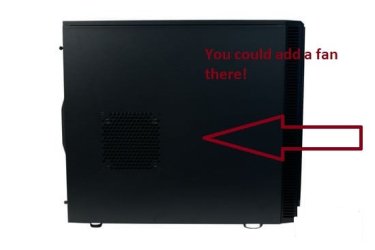
I saw you have a Define R4...If it is the classic case then you can add a Fan on the side to blow airflow on the motherboard chipsets....
 

Attachments

  • Define_R4_11.jpg
    Define_R4_11.jpg
    12.5 KB · Views: 43

My Computer My Computer

At a glance

Windows 7 Professional SP1 - x64 [Non-UEFI Boot]Ivy Bridge Core i5 3570K (Delidded)G.Skill "Ares" DDR3 PC3-12800 - 1600MHz (16Gb)Asus Dual-RX480-O4G
Computer type
PC/Desktop
Computer Manufacturer/Model Number
Custom Build
OS
Windows 7 Professional SP1 - x64 [Non-UEFI Boot]
CPU
Ivy Bridge Core i5 3570K (Delidded)
Motherboard
Asus P8Z77-V LE PLUS
Memory
G.Skill "Ares" DDR3 PC3-12800 - 1600MHz (16Gb)
Graphics Card(s)
Asus Dual-RX480-O4G
Sound Card
Creative Sound Blaster Z w/5.1 sound system
Monitor(s) Displays
Asus IPS 23"
Screen Resolution
16/9
Hard Drives
Internal:
500Go Sata 6Gb/s (x2)
500Go Sata 3Gb/s (x2)
SSD 60Go Sata 6Gb/s
PSU
In Win C 900W Series 80+ Platinum
Case
Thermaltake Chaser A71
Cooling
Custom Water Cooling Loop
Keyboard
Cooler Master QuickFire XTi
Mouse
Razer Imperator 2012 (4G)
Antivirus
MSE
Browser
IE 11.0.xxx Rtm
Other Info
"Raid0" with Intel Smart Response Technology (HDD/SSD)
Yes could be...!:)

Also... I have been checking out some stuff on my mobo..
Does the Hypertransport have anything to do with overclocking? becouse this board has 4800MT/s
Does it mean i can overclock my 8350 to 4.8Ghz?
Becouse if then thats REALLY good considering this is a 970 chipset that isnt made for overclocking at all but it does support it. So i used to run my cpu at 4.2 ghz but i removed it when my psu whent bad and i havent set it back to the 4.2Ghz even now when i got a RM650W psu

Seems the HyperTransportBus have to do with data exchange "read & write" at the same time...

With 4+1 Power phases you should be able to have a slight overclock but due to limitation of your phases i won't recommend you to go over 4.2GHz.

Here more infos: Hyper Transport Bus

EDIT: HyperTransport 3.0 what exactly does it help do? (see your bios settings also)

I saw you have a Define R4...If it is the classic case then you can add a Fan on the side to blow airflow on the motherboard chipsets....

Its the windowed version, Also i can overclock higher than 4.2 but i just didnt need that much cpu power.. the 8 core 4ghz is more than enough to thats also why i havent overclocked it again becouse yeah.. The 8350 is quite a beast for me compared to my old Laptop's 1.9Ghz 2.4Ghz turbo quad core. And my old desktops tripple core 2.4ghz
 

My Computer My Computer

At a glance

Windows 10 64BitIntel i7 6700K Cooled by Noctua NH-U14S16GB 2133MHZ DDR4 CorsairASUS Direct CUII OC GTX 660
Computer type
PC/Desktop
Computer Manufacturer/Model Number
Custom Built
OS
Windows 10 64Bit
CPU
Intel i7 6700K Cooled by Noctua NH-U14S
Motherboard
ASUS Z170 Pro Gaming
Memory
16GB 2133MHZ DDR4 Corsair
Graphics Card(s)
ASUS Direct CUII OC GTX 660
Sound Card
Supreme FX (On-Board)
Monitor(s) Displays
1: 24" Asus 144hz 2: 21.5" Benq 3: 20" Hp 2009m
Screen Resolution
1:1920x1080 2:1920x1080 3:1600:900
Hard Drives
Primary/OS: Samsung 850 EVO SSD 250GB
Secondary/Main: Seagate 1TB SSHD 3.5"
Media/Backups: WD Green 2TB HDD 3.5"
PSU
Corsair RM 650W
Case
Fractal Design R4
Cooling
2 140mm Noctua NF-A14 ULN, Noctua NH-U14S Cpu cooler
Keyboard
Corsair K70 RGB
Mouse
ROCCAT Kone XTD
Internet Speed
100 Mbit/s Download 100MBit/s Upload
Antivirus
F-Secure SAFE
Browser
Chrome, Firefox
Other Info
I hope hanging up your harddrives in rubber-bands for noise reasons isn't too harmful for the drives :S, but eh, rather silence than lasting drives.. :|
You can have a very cpu to Oc'ed but if your motherboard is slightly limited with the Power phases (4+1 in your case), then it is the motherboard that can't clock higher, not the Cpu. Maybe wait a little for AMD users, 'cause i'm more onto Intel board/cpu clocking.
 

My Computer My Computer

At a glance

Windows 7 Professional SP1 - x64 [Non-UEFI Boot]Ivy Bridge Core i5 3570K (Delidded)G.Skill "Ares" DDR3 PC3-12800 - 1600MHz (16Gb)Asus Dual-RX480-O4G
Computer type
PC/Desktop
Computer Manufacturer/Model Number
Custom Build
OS
Windows 7 Professional SP1 - x64 [Non-UEFI Boot]
CPU
Ivy Bridge Core i5 3570K (Delidded)
Motherboard
Asus P8Z77-V LE PLUS
Memory
G.Skill "Ares" DDR3 PC3-12800 - 1600MHz (16Gb)
Graphics Card(s)
Asus Dual-RX480-O4G
Sound Card
Creative Sound Blaster Z w/5.1 sound system
Monitor(s) Displays
Asus IPS 23"
Screen Resolution
16/9
Hard Drives
Internal:
500Go Sata 6Gb/s (x2)
500Go Sata 3Gb/s (x2)
SSD 60Go Sata 6Gb/s
PSU
In Win C 900W Series 80+ Platinum
Case
Thermaltake Chaser A71
Cooling
Custom Water Cooling Loop
Keyboard
Cooler Master QuickFire XTi
Mouse
Razer Imperator 2012 (4G)
Antivirus
MSE
Browser
IE 11.0.xxx Rtm
Other Info
"Raid0" with Intel Smart Response Technology (HDD/SSD)
You can have a very cpu to Oc'ed but if your motherboard is slightly limited with the Power phases (4+1 in your case), then it is the motherboard that can't clock higher, not the Cpu. Maybe wait a little for AMD users, 'cause i'm more onto Intel board/cpu clocking.

ok. Well i've seen that AMD cpus are extremely overclock happy while the intels are a bit fussy you need a mobo with a pretty good chipset but the amd's just overclock even with a crazy cheap and pretty low quality board like the one i have..
I suck with motherboard specs so i dont know whats good or not.
4-1 power phases?
MT/s?
WHAT??!
So anyhow my room where 26c so im cooling it now becouse my hands are floating away in sweat so im cooling it now.. But i didnt get it very clear.. Is it normal for the chipset and Vrm heatsinks beeing hot to the touch?
and otherwise.. Should i save up for 2 noctuas? 1 or 2 of them beeing PWM becouse my board has 1 or 2 dont remember pwm case fan connectors.. And the noctuas probably wont be very loud compared to the fractals at 7v. and they probably move more air at lover rpm's
 

My Computer My Computer

At a glance

Windows 10 64BitIntel i7 6700K Cooled by Noctua NH-U14S16GB 2133MHZ DDR4 CorsairASUS Direct CUII OC GTX 660
Computer type
PC/Desktop
Computer Manufacturer/Model Number
Custom Built
OS
Windows 10 64Bit
CPU
Intel i7 6700K Cooled by Noctua NH-U14S
Motherboard
ASUS Z170 Pro Gaming
Memory
16GB 2133MHZ DDR4 Corsair
Graphics Card(s)
ASUS Direct CUII OC GTX 660
Sound Card
Supreme FX (On-Board)
Monitor(s) Displays
1: 24" Asus 144hz 2: 21.5" Benq 3: 20" Hp 2009m
Screen Resolution
1:1920x1080 2:1920x1080 3:1600:900
Hard Drives
Primary/OS: Samsung 850 EVO SSD 250GB
Secondary/Main: Seagate 1TB SSHD 3.5"
Media/Backups: WD Green 2TB HDD 3.5"
PSU
Corsair RM 650W
Case
Fractal Design R4
Cooling
2 140mm Noctua NF-A14 ULN, Noctua NH-U14S Cpu cooler
Keyboard
Corsair K70 RGB
Mouse
ROCCAT Kone XTD
Internet Speed
100 Mbit/s Download 100MBit/s Upload
Antivirus
F-Secure SAFE
Browser
Chrome, Firefox
Other Info
I hope hanging up your harddrives in rubber-bands for noise reasons isn't too harmful for the drives :S, but eh, rather silence than lasting drives.. :|
26°C in your room is pretty hot, mine stays average max 20°C - 23°C even in early summer. That said you could check the motherboard fan headers available on yours.

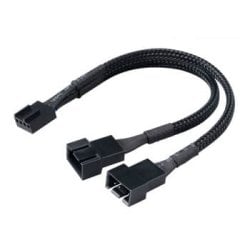
For the CPU I have plug with an "Y" cables, 2x4pins 120mm PWM fans with the CPU AirCooler in push/pull in the main CPU_Fan. Better airflow, then.

PS: My motherboard chipset is average 43°C - to 47°C when overclocking, looks your temps are OK for that. Considering the VRMs they can get hot, maybe try to increase the cooling solution on them.
 

Attachments

  • 1572879-a.jpg
    1572879-a.jpg
    8.4 KB · Views: 28

My Computer My Computer

At a glance

Windows 7 Professional SP1 - x64 [Non-UEFI Boot]Ivy Bridge Core i5 3570K (Delidded)G.Skill "Ares" DDR3 PC3-12800 - 1600MHz (16Gb)Asus Dual-RX480-O4G
Computer type
PC/Desktop
Computer Manufacturer/Model Number
Custom Build
OS
Windows 7 Professional SP1 - x64 [Non-UEFI Boot]
CPU
Ivy Bridge Core i5 3570K (Delidded)
Motherboard
Asus P8Z77-V LE PLUS
Memory
G.Skill "Ares" DDR3 PC3-12800 - 1600MHz (16Gb)
Graphics Card(s)
Asus Dual-RX480-O4G
Sound Card
Creative Sound Blaster Z w/5.1 sound system
Monitor(s) Displays
Asus IPS 23"
Screen Resolution
16/9
Hard Drives
Internal:
500Go Sata 6Gb/s (x2)
500Go Sata 3Gb/s (x2)
SSD 60Go Sata 6Gb/s
PSU
In Win C 900W Series 80+ Platinum
Case
Thermaltake Chaser A71
Cooling
Custom Water Cooling Loop
Keyboard
Cooler Master QuickFire XTi
Mouse
Razer Imperator 2012 (4G)
Antivirus
MSE
Browser
IE 11.0.xxx Rtm
Other Info
"Raid0" with Intel Smart Response Technology (HDD/SSD)
26°C in your room is pretty hot, mine stays average max 20°C - 23°C even in early summer. That said you could check the motherboard fan headers available on yours.

For the CPU I have plug with an "Y" cables, 2x4pins 120mm PWM fans with the CPU AirCooler in push/pull in the main CPU_Fan. Better airflow, then.

PS: My motherboard chipset is average 43°C - to 47°C when overclocking, looks your temps are OK for that. Considering the VRMs they can get hot, maybe try to increase the cooling solution on them.

Guess what :P
Have an Noctua NH U14s and i have one of them Y PWM splitters so YAY less cost!
But then i just need to buy 2 PWM noctuas wich well... Is not very cheap but i really want noctuas due to their Vibrationdampening, And that they match my Cpu cooler too.. And they are like the Cadilac of fans
 

My Computer My Computer

At a glance

Windows 10 64BitIntel i7 6700K Cooled by Noctua NH-U14S16GB 2133MHZ DDR4 CorsairASUS Direct CUII OC GTX 660
Computer type
PC/Desktop
Computer Manufacturer/Model Number
Custom Built
OS
Windows 10 64Bit
CPU
Intel i7 6700K Cooled by Noctua NH-U14S
Motherboard
ASUS Z170 Pro Gaming
Memory
16GB 2133MHZ DDR4 Corsair
Graphics Card(s)
ASUS Direct CUII OC GTX 660
Sound Card
Supreme FX (On-Board)
Monitor(s) Displays
1: 24" Asus 144hz 2: 21.5" Benq 3: 20" Hp 2009m
Screen Resolution
1:1920x1080 2:1920x1080 3:1600:900
Hard Drives
Primary/OS: Samsung 850 EVO SSD 250GB
Secondary/Main: Seagate 1TB SSHD 3.5"
Media/Backups: WD Green 2TB HDD 3.5"
PSU
Corsair RM 650W
Case
Fractal Design R4
Cooling
2 140mm Noctua NF-A14 ULN, Noctua NH-U14S Cpu cooler
Keyboard
Corsair K70 RGB
Mouse
ROCCAT Kone XTD
Internet Speed
100 Mbit/s Download 100MBit/s Upload
Antivirus
F-Secure SAFE
Browser
Chrome, Firefox
Other Info
I hope hanging up your harddrives in rubber-bands for noise reasons isn't too harmful for the drives :S, but eh, rather silence than lasting drives.. :|
Noctuas have good Rep!

Your motherboard have:
  1. 1 x CPU fan header
  2. 2 x system fan headers
  3. 1 x power fan header
You can save with the PWM "Y" cable, one fan header. The 2 Fans have to match exactly the same specs when plug with an "Y" Cable, otherwise it might report wrong infos when rotating.
 

My Computer My Computer

At a glance

Windows 7 Professional SP1 - x64 [Non-UEFI Boot]Ivy Bridge Core i5 3570K (Delidded)G.Skill "Ares" DDR3 PC3-12800 - 1600MHz (16Gb)Asus Dual-RX480-O4G
Computer type
PC/Desktop
Computer Manufacturer/Model Number
Custom Build
OS
Windows 7 Professional SP1 - x64 [Non-UEFI Boot]
CPU
Ivy Bridge Core i5 3570K (Delidded)
Motherboard
Asus P8Z77-V LE PLUS
Memory
G.Skill "Ares" DDR3 PC3-12800 - 1600MHz (16Gb)
Graphics Card(s)
Asus Dual-RX480-O4G
Sound Card
Creative Sound Blaster Z w/5.1 sound system
Monitor(s) Displays
Asus IPS 23"
Screen Resolution
16/9
Hard Drives
Internal:
500Go Sata 6Gb/s (x2)
500Go Sata 3Gb/s (x2)
SSD 60Go Sata 6Gb/s
PSU
In Win C 900W Series 80+ Platinum
Case
Thermaltake Chaser A71
Cooling
Custom Water Cooling Loop
Keyboard
Cooler Master QuickFire XTi
Mouse
Razer Imperator 2012 (4G)
Antivirus
MSE
Browser
IE 11.0.xxx Rtm
Other Info
"Raid0" with Intel Smart Response Technology (HDD/SSD)
Noctuas have good Rep!

Your motherboard have:
  1. 1 x CPU fan header
  2. 2 x system fan headers
  3. 1 x power fan header
You can save with the PWM "Y" cable, one fan header. The 2 Fans have to match exactly the same specs when plug with an "Y" Cable, otherwise it might report wrong infos when rotating.

Ok good. Um Whats a Power fan? Its the 3 Pin fan header?
 

My Computer My Computer

At a glance

Windows 10 64BitIntel i7 6700K Cooled by Noctua NH-U14S16GB 2133MHZ DDR4 CorsairASUS Direct CUII OC GTX 660
Computer type
PC/Desktop
Computer Manufacturer/Model Number
Custom Built
OS
Windows 10 64Bit
CPU
Intel i7 6700K Cooled by Noctua NH-U14S
Motherboard
ASUS Z170 Pro Gaming
Memory
16GB 2133MHZ DDR4 Corsair
Graphics Card(s)
ASUS Direct CUII OC GTX 660
Sound Card
Supreme FX (On-Board)
Monitor(s) Displays
1: 24" Asus 144hz 2: 21.5" Benq 3: 20" Hp 2009m
Screen Resolution
1:1920x1080 2:1920x1080 3:1600:900
Hard Drives
Primary/OS: Samsung 850 EVO SSD 250GB
Secondary/Main: Seagate 1TB SSHD 3.5"
Media/Backups: WD Green 2TB HDD 3.5"
PSU
Corsair RM 650W
Case
Fractal Design R4
Cooling
2 140mm Noctua NF-A14 ULN, Noctua NH-U14S Cpu cooler
Keyboard
Corsair K70 RGB
Mouse
ROCCAT Kone XTD
Internet Speed
100 Mbit/s Download 100MBit/s Upload
Antivirus
F-Secure SAFE
Browser
Chrome, Firefox
Other Info
I hope hanging up your harddrives in rubber-bands for noise reasons isn't too harmful for the drives :S, but eh, rather silence than lasting drives.. :|
Is it normal for the chipset and Vrm heatsinks beeing hot to the touch?

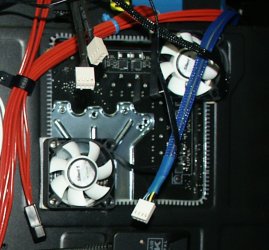
Temps should be in the 20 to low 30C when lightly loaded. With a heavy load I would like to be no higher then 50-55C. GPU and GPU VRM's can deal with higher temps. Your 8350 should never be allowed higher than 61C. I don't know about the 970 chips but the 990 chip set can have high NB temps, lot of users add a tiny heatsink/fan for added cooling. Some add a 50-80mm fan to the back side of the board to cool cpu and vrm's.
vrmfans.jpg
 

My Computer My Computer

At a glance

Win8/8.1,Win7-U64, Vista U64, uncounted Linux...AMD and Intell, 9590, 8350, i5 3570kCorsair G SkillCrossfired Sapphire HD 7950 Vapor-X, ASUS R9 ...
Computer type
PC/Desktop
Computer Manufacturer/Model Number
Custom, Dell and Lenono LT's
OS
Win8/8.1,Win7-U64, Vista U64, uncounted Linux distor's
CPU
AMD and Intell, 9590, 8350, i5 3570k
Motherboard
CFVFZ, GA990FXA, Z77e-itx
Memory
Corsair G Skill
Graphics Card(s)
Crossfired Sapphire HD 7950 Vapor-X, ASUS R9 280X TOP
Sound Card
Realtek ALC889
Monitor(s) Displays
ViewSonic VX2770SMH 27" / ViewSonic VX2433 LCD 24"
Screen Resolution
1080i HD
Hard Drives
Samsung SSD 840 Pro
OCZ Agility 3's
OCZ Vector's
WD's Blue, red, green, Velociraptors
Seagate USB3 & Hybrid's
ASUS Blu-Ray
ASUS DVD
PSU
Corsair AX1200i, Seasonice 850 Gold
Case
Cooler Master HAF 922 & HAF 932, Lian Li Train case.
Cooling
Air, Glacer 240L expanded, custom EK loop with duel D5's
Keyboard
Microsoft SideWinder X4 USB Keyboard / Logitech 250 PS2
Mouse
Logitech G500 / MS wireless 5000
Internet Speed
Best of 5ms / 75+ dn / 12+ up More or less.
Antivirus
MS esentials-MalwareBytes
Browser
Firefox Chromebook

My Computer My Computer

At a glance

Win 7 Home Premium SP1 32 bitAMD Athlon 64 X2 5000B4.00 GB Dual-Channel DDR2 @ 370MHz (6-6-6-18)Acer E181H (1366x768@60Hz) 64MB GeForce 6150 ...
Computer type
PC/Desktop
Computer Manufacturer/Model Number
Dell optiplex 740
OS
Win 7 Home Premium SP1 32 bit
CPU
AMD Athlon 64 X2 5000B
Motherboard
Dell Inc. 0YP696 (Socket M2 )
Memory
4.00 GB Dual-Channel DDR2 @ 370MHz (6-6-6-18)
Graphics Card(s)
Acer E181H (1366x768@60Hz) 64MB GeForce 6150 LE (Dell)
Sound Card
SigmaTel High Definition Audio CODEC
Monitor(s) Displays
Acer E181H (1366x768@60Hz) 64MB GeForce 6150 LE (Dell)
Hard Drives
699GB Seagate ST375064 0NS SCSI Disk Device (ATA)
Case
Mini tower
Internet Speed
Ping 36 ms, Download 57.71 mbps , Upload 11.79mbps
Antivirus
Free Avast. Pro paid Mbam , Free Sas
Browser
Palemoon .
Noctuas have good Rep!


Your motherboard have:
  1. 1 x CPU fan header
  2. 2 x system fan headers
  3. 1 x power fan header
You can save with the PWM "Y" cable, one fan header. The 2 Fans have to match exactly the same specs when plug with an "Y" Cable, otherwise it might report wrong infos when rotating.

Ok good. Um Whats a Power fan? Its the 3 Pin fan header?

The infos are very vague on that Power Fan Header, but looks it used to be for power supply that have such connectors. You should be able to plug and monitor a case fan with it also. The best is to try out and see in bios setting what speed it does report
 

My Computer My Computer

At a glance

Windows 7 Professional SP1 - x64 [Non-UEFI Boot]Ivy Bridge Core i5 3570K (Delidded)G.Skill "Ares" DDR3 PC3-12800 - 1600MHz (16Gb)Asus Dual-RX480-O4G
Computer type
PC/Desktop
Computer Manufacturer/Model Number
Custom Build
OS
Windows 7 Professional SP1 - x64 [Non-UEFI Boot]
CPU
Ivy Bridge Core i5 3570K (Delidded)
Motherboard
Asus P8Z77-V LE PLUS
Memory
G.Skill "Ares" DDR3 PC3-12800 - 1600MHz (16Gb)
Graphics Card(s)
Asus Dual-RX480-O4G
Sound Card
Creative Sound Blaster Z w/5.1 sound system
Monitor(s) Displays
Asus IPS 23"
Screen Resolution
16/9
Hard Drives
Internal:
500Go Sata 6Gb/s (x2)
500Go Sata 3Gb/s (x2)
SSD 60Go Sata 6Gb/s
PSU
In Win C 900W Series 80+ Platinum
Case
Thermaltake Chaser A71
Cooling
Custom Water Cooling Loop
Keyboard
Cooler Master QuickFire XTi
Mouse
Razer Imperator 2012 (4G)
Antivirus
MSE
Browser
IE 11.0.xxx Rtm
Other Info
"Raid0" with Intel Smart Response Technology (HDD/SSD)
Is it normal for the chipset and Vrm heatsinks beeing hot to the touch?

Temps should be in the 20 to low 30C when lightly loaded. With a heavy load I would like to be no higher then 50-55C. GPU and GPU VRM's can deal with higher temps. Your 8350 should never be allowed higher than 61C. I don't know about the 970 chips but the 990 chip set can have high NB temps, lot of users add a tiny heatsink/fan for added cooling. Some add a 50-80mm fan to the back side of the board to cool cpu and vrm's.
View attachment 311469

Why shouldnt i let the 8350 go over 61c?
Also without overclock the Noctua Nh u14s keeps it at no more than 45c at 99% load
 

My Computer My Computer

At a glance

Windows 10 64BitIntel i7 6700K Cooled by Noctua NH-U14S16GB 2133MHZ DDR4 CorsairASUS Direct CUII OC GTX 660
Computer type
PC/Desktop
Computer Manufacturer/Model Number
Custom Built
OS
Windows 10 64Bit
CPU
Intel i7 6700K Cooled by Noctua NH-U14S
Motherboard
ASUS Z170 Pro Gaming
Memory
16GB 2133MHZ DDR4 Corsair
Graphics Card(s)
ASUS Direct CUII OC GTX 660
Sound Card
Supreme FX (On-Board)
Monitor(s) Displays
1: 24" Asus 144hz 2: 21.5" Benq 3: 20" Hp 2009m
Screen Resolution
1:1920x1080 2:1920x1080 3:1600:900
Hard Drives
Primary/OS: Samsung 850 EVO SSD 250GB
Secondary/Main: Seagate 1TB SSHD 3.5"
Media/Backups: WD Green 2TB HDD 3.5"
PSU
Corsair RM 650W
Case
Fractal Design R4
Cooling
2 140mm Noctua NF-A14 ULN, Noctua NH-U14S Cpu cooler
Keyboard
Corsair K70 RGB
Mouse
ROCCAT Kone XTD
Internet Speed
100 Mbit/s Download 100MBit/s Upload
Antivirus
F-Secure SAFE
Browser
Chrome, Firefox
Other Info
I hope hanging up your harddrives in rubber-bands for noise reasons isn't too harmful for the drives :S, but eh, rather silence than lasting drives.. :|
UPDATE:
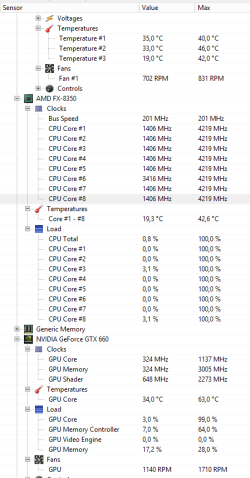
I ran 3dmark 11 with the Open Hardware Monitor in the background..
Here are my 3Dmark Results if anyone is interested.
NVIDIA GeForce GTX 660 video card benchmark result - AMD FX-8350,Gigabyte Technology Co., Ltd. 970A-DS3P

And here is a screenshot of the OHM:
OHM.PNG

( The Voltages i removed becouse it only showed the battery ( 3.192 ) so i could get space for the Gpu fan speed.)

Also i took a screenshot of the temps about 3-4 minutes after the benchmark
and the reason for the cpu beeing 100% is becouse of i ran Prime a bit to see the temp for it... But in 3dmark 11 it only hit max 88% usage

Chassifans where set to 7V instead of 5V. But i ramp them up to 7V while gaming
 

My Computer My Computer

At a glance

Windows 10 64BitIntel i7 6700K Cooled by Noctua NH-U14S16GB 2133MHZ DDR4 CorsairASUS Direct CUII OC GTX 660
Computer type
PC/Desktop
Computer Manufacturer/Model Number
Custom Built
OS
Windows 10 64Bit
CPU
Intel i7 6700K Cooled by Noctua NH-U14S
Motherboard
ASUS Z170 Pro Gaming
Memory
16GB 2133MHZ DDR4 Corsair
Graphics Card(s)
ASUS Direct CUII OC GTX 660
Sound Card
Supreme FX (On-Board)
Monitor(s) Displays
1: 24" Asus 144hz 2: 21.5" Benq 3: 20" Hp 2009m
Screen Resolution
1:1920x1080 2:1920x1080 3:1600:900
Hard Drives
Primary/OS: Samsung 850 EVO SSD 250GB
Secondary/Main: Seagate 1TB SSHD 3.5"
Media/Backups: WD Green 2TB HDD 3.5"
PSU
Corsair RM 650W
Case
Fractal Design R4
Cooling
2 140mm Noctua NF-A14 ULN, Noctua NH-U14S Cpu cooler
Keyboard
Corsair K70 RGB
Mouse
ROCCAT Kone XTD
Internet Speed
100 Mbit/s Download 100MBit/s Upload
Antivirus
F-Secure SAFE
Browser
Chrome, Firefox
Other Info
I hope hanging up your harddrives in rubber-bands for noise reasons isn't too harmful for the drives :S, but eh, rather silence than lasting drives.. :|
Yes could be...!:)

Also... I have been checking out some stuff on my mobo..
Does the Hypertransport have anything to do with overclocking? becouse this board has 4800MT/s
Does it mean i can overclock my 8350 to 4.8Ghz?
Becouse if then thats REALLY good considering this is a 970 chipset that isnt made for overclocking at all but it does support it. So i used to run my cpu at 4.2 ghz but i removed it when my psu whent bad and i havent set it back to the 4.2Ghz even now when i got a RM650W psu


First of all why did you OC it to 4.2 it does that on stock turbo

In a sense you didn't overclock anything you just maxed out the stock configuration any more and you would of ran into trouble most boards for that chip are 8+2 phase out of the box it's 4 ghz turbo 4.2
 

My Computer My Computer

At a glance

Windows 10 Home Premium 64bit sp1Intel I7-6700K @ 4.6 Ghz 1.344 volts everyday OC32GB G-Skill TridentZ 3200mhz 16-18-18-38 DDR4Sli Gigabyte Windforce GTX 980 G1
Computer type
PC/Desktop
Computer Manufacturer/Model Number
CoreI7-6700K MrFingerIII Special Builds
OS
Windows 10 Home Premium 64bit sp1
CPU
Intel I7-6700K @ 4.6 Ghz 1.344 volts everyday OC
Motherboard
Asrock Fatality K6 Z170 Socket 1151
Memory
32GB G-Skill TridentZ 3200mhz 16-18-18-38 DDR4
Graphics Card(s)
Sli Gigabyte Windforce GTX 980 G1
Sound Card
AC97 Creative Rage Tactic 3D Headphones Bluetooth
Monitor(s) Displays
27" Asus ROG Swift PG278Q G-Sync 48" Vizio Smart HD TV
Screen Resolution
2560x1440p 27"- 48" Currently Gaming at 2560x1440p Res 2K
Hard Drives
250GB Samsung Evo840SSD Seagate baracuda 500 GB WD Mybook 500Gb 1TB Seagate Barracuda
PSU
HX1050w Corsair Silver 80plus certified crosfire/sli
Case
Enthod Pro Full Tower
Cooling
Corsair H110i GT 280 mm High Performance WaterBlock
Keyboard
Logitech wireless keyboard
Mouse
Logitech wireless mouse
Internet Speed
Cox Cable 100+ mb
Antivirus
WebRoot Spysweeper with Antivirus
Browser
IE-10, Chrome, Opera
Other Info
My Other Rig is a AMD FX8320E @4.6Ghz 16GB Ballistic Sport Ram
Mobo Asrock Fatality 990FX 120GB OCZ SSD 1TB Seagate Barracuda Corsair H75 Cooling PSU Corsair CX750
GPU GTX Gigabyte 970G1
Back
Top