Low memory on C: drive after BSOD crash, suspecting malware.

gs97Official

New member
Local time
8:16 AM
Messages
6
Well a few days back, I had an unexpected BSOD crash. When the system rebooted, there were uninstalled updates, which I then installed. No crashes after that for some time. 2 days ago, I notice my C: drive memory depleting, showing just 2 GB free of 96.5 GB. Now because of this, my system performance slowed down and there were a few more crashes.

I suspected a malware in some file, so I researched a bit for memory scan softwares, and found out about SpaceSniffer, which I then downloaded and ran to scan the C: drive. It accounted for 37.3 GB used and there was a log generated, which I shall post in a reply as there isnit enough space on this message.

Anyways, now my disk space is down to just 100 MB free of 96.5 GB, and because of this I am not able to run a lot of programs. Would appreciate any immediate help. And I also want to let it known that Formatting and doing a clean install of Windows is gonna be my last resort as I do not have a Windows installation disc.

EDITED: Apparently the log is too big to be posted in one single reply. And also, I've analyzsed the C: drive with Advanced SystemCare and it showed that the path "C: > Windows" was occupying about 60 GB while it just showed as 18.2 GB on the SpaceSniffer scan.

The log in the SpaceSniffer scan showed that access is denied into one folder with path "C: > Windows > system32 > config > systemprofile". I suspect that's the problem folder, but as i said access to that is denied even though I have administrative rights.
 

My Computer My Computer

At a glance

Windows 7 Home Basic 32-bitE6700 @ 3.20 GHz2.00 GB
Computer type
PC/Desktop
Computer Manufacturer/Model Number
Acer
OS
Windows 7 Home Basic 32-bit
CPU
E6700 @ 3.20 GHz
Memory
2.00 GB
Antivirus
Avast
Browser
Google Chrome
What anti-malware and anti-virus scans have you done?

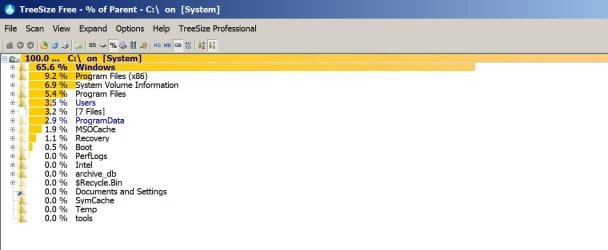
Download and run Treesize Free and post a screen shot of it.

TreeSize Free - Verzeichnisgren und Speicherfresser schnell erfassen

It will show all your directory trees and you can expand down to see every folder.

My System Profile folder is very small and is shown in Treesize Free.

Here's the screenshot:
 

Attachments

  • Untitled-1.jpg
    Untitled-1.jpg
    72.1 KB · Views: 2

My Computer My Computer

At a glance

Windows 7 Home Premium SP1, 64-bitIntel Skylake i5-6600K, not overclocked8 GB HyperX DDR4-2666 (2 x 4 GB)none; graphics are integrated on CPU
Computer type
PC/Desktop
Computer Manufacturer/Model Number
Ignatz Special; 4 speed manual gearbox; factory air conditioning; one of one
OS
Windows 7 Home Premium SP1, 64-bit
CPU
Intel Skylake i5-6600K, not overclocked
Motherboard
AsRock Z170M Extreme 4, micro ATX
Memory
8 GB HyperX DDR4-2666 (2 x 4 GB)
Graphics Card(s)
none; graphics are integrated on CPU
Sound Card
onboard: Realtek ALC1150; external: USB Behringer UF0-202
Monitor(s) Displays
Dell S2340M 23 inch IPS
Screen Resolution
1600 x 900
Hard Drives
System: Crucial MX100 series SSD, 128 GB;
Data: Samsung Spinpoint 103SJ, 1 TB;
Backup: WD Caviar Green WD30EZRX-00D8PB0, 3 TB
PSU
Rosewill SilentNight 500 watt fanless, semi-modular
Case
Antec Solo II
Cooling
Noctua NH-U12S; Noctua F12 intake, Noctua S12A exhaust
Keyboard
Microsoft 200 6JH-00001 USB
Mouse
Dell or Microsoft optical wired; USB
Antivirus
Microsoft Security Essentials and Malwarebytes Premium
Browser
Pale Moon
Other Info
All fans PWM; speeds at idle: CPU circa 500 rpm; intake circa 600 rpm; exhaust circa 600 rpm; CPU temps 27 idle and 47 C load in a warm room (27 C/81 F) when running Intel Extreme Tuning Utility stress test.
I can't download any more stuff, even if I try and delete anything the space is eaten up within minutes... I've done a scan with IOBit Disk explorer which comes with Advanced SystemCare. Screenshot attached.
 

Attachments

  • scan.jpg
    scan.jpg
    109.5 KB · Views: 7

My Computer My Computer

At a glance

Windows 7 Home Basic 32-bitE6700 @ 3.20 GHz2.00 GB
Computer type
PC/Desktop
Computer Manufacturer/Model Number
Acer
OS
Windows 7 Home Basic 32-bit
CPU
E6700 @ 3.20 GHz
Memory
2.00 GB
Antivirus
Avast
Browser
Google Chrome
On your PC, C:\windows\system32\config\systemprofile\appdata\local\microsoft\Windows is 58.01 GB.

On my PC, that same folder is less than 100 KB---about one millionth the size of yours.

That folder on my PC contains mostly “temporary Internet files” and “history”.

I’ve seen this issue several times previously on this forum and can’t recall the culprits. I’d guess it’s most likely a rogue program running away and generating a bunch of temp files.

You should be able to find more comments on resolving this by using the search function on this forum.

In the meantime:

Do you have access to a System Restore point prior to the date and time this began?

What specific anti-virus and anti-malware scans have you done since this began?

Have you examined your list of installed programs to see if there is anything there that you can't explain or that looks new or suspicious?

Have you looked at running processes within Task Manager to see if anything is hogging CPU cycles?

Have you looked at the memory tab within Resource Monitor in Task Manager to see if any particular process is using a lot of memory?
 

My Computer My Computer

At a glance

Windows 7 Home Premium SP1, 64-bitIntel Skylake i5-6600K, not overclocked8 GB HyperX DDR4-2666 (2 x 4 GB)none; graphics are integrated on CPU
Computer type
PC/Desktop
Computer Manufacturer/Model Number
Ignatz Special; 4 speed manual gearbox; factory air conditioning; one of one
OS
Windows 7 Home Premium SP1, 64-bit
CPU
Intel Skylake i5-6600K, not overclocked
Motherboard
AsRock Z170M Extreme 4, micro ATX
Memory
8 GB HyperX DDR4-2666 (2 x 4 GB)
Graphics Card(s)
none; graphics are integrated on CPU
Sound Card
onboard: Realtek ALC1150; external: USB Behringer UF0-202
Monitor(s) Displays
Dell S2340M 23 inch IPS
Screen Resolution
1600 x 900
Hard Drives
System: Crucial MX100 series SSD, 128 GB;
Data: Samsung Spinpoint 103SJ, 1 TB;
Backup: WD Caviar Green WD30EZRX-00D8PB0, 3 TB
PSU
Rosewill SilentNight 500 watt fanless, semi-modular
Case
Antec Solo II
Cooling
Noctua NH-U12S; Noctua F12 intake, Noctua S12A exhaust
Keyboard
Microsoft 200 6JH-00001 USB
Mouse
Dell or Microsoft optical wired; USB
Antivirus
Microsoft Security Essentials and Malwarebytes Premium
Browser
Pale Moon
Other Info
All fans PWM; speeds at idle: CPU circa 500 rpm; intake circa 600 rpm; exhaust circa 600 rpm; CPU temps 27 idle and 47 C load in a warm room (27 C/81 F) when running Intel Extreme Tuning Utility stress test.
Well I've done a scan with Advanced SystemCare, has freed up about 400 MB but that was consumed again, and when I try to scan with Avast it seems to just skip that folder. I cant even open it as the problem has denied access to it.

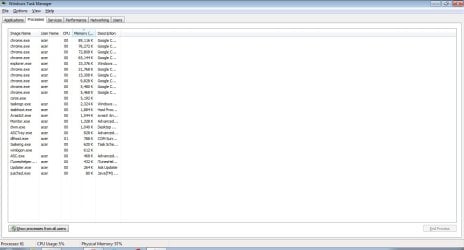
Checked task manager, no suspicious activity whatsoever. I do have a system restore point, but it's not recent so a lot of data (particularly on the D: drive) is going to be lost.
 

My Computer My Computer

At a glance

Windows 7 Home Basic 32-bitE6700 @ 3.20 GHz2.00 GB
Computer type
PC/Desktop
Computer Manufacturer/Model Number
Acer
OS
Windows 7 Home Basic 32-bit
CPU
E6700 @ 3.20 GHz
Memory
2.00 GB
Antivirus
Avast
Browser
Google Chrome
System Restore affects only system files, not your personal data. So it's worth a try.

Post screenshots of processes, with "show processes for all users" selected. Poke the CPU column to sort so that the highest CPU usage process is at the top.

Post screenshot of Resource Monitor memory tab, sorted by highest working set.

Post screenshot of installed programs.

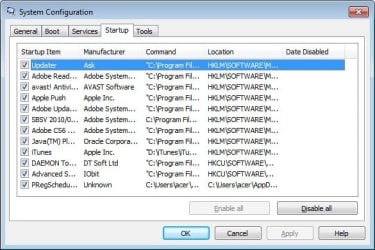
Post screenshot of the checked items shown in the startup tab of msconfig.

Are you using any particular toolbar? I'm wondering if you downloaded one recently, perhaps by accident.


I'd at least try to download and run malwarebytes from malwarebytes.org.
 

My Computer My Computer

At a glance

Windows 7 Home Premium SP1, 64-bitIntel Skylake i5-6600K, not overclocked8 GB HyperX DDR4-2666 (2 x 4 GB)none; graphics are integrated on CPU
Computer type
PC/Desktop
Computer Manufacturer/Model Number
Ignatz Special; 4 speed manual gearbox; factory air conditioning; one of one
OS
Windows 7 Home Premium SP1, 64-bit
CPU
Intel Skylake i5-6600K, not overclocked
Motherboard
AsRock Z170M Extreme 4, micro ATX
Memory
8 GB HyperX DDR4-2666 (2 x 4 GB)
Graphics Card(s)
none; graphics are integrated on CPU
Sound Card
onboard: Realtek ALC1150; external: USB Behringer UF0-202
Monitor(s) Displays
Dell S2340M 23 inch IPS
Screen Resolution
1600 x 900
Hard Drives
System: Crucial MX100 series SSD, 128 GB;
Data: Samsung Spinpoint 103SJ, 1 TB;
Backup: WD Caviar Green WD30EZRX-00D8PB0, 3 TB
PSU
Rosewill SilentNight 500 watt fanless, semi-modular
Case
Antec Solo II
Cooling
Noctua NH-U12S; Noctua F12 intake, Noctua S12A exhaust
Keyboard
Microsoft 200 6JH-00001 USB
Mouse
Dell or Microsoft optical wired; USB
Antivirus
Microsoft Security Essentials and Malwarebytes Premium
Browser
Pale Moon
Other Info
All fans PWM; speeds at idle: CPU circa 500 rpm; intake circa 600 rpm; exhaust circa 600 rpm; CPU temps 27 idle and 47 C load in a warm room (27 C/81 F) when running Intel Extreme Tuning Utility stress test.
Well, almost all my installed programs are on the D: drive and have no link to that folder. As for toolbars, I find them annoying with all their pop-ups and stuff so I never install any.

Other screenshots attached.
 

Attachments

  • startup.jpg
    startup.jpg
    47.2 KB · Views: 20
  • processes.jpg
    processes.jpg
    68.6 KB · Views: 5

My Computer My Computer

At a glance

Windows 7 Home Basic 32-bitE6700 @ 3.20 GHz2.00 GB
Computer type
PC/Desktop
Computer Manufacturer/Model Number
Acer
OS
Windows 7 Home Basic 32-bit
CPU
E6700 @ 3.20 GHz
Memory
2.00 GB
Antivirus
Avast
Browser
Google Chrome
Do you have any particular reason not to try a System Restore?

I don't see the screenshots for installed programs and Resource Monitor.

Are you unable to run Malwarebytes?

I don't recognize all of those items in startup. The PC will run fine with all unchecked at least as a test to see if it helps. You might leave Avast checked to keep anti-virus going, but the others can be unchecked as an experiment.
 

My Computer My Computer

At a glance

Windows 7 Home Premium SP1, 64-bitIntel Skylake i5-6600K, not overclocked8 GB HyperX DDR4-2666 (2 x 4 GB)none; graphics are integrated on CPU
Computer type
PC/Desktop
Computer Manufacturer/Model Number
Ignatz Special; 4 speed manual gearbox; factory air conditioning; one of one
OS
Windows 7 Home Premium SP1, 64-bit
CPU
Intel Skylake i5-6600K, not overclocked
Motherboard
AsRock Z170M Extreme 4, micro ATX
Memory
8 GB HyperX DDR4-2666 (2 x 4 GB)
Graphics Card(s)
none; graphics are integrated on CPU
Sound Card
onboard: Realtek ALC1150; external: USB Behringer UF0-202
Monitor(s) Displays
Dell S2340M 23 inch IPS
Screen Resolution
1600 x 900
Hard Drives
System: Crucial MX100 series SSD, 128 GB;
Data: Samsung Spinpoint 103SJ, 1 TB;
Backup: WD Caviar Green WD30EZRX-00D8PB0, 3 TB
PSU
Rosewill SilentNight 500 watt fanless, semi-modular
Case
Antec Solo II
Cooling
Noctua NH-U12S; Noctua F12 intake, Noctua S12A exhaust
Keyboard
Microsoft 200 6JH-00001 USB
Mouse
Dell or Microsoft optical wired; USB
Antivirus
Microsoft Security Essentials and Malwarebytes Premium
Browser
Pale Moon
Other Info
All fans PWM; speeds at idle: CPU circa 500 rpm; intake circa 600 rpm; exhaust circa 600 rpm; CPU temps 27 idle and 47 C load in a warm room (27 C/81 F) when running Intel Extreme Tuning Utility stress test.
BEWARE the filesizes you're seeing in these various views!.
Some explorer alternatives don't deal properly with the various link types (Junctions, hardlinks, and others) of Windows Vista and above, and repeatedly measure the same file, resulting in much higher space usage than is actually the case.
Windows Explorer itself isn't terribly consistent on this :(

I have seen similar problems to this caused by junctions recursing - and while the disk is actually nearly empty, the file system can't cope with the length of the paths that get generated as every recursion adds 30 or so characters to the path length. This overflows Windows ability to deal with it, and it mis-interprets it as a full drive.

It may be worth checking for such things...

In Safe Mode, open an Elevated Command Prompt, and run the following command.

DIR C:\ /S /AL >C:\links.txt
It will take a while to complete! Be patient.
When the cursor comes back to the Command Prompt window, reboot to normal mode, and upload the links.txt file created.
 

My Computer My Computer

At a glance

Win 7 x64 Home Premium (and x86 VirtualBox VM...i3 370M/i7 6500U8GB - finally :)/8GBit's an i3, dude!/dual Intel&nVidia
Computer type
Laptop
Computer Manufacturer/Model Number
Asus K52F or Lenovo B51-80
OS
Win 7 x64 Home Premium (and x86 VirtualBox VM)/Win10
CPU
i3 370M/i7 6500U
Motherboard
Asus/Lenovo
Memory
8GB - finally :)/8GB
Graphics Card(s)
it's an i3, dude!/dual Intel&nVidia
Sound Card
onboard
Monitor(s) Displays
15.6" built-in
Screen Resolution
1366x768/1920x1080
Hard Drives
750GB Seagate internal
Sundry external drives attached to other computers on the local network
1TB SSD on the Lenovo
PSU
n/a
Internet Speed
as much as I can get - usually on a dongle/phone, so <1MB/s
Antivirus
MSE/Defender
Browser
IE11/12/Edge/Chrome/FF(if I must)
@ignatzatsonic Well I don't have any apparent reason not to try system restore. Will do it if nothing else works. As for malwarebytes, I've managed to free up some space with Disk Cleanup and will try it now.

@NoelDP Just wanted to know, what exactly happens in such a case?
 

My Computer My Computer

At a glance

Windows 7 Home Basic 32-bitE6700 @ 3.20 GHz2.00 GB
Computer type
PC/Desktop
Computer Manufacturer/Model Number
Acer
OS
Windows 7 Home Basic 32-bit
CPU
E6700 @ 3.20 GHz
Memory
2.00 GB
Antivirus
Avast
Browser
Google Chrome
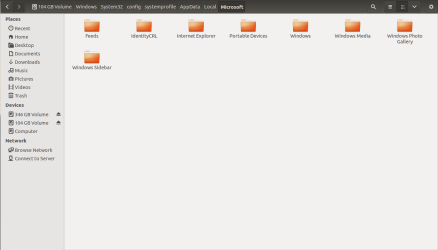
Okay I forgot to mention one thing before. This system is dual-booted with Ubuntu 13.10. When I tried to access that target folder through Ubuntu, I was able to do so. Now the contents of that folder are in the screenshot. So will it be possible to eliminate the problem through Ubuntu itself?
 

Attachments

  • Screenshot .png
    Screenshot .png
    19.3 KB · Views: 1

My Computer My Computer

At a glance

Windows 7 Home Basic 32-bitE6700 @ 3.20 GHz2.00 GB
Computer type
PC/Desktop
Computer Manufacturer/Model Number
Acer
OS
Windows 7 Home Basic 32-bit
CPU
E6700 @ 3.20 GHz
Memory
2.00 GB
Antivirus
Avast
Browser
Google Chrome
Did you run the command Noel suggested and upload the links.txt file that it creates?

I have no idea if Ubuntu can help.
 

My Computer My Computer

At a glance

Windows 7 Home Premium SP1, 64-bitIntel Skylake i5-6600K, not overclocked8 GB HyperX DDR4-2666 (2 x 4 GB)none; graphics are integrated on CPU
Computer type
PC/Desktop
Computer Manufacturer/Model Number
Ignatz Special; 4 speed manual gearbox; factory air conditioning; one of one
OS
Windows 7 Home Premium SP1, 64-bit
CPU
Intel Skylake i5-6600K, not overclocked
Motherboard
AsRock Z170M Extreme 4, micro ATX
Memory
8 GB HyperX DDR4-2666 (2 x 4 GB)
Graphics Card(s)
none; graphics are integrated on CPU
Sound Card
onboard: Realtek ALC1150; external: USB Behringer UF0-202
Monitor(s) Displays
Dell S2340M 23 inch IPS
Screen Resolution
1600 x 900
Hard Drives
System: Crucial MX100 series SSD, 128 GB;
Data: Samsung Spinpoint 103SJ, 1 TB;
Backup: WD Caviar Green WD30EZRX-00D8PB0, 3 TB
PSU
Rosewill SilentNight 500 watt fanless, semi-modular
Case
Antec Solo II
Cooling
Noctua NH-U12S; Noctua F12 intake, Noctua S12A exhaust
Keyboard
Microsoft 200 6JH-00001 USB
Mouse
Dell or Microsoft optical wired; USB
Antivirus
Microsoft Security Essentials and Malwarebytes Premium
Browser
Pale Moon
Other Info
All fans PWM; speeds at idle: CPU circa 500 rpm; intake circa 600 rpm; exhaust circa 600 rpm; CPU temps 27 idle and 47 C load in a warm room (27 C/81 F) when running Intel Extreme Tuning Utility stress test.
@ignatzatsonic Well I don't have any apparent reason not to try system restore. Will do it if nothing else works. As for malwarebytes, I've managed to free up some space with Disk Cleanup and will try it now.

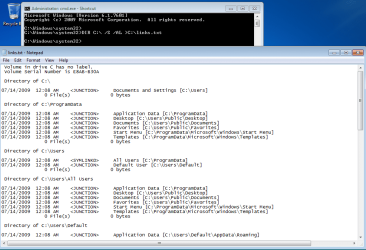
@NoelDP Just wanted to know, what exactly happens in such a case?

The redirected dir command creates a text file with the info that Noel wants to see.

It is safe to run (if that is what you were asking):

dir.png
 

My Computer My Computer

At a glance

W7 Pro SP1 64biti78GBIntel HD Graphics
Computer type
Laptop
Computer Manufacturer/Model Number
Employer provided Dell Latitude
OS
W7 Pro SP1 64bit
CPU
i7
Memory
8GB
Graphics Card(s)
Intel HD Graphics
Hard Drives
crappy SSD
Antivirus
Employer mandated Symantec Endpoint Protection
Browser
Pale Moon 64bit, IE11 64bit & Chrome 64bit
Please post the file - not a screenshot of it
 

My Computer My Computer

At a glance

Win 7 x64 Home Premium (and x86 VirtualBox VM...i3 370M/i7 6500U8GB - finally :)/8GBit's an i3, dude!/dual Intel&nVidia
Computer type
Laptop
Computer Manufacturer/Model Number
Asus K52F or Lenovo B51-80
OS
Win 7 x64 Home Premium (and x86 VirtualBox VM)/Win10
CPU
i3 370M/i7 6500U
Motherboard
Asus/Lenovo
Memory
8GB - finally :)/8GB
Graphics Card(s)
it's an i3, dude!/dual Intel&nVidia
Sound Card
onboard
Monitor(s) Displays
15.6" built-in
Screen Resolution
1366x768/1920x1080
Hard Drives
750GB Seagate internal
Sundry external drives attached to other computers on the local network
1TB SSD on the Lenovo
PSU
n/a
Internet Speed
as much as I can get - usually on a dongle/phone, so <1MB/s
Antivirus
MSE/Defender
Browser
IE11/12/Edge/Chrome/FF(if I must)
Back
Top