BSOD While playing any graphic intensive game 0x00000018

Psychological

New member
Local time
4:02 AM
Messages
15
ZkHqs8y.png


kPi7Yhq.png


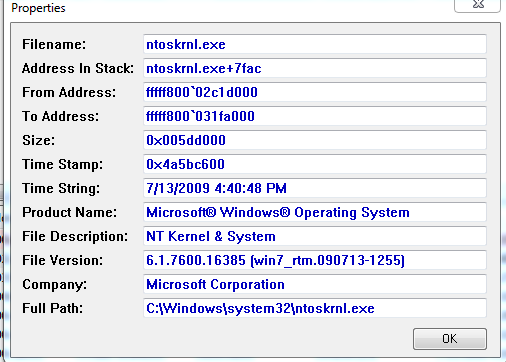
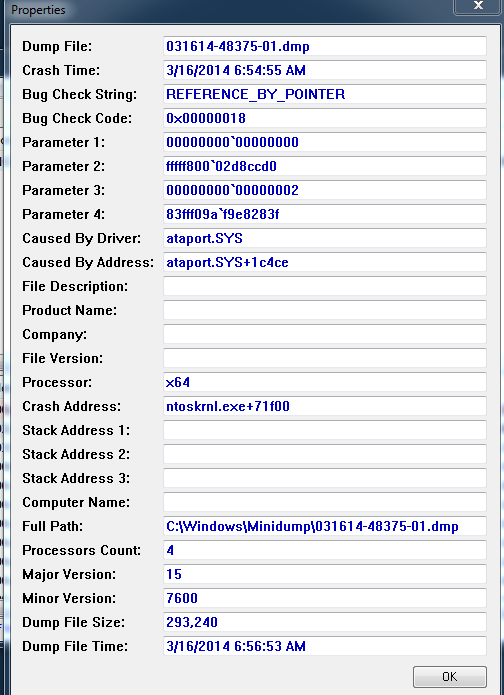
So i've been having this issue for awhile now,I can play regular games normally and i wont have a problem,But when i try playing any graphic intensive game i always BSOD. For example hawken.

Operating System
Windows 7 Ultimate 64-bit
CPU
AMD Athlon II X4 630 49 °C
Propus 45nm Technology
RAM
6.00GB Dual-Channel DDR3 @ 533MHz (7-7-7-20)
Motherboard
PEGATRON CORPORATION VIOLET6 (CPU 1) 53 °C
Graphics
HP 2009 (1600x900@60Hz)
DELL E197FP (1280x1024@60Hz)
1023MB NVIDIA GeForce GTX 550 Ti (EVGA) 63 °C
Storage
931GB Western Digital WDC WD10EADS-65M2BX ATA Device (SATA) 42 °C
Optical Drives
Optiarc DVD RW AD-7231S5 ATA Device
Audio
High Definition Audio Device
 

My Computer My Computer

At a glance

Windows 7 ultimate x64
Computer type
PC/Desktop
OS
Windows 7 ultimate x64
So please i still need help, now i've got a blur screen after resuming when the computer was asleep for a few hours.Ive uploaded the recent dump
 

My Computer My Computer

At a glance

Windows 7 ultimate x64
Computer type
PC/Desktop
OS
Windows 7 ultimate x64
Hello Psychological and welcome to the SevenForums,

Sorry for the late reply to your thread. There are a lot of people asking for BSoD support whilst we only have a few people capable of offering such support, so sometimes threads get overseen.

----------

Both your attachments only contain the dump files, please follow the BSOD Posting Instructions (Choose between option one and option two) and upload the .zip file created so that we can analyze your problem further.

----------

Code:
*******************************************************************************
*                                                                             *
*                        Bugcheck Analysis                                    *
*                                                                             *
*******************************************************************************

Use !analyze -v to get detailed debugging information.

[COLOR=Red][B]BugCheck 7A,[/B][/COLOR] {20, ffffffffc000009d, fffffa800799c078, 0}

Probably caused by : ntkrnlmp.exe ( nt! ?? ::FNODOBFM::`string'+4b9d0 )

Followup: MachineOwner
---------
Usual cause: Hard drive errors, failing RAM, virus infections.
More info :ar: Bug check 0x7A

----------

Let's first test your hard drive for possible errors;
   Warning
Do not do this step if your hard drive is an SSD!
Please scan your hard drive with Chkdsk.

  1. Click on the :orb:
  2. Open an Elevated Command Prompt.
  3. Type the following;
    chkdsk C: /R
    :ar:Replace C: with the letter of your hard drive.
  4. You will get a message that your drive is in use and that Chkdsk will be run at start up.
  5. Please exit the command prompt, close and save any open programs and restart your machine. Chkdsk will now scan at boot.
  6. Afterwards, please post the results via this method.
   Warning
Do not attempt to cancel or stop the scan, this might result in a loss in data and could render your Windows unusable!

----------

Please run Memtest86+ to test your RAM for issues.

   Tip
Let Memtest run for at least 10 passes and preferably overnight as it may take very long to complete.
:ar: Especially read part three of the tutorial, which explains you to test each RAM stick in all DIMM slots to filter out failing slots.
Suppose you have got the result like that:
test|Slot1|Slot2
RAM1| Error | Error
RAM2|Good|Good
It is a RAM, a bad RAM.

But if you have got a result like that:
test|Slot1|Slot2
RAM1| Error |Good
RAM2| Error |Good
It is a motherboard issue. The particular slot is bad.

----------

Now let's see if there are any signs of a virus infection;
Please run a free online scan with the ESET Online Scanner

Note: You will need to use Internet Explorer for this scan.

  1. Tick the box next to YES, I accept the Terms of Use.
  2. Click Start.
  3. When asked, allow the ActiveX control to install.
  4. Click Start.
  5. Make sure that the options Remove found threats and the option Scan unwanted applications is checked.
  6. Click Scan (This scan can take several hours, so please be patient).
  7. Once the scan is completed, you may close the window.
  8. Use Notepad to open the logfile located at C:\Program Files\EsetOnlineScanner\log.txt.
  9. Please copy and paste that log between [code][/code] tags in your next reply.
----------

Judging from the temperatures you posted in the OP (I assume you copy pasted the data from Speccy?), the temperature of your GPU is a tad high.
Let's check. Please download Speccy.

  1. Download and install Speccy.
  2. Open Speccy. Click on the Summary tab.
  3. Click on File and then on Save Snapshot.
  4. Set the save location as your desktop and upload the file by following this tutorial.
    :ar: Please upload a snapshot of your machine in the following situations;
    • Idle, after startup.
    • After being used for a few hours.
    • After straining the GPU by, for example, playing some High Res games.


Good luck and keep us posted,
Nommy
 

My Computer My Computer

At a glance

Microsoft Windows 8.1 64-bit ProfessionalIntel(R) Core(TM) i7-4510U CPU @ 2.00GHz8.00 GB (2 x 4.00 GB)AMD Radeon R7 M265
Computer type
Laptop
Computer Manufacturer/Model Number
Dell Inspiron 5547
OS
Microsoft Windows 8.1 64-bit Professional
CPU
Intel(R) Core(TM) i7-4510U CPU @ 2.00GHz
Motherboard
Dell Inc. 08KNCD
Memory
8.00 GB (2 x 4.00 GB)
Graphics Card(s)
AMD Radeon R7 M265
Screen Resolution
1366 x 768 x 4294967296 colors
Hard Drives
(1) 1TB ST1000LM024 HN-M101MBB (2) 2TB Western Digital external hard drive (3) 500GB Packard Bell external hard drive
Mouse
Corsair Vengeance M60
Antivirus
Windows Defender & Malwarebytes
Browser
Firefox, Chromium
Other Info
+ Acer TravelMate 7730G with 32bit Ubuntu 14.04 LTS Trusty Tahr.
Ive found no virus on my computer and i've also reinstalled windows many times incase it was software issue,Ive ran a chkdsk and i discovered 4100 KB in bad sectors in bad sectors,But ive reinstalled windows and they are still there,I am tired of not being able to do much,Should i just get a new hard drive?
 

My Computer My Computer

At a glance

Windows 7 ultimate x64
Computer type
PC/Desktop
OS
Windows 7 ultimate x64
1. Click Start
orb.png

2. In the search box, type cmd
3. In the list that appears, right-click on cmd.exe and choose Run as administrator
4. In the command window that opens, type chkdsk /R and hit enter.

You will be prompted whether you wish to schedule a chkdsk scan at next startup, type 'Y' and hit enter. Now restart your computer and chkdsk will automatically run.
 

My Computer My Computer

At a glance

Windows 10 Pro x64 ; Xubuntu x64Intel i7 860 @ 2.80 GHz O/C'ed to 4.0GHz16GB Corsair Vengance DDR3 @ 661 MHz Dual Cha...EVGA NVidia GTX 560 1024MB
Computer type
PC/Desktop
Computer Manufacturer/Model Number
Golden Mk. I.4
OS
Windows 10 Pro x64 ; Xubuntu x64
CPU
Intel i7 860 @ 2.80 GHz O/C'ed to 4.0GHz
Motherboard
Gigabyte P55A-UD3R Rev.1. Award BIOS F13
Memory
16GB Corsair Vengance DDR3 @ 661 MHz Dual Channel (9-9-9-24)
Graphics Card(s)
EVGA NVidia GTX 560 1024MB
Sound Card
Realtek Integrated
Monitor(s) Displays
Dual Samsung SyncMaster 2494HS
Screen Resolution
1920*1080 and 1920*1080
Hard Drives
1*Samsung 840 EVO 120GB SSD;
1*OCZ Vertex 2 60GB SSD;
2*Samsung F3 SpinPoint 1TB in RAID0;
1*Samsung F1 SpinPoint 1TB;
2*Western Digital 1TB External USB 3.0
1*Western Digital 500GB External USB 3.0
1*Seagate 500GB External USB 2.0
PSU
Thermaltake ToughPower QFan 750W
Case
Thermaltake Element S VK60001W2Z
Cooling
Corsair H60 Water Cooling, 2*230mm and 2*80mm case fans
Keyboard
Logitech G110
Mouse
Logitech MX518
1. Click Start
orb.png

2. In the search box, type cmd
3. In the list that appears, right-click on cmd.exe and choose Run as administrator
4. In the command window that opens, type chkdsk /R and hit enter.

You will be prompted whether you wish to schedule a chkdsk scan at next startup, type 'Y' and hit enter. Now restart your computer and chkdsk will automatically run.

Yes thanks golden,ive done this and i've checked the results in event log and there is currently 4100kb in bad sectors,how bad is that?
 

My Computer My Computer

At a glance

Windows 7 ultimate x64
Computer type
PC/Desktop
OS
Windows 7 ultimate x64

My Computer My Computer

At a glance

Windows 10 Pro x64 ; Xubuntu x64Intel i7 860 @ 2.80 GHz O/C'ed to 4.0GHz16GB Corsair Vengance DDR3 @ 661 MHz Dual Cha...EVGA NVidia GTX 560 1024MB
Computer type
PC/Desktop
Computer Manufacturer/Model Number
Golden Mk. I.4
OS
Windows 10 Pro x64 ; Xubuntu x64
CPU
Intel i7 860 @ 2.80 GHz O/C'ed to 4.0GHz
Motherboard
Gigabyte P55A-UD3R Rev.1. Award BIOS F13
Memory
16GB Corsair Vengance DDR3 @ 661 MHz Dual Channel (9-9-9-24)
Graphics Card(s)
EVGA NVidia GTX 560 1024MB
Sound Card
Realtek Integrated
Monitor(s) Displays
Dual Samsung SyncMaster 2494HS
Screen Resolution
1920*1080 and 1920*1080
Hard Drives
1*Samsung 840 EVO 120GB SSD;
1*OCZ Vertex 2 60GB SSD;
2*Samsung F3 SpinPoint 1TB in RAID0;
1*Samsung F1 SpinPoint 1TB;
2*Western Digital 1TB External USB 3.0
1*Western Digital 500GB External USB 3.0
1*Seagate 500GB External USB 2.0
PSU
Thermaltake ToughPower QFan 750W
Case
Thermaltake Element S VK60001W2Z
Cooling
Corsair H60 Water Cooling, 2*230mm and 2*80mm case fans
Keyboard
Logitech G110
Mouse
Logitech MX518
Did you use the /R switch? It should have isolated those bad sectors so they aren't reported.

Run this:
http://www.sevenforums.com/tutorials/313457-seatools-dos-windows-how-use.html

No i have not done the r switch,I expect it will take hours as usual? I'll do it and let it running and go to bed,Also i tried the western digital software to check the disk and that one did not find any problems. Do you think r switch will break windows? Since some windows files might be stored in those bad sectors?
 

My Computer My Computer

At a glance

Windows 7 ultimate x64
Computer type
PC/Desktop
OS
Windows 7 ultimate x64
Yes,it will take a while. I don't think anything will be damaged, but its important not to interrupt the chkdsk - let it finish.
 

My Computer My Computer

At a glance

Windows 10 Pro x64 ; Xubuntu x64Intel i7 860 @ 2.80 GHz O/C'ed to 4.0GHz16GB Corsair Vengance DDR3 @ 661 MHz Dual Cha...EVGA NVidia GTX 560 1024MB
Computer type
PC/Desktop
Computer Manufacturer/Model Number
Golden Mk. I.4
OS
Windows 10 Pro x64 ; Xubuntu x64
CPU
Intel i7 860 @ 2.80 GHz O/C'ed to 4.0GHz
Motherboard
Gigabyte P55A-UD3R Rev.1. Award BIOS F13
Memory
16GB Corsair Vengance DDR3 @ 661 MHz Dual Channel (9-9-9-24)
Graphics Card(s)
EVGA NVidia GTX 560 1024MB
Sound Card
Realtek Integrated
Monitor(s) Displays
Dual Samsung SyncMaster 2494HS
Screen Resolution
1920*1080 and 1920*1080
Hard Drives
1*Samsung 840 EVO 120GB SSD;
1*OCZ Vertex 2 60GB SSD;
2*Samsung F3 SpinPoint 1TB in RAID0;
1*Samsung F1 SpinPoint 1TB;
2*Western Digital 1TB External USB 3.0
1*Western Digital 500GB External USB 3.0
1*Seagate 500GB External USB 2.0
PSU
Thermaltake ToughPower QFan 750W
Case
Thermaltake Element S VK60001W2Z
Cooling
Corsair H60 Water Cooling, 2*230mm and 2*80mm case fans
Keyboard
Logitech G110
Mouse
Logitech MX518
Yes,it will take a while. I don't think anything will be damaged, but its important not to interrupt the chkdsk - let it finish.

Thanks alot ,I will run a test while i sleep and will report back here when i'm awake. Hopefully we can speak agan. Thanks alot for the help hope to see you soon.
 

My Computer My Computer

At a glance

Windows 7 ultimate x64
Computer type
PC/Desktop
OS
Windows 7 ultimate x64
Hello Psychological,

Thanks for posting back your results:) Could you please post the CHKDSK log via this method? You can post it between [CODE] [/CODE] tags.

Could you also please run Memtest as instructed in post #3 to rule out failing RAM?


Good luck and keep us posted,
Nommy
 

My Computer My Computer

At a glance

Microsoft Windows 8.1 64-bit ProfessionalIntel(R) Core(TM) i7-4510U CPU @ 2.00GHz8.00 GB (2 x 4.00 GB)AMD Radeon R7 M265
Computer type
Laptop
Computer Manufacturer/Model Number
Dell Inspiron 5547
OS
Microsoft Windows 8.1 64-bit Professional
CPU
Intel(R) Core(TM) i7-4510U CPU @ 2.00GHz
Motherboard
Dell Inc. 08KNCD
Memory
8.00 GB (2 x 4.00 GB)
Graphics Card(s)
AMD Radeon R7 M265
Screen Resolution
1366 x 768 x 4294967296 colors
Hard Drives
(1) 1TB ST1000LM024 HN-M101MBB (2) 2TB Western Digital external hard drive (3) 500GB Packard Bell external hard drive
Mouse
Corsair Vengeance M60
Antivirus
Windows Defender & Malwarebytes
Browser
Firefox, Chromium
Other Info
+ Acer TravelMate 7730G with 32bit Ubuntu 14.04 LTS Trusty Tahr.
Hello Psychological,

Thanks for posting back your results:) Could you please post the CHKDSK log via this method? You can post it between [CODE] [/CODE] tags.

Could you also please run Memtest as instructed in post #3 to rule out failing RAM?


Good luck and keep us posted,
Nommy


After runing the Chkdsk /R the bad sectors are still reported ,Ive also ran a memtest and it seemed every test was fine.

Code:
Checking file system on C:
The type of the file system is NTFS.
Volume label is HP.

A disk check has been scheduled.
Windows will now check the disk.                         

CHKDSK is verifying files (stage 1 of 5)...
  736256 file records processed.                                          File verification completed.
  596 large file records processed.                                      0 bad file records processed.                                        2 EA records processed.                                              44 reparse records processed.                                       CHKDSK is verifying indexes (stage 2 of 5)...
  835876 index entries processed.                                         Index verification completed.
  0 unindexed files scanned.                                           0 unindexed files recovered.                                       CHKDSK is verifying security descriptors (stage 3 of 5)...
  736256 file SDs/SIDs processed.                                         Cleaning up 2345 unused index entries from index $SII of file 0x9.
Cleaning up 2345 unused index entries from index $SDH of file 0x9.
Cleaning up 2345 unused security descriptors.
Security descriptor verification completed.
  49811 data files processed.                                            CHKDSK is verifying Usn Journal...
  35680680 USN bytes processed.                                             Usn Journal verification completed.
CHKDSK is verifying file data (stage 4 of 5)...
  736240 files processed.                                                 File data verification completed.
CHKDSK is verifying free space (stage 5 of 5)...
  220530439 free clusters processed.                                         Free space verification is complete.
Windows has checked the file system and found no problems.

 976656567 KB total disk space.
  93506244 KB in 206175 files.
    154032 KB in 49812 indexes.
      4100 KB in bad sectors.
    870435 KB in use by the system.
     65536 KB occupied by the log file.
 882121756 KB available on disk.

      4096 bytes in each allocation unit.
 244164141 total allocation units on disk.
 220530439 allocation units available on disk.

Internal Info:
00 3c 0b 00 fe e7 03 00 89 64 07 00 00 00 00 00  .<.......d......
71 03 00 00 2c 00 00 00 00 00 00 00 00 00 00 00  q...,...........
00 00 00 00 00 00 00 00 00 00 00 00 00 00 00 00  ................

Windows has finished checking your disk.
Please wait while your computer restarts.
 

My Computer My Computer

At a glance

Windows 7 ultimate x64
Computer type
PC/Desktop
OS
Windows 7 ultimate x64
Hmm, that's not good.

Which SeaTools test did you run, SeaTools for Windows or for DOS?
DOS is preferred since it usually works better. Either way, please run the one you haven't run yet and report back any problems.
:ar: Do make sure to run all the tests; the Short Test, Long Test and the Acoustic Test.

----------

Please check the following:
  • Is your BIOS up to date?
  • Are you overclocking, if so, please stop overclocking.
    :ar: Clear CMOS
  • Please use the SFC /SCANNOW command as displayed in option two of this tutorial.
  • You said that you have ran Memtest. For how many passes did you run the test?
    Also, please make sure that your RAM is seated properly.
  • Please follow this guide to further test your hard drive.

----------

Please also follow the BSOD Posting Instructions and upload the .zip file created so that we can analyze your problem more thoroughly.

----------

Code:
2: kd> lmvm nvlddmkm
start             end                 module name
fffff880`0fc8d000 fffff880`108e5000   nvlddmkm   (deferred)             
    Image path: \SystemRoot\system32\DRIVERS\nvlddmkm.sys
    Image name: nvlddmkm.sys
    Timestamp:        [COLOR=Red][B]Tue Mar 04 12:07:52 2014 [/B][/COLOR](5315B408)
    CheckSum:         00C20523
    ImageSize:        00C58000
    Translations:     0000.04b0 0000.04e4 0409.04b0 0409.04e4
Which driver are you currently using for your GeForce GTX 550 Ti?

----------

Have you experienced any BSOD since you started this thread?


Good luck and keep us posted,
Nommy
 

My Computer My Computer

At a glance

Microsoft Windows 8.1 64-bit ProfessionalIntel(R) Core(TM) i7-4510U CPU @ 2.00GHz8.00 GB (2 x 4.00 GB)AMD Radeon R7 M265
Computer type
Laptop
Computer Manufacturer/Model Number
Dell Inspiron 5547
OS
Microsoft Windows 8.1 64-bit Professional
CPU
Intel(R) Core(TM) i7-4510U CPU @ 2.00GHz
Motherboard
Dell Inc. 08KNCD
Memory
8.00 GB (2 x 4.00 GB)
Graphics Card(s)
AMD Radeon R7 M265
Screen Resolution
1366 x 768 x 4294967296 colors
Hard Drives
(1) 1TB ST1000LM024 HN-M101MBB (2) 2TB Western Digital external hard drive (3) 500GB Packard Bell external hard drive
Mouse
Corsair Vengeance M60
Antivirus
Windows Defender & Malwarebytes
Browser
Firefox, Chromium
Other Info
+ Acer TravelMate 7730G with 32bit Ubuntu 14.04 LTS Trusty Tahr.
Hmm, that's not good.

Which SeaTools test did you run, SeaTools for Windows or for DOS?
DOS is preferred since it usually works better. Either way, please run the one you haven't run yet and report back any problems.
:ar: Do make sure to run all the tests; the Short Test, Long Test and the Acoustic Test.

----------

Please check the following:
  • Is your BIOS up to date?
  • Are you overclocking, if so, please stop overclocking.
    :ar: Clear CMOS
  • Please use the SFC /SCANNOW command as displayed in option two of this tutorial.
  • You said that you have ran Memtest. For how many passes did you run the test?
    Also, please make sure that your RAM is seated properly.
  • Please follow this guide to further test your hard drive.

----------

Please also follow the BSOD Posting Instructions and upload the .zip file created so that we can analyze your problem more thoroughly.

----------

Code:
2: kd> lmvm nvlddmkm
start             end                 module name
fffff880`0fc8d000 fffff880`108e5000   nvlddmkm   (deferred)             
    Image path: \SystemRoot\system32\DRIVERS\nvlddmkm.sys
    Image name: nvlddmkm.sys
    Timestamp:        [COLOR=Red][B]Tue Mar 04 12:07:52 2014 [/B][/COLOR](5315B408)
    CheckSum:         00C20523
    ImageSize:        00C58000
    Translations:     0000.04b0 0000.04e4 0409.04b0 0409.04e4
Which driver are you currently using for your GeForce GTX 550 Ti?

----------

Have you experienced any BSOD since you started this thread?


Good luck and keep us posted,
Nommy

I am currently using the latest 550 driver which i updated a few days ago.

bios is up to date,
I used the WD hard drive test and it found nothing,then i used the windows chkdsk and it found the bad sectors. I ran the R switch. Do i need to reinstall windows now? or attempt to repair? I have not had any bsod since this threat because i do not run good games which is what causes it. it's very annoying. I've move rams around and tested it and it was fine. It seems it's caused by that i've also never overclocked.
 

My Computer My Computer

At a glance

Windows 7 ultimate x64
Computer type
PC/Desktop
OS
Windows 7 ultimate x64
UOqtO7a.png


So how do i fix this? i checked the log but it's tooo much to post. it does say there are corrupted files.
 

My Computer My Computer

At a glance

Windows 7 ultimate x64
Computer type
PC/Desktop
OS
Windows 7 ultimate x64
Hello Psychological,

Let's see if we can upload that log anyway:)


  1. Click on the Start :orb: button and in the search box, type Command Prompt
  2. When you see Command Prompt on the list, right-click on it and select Run as administrator
  3. When command prompt opens, copy and paste the following command into it and press enter.
    copy %windir%\logs\cbs\cbs.log %userprofile%\Desktop\cbs.txt
  4. This will create a file, cbs.txt on your Desktop.
  5. Right-click on this text file, and navigate through Send to, and select Compressed (zipped) folder.
  6. A new file, also called CBS (CBS.zip) will be created.
  7. Attach this to your next post please. If it is too big, please use an alternative uploading method then send me the link (Dropbox, SkyDrive, SendSpace etc.).

Good luck and keep us posted,
Nommy
 

My Computer My Computer

At a glance

Microsoft Windows 8.1 64-bit ProfessionalIntel(R) Core(TM) i7-4510U CPU @ 2.00GHz8.00 GB (2 x 4.00 GB)AMD Radeon R7 M265
Computer type
Laptop
Computer Manufacturer/Model Number
Dell Inspiron 5547
OS
Microsoft Windows 8.1 64-bit Professional
CPU
Intel(R) Core(TM) i7-4510U CPU @ 2.00GHz
Motherboard
Dell Inc. 08KNCD
Memory
8.00 GB (2 x 4.00 GB)
Graphics Card(s)
AMD Radeon R7 M265
Screen Resolution
1366 x 768 x 4294967296 colors
Hard Drives
(1) 1TB ST1000LM024 HN-M101MBB (2) 2TB Western Digital external hard drive (3) 500GB Packard Bell external hard drive
Mouse
Corsair Vengeance M60
Antivirus
Windows Defender & Malwarebytes
Browser
Firefox, Chromium
Other Info
+ Acer TravelMate 7730G with 32bit Ubuntu 14.04 LTS Trusty Tahr.
So nommy the first after getting tired of all the issues,i decided to purchase a new 1tb western digital drive. Everything is smoother now and everythings been going great. But recently i decided to try out wildstar game and i got a random blue screen with the same errors as before. My graphics card was very hot i have a 550 ti. I got it replaced and it seems to run better than the previous one. So i'm thinking it's either my powersupply giving out and causing the hardrive to die or my graphic card over heating. Please give me your opition.

Edit:
Troubleshoot a problem with a hard disk drive
Windows was temporarily unable to read your hard drive. We don't know the exact cause of the problem. In most cases, this type of condition is momentary and doesn't indicate a serious problem, but sometimes it means that a hard drive is failing.

So i'm guessing it's the power supply?
 

My Computer My Computer

At a glance

Windows 7 ultimate x64
Computer type
PC/Desktop
OS
Windows 7 ultimate x64
If you would, please fill out your system specs as completely as possible, this tutorial will help if you need it, http://www.sevenforums.com/tutorials/180324-system-info-see-your-system-specs.html The system specs will help us help you. To see what we like, click my system specs in the bottom left of this post to see mine.

Also, please download and run Western Digital's data Lifeguard which is their diagnostic tool to see if there is a problem with the hard drive.

Your graphics card should provide a program to monitor it. If so please monitor your temps. If not, MSI Afterburner will monitor a great number of details including temp and fan speed .

Please go to your bios an on the monitor page (or something similar) please tell us the reading for the +12V, +5V and +3.3V. ATX Specs for those values are +/- 5%. PSU's are difficult to test unless you have/have access to a multi meter. However, I wouldn't think it would cause your graphics card to run hot. Lets try these other easier things first, then tackle the PSU.

http://www.sevenforums.com/tutorials/301799-psu-test-dc-output-voltage.html
 

My Computers My Computers

  • At a glance

    Windows 11 ProRyzen 9 5900X32GB G Skill DDR4-3600EVGA RTX 3080 FTW 3 Ultra
    Computer type
    PC/Desktop
    Computer Manufacturer/Model Number
    ALWAYS UNDER CONSTRUCTION
    OS
    Windows 11 Pro
    CPU
    Ryzen 9 5900X
    Motherboard
    Asus X570 Crosshair Viii Hero
    Memory
    32GB G Skill DDR4-3600
    Graphics Card(s)
    EVGA RTX 3080 FTW 3 Ultra
    Sound Card
    On Board/Sennheiser PC37X Headset
    Monitor(s) Displays
    3 X Asus 27"
    Screen Resolution
    2560x1440
    Hard Drives
    2 X 1 TB NVME drives
    PSU
    EVGA 850
    Case
    Phanteks Eclipse P400A
    Cooling
    EVGA 280 AIO
    Keyboard
    Logitech G510s/ Logitech G13
    Mouse
    Logitech G502
    Internet Speed
    24/1
    Antivirus
    ESET/MBAM Pro/SAS Pro
    Browser
    Chrome/ Firefox/ Edge
  • At a glance

    Windows 11 ProIntel Ultra 9 288V32 GB LPDDR5X 8533
    Computer type
    Laptop
    System Manufacturer/Model Number
    Dell 16 Plus
    OS
    Windows 11 Pro
    CPU
    Intel Ultra 9 288V
    Memory
    32 GB LPDDR5X 8533
    Monitor(s) Displays
    16" Mini-LED HDR600 Touch 90 Hz
    Screen Resolution
    2560X1600
    Hard Drives
    1 TB NVME

With 4MB in bad sectors, the hard drive is in terminal health and should be replaced as soon as possible - it could drop dead any minute (or perhaps go on for years!)


never mind - I just realised you'd replaced it!
 

My Computer My Computer

At a glance

Win 7 x64 Home Premium (and x86 VirtualBox VM...i3 370M/i7 6500U8GB - finally :)/8GBit's an i3, dude!/dual Intel&nVidia
Computer type
Laptop
Computer Manufacturer/Model Number
Asus K52F or Lenovo B51-80
OS
Win 7 x64 Home Premium (and x86 VirtualBox VM)/Win10
CPU
i3 370M/i7 6500U
Motherboard
Asus/Lenovo
Memory
8GB - finally :)/8GB
Graphics Card(s)
it's an i3, dude!/dual Intel&nVidia
Sound Card
onboard
Monitor(s) Displays
15.6" built-in
Screen Resolution
1366x768/1920x1080
Hard Drives
750GB Seagate internal
Sundry external drives attached to other computers on the local network
1TB SSD on the Lenovo
PSU
n/a
Internet Speed
as much as I can get - usually on a dongle/phone, so <1MB/s
Antivirus
MSE/Defender
Browser
IE11/12/Edge/Chrome/FF(if I must)
If you would, please fill out your system specs as completely as possible, this tutorial will help if you need it, http://www.sevenforums.com/tutorials/180324-system-info-see-your-system-specs.html The system specs will help us help you. To see what we like, click my system specs in the bottom left of this post to see mine.

Also, please download and run Western Digital's data Lifeguard which is their diagnostic tool to see if there is a problem with the hard drive.

Your graphics card should provide a program to monitor it. If so please monitor your temps. If not, MSI Afterburner will monitor a great number of details including temp and fan speed .

Please go to your bios an on the monitor page (or something similar) please tell us the reading for the +12V, +5V and +3.3V. ATX Specs for those values are +/- 5%. PSU's are difficult to test unless you have/have access to a multi meter. However, I wouldn't think it would cause your graphics card to run hot. Lets try these other easier things first, then tackle the PSU.

http://www.sevenforums.com/tutorials/301799-psu-test-dc-output-voltage.html

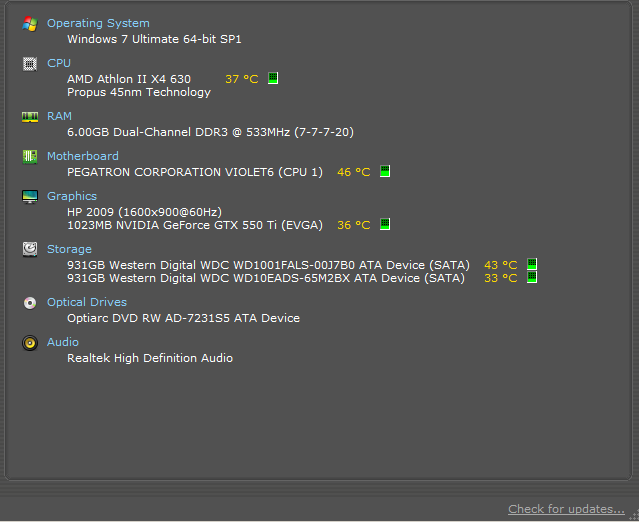
Ive replace the hard drive so i'm thinking the hard drive is not the problem anymore,the old one had bad sectors this one seems fine. it was brand new WD,I run speccy and it tells me my graphic card is running at about 35c on idle and 75c or 70s during playing a game which seems fine aswell. I'm still getting the bluescreens just not as fast and not as frequent. I will also test the psu with the tips you gave. Here are my spec.
DiHpW7Q.png


Id also like to mention that this only happens while playing games,and the screen glitches and the audio glitches and it repeats the audio for like a 2 seconds then the bluescreen comes up,I'm guessing that the cpu is suddenly being deprived of power? please reply.
 
Last edited:

My Computer My Computer

At a glance

Windows 7 ultimate x64
Computer type
PC/Desktop
OS
Windows 7 ultimate x64
Back
Top