Home is where the mouse is...

weirddave

New member
Local time
8:06 AM
Messages
11
Menus are at the top of windows, various media players controls are at the bottom. When are we going to see the option to place them where we want? This could drastically reduce the amount of mouse movement required, I could keep my mouse down near bottom left most of the time. I'd only need to move it further to do editing/gaming.

Imagine the close/minimize/restore buttons located top right, were actually bottom left where (usually) the start button is. All the menus located just above or next to those buttons. I'd be able to control all my apps from a very small area of the screen.

Any thoughts?
 

My Computer My Computer

OS
Windows 7
Menus are at the top of windows, various media players controls are at the bottom. When are we going to see the option to place them where we want? This could drastically reduce the amount of mouse movement required, I could keep my mouse down near bottom left most of the time. I'd only need to move it further to do editing/gaming.

Imagine the close/minimize/restore buttons located top right, were actually bottom left where (usually) the start button is. All the menus located just above or next to those buttons. I'd be able to control all my apps from a very small area of the screen.

Any thoughts?

You can move your task bar to the top of the screen already not sure if that's what you was meaning but you will be able to minimize and restore and such with the task bar at the top..
 

My Computer My Computer

Computer Manufacturer/Model Number
custom
OS
windows 7 6.1 build 7068x64
CPU
1333 Qcore 2.5
Motherboard
MSI neo3 p43 icH10
Memory
8gb ddr2 dual channal 800
Graphics Card(s)
ati hd 4870 512 sapphire
Sound Card
onboard hd realtech
Monitor(s) Displays
acerx193w
Screen Resolution
1440x900
Hard Drives
seagate baracuta 500 gb .11
samung 250gb sat.8
seagate baracuta 300gb.8
PSU
Antec 650 blue
Cooling
Stock fan
Internet Speed
15mb
In some apps with lots of toolbars, graphics for instance, you can move the toolbars to any location. This does not include the titlebar. I think if that could be moved around it would just confuse beginners, and I seldom use the red x to close a window. Usually just alt+F4.

Gary
 

My Computer My Computer

Computer Manufacturer/Model Number
Dell XPS420
OS
Vista Ult 64 bit Seven Ult RTM x64
CPU
Intel Core2 Quad Q6600 2.40 gigahertz
Memory
Crucial Ballistix 4x2GB PC2 6400
Graphics Card(s)
NVIDIA GeForce 8600 GTS 256 MB
Sound Card
Creative SB X-Fi audio
Monitor(s) Displays
HP w2207 + HPvs15
Screen Resolution
1680x1050 + 1024x768
Hard Drives
2-WD5000AAKS-500 GB
WD5000AAV-500 GB external
Keyboard
Microsoft Comfort Curve
Mouse
MX Revolution
Other Info
Wacom Intuos 2 Graphics Tablet
Experience Index=5.5
rob3,
I did think about moving the taaskbar, but that alone isn't enough flexibility for what I was thinking, I'd like to get all the common controls towards the same place, preferable bottom left (for me anyway).

Gary,
I see your point about beginners, but they (usually) don't know alt-F4 so they are being punished with the defaults by having to go all the way from the start button in the bottom left to the close button top right. People who have used windows for years still do this. If everything was different to start with, being a beginner wouldn't be a problem :D
Or perhaps you have to unlock these 'advanced' settings, hidden where most beginners wouldn't know about.

The nearest I can get to what I want is to move the taskbar to the top of the screen and use the windows top left icon to select close etc... but I would rather be able to reconfigure it completely. Once you get used to it, manipulating windows by mouse would be much quicker than alt-f4 since the hand movements are less, and you can keep your left hand grabbing the snack food :)
 
Last edited:

My Computer My Computer

OS
Windows 7
Actually WindowBlinds allowed to have your close button everywhere you want at your window... It was from Stardock when I remeber right.

Greetz,
GHad
 

My Computer My Computer

Computer Manufacturer/Model Number
Self assembled
OS
Windows 7 Beta/XP-Pro SP3
CPU
AMD Athlon 64 X2 4800+ (2,5 GHz)
Motherboard
ECS Elitegroup A780GM-A
Memory
2x 1 GiB MDT DDR2-800
Graphics Card(s)
OnBoard HD3200 (256 MiB shared, overclocked to 600MHz)
Sound Card
OnBoard Via/IDT High Definition Audio
Monitor(s) Displays
21.6" BenQ 2110WA
Screen Resolution
1680x1050
Hard Drives
160GB Seagate Barracuda 7200.11
PSU
400W ARLT.COM Silent
Case
MS-Tech LC-85 black
Cooling
AMD Boxed Cooler (X2-6200+), 80 CoolerMaster (adjustable)
Keyboard
Revoltec Lightboard Advanced
Mouse
Revoltec Lightmouse Precision
Internet Speed
6 MBit
Other Info
WEI: 3,4
Processor: 5,5
Memory: 5,5
Graphics: 3,4
Gaming graphics: 5,2
Primary hard disk: 5,7
Menus are at the top of windows, various media players controls are at the bottom. When are we going to see the option to place them where we want? This could drastically reduce the amount of mouse movement required, I could keep my mouse down near bottom left most of the time. I'd only need to move it further to do editing/gaming.

Imagine the close/minimize/restore buttons located top right, were actually bottom left where (usually) the start button is. All the menus located just above or next to those buttons. I'd be able to control all my apps from a very small area of the screen.

Any thoughts?

Just a thought (don't laugh), but you could do mouse acceleration so you don't have to move the mouse as much to cover a large distance. I know what you mean tho, going from taskbar to title bar to task tray, etc, etc is a workout (not literally), you just want more of the controls in a more centralized location so that the mouse doesn't do much movement. Then again, that's where mouse acceleration may become useful.
 

My Computer My Computer

Computer Manufacturer/Model Number
Dell XPS 400 / HP ProBook 4510s
OS
Windows 7 Build 7277
CPU
Intel Pentium D @ 2.8/Intel Centrino @ 2.10GHz
Motherboard
Dell DXP051
Memory
2GB DDR2
Graphics Card(s)
GeForce 7300 LE / Intel Integrated Graphics 4 Series
Sound Card
Realtek AC'97
Monitor(s) Displays
17" CRT (for now) / 15.6" LCD / 65" DLP Mitsubishi
Screen Resolution
1280 x 768 / 1920 x 1080i
Hard Drives
250GB WD IDE
160GB WD SATA
320GB Samsung SATA
500GB WD Caviar Green SATA
250GB WD SATA in HP ProBook
Case
Dell XPS 400
Cooling
2 fans (1 case, 1 CPU)
Keyboard
Dell Slim Standard Keyboard / Full Keypad w/ number pad
Mouse
Dell 3-Button Mouse / Logitech Wireless Mouse
Internet Speed
29mbps Down; 3.0mbps Up
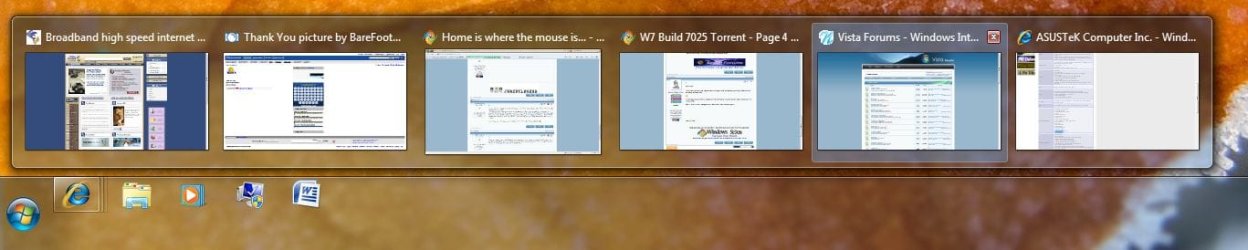
Do you realize that you can also close a window in the preview on the taskbar icon. If you move the mouse over the preview thumb, the red x will appear. Doesn't need to be pinned.

Gary
 

My Computer My Computer

Computer Manufacturer/Model Number
Dell XPS420
OS
Vista Ult 64 bit Seven Ult RTM x64
CPU
Intel Core2 Quad Q6600 2.40 gigahertz
Memory
Crucial Ballistix 4x2GB PC2 6400
Graphics Card(s)
NVIDIA GeForce 8600 GTS 256 MB
Sound Card
Creative SB X-Fi audio
Monitor(s) Displays
HP w2207 + HPvs15
Screen Resolution
1680x1050 + 1024x768
Hard Drives
2-WD5000AAKS-500 GB
WD5000AAV-500 GB external
Keyboard
Microsoft Comfort Curve
Mouse
MX Revolution
Other Info
Wacom Intuos 2 Graphics Tablet
Experience Index=5.5
^ Yep, he's right. The little red x is there even when Aero Basic is on.
 

My Computer My Computer

Computer Manufacturer/Model Number
Dell XPS 400 / HP ProBook 4510s
OS
Windows 7 Build 7277
CPU
Intel Pentium D @ 2.8/Intel Centrino @ 2.10GHz
Motherboard
Dell DXP051
Memory
2GB DDR2
Graphics Card(s)
GeForce 7300 LE / Intel Integrated Graphics 4 Series
Sound Card
Realtek AC'97
Monitor(s) Displays
17" CRT (for now) / 15.6" LCD / 65" DLP Mitsubishi
Screen Resolution
1280 x 768 / 1920 x 1080i
Hard Drives
250GB WD IDE
160GB WD SATA
320GB Samsung SATA
500GB WD Caviar Green SATA
250GB WD SATA in HP ProBook
Case
Dell XPS 400
Cooling
2 fans (1 case, 1 CPU)
Keyboard
Dell Slim Standard Keyboard / Full Keypad w/ number pad
Mouse
Dell 3-Button Mouse / Logitech Wireless Mouse
Internet Speed
29mbps Down; 3.0mbps Up
True, I can close windows from the taskbar. I don't have this preview stuff on tho, I have to right click then select close.
OK, I've just moved my mouse down by the bottom of the screen to enable typeing this, in a moment I'll want to use the google toolbar for a search, so I'll have to push my fat, heavy rodent forward so I can select it for typing, would be easier if it were down here already, same with the forward/back buttons. No doubt there are KB shortcuts, but I can only remember three or four at a time!

As for mouse acceleration, I never could get on with it! Must be getting old :D
 

My Computer My Computer

OS
Windows 7
There is an option in Control Panel/ Mouse options/ Pointer options to automatically move your mouse to the default button in a dialog box, this is invaluable to me and I use it all the time, first thing I do when I install a new OS is change that.
 

My Computer My Computer

Computer Manufacturer/Model Number
Acer Aspire M7720
OS
Vista Home Premium x64 sp1-XP x64 sp2/Windows 7 x64
CPU
Intel I7 920 2.67 ghz
Motherboard
FX58m
Memory
6 gigs ddr3 triple channel
Graphics Card(s)
Radeon HD4850 1ghz
Sound Card
Realtek HD
Monitor(s) Displays
22 inch widescreen
Screen Resolution
1024*168 need glasses
Hard Drives
enuff...inbuilt two*500gig sata 2's and a plugin 1 terabyte sata 2
PSU
inbuilt dunno exactly what it is
Case
a good one
Cooling
very good and very quiet
Keyboard
Acer
Mouse
Acer
Internet Speed
20mbit
There is an option in Control Panel/ Mouse options/ Pointer options to automatically move your mouse to the default button in a dialog box, this is invaluable to me and I use it all the time, first thing I do when I install a new OS is change that.

Ditto on that.
 

My Computer My Computer

Computer Manufacturer/Model Number
Dell XPS420
OS
Vista Ult 64 bit Seven Ult RTM x64
CPU
Intel Core2 Quad Q6600 2.40 gigahertz
Memory
Crucial Ballistix 4x2GB PC2 6400
Graphics Card(s)
NVIDIA GeForce 8600 GTS 256 MB
Sound Card
Creative SB X-Fi audio
Monitor(s) Displays
HP w2207 + HPvs15
Screen Resolution
1680x1050 + 1024x768
Hard Drives
2-WD5000AAKS-500 GB
WD5000AAV-500 GB external
Keyboard
Microsoft Comfort Curve
Mouse
MX Revolution
Other Info
Wacom Intuos 2 Graphics Tablet
Experience Index=5.5
Hello all.


I just learn something new every day; you can close a tab in IE from the taskbar....:huh:

Thanks Gary!

IE.JPG


Later ;) Ted
 

My Computer My Computer

Computer Manufacturer/Model Number
* BFK Customs *
OS
W 7 64-bit Ultimate
CPU
Intel Q9550 Yorkfield
Motherboard
ASUS P5Q Pro
Memory
8GB Dominator 8500C5D
Graphics Card(s)
ATI : XFX 5870
Sound Card
Realtek HD Audio 7-1
Monitor(s) Displays
1x 47" LCD HDMI & 3x 26" LCD HDMI
Screen Resolution
1920x1080P & 1920x1200
Hard Drives
1x 80GB Intel X25-M G2 SSD : 1x 500GB & 1x 640GB WD Caviar Black(s)
PSU
Corsair 620HX
Case
Cooler Master RC-690
Cooling
Tuniq Tower 120, 2x 140mm and 3x 120mm case fans
Keyboard
Microsoft 500
Mouse
Razer Diamondback 3G
Internet Speed
14 Mb/s
Other Info
1x Koutech 3Gb/s SATA HDD Hot Swap Rack
You welcome Ted. :)
 

My Computer My Computer

Computer Manufacturer/Model Number
Dell XPS420
OS
Vista Ult 64 bit Seven Ult RTM x64
CPU
Intel Core2 Quad Q6600 2.40 gigahertz
Memory
Crucial Ballistix 4x2GB PC2 6400
Graphics Card(s)
NVIDIA GeForce 8600 GTS 256 MB
Sound Card
Creative SB X-Fi audio
Monitor(s) Displays
HP w2207 + HPvs15
Screen Resolution
1680x1050 + 1024x768
Hard Drives
2-WD5000AAKS-500 GB
WD5000AAV-500 GB external
Keyboard
Microsoft Comfort Curve
Mouse
MX Revolution
Other Info
Wacom Intuos 2 Graphics Tablet
Experience Index=5.5
Back
Top