System File infected with TR/BProtector.Gen

As there are important system files infected rather than just extra malicious files being put there, it's best to dump all of your needed files elsewhere and then just let NPE sort the infected ones out.

-Rixterz

https://security.symantec.com/nbrt/npe.aspx

Because Norton Power Eraser uses aggressive methods to detect threats, there is a risk that it can select some legitimate programs for removal. If you accidentally remove a legitimate program, you can run Norton Power Eraser to review past repair sessions and undo them.
I think sticking to the advice and guidance of cottonball would be best.
Assumes that the OS will boot ;-(

I agree, wait for cottonball.

@Rixterz,
Our comments are not meant to discourage you from helping in threads... but the infection of system files (if that is indeed what the OP has) is best handled slowly, by less automated tools.


Hey i'm a safe guy too!..maybe xD!

Yeah following Cottonballs instruction is always a good way to go! Knows his stuff!
 

My Computer My Computer

Computer type
Laptop
Computer Manufacturer/Model Number
Packard Bell
OS
Windows 7 Home Premium 64Bit
CPU
AMD A6-3420M 1.5GHZ OC - 2.0GHZ
Memory
4GB DDR3 1600MHZ
Graphics Card(s)
AMD RADEON 6520G+AMD RADEON HD7470M 1GB DDR3
Screen Resolution
1366x768
Hard Drives
500GB SATA
Internet Speed
18Mb Unlimited
Antivirus
AVAST!
Browser
MOZILLA FIREFOX
Yep; but unless cottonball is known to be away for a while...
...there is not much reason to change horses midstream :-)
 

My Computer My Computer

Computer type
Laptop
Computer Manufacturer/Model Number
Employer provided Dell Latitude
OS
W7 Pro SP1 64bit
CPU
i7
Memory
8GB
Graphics Card(s)
Intel HD Graphics
Hard Drives
crappy SSD
Antivirus
Employer mandated Symantec Endpoint Protection
Browser
Pale Moon 64bit, IE11 64bit & Chrome 64bit
Done it. Here is the zoek.exe result :)

Code:
[ATTACH]314093._xfImport[/ATTACH]

And here is the link to the virus total scan :

Code:
taskeng.exe:
[url]https://www.virustotal.com/en/file/9e70685b73b3eab78c55863babceecc7cca89475b508b2a9c651ade6fde0751a/analysis/1397708365/[/url]

nvxdsync:
[url]https://www.virustotal.com/en/file/9a53e01f4b60dd83f6581bec5f04b2af08640b373f07fa2145e7910be4edfa47/analysis/1397708656/[/url]

oodag.exe:
[url]https://www.virustotal.com/en/file/1f07ce253bcc89a8195bdb903b00ee352cd128739bf85c2cea7aabbe52a4904e/analysis/1397708931/[/url]
 

My Computer My Computer

Computer Manufacturer/Model Number
Custom Build
OS
Windows 7 Professional 64 bit SP 1
CPU
Intel(R) Core(TM) i5-2500 CPU 3.30GHz
Motherboard
Asus P8H61-MLE
Memory
4.00 GB DDR3 SDRAM
Graphics Card(s)
NVIDIA GeForce 9500 GT
Sound Card
High Definition Audio Codec:
Monitor(s) Displays
SyncMaster (1280x1024@60Hz)
Screen Resolution
1280x1024
Hard Drives
1465GB Western Digital WDC WD15EARS-00Z5B1 ATA Device (SATA)
977GB Western Digital WDC WD10EADS-00L5B1 ATA Device (SATA)
1863GB Western Digital WDC WD20EARX-00PASB0 ATA Device (SATA)
156GB Seagate ST3160813AS ATA Device (SATA)
PSU
Cooler Master eXtreme Power Plus 650W
Case
Cooler Master Elite 431 Plus
Keyboard
Razer Tarantula
Mouse
Razer Mamba
Other Info
Creative SBS A200 speaker
You have some adware, but wait for cottonball to get back to you for the 'fix' ;)
 

My Computer My Computer

Computer type
PC/Desktop
Computer Manufacturer/Model Number
Bruce ... somewhere in his 40's
OS
Windows 7 Ultimate 32bit SP1
CPU
Intel(R) Core(TM)2 Quad CPU @ 2.40GHz, 2400 MHz
Motherboard
INTEL/D975XBX2
Memory
4 GB
Graphics Card(s)
ATI Radeon HD 2600 Pro
Monitor(s) Displays
Samsung SyncMaster 914v
Screen Resolution
1280 x 1024
Hard Drives
2/500GB each ... ST3500630AS ATA Device.
One is not connected
PSU
Rocketfish 700 W
Case
G.Skill Gigabyte Chassis
Keyboard
Standard PS/2 Keyboard
Mouse
Microsoft PS/2 Mouse
Internet Speed
DSL
Antivirus
Avira Internet Security
Browser
IE 11
Other Info
ATI HDMI Audio

My Computer My Computer

Computer Manufacturer/Model Number
Custom Build
OS
Windows 7 Professional 64 bit SP 1
CPU
Intel(R) Core(TM) i5-2500 CPU 3.30GHz
Motherboard
Asus P8H61-MLE
Memory
4.00 GB DDR3 SDRAM
Graphics Card(s)
NVIDIA GeForce 9500 GT
Sound Card
High Definition Audio Codec:
Monitor(s) Displays
SyncMaster (1280x1024@60Hz)
Screen Resolution
1280x1024
Hard Drives
1465GB Western Digital WDC WD15EARS-00Z5B1 ATA Device (SATA)
977GB Western Digital WDC WD10EADS-00L5B1 ATA Device (SATA)
1863GB Western Digital WDC WD20EARX-00PASB0 ATA Device (SATA)
156GB Seagate ST3160813AS ATA Device (SATA)
PSU
Cooler Master eXtreme Power Plus 650W
Case
Cooler Master Elite 431 Plus
Keyboard
Razer Tarantula
Mouse
Razer Mamba
Other Info
Creative SBS A200 speaker
Mual,

Based on the VirusTotal results, it makes one wonder about the validity of those files Avira is pointing to as being infected.

Let's go this route...

:info: Please right-click zoek.exe once again, and select: Run as Administrator (Give the program a few seconds to appear.)
Next, copy/paste the entire script in the code box below to the input field of Zoek:

Code:
autoclean;
emptyalltemp;
emptyclsid;

Now...
Close any open windows.
Click the Run script button and wait. It takes a few minutes to run the script.

When finished, the zoek-results.log is opened in Notepad.
If a reboot is needed the log is opened after the reboot.

:ar: Please post the new zoek-results.log in your reply.


:info: Next, let's see what MBAM has to report on the files Avira is targeting...

Please go to the Malwarebytes Anti-Malware (MBAM) download
Save to the Desktop
Double-click the downloaded MBAM file to run it.

When the installation begins, follow the prompts in the setup process.
Do not make any changes to default settings and when the program has finished installing, make sure only the following options are checked:
>Update Malwarebytes’ Anti-Malware
>Launch Malwarebytes’ Anti-Malware

Uncheck:
>Enable free trial of Malwarebytes Anti-Malware PRO
Click on the Finish button.

If an update is found, the program automatically updates itself.
At the program console, on the Scanner tab, and select: Perform Quick Scan

Next, click on the Scan button.

When the Malwarebytes scan is completed, click on: Show Results
When presented with a screen showing the malware detected, just press: Save Log

Save the log to the Desktop, or to an easy to find location.

:ar: Please copy/paste the entire contents of the MBAM report in your reply.
 

My Computer My Computer

Computer type
PC/Desktop
Computer Manufacturer/Model Number
An ol' eMachines
OS
Windows 7 Home Premium
Internet Speed
Fine for me...I'm retired!
I'll be posting soon once I done it, lately I've busy with college stuff. Sorry :)
 

My Computer My Computer

Computer Manufacturer/Model Number
Custom Build
OS
Windows 7 Professional 64 bit SP 1
CPU
Intel(R) Core(TM) i5-2500 CPU 3.30GHz
Motherboard
Asus P8H61-MLE
Memory
4.00 GB DDR3 SDRAM
Graphics Card(s)
NVIDIA GeForce 9500 GT
Sound Card
High Definition Audio Codec:
Monitor(s) Displays
SyncMaster (1280x1024@60Hz)
Screen Resolution
1280x1024
Hard Drives
1465GB Western Digital WDC WD15EARS-00Z5B1 ATA Device (SATA)
977GB Western Digital WDC WD10EADS-00L5B1 ATA Device (SATA)
1863GB Western Digital WDC WD20EARX-00PASB0 ATA Device (SATA)
156GB Seagate ST3160813AS ATA Device (SATA)
PSU
Cooler Master eXtreme Power Plus 650W
Case
Cooler Master Elite 431 Plus
Keyboard
Razer Tarantula
Mouse
Razer Mamba
Other Info
Creative SBS A200 speaker
I downloaded and update the MBAM to the latest version already. But I do not know where can I find "program console, on the Scanner tab, and select: Perform Quick Scan". Please guide me.

And here is another scan of zoek.
Code:
[ATTACH]314799._xfImport[/ATTACH]

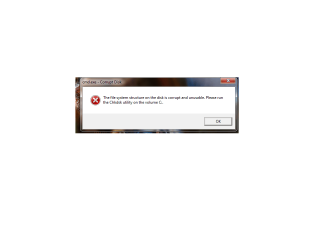
And I get this pop up error after zoek scan, which zoek require me to restart the computer.
Untitled.png
 
Last edited:

My Computer My Computer

Computer Manufacturer/Model Number
Custom Build
OS
Windows 7 Professional 64 bit SP 1
CPU
Intel(R) Core(TM) i5-2500 CPU 3.30GHz
Motherboard
Asus P8H61-MLE
Memory
4.00 GB DDR3 SDRAM
Graphics Card(s)
NVIDIA GeForce 9500 GT
Sound Card
High Definition Audio Codec:
Monitor(s) Displays
SyncMaster (1280x1024@60Hz)
Screen Resolution
1280x1024
Hard Drives
1465GB Western Digital WDC WD15EARS-00Z5B1 ATA Device (SATA)
977GB Western Digital WDC WD10EADS-00L5B1 ATA Device (SATA)
1863GB Western Digital WDC WD20EARX-00PASB0 ATA Device (SATA)
156GB Seagate ST3160813AS ATA Device (SATA)
PSU
Cooler Master eXtreme Power Plus 650W
Case
Cooler Master Elite 431 Plus
Keyboard
Razer Tarantula
Mouse
Razer Mamba
Other Info
Creative SBS A200 speaker
...do not know where can I find "program console, on the Scanner tab, and select: Perform Quick Scan".

The program console is nothing more that the main screen of MBAM. However, there is a new version of MBAM, and my instructions are outdated. Malwarebytes Anti-Malware 2.0 has a completely redesigned user interface.

Double-click mbam-setup-2.X.X.XXXX.exe to install (X's = current version)
Place a checkmark next to Launch Malwarebytes Anti-Malware, then click: Finish

Once MBAM opens, when it says Your databases is out of date, click the Fix Now button.

Next, click the Settings tab at the top, and, in the left column, select Detections and Protections
If not already checked, select: Scan for rootkits

Click the Scan tab at the top of the program window, and select: Threat Scan
Next, click: Scan Now

If you receive a message that updates are available, click: Update Now

At this point, the update is downloaded, installed, and the scan starts.
The scan may take some time to finish, so please be patient.

If potential threats are detected, select Quarantine All as the Action for all the listed items.
Next, click: Apply Actions

While still on the Scan tab, click the link for View detailed log
In the window that opens, click the Export button, select Text file (*.txt), and save the log to the Desktop.

Notes:
1. The log is automatically saved by MBAM and is also viewed by clicking:
History tab > Application Logs.
2, If MBAM encounters a file that is difficult to remove...
Click OK and allow MBAM to proceed with the disinfection process.
If asked to restart the computer, please do so immediately.
 
Last edited:

My Computer My Computer

Computer type
PC/Desktop
Computer Manufacturer/Model Number
An ol' eMachines
OS
Windows 7 Home Premium
Internet Speed
Fine for me...I'm retired!
...do not know where can I find "program console, on the Scanner tab, and select: Perform Quick Scan".

The program console is nothing more that the main screen of MBAM. However, there is a new version of MBAM, and my instructions are outdated. Malwarebytes Anti-Malware 2.0 has a completely redesigned user interface.

Double-click mbam-setup-2.X.X.XXXX.exe to install (X's = current version)
Place a checkmark next to Launch Malwarebytes Anti-Malware, then click: Finish

Once MBAM opens, when it says Your databases is out of date, click the Fix Now button.

Next, click the Settings tab at the top, and, in the left column, select Detections and Protections
If not already checked, select: Scan for rootkits

Click the Scan tab at the top of the program window, and select: Threat Scan
Next, click: Scan Now

If you receive a message that updates are available, click: Update Now

At this point, the update is downloaded, installed, and the scan starts.
The scan may take some time to finish, so please be patient.

If potential threats are detected, select Quarantine All as the Action for all the listed items.
Next, click: Apply Actions

While still on the Scan tab, click the link for View detailed log
In the window that opens, click the Export button, select Text file (*.txt), and save the log to the Desktop.

Notes:
1. The log is automatically saved by MBAM and is also viewed by clicking:
History tab > Application Logs.
2, If MBAM encounters a file that is difficult to remove...
Click OK and allow MBAM to proceed with the disinfection process.
If asked to restart the computer, please do so immediately.

Here is the file :D
Code:
[ATTACH]315039._xfImport[/ATTACH]

If you still get the chkdsk prompt, for running the utility on C: drive, use the following:
http://www.sevenforums.com/tutorials/433-disk-check.html

After I restart my PC, the PC automatically make a disk check for me. I suppose it already fix the error? :)
 

My Computer My Computer

Computer Manufacturer/Model Number
Custom Build
OS
Windows 7 Professional 64 bit SP 1
CPU
Intel(R) Core(TM) i5-2500 CPU 3.30GHz
Motherboard
Asus P8H61-MLE
Memory
4.00 GB DDR3 SDRAM
Graphics Card(s)
NVIDIA GeForce 9500 GT
Sound Card
High Definition Audio Codec:
Monitor(s) Displays
SyncMaster (1280x1024@60Hz)
Screen Resolution
1280x1024
Hard Drives
1465GB Western Digital WDC WD15EARS-00Z5B1 ATA Device (SATA)
977GB Western Digital WDC WD10EADS-00L5B1 ATA Device (SATA)
1863GB Western Digital WDC WD20EARX-00PASB0 ATA Device (SATA)
156GB Seagate ST3160813AS ATA Device (SATA)
PSU
Cooler Master eXtreme Power Plus 650W
Case
Cooler Master Elite 431 Plus
Keyboard
Razer Tarantula
Mouse
Razer Mamba
Other Info
Creative SBS A200 speaker
Check Disk can run automatically if it finds the file system to have issues, and it verifies the file system integrity on hard disks.

Hopefully someone here can assist you with chkdsk. If not, please stop by the following forum, and ask why chkdsk runs at every startup:
http://www.sevenforums.com/hardware-devices/

After that, runAvira once again, and see if it still finds the same files that brought you here in the first place.
 

My Computer My Computer

Computer type
PC/Desktop
Computer Manufacturer/Model Number
An ol' eMachines
OS
Windows 7 Home Premium
Internet Speed
Fine for me...I'm retired!
Check Disk can run automatically if it finds the file system to have issues, and it verifies the file system integrity on hard disks.

Hopefully someone here can assist you with chkdsk. If not, please stop by the following forum, and ask why chkdsk runs at every startup:
Hardware & Devices - Windows 7 Help Forums

After that, runAvira once again, and see if it still finds the same files that brought you here in the first place.


Ah, okay. I'll let you know once I do a scan on the whole PC :D
 

My Computer My Computer

Computer Manufacturer/Model Number
Custom Build
OS
Windows 7 Professional 64 bit SP 1
CPU
Intel(R) Core(TM) i5-2500 CPU 3.30GHz
Motherboard
Asus P8H61-MLE
Memory
4.00 GB DDR3 SDRAM
Graphics Card(s)
NVIDIA GeForce 9500 GT
Sound Card
High Definition Audio Codec:
Monitor(s) Displays
SyncMaster (1280x1024@60Hz)
Screen Resolution
1280x1024
Hard Drives
1465GB Western Digital WDC WD15EARS-00Z5B1 ATA Device (SATA)
977GB Western Digital WDC WD10EADS-00L5B1 ATA Device (SATA)
1863GB Western Digital WDC WD20EARX-00PASB0 ATA Device (SATA)
156GB Seagate ST3160813AS ATA Device (SATA)
PSU
Cooler Master eXtreme Power Plus 650W
Case
Cooler Master Elite 431 Plus
Keyboard
Razer Tarantula
Mouse
Razer Mamba
Other Info
Creative SBS A200 speaker
Hi cottonball, I already scanned my PC and now everything is fine. No more pop up of error or viruses. Except that the flase detection by Avira about zoek.exe.
Thanks!!!
 

My Computer My Computer

Computer Manufacturer/Model Number
Custom Build
OS
Windows 7 Professional 64 bit SP 1
CPU
Intel(R) Core(TM) i5-2500 CPU 3.30GHz
Motherboard
Asus P8H61-MLE
Memory
4.00 GB DDR3 SDRAM
Graphics Card(s)
NVIDIA GeForce 9500 GT
Sound Card
High Definition Audio Codec:
Monitor(s) Displays
SyncMaster (1280x1024@60Hz)
Screen Resolution
1280x1024
Hard Drives
1465GB Western Digital WDC WD15EARS-00Z5B1 ATA Device (SATA)
977GB Western Digital WDC WD10EADS-00L5B1 ATA Device (SATA)
1863GB Western Digital WDC WD20EARX-00PASB0 ATA Device (SATA)
156GB Seagate ST3160813AS ATA Device (SATA)
PSU
Cooler Master eXtreme Power Plus 650W
Case
Cooler Master Elite 431 Plus
Keyboard
Razer Tarantula
Mouse
Razer Mamba
Other Info
Creative SBS A200 speaker
If you are no longer having problems, you are good to go!

Let's wrap up, as well as remove the tools used and their reports, since these tools are updated frequently, and it is best to have a new copy:

Tools and Reports:
-FRST, its folder in C:\FRST, and any fixlist, fixlog, or Addition.txt on the Desktop.
-Security Check, and its report
-Zoek.exe, its icon on the Desktop, any C:\zoek-results.logs, and the following, folders if found:
C:\zoek_backup
C:\zoek-quatantine

Would keep Malwarebytes Anti-Malware, and use it regularly.

Also, make sure your security software is ALL enabled and running!


Thanks for following all the instructions and providing the reports!!

Have a great week, Mual !!
 

My Computer My Computer

Computer type
PC/Desktop
Computer Manufacturer/Model Number
An ol' eMachines
OS
Windows 7 Home Premium
Internet Speed
Fine for me...I'm retired!
If you are no longer having problems, you are good to go!

Let's wrap up, as well as remove the tools used and their reports, since these tools are updated frequently, and it is best to have a new copy:

Tools and Reports:
-FRST, its folder in C:\FRST, and any fixlist, fixlog, or Addition.txt on the Desktop.
-Security Check, and its report
-Zoek.exe, its icon on the Desktop, any C:\zoek-results.logs, and the following, folders if found:
C:\zoek_backup
C:\zoek-quatantine

Would keep Malwarebytes Anti-Malware, and use it regularly.

Also, make sure your security software is ALL enabled and running!


Thanks for following all the instructions and providing the reports!!

Have a great week, Mual !!

Done. Thank you.
And as a update for you, the HDD is spoil after weeks. I can't start the computer at all.
I replace the old HDD with a new Samsung 840EVO. :)
 

My Computer My Computer

Computer Manufacturer/Model Number
Custom Build
OS
Windows 7 Professional 64 bit SP 1
CPU
Intel(R) Core(TM) i5-2500 CPU 3.30GHz
Motherboard
Asus P8H61-MLE
Memory
4.00 GB DDR3 SDRAM
Graphics Card(s)
NVIDIA GeForce 9500 GT
Sound Card
High Definition Audio Codec:
Monitor(s) Displays
SyncMaster (1280x1024@60Hz)
Screen Resolution
1280x1024
Hard Drives
1465GB Western Digital WDC WD15EARS-00Z5B1 ATA Device (SATA)
977GB Western Digital WDC WD10EADS-00L5B1 ATA Device (SATA)
1863GB Western Digital WDC WD20EARX-00PASB0 ATA Device (SATA)
156GB Seagate ST3160813AS ATA Device (SATA)
PSU
Cooler Master eXtreme Power Plus 650W
Case
Cooler Master Elite 431 Plus
Keyboard
Razer Tarantula
Mouse
Razer Mamba
Other Info
Creative SBS A200 speaker
Back
Top