1600Mhz RAM only showing 1400Mhz?

snadge

New member
Member
Local time
9:19 PM
Messages
87
I built a computer for a friend using Gigabyte H81M-H v1.1 and 1600Mhz Crucial Ballistix Sport RAM - the mobo says it supports 1600Mhz but was only running at 1333Mhz and OC'ing would only let me go to 1400Mhz..??

thing is it should be running 1600Mhz out the box?

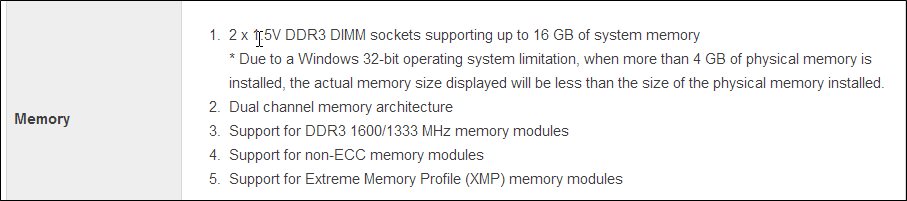
GIGABYTE - Motherboard - Socket 1150 - GA-H81M-H (rev. 1.1)

Support for DDR3 1600/1333 MHz memory modules

Ive enabled XMP just incase but no difference..

thanks
 

My Computer My Computer

At a glance

Windows 7 Pro x64Intel Core-i5 3470 @ 3.67Ghz (Ivy-Bridge)8Gb (2x4) 1616Mhz Crucial BallistixnVidia GTX650
Computer type
PC/Desktop
Computer Manufacturer/Model Number
GT1000
OS
Windows 7 Pro x64
CPU
Intel Core-i5 3470 @ 3.67Ghz (Ivy-Bridge)
Motherboard
Gigabyte H77M-D3H
Memory
8Gb (2x4) 1616Mhz Crucial Ballistix
Graphics Card(s)
nVidia GTX650
Sound Card
Via 2021T
Monitor(s) Displays
19" LG Flatron
Screen Resolution
1440x900
Hard Drives
2 x 120Gb Samsung 840 EVO in RAID '0' (1GB/s - 800MB/s - 140k IOPS)
500Gb Seagate Barracuda HDD
PSU
XFX 450 Pro Core Edition
Case
NXZT
Cooling
Arctic 7 Freezer Pro
Keyboard
Q-Connect Wi-Fi
Mouse
Q-Connect Wi-Fi
Internet Speed
16Mbps
Antivirus
(none) - Private Firewall + WinPatrol
Browser
Chrome
Other Info
Home-Built Computer
No Ram will run at it's rated speed out the Box until you set your ram to 1600mhz in the Bios

You can turn on XMP but you still have to set the ram in order for it to use it's full speed

Ram always will default to 1333mhz because it needs to be set most CPU's support 1600-1866mhz but obviously your board allows higher anyway you need to check all Ram settings and make sure to set it all to 1600mhz you should have a tab to set Ram speed most Modern Bios does
 

My Computer My Computer

At a glance

Windows 10 Home Premium 64bit sp1Intel I7-6700K @ 4.6 Ghz 1.344 volts everyday OC32GB G-Skill TridentZ 3200mhz 16-18-18-38 DDR4Sli Gigabyte Windforce GTX 980 G1
Computer type
PC/Desktop
Computer Manufacturer/Model Number
CoreI7-6700K MrFingerIII Special Builds
OS
Windows 10 Home Premium 64bit sp1
CPU
Intel I7-6700K @ 4.6 Ghz 1.344 volts everyday OC
Motherboard
Asrock Fatality K6 Z170 Socket 1151
Memory
32GB G-Skill TridentZ 3200mhz 16-18-18-38 DDR4
Graphics Card(s)
Sli Gigabyte Windforce GTX 980 G1
Sound Card
AC97 Creative Rage Tactic 3D Headphones Bluetooth
Monitor(s) Displays
27" Asus ROG Swift PG278Q G-Sync 48" Vizio Smart HD TV
Screen Resolution
2560x1440p 27"- 48" Currently Gaming at 2560x1440p Res 2K
Hard Drives
250GB Samsung Evo840SSD Seagate baracuda 500 GB WD Mybook 500Gb 1TB Seagate Barracuda
PSU
HX1050w Corsair Silver 80plus certified crosfire/sli
Case
Enthod Pro Full Tower
Cooling
Corsair H110i GT 280 mm High Performance WaterBlock
Keyboard
Logitech wireless keyboard
Mouse
Logitech wireless mouse
Internet Speed
Cox Cable 100+ mb
Antivirus
WebRoot Spysweeper with Antivirus
Browser
IE-10, Chrome, Opera
Other Info
My Other Rig is a AMD FX8320E @4.6Ghz 16GB Ballistic Sport Ram
Mobo Asrock Fatality 990FX 120GB OCZ SSD 1TB Seagate Barracuda Corsair H75 Cooling PSU Corsair CX750
GPU GTX Gigabyte 970G1
Not sure if this can be done with Gigabyte Mobos. But, I changed the frequency of the RAM from the BIOS setup of my ASUS mobo. By default, it was set to 1333 and I changed it to 1600 MHz.
 

My Computer My Computer

At a glance

Windows 11 x64i5 2500K @ 3.3 GHz16 GB DDR 3 @ 1600MhzMSI 1050TI 4GB OC version
Computer type
PC/Desktop
Computer Manufacturer/Model Number
Custom Bulid/Self made
OS
Windows 11 x64
CPU
i5 2500K @ 3.3 GHz
Motherboard
ASUS P8 Z77 V pro
Memory
16 GB DDR 3 @ 1600Mhz
Graphics Card(s)
MSI 1050TI 4GB OC version
Sound Card
On Board (Realtek HD audio)
Monitor(s) Displays
Samsung 22" LCD
Screen Resolution
1920*1080
Hard Drives
Seagate 1 TB, WD 1TB, Seagate 2 TB ( I use a lot of space)
PSU
coolermaster 750 W
Case
Coolermaster HAF912
Cooling
Coolermaster hyper 212 EVO
Keyboard
Samsung
Mouse
Dell Wireless
Internet Speed
Wireless 50 Mbps
Antivirus
AVG 2016 Internet Security
Browser
Google Chrome
I am not sure if this is your Bios but i was watching this Video to make sure it showed how to set Ram and the Person that did that Video showed how to tune with Gigabyte Bios
 

My Computer My Computer

At a glance

Windows 10 Home Premium 64bit sp1Intel I7-6700K @ 4.6 Ghz 1.344 volts everyday OC32GB G-Skill TridentZ 3200mhz 16-18-18-38 DDR4Sli Gigabyte Windforce GTX 980 G1
Computer type
PC/Desktop
Computer Manufacturer/Model Number
CoreI7-6700K MrFingerIII Special Builds
OS
Windows 10 Home Premium 64bit sp1
CPU
Intel I7-6700K @ 4.6 Ghz 1.344 volts everyday OC
Motherboard
Asrock Fatality K6 Z170 Socket 1151
Memory
32GB G-Skill TridentZ 3200mhz 16-18-18-38 DDR4
Graphics Card(s)
Sli Gigabyte Windforce GTX 980 G1
Sound Card
AC97 Creative Rage Tactic 3D Headphones Bluetooth
Monitor(s) Displays
27" Asus ROG Swift PG278Q G-Sync 48" Vizio Smart HD TV
Screen Resolution
2560x1440p 27"- 48" Currently Gaming at 2560x1440p Res 2K
Hard Drives
250GB Samsung Evo840SSD Seagate baracuda 500 GB WD Mybook 500Gb 1TB Seagate Barracuda
PSU
HX1050w Corsair Silver 80plus certified crosfire/sli
Case
Enthod Pro Full Tower
Cooling
Corsair H110i GT 280 mm High Performance WaterBlock
Keyboard
Logitech wireless keyboard
Mouse
Logitech wireless mouse
Internet Speed
Cox Cable 100+ mb
Antivirus
WebRoot Spysweeper with Antivirus
Browser
IE-10, Chrome, Opera
Other Info
My Other Rig is a AMD FX8320E @4.6Ghz 16GB Ballistic Sport Ram
Mobo Asrock Fatality 990FX 120GB OCZ SSD 1TB Seagate Barracuda Corsair H75 Cooling PSU Corsair CX750
GPU GTX Gigabyte 970G1
I am not sure if this is your Bios but i was watching this Video to make sure it showed h ow to set Ram and the Person that did that Video showed how to tune with Gigabyte Bios

This is exactly what I meant. Thanks Solarstarshines. I did the same with my ASUS mobo and now the RAM shows 1600 MHz.
 

My Computer My Computer

At a glance

Windows 11 x64i5 2500K @ 3.3 GHz16 GB DDR 3 @ 1600MhzMSI 1050TI 4GB OC version
Computer type
PC/Desktop
Computer Manufacturer/Model Number
Custom Bulid/Self made
OS
Windows 11 x64
CPU
i5 2500K @ 3.3 GHz
Motherboard
ASUS P8 Z77 V pro
Memory
16 GB DDR 3 @ 1600Mhz
Graphics Card(s)
MSI 1050TI 4GB OC version
Sound Card
On Board (Realtek HD audio)
Monitor(s) Displays
Samsung 22" LCD
Screen Resolution
1920*1080
Hard Drives
Seagate 1 TB, WD 1TB, Seagate 2 TB ( I use a lot of space)
PSU
coolermaster 750 W
Case
Coolermaster HAF912
Cooling
Coolermaster hyper 212 EVO
Keyboard
Samsung
Mouse
Dell Wireless
Internet Speed
Wireless 50 Mbps
Antivirus
AVG 2016 Internet Security
Browser
Google Chrome
when what you describe is true they have it disaplyed as so on the mobo's page:

1333Mhz / 1600Mhz (OC) - this means it will only run at 133Mhz and you have to OC it to get 1600Mhz...

I have a Gigabyte board that uses 1600Mhz RAM (same RAM as above) and is rated for 1600Mhz and I didnt have to overclock it?

e.g. for my Mobo:

Support for DDR3 2200(OC)/1600/1333/1066 MHz memory modules - this means it will run at up to 1600Mhz without overclocking... I put 1600Mhz RAM in and its running at 1600Mhz...I dont recall having to overclock?...otherwise they would have (OC) next to that too or it would be made obvious in some way

also as I said in my post I have used the overclocker anyway but it just goes to 1400Mhz and not 1600Mhz ...so something aint right... its a low spec haswell board so overclocking on it is limited, but it says 1600Mhz (without the OC) so should run RAM at 1600Mhz if you put 1600Mhz RAM in as I did... I did put a single stick of 4Gb in (instead of 2x2) because he may upgrade RAM later
 

My Computer My Computer

At a glance

Windows 7 Pro x64Intel Core-i5 3470 @ 3.67Ghz (Ivy-Bridge)8Gb (2x4) 1616Mhz Crucial BallistixnVidia GTX650
Computer type
PC/Desktop
Computer Manufacturer/Model Number
GT1000
OS
Windows 7 Pro x64
CPU
Intel Core-i5 3470 @ 3.67Ghz (Ivy-Bridge)
Motherboard
Gigabyte H77M-D3H
Memory
8Gb (2x4) 1616Mhz Crucial Ballistix
Graphics Card(s)
nVidia GTX650
Sound Card
Via 2021T
Monitor(s) Displays
19" LG Flatron
Screen Resolution
1440x900
Hard Drives
2 x 120Gb Samsung 840 EVO in RAID '0' (1GB/s - 800MB/s - 140k IOPS)
500Gb Seagate Barracuda HDD
PSU
XFX 450 Pro Core Edition
Case
NXZT
Cooling
Arctic 7 Freezer Pro
Keyboard
Q-Connect Wi-Fi
Mouse
Q-Connect Wi-Fi
Internet Speed
16Mbps
Antivirus
(none) - Private Firewall + WinPatrol
Browser
Chrome
Other Info
Home-Built Computer
note also that some ram runts at a higher voltage than others.

my vengence ram runs at its full speed at 1.5v not the standard 1.35v on some motherboards. if I simply change the ram to its native speed without changing the voltage profile I get an overclocking failed message pre post and then it will restart as normal.
 

My Computer My Computer

At a glance

Windows 7 Ultimate x64, & Mac OS X 10.9.2Intel Core i5 2500kCorsair Vengence 8gb 1866mhzNvidia GTX 770 OC
Computer type
PC/Desktop
Computer Manufacturer/Model Number
Built by badgers!!!
OS
Windows 7 Ultimate x64, & Mac OS X 10.9.2
CPU
Intel Core i5 2500k
Motherboard
Asus P8z68 LE
Memory
Corsair Vengence 8gb 1866mhz
Graphics Card(s)
Nvidia GTX 770 OC
Monitor(s) Displays
2x ASUS LED 22" IPS
Screen Resolution
3840x1080
Hard Drives
240GB Crucial M500 SSD
120gb Corsair Force 3 SSD
1TB Western Digital
PSU
Corsair HX650w Modular
Case
Corsair Air 540
Cooling
Corsair H60 Push/Pull
Keyboard
Corsair K70/ Logitech G27 wheel
Mouse
Saitek R.A.T 9
Internet Speed
Too slow!
Other Info
AMD fusion E350N Home server-Windows Home Server 2011 (also made by badgers!)
2011 Macbook 2.4ghz Core2Duo, 4gb ddr3, 120gb Ocz Vertex SSD
You can't just install ram and it goes to 1600mhz all ram defaults to 1333mhz no matter what speed

I don't know where you are getting the impression of Oc ram but you have to set the ram to it's rated speed it's not overclocking it's adjusting the timings to show the correct speed big difference

If you were overclocking ram you would exceed the 1600mhz there is a difference and what i am explaining to you it will default to 1333mhz and you have to adjust the timings because it will always go to the lowest speed instead of the highest

Now once you adjust the timings for the rated speed you will be able to understand better what i am talking about
 

My Computer My Computer

At a glance

Windows 10 Home Premium 64bit sp1Intel I7-6700K @ 4.6 Ghz 1.344 volts everyday OC32GB G-Skill TridentZ 3200mhz 16-18-18-38 DDR4Sli Gigabyte Windforce GTX 980 G1
Computer type
PC/Desktop
Computer Manufacturer/Model Number
CoreI7-6700K MrFingerIII Special Builds
OS
Windows 10 Home Premium 64bit sp1
CPU
Intel I7-6700K @ 4.6 Ghz 1.344 volts everyday OC
Motherboard
Asrock Fatality K6 Z170 Socket 1151
Memory
32GB G-Skill TridentZ 3200mhz 16-18-18-38 DDR4
Graphics Card(s)
Sli Gigabyte Windforce GTX 980 G1
Sound Card
AC97 Creative Rage Tactic 3D Headphones Bluetooth
Monitor(s) Displays
27" Asus ROG Swift PG278Q G-Sync 48" Vizio Smart HD TV
Screen Resolution
2560x1440p 27"- 48" Currently Gaming at 2560x1440p Res 2K
Hard Drives
250GB Samsung Evo840SSD Seagate baracuda 500 GB WD Mybook 500Gb 1TB Seagate Barracuda
PSU
HX1050w Corsair Silver 80plus certified crosfire/sli
Case
Enthod Pro Full Tower
Cooling
Corsair H110i GT 280 mm High Performance WaterBlock
Keyboard
Logitech wireless keyboard
Mouse
Logitech wireless mouse
Internet Speed
Cox Cable 100+ mb
Antivirus
WebRoot Spysweeper with Antivirus
Browser
IE-10, Chrome, Opera
Other Info
My Other Rig is a AMD FX8320E @4.6Ghz 16GB Ballistic Sport Ram
Mobo Asrock Fatality 990FX 120GB OCZ SSD 1TB Seagate Barracuda Corsair H75 Cooling PSU Corsair CX750
GPU GTX Gigabyte 970G1
please read the post i made above before it gets lost in replies lol

the mobo is rated for 1.5v RAM... thats what I put in...ive been building computers for years so no stranger to it and BIOS settings

GIGABYTE - Motherboard - Socket 1150 - GA-H81M-H (rev. 1.1) <- motherboard says 1600Mhz without (OC)
and I put in 1 x 4Gb 1.5v 1600Mhz RAM

the only thing I can think of is if they sent 1333Mhz by mistake...I didnt check, just opened it...will be at his later so will take a look

my mobo:

o3bdhBT.jpg
 

My Computer My Computer

At a glance

Windows 7 Pro x64Intel Core-i5 3470 @ 3.67Ghz (Ivy-Bridge)8Gb (2x4) 1616Mhz Crucial BallistixnVidia GTX650
Computer type
PC/Desktop
Computer Manufacturer/Model Number
GT1000
OS
Windows 7 Pro x64
CPU
Intel Core-i5 3470 @ 3.67Ghz (Ivy-Bridge)
Motherboard
Gigabyte H77M-D3H
Memory
8Gb (2x4) 1616Mhz Crucial Ballistix
Graphics Card(s)
nVidia GTX650
Sound Card
Via 2021T
Monitor(s) Displays
19" LG Flatron
Screen Resolution
1440x900
Hard Drives
2 x 120Gb Samsung 840 EVO in RAID '0' (1GB/s - 800MB/s - 140k IOPS)
500Gb Seagate Barracuda HDD
PSU
XFX 450 Pro Core Edition
Case
NXZT
Cooling
Arctic 7 Freezer Pro
Keyboard
Q-Connect Wi-Fi
Mouse
Q-Connect Wi-Fi
Internet Speed
16Mbps
Antivirus
(none) - Private Firewall + WinPatrol
Browser
Chrome
Other Info
Home-Built Computer
Once again you are not overclocking your ram you are fixing the timings

It's ok you been building computers for many years but i am certain what i am telling you is the problem

I can't force you to listen the option is up to you ,There is no ram on earth that you just stick in and it auto jumps to rated speed not that i have witnessed

You even stated you hit a overclock feature and it walled at 1400mhz meaning it clocked your FSB and not the mem setting properly
 

My Computer My Computer

At a glance

Windows 10 Home Premium 64bit sp1Intel I7-6700K @ 4.6 Ghz 1.344 volts everyday OC32GB G-Skill TridentZ 3200mhz 16-18-18-38 DDR4Sli Gigabyte Windforce GTX 980 G1
Computer type
PC/Desktop
Computer Manufacturer/Model Number
CoreI7-6700K MrFingerIII Special Builds
OS
Windows 10 Home Premium 64bit sp1
CPU
Intel I7-6700K @ 4.6 Ghz 1.344 volts everyday OC
Motherboard
Asrock Fatality K6 Z170 Socket 1151
Memory
32GB G-Skill TridentZ 3200mhz 16-18-18-38 DDR4
Graphics Card(s)
Sli Gigabyte Windforce GTX 980 G1
Sound Card
AC97 Creative Rage Tactic 3D Headphones Bluetooth
Monitor(s) Displays
27" Asus ROG Swift PG278Q G-Sync 48" Vizio Smart HD TV
Screen Resolution
2560x1440p 27"- 48" Currently Gaming at 2560x1440p Res 2K
Hard Drives
250GB Samsung Evo840SSD Seagate baracuda 500 GB WD Mybook 500Gb 1TB Seagate Barracuda
PSU
HX1050w Corsair Silver 80plus certified crosfire/sli
Case
Enthod Pro Full Tower
Cooling
Corsair H110i GT 280 mm High Performance WaterBlock
Keyboard
Logitech wireless keyboard
Mouse
Logitech wireless mouse
Internet Speed
Cox Cable 100+ mb
Antivirus
WebRoot Spysweeper with Antivirus
Browser
IE-10, Chrome, Opera
Other Info
My Other Rig is a AMD FX8320E @4.6Ghz 16GB Ballistic Sport Ram
Mobo Asrock Fatality 990FX 120GB OCZ SSD 1TB Seagate Barracuda Corsair H75 Cooling PSU Corsair CX750
GPU GTX Gigabyte 970G1
A) why would it deliberately underlclock

b) why isnt the overlcock going past 1400Mhz when the board supports 1600Mhz

C) i never had to change the timings to get my dad 1333Mhz RAM to run at 1600Mhz (mind i used XMP on those)

D) i have not touched the FSB setting? - just the RAM speed overclocking
 

My Computer My Computer

At a glance

Windows 7 Pro x64Intel Core-i5 3470 @ 3.67Ghz (Ivy-Bridge)8Gb (2x4) 1616Mhz Crucial BallistixnVidia GTX650
Computer type
PC/Desktop
Computer Manufacturer/Model Number
GT1000
OS
Windows 7 Pro x64
CPU
Intel Core-i5 3470 @ 3.67Ghz (Ivy-Bridge)
Motherboard
Gigabyte H77M-D3H
Memory
8Gb (2x4) 1616Mhz Crucial Ballistix
Graphics Card(s)
nVidia GTX650
Sound Card
Via 2021T
Monitor(s) Displays
19" LG Flatron
Screen Resolution
1440x900
Hard Drives
2 x 120Gb Samsung 840 EVO in RAID '0' (1GB/s - 800MB/s - 140k IOPS)
500Gb Seagate Barracuda HDD
PSU
XFX 450 Pro Core Edition
Case
NXZT
Cooling
Arctic 7 Freezer Pro
Keyboard
Q-Connect Wi-Fi
Mouse
Q-Connect Wi-Fi
Internet Speed
16Mbps
Antivirus
(none) - Private Firewall + WinPatrol
Browser
Chrome
Other Info
Home-Built Computer
WOW :doh: I just told you it will always default to 1333mhz when it is installed

You hit a overclock feature that will focus on Bus speed not Core Clocks which will bring the ram up only a few Mhz and potentially add more juice on the ram then is needed you didn't have to touch FSB the program did it for you

XPM may work but only if ram is correctly adjusted like i said before it has to be adjusted time cycles voltages and all if you don't know how to i suggest you read a little on it
 

My Computer My Computer

At a glance

Windows 10 Home Premium 64bit sp1Intel I7-6700K @ 4.6 Ghz 1.344 volts everyday OC32GB G-Skill TridentZ 3200mhz 16-18-18-38 DDR4Sli Gigabyte Windforce GTX 980 G1
Computer type
PC/Desktop
Computer Manufacturer/Model Number
CoreI7-6700K MrFingerIII Special Builds
OS
Windows 10 Home Premium 64bit sp1
CPU
Intel I7-6700K @ 4.6 Ghz 1.344 volts everyday OC
Motherboard
Asrock Fatality K6 Z170 Socket 1151
Memory
32GB G-Skill TridentZ 3200mhz 16-18-18-38 DDR4
Graphics Card(s)
Sli Gigabyte Windforce GTX 980 G1
Sound Card
AC97 Creative Rage Tactic 3D Headphones Bluetooth
Monitor(s) Displays
27" Asus ROG Swift PG278Q G-Sync 48" Vizio Smart HD TV
Screen Resolution
2560x1440p 27"- 48" Currently Gaming at 2560x1440p Res 2K
Hard Drives
250GB Samsung Evo840SSD Seagate baracuda 500 GB WD Mybook 500Gb 1TB Seagate Barracuda
PSU
HX1050w Corsair Silver 80plus certified crosfire/sli
Case
Enthod Pro Full Tower
Cooling
Corsair H110i GT 280 mm High Performance WaterBlock
Keyboard
Logitech wireless keyboard
Mouse
Logitech wireless mouse
Internet Speed
Cox Cable 100+ mb
Antivirus
WebRoot Spysweeper with Antivirus
Browser
IE-10, Chrome, Opera
Other Info
My Other Rig is a AMD FX8320E @4.6Ghz 16GB Ballistic Sport Ram
Mobo Asrock Fatality 990FX 120GB OCZ SSD 1TB Seagate Barracuda Corsair H75 Cooling PSU Corsair CX750
GPU GTX Gigabyte 970G1
what your missing the point is that the motherboard is 1600Mhz supported and the OC feature is locked to a MAX of 1400Mhz - so theres something wrong there...

I dont think the RAM supports XMP - I just tried it

Ive done this many times and something isnt right... you simply change the speed of the RAM to 1600Mhz... but it maxes at 1400Mhz

1600Mhz RAM
1600Mhz MOBO

regardless of 1333Mhz underclock its not letting me get to 1600Mhz...1400Mhz only

the setting your talking about is the System Clock Multiplier (no longer called FSB) which ALL bus speeds are derived from and is 100Mhz by default 16x100Mhz = 1600Mhz... you dont change that too over clock the RAM from 1333Mhz to 1600Mhz - it has its own overclock options as shown in the video posted...but his wont go past 1400Mhz...why? ive never encountered this problem before and done this many times (overclocking RAM - and yes 1333Mhz to 1600Mhz will OC quite fine on 1.5V as thats what its rated for)

so why is it locked at 1400Mhz when the board says it supports 1600Mhz... your answer was to overclock it...my answer is ive tried but wont go past 1400Mhz - it should go to 1600Mhz
 

My Computer My Computer

At a glance

Windows 7 Pro x64Intel Core-i5 3470 @ 3.67Ghz (Ivy-Bridge)8Gb (2x4) 1616Mhz Crucial BallistixnVidia GTX650
Computer type
PC/Desktop
Computer Manufacturer/Model Number
GT1000
OS
Windows 7 Pro x64
CPU
Intel Core-i5 3470 @ 3.67Ghz (Ivy-Bridge)
Motherboard
Gigabyte H77M-D3H
Memory
8Gb (2x4) 1616Mhz Crucial Ballistix
Graphics Card(s)
nVidia GTX650
Sound Card
Via 2021T
Monitor(s) Displays
19" LG Flatron
Screen Resolution
1440x900
Hard Drives
2 x 120Gb Samsung 840 EVO in RAID '0' (1GB/s - 800MB/s - 140k IOPS)
500Gb Seagate Barracuda HDD
PSU
XFX 450 Pro Core Edition
Case
NXZT
Cooling
Arctic 7 Freezer Pro
Keyboard
Q-Connect Wi-Fi
Mouse
Q-Connect Wi-Fi
Internet Speed
16Mbps
Antivirus
(none) - Private Firewall + WinPatrol
Browser
Chrome
Other Info
Home-Built Computer
1333mhz is Not an underclock, its the default speed of ALL ram regradless of its speed (even 2100mhz) because it allows for compatibility with all motherboards and chipsets.

if your ram is rated at 1600mhz then you need to consult your motherboards manual to get the correct timing for your ram.
Again this is NOT overclocking, its simply telling your motherboard how to handle the ram.

if your only getting 1400mhz then you have the timings incorrect. and as I stated some ram requires a change of voltage.

regardless of you never having to go through this, this is the process of installing ram! again its not overclocking and your motherboard is not underclocking!
 

My Computer My Computer

At a glance

Windows 7 Ultimate x64, & Mac OS X 10.9.2Intel Core i5 2500kCorsair Vengence 8gb 1866mhzNvidia GTX 770 OC
Computer type
PC/Desktop
Computer Manufacturer/Model Number
Built by badgers!!!
OS
Windows 7 Ultimate x64, & Mac OS X 10.9.2
CPU
Intel Core i5 2500k
Motherboard
Asus P8z68 LE
Memory
Corsair Vengence 8gb 1866mhz
Graphics Card(s)
Nvidia GTX 770 OC
Monitor(s) Displays
2x ASUS LED 22" IPS
Screen Resolution
3840x1080
Hard Drives
240GB Crucial M500 SSD
120gb Corsair Force 3 SSD
1TB Western Digital
PSU
Corsair HX650w Modular
Case
Corsair Air 540
Cooling
Corsair H60 Push/Pull
Keyboard
Corsair K70/ Logitech G27 wheel
Mouse
Saitek R.A.T 9
Internet Speed
Too slow!
Other Info
AMD fusion E350N Home server-Windows Home Server 2011 (also made by badgers!)
2011 Macbook 2.4ghz Core2Duo, 4gb ddr3, 120gb Ocz Vertex SSD
You are confusing my statements with yours you are the one who said you tried to use a overclock feature and it stuck at 1400mhz

I told you the timings need to be adjusted and the cycles there is no where i said to overclock your ram

Overclocking your ram would mean going over 1600mhz not to 1600mhz it's already rated speed

you can swap that ram out a 100 times over and the result will be the same until you study your Mobo and Bios better that is the only way
 

My Computer My Computer

At a glance

Windows 10 Home Premium 64bit sp1Intel I7-6700K @ 4.6 Ghz 1.344 volts everyday OC32GB G-Skill TridentZ 3200mhz 16-18-18-38 DDR4Sli Gigabyte Windforce GTX 980 G1
Computer type
PC/Desktop
Computer Manufacturer/Model Number
CoreI7-6700K MrFingerIII Special Builds
OS
Windows 10 Home Premium 64bit sp1
CPU
Intel I7-6700K @ 4.6 Ghz 1.344 volts everyday OC
Motherboard
Asrock Fatality K6 Z170 Socket 1151
Memory
32GB G-Skill TridentZ 3200mhz 16-18-18-38 DDR4
Graphics Card(s)
Sli Gigabyte Windforce GTX 980 G1
Sound Card
AC97 Creative Rage Tactic 3D Headphones Bluetooth
Monitor(s) Displays
27" Asus ROG Swift PG278Q G-Sync 48" Vizio Smart HD TV
Screen Resolution
2560x1440p 27"- 48" Currently Gaming at 2560x1440p Res 2K
Hard Drives
250GB Samsung Evo840SSD Seagate baracuda 500 GB WD Mybook 500Gb 1TB Seagate Barracuda
PSU
HX1050w Corsair Silver 80plus certified crosfire/sli
Case
Enthod Pro Full Tower
Cooling
Corsair H110i GT 280 mm High Performance WaterBlock
Keyboard
Logitech wireless keyboard
Mouse
Logitech wireless mouse
Internet Speed
Cox Cable 100+ mb
Antivirus
WebRoot Spysweeper with Antivirus
Browser
IE-10, Chrome, Opera
Other Info
My Other Rig is a AMD FX8320E @4.6Ghz 16GB Ballistic Sport Ram
Mobo Asrock Fatality 990FX 120GB OCZ SSD 1TB Seagate Barracuda Corsair H75 Cooling PSU Corsair CX750
GPU GTX Gigabyte 970G1
Solar and Badger are correct, the RAM has installed at default timings and shouldn't need to be overclocked to 1600MHz, it's just the timings that need adjusting. If they don't use XMP profiles they'll need to be set manually, not overclocked as they're not underlocked.
 
Last edited:

My Computer My Computer

At a glance

W7 Pro x64 SP1 | W10 Pro IP x64 | W8.1 Pro x6...i7-4790k @ 4GHz (4.4GHz Boost)16GB DDR3 Kingston HyperX Fury @ 1600MHz CL 9...EVGA GTX 980 Classified
Computer type
PC/Desktop
Computer Manufacturer/Model Number
Custom Build
OS
W7 Pro x64 SP1 | W10 Pro IP x64 | W8.1 Pro x64 VM | Linux Mint VM
CPU
i7-4790k @ 4GHz (4.4GHz Boost)
Motherboard
ASUS Sabertooth Z87 (BIOS Rev 2004)
Memory
16GB DDR3 Kingston HyperX Fury @ 1600MHz CL 9-9-9-27
Graphics Card(s)
EVGA GTX 980 Classified
Sound Card
Realtek Onboard
Monitor(s) Displays
Samsung S27D390
Screen Resolution
1920 x 1080
Hard Drives
240GB Intel 520 Series SSD |
Samsung 850 EVO 120GB SSD |
2TB WD Caviar Black |
2TB WD Caviar Green
PSU
Corsair HX850-80 Gold Modular
Case
Cooler Master Silencio 650
Cooling
Corsair H80i w/2 x Corsair SP120 | 2 x 120mm Noctua NF-S12B
Keyboard
Microsoft Sidewinder X4
Mouse
Gigabyte M6900 optical
Internet Speed
152mb
Antivirus
F-Secure
Browser
Firefox 38.0
Other Info
Backup Rig: Win 7 Pro 64-bit | AMD A10-5800k | ASUS F2A85-V Pro | 8GB Samsung DDR3 @1600MHz | 120GB Toshiba SDD | 2TB Seagate HDD | Cooler Master Silencio 550
I cant see how changing the timings would allow for an overclock to 1600Mhz...??? i cant fathom it

any other time ive just changed the mulitplier from 13x to 16x and that was that.... fine tuning timings is to increase the card speed in different ways and (as far as Im aware) is unrelated to changing the multiplier??

if this was the case them why doesnt Gigabyte say 1600Mhz (OC - if you change the timings) doesnt make sense, they said the board is capable of 1600Mhz and the RAM is 1600Mhz so it should allow the RAM multiplier to go to 16x if Gigabyte say 1600Mhz supported...

HGGYWmZ.jpg


you stick in 1600Mhz RAM and it only allows to overclock to 1400Mhz..... with the RAM multiplier....thats not right?

also - actually just checked my system as it actually does have 1333Mhz ram in and was OC'd to 1600Mhz by the RAM multiplier...no messing with timings or nothing
 

My Computer My Computer

At a glance

Windows 7 Pro x64Intel Core-i5 3470 @ 3.67Ghz (Ivy-Bridge)8Gb (2x4) 1616Mhz Crucial BallistixnVidia GTX650
Computer type
PC/Desktop
Computer Manufacturer/Model Number
GT1000
OS
Windows 7 Pro x64
CPU
Intel Core-i5 3470 @ 3.67Ghz (Ivy-Bridge)
Motherboard
Gigabyte H77M-D3H
Memory
8Gb (2x4) 1616Mhz Crucial Ballistix
Graphics Card(s)
nVidia GTX650
Sound Card
Via 2021T
Monitor(s) Displays
19" LG Flatron
Screen Resolution
1440x900
Hard Drives
2 x 120Gb Samsung 840 EVO in RAID '0' (1GB/s - 800MB/s - 140k IOPS)
500Gb Seagate Barracuda HDD
PSU
XFX 450 Pro Core Edition
Case
NXZT
Cooling
Arctic 7 Freezer Pro
Keyboard
Q-Connect Wi-Fi
Mouse
Q-Connect Wi-Fi
Internet Speed
16Mbps
Antivirus
(none) - Private Firewall + WinPatrol
Browser
Chrome
Other Info
Home-Built Computer
snadge its not overclocking!!

over clocking is increasing the clock speed higher than that of which it was sold to you.

so if you bought 1600mhz ram an overclock would be to increase it to say 1866mhz or 2133mhz ect.

if you go out and buy 1600mhz ram and put it in any compatible motherboard by default it will ALWAYS run at 1333mhz!

setting the timings to your correct ram is not overclocking. its just adjusting the bios to the correct settings to run the ram.

think of it as putting a bigger engine in a car and keeping the same ecu, you would need to tune the ecu to account for the new fuel flow ect..

to overclock ram is a completely different process.

motherboards support a wide range of ram timings from low latency to high latency, but these settings are not changed by the bios by default. it only sees every stick of ram as the same, so hence the reason it runs at 1333mhz not its native 1600mhz.

you have to tell the bios you have lower latancy ram by adjusting the timing.

if you have ram that is rated to 1333mhz and want it to run at 1600mhz yes that is overclocking and nothing to do with the timing.

however just because your motherboard says it supports 1600mhz and you want your non native 1600mhz ram to run at this speed doesnt mean it will.
 

My Computer My Computer

At a glance

Windows 7 Ultimate x64, & Mac OS X 10.9.2Intel Core i5 2500kCorsair Vengence 8gb 1866mhzNvidia GTX 770 OC
Computer type
PC/Desktop
Computer Manufacturer/Model Number
Built by badgers!!!
OS
Windows 7 Ultimate x64, & Mac OS X 10.9.2
CPU
Intel Core i5 2500k
Motherboard
Asus P8z68 LE
Memory
Corsair Vengence 8gb 1866mhz
Graphics Card(s)
Nvidia GTX 770 OC
Monitor(s) Displays
2x ASUS LED 22" IPS
Screen Resolution
3840x1080
Hard Drives
240GB Crucial M500 SSD
120gb Corsair Force 3 SSD
1TB Western Digital
PSU
Corsair HX650w Modular
Case
Corsair Air 540
Cooling
Corsair H60 Push/Pull
Keyboard
Corsair K70/ Logitech G27 wheel
Mouse
Saitek R.A.T 9
Internet Speed
Too slow!
Other Info
AMD fusion E350N Home server-Windows Home Server 2011 (also made by badgers!)
2011 Macbook 2.4ghz Core2Duo, 4gb ddr3, 120gb Ocz Vertex SSD
What I suspect is happening is that the RAM you bought doesn't have a XMP profile

Most RAM that's rated for over 1333MHz will have an XMP that automatically tells the MOBO how to adjust the timings, voltages, etc to run at the rated speed, so you would have never needed to do anything manually other than enable the XMP.

The RAM you bought however must not have an XMP, so everything must be done manually; i.e. you need to go into the settings and change the TIMINGS and possibly VOLTAGES (not the multiplier) to those that the RAM supports, which can be found on the manufacturer's website and most online merchants such as Newegg or Amazon (though you should go to the manufacturer's page first)

So you won't be overclocking your RAM to 1600, you're simply letting the motherboard run it at the higher speeds it supports
 

My Computer My Computer

At a glance

Windows 7 Professional x64 w/SP1Intel i7-3770 3.4GHz32GB (8GB x4) DDR3 1600MHz Corsair Vengeance ...Sapphire Radeon HD 7950 3GB GDDR5 VRAM
Computer type
PC/Desktop
Computer Manufacturer/Model Number
Custom
OS
Windows 7 Professional x64 w/SP1
CPU
Intel i7-3770 3.4GHz
Motherboard
Gigabyte GA-Z77-D3H
Memory
32GB (8GB x4) DDR3 1600MHz Corsair Vengeance Dual Channel
Graphics Card(s)
Sapphire Radeon HD 7950 3GB GDDR5 VRAM
Sound Card
Sound Blaster ZxR PCIe
Monitor(s) Displays
1x 21.5"
Screen Resolution
1920x1080
Hard Drives
128GB OCZ Vertex 4 SSD
1TB 7200 rpm Seagate Barracuda
4TB 7200 rpm Western Digital Black
PSU
600W Coolmax ZU-600B
Case
Antec Nine Hundred Two V3
Cooling
4 stock case fans. 1 stock cpu fan. 2 stock gpu fans
Keyboard
Logitech K800 wireless backlit
Mouse
Roccat Tyon
Internet Speed
400 KB/s or so
Antivirus
992KB Hosts file, Hardware firewall, not clicking on links
Browser
Chrome
Just a note guys, Ivy Bridge supports a default RAM of 1600 with no adjustments. Sandy and prior only 1333.

The H series chipsets are limited in what overclocking settings can be made and you have a locked CPU.

To run RAM at faster frequencies usually requires "looser" timings to get it there.
 

My Computer My Computer

At a glance

Windows 7 Ultimate X64 SP1Intel i5-2550K, Differing ~4.4-4.8GHz No buil...16GB G.Skill Sniper 1866MHz @ 2133MHz 2x8GBASUS GTX650TIB-DC2OC-2GD5, (650TI Boost)
Computer type
PC/Desktop
Computer Manufacturer/Model Number
Home Built Desktop By DataTech
OS
Windows 7 Ultimate X64 SP1
CPU
Intel i5-2550K, Differing ~4.4-4.8GHz No built in GPU
Motherboard
ASUS P8Z68-V PRO/GEN3
Memory
16GB G.Skill Sniper 1866MHz @ 2133MHz 2x8GB
Graphics Card(s)
ASUS GTX650TIB-DC2OC-2GD5, (650TI Boost)
Sound Card
Onboard Realtek 5-1
Monitor(s) Displays
Samsung P2570HD
Screen Resolution
1920x1080
Hard Drives
Samsung 840 Pro 256GB SSD for OS, 500GB Seagate Constellation (Enterprise drive) for Data
PSU
Corsair HX650W
Case
Inwin Dragon Rider
Cooling
Hyper 212 EVO w/two Noctua fans, push-pull, @1300 RPM
Keyboard
E-Z Eyes, bright yellow keys with large characters
Mouse
steelseries SENSEI Laser Pro Gaming
Internet Speed
48-51Mbs Mbs down, 11 Mbs up Xfinity Cable
Antivirus
Norton Internet Security 2013
Browser
IE 10, Opera, Pale Moon if needed
Other Info
4 case fans, LG BluRay-RE, ASUS DVD-RW, Mr. Fusion power supply, 1.21 gigawatts.
Back
Top