Solved MsMpEng.exe consuming too much memory, other fixes not helping

Blackout STi

New member
Local time
12:37 AM
Messages
5
MsMpEng.exe is using way too much memory I believe. Seems like something is wrong. When I open MSE, I don't see anything indicating an active scan, but 'real-time protection' is enabled. I am leaving to do some shopping. Gonna see what the resource monitor says when I get back. Is it possible there is some background scan running?

I found some posts around the web saying that adding the 'MsMpEng.exe' file to the list of Excluded files / locations via Microsoft Security Essentials settings would (possibly) fix the high memory consumption. I did this, rebooted and nothing has changed. The process is still consuming 56,000k+ memory. It doesn't appear to be using much CPU. I am leaving it in the excluded files for now. (C:/Program Files/Microsoft Security Suite/MsMpEng.exe I believe)

I have read that having previous anti-virus programs installed, etc. can also cause this- however I am using a brand new install with only this security software. There isn't much else installed on my machine at all. One game, my video card stuff (Catalyst CC, etc.). So I don't believe this pertains to me.

What can I do. I really don't want to pay for Kaspersky again. Though, it used much less resources, I may have to. What do I do? Is this just how the program is going to be?
 

My Computer My Computer

At a glance

Windows 7 Professional x64AMD A8 387012GbASUS Radeon HD 7870 DirectCU II GHz Edition V2
Computer type
PC/Desktop
Computer Manufacturer/Model Number
Custom
OS
Windows 7 Professional x64
CPU
AMD A8 3870
Motherboard
ASUS F1A75-V EVO
Memory
12Gb
Graphics Card(s)
ASUS Radeon HD 7870 DirectCU II GHz Edition V2
Hard Drives
Samsung SSD 840 PRO Series 128Gb
WD 1Tb HDD
Case
CoolMaster Storm
Internet Speed
56.96Mbps / 11.77Mbps
Antivirus
Microsoft Security Essentials / Windows Defender
Browser
Mozilla Firefox
How much is too much. Mine is 60MB and that is OK. There are other processes that are bigger - e.g. Chrome or my snipping tool Jing which is 100MB..
 

My Computer My Computer

At a glance

Vista, Windows7, Mint Mate, Zorin, Windows 8from 1.6GHz Duo to i7
Computer Manufacturer/Model Number
HP, Dell, Gateway, Toshiba - 4 laptops and 2 desktops
OS
Vista, Windows7, Mint Mate, Zorin, Windows 8
CPU
from 1.6GHz Duo to i7
Monitor(s) Displays
2x HP w2207
Hard Drives
5x HDD, 7x SSD, 12x Externals
Keyboard
with trackball - no mices
Mouse
Trackball mice
Internet Speed
DSL 6000
To be honest, I don't know how much memory it should be using. Of course my browser uses more memory, but that is the only thing using more than this application. It just seems that 40,000kb - 60,000kb while idling is a bit excessive. Please keep in mind I am comparing the performance of this application to my previous AV which was Kaspersky PURE. I thought that MSE would be more of a lightweight solution than Kaspersky... This is by no means impairing my ability to use my machine, I am simply obsessive compulsive when it comes to my pc. I want it to be running optimally.

Before reformatting, my machine idled at 1.90mb. That was with many things running... MySQL, IIS, Kaspersky PURE, Adobe CC, etc. I would think that a fresh Windows install with MSE and really nothing else would use less resources. I left the machine on and just returned home since posting this thread. The memory consumption is still 44,000kb. So I'm thinking that there is no background scan running. I think I'm going to reinstall MSE. See if anything changes. If not, then I will have to go back to Avast! or something.

Would prefer to continue giving MSE a try. Any help figuring this out would still be greatly appreciated. Thanks in advance for any further responses!
 

My Computer My Computer

At a glance

Windows 7 Professional x64AMD A8 387012GbASUS Radeon HD 7870 DirectCU II GHz Edition V2
Computer type
PC/Desktop
Computer Manufacturer/Model Number
Custom
OS
Windows 7 Professional x64
CPU
AMD A8 3870
Motherboard
ASUS F1A75-V EVO
Memory
12Gb
Graphics Card(s)
ASUS Radeon HD 7870 DirectCU II GHz Edition V2
Hard Drives
Samsung SSD 840 PRO Series 128Gb
WD 1Tb HDD
Case
CoolMaster Storm
Internet Speed
56.96Mbps / 11.77Mbps
Antivirus
Microsoft Security Essentials / Windows Defender
Browser
Mozilla Firefox
Don't bother reinstalling MSE. Nothing will change. I have 6 PCs and they are all the same. And what's the problem. You might as well use all your RAM. No need to save it for a rainy day.

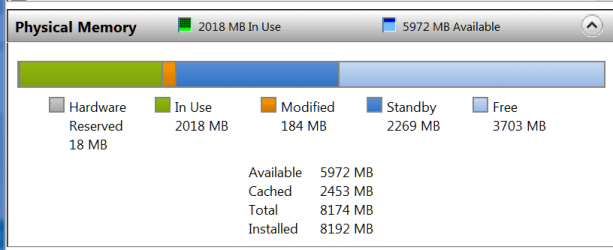
Have a look into Resource Monitor > Memory tab. There you will probably discover that your RAM is mostely empty - like mine. All the blue is 'available' RAM. Nearly 6GBs that are just hanging around.
 

Attachments

  • 2014-05-01_2043.png
    2014-05-01_2043.png
    9 KB · Views: 0
Last edited:

My Computer My Computer

At a glance

Vista, Windows7, Mint Mate, Zorin, Windows 8from 1.6GHz Duo to i7
Computer Manufacturer/Model Number
HP, Dell, Gateway, Toshiba - 4 laptops and 2 desktops
OS
Vista, Windows7, Mint Mate, Zorin, Windows 8
CPU
from 1.6GHz Duo to i7
Monitor(s) Displays
2x HP w2207
Hard Drives
5x HDD, 7x SSD, 12x Externals
Keyboard
with trackball - no mices
Mouse
Trackball mice
Internet Speed
DSL 6000
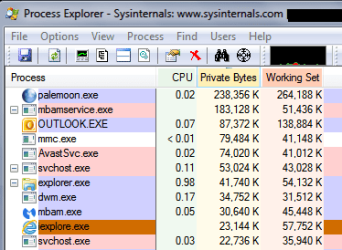
Here's a Process Explorer snip sorted by Privates Bytes.
Win 7 x64, 6 GB RAM, Avast free, MBAM Premium, ...

MEMSP01.PNG
 

My Computer My Computer

At a glance

Multi-Boot W7_Pro_x64 W8.1_Pro_x64 W10_Pro_x6...AMD Athlon II x4 6206GB GSkill DDR2 800AMD 4670 GPU + AMD 4200 IGP
Computer type
PC/Desktop
Computer Manufacturer/Model Number
home built
OS
Multi-Boot W7_Pro_x64 W8.1_Pro_x64 W10_Pro_x64 +Linux_VMs +Chromium_VM
CPU
AMD Athlon II x4 620
Motherboard
Gigabyte GA-MA785G-UD3H
Memory
6GB GSkill DDR2 800
Graphics Card(s)
AMD 4670 GPU + AMD 4200 IGP
Sound Card
on board Realtek ALC889A
Monitor(s) Displays
RCA 40" LCD TV, Insignia 32" LCD TV, HP 15" LCD monitor
Screen Resolution
1680 x 1050
Hard Drives
OCZ Vertex 3 120GB,
Samsung F3 1TB (3),
Several others - WD, Seagate, Hitachi, ...
PSU
Corsair 500 W
Case
Rosewill mid tower
Cooling
CM 90mm rifle
Keyboard
Gyration wireless, Logitech wireless, Dell USB wired
Mouse
Gyration wireless, Logitech wireless, V7 USB wired
Internet Speed
Spectrum - 100Mbps D / 10Mbps U
Antivirus
Avast, MBAM3, EMET, WinPatrol
Browser
Pale Moon, Firefox, IE
Other Info
2 multi-boot PC's
Mainly HTPC/Office/Gen purpose (no gaming).
Trendnet USB KVM.
LG DVD burner/Blue Ray Player.
Tray system for removable SATA backup drives.

Not currently OCd, under-volted.
I use Hybrid sleep, rarely re-boot or shutdown.

Hauppauge HD-PVR, Avermedia PCIe TV Tuner, Hauppauge PCI TV Tuner.
Here's a Process Explorer snip sorted by Privates Bytes.
Win 7 x64, 6 GB RAM, Avast free, MBAM Premium, ...

View attachment 316197

So this is showing that Avast! uses about the same amount of resources as MSE. Good to know. I guess I was just used to a lighter program. I ended up downloading Norton Internet Security instead. I've had poor experiences with Norton in the past, but I'm giving it a try. It only uses 16,000-17,000k which brought my RAM usage down to about considerably (from 2.2mb to 1.2mb while idling). Thank you very much for the insight!
 

My Computer My Computer

At a glance

Windows 7 Professional x64AMD A8 387012GbASUS Radeon HD 7870 DirectCU II GHz Edition V2
Computer type
PC/Desktop
Computer Manufacturer/Model Number
Custom
OS
Windows 7 Professional x64
CPU
AMD A8 3870
Motherboard
ASUS F1A75-V EVO
Memory
12Gb
Graphics Card(s)
ASUS Radeon HD 7870 DirectCU II GHz Edition V2
Hard Drives
Samsung SSD 840 PRO Series 128Gb
WD 1Tb HDD
Case
CoolMaster Storm
Internet Speed
56.96Mbps / 11.77Mbps
Antivirus
Microsoft Security Essentials / Windows Defender
Browser
Mozilla Firefox
Don't bother reinstalling MSE. Nothing will change. I have 6 PCs and they are all the same. And what's the problem. You might as well use all your RAM. No need to save it for a rainy day.

Have a look into Resource Monitor > Memory tab. There you will probably discover that your RAM is mostely empty - like mine. All the blue is 'available' RAM. Nearly 6GBs that are just hanging around.

There is definitely more RAM available. My tower has 12Gb installed at the moment. I just prefer using as little as possible while idling. I game quite a bit and use a good chunk of that 12Gb while working with Adobe CS apps. It just seemed that MSE was using more RAM than it should- which made me think it was malfunctioning. I was basing my concern off of my experiences with Kaspersky, which apparently is more lightweight.

Thank you for you reply!
 

My Computer My Computer

At a glance

Windows 7 Professional x64AMD A8 387012GbASUS Radeon HD 7870 DirectCU II GHz Edition V2
Computer type
PC/Desktop
Computer Manufacturer/Model Number
Custom
OS
Windows 7 Professional x64
CPU
AMD A8 3870
Motherboard
ASUS F1A75-V EVO
Memory
12Gb
Graphics Card(s)
ASUS Radeon HD 7870 DirectCU II GHz Edition V2
Hard Drives
Samsung SSD 840 PRO Series 128Gb
WD 1Tb HDD
Case
CoolMaster Storm
Internet Speed
56.96Mbps / 11.77Mbps
Antivirus
Microsoft Security Essentials / Windows Defender
Browser
Mozilla Firefox
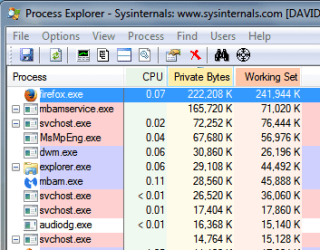
The PC I posted the snip from (post #5) is a dual-boot.
Here is a snip from the other OS
Win 7 x86, 6 GB RAM/3.5 usable, MSE, MBAM Premium, ...

MEMSP02.PNG
 

My Computer My Computer

At a glance

Multi-Boot W7_Pro_x64 W8.1_Pro_x64 W10_Pro_x6...AMD Athlon II x4 6206GB GSkill DDR2 800AMD 4670 GPU + AMD 4200 IGP
Computer type
PC/Desktop
Computer Manufacturer/Model Number
home built
OS
Multi-Boot W7_Pro_x64 W8.1_Pro_x64 W10_Pro_x64 +Linux_VMs +Chromium_VM
CPU
AMD Athlon II x4 620
Motherboard
Gigabyte GA-MA785G-UD3H
Memory
6GB GSkill DDR2 800
Graphics Card(s)
AMD 4670 GPU + AMD 4200 IGP
Sound Card
on board Realtek ALC889A
Monitor(s) Displays
RCA 40" LCD TV, Insignia 32" LCD TV, HP 15" LCD monitor
Screen Resolution
1680 x 1050
Hard Drives
OCZ Vertex 3 120GB,
Samsung F3 1TB (3),
Several others - WD, Seagate, Hitachi, ...
PSU
Corsair 500 W
Case
Rosewill mid tower
Cooling
CM 90mm rifle
Keyboard
Gyration wireless, Logitech wireless, Dell USB wired
Mouse
Gyration wireless, Logitech wireless, V7 USB wired
Internet Speed
Spectrum - 100Mbps D / 10Mbps U
Antivirus
Avast, MBAM3, EMET, WinPatrol
Browser
Pale Moon, Firefox, IE
Other Info
2 multi-boot PC's
Mainly HTPC/Office/Gen purpose (no gaming).
Trendnet USB KVM.
LG DVD burner/Blue Ray Player.
Tray system for removable SATA backup drives.

Not currently OCd, under-volted.
I use Hybrid sleep, rarely re-boot or shutdown.

Hauppauge HD-PVR, Avermedia PCIe TV Tuner, Hauppauge PCI TV Tuner.
I would suggest that judging a program down to the kb of memory used is not the best way to judge a programs quality.
My system runs about 2150 mb of ram with MSE, MBAM, and this website.
If it took more then so be it. If that is what it takes to do the things I want and or need to do I'm happy.
If by chance you start sneaking up the total of your ram it means you need more ram. For most systems use it would be hard pressed to use all of 12 gigs of ram.
 

My Computer My Computer

At a glance

Windows 10 Pro. 64/ version 1709 Windows 7 Pr...Intel i7-6800K @ 4.3Corsair Platinum 16 gig @2400EVGA GTX 1070 OC
Computer type
PC/Desktop
Computer Manufacturer/Model Number
Home made Desktop
OS
Windows 10 Pro. 64/ version 1709 Windows 7 Pro/64
CPU
Intel i7-6800K @ 4.3
Motherboard
ASUS X-99 Deluxe II
Memory
Corsair Platinum 16 gig @2400
Graphics Card(s)
EVGA GTX 1070 OC
Monitor(s) Displays
Asus 27" LED LCD/VE278Q
Screen Resolution
1920-1080 or 1280-720 HDMI
Hard Drives
INTEL SSD 730-240 Gb Sata 3.0/
PSU
EVGA Platium 1200W
Case
Phanteks Luxe Tempered Glass 8 fans/ one radiator
Cooling
XSPC/ Water Cooled CPU
Keyboard
Das 4 Professional
Mouse
Logitech M705/MX Anywhere 2-S
Internet Speed
100 mbits
Antivirus
Microsoft Security Essentials/ Malwarebytes Premium 3.0/ SAS
Browser
I.E. 11 default/Firefox/ ISP Time Warner Cable/Spectrum
Other Info
LG BluRay Burner/
Sound system-KLipsch-THX/
Icy Dock ssd Hot Swap bays.
I wasn't judging the quality of the program. I mistakenly compared the memory consumption of MSE to Kaspersky PURE. The comparison led me to believe that MSE was using more memory than it should (more memory than it would if it were functioning correctly). As people pointed out above, the amount of memory being used by the program appears to be normal for an antivirus program. I did not realize this since my previous AV program used much less (from what I remember.

It definitely takes some effort to use all 12GB of RAM. I simply wish to keep the resource usage to a minimum for the sake of knowing my machine is running optimally. Call it a hobby. Thank you for your insight as well. I appreciate the responses I've gotten today regarding this. It prevented me from going crazy trying to fix something that was not broken :)
 

My Computer My Computer

At a glance

Windows 7 Professional x64AMD A8 387012GbASUS Radeon HD 7870 DirectCU II GHz Edition V2
Computer type
PC/Desktop
Computer Manufacturer/Model Number
Custom
OS
Windows 7 Professional x64
CPU
AMD A8 3870
Motherboard
ASUS F1A75-V EVO
Memory
12Gb
Graphics Card(s)
ASUS Radeon HD 7870 DirectCU II GHz Edition V2
Hard Drives
Samsung SSD 840 PRO Series 128Gb
WD 1Tb HDD
Case
CoolMaster Storm
Internet Speed
56.96Mbps / 11.77Mbps
Antivirus
Microsoft Security Essentials / Windows Defender
Browser
Mozilla Firefox
The memory usage of processes in any modern OS is not a fixed quantity but is in fact highly dynamic. At any given time the usage of a process will depend on how much RAM is in the system, what the process is doing now, what it was doing in the past, what other processes are doing now, what they were doing in the past, and more. All of these factors interact in very complex ways. Also, most AV products have multiple processes. For some products this is obvious, in others it is not. Finally (all I will mention, not all there is) the memory usage column shown by default in Task Manager (Private working set) does not show the full usage of a process. Actual usage can be substantially higher than shown. This is due to a misinterpretation of what the numbers mean.

It is not the process itself but the system memory manager that determines how much memory a process will have at any given time. The goal is always to maximize overall system performance, not to minimize memory usage. It usually does a very good job, far better than you could hope to do yourself.

Even in the same computer the memory usage of a process can easily vary by a factor of 10, and in some cases much more. I have seen this on multiple occasions. And none of this in any way indicates that anything is wrong.

I trust that the implications of this are clear.
 

My Computer My Computer

At a glance

Windows 7 Pro 64 bitXeon W35208 GBNvidia Geforce 210
Computer type
PC/Desktop
Computer Manufacturer/Model Number
HP
OS
Windows 7 Pro 64 bit
CPU
Xeon W3520
Memory
8 GB
Graphics Card(s)
Nvidia Geforce 210
Back
Top