Show us your SSD performance 2

Thanks Steve for the answer. I did not know that.
Yes, thank you. I didn't know that either.

@ A Guy:

I feel better now. Thanks. :)
 

My Computer My Computer

Computer type
PC/Desktop
Computer Manufacturer/Model Number
Mellon Labs (custom build)
OS
Win 7 Pro x64/Win 10 Pro x64 dual boot
CPU
AMD FX 8350 Vishera @ 4200
Motherboard
ASUS M5A97 R2.0
Memory
16 GB Mushkin Blackline DDR3-2400 @ 1866 (9-10-10-10-31)
Graphics Card(s)
XFX Radeon R9 280 Double D Black Edition
Sound Card
Realtek HD Audio on MB. Sounds great.
Monitor(s) Displays
Acer 24", Acer 22"
Screen Resolution
3840 x 1080
Hard Drives
1 x Mushkin Chronos 120 GB SSD (Win 10)
1 x Samsung 850 EVO 250 GB SSD (Win 7)
1 x WD 1TB SATA Blue
1 x WD 1TB SATA Green
PSU
Corsair TX-750
Case
CoolerMaster HAF 912+
Cooling
Coolermaster Seidon 240M Liquid AIO. 6 case fans
Keyboard
Logitech G710+
Mouse
Logitech G500s
Internet Speed
Much better since I got fiber, but still way overpriced.
Antivirus
MSE, Malware Bytes for scanning
Browser
Firefox
Other Info
Corsair VOID USB headphones.

A Mellon Labs X-1 - LCD Smartie driven system status display.

Brought to you by the letter E
You're quite welcome.
 

My Computers My Computers

System One System Two

  • Computer type
    PC/Desktop
    Computer Manufacturer/Model Number
    ALWAYS UNDER CONSTRUCTION
    OS
    Windows 11 Pro
    CPU
    Ryzen 9 5900X
    Motherboard
    Asus X570 Crosshair Viii Hero
    Memory
    32GB G Skill DDR4-3600
    Graphics Card(s)
    EVGA RTX 3080 FTW 3 Ultra
    Sound Card
    On Board/Sennheiser PC37X Headset
    Monitor(s) Displays
    3 X Asus 27"
    Screen Resolution
    2560x1440
    Hard Drives
    2 X 1 TB NVME drives
    PSU
    EVGA 850
    Case
    Phanteks Eclipse P400A
    Cooling
    EVGA 280 AIO
    Keyboard
    Logitech G510s/ Logitech G13
    Mouse
    Logitech G502
    Internet Speed
    24/1
    Antivirus
    ESET/MBAM Pro/SAS Pro
    Browser
    Chrome/ Firefox/ Edge
  • Computer type
    Laptop
    System Manufacturer/Model Number
    Dell 16 Plus
    OS
    Windows 11 Pro
    CPU
    Intel Ultra 9 288V
    Memory
    32 GB LPDDR5X 8533
    Monitor(s) Displays
    16" Mini-LED HDR600 Touch 90 Hz
    Screen Resolution
    2560X1600
    Hard Drives
    1 TB NVME
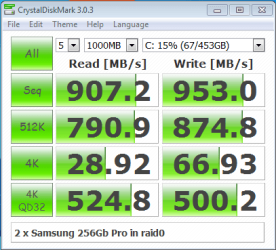
I only came back to the forum to get help with a keyboard problem, but I'll play this game while I am here. Two Samsung 256Gb Pro in raid0 for OS. Attached to SATA ports 0/1 on X79-UD5 with Intel Enterprise Driver. I have seen someone who got just over the 1Gb/s with this setup. I couldn't quite manage that, but what really impresses me is the 4K performance.

2 x Samsung 256Gb Pro raid0.PNG
 

My Computer My Computer

Computer type
PC/Desktop
Computer Manufacturer/Model Number
Gigabyte
OS
Windows 7 Pro 64bit
CPU
3930K
Motherboard
X79-UD5
Memory
32Gb DDR3 1600
Graphics Card(s)
GeForce GTX 570
Sound Card
none
Monitor(s) Displays
Dell 2709W, LG 24EB23 (in portrait mode)
Screen Resolution
both 1920 x 1200
Hard Drives
2 x Samsung 256Gb Pro in raid0 (OS)
2 x 6th Gen 1Tb VelociRaptor raid0 (Projects)
2 x 1Tb WD Black raid0 (My Docs, Exports)
300Gb VelociRaptor (Photoshop scratch)
18Tb in total over 14 drives including 5 USB3 externals
PSU
ADATA 750W
Case
Coolermaster Storm Trooper (full tower)
Cooling
Intel RTS2011LC (water)
Keyboard
Logitech G110
Mouse
Logitech Performance MX and Razer Mamba (both connected)
Internet Speed
Shite :-(
Antivirus
f-secure
Browser
IE11
Other Info
full Creative Cloud subscription
I just bought an Samsung EVO 120, I didn't install the software yet. I was going to buy a Samsung Pro but in my opinion the numbers between the two are almost identical, plus I saved $50 so I spent it on other PC hardware :)
 

My Computer My Computer

Computer type
PC/Desktop
Computer Manufacturer/Model Number
Custom Built
OS
Windows 10 Pro
CPU
Core2Quad (2.6 Ghz)
Motherboard
nVidia 775
Memory
8 Gigs DDR2
Graphics Card(s)
Geforce Titan Black
Sound Card
Motherboard Audio
Monitor(s) Displays
25" Asus LCD
Screen Resolution
1680x1050
Hard Drives
120 Gig SSD
60 Gig SSD
750 Gig HDD
PSU
850 Watts
Case
Mid-Size
Keyboard
Logitech
Mouse
Logitech - I love logitech mouses
Internet Speed
DSL 25Mbps - Although extremely expensive
Antivirus
Microsoft Anti-Virus
Browser
FireFox 36.x
I just bought an Samsung EVO 120, I didn't install the software yet. I was going to buy a Samsung Pro but in my opinion the numbers between the two are almost identical, plus I saved $50 so I spent it on other PC hardware :)

I had got as far as ordering a pair of 250Gb EVO when I discovered that they don't work well in any raid configuration. In Fact Samsung specifically advise against raiding EVO drives. So I had a mad rush getting on to the supplier and changing the order to a pair of Pros.

I get all my hardware advice from the Adobe Premiere Pro Hardware forum, as they really know their stuff there. They didn't like that I wanted to put my OS on a raid0, but I do a lot more Photoshop than Premier Pro, so I went ahead anyway. This is the thread, and there is a link to another relevant thread

Adobe Community: How To Install OS on Raid0?
 

My Computer My Computer

Computer type
PC/Desktop
Computer Manufacturer/Model Number
Gigabyte
OS
Windows 7 Pro 64bit
CPU
3930K
Motherboard
X79-UD5
Memory
32Gb DDR3 1600
Graphics Card(s)
GeForce GTX 570
Sound Card
none
Monitor(s) Displays
Dell 2709W, LG 24EB23 (in portrait mode)
Screen Resolution
both 1920 x 1200
Hard Drives
2 x Samsung 256Gb Pro in raid0 (OS)
2 x 6th Gen 1Tb VelociRaptor raid0 (Projects)
2 x 1Tb WD Black raid0 (My Docs, Exports)
300Gb VelociRaptor (Photoshop scratch)
18Tb in total over 14 drives including 5 USB3 externals
PSU
ADATA 750W
Case
Coolermaster Storm Trooper (full tower)
Cooling
Intel RTS2011LC (water)
Keyboard
Logitech G110
Mouse
Logitech Performance MX and Razer Mamba (both connected)
Internet Speed
Shite :-(
Antivirus
f-secure
Browser
IE11
Other Info
full Creative Cloud subscription
I think Peru Bob on the Adobe forum is right. Raid will not buy any significant performance advantage. The access time for Raid is the same as for a single unit and the OS performance is driven by the access time.
 

My Computer My Computer

Computer Manufacturer/Model Number
HP, Dell, Gateway, Toshiba - 4 laptops and 2 desktops
OS
Vista, Windows7, Mint Mate, Zorin, Windows 8
CPU
from 1.6GHz Duo to i7
Monitor(s) Displays
2x HP w2207
Hard Drives
5x HDD, 7x SSD, 12x Externals
Keyboard
with trackball - no mices
Mouse
Trackball mice
Internet Speed
DSL 6000
I think Peru Bob on the Adobe forum is right. Raid will not buy any significant performance advantage. The access time for Raid is the same as for a single unit and the OS performance is driven by the access time.


This is completely true. The only numbers of any importance to anyone using a single SSD or SSD + HDD setup are the Random 4K's(not 4K QD32/64) and access times. RAID 0 affects neither of them. Sequential read/writes will become important when you have multiple, large capacity SSD's and you transfer files between them. As of now, anyone using an SSD/HDD setup are limited to the speed of the HDD which is on average 100-150 MB/s versus 500-500 MB/s for an SSD.
 

My Computer My Computer

Computer type
PC/Desktop
Computer Manufacturer/Model Number
Custom Built
OS
Windows 7 Professional 64bit SP1
CPU
Intel Core i5-3570K @ 4.5GHz
Motherboard
Asus Sabertooth Z77
Memory
Corsair Vengeance 16GB (4x4) @1866MHz CL 9-9-9-24 1T
Graphics Card(s)
EVGA GTX 750 Ti FTW
Sound Card
Onboard Audio
Monitor(s) Displays
Dell S2309W
Screen Resolution
1920x1080
Hard Drives
Samsung 830 128GB SSD - OS
(4) Seagate 5TB HDD
(1) Seagate 2TB HDD
PSU
Seasonic X750 80+ Gold Full Modular
Case
Antec Eleven Hundred Super Mid Tower
Cooling
Intel Liquid Cooler
Keyboard
Max Nighthawk X8 Mechanical keyboard
Mouse
Mionix Naos 7000
Internet Speed
50 Mbps Down / 10 Mbps Up
Antivirus
Microsoft Security Essentials/Malwarebytes Anti-Malware
Browser
Chrome/Firefox
Other Info
Klipsch ProMedia 2.1's
Asus RT-N66R Wireless Router
Hi Kelly, long time no see.

I think Steve was going to RAID two SSDs to see what happens.
 

My Computer My Computer

Computer type
PC/Desktop
Computer Manufacturer/Model Number
Home Built Desktop By DataTech
OS
Windows 7 Ultimate X64 SP1
CPU
Intel i5-2550K, Differing ~4.4-4.8GHz No built in GPU
Motherboard
ASUS P8Z68-V PRO/GEN3
Memory
16GB G.Skill Sniper 1866MHz @ 2133MHz 2x8GB
Graphics Card(s)
ASUS GTX650TIB-DC2OC-2GD5, (650TI Boost)
Sound Card
Onboard Realtek 5-1
Monitor(s) Displays
Samsung P2570HD
Screen Resolution
1920x1080
Hard Drives
Samsung 840 Pro 256GB SSD for OS, 500GB Seagate Constellation (Enterprise drive) for Data
PSU
Corsair HX650W
Case
Inwin Dragon Rider
Cooling
Hyper 212 EVO w/two Noctua fans, push-pull, @1300 RPM
Keyboard
E-Z Eyes, bright yellow keys with large characters
Mouse
steelseries SENSEI Laser Pro Gaming
Internet Speed
48-51Mbs Mbs down, 11 Mbs up Xfinity Cable
Antivirus
Norton Internet Security 2013
Browser
IE 10, Opera, Pale Moon if needed
Other Info
4 case fans, LG BluRay-RE, ASUS DVD-RW, Mr. Fusion power supply, 1.21 gigawatts.
Hey Gary! Feels good to be active around here again. IF there are any measurable differences, the risks of RAID 0(to me) aren't worth it. I still don't think it will improve boot time, load time, or anything important. It will almost double your Sequential Read/Write speeds(which most of us can't take advantage of), and it will pump your Random 4K QD 32/64 up quite a bit. Most of us generally operate in the range of QD 1-7 or 8, so QD's of 32 or 64 don't mean much.
 

My Computer My Computer

Computer type
PC/Desktop
Computer Manufacturer/Model Number
Custom Built
OS
Windows 7 Professional 64bit SP1
CPU
Intel Core i5-3570K @ 4.5GHz
Motherboard
Asus Sabertooth Z77
Memory
Corsair Vengeance 16GB (4x4) @1866MHz CL 9-9-9-24 1T
Graphics Card(s)
EVGA GTX 750 Ti FTW
Sound Card
Onboard Audio
Monitor(s) Displays
Dell S2309W
Screen Resolution
1920x1080
Hard Drives
Samsung 830 128GB SSD - OS
(4) Seagate 5TB HDD
(1) Seagate 2TB HDD
PSU
Seasonic X750 80+ Gold Full Modular
Case
Antec Eleven Hundred Super Mid Tower
Cooling
Intel Liquid Cooler
Keyboard
Max Nighthawk X8 Mechanical keyboard
Mouse
Mionix Naos 7000
Internet Speed
50 Mbps Down / 10 Mbps Up
Antivirus
Microsoft Security Essentials/Malwarebytes Anti-Malware
Browser
Chrome/Firefox
Other Info
Klipsch ProMedia 2.1's
Asus RT-N66R Wireless Router
  • Like
Reactions: whs
Kelly, I have done it in the past, just to see how it works, plus the fact I have always advised against it for the reasons you mentioned, but like to see for myself before advising anyone. It did not help and what you said is absolutely correct. I have, as Gary said, thought seriously about doing it again. The only advantage of Raid 0 is the increased space from combining 2 SSDs. Speed is not affected at all nor is access times. usable space is improved. That is the only advantage if you can live with the risks, which I can due to the fact I am a backup freak. I'm not concerned about losing anything. We are happy you are around more, you add much to these forums.
 

My Computers My Computers

System One System Two

  • Computer type
    PC/Desktop
    Computer Manufacturer/Model Number
    ALWAYS UNDER CONSTRUCTION
    OS
    Windows 11 Pro
    CPU
    Ryzen 9 5900X
    Motherboard
    Asus X570 Crosshair Viii Hero
    Memory
    32GB G Skill DDR4-3600
    Graphics Card(s)
    EVGA RTX 3080 FTW 3 Ultra
    Sound Card
    On Board/Sennheiser PC37X Headset
    Monitor(s) Displays
    3 X Asus 27"
    Screen Resolution
    2560x1440
    Hard Drives
    2 X 1 TB NVME drives
    PSU
    EVGA 850
    Case
    Phanteks Eclipse P400A
    Cooling
    EVGA 280 AIO
    Keyboard
    Logitech G510s/ Logitech G13
    Mouse
    Logitech G502
    Internet Speed
    24/1
    Antivirus
    ESET/MBAM Pro/SAS Pro
    Browser
    Chrome/ Firefox/ Edge
  • Computer type
    Laptop
    System Manufacturer/Model Number
    Dell 16 Plus
    OS
    Windows 11 Pro
    CPU
    Intel Ultra 9 288V
    Memory
    32 GB LPDDR5X 8533
    Monitor(s) Displays
    16" Mini-LED HDR600 Touch 90 Hz
    Screen Resolution
    2560X1600
    Hard Drives
    1 TB NVME
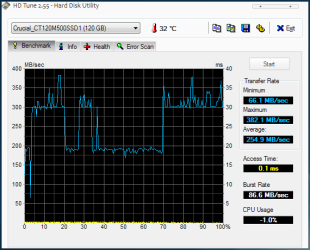
So, I discovered I had a misaligned partition on my new M500 and that my drive controller had reverted to IDE mode. Switched to AHCI, aligned partition to the 2048 sector (1024k), and suddenly I'm getting much better speeds on startup and app launches.

:p

picture.php


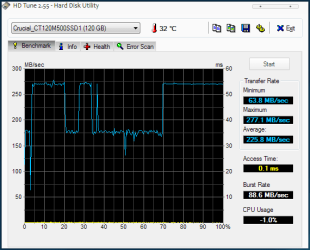
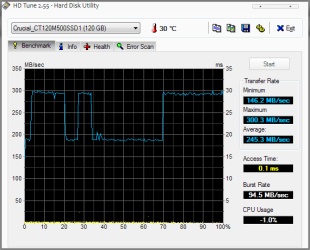
I am slightly concerned about something though, if you see the three pics I've attached to this post:

HDTune - 1: first run, before alignment or AHCI
HDTune - 2: second run, before alignment, with AHCI
HDTune - 3: third run, after alignment, with AHCI (at the same time as the AS SSD score above)

Why would the graphs in HDTune all have that odd shape with the drops in speed...? All the test shots I've seen in other posts and tech reviews have had a smooth graph. Is this something I should be worried about?

edit: Off topic, but why aren't attachments shown as thumbnails anymore? O.o
 

Attachments

  • HDTune - 1.PNG
    HDTune - 1.PNG
    11.1 KB · Views: 83
  • HDTune - 2.PNG
    HDTune - 2.PNG
    10.2 KB · Views: 83
  • HDTune - 3.PNG
    HDTune - 3.PNG
    10.5 KB · Views: 83

My Computer My Computer

Computer type
PC/Desktop
OS
Win 10 x64 Pro x64 / Ubuntu 15.10 x64
CPU
Intel i7-4960X
Motherboard
Asus Rampage IV Black Edition
Memory
4x8GB Corsair Dominator Platinum @2400MHz 10-12-12-31
Graphics Card(s)
2x MSI GTX780Ti 3GB (SLI)
Sound Card
Onboard SupremeFX (Cirrus Logic CS4398)
Monitor(s) Displays
3x LG Cinema 27" IPS LED (27MP65)
Screen Resolution
[1920x1080]x3
Hard Drives
Crucial M500 120GB, Crucial M500 480GB, Toshiba DT01ACA200 2TB
PSU
CoolerMaster V1000
Case
Corsair Obsidian 750D
Cooling
ThermalTake Water 3.0 Extreme, 4xSP120, 3xAF120
Keyboard
Moshi Luna
Mouse
Logitech G700s / Roccat Tyon
Internet Speed
4Mb uncapped ADSL (Afrihost)
Antivirus
MS Security Essentials
Browser
Chrome... Duh. (:
I was having a problem whereas my computer would continue to run, but the monitor would shut off and windows would stop working. What was happening in the BIOS the boot order was being rearranged. I bought a new SSD drive a week ago, put it in so far so good up until today, the problem resurfaced.

Before putting in the new SSD the problem would surface frequently, this is the first time in almost a week with the new SSD that the problem resurfaced. I replaced some connectors, I'm at a loss what is causing this.
 

My Computer My Computer

Computer type
PC/Desktop
Computer Manufacturer/Model Number
Custom Built
OS
Windows 10 Pro
CPU
Core2Quad (2.6 Ghz)
Motherboard
nVidia 775
Memory
8 Gigs DDR2
Graphics Card(s)
Geforce Titan Black
Sound Card
Motherboard Audio
Monitor(s) Displays
25" Asus LCD
Screen Resolution
1680x1050
Hard Drives
120 Gig SSD
60 Gig SSD
750 Gig HDD
PSU
850 Watts
Case
Mid-Size
Keyboard
Logitech
Mouse
Logitech - I love logitech mouses
Internet Speed
DSL 25Mbps - Although extremely expensive
Antivirus
Microsoft Anti-Virus
Browser
FireFox 36.x
I was having a problem whereas my computer would continue to run, but the monitor would shut off and windows would stop working. What was happening in the BIOS the boot order was being rearranged. I bought a new SSD drive a week ago, put it in so far so good up until today, the problem resurfaced.

Before putting in the new SSD the problem would surface frequently, this is the first time in almost a week with the new SSD that the problem resurfaced. I replaced some connectors, I'm at a loss what is causing this.
This is not a good thread to get attention to your problem. I suggest you start a new thread for it.
 

My Computer My Computer

Computer Manufacturer/Model Number
HP, Dell, Gateway, Toshiba - 4 laptops and 2 desktops
OS
Vista, Windows7, Mint Mate, Zorin, Windows 8
CPU
from 1.6GHz Duo to i7
Monitor(s) Displays
2x HP w2207
Hard Drives
5x HDD, 7x SSD, 12x Externals
Keyboard
with trackball - no mices
Mouse
Trackball mice
Internet Speed
DSL 6000
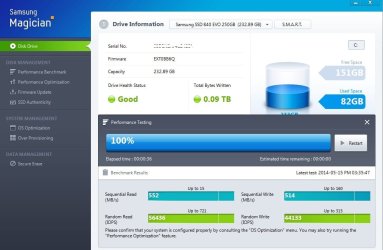
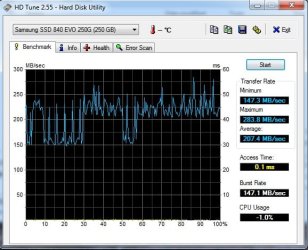
840 Evo for the Laptop (Asus k53e w/i5)
I did a fresh install of 7 not a clone from the 5400.
 

Attachments

  • evo_maj_1.jpg
    evo_maj_1.jpg
    66 KB · Views: 1
  • evo_hdtune_1.jpg
    evo_hdtune_1.jpg
    46.7 KB · Views: 48

My Computer My Computer

Computer type
PC/Desktop
Computer Manufacturer/Model Number
Self - Build | Asus K53e Laptop
OS
10 x64 | 7 x64
CPU
AMD FX-9590 Vishera 4.7 | i5 Sandy Bridge
Motherboard
MSI 990 FXA | K53e
Memory
16 gigs Crucial Ballistix | 8 gigs Adata ddr3 1600
Graphics Card(s)
RX-570 4gd5 | Intel HD 3000
Sound Card
Realtek HD OnBoard Audio
Monitor(s) Displays
Samsung 22" & 37" Toshiba | 15.6
Hard Drives
ADATA 240 ssd & 750 Caviar Black 7200 sata | 250 840 EVO ssd & samsung ssd
PSU
Thermaltake 700 | 65w
Case
CoolMaster Centurion 534+
Cooling
Corsair H60
Keyboard
Rosewill RK-800G PS/2 Gaming Keyboard | Asus Chiclet
Mouse
Ventus | MS w/side buttons
Internet Speed
RoadRunner
Other Info
I hate the smell of friggin corn chip butt breath snacks.
The widely varying read/write traces may me due to the program crunching through compressed and non-compressed data.
 

My Computer My Computer

Computer type
PC/Desktop
Computer Manufacturer/Model Number
Home Built Desktop By DataTech
OS
Windows 7 Ultimate X64 SP1
CPU
Intel i5-2550K, Differing ~4.4-4.8GHz No built in GPU
Motherboard
ASUS P8Z68-V PRO/GEN3
Memory
16GB G.Skill Sniper 1866MHz @ 2133MHz 2x8GB
Graphics Card(s)
ASUS GTX650TIB-DC2OC-2GD5, (650TI Boost)
Sound Card
Onboard Realtek 5-1
Monitor(s) Displays
Samsung P2570HD
Screen Resolution
1920x1080
Hard Drives
Samsung 840 Pro 256GB SSD for OS, 500GB Seagate Constellation (Enterprise drive) for Data
PSU
Corsair HX650W
Case
Inwin Dragon Rider
Cooling
Hyper 212 EVO w/two Noctua fans, push-pull, @1300 RPM
Keyboard
E-Z Eyes, bright yellow keys with large characters
Mouse
steelseries SENSEI Laser Pro Gaming
Internet Speed
48-51Mbs Mbs down, 11 Mbs up Xfinity Cable
Antivirus
Norton Internet Security 2013
Browser
IE 10, Opera, Pale Moon if needed
Other Info
4 case fans, LG BluRay-RE, ASUS DVD-RW, Mr. Fusion power supply, 1.21 gigawatts.
Yeah I was kind of wondering about that, expecting more of a straight line. I thought it might have something to do with the magician performance / os settings. Maybe I'll tweek some options but I'm not so sure its a good idea to keep changing them.
 

My Computer My Computer

Computer type
PC/Desktop
Computer Manufacturer/Model Number
Self - Build | Asus K53e Laptop
OS
10 x64 | 7 x64
CPU
AMD FX-9590 Vishera 4.7 | i5 Sandy Bridge
Motherboard
MSI 990 FXA | K53e
Memory
16 gigs Crucial Ballistix | 8 gigs Adata ddr3 1600
Graphics Card(s)
RX-570 4gd5 | Intel HD 3000
Sound Card
Realtek HD OnBoard Audio
Monitor(s) Displays
Samsung 22" & 37" Toshiba | 15.6
Hard Drives
ADATA 240 ssd & 750 Caviar Black 7200 sata | 250 840 EVO ssd & samsung ssd
PSU
Thermaltake 700 | 65w
Case
CoolMaster Centurion 534+
Cooling
Corsair H60
Keyboard
Rosewill RK-800G PS/2 Gaming Keyboard | Asus Chiclet
Mouse
Ventus | MS w/side buttons
Internet Speed
RoadRunner
Other Info
I hate the smell of friggin corn chip butt breath snacks.
840 Evo for the Laptop (Asus k53e w/i5)
I did a fresh install of 7 not a clone from the 5400.

Is the partition perhaps just misaligned? Had a similar story when I got my M500 installed, switching back to AHCI SATA mode and aligning the partition to 1024k sorted it out beautifully.
 

My Computer My Computer

Computer type
PC/Desktop
OS
Win 10 x64 Pro x64 / Ubuntu 15.10 x64
CPU
Intel i7-4960X
Motherboard
Asus Rampage IV Black Edition
Memory
4x8GB Corsair Dominator Platinum @2400MHz 10-12-12-31
Graphics Card(s)
2x MSI GTX780Ti 3GB (SLI)
Sound Card
Onboard SupremeFX (Cirrus Logic CS4398)
Monitor(s) Displays
3x LG Cinema 27" IPS LED (27MP65)
Screen Resolution
[1920x1080]x3
Hard Drives
Crucial M500 120GB, Crucial M500 480GB, Toshiba DT01ACA200 2TB
PSU
CoolerMaster V1000
Case
Corsair Obsidian 750D
Cooling
ThermalTake Water 3.0 Extreme, 4xSP120, 3xAF120
Keyboard
Moshi Luna
Mouse
Logitech G700s / Roccat Tyon
Internet Speed
4Mb uncapped ADSL (Afrihost)
Antivirus
MS Security Essentials
Browser
Chrome... Duh. (:
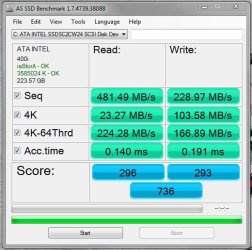
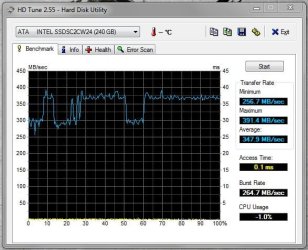
Intel 520 series.

Capture.JPG

Capture 2.JPG
 

My Computer My Computer

Computer type
PC/Desktop
Computer Manufacturer/Model Number
Custom Build
OS
W7 Pro x64 SP1 | W10 Pro IP x64 | W8.1 Pro x64 VM | Linux Mint VM
CPU
i7-4790k @ 4GHz (4.4GHz Boost)
Motherboard
ASUS Sabertooth Z87 (BIOS Rev 2004)
Memory
16GB DDR3 Kingston HyperX Fury @ 1600MHz CL 9-9-9-27
Graphics Card(s)
EVGA GTX 980 Classified
Sound Card
Realtek Onboard
Monitor(s) Displays
Samsung S27D390
Screen Resolution
1920 x 1080
Hard Drives
240GB Intel 520 Series SSD |
Samsung 850 EVO 120GB SSD |
2TB WD Caviar Black |
2TB WD Caviar Green
PSU
Corsair HX850-80 Gold Modular
Case
Cooler Master Silencio 650
Cooling
Corsair H80i w/2 x Corsair SP120 | 2 x 120mm Noctua NF-S12B
Keyboard
Microsoft Sidewinder X4
Mouse
Gigabyte M6900 optical
Internet Speed
152mb
Antivirus
F-Secure
Browser
Firefox 38.0
Other Info
Backup Rig: Win 7 Pro 64-bit | AMD A10-5800k | ASUS F2A85-V Pro | 8GB Samsung DDR3 @1600MHz | 120GB Toshiba SDD | 2TB Seagate HDD | Cooler Master Silencio 550

My Computer My Computer

Computer type
PC/Desktop
OS
Win 10 x64 Pro x64 / Ubuntu 15.10 x64
CPU
Intel i7-4960X
Motherboard
Asus Rampage IV Black Edition
Memory
4x8GB Corsair Dominator Platinum @2400MHz 10-12-12-31
Graphics Card(s)
2x MSI GTX780Ti 3GB (SLI)
Sound Card
Onboard SupremeFX (Cirrus Logic CS4398)
Monitor(s) Displays
3x LG Cinema 27" IPS LED (27MP65)
Screen Resolution
[1920x1080]x3
Hard Drives
Crucial M500 120GB, Crucial M500 480GB, Toshiba DT01ACA200 2TB
PSU
CoolerMaster V1000
Case
Corsair Obsidian 750D
Cooling
ThermalTake Water 3.0 Extreme, 4xSP120, 3xAF120
Keyboard
Moshi Luna
Mouse
Logitech G700s / Roccat Tyon
Internet Speed
4Mb uncapped ADSL (Afrihost)
Antivirus
MS Security Essentials
Browser
Chrome... Duh. (:
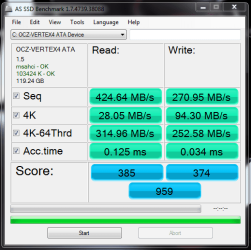
Here is my aging OCZ Vertex 4, I really need a bigger drive. It's on my upgrade list.
 

Attachments

  • ssd.PNG
    ssd.PNG
    21.6 KB · Views: 31

My Computer My Computer

OS
Windows 7 Professional 64 bit
Back
Top