I recently installed a Crucial M4 128GB SSD into my pc.
I connected to a SATA lll 6.0 Gb/s port on my motherboard.
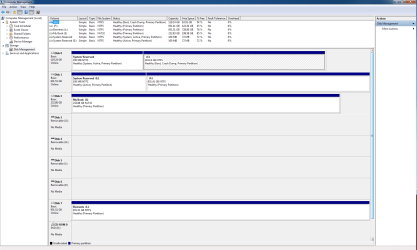
This drive exists along side my HDD, which is now Drive "F", with the SSD being drive "C". I did not clone or transfer anything to the SSD, installing a fresh copy of Windows 7 Home Premium 64 bit from my CD.
I went through all the optimization steps spelled out by the experts both here and on other sites.
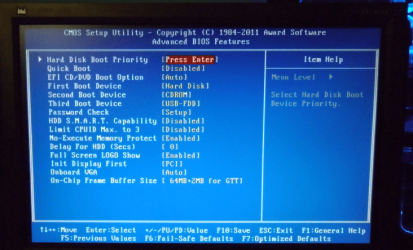
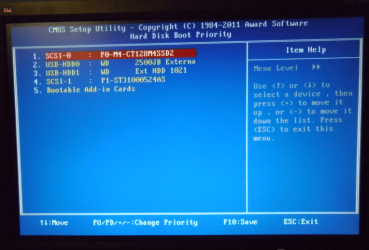
I have the SSD selected as the boot drive, but to my disappointment WIndows7 64 bit loads slower than my HDD. I would like to find out why, but I can live with that as long as the drive performance is what it should be.
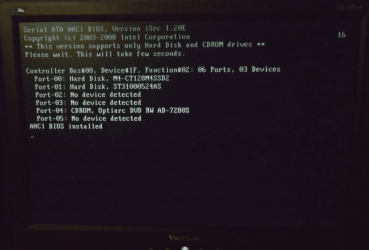
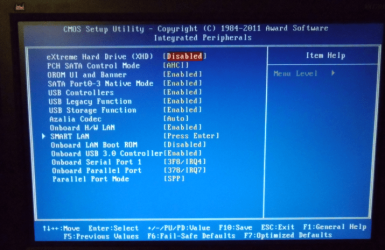
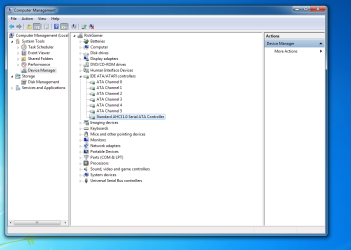
I attempted to set AHCI in the BIOS, before installing the OS, but each time I selected it, I would get a blue screen which wouldn't leave until I restarted the computer. As soon as I switched the setting over to IDE, the pc booted but as I said, slower than my HDD.
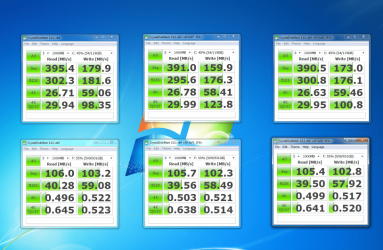
I have attached a screenshot of a result using Crystal Disk Mark.
The top row are the results of the SSD, while the bottom row is the results of my HDD. Although the results are considerably better than the HDD, I have been told that these numbers should be much better and the boot time should be very quick.
Any help would be greatly appreciated
Rick
I have also included my computer specs below:
Case: Coolermaster HAF-X
MB: Gigabyte Z68AP-D3
Processor: Intel Core i7-2700k @ 3.50GHz
Video Card: Zotac NVIDIA GeForce GTX 570
Memory: Corsair Vengeance 8 GB (2 x4 GB) 1600MHz
Hard Disk 1: Crucial M4 128 GB SATA lll 6.0 Gb/s
Hard Disk 2: Western Digital 1 TB 7200 RPM
PSU: Coolermaster Silent Pro 850W
Monitor: Hanns-G 27.5" (11920 x 1200)
I connected to a SATA lll 6.0 Gb/s port on my motherboard.
This drive exists along side my HDD, which is now Drive "F", with the SSD being drive "C". I did not clone or transfer anything to the SSD, installing a fresh copy of Windows 7 Home Premium 64 bit from my CD.
I went through all the optimization steps spelled out by the experts both here and on other sites.
I have the SSD selected as the boot drive, but to my disappointment WIndows7 64 bit loads slower than my HDD. I would like to find out why, but I can live with that as long as the drive performance is what it should be.
I attempted to set AHCI in the BIOS, before installing the OS, but each time I selected it, I would get a blue screen which wouldn't leave until I restarted the computer. As soon as I switched the setting over to IDE, the pc booted but as I said, slower than my HDD.
I have attached a screenshot of a result using Crystal Disk Mark.
The top row are the results of the SSD, while the bottom row is the results of my HDD. Although the results are considerably better than the HDD, I have been told that these numbers should be much better and the boot time should be very quick.
Any help would be greatly appreciated
Rick
I have also included my computer specs below:
Case: Coolermaster HAF-X
MB: Gigabyte Z68AP-D3
Processor: Intel Core i7-2700k @ 3.50GHz
Video Card: Zotac NVIDIA GeForce GTX 570
Memory: Corsair Vengeance 8 GB (2 x4 GB) 1600MHz
Hard Disk 1: Crucial M4 128 GB SATA lll 6.0 Gb/s
Hard Disk 2: Western Digital 1 TB 7200 RPM
PSU: Coolermaster Silent Pro 850W
Monitor: Hanns-G 27.5" (11920 x 1200)
Attachments
My Computer
At a glance
Windows 7 Home Premium 64 bitIntel Core i7-2700K @ 3.50 GHzCorsair Vengeance 8 GB (2 x 4 GB) 1600 MHzNVIDIA GeForce GTX 570
- Computer Manufacturer/Model Number
- Custom Build
- OS
- Windows 7 Home Premium 64 bit
- CPU
- Intel Core i7-2700K @ 3.50 GHz
- Motherboard
- Gigabyte Z68AP-D3
- Memory
- Corsair Vengeance 8 GB (2 x 4 GB) 1600 MHz
- Graphics Card(s)
- NVIDIA GeForce GTX 570
- Sound Card
- On Motherboard 7.1
- Monitor(s) Displays
- Hanns-G 27.5 Inch 1920 x 1200 LCD Monitor
- Hard Drives
- Seagate Barracuda 1TB 7200 RPM 32MB Cache SATA 6.0Gb/s 3.5" Internal Hard Drive
Crucial M4 128 GB SATA lll SSD
- PSU
- Coolermaster 850W Silent Pro
- Case
- Coolermaster HAF X Gaming Case
- Cooling
- Asetek 570LC Liquid Cooling System with 120 MM Radiator w PP
- Keyboard
- Logitech G15 Gaming Keyboard
- Mouse
- Razer Imperator 5600 DPI Gaming Mouse
- Internet Speed
- 75 Gbps Download / 35 Gbps Upload (FIOS Quantum)