Does MS embed PC manufacturers logo in the install disc?

DOB120745

New member
Local time
3:16 PM
Messages
4
It's not that I particularly mind that the Falcon Northwest logo remains on my computer. What does bother me is that I'm doubtful that I did the total wipe I was going for when I re-installed Win7 (with format). My PC was getting buggy and I felt that the best fix was to scrub everything. When the logo appears, I'm left to wonder if Microsoft burned it in to the disc for that particular vendor, or if it's in the BIOS or somewhere else. There are plenty of videos showing you how to delete the info. But that still doesn't tell me if the wipe missed it (and no telling what else), or if it's installed in a separate storage device. I can't imagine what that would be. I'm limited to what I know about computers. I hope you can help me without too much jargon. Thanks
 

My Computer My Computer

At a glance

Win7/64/HomePremium
Computer type
PC/Desktop
Computer Manufacturer/Model Number
Falcon Northwest
OS
Win7/64/HomePremium
Browser
Google Chrome
Hello Dob, and welcome to Seven Forums.

If this was a clean install with a retail copy of Windows, then yeah it'll be your BIOS splash screen showing the OEM Falcon Northwest manufacturer logo. :)
 

My Computer My Computer

At a glance

64-bit Windows 11 Pro for WorkstationsIntel i7-8700K OC'd to 5 GHz64 GB (4x16GB) G.SKILL TridentZ RGB DDR4 3600...ASUS ROG-STRIX-GTX1080TI-O11G-GAMING
Computer type
PC/Desktop
Computer Manufacturer/Model Number
Self built custom
OS
64-bit Windows 11 Pro for Workstations
CPU
Intel i7-8700K OC'd to 5 GHz
Motherboard
ASUS ROG Maximus XI Formula Z390
Memory
64 GB (4x16GB) G.SKILL TridentZ RGB DDR4 3600 MHz
Graphics Card(s)
ASUS ROG-STRIX-GTX1080TI-O11G-GAMING
Sound Card
Integrated
Monitor(s) Displays
2 x Samsung Odyssey G7 27"
Screen Resolution
2560x1440
Hard Drives
1TB Samsung 990 PRO M.2,
4TB Samsung 990 PRO PRO M.2,
TerraMaster F8 SSD Plus NAS
PSU
Seasonic Prime Titanium 850W
Case
Thermaltake Core P3
Cooling
Corsair Hydro H115i
Keyboard
Logitech wireless K800
Mouse
Logitech MX Master 4
Internet Speed
2 Gb/s Download and 100 Mb/s Upload
Antivirus
Malwarebyte Anti-Malware Premium
Browser
Google Chrome
Other Info
Logitech Z625 speaker system,
Logitech BRIO 4K Pro webcam,
HP Color LaserJet Pro MFP M477fdn,
APC SMART-UPS RT 1000 XL - SURT1000XLI,
Galaxy S23 Plus phone
As for the OEM version many makers/vendors of a computer do indeed embed their logo but they also include coding that prevents using that disc on any other computer except that brand and sometimes only on certain models, e.g a Dell Inspiron disc can't be used on a Dell Dimension computer. Under the licensing from Microsoft the OEMs are allowed to 'customize' their installation.
 

My Computer My Computer

At a glance

Windows 7 Ultimate 64-bit, Windows 8.1 64-bit...
Computer type
PC/Desktop
Computer Manufacturer/Model Number
Customs, Dell, Gateway, HP, Toshiba, Acer, ASUS
OS
Windows 7 Ultimate 64-bit, Windows 8.1 64-bit, Mac OS X 10.10, Linux Mint 17, Windows 10 Pro TP
Keyboard
Microsoft
Mouse
Microsoft
Follow up question

Hello Dob, and welcome to Seven Forums.

If this was a clean install with a retail copy of Windows, then yeah it'll be your BIOS splash screen showing the OEM Falcon Northwest manufacturer logo. :)

Thank you for the welcome and the reply. You say "retail". All I know is that it came in the box with my PC. If the files are in my BIOS, will they be re-embedded each time I do a clean install? Thanks
 

My Computer My Computer

At a glance

Win7/64/HomePremium
Computer type
PC/Desktop
Computer Manufacturer/Model Number
Falcon Northwest
OS
Win7/64/HomePremium
Browser
Google Chrome
That would be a factory recovery disc, and would also include the OEM customizations that Berton posted above.

"Retail" would be a Windows you purchase as a package box in a retail store (ex: Best Buy).
 

My Computer My Computer

At a glance

64-bit Windows 11 Pro for WorkstationsIntel i7-8700K OC'd to 5 GHz64 GB (4x16GB) G.SKILL TridentZ RGB DDR4 3600...ASUS ROG-STRIX-GTX1080TI-O11G-GAMING
Computer type
PC/Desktop
Computer Manufacturer/Model Number
Self built custom
OS
64-bit Windows 11 Pro for Workstations
CPU
Intel i7-8700K OC'd to 5 GHz
Motherboard
ASUS ROG Maximus XI Formula Z390
Memory
64 GB (4x16GB) G.SKILL TridentZ RGB DDR4 3600 MHz
Graphics Card(s)
ASUS ROG-STRIX-GTX1080TI-O11G-GAMING
Sound Card
Integrated
Monitor(s) Displays
2 x Samsung Odyssey G7 27"
Screen Resolution
2560x1440
Hard Drives
1TB Samsung 990 PRO M.2,
4TB Samsung 990 PRO PRO M.2,
TerraMaster F8 SSD Plus NAS
PSU
Seasonic Prime Titanium 850W
Case
Thermaltake Core P3
Cooling
Corsair Hydro H115i
Keyboard
Logitech wireless K800
Mouse
Logitech MX Master 4
Internet Speed
2 Gb/s Download and 100 Mb/s Upload
Antivirus
Malwarebyte Anti-Malware Premium
Browser
Google Chrome
Other Info
Logitech Z625 speaker system,
Logitech BRIO 4K Pro webcam,
HP Color LaserJet Pro MFP M477fdn,
APC SMART-UPS RT 1000 XL - SURT1000XLI,
Galaxy S23 Plus phone
If the files are in my BIOS, will they be re-embedded each time I do a clean install? Thanks

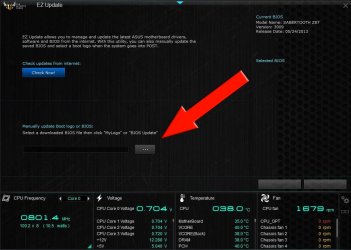
If the files are in the BIOS (which in this case they are) they aren't re-embedded, they just stay there. Formatting your hard drive doesn't affect your BIOS at all so the image will stay there. I only know of one way to change/delete that image and that requires you having one of a certain few ASUS motherboards which carry the 'MyLogo' feature or the 'EZUpdate' feature.

   Warning
Using this feature requires a BIOS flash. Do not continue if you're 100% certain you're comfortable with what you're doing.


Capture3_zps4eaa4292.jpg
 
Last edited:

My Computer My Computer

At a glance

W7 Pro x64 SP1 | W10 Pro IP x64 | W8.1 Pro x6...i7-4790k @ 4GHz (4.4GHz Boost)16GB DDR3 Kingston HyperX Fury @ 1600MHz CL 9...EVGA GTX 980 Classified
Computer type
PC/Desktop
Computer Manufacturer/Model Number
Custom Build
OS
W7 Pro x64 SP1 | W10 Pro IP x64 | W8.1 Pro x64 VM | Linux Mint VM
CPU
i7-4790k @ 4GHz (4.4GHz Boost)
Motherboard
ASUS Sabertooth Z87 (BIOS Rev 2004)
Memory
16GB DDR3 Kingston HyperX Fury @ 1600MHz CL 9-9-9-27
Graphics Card(s)
EVGA GTX 980 Classified
Sound Card
Realtek Onboard
Monitor(s) Displays
Samsung S27D390
Screen Resolution
1920 x 1080
Hard Drives
240GB Intel 520 Series SSD |
Samsung 850 EVO 120GB SSD |
2TB WD Caviar Black |
2TB WD Caviar Green
PSU
Corsair HX850-80 Gold Modular
Case
Cooler Master Silencio 650
Cooling
Corsair H80i w/2 x Corsair SP120 | 2 x 120mm Noctua NF-S12B
Keyboard
Microsoft Sidewinder X4
Mouse
Gigabyte M6900 optical
Internet Speed
152mb
Antivirus
F-Secure
Browser
Firefox 38.0
Other Info
Backup Rig: Win 7 Pro 64-bit | AMD A10-5800k | ASUS F2A85-V Pro | 8GB Samsung DDR3 @1600MHz | 120GB Toshiba SDD | 2TB Seagate HDD | Cooler Master Silencio 550
Think I understand it all now.

The distinction between retail and what came in the box would've been clear to me if I had taken a closer look before starting this string. I just assumed that since it was in a genuine MS cd-box that it was same as a disc that you'd buy off the shelf at Best Buy. In reality, it's very generic looking and bears the words "Intended for distribution with a new PC."

I guess it's safe to assume that I did actually accomplish the full wipe despite the persistence of the logo. And that's really all I was concerned with. But now, just wondering what kind of methods they use to make all this happen. I can imagine that Dell and HP and FalconNW, etc., would send a logo kit to MS who would burn them into the vendor copies. Or maybe they send the same disc to all the vendors with instructions on how to burn their logos on to the disc. Inquiring minds want to know. Thanks guys.
 

My Computer My Computer

At a glance

Win7/64/HomePremium
Computer type
PC/Desktop
Computer Manufacturer/Model Number
Falcon Northwest
OS
Win7/64/HomePremium
Browser
Google Chrome
I guess it's safe to assume that I did actually accomplish the full wipe despite the persistence of the logo. And that's really all I was concerned with.

Yes you will have accomplished that. The boot logo has nothing to with Windows or your hard drive.

But now, just wondering what kind of methods they use to make all this happen. I can imagine that Dell and HP and FalconNW, etc., would send a logo kit to MS who would burn them into the vendor copies. Or maybe they send the same disc to all the vendors with instructions on how to burn their logos on to the disc. Inquiring minds want to know. Thanks guys.

PC manufacturers write their image file into the BIOS. It's nothing to do with the Windows disk.
 

My Computer My Computer

At a glance

W7 Pro x64 SP1 | W10 Pro IP x64 | W8.1 Pro x6...i7-4790k @ 4GHz (4.4GHz Boost)16GB DDR3 Kingston HyperX Fury @ 1600MHz CL 9...EVGA GTX 980 Classified
Computer type
PC/Desktop
Computer Manufacturer/Model Number
Custom Build
OS
W7 Pro x64 SP1 | W10 Pro IP x64 | W8.1 Pro x64 VM | Linux Mint VM
CPU
i7-4790k @ 4GHz (4.4GHz Boost)
Motherboard
ASUS Sabertooth Z87 (BIOS Rev 2004)
Memory
16GB DDR3 Kingston HyperX Fury @ 1600MHz CL 9-9-9-27
Graphics Card(s)
EVGA GTX 980 Classified
Sound Card
Realtek Onboard
Monitor(s) Displays
Samsung S27D390
Screen Resolution
1920 x 1080
Hard Drives
240GB Intel 520 Series SSD |
Samsung 850 EVO 120GB SSD |
2TB WD Caviar Black |
2TB WD Caviar Green
PSU
Corsair HX850-80 Gold Modular
Case
Cooler Master Silencio 650
Cooling
Corsair H80i w/2 x Corsair SP120 | 2 x 120mm Noctua NF-S12B
Keyboard
Microsoft Sidewinder X4
Mouse
Gigabyte M6900 optical
Internet Speed
152mb
Antivirus
F-Secure
Browser
Firefox 38.0
Other Info
Backup Rig: Win 7 Pro 64-bit | AMD A10-5800k | ASUS F2A85-V Pro | 8GB Samsung DDR3 @1600MHz | 120GB Toshiba SDD | 2TB Seagate HDD | Cooler Master Silencio 550

My Computer My Computer

At a glance

Win 10 Pro x64Intel I5-2500K @3.3GHz16GB G.Skill Ripjaws X (4x4GB)EVGA GeForce 750 Ti SC 2GB
Computer type
PC/Desktop
Computer Manufacturer/Model Number
Self Built
OS
Win 10 Pro x64
CPU
Intel I5-2500K @3.3GHz
Motherboard
Asrock P67 Extreme4
Memory
16GB G.Skill Ripjaws X (4x4GB)
Graphics Card(s)
EVGA GeForce 750 Ti SC 2GB
Sound Card
ASUS Xonar DG 5.1 Channels 24-bit 96KHz PCI Interface Sound
Monitor(s) Displays
auria eq2367
Screen Resolution
1920 x 1080
Hard Drives
250GB Samsung 850 EVO SSD
1TB WD Blue
1TB Hitachi
PSU
SeaSonic X 650W 80 Plus Gold
Case
Corsair Obsidian 750D
Cooling
Corsair H60, Three 140mm case fans
Keyboard
Logitech Wireless Keyboard K520
Mouse
Logitech Wireless Mouse M310
Internet Speed
Wave Broadband ~ 100 dn 5 up
Antivirus
Windows Defender, Malwarebytes Premium
Browser
Edge, IE11, Chrome
Other Info
Laptop specs: HP g7-1365dx /
CPU: AMD A6-3420M APU with Radeon(tm) HD Graphics /
RAM: Crucial 8Gb (2x4Gb) /
SSD: Crucial M4-CT128M4SSD2 ATA Device/ FW 000F /
GFX: AMD Radeon HD 6520G /
OS: Windows 10 Pro x64
Thanks to everyone. Just FYI, the video link at end of this post, shows path for changing vendor logos within Windows. But when I followed the path, I found Name: (Default) Type: REG_SZ Data: (value not set). So I guess that pretty well confirms the storage to be in the BIOS (as you said).


My Computer My Computer

At a glance

Win7/64/HomePremium
Computer type
PC/Desktop
Computer Manufacturer/Model Number
Falcon Northwest
OS
Win7/64/HomePremium
Browser
Google Chrome
Thanks to everyone. Just FYI, the video link at end of this post, shows path for changing vendor logos within Windows. But when I followed the path, I found Name: (Default) Type: REG_SZ Data: (value not set). So I guess that pretty well confirms the storage to be in the BIOS (as you said).

That is different than the boot logo,


I'm just a little curious about whether FalconNW actually modified their own BIOS, they don't offer a download for BIOS or even drivers that I can find.

Drivers and Downloads for Custom PCs | Falcon Northwest
 

My Computer My Computer

At a glance

Win 10 Pro x64Intel I5-2500K @3.3GHz16GB G.Skill Ripjaws X (4x4GB)EVGA GeForce 750 Ti SC 2GB
Computer type
PC/Desktop
Computer Manufacturer/Model Number
Self Built
OS
Win 10 Pro x64
CPU
Intel I5-2500K @3.3GHz
Motherboard
Asrock P67 Extreme4
Memory
16GB G.Skill Ripjaws X (4x4GB)
Graphics Card(s)
EVGA GeForce 750 Ti SC 2GB
Sound Card
ASUS Xonar DG 5.1 Channels 24-bit 96KHz PCI Interface Sound
Monitor(s) Displays
auria eq2367
Screen Resolution
1920 x 1080
Hard Drives
250GB Samsung 850 EVO SSD
1TB WD Blue
1TB Hitachi
PSU
SeaSonic X 650W 80 Plus Gold
Case
Corsair Obsidian 750D
Cooling
Corsair H60, Three 140mm case fans
Keyboard
Logitech Wireless Keyboard K520
Mouse
Logitech Wireless Mouse M310
Internet Speed
Wave Broadband ~ 100 dn 5 up
Antivirus
Windows Defender, Malwarebytes Premium
Browser
Edge, IE11, Chrome
Other Info
Laptop specs: HP g7-1365dx /
CPU: AMD A6-3420M APU with Radeon(tm) HD Graphics /
RAM: Crucial 8Gb (2x4Gb) /
SSD: Crucial M4-CT128M4SSD2 ATA Device/ FW 000F /
GFX: AMD Radeon HD 6520G /
OS: Windows 10 Pro x64

My Computer My Computer

At a glance

64-bit Windows 11 Pro for WorkstationsIntel i7-8700K OC'd to 5 GHz64 GB (4x16GB) G.SKILL TridentZ RGB DDR4 3600...ASUS ROG-STRIX-GTX1080TI-O11G-GAMING
Computer type
PC/Desktop
Computer Manufacturer/Model Number
Self built custom
OS
64-bit Windows 11 Pro for Workstations
CPU
Intel i7-8700K OC'd to 5 GHz
Motherboard
ASUS ROG Maximus XI Formula Z390
Memory
64 GB (4x16GB) G.SKILL TridentZ RGB DDR4 3600 MHz
Graphics Card(s)
ASUS ROG-STRIX-GTX1080TI-O11G-GAMING
Sound Card
Integrated
Monitor(s) Displays
2 x Samsung Odyssey G7 27"
Screen Resolution
2560x1440
Hard Drives
1TB Samsung 990 PRO M.2,
4TB Samsung 990 PRO PRO M.2,
TerraMaster F8 SSD Plus NAS
PSU
Seasonic Prime Titanium 850W
Case
Thermaltake Core P3
Cooling
Corsair Hydro H115i
Keyboard
Logitech wireless K800
Mouse
Logitech MX Master 4
Internet Speed
2 Gb/s Download and 100 Mb/s Upload
Antivirus
Malwarebyte Anti-Malware Premium
Browser
Google Chrome
Other Info
Logitech Z625 speaker system,
Logitech BRIO 4K Pro webcam,
HP Color LaserJet Pro MFP M477fdn,
APC SMART-UPS RT 1000 XL - SURT1000XLI,
Galaxy S23 Plus phone
What was explained to me some years ago was that Microsoft sends the OS to the OEMs and their programmers do their thing with it, printed the disc/s with their logo and stuff. The last several years have seen the OEMs leaving out the discs but sometimes making them an option. The OEM puts a small program on the computer that allows creating those discs after the setup, best to do so because if the HDD actually crashes the Factory Restore partition may also be lost. Sometimes one can get the discs for a fee if the computer isn't too old [who knows when that is]. When I have to set up a new computer I will take a few DVD-R or DVD+R discs with me to do it. Can't use the RW discs. Some OEMs set the program to make DVD+R/DL discs, takes one or two less that the other.

For OEM computers look at the My Computer/Computer, Properties, the Product Key will not be shown but the second group of characters on Product ID: will be OEM while the Retail version and maybe Enterprise or NFR versions will be 3 numbers.
 

My Computer My Computer

At a glance

Windows 7 Ultimate 64-bit, Windows 8.1 64-bit...
Computer type
PC/Desktop
Computer Manufacturer/Model Number
Customs, Dell, Gateway, HP, Toshiba, Acer, ASUS
OS
Windows 7 Ultimate 64-bit, Windows 8.1 64-bit, Mac OS X 10.10, Linux Mint 17, Windows 10 Pro TP
Keyboard
Microsoft
Mouse
Microsoft
Back
Top