Unknown IP camera keeps showing up in my network, cant get rid of it.

davucini

New member
Local time
4:04 PM
Messages
4
Hi,

I am having an issue with an unknown camera showing up in my network, and its making me kind of paranoid

So I have 3 pcs in my house, all running windows 7 home premium 64bit, they are connected to my netgear r7000 router, which is connected to my verizon fios ONT. 2 are connected directly with Ethernet cables, one is connected with Wifi.

So on all 3 computer when I go to "network" a camera shows up on the network. The problem is that it is not my camera, sometimes if I refresh the "network" the camera will go away, but later it will show up again. I tried to do research on the camera and there is almost nothing about the it. The model number does show up as a camera used by ADT security, but I never ever have had ADT security.

I did all the regular stuff, reset comps/routers/internet, restore everything to default, upgrade firmware, etc but nothing helped. I thought if I could block this camera on my router side it would go away. I right clicked the camera and went to properties to get the mac address. Then I blocked the mac address in my router settings. But it still shows up in my "network" page. When I log into the router settings (192.168.1.1), there is no camera shown as a connected device. Also when I look at properties for the camera there is no ip address for it. So this is making me a bit paranoid. I am pretty tech savvy and I have searched Google extensively for solutions but this has me stumped. If anyone can help I would be grateful.

I have 2 screenshots to help explain my situation.

0f547f00c8614757cb4c.jpg


0f547f00c8614757cb4c_2.jpg
 

My Computer My Computer

At a glance

Windows 7, home premium, 64bit
Computer type
PC/Desktop
OS
Windows 7, home premium, 64bit

My Computer My Computer

At a glance

Windows 7 ultimate 64-bitIntel I7 2600K 3.4ghzCorsair 16gb ddr3 1600mhzNvidia Geforce gt 430
Computer type
PC/Desktop
Computer Manufacturer/Model Number
custom built
OS
Windows 7 ultimate 64-bit
CPU
Intel I7 2600K 3.4ghz
Motherboard
Asus Evo P8P67
Memory
Corsair 16gb ddr3 1600mhz
Graphics Card(s)
Nvidia Geforce gt 430
Sound Card
Sound Blaster Titanium x-fi pci express
Monitor(s) Displays
Dell E198WFP
Hard Drives
1 western digital 2TB drive.
PSU
Antec 1200 watt
Case
Inwin Dragon Rider
Cooling
6 case supplied cooling fans
Keyboard
logitech mk700
Mouse
logitech m705
Internet Speed
25-50mbps download; 10mbps upload(i think)
Antivirus
avg free 2014
Browser
mozilla firefox
Other Info
Also have a pretty bad speaker setup which is a klipsch promedia 5.1 surround speaker setup with huge subwoofer and lg blu ray player/writer. Also a hp officejet pro 8600 plus wireless all in one and a logitech s7500 webcam.
I would do a scan for malware and spyware and adware using the following links; download, install, and run the spyware and malware and adware programs:

Downloading AdwCleaner

SUPERAntiSpyware - Downloading File

https://www.malwarebytes.org/mwb-download/

Try these programs and see if it finds anything and gets rid of it for ya. If not; post back here and we can go from there.


Hi Matt, thanks for responding

I had previously malwarebytes scans on all computers and nothing showed up. I even went as far as complete clean re-install of windows 7 on a new hard drive for one of my wired PCs and the camera still showed up.

Nevertheless I did install and scan will all the programs you mentioned and the only one to find anything was the ADWcleaner on one of the PCs, but it was just an aol toolbar hiding in a dormant browser I dont use anymore. The other 2 pcs were clean.

The camera still shows up.

If you have anymore suggestions I am eager and thankful to read them

-----------------

Did a little more digging, it seems this is an wifi camera, when i go to "add devices" thats what it lists as

here is a picture if it helps

ac2d6923e40e1c05b5b7_1.jpg
 
Last edited:

My Computer My Computer

At a glance

Windows 7, home premium, 64bit
Computer type
PC/Desktop
OS
Windows 7, home premium, 64bit
From post #3

I had previously malwarebytes scans on all computers and nothing showed up. I even went as far as complete clean re-install of windows 7 on a new hard drive for one of my wired PCs and the camera still showed up.
This does not add up. (Clean re-install of Windows 7)

We are missing some information.

Are these computers in a domain/network?
Are any of these computers a laptop with a built in camera?
Was the computer you did a clean re-install hooked to the network at the time of the install?
A clean install of Windows 7 does not install cameras.

How did you do a clean re-install?
Did you do it like one of these tutorial. If so which one.

By Brink:
http://www.sevenforums.com/tutorials/1649-clean-install-windows-7-a.html


By Bare Foot Kid:
http://www.sevenforums.com/tutorials/174907-clean-install-factory-coa-activation-key.html


By Gregrocker:
http://www.sevenforums.com/tutorials/219487-clean-reinstall-factory-oem-windows-7-a.html

Could you post the System Specs of the troubled computer?


http://www.sevenforums.com/tutorials/180324-system-info-see-your-system-specs.html
 

My Computer My Computer

At a glance

Windows 10 Pro. 64/ version 1709 Windows 7 Pr...Intel i7-6800K @ 4.3Corsair Platinum 16 gig @2400EVGA GTX 1070 OC
Computer type
PC/Desktop
Computer Manufacturer/Model Number
Home made Desktop
OS
Windows 10 Pro. 64/ version 1709 Windows 7 Pro/64
CPU
Intel i7-6800K @ 4.3
Motherboard
ASUS X-99 Deluxe II
Memory
Corsair Platinum 16 gig @2400
Graphics Card(s)
EVGA GTX 1070 OC
Monitor(s) Displays
Asus 27" LED LCD/VE278Q
Screen Resolution
1920-1080 or 1280-720 HDMI
Hard Drives
INTEL SSD 730-240 Gb Sata 3.0/
PSU
EVGA Platium 1200W
Case
Phanteks Luxe Tempered Glass 8 fans/ one radiator
Cooling
XSPC/ Water Cooled CPU
Keyboard
Das 4 Professional
Mouse
Logitech M705/MX Anywhere 2-S
Internet Speed
100 mbits
Antivirus
Microsoft Security Essentials/ Malwarebytes Premium 3.0/ SAS
Browser
I.E. 11 default/Firefox/ ISP Time Warner Cable/Spectrum
Other Info
LG BluRay Burner/
Sound system-KLipsch-THX/
Icy Dock ssd Hot Swap bays.
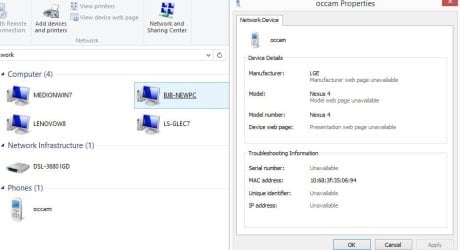
I get something very similar, in my case it's called a Phone but its Properties reveal it as a Nexus 4 tablet. It does not show in my router as a connected client and it has no IP. I believe it's probably located next door as there are no Nexus tablets here. It disappears off the network map after a short while but usually reappears if I refresh it. It used to be a concern but I no longer worry about it as without an IP it can't access my internet connection nor, more importantly, my home network.

EDIT - it's now disappeared so I guess that whoever was using it has turned it off, which happens a lot. Perhaps the camera you are seeing is a security camera on a nearby property. If so that would always be on.
 

Attachments

  • Capture.JPG
    Capture.JPG
    45.1 KB · Views: 2
Last edited:

My Computer My Computer

At a glance

Windows 7 Pro 64 bitIntel i58GB KINGSTON DUAL-DDR3 1600MHz2GB AMD RADEON™ R7 250
Computer type
PC/Desktop
Computer Manufacturer/Model Number
PC Specialist Custom
OS
Windows 7 Pro 64 bit
CPU
Intel i5
Motherboard
ASUS® H81M-PLUS
Memory
8GB KINGSTON DUAL-DDR3 1600MHz
Graphics Card(s)
2GB AMD RADEON™ R7 250
Hard Drives
120GB KINGSTON V300 SSD
1TB WD CAVIAR BLACK WD1003FZEX
I have phones and other devices show up here all the time. They come and go. Windows picks up all kinds of wireless devices on different networks, even when they aren't connected to your own network.

This is typical Windows behavior and it doesn't mean you are being spied on or that you have malware.
 

My Computer My Computer

At a glance

Windows 7 Ult, Windows 8.1 Pro,Q9650-4.275GHz, E8600 4.5GHz, E6750-3.8GHzG.Skill PC2 9600 1200Mhz 5 5 5 15 2TGTX480
Computer type
PC/Desktop
Computer Manufacturer/Model Number
Home built
OS
Windows 7 Ult, Windows 8.1 Pro,
CPU
Q9650-4.275GHz, E8600 4.5GHz, E6750-3.8GHz
Motherboard
Evga 780i FTW
Memory
G.Skill PC2 9600 1200Mhz 5 5 5 15 2T
Graphics Card(s)
GTX480
Sound Card
Asus Xonar D2
Monitor(s) Displays
HannsG
Screen Resolution
1680X1050
Hard Drives
GSkill Phoenix Pro 120GB SSD
PSU
ThermalTake Toughpower 1000Watt modular
Case
ThermalTake XaserV
Cooling
Xigmatek S1283
Keyboard
Logitech G15
Mouse
Logitech G9
Internet Speed
T1
Chev65 I need help here to understand.
I don't use wifi anything.

I'm I correct that when installing Windows 7 is does not install wifi?
One has to do that after the install is completed if one wants wifi.

So after a re-install how does one pickup wifi hardware until they install wifi on that computer?

I could be learning along with davucini.
 

My Computer My Computer

At a glance

Windows 10 Pro. 64/ version 1709 Windows 7 Pr...Intel i7-6800K @ 4.3Corsair Platinum 16 gig @2400EVGA GTX 1070 OC
Computer type
PC/Desktop
Computer Manufacturer/Model Number
Home made Desktop
OS
Windows 10 Pro. 64/ version 1709 Windows 7 Pro/64
CPU
Intel i7-6800K @ 4.3
Motherboard
ASUS X-99 Deluxe II
Memory
Corsair Platinum 16 gig @2400
Graphics Card(s)
EVGA GTX 1070 OC
Monitor(s) Displays
Asus 27" LED LCD/VE278Q
Screen Resolution
1920-1080 or 1280-720 HDMI
Hard Drives
INTEL SSD 730-240 Gb Sata 3.0/
PSU
EVGA Platium 1200W
Case
Phanteks Luxe Tempered Glass 8 fans/ one radiator
Cooling
XSPC/ Water Cooled CPU
Keyboard
Das 4 Professional
Mouse
Logitech M705/MX Anywhere 2-S
Internet Speed
100 mbits
Antivirus
Microsoft Security Essentials/ Malwarebytes Premium 3.0/ SAS
Browser
I.E. 11 default/Firefox/ ISP Time Warner Cable/Spectrum
Other Info
LG BluRay Burner/
Sound system-KLipsch-THX/
Icy Dock ssd Hot Swap bays.
Chev65 I need help here to understand.
I don't use wifi anything.

I'm I correct that when installing Windows 7 is does not install wifi?
One has to do that after the install is completed if one wants wifi.

So after a re-install how does one pickup wifi hardware until they install wifi on that computer?

I could be learning along with davucini.

I believe it's picking up wireless devices that the router see's through the wireless radio then assumes they are part of the local network and so places them under devices.

This problem has come up multiple times and there never seems to a virus associated with the problem.
 

My Computer My Computer

At a glance

Windows 7 Ult, Windows 8.1 Pro,Q9650-4.275GHz, E8600 4.5GHz, E6750-3.8GHzG.Skill PC2 9600 1200Mhz 5 5 5 15 2TGTX480
Computer type
PC/Desktop
Computer Manufacturer/Model Number
Home built
OS
Windows 7 Ult, Windows 8.1 Pro,
CPU
Q9650-4.275GHz, E8600 4.5GHz, E6750-3.8GHz
Motherboard
Evga 780i FTW
Memory
G.Skill PC2 9600 1200Mhz 5 5 5 15 2T
Graphics Card(s)
GTX480
Sound Card
Asus Xonar D2
Monitor(s) Displays
HannsG
Screen Resolution
1680X1050
Hard Drives
GSkill Phoenix Pro 120GB SSD
PSU
ThermalTake Toughpower 1000Watt modular
Case
ThermalTake XaserV
Cooling
Xigmatek S1283
Keyboard
Logitech G15
Mouse
Logitech G9
Internet Speed
T1
Turn off universal plug and play in your router settings. Poof gone. Problem should then be solved.

Universal Plug and Play - Wikipedia, the free encyclopedia

Windows will show these devices in your network folder when the device is available to be used, or available to be installed on the system.

From your screenshot though, you have network discovery turned off. Which makes my above point irrelevant. (I still always recommend disabling UP&P on your router for security reasons.) With that turned off, windows will not show any devices it discovered on the network.

This means the following must be true:

-The device is not part of your network
-The device may or may not be a camera. It might for example be another device wrongly flagged as a camera.
-Since network discovery is off, it is something attached to your pc or avalible with something like bluetooth that does not deal with your actual network.


It may be a bluetooth device, such as a phone or wireless memory card, being detected as a camera. The window you show in the second screenshot is where windows uses all wireless means and wired means to search for new devices to install. It could be a neighbors wireless camera it is detecting by bluetooth or infrared.

Do all the pcs have bluetooth or are wireless in some way? You have a couple media tuners, it could be one of them.

What happens when you right click on it and choose view device webpage vs properties?
 
Last edited:

My Computer My Computer

At a glance

Windows 10 ProAMD Ryzen 5 2400G Processor with Radeon RX Ve...G.SKILL Ripjaws V Series 16GB (2 x 8GB) 288-P...2047MB NVIDIA GeForce GTX 1060 6GB (EVGA)
Computer type
PC/Desktop
Computer Manufacturer/Model Number
Custom Built
OS
Windows 10 Pro
CPU
AMD Ryzen 5 2400G Processor with Radeon RX Vega 11 Graphics
Motherboard
ASRock X470 Master SLI/AC AM4 AMD Promontory X470 SATA 6Gb/s
Memory
G.SKILL Ripjaws V Series 16GB (2 x 8GB) 288-Pin DDR4 SDRAM D
Graphics Card(s)
2047MB NVIDIA GeForce GTX 1060 6GB (EVGA)
Sound Card
Motherboard Built in
Monitor(s) Displays
Acer R240HY bidx 23.8-Inch IPS HDMI DVI VGA (1920 x 1080) Wi
Screen Resolution
1920 x 1080
Hard Drives
1TB Sandisk SSD PLUS (Main drive)
500 GB Seagate 7200 RPM (Games)
500 GB Western Digital 7200 RPM (Virtual Machines)
PSU
CORSAIR TX Series TX650M 650W 80+ Gold Modular Power Supply
Case
CORSAIR CARBIDE SPEC-02 Mid-Tower Gaming Case, Red LED Fan
Cooling
220mm, two 120mm, and four 60mm fans
Keyboard
Wired Dell keyboard
Mouse
Wireless Logitech mouse
Internet Speed
250mb down, 30mb up
Antivirus
Panda Cloud Antivirus
Browser
Chrome-ish x64
Other Info
Your awesome for reading this.
I have phones and other devices show up here all the time. They come and go. Windows picks up all kinds of wireless devices on different networks, even when they aren't connected to your own network.

This is typical Windows behavior and it doesn't mean you are being spied on or that you have malware.

I believe I'm inclined to agree with chev here. Windows does have
It's peculiarities on plenty of occasions. More than I would like to say lol. So yea it's probably nothing. Like one of the others mentioned as long as their is no IP address attached to it i wouldn't worry about it. Just
My .02 here.
 

My Computer My Computer

At a glance

Windows 7 ultimate 64-bitIntel I7 2600K 3.4ghzCorsair 16gb ddr3 1600mhzNvidia Geforce gt 430
Computer type
PC/Desktop
Computer Manufacturer/Model Number
custom built
OS
Windows 7 ultimate 64-bit
CPU
Intel I7 2600K 3.4ghz
Motherboard
Asus Evo P8P67
Memory
Corsair 16gb ddr3 1600mhz
Graphics Card(s)
Nvidia Geforce gt 430
Sound Card
Sound Blaster Titanium x-fi pci express
Monitor(s) Displays
Dell E198WFP
Hard Drives
1 western digital 2TB drive.
PSU
Antec 1200 watt
Case
Inwin Dragon Rider
Cooling
6 case supplied cooling fans
Keyboard
logitech mk700
Mouse
logitech m705
Internet Speed
25-50mbps download; 10mbps upload(i think)
Antivirus
avg free 2014
Browser
mozilla firefox
Other Info
Also have a pretty bad speaker setup which is a klipsch promedia 5.1 surround speaker setup with huge subwoofer and lg blu ray player/writer. Also a hp officejet pro 8600 plus wireless all in one and a logitech s7500 webcam.
From post #3

I had previously malwarebytes scans on all computers and nothing showed up. I even went as far as complete clean re-install of windows 7 on a new hard drive for one of my wired PCs and the camera still showed up.
This does not add up. (Clean re-install of Windows 7)

We are missing some information.

Are these computers in a domain/network?
Are any of these computers a laptop with a built in camera?
Was the computer you did a clean re-install hooked to the network at the time of the install?
A clean install of Windows 7 does not install cameras.

How did you do a clean re-install?
Did you do it like one of these tutorial. If so which one.

By Brink:
http://www.sevenforums.com/tutorials/1649-clean-install-windows-7-a.html


By Bare Foot Kid:
http://www.sevenforums.com/tutorials/174907-clean-install-factory-coa-activation-key.html


By Gregrocker:
http://www.sevenforums.com/tutorials/219487-clean-reinstall-factory-oem-windows-7-a.html

Could you post the System Specs of the troubled computer?


http://www.sevenforums.com/tutorials/180324-system-info-see-your-system-specs.html

More Info: These computers are on a network, after the clean install I did connect it to a network, not during the install, because the clean install was on my htpc, and I use a network cablecard tuner for my television, the screenshots are not from the pc with the clean install.


How I did the clean install-

took an old sata II 2.5 inch drive from an old laptop,

used killdisk to erase everything,

then installed in the pc and did an install of windows 7 home premium, from an authentic disk I bought on Newegg years ago when I made this pc.


The camera isnt "installed", but you know how if you have a printer on network or a bluetooth device, and you go to "add devices" and it scans for devices, there it shows up.
The camera shows up an all the 3 pcs, its why I think it is an actual wifi camera, maybe a neighbor's, I just dont understand why it shows up the "network" page.

Maybe as another poster said, windows just picks up things, even not in the network, if so that would bring me a little bit for comfort, since I do believe my next door neighbor does had a ADT. I did a reverse check of the MAC address using an online directory , MAC_Find: Vendor/Ethernet/Bluetooth MAC Address Lookup and Search, and it did point to a company that makes IP cameras( Sercomm ), and is a provider to ADT security. I would ask my neighbor but they are never home or sleeping, I think they work graveyard or something where they have a weird schedule.

Lastly I did have a built in webcam in my laptop, but I had opened it up and phsyically unplugged it from the circuit board, 2 years ago when I got the laptop, I am a little paranoid :D

Thanks for taking time to help me
 

My Computer My Computer

At a glance

Windows 7, home premium, 64bit
Computer type
PC/Desktop
OS
Windows 7, home premium, 64bit
I get something very similar, in my case it's called a Phone but its Properties reveal it as a Nexus 4 tablet. It does not show in my router as a connected client and it has no IP. I believe it's probably located next door as there are no Nexus tablets here. It disappears off the network map after a short while but usually reappears if I refresh it. It used to be a concern but I no longer worry about it as without an IP it can't access my internet connection nor, more importantly, my home network.

EDIT - it's now disappeared so I guess that whoever was using it has turned it off, which happens a lot. Perhaps the camera you are seeing is a security camera on a nearby property. If so that would always be on.

I have phones and other devices show up here all the time. They come and go. Windows picks up all kinds of wireless devices on different networks, even when they aren't connected to your own network.

This is typical Windows behavior and it doesn't mean you are being spied on or that you have malware.

Chev65 I need help here to understand.
I don't use wifi anything.

I'm I correct that when installing Windows 7 is does not install wifi?
One has to do that after the install is completed if one wants wifi.

So after a re-install how does one pickup wifi hardware until they install wifi on that computer?

I could be learning along with davucini.

I believe it's picking up wireless devices that the router see's through the wireless radio then assumes they are part of the local network and so places them under devices.

This problem has come up multiple times and there never seems to a virus associated with the problem.

Turn off universal plug and play in your router settings. Poof gone. Problem should then be solved.

Universal Plug and Play - Wikipedia, the free encyclopedia

Windows will show these devices in your network folder when the device is available to be used, or available to be installed on the system.

From your screenshot though, you have network discovery turned off. Which makes my above point irrelevant. (I still always recommend disabling UP&P on your router for security reasons.) With that turned off, windows will not show any devices it discovered on the network.

This means the following must be true:

-The device is not part of your network
-The device may or may not be a camera. It might for example be another device wrongly flagged as a camera.
-Since network discovery is off, it is something attached to your pc or avalible with something like bluetooth that does not deal with your actual network.


It may be a bluetooth device, such as a phone or wireless memory card, being detected as a camera. The window you show in the second screenshot is where windows uses all wireless means and wired means to search for new devices to install. It could be a neighbors wireless camera it is detecting by bluetooth or infrared.

Do all the pcs have bluetooth or are wireless in some way? You have a couple media tuners, it could be one of them.

What happens when you right click on it and choose view device webpage vs properties?


Thanks guys, after your suggestions my heart is at ease, 99% of me thought it might be something like this, but that 1% of my psyche is very very loud and hard to ignore. I do used PNP to stream from my DNLA cablecard tuner and attached hardrive to my smartTV with built in DNLA features. And with you guys saying windows picks up signals that aren't necessarily on the network, along with my router settings not showing this device as a connected device in the network, I believe I can quiet down the scared little voice in my head... at least enough to be drowned out by the cooling fans in my PC. :)
 

My Computer My Computer

At a glance

Windows 7, home premium, 64bit
Computer type
PC/Desktop
OS
Windows 7, home premium, 64bit
Do you have an Open network instread of security enabled WEP/WPA TKIP/WPA2 AES network. An open network you wouldn't enter a Network key at all. Hover over the network SSID it will tell you.

No IP address would suggest it comes from your network.

A simple test would be do a test where you switch the pc, Laptop, tuners on one at a time turning them off until you have IP camera appear. Do this at a time when the IP camera appears in Network.
 

My Computer My Computer

At a glance

Windows 7 Ultimate x64AMD turion 64x2 TL-64 2.2GhzSodimm DDR2 4GBATI Radeon 1250 128MB IGP
Computer Manufacturer/Model Number
HP Compaq 6715B
OS
Windows 7 Ultimate x64
CPU
AMD turion 64x2 TL-64 2.2Ghz
Motherboard
HC030
Memory
Sodimm DDR2 4GB
Graphics Card(s)
ATI Radeon 1250 128MB IGP
Hard Drives
Fujitsu Siemens 500GB sata 3.0 Gb/s
No IP address would suggest it comes from your network.
No IP address suggests it comes from OUTSIDE the network. Every device ON the network will have an IP address.
 

My Computer My Computer

At a glance

Windows 7 Pro 64 bitIntel i58GB KINGSTON DUAL-DDR3 1600MHz2GB AMD RADEON™ R7 250
Computer type
PC/Desktop
Computer Manufacturer/Model Number
PC Specialist Custom
OS
Windows 7 Pro 64 bit
CPU
Intel i5
Motherboard
ASUS® H81M-PLUS
Memory
8GB KINGSTON DUAL-DDR3 1600MHz
Graphics Card(s)
2GB AMD RADEON™ R7 250
Hard Drives
120GB KINGSTON V300 SSD
1TB WD CAVIAR BLACK WD1003FZEX
I don't think you right every machine would have an IP address, unless, it is from a parent device which would have an IP address in your network the OP has not seen anything else.
 

My Computer My Computer

At a glance

Windows 7 Ultimate x64AMD turion 64x2 TL-64 2.2GhzSodimm DDR2 4GBATI Radeon 1250 128MB IGP
Computer Manufacturer/Model Number
HP Compaq 6715B
OS
Windows 7 Ultimate x64
CPU
AMD turion 64x2 TL-64 2.2Ghz
Motherboard
HC030
Memory
Sodimm DDR2 4GB
Graphics Card(s)
ATI Radeon 1250 128MB IGP
Hard Drives
Fujitsu Siemens 500GB sata 3.0 Gb/s
I know this is an old thread, but people with the identical problem will read it from start to finish searching for a solution, and it doesn't quite have one. I'm curious if the OP ever found out what was going on.

I had the same problem, slept on it, and it didn't show up the next morning. I'm a bit less paranoid about it, because a bigger concern would be if I actually had such a camera and it showed up on somebody else's network. Since it's not my camera, giving me access to it is the opposite of scary. The solution would be to install the drivers if it were that simple. Then I might see the feed from the camera and see if it looks familiar and figure out where it is. Since it appears to be a security camera and ADT's documented installation guide gives me the impression that I'm supposed to have a very specific gateway and corresponding software, I assume they went out of their way not to let strangers have a way of getting access to it.

If it does show up again, I'll probably have a very hard time getting access to its feed, if I can do so at all, but I'm still curious why it's showing up on my network. If I were an ADT customer who happened to have found this thread by searching for the camera model number, I'd want to know why it's showing up on my neighbor's computer.
 

My Computer My Computer

At a glance

Windows 7 Professional x64
OS
Windows 7 Professional x64
It is unlikely that the OP will still be watching this thread as they last visited in May 2014 - but you never know

A lot of modern security devices actually contain their own router which allows the owner to view the feed on their mobile devices (laptops, phones, Etc.). these are often set to broadcast on one of the "private" network sub-nets, (192.168.nnn.nnn etc). Unfortunately the manufacturers are not that adventurous and can often use common names for SSID and ranges such as 192.168.1.1 - 192.168.1.256 and sometimes this will result in them showing up in the wireless devices of neighbours systems.

You might want to change your SSID to a unique one identifiable to yourself, and change the IP address range to something different (this is a good general idea anyway as it gives a slight improvement in security over using defaults - this also applies to wireless passphrase and router admin password and even name - Check your router manual ;)
 

My Computers My Computers

  • At a glance

    Windows 11 Pro x64 [Latest Release and Releas...Ryzen 9 5950X, 3.8 - 5.2 MHz64GB [2 x 32GB] DDR4 3200MHz4GB NVIDIA GEFORCE GTX 1650 Ti
    Computer type
    PC/Desktop
    Computer Manufacturer/Model Number
    ChillBlast - Custom to my design
    OS
    Windows 11 Pro x64 [Latest Release and Release Preview]
    CPU
    Ryzen 9 5950X, 3.8 - 5.2 MHz
    Motherboard
    Asus Prime X570-Pro
    Memory
    64GB [2 x 32GB] DDR4 3200MHz
    Graphics Card(s)
    4GB NVIDIA GEFORCE GTX 1650 Ti
    Sound Card
    On-board SPDIF to 5.1 System + HDMI [5.1 system]
    Monitor(s) Displays
    32" UHD 32 Bit HDR Monitor + 43" UHD 4K 32Bit HDR TV
    Screen Resolution
    2 x 3840 x 2160 @60Hz
    Hard Drives
    1TB M2 SSD OS, 500GB Fast Access SSD, 2 x 8TB Data + Various Externals from 1TB to 4TB, 10TB NAS
    PSU
    NZXT C750 80 PLUS Gold 750W Modular PSU
    Case
    Workstation Case [Matt Black]
    Cooling
    NZXT Kraken X63 280mm CPU Cooler +2x Quiet Case fans
    Keyboard
    Logitech Wireless MX Keys & K400 + others
    Mouse
    Logitech Wireless MX Master 3S
    Internet Speed
    920 MB Down 50 MB Up
    Antivirus
    BitDefender Total Security Pro
    Browser
    Chrome (always run latest Non-Beta)
    Other Info
    Also run ...
    Laptop - Quad 8GB - Windows 10 Pro x64
    Nexus 7 Android tablet x2
    Samsung 10.2" tablet
    Blackview TAB 8 4G Android Tablet c/w Keyboard
    Wacom Intuos Pro Medium Pen Pad
    Wacom Intuos Pro Small Pen Pad
    Wacom Expresskeys Remote
    Loopdeck+ Graphics Controller
    Shuttle Pro v2 Control
  • At a glance

    Windows 11 Pro x64 Latest RPIntel I7 10750H 5.0GHz32GB [2x16GB] DDR4 2933 MHznVidia GTX1650Ti 4 GB GDDR6
    Computer type
    Laptop
    System Manufacturer/Model Number
    Dell XPS 17 10750H
    OS
    Windows 11 Pro x64 Latest RP
    CPU
    Intel I7 10750H 5.0GHz
    Motherboard
    Dell XPS
    Memory
    32GB [2x16GB] DDR4 2933 MHz
    Graphics Card(s)
    nVidia GTX1650Ti 4 GB GDDR6
    Sound Card
    Stock [Realtek] 4 Speaker
    Monitor(s) Displays
    17" IPS UHD+ Infinity Edge Touchscreen
    Screen Resolution
    3840 x 2400
    Hard Drives
    2TB M2 NVMe, 4TB External + various 500GB & 1TB External NVMe (also have access to spinner HDD from
    PSU
    Stock
    Case
    Stock XPS Aluminium & Carbon Fibre
    Cooling
    Stock - Active Fan Control
    Keyboard
    Backlit + Various Logitech
    Mouse
    Stock Track Pad + Logitech MX Trackball
    Internet Speed
    72 MB Down 18MB Up
    Browser
    Chrome
    Other Info
    Also run ...
    Laptop - Quad 8GB - Windows 10 Pro x64
    Nexus 7 Android tablet x2
    10.2" tablet
    Sony Z3 Android Smartphone
    Wacom Intuos Pro Medium Pen Pad
    Wacom Intuos Pro Small Pen Pad
    Wacom Expresskeys Remote
    Loopdeck+ Graphics Controller
    Shuttle Pro v2 Control Pad
    10TB NAS
I had the same camera pop up on my Windows 7 Pro system after I paired my ZTE smart phone with it.
 

My Computer My Computer

At a glance

Window 7 Pro 64 biti7-3520M8 GB?
Computer type
PC/Desktop
Computer Manufacturer/Model Number
Lenovo/T530
OS
Window 7 Pro 64 bit
CPU
i7-3520M
Motherboard
?
Memory
8 GB
Graphics Card(s)
?
Hard Drives
Solid state
Antivirus
Norton
Browser
Internet Explorer, Chrome
Hi, I found this thread because, due to some change in the last 23 days since I last looked at my network, that weird camera popped up last night in the Network window. I went to log in to my router to try turning off 'network discovery', or at least UPNP - and I couldn't. The username or/and password were not the default, nor what I had written down.

So I hard reset it, and re-did those, and now the camera no longer appears. Last time I messed with it, I'd set up a bunch of not-too-power-user-ish things, but beyond stock, and perhaps something there was allowing the camera to appear. Still, since my login credentials were no longer valid/known, I suspect something more nefarious. I recommend doing as I described above.
 

My Computer My Computer

At a glance

Windows 7 Pro x64
Computer type
PC/Desktop
OS
Windows 7 Pro x64
I know that this is an old thread, but I thought I'd throw in my 2c. Go into your router, get the MAC addresses of all your legitimate devices, and set up restrictions so that only those devices are allowed to connect. This will stop the "camera" and all other unknown/unauthorized devices from connecting to your router. Save the list of legitimate MAC addresses for future reference.

Make sure that you have encryption turned on in your router -- WPA2 is what you should be using. (If you weren't already using WPA2, then you'll need to establish a new connection on each authorized device after doing this.)

Make sure you have a password set, both for accessing your wireless network, and for accessing the administrative areas of your router. (Use a different password for each.)

If there is something nefarious going on here (i.e. if someone is trying hack your network), then they might know how to get around these restrictions (i.e. they could change their MAC address to a legitimate one). Therefore, from time to time, you should log into your router and see which devices are connected. Compare to the authorized list, to see if anything is connecting which shouldn't be.
 

My Computer My Computer

At a glance

Linux Mint 18.2 xfce 64-bit (VMWare host) / W...Haswell4 GB
Computer type
PC/Desktop
Computer Manufacturer/Model Number
Dell
OS
Linux Mint 18.2 xfce 64-bit (VMWare host) / Windows 8.1 Pro 32-bit (VMWare guest)
CPU
Haswell
Memory
4 GB
Monitor(s) Displays
Acer 23"
Screen Resolution
1920 x 1080
Hard Drives
Two hard drives, 1TB each: One for Linux, one for my data.
Keyboard
IBM Model M
Antivirus
Sophos (Linux), Trend Micro (Windows)
Browser
Firefox, Opera
Other Info
I use Samba to share my data drive with the other computers at my house and with my guest session in VMWare Workstation Player.
Back
Top