Solved USB Devices not working properly - Keyboard/Headset

Slowlyklasse

New member
Local time
4:17 PM
Messages
6
So both my headset and my keyboard, has multimediabuttons, like play/pause, volume controlls etc. But no one seems to work properly. I had the headset for a couple of months, but didn't really deal with the problem since everything else worked fine, but now with the recent purchase of a new keyboard, it doesn't work here either. It is not driver issues, and not hardware issues, so I have no idea what to do, I am bit of a newbie on computers, but my guess is that it is something wrong with Registry somehow or something. :confused:
Now I have contacted the support from the keyboard manufacter, and they want me to send it to them, but since I don't think it is a hardware issue and really don't have the time to send it, so im looking for help here

Headset - Creative Soundblaster Tactic 3D Wrath
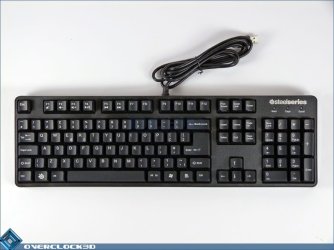
Keyboard - Steelseries 6Gv2

I would really appreciate some help
 

My Computer My Computer

Computer type
PC/Desktop
Computer Manufacturer/Model Number
Custom Build
OS
Windows 7 Ultimate 64 bit
CPU
Intel Core i5-2500k 3.30GHz
Motherboard
Gigabyte Z68XP-UD3P
Memory
8 GB
Graphics Card(s)
Gigabyte GTX 680 4 GB
Hard Drives
SSD 60GB - 500GB Elements - 300GB Hard drive
Antivirus
AVG
Browser
Chrome
It is not driver issues, and not hardware issues

I take it from this you've installed the relevant software that came with the peripherals?
 

My Computer My Computer

Computer type
PC/Desktop
Computer Manufacturer/Model Number
Custom Build
OS
W7 Pro x64 SP1 | W10 Pro IP x64 | W8.1 Pro x64 VM | Linux Mint VM
CPU
i7-4790k @ 4GHz (4.4GHz Boost)
Motherboard
ASUS Sabertooth Z87 (BIOS Rev 2004)
Memory
16GB DDR3 Kingston HyperX Fury @ 1600MHz CL 9-9-9-27
Graphics Card(s)
EVGA GTX 980 Classified
Sound Card
Realtek Onboard
Monitor(s) Displays
Samsung S27D390
Screen Resolution
1920 x 1080
Hard Drives
240GB Intel 520 Series SSD |
Samsung 850 EVO 120GB SSD |
2TB WD Caviar Black |
2TB WD Caviar Green
PSU
Corsair HX850-80 Gold Modular
Case
Cooler Master Silencio 650
Cooling
Corsair H80i w/2 x Corsair SP120 | 2 x 120mm Noctua NF-S12B
Keyboard
Microsoft Sidewinder X4
Mouse
Gigabyte M6900 optical
Internet Speed
152mb
Antivirus
F-Secure
Browser
Firefox 38.0
Other Info
Backup Rig: Win 7 Pro 64-bit | AMD A10-5800k | ASUS F2A85-V Pro | 8GB Samsung DDR3 @1600MHz | 120GB Toshiba SDD | 2TB Seagate HDD | Cooler Master Silencio 550
It is not driver issues, and not hardware issues

I take it from this you've installed the relevant software that came with the peripherals?

Indeed, on the headset I did, but the keyboard didn't get any, nor could I find it online, it seems to install through just plugging it in.
 

My Computer My Computer

Computer type
PC/Desktop
Computer Manufacturer/Model Number
Custom Build
OS
Windows 7 Ultimate 64 bit
CPU
Intel Core i5-2500k 3.30GHz
Motherboard
Gigabyte Z68XP-UD3P
Memory
8 GB
Graphics Card(s)
Gigabyte GTX 680 4 GB
Hard Drives
SSD 60GB - 500GB Elements - 300GB Hard drive
Antivirus
AVG
Browser
Chrome
Is this your keyboard? You have to press the Steel Series key (in place of the Windows key) then the relevant F key to use the media control keys.

11214754259l.JPG
 

My Computer My Computer

Computer type
PC/Desktop
Computer Manufacturer/Model Number
Custom Build
OS
W7 Pro x64 SP1 | W10 Pro IP x64 | W8.1 Pro x64 VM | Linux Mint VM
CPU
i7-4790k @ 4GHz (4.4GHz Boost)
Motherboard
ASUS Sabertooth Z87 (BIOS Rev 2004)
Memory
16GB DDR3 Kingston HyperX Fury @ 1600MHz CL 9-9-9-27
Graphics Card(s)
EVGA GTX 980 Classified
Sound Card
Realtek Onboard
Monitor(s) Displays
Samsung S27D390
Screen Resolution
1920 x 1080
Hard Drives
240GB Intel 520 Series SSD |
Samsung 850 EVO 120GB SSD |
2TB WD Caviar Black |
2TB WD Caviar Green
PSU
Corsair HX850-80 Gold Modular
Case
Cooler Master Silencio 650
Cooling
Corsair H80i w/2 x Corsair SP120 | 2 x 120mm Noctua NF-S12B
Keyboard
Microsoft Sidewinder X4
Mouse
Gigabyte M6900 optical
Internet Speed
152mb
Antivirus
F-Secure
Browser
Firefox 38.0
Other Info
Backup Rig: Win 7 Pro 64-bit | AMD A10-5800k | ASUS F2A85-V Pro | 8GB Samsung DDR3 @1600MHz | 120GB Toshiba SDD | 2TB Seagate HDD | Cooler Master Silencio 550
Is this your keyboard? You have to press the Steel Series key (in place of the Windows key) then the relevant F key to use the media control keys.

View attachment 319222

Yes, I am aware of that, the F keys are working fine, but not when using the steelseries button for the hotkeys to work. Nor Is the hotkeys on the headset.
 

My Computer My Computer

Computer type
PC/Desktop
Computer Manufacturer/Model Number
Custom Build
OS
Windows 7 Ultimate 64 bit
CPU
Intel Core i5-2500k 3.30GHz
Motherboard
Gigabyte Z68XP-UD3P
Memory
8 GB
Graphics Card(s)
Gigabyte GTX 680 4 GB
Hard Drives
SSD 60GB - 500GB Elements - 300GB Hard drive
Antivirus
AVG
Browser
Chrome
As you didn't outline that in your original post I could only assume you hadn't tried it.
 

My Computer My Computer

Computer type
PC/Desktop
Computer Manufacturer/Model Number
Custom Build
OS
W7 Pro x64 SP1 | W10 Pro IP x64 | W8.1 Pro x64 VM | Linux Mint VM
CPU
i7-4790k @ 4GHz (4.4GHz Boost)
Motherboard
ASUS Sabertooth Z87 (BIOS Rev 2004)
Memory
16GB DDR3 Kingston HyperX Fury @ 1600MHz CL 9-9-9-27
Graphics Card(s)
EVGA GTX 980 Classified
Sound Card
Realtek Onboard
Monitor(s) Displays
Samsung S27D390
Screen Resolution
1920 x 1080
Hard Drives
240GB Intel 520 Series SSD |
Samsung 850 EVO 120GB SSD |
2TB WD Caviar Black |
2TB WD Caviar Green
PSU
Corsair HX850-80 Gold Modular
Case
Cooler Master Silencio 650
Cooling
Corsair H80i w/2 x Corsair SP120 | 2 x 120mm Noctua NF-S12B
Keyboard
Microsoft Sidewinder X4
Mouse
Gigabyte M6900 optical
Internet Speed
152mb
Antivirus
F-Secure
Browser
Firefox 38.0
Other Info
Backup Rig: Win 7 Pro 64-bit | AMD A10-5800k | ASUS F2A85-V Pro | 8GB Samsung DDR3 @1600MHz | 120GB Toshiba SDD | 2TB Seagate HDD | Cooler Master Silencio 550
As you didn't outline that in your original post I could only assume you hadn't tried it.

Yes, sorry about that, I really appreciate your help, but it just seems like a really simple problem, and I don't understand how no one else has the same problem, Im just thinking that there is something with the computer, rather the hardware, like a registry problem of some sort, maybe the computer can't recognize the hotkeys, or I need to update something. In the steelseries forums it says the the hotkeys uses windows media player to function, and that you need WMP 6.4 or later to function properly. I have the latest version, but I had some problems before with WMP not starting. But I fixed it some time ago and its working.
- And the hotkeys doesn't work on the headset too, it has to be some kind of connection.
 

My Computer My Computer

Computer type
PC/Desktop
Computer Manufacturer/Model Number
Custom Build
OS
Windows 7 Ultimate 64 bit
CPU
Intel Core i5-2500k 3.30GHz
Motherboard
Gigabyte Z68XP-UD3P
Memory
8 GB
Graphics Card(s)
Gigabyte GTX 680 4 GB
Hard Drives
SSD 60GB - 500GB Elements - 300GB Hard drive
Antivirus
AVG
Browser
Chrome
Alright, so I did some digging, and I found out that in services my "Human interface device services" is disabled, and I think thats the problem, but when I try to enable it, it says "access is denied"
 

My Computer My Computer

Computer type
PC/Desktop
Computer Manufacturer/Model Number
Custom Build
OS
Windows 7 Ultimate 64 bit
CPU
Intel Core i5-2500k 3.30GHz
Motherboard
Gigabyte Z68XP-UD3P
Memory
8 GB
Graphics Card(s)
Gigabyte GTX 680 4 GB
Hard Drives
SSD 60GB - 500GB Elements - 300GB Hard drive
Antivirus
AVG
Browser
Chrome

My Computer My Computer

Computer type
PC/Desktop
Computer Manufacturer/Model Number
Custom Built
OS
Windows 10 Pro
CPU
AMD Ryzen 5 2400G Processor with Radeon RX Vega 11 Graphics
Motherboard
ASRock X470 Master SLI/AC AM4 AMD Promontory X470 SATA 6Gb/s
Memory
G.SKILL Ripjaws V Series 16GB (2 x 8GB) 288-Pin DDR4 SDRAM D
Graphics Card(s)
2047MB NVIDIA GeForce GTX 1060 6GB (EVGA)
Sound Card
Motherboard Built in
Monitor(s) Displays
Acer R240HY bidx 23.8-Inch IPS HDMI DVI VGA (1920 x 1080) Wi
Screen Resolution
1920 x 1080
Hard Drives
1TB Sandisk SSD PLUS (Main drive)
500 GB Seagate 7200 RPM (Games)
500 GB Western Digital 7200 RPM (Virtual Machines)
PSU
CORSAIR TX Series TX650M 650W 80+ Gold Modular Power Supply
Case
CORSAIR CARBIDE SPEC-02 Mid-Tower Gaming Case, Red LED Fan
Cooling
220mm, two 120mm, and four 60mm fans
Keyboard
Wired Dell keyboard
Mouse
Wireless Logitech mouse
Internet Speed
250mb down, 30mb up
Antivirus
Panda Cloud Antivirus
Browser
Chrome-ish x64
Other Info
Your awesome for reading this.
Okay, so after a lot of work, it looked like my computer was infected with malware, and some other underlying issues with my sloppy computer work. I did a windows reinstall, and that seems to have fixed the issue, both keyboard and headset are working properly. Don't know if I should mark this as solved, but still, thank you both for the help, I really appreciate it
 

My Computer My Computer

Computer type
PC/Desktop
Computer Manufacturer/Model Number
Custom Build
OS
Windows 7 Ultimate 64 bit
CPU
Intel Core i5-2500k 3.30GHz
Motherboard
Gigabyte Z68XP-UD3P
Memory
8 GB
Graphics Card(s)
Gigabyte GTX 680 4 GB
Hard Drives
SSD 60GB - 500GB Elements - 300GB Hard drive
Antivirus
AVG
Browser
Chrome
Make sure the malware is gone by installing malwarebytes and a good Antivirus like Panda or avast or even antivir.

Then scan your backups to make sure they are clean before allowing them back on your system.

Otherwise you will just reinfect yourself.

This is also why it is always a good idea to practice system images.
 

My Computer My Computer

Computer type
PC/Desktop
Computer Manufacturer/Model Number
Custom Built
OS
Windows 10 Pro
CPU
AMD Ryzen 5 2400G Processor with Radeon RX Vega 11 Graphics
Motherboard
ASRock X470 Master SLI/AC AM4 AMD Promontory X470 SATA 6Gb/s
Memory
G.SKILL Ripjaws V Series 16GB (2 x 8GB) 288-Pin DDR4 SDRAM D
Graphics Card(s)
2047MB NVIDIA GeForce GTX 1060 6GB (EVGA)
Sound Card
Motherboard Built in
Monitor(s) Displays
Acer R240HY bidx 23.8-Inch IPS HDMI DVI VGA (1920 x 1080) Wi
Screen Resolution
1920 x 1080
Hard Drives
1TB Sandisk SSD PLUS (Main drive)
500 GB Seagate 7200 RPM (Games)
500 GB Western Digital 7200 RPM (Virtual Machines)
PSU
CORSAIR TX Series TX650M 650W 80+ Gold Modular Power Supply
Case
CORSAIR CARBIDE SPEC-02 Mid-Tower Gaming Case, Red LED Fan
Cooling
220mm, two 120mm, and four 60mm fans
Keyboard
Wired Dell keyboard
Mouse
Wireless Logitech mouse
Internet Speed
250mb down, 30mb up
Antivirus
Panda Cloud Antivirus
Browser
Chrome-ish x64
Other Info
Your awesome for reading this.
Back
Top