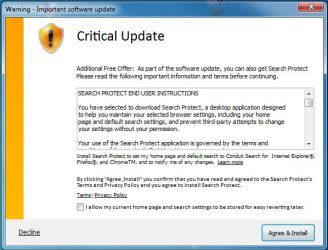
Search Protect message on start up

kevtherev

New member
Local time
10:20 AM
Messages
21
On start up of Windows7 there suddenly appears a notification concerning important update from a source 'Search Protect' which is asking for installation. Not knowing what this is for I naturally select the decline button. Notification then disappears. I have run several Spyware programs to try to get rid of this message but with no effect, can anyone please help as this appears every time I start my PC.
 

My Computer My Computer

Computer Manufacturer/Model Number
Medion
OS
Microsoft Windows 7 Home Premium 64-Bit 7601 Multiprocessor Free Service Pack 1
CPU
AMD Phenom(tm) II X6 1055T Processor
Motherboard
MEDIONPC MS-7646
Memory
8,00 GB
Graphics Card(s)
AMD Radeon HD 6570
Sound Card
(1) Realtek High Definition Audio (2) AMD High Definition
Monitor(s) Displays
Acer AL1716 / NEC Multisync LCD1770NX
Screen Resolution
Both 1280 X 1024
Hard Drives
ST310005 28AS SATA Disk Device Fixed hard disk media 931,51 GB
Keyboard
Medion
Mouse
Medion
Many thanks for the info but I have not actually installed the program. It is just the request message on startup that is annoying.
 

My Computer My Computer

Computer Manufacturer/Model Number
Medion
OS
Microsoft Windows 7 Home Premium 64-Bit 7601 Multiprocessor Free Service Pack 1
CPU
AMD Phenom(tm) II X6 1055T Processor
Motherboard
MEDIONPC MS-7646
Memory
8,00 GB
Graphics Card(s)
AMD Radeon HD 6570
Sound Card
(1) Realtek High Definition Audio (2) AMD High Definition
Monitor(s) Displays
Acer AL1716 / NEC Multisync LCD1770NX
Screen Resolution
Both 1280 X 1024
Hard Drives
ST310005 28AS SATA Disk Device Fixed hard disk media 931,51 GB
Keyboard
Medion
Mouse
Medion
What programs have you tried to remove it with ?
 

My Computer My Computer

Computer Manufacturer/Model Number
W530-3630QM1
OS
windows 7 home 64bit
CPU
INTEL-CORE I7
Memory
16GB
Hard Drives
750GB
Browser
Chrome
What programs have you tried to remove it with ?
I have used Yet Another Cleaner, Malwarebytes Anti-Malware, IObit Malware and a virus scan with Kaspersky Internet Security 2013 all without results, the message is always there on start up.
 

Attachments

  • Update.jpg
    Update.jpg
    45.6 KB · Views: 25

My Computer My Computer

Computer Manufacturer/Model Number
Medion
OS
Microsoft Windows 7 Home Premium 64-Bit 7601 Multiprocessor Free Service Pack 1
CPU
AMD Phenom(tm) II X6 1055T Processor
Motherboard
MEDIONPC MS-7646
Memory
8,00 GB
Graphics Card(s)
AMD Radeon HD 6570
Sound Card
(1) Realtek High Definition Audio (2) AMD High Definition
Monitor(s) Displays
Acer AL1716 / NEC Multisync LCD1770NX
Screen Resolution
Both 1280 X 1024
Hard Drives
ST310005 28AS SATA Disk Device Fixed hard disk media 931,51 GB
Keyboard
Medion
Mouse
Medion
It is lurking some where in your Registry .... Try using Junkware Removal Tool .. I would also use AdwCleaner .. I would also advise that you Uninstall IObit Malware IMO their products cause nothing but trouble ..
 

My Computer My Computer

Computer Manufacturer/Model Number
W530-3630QM1
OS
windows 7 home 64bit
CPU
INTEL-CORE I7
Memory
16GB
Hard Drives
750GB
Browser
Chrome
So I did as you recommended, including uninstalling IObit Malware but the problem is still there. I have attached reports both from JRT and AdwCleaner for your perusal. I cannot find any trace of the mentioned isafe files etc on my PC.
 

Attachments

My Computer My Computer

Computer Manufacturer/Model Number
Medion
OS
Microsoft Windows 7 Home Premium 64-Bit 7601 Multiprocessor Free Service Pack 1
CPU
AMD Phenom(tm) II X6 1055T Processor
Motherboard
MEDIONPC MS-7646
Memory
8,00 GB
Graphics Card(s)
AMD Radeon HD 6570
Sound Card
(1) Realtek High Definition Audio (2) AMD High Definition
Monitor(s) Displays
Acer AL1716 / NEC Multisync LCD1770NX
Screen Resolution
Both 1280 X 1024
Hard Drives
ST310005 28AS SATA Disk Device Fixed hard disk media 931,51 GB
Keyboard
Medion
Mouse
Medion
I have asked a Security Expert to look into your Post ... It still must be in the Registry ...
 

My Computer My Computer

Computer Manufacturer/Model Number
W530-3630QM1
OS
windows 7 home 64bit
CPU
INTEL-CORE I7
Memory
16GB
Hard Drives
750GB
Browser
Chrome
O/K maxie, many thanks for your help and looking forward to your reply. In the meantime I will do a thorough search in the registry to see if I can spot anything. Will not do any registry alterations without contacting you, if that is o/k.
 

My Computer My Computer

Computer Manufacturer/Model Number
Medion
OS
Microsoft Windows 7 Home Premium 64-Bit 7601 Multiprocessor Free Service Pack 1
CPU
AMD Phenom(tm) II X6 1055T Processor
Motherboard
MEDIONPC MS-7646
Memory
8,00 GB
Graphics Card(s)
AMD Radeon HD 6570
Sound Card
(1) Realtek High Definition Audio (2) AMD High Definition
Monitor(s) Displays
Acer AL1716 / NEC Multisync LCD1770NX
Screen Resolution
Both 1280 X 1024
Hard Drives
ST310005 28AS SATA Disk Device Fixed hard disk media 931,51 GB
Keyboard
Medion
Mouse
Medion
Yes that is fine i am usually about for most of the day ...
 

My Computer My Computer

Computer Manufacturer/Model Number
W530-3630QM1
OS
windows 7 home 64bit
CPU
INTEL-CORE I7
Memory
16GB
Hard Drives
750GB
Browser
Chrome
Uninstall IObit Malware. Anything iobit software is junk and will cause multiple issues with your PC.

http://www.sevenforums.com/tutorials/306648-ccleaner-delete-junk-files.html

You can use ccleaner to go into the startup entries there and delete it if found under tools-startup in ccleaner.


1.) Download herdprotect: (choose the portable version)

Download herdProtect - Free Anti-Malware Platform

2.) Run the scan.

3.) When the scan finishes, save the results per the screenshot below. Then upload the log here.

DO NOT REMOVE ANYTHING YET. I will advise if anything needs removed when I receive the log.

Attached Images
313957d1397626709-degrading-windows-performance-save-results.png
 

My Computer My Computer

Computer type
PC/Desktop
Computer Manufacturer/Model Number
Custom Built
OS
Windows 10 Pro
CPU
AMD Ryzen 5 2400G Processor with Radeon RX Vega 11 Graphics
Motherboard
ASRock X470 Master SLI/AC AM4 AMD Promontory X470 SATA 6Gb/s
Memory
G.SKILL Ripjaws V Series 16GB (2 x 8GB) 288-Pin DDR4 SDRAM D
Graphics Card(s)
2047MB NVIDIA GeForce GTX 1060 6GB (EVGA)
Sound Card
Motherboard Built in
Monitor(s) Displays
Acer R240HY bidx 23.8-Inch IPS HDMI DVI VGA (1920 x 1080) Wi
Screen Resolution
1920 x 1080
Hard Drives
1TB Sandisk SSD PLUS (Main drive)
500 GB Seagate 7200 RPM (Games)
500 GB Western Digital 7200 RPM (Virtual Machines)
PSU
CORSAIR TX Series TX650M 650W 80+ Gold Modular Power Supply
Case
CORSAIR CARBIDE SPEC-02 Mid-Tower Gaming Case, Red LED Fan
Cooling
220mm, two 120mm, and four 60mm fans
Keyboard
Wired Dell keyboard
Mouse
Wireless Logitech mouse
Internet Speed
250mb down, 30mb up
Antivirus
Panda Cloud Antivirus
Browser
Chrome-ish x64
Other Info
Your awesome for reading this.
kevtherev,

Also, please use the tool Zoek:
Download > Zoek.exe [/COLOR]and select: Run as Administrator
Give it a few seconds to appear.

Disable your AntiVirus and AntiSpyware programs, so they don't interfere with the running of Zoek.exe.
You can find instructions how to disable your security applications here:
[url]http://www.bleepingcomputer.com/forums/topic114351.html]Download zoek.exe version 5.0.0.0

Click the Options button and place a checkmark only on the following:

Do a Deep Scan
Installed Programs


Now...
  • Close any open Browsers.
  • Click the Run script button, and wait. It takes a few minutes to run all the script.
  • When the tool finishes, the zoek-results.log is opened in Notepad.
  • The log is also found on the systemdrive, normally C:\
  • If a reboot is needed log is opened after the reboot.

:ar: Please post the zoek-results.log in your reply.
 

My Computer My Computer

Computer type
PC/Desktop
Computer Manufacturer/Model Number
An ol' eMachines
OS
Windows 7 Home Premium
Internet Speed
Fine for me...I'm retired!
Uninstall IObit Malware. Anything iobit software is junk and will cause multiple issues with your PC.
http://www.sevenforums.com/tutorials/306648-ccleaner-delete-junk-files.html
You can use ccleaner to go into the startup entries there and delete it if found under tools-startup in ccleaner.
1.) Download herdprotect: (choose the portable version)
Download herdProtect - Free Anti-Malware Platform
2.) Run the scan.
3.) When the scan finishes, save the results per the screenshot below. Then upload the log here.
DO NOT REMOVE ANYTHING YET. I will advise if anything needs removed when I receive the log.
Attached Images

Have just run the first scan of HerdProtect before CCleaner. Results are in attached file. Was informed that I should run HerdProtect again in about 1hr 15mins. Will do that and keep you informed. Was I doing it correctly by running this first before using CCleaner ?
 

Attachments

Last edited:

My Computer My Computer

Computer Manufacturer/Model Number
Medion
OS
Microsoft Windows 7 Home Premium 64-Bit 7601 Multiprocessor Free Service Pack 1
CPU
AMD Phenom(tm) II X6 1055T Processor
Motherboard
MEDIONPC MS-7646
Memory
8,00 GB
Graphics Card(s)
AMD Radeon HD 6570
Sound Card
(1) Realtek High Definition Audio (2) AMD High Definition
Monitor(s) Displays
Acer AL1716 / NEC Multisync LCD1770NX
Screen Resolution
Both 1280 X 1024
Hard Drives
ST310005 28AS SATA Disk Device Fixed hard disk media 931,51 GB
Keyboard
Medion
Mouse
Medion
I suggest you follow Cottonball Instructions too ...
 

My Computer My Computer

Computer Manufacturer/Model Number
W530-3630QM1
OS
windows 7 home 64bit
CPU
INTEL-CORE I7
Memory
16GB
Hard Drives
750GB
Browser
Chrome

Attachments

My Computer My Computer

Computer Manufacturer/Model Number
Medion
OS
Microsoft Windows 7 Home Premium 64-Bit 7601 Multiprocessor Free Service Pack 1
CPU
AMD Phenom(tm) II X6 1055T Processor
Motherboard
MEDIONPC MS-7646
Memory
8,00 GB
Graphics Card(s)
AMD Radeon HD 6570
Sound Card
(1) Realtek High Definition Audio (2) AMD High Definition
Monitor(s) Displays
Acer AL1716 / NEC Multisync LCD1770NX
Screen Resolution
Both 1280 X 1024
Hard Drives
ST310005 28AS SATA Disk Device Fixed hard disk media 931,51 GB
Keyboard
Medion
Mouse
Medion
1.) You have a lot of junk programs installed on your pc. AKA snake oil.

Uninstall the following:

-Advanced SystemCare
-Anything IOBIT-including Smart Defrag
-Driver booster

Restart the pc.

2.) Run herdprotect again and remove the following items:

How to remove with herdprotect: Click the entry, and then click action-remove. Restart the PC after removing all items. Then post a fresh log of herdprotect.


Code:
File path: 		c:\users\kevin\appdata\local\temp\fjxd34wb.hu5.exe
Publisher: 		
MD5: 			c849eff2a4d9d233cf1c4eb9cffa16a0
SHA-1: 			90b6337aedf13d2835be0842c6f608ae31dbe09c
Created: 		23/05/2014 14:50:51
Detections: 		8

Code:
File path: 		c:\users\kevin\appdata\local\temp\gpupd.exe
Publisher: 		
Signer: 		Closed Joint-Stock Company 
MD5: 			356cba6f32e67e7c607a0d467334a93e
SHA-1: 			c8ea747c00b74a4393057fceefdea96df5c2effc
Created: 		23/05/2014 14:59:11
Detections: 		4
Determination: 		Adware

Code:
File path: 		c:\users\kevin\appdata\local\microsoft\windows\temporary internet files\content.ie5\qcxp1bd6\isafe_upgrade_release_win32_4.4.50.11132_2014.05.22[1].exe
Publisher: 		Elex do Brasil Participações Ltda
Signer: 		Elex do Brasil Participações Ltda
MD5: 			2ca3a7fbc32a338621d87477cea4bf9a
SHA-1: 			2f6ec93477d5d7eaeaa2bed48b5fff53ade7feac
Created: 		24/05/2014 16:20:05
Detections: 		3
Determination: 		Adware

Code:
File path: 		c:\users\kevin\appdata\roaming\wi_upd\si.exe
Publisher: 		
Signer: 		Closed Joint-Stock Company 
MD5: 			47e618a0d2477068741d73a0f2c5a10c
SHA-1: 			1735e2c1632ae6146be074215bb2f8df4a8e9734
Created: 		23/05/2014 14:50:30
Detections: 		1

Code:
File path: 		c:\users\kevin\appdata\roaming\microsoft\installer\{72aaf455-1e54-475b-b0ab-5413c78d0e63}\icon1226a4c5.exe
Publisher: 		
MD5: 			36b98b8197e1be8e7382d29c1a3628aa
SHA-1: 			90e3b7412ae40f102d2f99faae950fabe4426f8d
Created: 		10/11/2013 18:06:54
Detections: 		4

Code:
File path: 		c:\program files (x86)\wisen wizard\updatewisenwizard.exe
Publisher: 		
Signer: 		wisen wizard
MD5: 			b8fe02993a6047194e94f6c61ffb364c
SHA-1: 			64f31591d7b971722a20b7764ea93c4764a04733
Created: 		28/04/2014 15:34:38
Detections: 		5

Code:
File path: 		c:\program files (x86)\systpl\systplutil.dll
Publisher: 		Tlapia
Signer: 		TLAPIA
MD5: 			0e8614e34a9109d9d8e16648b16cc3a3
SHA-1: 			5a407ead5e79f5816e48c87ab67c085226967a98
Created: 		29/09/2013 23:10:38
 
Last edited:

My Computer My Computer

Computer type
PC/Desktop
Computer Manufacturer/Model Number
Custom Built
OS
Windows 10 Pro
CPU
AMD Ryzen 5 2400G Processor with Radeon RX Vega 11 Graphics
Motherboard
ASRock X470 Master SLI/AC AM4 AMD Promontory X470 SATA 6Gb/s
Memory
G.SKILL Ripjaws V Series 16GB (2 x 8GB) 288-Pin DDR4 SDRAM D
Graphics Card(s)
2047MB NVIDIA GeForce GTX 1060 6GB (EVGA)
Sound Card
Motherboard Built in
Monitor(s) Displays
Acer R240HY bidx 23.8-Inch IPS HDMI DVI VGA (1920 x 1080) Wi
Screen Resolution
1920 x 1080
Hard Drives
1TB Sandisk SSD PLUS (Main drive)
500 GB Seagate 7200 RPM (Games)
500 GB Western Digital 7200 RPM (Virtual Machines)
PSU
CORSAIR TX Series TX650M 650W 80+ Gold Modular Power Supply
Case
CORSAIR CARBIDE SPEC-02 Mid-Tower Gaming Case, Red LED Fan
Cooling
220mm, two 120mm, and four 60mm fans
Keyboard
Wired Dell keyboard
Mouse
Wireless Logitech mouse
Internet Speed
250mb down, 30mb up
Antivirus
Panda Cloud Antivirus
Browser
Chrome-ish x64
Other Info
Your awesome for reading this.

Attachments

My Computer My Computer

Computer Manufacturer/Model Number
Medion
OS
Microsoft Windows 7 Home Premium 64-Bit 7601 Multiprocessor Free Service Pack 1
CPU
AMD Phenom(tm) II X6 1055T Processor
Motherboard
MEDIONPC MS-7646
Memory
8,00 GB
Graphics Card(s)
AMD Radeon HD 6570
Sound Card
(1) Realtek High Definition Audio (2) AMD High Definition
Monitor(s) Displays
Acer AL1716 / NEC Multisync LCD1770NX
Screen Resolution
Both 1280 X 1024
Hard Drives
ST310005 28AS SATA Disk Device Fixed hard disk media 931,51 GB
Keyboard
Medion
Mouse
Medion
Make sure your data is backed up either on an external hard drive or somewhere else before proceeding:


You have a lot of items hiding in your temp folders, lets clean them out:

1.) Please download and save the file TFC by Old Timer. Again, save the file to your downloads folder or your desktop. Do not run it.

Downloading TFC


2.) Close your programs before running this tool. TFC will close ALL open programs.

3.) Browse to where you saved tfc. Right click on tfc.exe and choose Run As Administrator.

4.) Click the Start button to begin the cleaning process and let it run uninterrupted to completion. When it finishes it will say total files cleaned, and the start button will be grayed out. Click exit.
Important! If TFC prompts you to reboot, please do so immediately. If not prompted, manually reboot the machine anyway to ensure a complete clean.
 

My Computer My Computer

Computer type
PC/Desktop
Computer Manufacturer/Model Number
Custom Built
OS
Windows 10 Pro
CPU
AMD Ryzen 5 2400G Processor with Radeon RX Vega 11 Graphics
Motherboard
ASRock X470 Master SLI/AC AM4 AMD Promontory X470 SATA 6Gb/s
Memory
G.SKILL Ripjaws V Series 16GB (2 x 8GB) 288-Pin DDR4 SDRAM D
Graphics Card(s)
2047MB NVIDIA GeForce GTX 1060 6GB (EVGA)
Sound Card
Motherboard Built in
Monitor(s) Displays
Acer R240HY bidx 23.8-Inch IPS HDMI DVI VGA (1920 x 1080) Wi
Screen Resolution
1920 x 1080
Hard Drives
1TB Sandisk SSD PLUS (Main drive)
500 GB Seagate 7200 RPM (Games)
500 GB Western Digital 7200 RPM (Virtual Machines)
PSU
CORSAIR TX Series TX650M 650W 80+ Gold Modular Power Supply
Case
CORSAIR CARBIDE SPEC-02 Mid-Tower Gaming Case, Red LED Fan
Cooling
220mm, two 120mm, and four 60mm fans
Keyboard
Wired Dell keyboard
Mouse
Wireless Logitech mouse
Internet Speed
250mb down, 30mb up
Antivirus
Panda Cloud Antivirus
Browser
Chrome-ish x64
Other Info
Your awesome for reading this.
You still have iobit products installed. Remove everything that involves iobit.

You still have a registry defregger from them, and their malware scanner in your downloads folder.

Delete/uninstall all of it.

Then post another herdprotect log after you do all the above and restart.
 

My Computer My Computer

Computer type
PC/Desktop
Computer Manufacturer/Model Number
Custom Built
OS
Windows 10 Pro
CPU
AMD Ryzen 5 2400G Processor with Radeon RX Vega 11 Graphics
Motherboard
ASRock X470 Master SLI/AC AM4 AMD Promontory X470 SATA 6Gb/s
Memory
G.SKILL Ripjaws V Series 16GB (2 x 8GB) 288-Pin DDR4 SDRAM D
Graphics Card(s)
2047MB NVIDIA GeForce GTX 1060 6GB (EVGA)
Sound Card
Motherboard Built in
Monitor(s) Displays
Acer R240HY bidx 23.8-Inch IPS HDMI DVI VGA (1920 x 1080) Wi
Screen Resolution
1920 x 1080
Hard Drives
1TB Sandisk SSD PLUS (Main drive)
500 GB Seagate 7200 RPM (Games)
500 GB Western Digital 7200 RPM (Virtual Machines)
PSU
CORSAIR TX Series TX650M 650W 80+ Gold Modular Power Supply
Case
CORSAIR CARBIDE SPEC-02 Mid-Tower Gaming Case, Red LED Fan
Cooling
220mm, two 120mm, and four 60mm fans
Keyboard
Wired Dell keyboard
Mouse
Wireless Logitech mouse
Internet Speed
250mb down, 30mb up
Antivirus
Panda Cloud Antivirus
Browser
Chrome-ish x64
Other Info
Your awesome for reading this.
Make sure your data is backed up either on an external hard drive or somewhere else before proceeding:

Missed this warning and ran the temp folder tool. Now I see that my App Folder is missing from my User menu. Any chance of restoring it ?
Will complete your requests later.
 

My Computer My Computer

Computer Manufacturer/Model Number
Medion
OS
Microsoft Windows 7 Home Premium 64-Bit 7601 Multiprocessor Free Service Pack 1
CPU
AMD Phenom(tm) II X6 1055T Processor
Motherboard
MEDIONPC MS-7646
Memory
8,00 GB
Graphics Card(s)
AMD Radeon HD 6570
Sound Card
(1) Realtek High Definition Audio (2) AMD High Definition
Monitor(s) Displays
Acer AL1716 / NEC Multisync LCD1770NX
Screen Resolution
Both 1280 X 1024
Hard Drives
ST310005 28AS SATA Disk Device Fixed hard disk media 931,51 GB
Keyboard
Medion
Mouse
Medion
Back
Top