
Hi all,
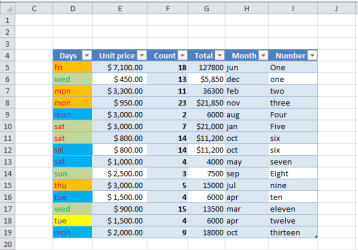
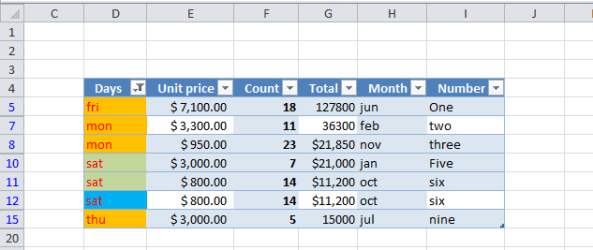
I have a small table and want to copy it after filtering. The image is in below (image no. 1), and I have filtered it to shows only the red font color of the column "Days" as follows, (image no. 2).
Now everything is ready to start the copying! So I select all the table (Double CTRL+A inside the table) then go into the "Go to special" dialog box and choose the "Visible cells only". Then I simply copy that selected filtered range of that table and paste it as follows, (image no. 3);
As it's clear, the right-side of the image shows the result of the copy-paste which of course is very odd! Why not all of the visible rows are pasted please?
I have a small table and want to copy it after filtering. The image is in below (image no. 1), and I have filtered it to shows only the red font color of the column "Days" as follows, (image no. 2).
Now everything is ready to start the copying! So I select all the table (Double CTRL+A inside the table) then go into the "Go to special" dialog box and choose the "Visible cells only". Then I simply copy that selected filtered range of that table and paste it as follows, (image no. 3);
As it's clear, the right-side of the image shows the result of the copy-paste which of course is very odd! Why not all of the visible rows are pasted please?
Attachments

My Computer
At a glance
windows 7 32-bitIntel(R) Core(TM) i3-2120 CPU @ 3.30GHz4.00 GBNVIDIA GeForce GTS 450
- Computer type
- PC/Desktop
- OS
- windows 7 32-bit
- CPU
- Intel(R) Core(TM) i3-2120 CPU @ 3.30GHz
- Motherboard
- Gigabyte Technology Co., Ltd. P61A-D3
- Memory
- 4.00 GB
- Graphics Card(s)
- NVIDIA GeForce GTS 450
- Sound Card
- (1) NVIDIA High Definition Audio (2) NVIDIA Virtual Audio
- Monitor(s) Displays
- Samsung
- Hard Drives
- ST500DM002-1BC142 ATA Device
- Internet Speed
- 1 Mbps
- Antivirus
- KIS 2013
- Browser
- chrome
