2 SSD's + HDD - How to set up OS and file structure

chopp nz

New member
Local time
10:29 AM
Messages
14
Hello,

So soon I am getting a 250gig SSD.
I currently have an 80gig SSD and a 1TB hard drive.

What I'm hoping to find out is exactly what the best solution to install what where would be.

For example where should I install the OS? I'm a heavy computer user as I am on them almost all the time.

I use many programs that take up a lot of space, the program itself and the files they use, like video editing and 3D modelling type of programs.

I would like to install the OS to the 80gig but what should I do with all the My Documents considering Autodesk's Maya places project files in the My Documents, these project files can easily go into the gigabyte range and I would have many projects.

On top of that what about the temp files, they seem to get very heavy too.

I would like to install my work type programs to an SSD and other general programs (Games and such) on the HDD.
I would also like to install my drivers to the same place as my OSS.

Thank you any help is appreciated.
 

My Computer My Computer

At a glance

Windows 7 Ultimate x64Intel(R) Core(TM) i5-2500K CPU @ 3.30GHz (4 C...6144MB RAMATI Radeon HD 4800 Series
Computer type
PC/Desktop
Computer Manufacturer/Model Number
Custom
OS
Windows 7 Ultimate x64
CPU
Intel(R) Core(TM) i5-2500K CPU @ 3.30GHz (4 CPUs), ~3.3GHz
Motherboard
Asus P8P67 LE
Memory
6144MB RAM
Graphics Card(s)
ATI Radeon HD 4800 Series
Sound Card
Realtek Digital Output (Realtek High Definition Audio)
Screen Resolution
1920*1080
Hard Drives
64 Gig OCZ - Vertex 4 SSD
Generic 1TB HDD
Hey there,

You can still install the OS to the 80Gb, in fact it is probably better that way because you can dedicate the entire drive to it for updates / features or other bits.

I would suggest you install your other programs (Maya, Photoshop) to your second SSD, so they still benefit from the load speed and you utilise the I/O speeds.


As for your documents, you can set your My Documents to actually be set on your 1tb drive, http://www.sevenforums.com/tutorials/18629-user-folders-change-default-location.html This will show you how to do it.

If you then store your videos, images and work files on your larger 1Tb drive, you will have no issues. Plus if your OS fails, your HDD is still likely to be happily whiring away with your data saved on it.
 

My Computer My Computer

At a glance

Windows 8.1Intel i5 3750k OC'd 4.0Ghz16GB Vengence CorsairGTX 770 OC 2GB Windforce
Computer type
PC/Desktop
Computer Manufacturer/Model Number
Custom Build
OS
Windows 8.1
CPU
Intel i5 3750k OC'd 4.0Ghz
Motherboard
P8Z77-V LX3
Memory
16GB Vengence Corsair
Graphics Card(s)
GTX 770 OC 2GB Windforce
Sound Card
C-Media 7.1 Surround Card
Monitor(s) Displays
Asus 3D 23" & BenQ 24" & LG 19"
Screen Resolution
1920*1080, 1920*1080, 1440*900
Hard Drives
Crucial 512GB SSD
WD 1.5 TB
WD 500Gb
PSU
850MW Silverstone
Case
inWin DragonRider
Cooling
4 * 140mm LED Akasa, One 140mm Fan Akasa
Keyboard
Corsair k95
Mouse
R.A.T 7 Contagion
Internet Speed
152 Mb Fiber Optic
Antivirus
ESET Nod32
Browser
Waterfox x64 / Chrome x64
Other Info
Freenas / Plex Media server
Q6600
6Gb DDR3
6TB ZFS Raid
500W PSu
2 x Intel NIC's
Hi thanks for the help!

So with the User Folders thing, would that change the default install location for things? Since the majority of programs I install would go do the HDD?
And would the computer know that, that drive is the default?
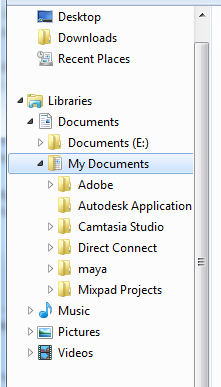
For example this is what mine is currently like
nyV8CpA.png

Where E is my HDD but the computers default Libraries all point to C: where my OS currently is on the 80gig SSD.
As you can see the maya and Adobe folders were created in there because the programs thought that's where it should go.

So with the changing default location, would that fix all future problems like that?

Cheers for your help! =]
 

My Computer My Computer

At a glance

Windows 7 Ultimate x64Intel(R) Core(TM) i5-2500K CPU @ 3.30GHz (4 C...6144MB RAMATI Radeon HD 4800 Series
Computer type
PC/Desktop
Computer Manufacturer/Model Number
Custom
OS
Windows 7 Ultimate x64
CPU
Intel(R) Core(TM) i5-2500K CPU @ 3.30GHz (4 CPUs), ~3.3GHz
Motherboard
Asus P8P67 LE
Memory
6144MB RAM
Graphics Card(s)
ATI Radeon HD 4800 Series
Sound Card
Realtek Digital Output (Realtek High Definition Audio)
Screen Resolution
1920*1080
Hard Drives
64 Gig OCZ - Vertex 4 SSD
Generic 1TB HDD
I think I would install the OS and all programs to the larger SSD because there can be complications with moving programs off the OS drive because their installers write registry keys that integrate them into the OS itself until uninstalled. This also makes the image less problematic.

You can then either move the User folders to the data drive as shown in http://www.sevenforums.com/tutorials/18629-user-folders-change-default-location.html or simply move a copy of them there and rightclick each to add to the related http://www.sevenforums.com/tutorials/585-library-include-folder.html and then http://www.sevenforums.com/tutorials/595-library-set-save-folder.html. If you use Windows imaging you'll need to use the Library method.

If you get a chance to compare speed with User folders on and off the SSD please let us know your impression.
 
I think I would install the OS and all programs to the larger SSD because there can be complications with moving programs off the OS drive because their installers write registry keys that integrate them into the OS itself until uninstalled. This also makes the image less problematic.

Hello, when you say moving programs off the OS could cause complications, what kind of programs are you talking about here?

At the moment my computer is set up like this
PibASyS.png
.

And I install all drivers to the same location as the OS, as you can see it looks far too full however this is mostly due to programs using it to store temp data and project files. (Like scratch disks and such).
 

My Computer My Computer

At a glance

Windows 7 Ultimate x64Intel(R) Core(TM) i5-2500K CPU @ 3.30GHz (4 C...6144MB RAMATI Radeon HD 4800 Series
Computer type
PC/Desktop
Computer Manufacturer/Model Number
Custom
OS
Windows 7 Ultimate x64
CPU
Intel(R) Core(TM) i5-2500K CPU @ 3.30GHz (4 CPUs), ~3.3GHz
Motherboard
Asus P8P67 LE
Memory
6144MB RAM
Graphics Card(s)
ATI Radeon HD 4800 Series
Sound Card
Realtek Digital Output (Realtek High Definition Audio)
Screen Resolution
1920*1080
Hard Drives
64 Gig OCZ - Vertex 4 SSD
Generic 1TB HDD
I think I would install the OS and all programs to the larger SSD because there can be complications with moving programs off the OS drive because their installers write registry keys that integrate them into the OS itself until uninstalled. This also makes the image less problematic.

Hello, when you say moving programs off the OS could cause complications, what kind of programs are you talking about here?

At the moment my computer is set up like this
PibASyS.png
.

And I install all drivers to the same location as the OS, as you can see it looks far too full however this is mostly due to programs using it to store temp data and project files. (Like scratch disks and such).


You will want to enable file compression on the drives to optimize storage space, and also run CCleaner to remove all temp files.
 

My Computer My Computer

At a glance

Windows 8.1Intel i5 3750k OC'd 4.0Ghz16GB Vengence CorsairGTX 770 OC 2GB Windforce
Computer type
PC/Desktop
Computer Manufacturer/Model Number
Custom Build
OS
Windows 8.1
CPU
Intel i5 3750k OC'd 4.0Ghz
Motherboard
P8Z77-V LX3
Memory
16GB Vengence Corsair
Graphics Card(s)
GTX 770 OC 2GB Windforce
Sound Card
C-Media 7.1 Surround Card
Monitor(s) Displays
Asus 3D 23" & BenQ 24" & LG 19"
Screen Resolution
1920*1080, 1920*1080, 1440*900
Hard Drives
Crucial 512GB SSD
WD 1.5 TB
WD 500Gb
PSU
850MW Silverstone
Case
inWin DragonRider
Cooling
4 * 140mm LED Akasa, One 140mm Fan Akasa
Keyboard
Corsair k95
Mouse
R.A.T 7 Contagion
Internet Speed
152 Mb Fiber Optic
Antivirus
ESET Nod32
Browser
Waterfox x64 / Chrome x64
Other Info
Freenas / Plex Media server
Q6600
6Gb DDR3
6TB ZFS Raid
500W PSu
2 x Intel NIC's
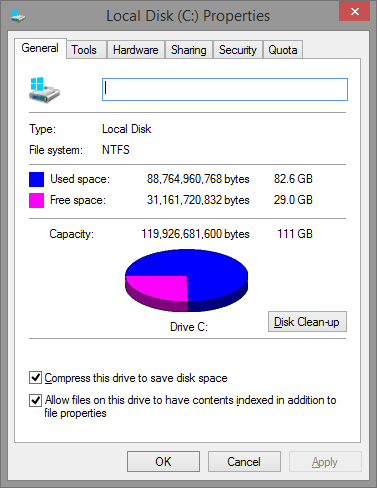
Do not compress the C drive as it can compress the MBR resulting in boot failure.
 
Do not compress the C drive as it can compress the MBR resulting in boot failure.

Only if you interrupt it whilst it is compressing...


U5pZCsC.png


I always compress drives as it saves space.
 

My Computer My Computer

At a glance

Windows 8.1Intel i5 3750k OC'd 4.0Ghz16GB Vengence CorsairGTX 770 OC 2GB Windforce
Computer type
PC/Desktop
Computer Manufacturer/Model Number
Custom Build
OS
Windows 8.1
CPU
Intel i5 3750k OC'd 4.0Ghz
Motherboard
P8Z77-V LX3
Memory
16GB Vengence Corsair
Graphics Card(s)
GTX 770 OC 2GB Windforce
Sound Card
C-Media 7.1 Surround Card
Monitor(s) Displays
Asus 3D 23" & BenQ 24" & LG 19"
Screen Resolution
1920*1080, 1920*1080, 1440*900
Hard Drives
Crucial 512GB SSD
WD 1.5 TB
WD 500Gb
PSU
850MW Silverstone
Case
inWin DragonRider
Cooling
4 * 140mm LED Akasa, One 140mm Fan Akasa
Keyboard
Corsair k95
Mouse
R.A.T 7 Contagion
Internet Speed
152 Mb Fiber Optic
Antivirus
ESET Nod32
Browser
Waterfox x64 / Chrome x64
Other Info
Freenas / Plex Media server
Q6600
6Gb DDR3
6TB ZFS Raid
500W PSu
2 x Intel NIC's
We've seen boot failure due to compressing C regularly enough here since beta that I wouldn't attempt it. I don't recall any reporting that they interrupted compression. I do find one search result where this was the case.

I would not compress C and if you do have this handy: BootMGR Compressed Message at Boot Fix - Vista Forums


I just realised that the reason i can do this is because when installing to an SSD, it creates a 100mb partition to save the bootmgr and such. Which means even when I compress it, the bootmgr is not touched.


Anyway we haven't heard from chopp nz in a while, does this mean your question has been answered?
 

My Computer My Computer

At a glance

Windows 8.1Intel i5 3750k OC'd 4.0Ghz16GB Vengence CorsairGTX 770 OC 2GB Windforce
Computer type
PC/Desktop
Computer Manufacturer/Model Number
Custom Build
OS
Windows 8.1
CPU
Intel i5 3750k OC'd 4.0Ghz
Motherboard
P8Z77-V LX3
Memory
16GB Vengence Corsair
Graphics Card(s)
GTX 770 OC 2GB Windforce
Sound Card
C-Media 7.1 Surround Card
Monitor(s) Displays
Asus 3D 23" & BenQ 24" & LG 19"
Screen Resolution
1920*1080, 1920*1080, 1440*900
Hard Drives
Crucial 512GB SSD
WD 1.5 TB
WD 500Gb
PSU
850MW Silverstone
Case
inWin DragonRider
Cooling
4 * 140mm LED Akasa, One 140mm Fan Akasa
Keyboard
Corsair k95
Mouse
R.A.T 7 Contagion
Internet Speed
152 Mb Fiber Optic
Antivirus
ESET Nod32
Browser
Waterfox x64 / Chrome x64
Other Info
Freenas / Plex Media server
Q6600
6Gb DDR3
6TB ZFS Raid
500W PSu
2 x Intel NIC's
Back
Top