What PSU is needed to run my internals

r3b3lw0lf

New member
Local time
6:14 PM
Messages
8
CPU: Intel Core i5 4460 (Base:3.20GHz, Turbo:3.4GHz / 6MB / LGA1150 / Quad Core), Haswell Refresh
Mobo: ASRock Fatal1ty H87-PERFORMANCE MB, H87, 4x DDR3, 1x PCI-E 3.0 x16, 6x SATA III, 6x USB 3.0, HDMI, DVI, ATX
GFX Card: GIGABYTE Radeon R7 250 (1100MHz), 1GB GDDR5 (4600MHz), PCI-E 3.0, DVI, HDMI, VGA
RAM: G.Skill 8GB (2x4GB), PC3-12800 (1600MHz) DDR3, Ripjaws X, 8-8-8-24-2N, 1.5V, Dual Channel Kit
SSD: SanDisk 128GB SSD, Ultra Plus, SATAIII, Read up to 530MB/s, Write up to 290MB/s
Case: Zalman ZM-Z5 Plus Black ATX Case, Window, NO PSU, USB3.0.

What is the minimum and safest PSU wattage to get to run these please and ty.
 

My Computer My Computer

At a glance

Windows 7 Ultimate x64
Computer type
PC/Desktop
OS
Windows 7 Ultimate x64
Hello r3b3lw0lf. Welcome to the forum.

Go here:
http://extreme.outervision.com/psucalculatorlite.jsp (site is down at the moment - should be back soon)
and fill in your system specs to get your answer.
At the end you will see a box for Capacitor Aging. Use 10% if you plan on replacing the power supply or PC in 2 or 3 years, use 50% if you want maximum lifespan.

There are others, just not as comprehensive. This one's OK:
MSI USA - Computer, Laptop, Notebook, Desktop, Mainboard, Graphics and more
 

My Computer My Computer

At a glance

Windows 7 64 Bit Home Premium SP1i7-3820GSkill F3-14900CL9Q - 16GBEVGA GeForce GTX660 - Driver 352.86
Computer type
PC/Desktop
Computer Manufacturer/Model Number
Home Built - Jan 2013
OS
Windows 7 64 Bit Home Premium SP1
CPU
i7-3820
Motherboard
Asus P9X79-PRO - Bios 4608
Memory
GSkill F3-14900CL9Q - 16GB
Graphics Card(s)
EVGA GeForce GTX660 - Driver 352.86
Sound Card
On board Realtek ALC898
Monitor(s) Displays
Acer S271HL
Screen Resolution
1920 x 1080
Hard Drives
#1- Samsung 840 Pro Series
#2- Western Digital WD1002FAEX Sata3 Black
#3- Western Digital WD1002FAEX Sata3 Black
PSU
Corsair CMPSU-850TX-V2 - 850 watt (by Seasonic)
Case
Corsair Obsidian 550D
Cooling
Standard 3 120mm case fans, Cooler Master Hyper 212 EVO
Keyboard
MS KC-0405
Mouse
Intellimouse 5-button
Internet Speed
56 Mbits/Sec (on a good day)
Antivirus
Avast & Malwarebytes
Browser
Firefox
Other Info
Asus DVD - DRW-24B1ST 24X
Thanx for the response eblen.

yeah I have seen a few of those from this site.... that first one... well didn't know nothing bout the aging and such capacitor, the recommended wattage was like 530w or something....
then the was that PSU REQUIREMENTS - RealHardTechX and it tells me ... "The “Recommended PSU Wattage” value is for the whole system, not only for the graphics card/s."
R7 250 <=-- gfx card 380watts <=-- recommended 0 <=-- 6pin 0 <=-- 8pin
and well really got confused then LOL... hence why I came here, to see if someone could give a more accurate guesstimation :)

Hmmm that second one, told me 103 watts...

Hence my confusion LOL

Is 500 powerful enough you reckon?
 

My Computer My Computer

At a glance

Windows 7 Ultimate x64
Computer type
PC/Desktop
OS
Windows 7 Ultimate x64
Thanx for the response eblen.

yeah I have seen a few of those from this site.... that first one... well didn't know nothing bout the aging and such capacitor, the recommended wattage was like 530w or something....
then the was that PSU REQUIREMENTS - RealHardTechX and it tells me ... "The “Recommended PSU Wattage” value is for the whole system, not only for the graphics card/s."
R7 250 <=-- gfx card 380watts <=-- recommended 0 <=-- 6pin 0 <=-- 8pin
and well really got confused then LOL... hence why I came here, to see if someone could give a more accurate guesstimation :)

Hmmm that second one, told me 103 watts...

Hence my confusion LOL

Is 500 powerful enough you reckon?

Basically what it means is the system will need a 530W psu to cover a 10% degradation.

Your GPU Card will require ~100W of power.


If that is the total / final build of the computer then yes 500W will cover it happily.


However! If you plan on adding a new GPu / HDD at some point in the future, you will need to get a slightly larger size to cover it.
 

My Computer My Computer

At a glance

Windows 8.1Intel i5 3750k OC'd 4.0Ghz16GB Vengence CorsairGTX 770 OC 2GB Windforce
Computer type
PC/Desktop
Computer Manufacturer/Model Number
Custom Build
OS
Windows 8.1
CPU
Intel i5 3750k OC'd 4.0Ghz
Motherboard
P8Z77-V LX3
Memory
16GB Vengence Corsair
Graphics Card(s)
GTX 770 OC 2GB Windforce
Sound Card
C-Media 7.1 Surround Card
Monitor(s) Displays
Asus 3D 23" & BenQ 24" & LG 19"
Screen Resolution
1920*1080, 1920*1080, 1440*900
Hard Drives
Crucial 512GB SSD
WD 1.5 TB
WD 500Gb
PSU
850MW Silverstone
Case
inWin DragonRider
Cooling
4 * 140mm LED Akasa, One 140mm Fan Akasa
Keyboard
Corsair k95
Mouse
R.A.T 7 Contagion
Internet Speed
152 Mb Fiber Optic
Antivirus
ESET Nod32
Browser
Waterfox x64 / Chrome x64
Other Info
Freenas / Plex Media server
Q6600
6Gb DDR3
6TB ZFS Raid
500W PSu
2 x Intel NIC's
Googling says that the R7 250 consumes a maximum of 65 watts under load.

Doesn't look like you could use more than 250 or 300 for the whole system.

So, yeah, 500 would be plenty, or even less assuming you got a quality brand and model.
 

My Computer My Computer

At a glance

Windows 7 Home Premium SP1, 64-bitIntel Skylake i5-6600K, not overclocked8 GB HyperX DDR4-2666 (2 x 4 GB)none; graphics are integrated on CPU
Computer type
PC/Desktop
Computer Manufacturer/Model Number
Ignatz Special; 4 speed manual gearbox; factory air conditioning; one of one
OS
Windows 7 Home Premium SP1, 64-bit
CPU
Intel Skylake i5-6600K, not overclocked
Motherboard
AsRock Z170M Extreme 4, micro ATX
Memory
8 GB HyperX DDR4-2666 (2 x 4 GB)
Graphics Card(s)
none; graphics are integrated on CPU
Sound Card
onboard: Realtek ALC1150; external: USB Behringer UF0-202
Monitor(s) Displays
Dell S2340M 23 inch IPS
Screen Resolution
1600 x 900
Hard Drives
System: Crucial MX100 series SSD, 128 GB;
Data: Samsung Spinpoint 103SJ, 1 TB;
Backup: WD Caviar Green WD30EZRX-00D8PB0, 3 TB
PSU
Rosewill SilentNight 500 watt fanless, semi-modular
Case
Antec Solo II
Cooling
Noctua NH-U12S; Noctua F12 intake, Noctua S12A exhaust
Keyboard
Microsoft 200 6JH-00001 USB
Mouse
Dell or Microsoft optical wired; USB
Antivirus
Microsoft Security Essentials and Malwarebytes Premium
Browser
Pale Moon
Other Info
All fans PWM; speeds at idle: CPU circa 500 rpm; intake circa 600 rpm; exhaust circa 600 rpm; CPU temps 27 idle and 47 C load in a warm room (27 C/81 F) when running Intel Extreme Tuning Utility stress test.

My Computer My Computer

At a glance

Windows 8.1Intel i5 3750k OC'd 4.0Ghz16GB Vengence CorsairGTX 770 OC 2GB Windforce
Computer type
PC/Desktop
Computer Manufacturer/Model Number
Custom Build
OS
Windows 8.1
CPU
Intel i5 3750k OC'd 4.0Ghz
Motherboard
P8Z77-V LX3
Memory
16GB Vengence Corsair
Graphics Card(s)
GTX 770 OC 2GB Windforce
Sound Card
C-Media 7.1 Surround Card
Monitor(s) Displays
Asus 3D 23" & BenQ 24" & LG 19"
Screen Resolution
1920*1080, 1920*1080, 1440*900
Hard Drives
Crucial 512GB SSD
WD 1.5 TB
WD 500Gb
PSU
850MW Silverstone
Case
inWin DragonRider
Cooling
4 * 140mm LED Akasa, One 140mm Fan Akasa
Keyboard
Corsair k95
Mouse
R.A.T 7 Contagion
Internet Speed
152 Mb Fiber Optic
Antivirus
ESET Nod32
Browser
Waterfox x64 / Chrome x64
Other Info
Freenas / Plex Media server
Q6600
6Gb DDR3
6TB ZFS Raid
500W PSu
2 x Intel NIC's
Yet, the specs say....
Power requirement 400W
GIGABYTE Radeon R7 250, 1GB [GV-R725OC-1GI] - $99.00 - Scorptec Computers

are there two different meanings for W and watts?

I am putting these together (well they are building for me), buts its like my first selection of parts LOL... just need the psu now.
I didn't wanna buy a new one, when I got those parts, cos it would be extra 55 for labour PLUS the cost of PSU (and I figure I wanted ssd AND gfx card, better than the price of getting psu through them)... and we all know that the cases WITH psu already are crapola LOL, so picked the case I wanted and I gotta provide PSU (which won't come under the build warranty), so am on the hunt for one that will do me. I have a Vantec ion2 500W that im using atm in this one, and if I could, I would add it for the new one... but not sure if its will cause problems

I do not plan on doing any crossfire/ sli stuff, just using that one gfx card gddr5 (apparently better then a 2g ddr3 240)
 

My Computer My Computer

At a glance

Windows 7 Ultimate x64
Computer type
PC/Desktop
OS
Windows 7 Ultimate x64
Is 500 powerful enough you reckon?

As a minimum supply, yes.
What I do is look at pricing at the moment. If I see that I can get a larger power supply for the same price or a bit more than the minimum required supply, that's what I do.

It also depends on the quality of the supply. Higher end supplies made by Seasonic and others sold as Corsair or Antec etc. will put out the required minimum reliably longer than cheaper supplies.

Wait until the Extreme Calculator comes back on line. It is a much better calculator.
The MSI calculator is giving you the actual power draw of the system components entered, running at 'normal' capacities. However you would never try and run a system on a power supply running at 100% capacity every minute. So the rule of thumb is to double the result (so the supply is running at 50% of capacity - less heat, less wear).
And then you want to add so "overhead" to account for the addition of more components later. So plug in an extra hard drive or 2, another optical drive, and a sound card (even if you don't plan on getting one), and you will at least be prepared for any future upgrade.
 

Attachments

  • Capture.JPG
    Capture.JPG
    85.9 KB · Views: 1

My Computer My Computer

At a glance

Windows 7 64 Bit Home Premium SP1i7-3820GSkill F3-14900CL9Q - 16GBEVGA GeForce GTX660 - Driver 352.86
Computer type
PC/Desktop
Computer Manufacturer/Model Number
Home Built - Jan 2013
OS
Windows 7 64 Bit Home Premium SP1
CPU
i7-3820
Motherboard
Asus P9X79-PRO - Bios 4608
Memory
GSkill F3-14900CL9Q - 16GB
Graphics Card(s)
EVGA GeForce GTX660 - Driver 352.86
Sound Card
On board Realtek ALC898
Monitor(s) Displays
Acer S271HL
Screen Resolution
1920 x 1080
Hard Drives
#1- Samsung 840 Pro Series
#2- Western Digital WD1002FAEX Sata3 Black
#3- Western Digital WD1002FAEX Sata3 Black
PSU
Corsair CMPSU-850TX-V2 - 850 watt (by Seasonic)
Case
Corsair Obsidian 550D
Cooling
Standard 3 120mm case fans, Cooler Master Hyper 212 EVO
Keyboard
MS KC-0405
Mouse
Intellimouse 5-button
Internet Speed
56 Mbits/Sec (on a good day)
Antivirus
Avast & Malwarebytes
Browser
Firefox
Other Info
Asus DVD - DRW-24B1ST 24X
Yet, the specs say....
Power requirement 400W
GIGABYTE Radeon R7 250, 1GB [GV-R725OC-1GI] - $99.00 - Scorptec Computers

are there two different meanings for W and watts?

I am putting these together (well they are building for me), buts its like my first selection of parts LOL... just need the psu now.
I didn't wanna buy a new one, when I got those parts, cos it would be extra 55 for labour PLUS the cost of PSU (and I figure I wanted ssd AND gfx card, better than the price of getting psu through them)... and we all know that the cases WITH psu already are crapola LOL, so picked the case I wanted and I gotta provide PSU (which won't come under the build warranty), so am on the hunt for one that will do me. I have a Vantec ion2 500W that im using atm in this one, and if I could, I would add it for the new one... but not sure if its will cause problems

I do not plan on doing any crossfire/ sli stuff, just using that one gfx card gddr5 (apparently better then a 2g ddr3 240)


No thats 400W when running with their version of a barebone PC setup, so all the necessities included.

The figures we posted above are how much the unit will use on it's own.


For a PSU, check out the Corsair builder series > Corsair Builder Series CX 500 Watt ATX/EPS 80 PLUS Bronze Power Supply Unit: Amazon.co.uk: Computers & Accessories

Very good company, and made for pc builders in mind.


Yes GDDR5 is 4x quicker the GDDR3 i beilieve is how the base rate works with the bandwidth. It used to be,
DDR x2 = DDR2
DDR2 x2 = DDR3

and so forth.
 

My Computer My Computer

At a glance

Windows 8.1Intel i5 3750k OC'd 4.0Ghz16GB Vengence CorsairGTX 770 OC 2GB Windforce
Computer type
PC/Desktop
Computer Manufacturer/Model Number
Custom Build
OS
Windows 8.1
CPU
Intel i5 3750k OC'd 4.0Ghz
Motherboard
P8Z77-V LX3
Memory
16GB Vengence Corsair
Graphics Card(s)
GTX 770 OC 2GB Windforce
Sound Card
C-Media 7.1 Surround Card
Monitor(s) Displays
Asus 3D 23" & BenQ 24" & LG 19"
Screen Resolution
1920*1080, 1920*1080, 1440*900
Hard Drives
Crucial 512GB SSD
WD 1.5 TB
WD 500Gb
PSU
850MW Silverstone
Case
inWin DragonRider
Cooling
4 * 140mm LED Akasa, One 140mm Fan Akasa
Keyboard
Corsair k95
Mouse
R.A.T 7 Contagion
Internet Speed
152 Mb Fiber Optic
Antivirus
ESET Nod32
Browser
Waterfox x64 / Chrome x64
Other Info
Freenas / Plex Media server
Q6600
6Gb DDR3
6TB ZFS Raid
500W PSu
2 x Intel NIC's

My Computer My Computer

At a glance

Windows 7 Home Premium SP1, 64-bitIntel Skylake i5-6600K, not overclocked8 GB HyperX DDR4-2666 (2 x 4 GB)none; graphics are integrated on CPU
Computer type
PC/Desktop
Computer Manufacturer/Model Number
Ignatz Special; 4 speed manual gearbox; factory air conditioning; one of one
OS
Windows 7 Home Premium SP1, 64-bit
CPU
Intel Skylake i5-6600K, not overclocked
Motherboard
AsRock Z170M Extreme 4, micro ATX
Memory
8 GB HyperX DDR4-2666 (2 x 4 GB)
Graphics Card(s)
none; graphics are integrated on CPU
Sound Card
onboard: Realtek ALC1150; external: USB Behringer UF0-202
Monitor(s) Displays
Dell S2340M 23 inch IPS
Screen Resolution
1600 x 900
Hard Drives
System: Crucial MX100 series SSD, 128 GB;
Data: Samsung Spinpoint 103SJ, 1 TB;
Backup: WD Caviar Green WD30EZRX-00D8PB0, 3 TB
PSU
Rosewill SilentNight 500 watt fanless, semi-modular
Case
Antec Solo II
Cooling
Noctua NH-U12S; Noctua F12 intake, Noctua S12A exhaust
Keyboard
Microsoft 200 6JH-00001 USB
Mouse
Dell or Microsoft optical wired; USB
Antivirus
Microsoft Security Essentials and Malwarebytes Premium
Browser
Pale Moon
Other Info
All fans PWM; speeds at idle: CPU circa 500 rpm; intake circa 600 rpm; exhaust circa 600 rpm; CPU temps 27 idle and 47 C load in a warm room (27 C/81 F) when running Intel Extreme Tuning Utility stress test.
So can I go eek then and say that 500watts will def not be big enough?

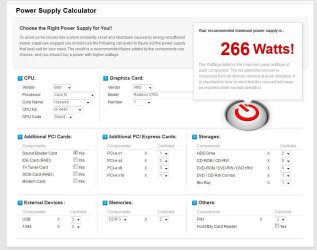
Minimum PSU Wattage:620 W Recommended
PSU Wattage:
*
6.gif
7.gif
0.gif
w.gif

That was aging capacity at 50%

But not sure if I filled it all out right.
I won't say a lie, when im in totally over my head LOL
Don't want to get a huge one thats too much, but I more importantly, don't want to go UNDER... and possibly wreck my new stuff LOL

As a minimum supply, yes.
What I do is look at pricing at the moment. If I see that I can get a larger power supply for the same price or a bit more than the minimum required supply, that's what I do.
Well if 500 IS enough, then I can use my Vantec Ion2 500W (for now). I spent all my dosh ON the system, and fiddled around with the build to get (better) gfx card and a ssd drive. Going by the same price or a little bit more... means the new one gunna be free OR a little bit more for higher powered.

I went to local pc shop (pc australia) and got quoted $89 for a cooler power gx700 extreme power... which is apparently 80+ bronze and so on... NOT to be confused with cooler master.
 

My Computer My Computer

At a glance

Windows 7 Ultimate x64
Computer type
PC/Desktop
OS
Windows 7 Ultimate x64
Probably filled it out OK. I came up with 525/575.
Your idea to stick with the 500W you have is OK. Just keep in mind that if you experience any anomolies that could be power related it is time to start shopping for a 650W supply.
 

My Computer My Computer

At a glance

Windows 7 64 Bit Home Premium SP1i7-3820GSkill F3-14900CL9Q - 16GBEVGA GeForce GTX660 - Driver 352.86
Computer type
PC/Desktop
Computer Manufacturer/Model Number
Home Built - Jan 2013
OS
Windows 7 64 Bit Home Premium SP1
CPU
i7-3820
Motherboard
Asus P9X79-PRO - Bios 4608
Memory
GSkill F3-14900CL9Q - 16GB
Graphics Card(s)
EVGA GeForce GTX660 - Driver 352.86
Sound Card
On board Realtek ALC898
Monitor(s) Displays
Acer S271HL
Screen Resolution
1920 x 1080
Hard Drives
#1- Samsung 840 Pro Series
#2- Western Digital WD1002FAEX Sata3 Black
#3- Western Digital WD1002FAEX Sata3 Black
PSU
Corsair CMPSU-850TX-V2 - 850 watt (by Seasonic)
Case
Corsair Obsidian 550D
Cooling
Standard 3 120mm case fans, Cooler Master Hyper 212 EVO
Keyboard
MS KC-0405
Mouse
Intellimouse 5-button
Internet Speed
56 Mbits/Sec (on a good day)
Antivirus
Avast & Malwarebytes
Browser
Firefox
Other Info
Asus DVD - DRW-24B1ST 24X
and just something about that build.
It appears that my ram (G.Skill F3-12800CL8D-8GBXM 8GB (2x4GB) 1600MHz DDR3) is NOT compatible with my mobo, ASRock Fatal1ty H87-PERFORMANCE MB and my NEXT choice... G.Skill F3-12800CL9D-8GBXL 8GB (2x4GB) 1600MHz DDR3

ASRock > Fatal1ty H87 Performance
from what I can see in that link anyways

Motherboards - B85M-E - ASUS was my second choice mobo... but I can't see anything bout memory compatibility tho.

Am I in trouble with my compatibilities.
 

My Computer My Computer

At a glance

Windows 7 Ultimate x64
Computer type
PC/Desktop
OS
Windows 7 Ultimate x64
What makes you think those RAM modules are not compatible?
 

My Computer My Computer

At a glance

Windows 7 64 Bit Home Premium SP1i7-3820GSkill F3-14900CL9Q - 16GBEVGA GeForce GTX660 - Driver 352.86
Computer type
PC/Desktop
Computer Manufacturer/Model Number
Home Built - Jan 2013
OS
Windows 7 64 Bit Home Premium SP1
CPU
i7-3820
Motherboard
Asus P9X79-PRO - Bios 4608
Memory
GSkill F3-14900CL9Q - 16GB
Graphics Card(s)
EVGA GeForce GTX660 - Driver 352.86
Sound Card
On board Realtek ALC898
Monitor(s) Displays
Acer S271HL
Screen Resolution
1920 x 1080
Hard Drives
#1- Samsung 840 Pro Series
#2- Western Digital WD1002FAEX Sata3 Black
#3- Western Digital WD1002FAEX Sata3 Black
PSU
Corsair CMPSU-850TX-V2 - 850 watt (by Seasonic)
Case
Corsair Obsidian 550D
Cooling
Standard 3 120mm case fans, Cooler Master Hyper 212 EVO
Keyboard
MS KC-0405
Mouse
Intellimouse 5-button
Internet Speed
56 Mbits/Sec (on a good day)
Antivirus
Avast & Malwarebytes
Browser
Firefox
Other Info
Asus DVD - DRW-24B1ST 24X
Cos looking on the memory compatibility list (and there is a huge list) there is only
DDR3 1600 4GB G.Skill F3-12800CL8D-8GBECO
there is no 8GBXM (blue) or 8GBXL (red) its only 8GBECO
Thats what makes me think its incompatible.
Or am I just being over worrying cos its my first pick and you put together kinda thing LOL
 

My Computer My Computer

At a glance

Windows 7 Ultimate x64
Computer type
PC/Desktop
OS
Windows 7 Ultimate x64
You may be over thinking it a tad.
Those last few numbers/letters often just designated the color or the number of modules in a package.
What you look at is the first group of characters.
G.Skill F3-12800 is the product group. Notice how all the modules tested from G.Skill have that designation.
12800 is the RAM speed (PC12800) and it corresponds to 1600MHz. Another F3 package may be higher speed (1866MHz-PC14900) but it is still the same group.

CL indicates the latency of the RAM. CL7 is better than CL9, but it all works.

8GB is the amount of RAM in the package (2x4GB) - that number will change but it is still the same stuff.

And then there is ECO, BDX, XYZ, etc.. And that may mean a blue heatsheild, or a tall heatshield, etc.

Just match the specs, not the model numbers.
The most important spec is the RAM voltage. To be compatible the RAM must fall in the voltage range acceptable by the motherboard. That board looks like it will do anything from 1.35v to 1.65v with most of the compatible RAM at 1.5v.

Hope that helps
 

My Computer My Computer

At a glance

Windows 7 64 Bit Home Premium SP1i7-3820GSkill F3-14900CL9Q - 16GBEVGA GeForce GTX660 - Driver 352.86
Computer type
PC/Desktop
Computer Manufacturer/Model Number
Home Built - Jan 2013
OS
Windows 7 64 Bit Home Premium SP1
CPU
i7-3820
Motherboard
Asus P9X79-PRO - Bios 4608
Memory
GSkill F3-14900CL9Q - 16GB
Graphics Card(s)
EVGA GeForce GTX660 - Driver 352.86
Sound Card
On board Realtek ALC898
Monitor(s) Displays
Acer S271HL
Screen Resolution
1920 x 1080
Hard Drives
#1- Samsung 840 Pro Series
#2- Western Digital WD1002FAEX Sata3 Black
#3- Western Digital WD1002FAEX Sata3 Black
PSU
Corsair CMPSU-850TX-V2 - 850 watt (by Seasonic)
Case
Corsair Obsidian 550D
Cooling
Standard 3 120mm case fans, Cooler Master Hyper 212 EVO
Keyboard
MS KC-0405
Mouse
Intellimouse 5-button
Internet Speed
56 Mbits/Sec (on a good day)
Antivirus
Avast & Malwarebytes
Browser
Firefox
Other Info
Asus DVD - DRW-24B1ST 24X
Pfft at the server coding or whatever LOL
I hit send, then went to shops, hit refresh to see if there was a reply but yeah before I did I seen "token expired" or some such crap... so my post never got sent, and cos I refreshed, what i HAD typed was gone as well (been doing the same process since I started LOL. Hit refresh, if reply, to post, then I reply. Stoopid thing.

Anyways, see if it goes this time LOL
Thanx for that clarification, thats a headache gone... huge relief, ty.

Back about the PSU.

I took my vantec ion2 500w OUT of this machine, and put in a 320w Aywun PSU from an old case (had 2 sata cables, the others I had, only had 1 sata cable)... and the internals of this are
OS: Win 7 ult 64 bit sp1 on a small (not II or III, just sata) hdd
RAM: 6.00GB Single-Channel DDR2 @ 334MHz (5-5-5-15) (kingston hyperX blue)
CPU: AMD Athlon 64 X2 3800+
MOBO: Asus MXN-MX
GFX: gigabyte hd 5450 1gb ddr3 connected through hdmi on 1920X1200
Storage: internal sata III 1gb hdd

These are on this machine and will also be getting transferred to other machine.

4port usb3 pci/e card (connected with molex)
PCI SB 5.1 VX soundblaster
and connected is 3 external drives (2TB) one is usb3, the others are usb2 all dc powered (not usb powered)

All seemingly running smooth on that 320watt psu.
BUT, I know that I am probably well under powered LOL...
I understand gold is sweet as, silver, bronze, 80+ etc... and stuff without them, are good aswell, but not as good... anyways... am after GOOD, but not not crazy expensive either (and apparently aus has "insane prices" LOL)

These are what I am looking at....
Thermaltake Litepower 600W $71.50
Aerocool VP-Series 550w PSU $70.00
Cooler Master Thunder 600W Power Supply $75.00
Thermaltake Smart Power 550W - 80 Plus Bronze $75.00
Aerocool VP-Series 650w PSU $79.00
CFI 500W 80+ Silver Active True Power PSU $79.00
SilverStone 500W Strider Essetial 80+ Gold Power Supply $91.50
SilverStone 600W Strider Essential 80+ Gold Power Supply $104.00

The range is best coming from that location (cos its closer) anyways, there what im thinking of... but is it overkill?

http://www.centrecom.com.au/aerocool-vp-series
 

My Computer My Computer

At a glance

Windows 7 Ultimate x64
Computer type
PC/Desktop
OS
Windows 7 Ultimate x64
Most of the supplies you list are consumer grade supplies. You have chosen PRICE as your primary criteria.

You have already experienced what can result from spending good money on an inferior power supply (the 320W is outperforming the 500W). So you might want to consider using QUALITY as your primary criteria.

Most of the builders here use supplies from Seasonic, Corsair, PC Power & Cooling. These are pretty much $20-$30 more than consumer grade supplies of the same size, but the quality of the internal components is much better. Please consider.

Sounds like you are on the path to solution though. Good test.

Some more technical information here:
http://www.tomshardware.com/reviews/power-supply-oem-manufacturer,2913.html

The summary is that the vast majority of power supply labels are just resellers. They do not build power supplies (like OEMs) and they do not even design power supplies (like Corsair or Antec). Note that if you go to the Corsair page you will see that some of their supplies are made by Seasonic (an OEM).
 

My Computer My Computer

At a glance

Windows 7 64 Bit Home Premium SP1i7-3820GSkill F3-14900CL9Q - 16GBEVGA GeForce GTX660 - Driver 352.86
Computer type
PC/Desktop
Computer Manufacturer/Model Number
Home Built - Jan 2013
OS
Windows 7 64 Bit Home Premium SP1
CPU
i7-3820
Motherboard
Asus P9X79-PRO - Bios 4608
Memory
GSkill F3-14900CL9Q - 16GB
Graphics Card(s)
EVGA GeForce GTX660 - Driver 352.86
Sound Card
On board Realtek ALC898
Monitor(s) Displays
Acer S271HL
Screen Resolution
1920 x 1080
Hard Drives
#1- Samsung 840 Pro Series
#2- Western Digital WD1002FAEX Sata3 Black
#3- Western Digital WD1002FAEX Sata3 Black
PSU
Corsair CMPSU-850TX-V2 - 850 watt (by Seasonic)
Case
Corsair Obsidian 550D
Cooling
Standard 3 120mm case fans, Cooler Master Hyper 212 EVO
Keyboard
MS KC-0405
Mouse
Intellimouse 5-button
Internet Speed
56 Mbits/Sec (on a good day)
Antivirus
Avast & Malwarebytes
Browser
Firefox
Other Info
Asus DVD - DRW-24B1ST 24X
again, I made a post and its not here... *annoyed*
and this time I copied it, and pasted in again... and yeah... still not here...
When I replaced a crappy 500W power supply bought online from Fry's with a Corsair 520W supply built by Seasonic (from the egg), a few years ago the system almost miraculously became 100% more stable. I will never skimp on a power supply again. EVER.
So name is better than no brand (except food stuffs)

Thermaltake Litepower 600W $71.50
That would be better then my vantec ion2 500watt yeah?

But if I pay 20 extra and get SAME watts as vantec...
SilverStone 500W Strider Essetial 80+ Gold Power Supply $91.50
Would that perform better than the thermaltake?
and would this one perform better than all?
SilverStone 600W Strider Essential 80+ Gold Power Supply $104.00

Corsair VS650 — 650 Watt Power Supply $75..
Maybe that one? its a corsair. To get a gold corsair its like $142... its dearer than my mobo LOL
Anyways... as I have said three times now (well tried to)
You have already experienced what can result from spending good money on an inferior power supply (the 320W is outperforming the 500W)
I never experienced that... cos the 320 is running the same as the 500watt... and all ways going well

Anyways, I came back to edit that post with an update, but post wasn't there too update...
The update is... the 320 just crapped itself... was typing on skype and then screen went black LOL

So changed to 550watt, BUT this one just has one sata... and the fcker is noisy as LOL
The psu is a 'power case', model: ez-pph524x.
+3.3v = 30a
+5v = 28a
+12v1 = 18a
+12v2 =18a
-12v = 0.8a
+5vsb = 3.0a
Total output 550w

Hopefully this one lasts the distance until new machine is ready LOL...

The system build will test about 5 working days after all parts are available <=-- shouldn't take THAT long to build and test surely LOL
 

My Computer My Computer

At a glance

Windows 7 Ultimate x64
Computer type
PC/Desktop
OS
Windows 7 Ultimate x64
One thing I do to ease the power requirements of my computers is to use Self-Powered USB devices whenever possible. Another choice is a Self-Powered USB 2 [or 3] Hub. Both of these lessen the amount of power needed from the USB ports for devices. Thumb/Flash drives don't need much power.
 

My Computer My Computer

At a glance

Windows 7 Ultimate 64-bit, Windows 8.1 64-bit...
Computer type
PC/Desktop
Computer Manufacturer/Model Number
Customs, Dell, Gateway, HP, Toshiba, Acer, ASUS
OS
Windows 7 Ultimate 64-bit, Windows 8.1 64-bit, Mac OS X 10.10, Linux Mint 17, Windows 10 Pro TP
Keyboard
Microsoft
Mouse
Microsoft
Back
Top