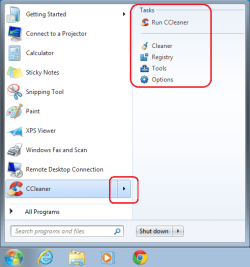
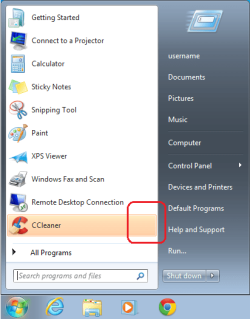
Solved Start menu - Remove task list (arrow)

Skalman

New member
Local time
6:01 PM
Messages
6

Attachments

  • windows7.png
    windows7.png
    16.4 KB · Views: 52

My Computer

Computer type
PC/Desktop
Computer Manufacturer/Model Number
custom build
OS
Windows 7 Ultimate x64
CPU
Intel i7 3770K
Motherboard
ASRock - Z77 Extreme4
Memory
16GB DDR3
Graphics Card(s)
NVIDIA GeForce GTX 760
Screen Resolution
2560x1440
Hard Drives
Western Digital
Internet Speed
100 Mbit
Browser
Google Chrome

My Computer

Computer type
PC/Desktop
Computer Manufacturer/Model Number
Custom assembled by me :}
OS
Win-7-Pro64bit 7-H-Prem-64bit
CPU
i7-5930K 2nd i9-9940x both water blocked VRM's too
Motherboard
ASUS SABERTOOTH X99 2nd ASUS x299 Apex
Memory
Trident-z 3200C14 2nd Trident-z 3600C16
Graphics Card(s)
EVGA 1080ti ftw3 2nd Titan Xp both water blocked
Sound Card
Built-in Realtek
Monitor(s) Displays
1-AOC G2460PG 24"G-Sync 144Hz/ 2nd 1-ASUS VG248QE 24" 144Hz
Screen Resolution
1920 x 1080 144Hz
Hard Drives
2-Samsung M.2 Evo & Evo Plus
2-Samsung 850 EVO 500GB SSD's/ 3-2.5 W.D. Black 1tb-&3-1tb/3-3.5 WD Black 1tb hdd's
PSU
EVGA SuperNOVA 1000-P2 2nd 1200-P2
Case
2-Corsair Obsidian Series 450D Black ATX Mid Tower
Cooling
Custom water loops
Keyboard
Logitech G710+/ 2nd Logitech G910
Mouse
2-RedDragon M901 Perdition 16400 dpi Gaming mouse = wired
Internet Speed
Comcast Ping 19ms 89.31mbps download speed 6.12mbps upload
Antivirus
Malwarebytes Pro/ Superantispyware Pro
Browser
FireFox & Pale moon
Other Info
2nd ASUS X299 Apex/Intel i9-9940x with Custom water loop/7H-Prem-x64/Corsair 450D case/Ram Trident-z 3600C16 4x8gb / Samsung970Evo plus 500gb SSD/Dual ssd EZ swap evo/PSU EVGA SuperNova 1200w-P2 80+Platinum/GPU Titan Xp /8-ML-140 on push-pull on 2-280GTX rads
Hi!

No it does not match exactly. I have the box to not show recently used files unchecked.

But I still want to list recently programs, but without the extended menu.

This extra menu appears on different programs, for example CCleaner and Google Chrome.
 

My Computer

Computer type
PC/Desktop
Computer Manufacturer/Model Number
custom build
OS
Windows 7 Ultimate x64
CPU
Intel i7 3770K
Motherboard
ASRock - Z77 Extreme4
Memory
16GB DDR3
Graphics Card(s)
NVIDIA GeForce GTX 760
Screen Resolution
2560x1440
Hard Drives
Western Digital
Internet Speed
100 Mbit
Browser
Google Chrome

My Computer

Computer type
PC/Desktop
Computer Manufacturer/Model Number
Custom assembled by me :}
OS
Win-7-Pro64bit 7-H-Prem-64bit
CPU
i7-5930K 2nd i9-9940x both water blocked VRM's too
Motherboard
ASUS SABERTOOTH X99 2nd ASUS x299 Apex
Memory
Trident-z 3200C14 2nd Trident-z 3600C16
Graphics Card(s)
EVGA 1080ti ftw3 2nd Titan Xp both water blocked
Sound Card
Built-in Realtek
Monitor(s) Displays
1-AOC G2460PG 24"G-Sync 144Hz/ 2nd 1-ASUS VG248QE 24" 144Hz
Screen Resolution
1920 x 1080 144Hz
Hard Drives
2-Samsung M.2 Evo & Evo Plus
2-Samsung 850 EVO 500GB SSD's/ 3-2.5 W.D. Black 1tb-&3-1tb/3-3.5 WD Black 1tb hdd's
PSU
EVGA SuperNOVA 1000-P2 2nd 1200-P2
Case
2-Corsair Obsidian Series 450D Black ATX Mid Tower
Cooling
Custom water loops
Keyboard
Logitech G710+/ 2nd Logitech G910
Mouse
2-RedDragon M901 Perdition 16400 dpi Gaming mouse = wired
Internet Speed
Comcast Ping 19ms 89.31mbps download speed 6.12mbps upload
Antivirus
Malwarebytes Pro/ Superantispyware Pro
Browser
FireFox & Pale moon
Other Info
2nd ASUS X299 Apex/Intel i9-9940x with Custom water loop/7H-Prem-x64/Corsair 450D case/Ram Trident-z 3600C16 4x8gb / Samsung970Evo plus 500gb SSD/Dual ssd EZ swap evo/PSU EVGA SuperNova 1200w-P2 80+Platinum/GPU Titan Xp /8-ML-140 on push-pull on 2-280GTX rads
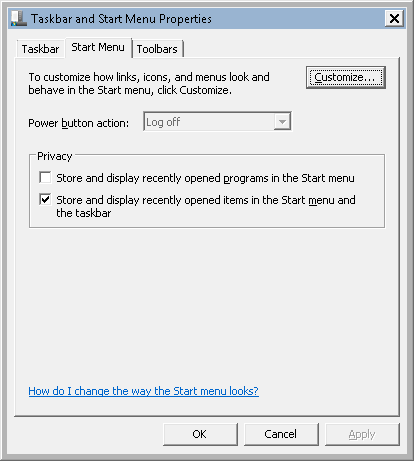
Turn this item off in the startbar properties.
(The one that is ticked)

vJl0Lfk.png


**Edit**
Wrong link sorry.
 

My Computer

Computer type
PC/Desktop
Computer Manufacturer/Model Number
Custom Build
OS
Windows 8.1
CPU
Intel i5 3750k OC'd 4.0Ghz
Motherboard
P8Z77-V LX3
Memory
16GB Vengence Corsair
Graphics Card(s)
GTX 770 OC 2GB Windforce
Sound Card
C-Media 7.1 Surround Card
Monitor(s) Displays
Asus 3D 23" & BenQ 24" & LG 19"
Screen Resolution
1920*1080, 1920*1080, 1440*900
Hard Drives
Crucial 512GB SSD
WD 1.5 TB
WD 500Gb
PSU
850MW Silverstone
Case
inWin DragonRider
Cooling
4 * 140mm LED Akasa, One 140mm Fan Akasa
Keyboard
Corsair k95
Mouse
R.A.T 7 Contagion
Internet Speed
152 Mb Fiber Optic
Antivirus
ESET Nod32
Browser
Waterfox x64 / Chrome x64
Other Info
Freenas / Plex Media server
Q6600
6Gb DDR3
6TB ZFS Raid
500W PSu
2 x Intel NIC's
Hi!
Thank you all for your replies, what a nice and helpful forum.

Unfortunately it does not work. The box is already unchecked but it makes no changes wheter its checked or not.

Some more softwares that gives this "task" list is also Windows Live Mail.

Patching of dlls and exes would be fine too, if I just had any idea where to look.
 

My Computer

Computer type
PC/Desktop
Computer Manufacturer/Model Number
custom build
OS
Windows 7 Ultimate x64
CPU
Intel i7 3770K
Motherboard
ASRock - Z77 Extreme4
Memory
16GB DDR3
Graphics Card(s)
NVIDIA GeForce GTX 760
Screen Resolution
2560x1440
Hard Drives
Western Digital
Internet Speed
100 Mbit
Browser
Google Chrome
Have you tried disabling Jumplists?

clip_image0054.jpg


Cause that is what they are technically i believe.

Set the number of items to 0
 

My Computer

Computer type
PC/Desktop
Computer Manufacturer/Model Number
Custom Build
OS
Windows 8.1
CPU
Intel i5 3750k OC'd 4.0Ghz
Motherboard
P8Z77-V LX3
Memory
16GB Vengence Corsair
Graphics Card(s)
GTX 770 OC 2GB Windforce
Sound Card
C-Media 7.1 Surround Card
Monitor(s) Displays
Asus 3D 23" & BenQ 24" & LG 19"
Screen Resolution
1920*1080, 1920*1080, 1440*900
Hard Drives
Crucial 512GB SSD
WD 1.5 TB
WD 500Gb
PSU
850MW Silverstone
Case
inWin DragonRider
Cooling
4 * 140mm LED Akasa, One 140mm Fan Akasa
Keyboard
Corsair k95
Mouse
R.A.T 7 Contagion
Internet Speed
152 Mb Fiber Optic
Antivirus
ESET Nod32
Browser
Waterfox x64 / Chrome x64
Other Info
Freenas / Plex Media server
Q6600
6Gb DDR3
6TB ZFS Raid
500W PSu
2 x Intel NIC's
These are jump lists, disabling them typically only disabled the task bar history in the jump lists, not the tasks itself.

CCleaner jumplist under the start menu is normal.

http://www.sevenforums.com/tutorials/81483-jump-lists-reset-clear-all-items.html

That will only clear recent tasks for the application. For ccleaner and some programs they cannot be removed as they are critical functions of the program and are not a history. Internet explorer for example cleaning the jumplist will only clear recently viewed pages under the jumplist, but it does not clear the new private tab button or similar as that is a actual task for the program and not a history.

These are what can be done:

http://www.sevenforums.com/tutorials/104503-recent-items-enable-disable.html

http://www.sevenforums.com/tutorials/14067-jumplist-launcher-create-custom-jump-lists.html

http://www.sevenforums.com/tutorials/4820-jump-lists-change-number-recent-items-display.html
 

My Computer

Computer type
PC/Desktop
Computer Manufacturer/Model Number
Custom Built
OS
Windows 10 Pro
CPU
AMD Ryzen 5 2400G Processor with Radeon RX Vega 11 Graphics
Motherboard
ASRock X470 Master SLI/AC AM4 AMD Promontory X470 SATA 6Gb/s
Memory
G.SKILL Ripjaws V Series 16GB (2 x 8GB) 288-Pin DDR4 SDRAM D
Graphics Card(s)
2047MB NVIDIA GeForce GTX 1060 6GB (EVGA)
Sound Card
Motherboard Built in
Monitor(s) Displays
Acer R240HY bidx 23.8-Inch IPS HDMI DVI VGA (1920 x 1080) Wi
Screen Resolution
1920 x 1080
Hard Drives
1TB Sandisk SSD PLUS (Main drive)
500 GB Seagate 7200 RPM (Games)
500 GB Western Digital 7200 RPM (Virtual Machines)
PSU
CORSAIR TX Series TX650M 650W 80+ Gold Modular Power Supply
Case
CORSAIR CARBIDE SPEC-02 Mid-Tower Gaming Case, Red LED Fan
Cooling
220mm, two 120mm, and four 60mm fans
Keyboard
Wired Dell keyboard
Mouse
Wireless Logitech mouse
Internet Speed
250mb down, 30mb up
Antivirus
Panda Cloud Antivirus
Browser
Chrome-ish x64
Other Info
Your awesome for reading this.
Thanks for all your replies.

So I guess its not possible to disable these lists all togheter?
 

My Computer

Computer type
PC/Desktop
Computer Manufacturer/Model Number
custom build
OS
Windows 7 Ultimate x64
CPU
Intel i7 3770K
Motherboard
ASRock - Z77 Extreme4
Memory
16GB DDR3
Graphics Card(s)
NVIDIA GeForce GTX 760
Screen Resolution
2560x1440
Hard Drives
Western Digital
Internet Speed
100 Mbit
Browser
Google Chrome
Thanks for all your replies.

So I guess its not possible to disable these lists all togheter?

Doing what i suggested and the second link that andrew129260 provided will disable the jump lists.
 

My Computer

Computer type
PC/Desktop
Computer Manufacturer/Model Number
Custom Build
OS
Windows 8.1
CPU
Intel i5 3750k OC'd 4.0Ghz
Motherboard
P8Z77-V LX3
Memory
16GB Vengence Corsair
Graphics Card(s)
GTX 770 OC 2GB Windforce
Sound Card
C-Media 7.1 Surround Card
Monitor(s) Displays
Asus 3D 23" & BenQ 24" & LG 19"
Screen Resolution
1920*1080, 1920*1080, 1440*900
Hard Drives
Crucial 512GB SSD
WD 1.5 TB
WD 500Gb
PSU
850MW Silverstone
Case
inWin DragonRider
Cooling
4 * 140mm LED Akasa, One 140mm Fan Akasa
Keyboard
Corsair k95
Mouse
R.A.T 7 Contagion
Internet Speed
152 Mb Fiber Optic
Antivirus
ESET Nod32
Browser
Waterfox x64 / Chrome x64
Other Info
Freenas / Plex Media server
Q6600
6Gb DDR3
6TB ZFS Raid
500W PSu
2 x Intel NIC's

My Computer

Computer type
Laptop
Computer Manufacturer/Model Number
Employer provided Dell Latitude
OS
W7 Pro SP1 64bit
CPU
i7
Memory
8GB
Graphics Card(s)
Intel HD Graphics
Hard Drives
crappy SSD
Antivirus
Employer mandated Symantec Endpoint Protection
Browser
Pale Moon 64bit, IE11 64bit & Chrome 64bit
Hi!

No it does not match exactly. I have the box to not show recently used files unchecked.

But I still want to list recently programs, but without the extended menu.

This extra menu appears on different programs, for example CCleaner and Google Chrome.
It is possible to have the list of recent programs and not have the extended menu.

I would rather exhaust all other avenues before I document how I managed that.

Let's wait and see if others in the threadhttp://www.sevenforums.com/members/windows-sniper.html can tell us where we went wrong in following their suggestions.
 

My Computer

Computer type
Laptop
Computer Manufacturer/Model Number
Employer provided Dell Latitude
OS
W7 Pro SP1 64bit
CPU
i7
Memory
8GB
Graphics Card(s)
Intel HD Graphics
Hard Drives
crappy SSD
Antivirus
Employer mandated Symantec Endpoint Protection
Browser
Pale Moon 64bit, IE11 64bit & Chrome 64bit
Thanks for all your replies.

So I guess its not possible to disable these lists all together?

Doesn't look like it,
Best I can say is remove ccleaner from the list and simply access it via a desktop shortcut or the actual all programs list,

I did the same for Internet explorer as for Andrews example ;)
Cheers.
 

My Computer

Computer type
PC/Desktop
Computer Manufacturer/Model Number
Custom assembled by me :}
OS
Win-7-Pro64bit 7-H-Prem-64bit
CPU
i7-5930K 2nd i9-9940x both water blocked VRM's too
Motherboard
ASUS SABERTOOTH X99 2nd ASUS x299 Apex
Memory
Trident-z 3200C14 2nd Trident-z 3600C16
Graphics Card(s)
EVGA 1080ti ftw3 2nd Titan Xp both water blocked
Sound Card
Built-in Realtek
Monitor(s) Displays
1-AOC G2460PG 24"G-Sync 144Hz/ 2nd 1-ASUS VG248QE 24" 144Hz
Screen Resolution
1920 x 1080 144Hz
Hard Drives
2-Samsung M.2 Evo & Evo Plus
2-Samsung 850 EVO 500GB SSD's/ 3-2.5 W.D. Black 1tb-&3-1tb/3-3.5 WD Black 1tb hdd's
PSU
EVGA SuperNOVA 1000-P2 2nd 1200-P2
Case
2-Corsair Obsidian Series 450D Black ATX Mid Tower
Cooling
Custom water loops
Keyboard
Logitech G710+/ 2nd Logitech G910
Mouse
2-RedDragon M901 Perdition 16400 dpi Gaming mouse = wired
Internet Speed
Comcast Ping 19ms 89.31mbps download speed 6.12mbps upload
Antivirus
Malwarebytes Pro/ Superantispyware Pro
Browser
FireFox & Pale moon
Other Info
2nd ASUS X299 Apex/Intel i9-9940x with Custom water loop/7H-Prem-x64/Corsair 450D case/Ram Trident-z 3600C16 4x8gb / Samsung970Evo plus 500gb SSD/Dual ssd EZ swap evo/PSU EVGA SuperNova 1200w-P2 80+Platinum/GPU Titan Xp /8-ML-140 on push-pull on 2-280GTX rads
Okay, we have heard from ThrashZone.

andrew129260 & Windows Sniper have both been on the forum since I made post #12...
...so I guess we are stuck with this:

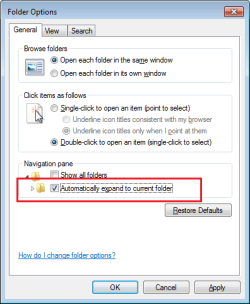
Set Folder Options like this:
D1.png

D2.png
(Some of those settings are not important to the task at hand, but they might help you to see windows that look like the screenshots below. You can set them back to whatever you like after you complete the steps below.)


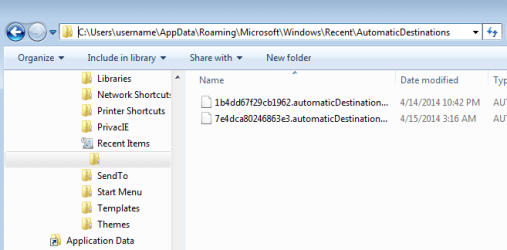
Open Windows (file) Explorer.

Copy/paste, go to this folder...
%APPDATA%\Microsoft\Windows\Recent\AutomaticDestinations\
...via the address field (bar?).
(The address field is shown in the top of the screenshot below.
It has C:\Users\username\... in it - in that screenshot.)

You should now see a folder with no name:
(Under Recent Items, in the Navigation Pane.)
D3.png


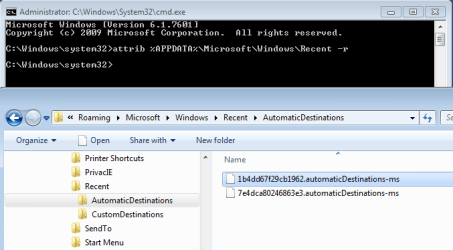
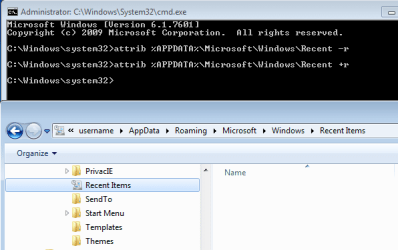
Open a cmd prompt window at the admin level.
Paste this in and press enter to run it:
Code:
attrib %APPDATA%\Microsoft\Windows\Recent -r
You should now be able to see the folders where these tasks lists are stored.
(Notice that the folder icon has changed for Recent Items.)
D4.png


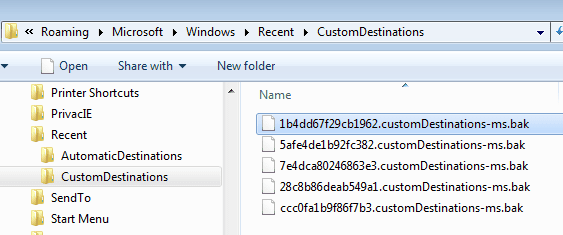
Add a new file extension - like ".bak" - to each file.
(Do this for both folders - AutomaticDestinations and CustomDestinations)
D5.png


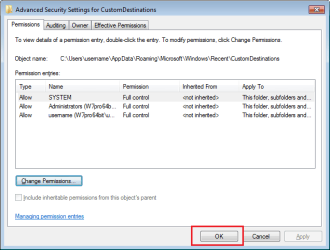
SETTING NTFS PERMISSIONS:

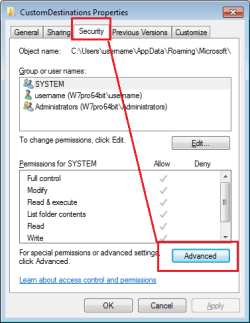
Right click on one of the CustomDestinations folder...
...select Properties from the context menu
...then go to the tab named Security:
D6.png

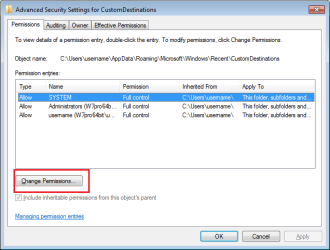
D7.png

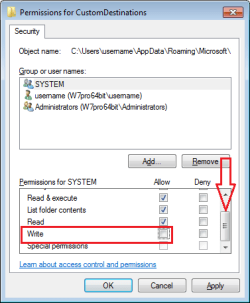
Remove the check by this option:
D8.png

D9.png

D10.png

D11.png

D12.png

Scroll down and remove the check from this option:
D13.png
Repeat that permissions setting for each account.

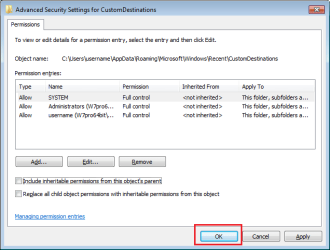
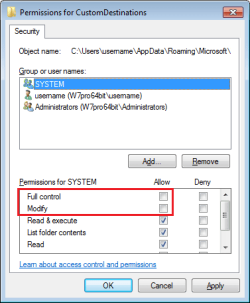
Scroll back up and check to see that it looks like this:
D14.png
Repeat these permissions settings for each account.

Repeat SETTING NTFS PERMISSIONS: for the AutomaticDestinations folder.


Open a cmd prompt window at the admin level.
Paste this in and press enter to run it:
Code:
attrib %APPDATA%\Microsoft\Windows\Recent [COLOR=Red][B]+[/B][/COLOR]r
You no longer be able to see the folders where these tasks lists are stored.
(Notice that the folder icon has changed back for Recent Items.)
D15.png


Wasn't that simple?
You should now have no more "extended menus" (Task Lists).

All of this could be reduced to a batch file, but where is the fun in that :-)
 
Last edited:

My Computer

Computer type
Laptop
Computer Manufacturer/Model Number
Employer provided Dell Latitude
OS
W7 Pro SP1 64bit
CPU
i7
Memory
8GB
Graphics Card(s)
Intel HD Graphics
Hard Drives
crappy SSD
Antivirus
Employer mandated Symantec Endpoint Protection
Browser
Pale Moon 64bit, IE11 64bit & Chrome 64bit
Wow man, that works great! Thank you so much!

So this means that SYSTEM (computer name?) does not have any write permissions to any of those 2 folders I guess?

This is the batch I wrote so far, it works but could maybe be done in a better way too?

Code:
attrib %APPDATA%\Microsoft\Windows\Recent -r
del /s /q %APPDATA%\Microsoft\Windows\Recent\AutomaticDestinations\*
del /s /q %APPDATA%\Microsoft\Windows\Recent\CustomDestinations\*
echo y| cacls %APPDATA%\Microsoft\Windows\Recent\AutomaticDestinations /G "%COMPUTERNAME%":R
echo y| cacls %APPDATA%\Microsoft\Windows\Recent\CustomDestinations /G "%COMPUTERNAME%":R
attrib %APPDATA%\Microsoft\Windows\Recent +r
 

My Computer

Computer type
PC/Desktop
Computer Manufacturer/Model Number
custom build
OS
Windows 7 Ultimate x64
CPU
Intel i7 3770K
Motherboard
ASRock - Z77 Extreme4
Memory
16GB DDR3
Graphics Card(s)
NVIDIA GeForce GTX 760
Screen Resolution
2560x1440
Hard Drives
Western Digital
Internet Speed
100 Mbit
Browser
Google Chrome
I'm glad that it works for you.

Your batch file works, but it removes any local user accounts and the administrators group account from those folders. Functionally, that is fine. But I did not want to go quite that far for people that might find this thread later. Hence, my long set of images that might help people undo what they have done if they ever want the lists back.
 

My Computer

Computer type
Laptop
Computer Manufacturer/Model Number
Employer provided Dell Latitude
OS
W7 Pro SP1 64bit
CPU
i7
Memory
8GB
Graphics Card(s)
Intel HD Graphics
Hard Drives
crappy SSD
Antivirus
Employer mandated Symantec Endpoint Protection
Browser
Pale Moon 64bit, IE11 64bit & Chrome 64bit
Hi!
I realized my batch file only worked for some time (it did not completely remove the write rights etc).

I've made some changes which now seems to work for me (My machines are all single-user)

Code:
REM Remove "expandable" menus on start menu (completely, not just recent)

attrib %APPDATA%\Microsoft\Windows\Recent -r

REM Make sure we have ownership of the file first
takeown /s %COMPUTERNAME% /u %USERNAME% /f %APPDATA%\Microsoft\Windows\Recent\AutomaticDestinations
takeown /s %COMPUTERNAME% /u %USERNAME% /f %APPDATA%\Microsoft\Windows\Recent\CustomDestinations

REM Delete the files
del /s /q %APPDATA%\Microsoft\Windows\Recent\AutomaticDestinations\*
del /s /q %APPDATA%\Microsoft\Windows\Recent\CustomDestinations\*

REM Remove inheritance and all rights - only add back the rights we want (read)
icacls %APPDATA%\Microsoft\Windows\Recent\AutomaticDestinations /inheritance:r /remove %COMPUTERNAME% /grant %COMPUTERNAME%:(R) /T /C
icacls %APPDATA%\Microsoft\Windows\Recent\AutomaticDestinations /inheritance:r /remove %USERNAME% /grant %USERNAME%:(R) /T /C
icacls %APPDATA%\Microsoft\Windows\Recent\CustomDestinations /inheritance:r /remove %COMPUTERNAME% /grant %COMPUTERNAME%:(R) /T /C
icacls %APPDATA%\Microsoft\Windows\Recent\CustomDestinations /inheritance:r /remove %USERNAME% /grant %USERNAME%:(R) /T /C

attrib %APPDATA%\Microsoft\Windows\Recent +r
 

My Computer

Computer type
PC/Desktop
Computer Manufacturer/Model Number
custom build
OS
Windows 7 Ultimate x64
CPU
Intel i7 3770K
Motherboard
ASRock - Z77 Extreme4
Memory
16GB DDR3
Graphics Card(s)
NVIDIA GeForce GTX 760
Screen Resolution
2560x1440
Hard Drives
Western Digital
Internet Speed
100 Mbit
Browser
Google Chrome
Sorry, been dealing with a lot of threads at once. As I stated those are only tasks in the jumplist. Tasks for programs in the jump list cannot be removed. Jump lists cannot be completely disabled as far as I know. Only thing I have found on this is here:

http://www.sevenforums.com/customiz...-disable-jump-list-trigger-2.html#post2384261

Since tasks in jump lists are not history, they cannot be removed easily. History can. (Unless forcibly removed via reg hack or something I am not in knowledge of) Link above may work....

Tip:

Right clicking with shift brings the classic taskbar right click menu back.
 

My Computer

Computer type
PC/Desktop
Computer Manufacturer/Model Number
Custom Built
OS
Windows 10 Pro
CPU
AMD Ryzen 5 2400G Processor with Radeon RX Vega 11 Graphics
Motherboard
ASRock X470 Master SLI/AC AM4 AMD Promontory X470 SATA 6Gb/s
Memory
G.SKILL Ripjaws V Series 16GB (2 x 8GB) 288-Pin DDR4 SDRAM D
Graphics Card(s)
2047MB NVIDIA GeForce GTX 1060 6GB (EVGA)
Sound Card
Motherboard Built in
Monitor(s) Displays
Acer R240HY bidx 23.8-Inch IPS HDMI DVI VGA (1920 x 1080) Wi
Screen Resolution
1920 x 1080
Hard Drives
1TB Sandisk SSD PLUS (Main drive)
500 GB Seagate 7200 RPM (Games)
500 GB Western Digital 7200 RPM (Virtual Machines)
PSU
CORSAIR TX Series TX650M 650W 80+ Gold Modular Power Supply
Case
CORSAIR CARBIDE SPEC-02 Mid-Tower Gaming Case, Red LED Fan
Cooling
220mm, two 120mm, and four 60mm fans
Keyboard
Wired Dell keyboard
Mouse
Wireless Logitech mouse
Internet Speed
250mb down, 30mb up
Antivirus
Panda Cloud Antivirus
Browser
Chrome-ish x64
Other Info
Your awesome for reading this.
...Tasks for programs in the jump list cannot be removed. Jump lists cannot be completely disabled as far as I know....
Maybe we are talking about different things. Could you show a screenshot of what you are talking about?

Before doing the steps in post#14:

before.png


After doing the steps in post#14:

after.png

The jump lists and the list of tasks are disabled. They do not come back.


The two batch files in posts 15 and 17 don't perfectly do the steps from post #14 - yet :-)
The SYSTEM account and the Administrators group account is still not handled.
 

My Computer

Computer type
Laptop
Computer Manufacturer/Model Number
Employer provided Dell Latitude
OS
W7 Pro SP1 64bit
CPU
i7
Memory
8GB
Graphics Card(s)
Intel HD Graphics
Hard Drives
crappy SSD
Antivirus
Employer mandated Symantec Endpoint Protection
Browser
Pale Moon 64bit, IE11 64bit & Chrome 64bit
Well it looks like you can indeed remove jump lists entirely like you showed. :) I know you could clear the jump list history, but not the tasks itself for the application in the jump list. Anyways you have done it. :)
 

My Computer

Computer type
PC/Desktop
Computer Manufacturer/Model Number
Custom Built
OS
Windows 10 Pro
CPU
AMD Ryzen 5 2400G Processor with Radeon RX Vega 11 Graphics
Motherboard
ASRock X470 Master SLI/AC AM4 AMD Promontory X470 SATA 6Gb/s
Memory
G.SKILL Ripjaws V Series 16GB (2 x 8GB) 288-Pin DDR4 SDRAM D
Graphics Card(s)
2047MB NVIDIA GeForce GTX 1060 6GB (EVGA)
Sound Card
Motherboard Built in
Monitor(s) Displays
Acer R240HY bidx 23.8-Inch IPS HDMI DVI VGA (1920 x 1080) Wi
Screen Resolution
1920 x 1080
Hard Drives
1TB Sandisk SSD PLUS (Main drive)
500 GB Seagate 7200 RPM (Games)
500 GB Western Digital 7200 RPM (Virtual Machines)
PSU
CORSAIR TX Series TX650M 650W 80+ Gold Modular Power Supply
Case
CORSAIR CARBIDE SPEC-02 Mid-Tower Gaming Case, Red LED Fan
Cooling
220mm, two 120mm, and four 60mm fans
Keyboard
Wired Dell keyboard
Mouse
Wireless Logitech mouse
Internet Speed
250mb down, 30mb up
Antivirus
Panda Cloud Antivirus
Browser
Chrome-ish x64
Other Info
Your awesome for reading this.
Back
Top