Deleting Temporary + Set Up Files etc - OK to do that?

Newcomer7

New member
Member
Local time
7:30 AM
Messages
60
Hello

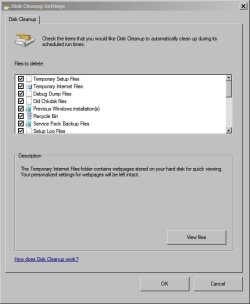
My first question is that Windows Cleanup always "discovers" many files for cleaning up. However, it usually only ticks a few items such as temp internet files. How about those Set up log files, Temporary Files, Per user archived windows error report, System archived windows error report? Why does it not choose those?

Actually I always tick those manually and then delete them all. On second thoughts, I am not sure if it is OK to do so :confused::confused: Advice please?

Also, my (previous) broadband provider used remote control to delete all the files below (to speed up the pc):
%temp%
C:\Windows\Temp

Is it safe to do?

Can you please tell me what you think about these? Thank you in advance :geek:
 

My Computer My Computer

At a glance

Windows 7 64 bit
Computer type
Laptop
Computer Manufacturer/Model Number
Packard Bell
OS
Windows 7 64 bit
You might want to consider CCleaner, which gives you a greater degree of control over what to delete. A total of maybe 50 checkboxes. I have most of them checked. If you check too many, you will soon discover that you shouldn't have, and can then just uncheck it so it won't be cleaned in the future.

I only see 7 categories in Disk Cleanup's list on my PC. Of those you list, I see only "temporary files".

I don't think you'd have trouble deleting from C Windows Temp, but I just checked mine. It contains only 22 kb---hardly worth the trouble.
 

My Computer My Computer

At a glance

Windows 7 Home Premium SP1, 64-bitIntel Skylake i5-6600K, not overclocked8 GB HyperX DDR4-2666 (2 x 4 GB)none; graphics are integrated on CPU
Computer type
PC/Desktop
Computer Manufacturer/Model Number
Ignatz Special; 4 speed manual gearbox; factory air conditioning; one of one
OS
Windows 7 Home Premium SP1, 64-bit
CPU
Intel Skylake i5-6600K, not overclocked
Motherboard
AsRock Z170M Extreme 4, micro ATX
Memory
8 GB HyperX DDR4-2666 (2 x 4 GB)
Graphics Card(s)
none; graphics are integrated on CPU
Sound Card
onboard: Realtek ALC1150; external: USB Behringer UF0-202
Monitor(s) Displays
Dell S2340M 23 inch IPS
Screen Resolution
1600 x 900
Hard Drives
System: Crucial MX100 series SSD, 128 GB;
Data: Samsung Spinpoint 103SJ, 1 TB;
Backup: WD Caviar Green WD30EZRX-00D8PB0, 3 TB
PSU
Rosewill SilentNight 500 watt fanless, semi-modular
Case
Antec Solo II
Cooling
Noctua NH-U12S; Noctua F12 intake, Noctua S12A exhaust
Keyboard
Microsoft 200 6JH-00001 USB
Mouse
Dell or Microsoft optical wired; USB
Antivirus
Microsoft Security Essentials and Malwarebytes Premium
Browser
Pale Moon
Other Info
All fans PWM; speeds at idle: CPU circa 500 rpm; intake circa 600 rpm; exhaust circa 600 rpm; CPU temps 27 idle and 47 C load in a warm room (27 C/81 F) when running Intel Extreme Tuning Utility stress test.
My first question is that Windows Cleanup always "discovers" many files for cleaning up. However, it usually only ticks a few items such as temp internet files. How about those Set up log files, Temporary Files, Per user archived windows error report, System archived windows error report? Why does it not choose those?

These files were created for a reason. You may have no interest in them but for some people they are of considerable value. Windows tends to be conservative about these things and thus leaves them unchecked. Anything Disk Cleanup makes available for deletion will be safe do do so. Unless of course they are of value to you.

Deletion of temporary files created in the current session can cause problems. When an application creates a temp file it may wish to access it later. If it isn't there the results are unpredictable. Here too Windows is conservative in what it deletes.

Manual deletion of files in %temp% or in c:\Windows\temp\ may cause problems.
 

My Computer My Computer

At a glance

Windows 7 Pro 64 bitXeon W35208 GBNvidia Geforce 210
Computer type
PC/Desktop
Computer Manufacturer/Model Number
HP
OS
Windows 7 Pro 64 bit
CPU
Xeon W3520
Memory
8 GB
Graphics Card(s)
Nvidia Geforce 210
Disk Cleanup

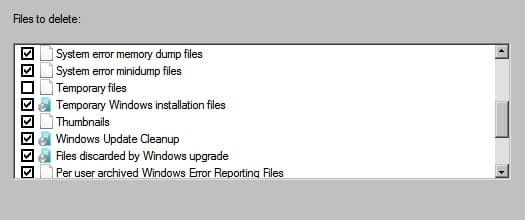
Here's what I personally select in Disk Cleanup:

Disk Cleanup Settings 1.jpg
Disk Cleanup Settings 2.jpg
Disk Cleanup Settings 3.jpg

Note: If you select Windows Update Cleanup you may not be able to remove installed updates.

If you select Thumbnails it will initially take longer to load images when you want to view them.

If in doubt just stick to the regular settings.

As for temp files take a look at this post.
 
Last edited:

My Computer My Computer

At a glance

Microsoft Windows 7 Home Premium 64-bit 7601 ...AMD C-60 APU with Radeon(tm) HD Graphics4.00 GBAMD Radeon HD 6290 Graphics
Computer type
Laptop
Computer Manufacturer/Model Number
ASUS
OS
Microsoft Windows 7 Home Premium 64-bit 7601 Multiprocessor Free Service Pack 1
CPU
AMD C-60 APU with Radeon(tm) HD Graphics
Motherboard
ASUSTeK COMPUTER INC. X501U
Memory
4.00 GB
Graphics Card(s)
AMD Radeon HD 6290 Graphics
Sound Card
(1) AMD High Definition Audio Device (2) Realtek High Defi
Screen Resolution
1366 x 768 x 32 bits (4294967296 colors) @ 60 Hz
Hard Drives
Hitachi HTS545050A7E380 SATA Disk Device
Antivirus
Comodo CIS & FW, SecureAplus App Whitelisting, Threatfire
Browser
Cyberfox 64bit, Opera 64bit, Airfox
Other Info
Spy-The-Spy, HitmanPro.Alert, Norton Connect Safe, MJRegWatcher, BitDefender TrafficLight, Voodoo Shield, Zemana AntiMalware
You might want to consider CCleaner, which gives you a greater degree of control over what to delete. A total of maybe 50 checkboxes. I have most of them checked. If you check too many, you will soon discover that you shouldn't have, and can then just uncheck it so it won't be cleaned in the future.

I only see 7 categories in Disk Cleanup's list on my PC. Of those you list, I see only "temporary files".

I don't think you'd have trouble deleting from C Windows Temp, but I just checked mine. It contains only 22 kb---hardly worth the trouble.
My trouble will be I do not know how to select what to be deleted :rolleyes: .... I think I am a tidy freak, and just want to get rid of ANYTHING that is useless :o .... Regarding CC Cleaner, it seems the options are mixed. A lot of people use it, but some MS Engineer said it is not that safe .... :picnic:

Thank you for the reply :)
 

My Computer My Computer

At a glance

Windows 7 64 bit
Computer type
Laptop
Computer Manufacturer/Model Number
Packard Bell
OS
Windows 7 64 bit
Here's what I personally select in Disk Cleanup:

View attachment 321387
View attachment 321388
View attachment 321389

Note: If you select Windows Update Cleanup you may not be able to remove installed updates.

If you select Thumbnails it will initially take longer to load images when you want to view them.

If in doubt just stick to the regular settings.

As for temp files take a look at this post.
Yes, that is pretty much I will see on Windows Cleanup selections ... and I usually just delete EVERYTHING without even thinking :p
 

My Computer My Computer

At a glance

Windows 7 64 bit
Computer type
Laptop
Computer Manufacturer/Model Number
Packard Bell
OS
Windows 7 64 bit
Oh... actually I do not see so much selections ... but it doesn't matter. I just delete whatever is shown to me :)

If it is ok to delete all in %temp% + C:\windows\temp ... it is probably enough for me ... just to fulfill my tidy freak intention, nothing more than that :roflmao:
 

My Computer My Computer

At a glance

Windows 7 64 bit
Computer type
Laptop
Computer Manufacturer/Model Number
Packard Bell
OS
Windows 7 64 bit
If it is ok to delete all in %temp% + C:\windows\temp ... it is probably enough for me ... just to fulfill my tidy freak intention, nothing more than that

As I said previously, there are risks in deleting temp files created in the current session. I cannot quantify that risk but it exists. By default Windows only deletes temp files older then 7 days. If an application tries to access a deleted temp file the results are unpredictable.
 

My Computer My Computer

At a glance

Windows 7 Pro 64 bitXeon W35208 GBNvidia Geforce 210
Computer type
PC/Desktop
Computer Manufacturer/Model Number
HP
OS
Windows 7 Pro 64 bit
CPU
Xeon W3520
Memory
8 GB
Graphics Card(s)
Nvidia Geforce 210
OK then ... I cannot delete as much as I want then ... :cry: It is a shame to me...
 

My Computer My Computer

At a glance

Windows 7 64 bit
Computer type
Laptop
Computer Manufacturer/Model Number
Packard Bell
OS
Windows 7 64 bit

My Computer My Computer

At a glance

Windows 10 ProAMD Ryzen 5 2400G Processor with Radeon RX Ve...G.SKILL Ripjaws V Series 16GB (2 x 8GB) 288-P...2047MB NVIDIA GeForce GTX 1060 6GB (EVGA)
Computer type
PC/Desktop
Computer Manufacturer/Model Number
Custom Built
OS
Windows 10 Pro
CPU
AMD Ryzen 5 2400G Processor with Radeon RX Vega 11 Graphics
Motherboard
ASRock X470 Master SLI/AC AM4 AMD Promontory X470 SATA 6Gb/s
Memory
G.SKILL Ripjaws V Series 16GB (2 x 8GB) 288-Pin DDR4 SDRAM D
Graphics Card(s)
2047MB NVIDIA GeForce GTX 1060 6GB (EVGA)
Sound Card
Motherboard Built in
Monitor(s) Displays
Acer R240HY bidx 23.8-Inch IPS HDMI DVI VGA (1920 x 1080) Wi
Screen Resolution
1920 x 1080
Hard Drives
1TB Sandisk SSD PLUS (Main drive)
500 GB Seagate 7200 RPM (Games)
500 GB Western Digital 7200 RPM (Virtual Machines)
PSU
CORSAIR TX Series TX650M 650W 80+ Gold Modular Power Supply
Case
CORSAIR CARBIDE SPEC-02 Mid-Tower Gaming Case, Red LED Fan
Cooling
220mm, two 120mm, and four 60mm fans
Keyboard
Wired Dell keyboard
Mouse
Wireless Logitech mouse
Internet Speed
250mb down, 30mb up
Antivirus
Panda Cloud Antivirus
Browser
Chrome-ish x64
Other Info
Your awesome for reading this.
Thank you ;)
 

My Computer My Computer

At a glance

Windows 7 64 bit
Computer type
Laptop
Computer Manufacturer/Model Number
Packard Bell
OS
Windows 7 64 bit
Back
Top