Solved BSOD while doing anything graphics intensive (gaming, rendering, etc.)

PeregrineX

New member
Local time
7:24 AM
Messages
81
Location
Springfield, VA, USA
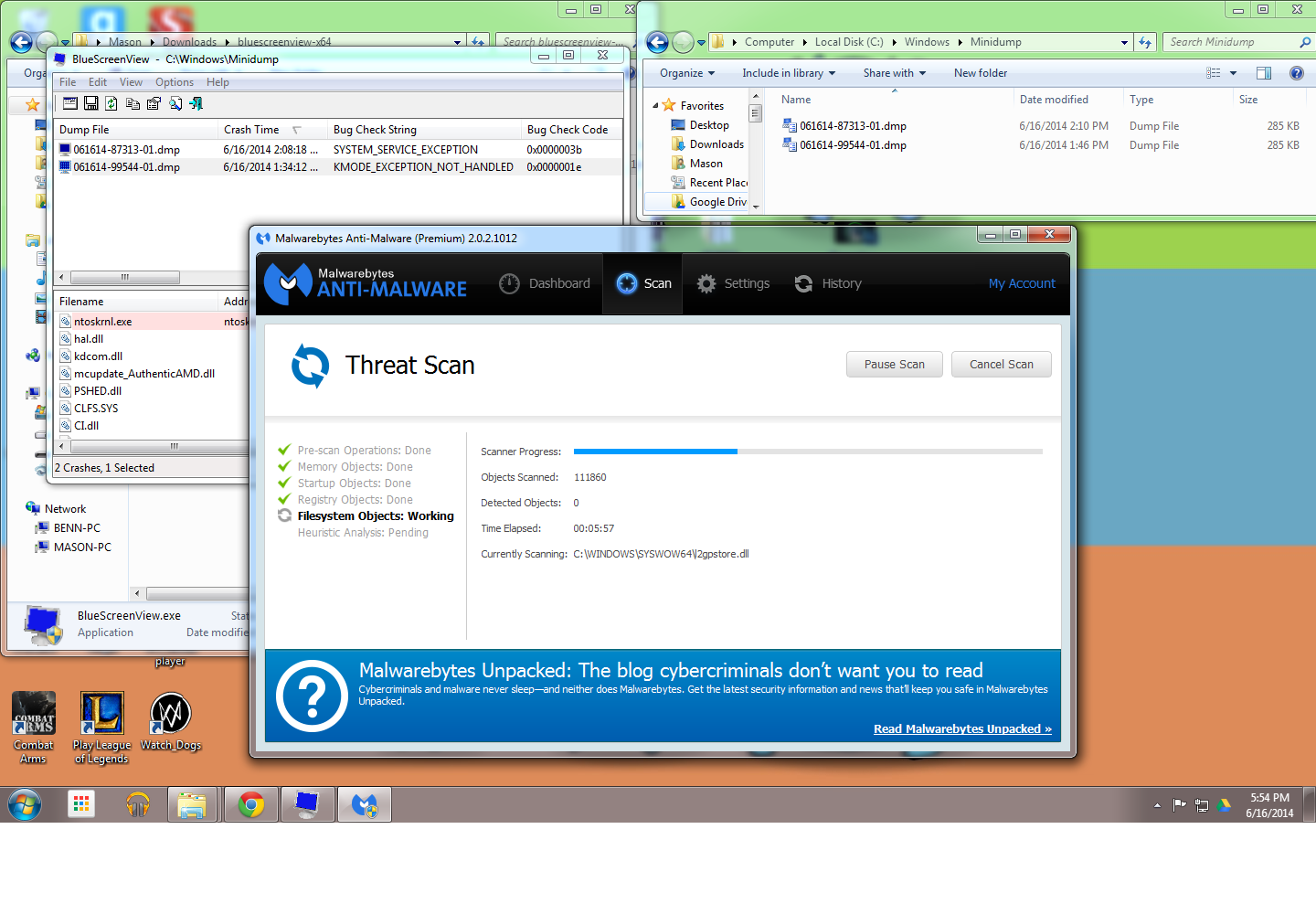
Hello, Due to some recent BSODs, I've been having a lot of problems lately. It happens at random times (usually only after a while) when gaming, rendering, basically anything that uses the GPU a lot.

Here's what I know:

The errors I get are "ntoskrnl.exe || 0x0000003b" and "ntoskrnl.exe || 0x0000001e" in the two successfully logged dumps. However, there are more dumps from different BSODs in the past that might have been deleted by Glary Utilities or CCleaner accidentally.

Since it only happens when GPU intensive programs are running, I have deduced that it is the problem. However, it's not the actual card (I got a GTX 760 after having an old GT 640 2GB that I wanted to upgrade, especially since I thought it was dying due to the BSODs. That didn't help at all), so it must be a driver issue.

I've tried to use the Microsoft hotfix for 0x0000003b, but it said it wasn't compatible with my computer/OS.

I think that's all I have for you, so if anyone could point me in the right direction as to how to fix this, it would be greatly appreciated.

Thanks in advance,

~PeregrineX
 
Last edited:

My Computer

Computer type
PC/Desktop
Computer Manufacturer/Model Number
Custom Build
OS
Windows 7 Ultimate X64
CPU
AMD FX-6300 Hex Core
Motherboard
ASRock 970 EXTREME4
Memory
8GB
Graphics Card(s)
NVidia Geforce GTX 760
Sound Card
N/A
Monitor(s) Displays
Dell P1913
Screen Resolution
1440x900
Hard Drives
Western Digital WD3200AVVS-63L2B0 298GB
Western Digital WD10EAVS-00D7B1 1TB
Cooling
Fans
Keyboard
Logitech Y-R0009
Mouse
GE Optical Mouse
Internet Speed
1Gbps
Antivirus
MBAM Pro
Browser
Chrome, duh.
It's your driver for your GPU that's causing the issue.

Code:
fffff880`046ba818  fffff880`132b674eUnable to load image \SystemRoot\system32\DRIVERS\nvlddmkm.sys, Win32 error 0n2
[B][COLOR=Red]*** WARNING: Unable to verify timestamp for nvlddmkm.sys
*** ERROR: Module load completed but symbols could not be loaded for nvlddmkm.sys[/COLOR][/B]
 nvlddmkm+0x21274e

Download this earlier version from here and follow NVIDIA Drivers - Avoid Problems for the cleanest possible install.
 

My Computer

Computer type
PC/Desktop
Computer Manufacturer/Model Number
Custom Build
OS
W7 Pro x64 SP1 | W10 Pro IP x64 | W8.1 Pro x64 VM | Linux Mint VM
CPU
i7-4790k @ 4GHz (4.4GHz Boost)
Motherboard
ASUS Sabertooth Z87 (BIOS Rev 2004)
Memory
16GB DDR3 Kingston HyperX Fury @ 1600MHz CL 9-9-9-27
Graphics Card(s)
EVGA GTX 980 Classified
Sound Card
Realtek Onboard
Monitor(s) Displays
Samsung S27D390
Screen Resolution
1920 x 1080
Hard Drives
240GB Intel 520 Series SSD |
Samsung 850 EVO 120GB SSD |
2TB WD Caviar Black |
2TB WD Caviar Green
PSU
Corsair HX850-80 Gold Modular
Case
Cooler Master Silencio 650
Cooling
Corsair H80i w/2 x Corsair SP120 | 2 x 120mm Noctua NF-S12B
Keyboard
Microsoft Sidewinder X4
Mouse
Gigabyte M6900 optical
Internet Speed
152mb
Antivirus
F-Secure
Browser
Firefox 38.0
Other Info
Backup Rig: Win 7 Pro 64-bit | AMD A10-5800k | ASUS F2A85-V Pro | 8GB Samsung DDR3 @1600MHz | 120GB Toshiba SDD | 2TB Seagate HDD | Cooler Master Silencio 550
First of all I recommend you remove these utilities as they can cause a lot of issues.

Code:
Start Menu\Programs\[COLOR="red"]ASRock Utility[/COLOR]	Public:Start Menu\Programs\ASRock Utility	Public
Start Menu\Programs\ASRock Utility\3TB+ Unlocker	Public:Start Menu\Programs\ASRock Utility\3TB+ Unlocker	Public
Start Menu\Programs\ASRock Utility\[COLOR="red"]ASRock eXtreme[/COLOR] Tuner	Public:Start Menu\Programs\ASRock Utility\ASRock eXtreme Tuner	Public
Start Menu\Programs\ASRock Utility\[COLOR="red"]InstantBoot[/COLOR]	Public:Start Menu\Programs\ASRock Utility\InstantBoot	Public
Start Menu\Programs\[COLOR="Red"]Device Doctor Pro[/COLOR]	Public:Start Menu\Programs\Device Doctor Pro	Public

Lastly I've seen this program on your startup...

Code:
	[COLOR="red"]뀀a[/COLOR]	Mason-PC\Mason	HKU\S-1-5-21-464554891-1052774010-1193810398-1001\SOFTWARE\Microsoft\Windows\CurrentVersion\Run

Do you have any idea what it is?

You might want to run a virus scan.

Use Kaspersky's TDSSKiller Anti Rootkit utility

Anti-rootkit utility TDSSKiller

Here's what I find interesting

Code:
4: kd> k
Child-SP          RetAddr           Call Site
fffff880`0c1f5d78 fffff800`03526738 nt!KeBugCheckEx
fffff880`0c1f5d80 fffff800`034db242 nt! ?? ::FNODOBFM::`string'+0x487ed
fffff880`0c1f6420 fffff800`034d9b4a nt!KiExceptionDispatch+0xc2
fffff880`0c1f6600 fffff800`0350c622 nt!KiGeneralProtectionFault+0x10a
fffff880`0c1f6790 fffff800`034e4c6e nt!KxWaitForLockOwnerShip+0x12 <-- probably waiting for resources to be unlocked so they can be acquired
fffff880`0c1f67c0 fffff800`0359b256 nt!KeAcquireInStackQueuedSpinLockAtDpcLevel+0x7e <-- waiting for the spinlock to be released.
fffff880`0c1f6810 fffff800`034ebc83 nt!MiRemoveLowestPriorityStandbyPage+0x56 <-- lower priority thread removed, it's probably delaying a higher priority thread from running by preventing resources being used.
fffff880`0c1f6890 fffff800`034e83fe nt!MiResolveDemandZeroFault+0x6f3 <-- the page fault demands a zeroed page to resolve the issue
fffff880`0c1f6980 fffff800`034d9cee nt!MmAccessFault+0x5de
fffff880`0c1f6ae0 00000000`665b7a59 nt!KiPageFault+0x16e <-- page fault
00000000`002fd218 00000000`00000000 0x665b7a59

Looks like the system nearly deadlocked but an exception occurred, I might be wrong.

Looking at the raw stack I see your Nvidia display driver being flagged.

Code:
Unable to load image \SystemRoot\system32\DRIVERS\nvlddmkm.sys, Win32 error 0n2
*** WARNING: Unable to verify timestamp for nvlddmkm.sys
*** ERROR: Module load completed but symbols could not be loaded for nvlddmkm.sys
 [COLOR="red"]nvlddmkm+0x21274e[/COLOR]

Code:
2: kd> [COLOR="Green"]lmvm nvlddmkm[/COLOR]
start             end                 module name
fffff880`130a4000 fffff880`13d08000   nvlddmkm T (no symbols)           
    Loaded symbol image file: nvlddmkm.sys
    Image path: \SystemRoot\system32\DRIVERS\nvlddmkm.sys
    Image name: nvlddmkm.sys
    Timestamp:        [COLOR="red"]Tue May 20 00:08:44 2014[/COLOR] (537A8EFC)
    CheckSum:         00C1EA41
    ImageSize:        00C64000
    Translations:     0000.04b0 0000.04e4 0409.04b0 0409.04e4

I suggest rolling back your display driver as these latest versions have caused a lot of issues.

314.22 drivers aren't available for GTX 700 series and later so I am unsure which driver version is the most stable you can use.

Try one in late 2013.

Drivers - Download NVIDIA Drivers
 

My Computer

Computer type
PC/Desktop
First of all I recommend you remove these utilities as they can cause a lot of issues.

Code:
Start Menu\Programs\[COLOR="red"]ASRock Utility[/COLOR]	Public:Start Menu\Programs\ASRock Utility	Public
Start Menu\Programs\ASRock Utility\3TB+ Unlocker	Public:Start Menu\Programs\ASRock Utility\3TB+ Unlocker	Public
Start Menu\Programs\ASRock Utility\[COLOR="red"]ASRock eXtreme[/COLOR] Tuner	Public:Start Menu\Programs\ASRock Utility\ASRock eXtreme Tuner	Public
Start Menu\Programs\ASRock Utility\[COLOR="red"]InstantBoot[/COLOR]	Public:Start Menu\Programs\ASRock Utility\InstantBoot	Public
Start Menu\Programs\[COLOR="Red"]Device Doctor Pro[/COLOR]	Public:Start Menu\Programs\Device Doctor Pro	Public

Lastly I've seen this program on your startup...

Code:
	[COLOR="red"]뀀a[/COLOR]	Mason-PC\Mason	HKU\S-1-5-21-464554891-1052774010-1193810398-1001\SOFTWARE\Microsoft\Windows\CurrentVersion\Run

Do you have any idea what it is?

You might want to run a virus scan.

Use Kaspersky's TDSSKiller Anti Rootkit utility

Anti-rootkit utility TDSSKiller

Here's what I find interesting

Code:
4: kd> k
Child-SP          RetAddr           Call Site
fffff880`0c1f5d78 fffff800`03526738 nt!KeBugCheckEx
fffff880`0c1f5d80 fffff800`034db242 nt! ?? ::FNODOBFM::`string'+0x487ed
fffff880`0c1f6420 fffff800`034d9b4a nt!KiExceptionDispatch+0xc2
fffff880`0c1f6600 fffff800`0350c622 nt!KiGeneralProtectionFault+0x10a
fffff880`0c1f6790 fffff800`034e4c6e nt!KxWaitForLockOwnerShip+0x12 <-- probably waiting for resources to be unlocked so they can be acquired
fffff880`0c1f67c0 fffff800`0359b256 nt!KeAcquireInStackQueuedSpinLockAtDpcLevel+0x7e <-- waiting for the spinlock to be released.
fffff880`0c1f6810 fffff800`034ebc83 nt!MiRemoveLowestPriorityStandbyPage+0x56 <-- lower priority thread removed, it's probably delaying a higher priority thread from running by preventing resources being used.
fffff880`0c1f6890 fffff800`034e83fe nt!MiResolveDemandZeroFault+0x6f3 <-- the page fault demands a zeroed page to resolve the issue
fffff880`0c1f6980 fffff800`034d9cee nt!MmAccessFault+0x5de
fffff880`0c1f6ae0 00000000`665b7a59 nt!KiPageFault+0x16e <-- page fault
00000000`002fd218 00000000`00000000 0x665b7a59

Looks like the system nearly deadlocked but an exception occurred, I might be wrong.

Looking at the raw stack I see your Nvidia display driver being flagged.

Code:
Unable to load image \SystemRoot\system32\DRIVERS\nvlddmkm.sys, Win32 error 0n2
*** WARNING: Unable to verify timestamp for nvlddmkm.sys
*** ERROR: Module load completed but symbols could not be loaded for nvlddmkm.sys
 [COLOR="red"]nvlddmkm+0x21274e[/COLOR]

Code:
2: kd> [COLOR="Green"]lmvm nvlddmkm[/COLOR]
start             end                 module name
fffff880`130a4000 fffff880`13d08000   nvlddmkm T (no symbols)           
    Loaded symbol image file: nvlddmkm.sys
    Image path: \SystemRoot\system32\DRIVERS\nvlddmkm.sys
    Image name: nvlddmkm.sys
    Timestamp:        [COLOR="red"]Tue May 20 00:08:44 2014[/COLOR] (537A8EFC)
    CheckSum:         00C1EA41
    ImageSize:        00C64000
    Translations:     0000.04b0 0000.04e4 0409.04b0 0409.04e4

I suggest rolling back your display driver as these latest versions have caused a lot of issues.

314.22 drivers aren't available for GTX 700 series and later so I am unsure which driver version is the most stable you can use.

Try one in late 2013.

Drivers - Download NVIDIA Drivers

Thanks for the reply, here's what I've done:

1) I have uninstalled those programs (I usually install programs, deem them useless, and forget to uninstall them...)

2) I followed the instructions Boozad gave me, but I checked in the registry for it, and it wasn't there... I will run a virus scan just to be sure.

3) I don't know much about this, but when I was uninstalling via Boozad's method, I realized I had two versions of the same driver in C:\NVIDIA, so I deleted both of them. Maybe those two were running at the same time, causing them both to try to access the same address at the same time (again, I don't know much about this, but it's only a guess).

4) I just finished installing the 331.65 driver for GTX 700 series. I will try to render a video and see what happens.

Thanks to all of you!

~PeregrineX
 

My Computer

Computer type
PC/Desktop
Computer Manufacturer/Model Number
Custom Build
OS
Windows 7 Ultimate X64
CPU
AMD FX-6300 Hex Core
Motherboard
ASRock 970 EXTREME4
Memory
8GB
Graphics Card(s)
NVidia Geforce GTX 760
Sound Card
N/A
Monitor(s) Displays
Dell P1913
Screen Resolution
1440x900
Hard Drives
Western Digital WD3200AVVS-63L2B0 298GB
Western Digital WD10EAVS-00D7B1 1TB
Cooling
Fans
Keyboard
Logitech Y-R0009
Mouse
GE Optical Mouse
Internet Speed
1Gbps
Antivirus
MBAM Pro
Browser
Chrome, duh.
2) I followed the instructions Boozad gave me, but I checked in the registry for it, and it wasn't there... I will run a virus scan just to be sure.

That tutorial doesn't tell you to check the registry for anything, do not edit any registry settings.

Read the tutorial again if you need to use it and don't proceed until you fully understand it.
 

My Computer

Computer type
PC/Desktop
Computer Manufacturer/Model Number
Custom Build
OS
W7 Pro x64 SP1 | W10 Pro IP x64 | W8.1 Pro x64 VM | Linux Mint VM
CPU
i7-4790k @ 4GHz (4.4GHz Boost)
Motherboard
ASUS Sabertooth Z87 (BIOS Rev 2004)
Memory
16GB DDR3 Kingston HyperX Fury @ 1600MHz CL 9-9-9-27
Graphics Card(s)
EVGA GTX 980 Classified
Sound Card
Realtek Onboard
Monitor(s) Displays
Samsung S27D390
Screen Resolution
1920 x 1080
Hard Drives
240GB Intel 520 Series SSD |
Samsung 850 EVO 120GB SSD |
2TB WD Caviar Black |
2TB WD Caviar Green
PSU
Corsair HX850-80 Gold Modular
Case
Cooler Master Silencio 650
Cooling
Corsair H80i w/2 x Corsair SP120 | 2 x 120mm Noctua NF-S12B
Keyboard
Microsoft Sidewinder X4
Mouse
Gigabyte M6900 optical
Internet Speed
152mb
Antivirus
F-Secure
Browser
Firefox 38.0
Other Info
Backup Rig: Win 7 Pro 64-bit | AMD A10-5800k | ASUS F2A85-V Pro | 8GB Samsung DDR3 @1600MHz | 120GB Toshiba SDD | 2TB Seagate HDD | Cooler Master Silencio 550
2) I followed the instructions Boozad gave me, but I checked in the registry for it, and it wasn't there... I will run a virus scan just to be sure.

That tutorial doesn't tell you to check the registry for anything, do not edit any registry settings.

Read the tutorial again if you need to use it and don't proceed until you fully understand it.

I didn't change anything in the registry, I simply checked it to make sure the alleged "virus start-up program" was there, like thedoctor44 siad. It wasn't there, so I closed out of it.
 

My Computer

Computer type
PC/Desktop
Computer Manufacturer/Model Number
Custom Build
OS
Windows 7 Ultimate X64
CPU
AMD FX-6300 Hex Core
Motherboard
ASRock 970 EXTREME4
Memory
8GB
Graphics Card(s)
NVidia Geforce GTX 760
Sound Card
N/A
Monitor(s) Displays
Dell P1913
Screen Resolution
1440x900
Hard Drives
Western Digital WD3200AVVS-63L2B0 298GB
Western Digital WD10EAVS-00D7B1 1TB
Cooling
Fans
Keyboard
Logitech Y-R0009
Mouse
GE Optical Mouse
Internet Speed
1Gbps
Antivirus
MBAM Pro
Browser
Chrome, duh.
As for the drivers running at the same time, that isn't possible.
The Nvidia driver is one display driver, those folders are the initial setup files that can be deleted regardless where or not you're using that driver.

When you try and install the same version it stops you as it's already installed, when you install a new version it removes the old one and uses the new one.

The registry should never be altered unless you know what you are doing, it contains critical system configurations that when altered can cause a lot of damage depending on what you accidentally edited.
 

My Computer

Computer type
PC/Desktop
Thanks for the information, thedoctor44. As far as testing goes, I am rendering a video at 720p right now. It's at 15% at the moment, so it looks like it's doing just fine. If the video renders successfully, I will mark this issue as "solved". Thank you for your kindness and support! :).
 

My Computer

Computer type
PC/Desktop
Computer Manufacturer/Model Number
Custom Build
OS
Windows 7 Ultimate X64
CPU
AMD FX-6300 Hex Core
Motherboard
ASRock 970 EXTREME4
Memory
8GB
Graphics Card(s)
NVidia Geforce GTX 760
Sound Card
N/A
Monitor(s) Displays
Dell P1913
Screen Resolution
1440x900
Hard Drives
Western Digital WD3200AVVS-63L2B0 298GB
Western Digital WD10EAVS-00D7B1 1TB
Cooling
Fans
Keyboard
Logitech Y-R0009
Mouse
GE Optical Mouse
Internet Speed
1Gbps
Antivirus
MBAM Pro
Browser
Chrome, duh.
Well, this is definately odd. I got another BSOD, but, to my confusion and amazement, it wasn't logged. There's no .dmp file in C:\Windows\Minidump other than the two I showed earlier. I am not sure what would be causing this, but I did catch that there was no error message to be seen in the BSOD. The last time it did that, I found that the actual error was KMODE_EXCEPTION_NOT_HANDLED, so I can only guess the nVidia drivers are still the culprits.

I honestly don't know what to do,

~PeregrineX

EDIT: Here's a picture to show you,

l7vlDtl.png
 
Last edited:

My Computer

Computer type
PC/Desktop
Computer Manufacturer/Model Number
Custom Build
OS
Windows 7 Ultimate X64
CPU
AMD FX-6300 Hex Core
Motherboard
ASRock 970 EXTREME4
Memory
8GB
Graphics Card(s)
NVidia Geforce GTX 760
Sound Card
N/A
Monitor(s) Displays
Dell P1913
Screen Resolution
1440x900
Hard Drives
Western Digital WD3200AVVS-63L2B0 298GB
Western Digital WD10EAVS-00D7B1 1TB
Cooling
Fans
Keyboard
Logitech Y-R0009
Mouse
GE Optical Mouse
Internet Speed
1Gbps
Antivirus
MBAM Pro
Browser
Chrome, duh.
That has to be an old dump file because BlueScreenView gathers the basic information off of the dump files created.
Kmode exception doesn't always mean it's your nvidia driver but because you were having problems with them before I would put it past it.
 

My Computer

Computer type
PC/Desktop
I'll do some research and I'll come back to this, clearly something's wrong.

EDIT: I'm going to do another render test, but before that, I'm going to try to install the 334.89 version (not the latest version, which is 337.88, the one people say is having problems).
 
Last edited:

My Computer

Computer type
PC/Desktop
Computer Manufacturer/Model Number
Custom Build
OS
Windows 7 Ultimate X64
CPU
AMD FX-6300 Hex Core
Motherboard
ASRock 970 EXTREME4
Memory
8GB
Graphics Card(s)
NVidia Geforce GTX 760
Sound Card
N/A
Monitor(s) Displays
Dell P1913
Screen Resolution
1440x900
Hard Drives
Western Digital WD3200AVVS-63L2B0 298GB
Western Digital WD10EAVS-00D7B1 1TB
Cooling
Fans
Keyboard
Logitech Y-R0009
Mouse
GE Optical Mouse
Internet Speed
1Gbps
Antivirus
MBAM Pro
Browser
Chrome, duh.
Ok, so updating the drivers didn't work, I'm still getting it.

Just a thought: do you think switching the PCI slot will do anything? I need suggestions...

EDIT2: No new minidump files...
 
Last edited:

My Computer

Computer type
PC/Desktop
Computer Manufacturer/Model Number
Custom Build
OS
Windows 7 Ultimate X64
CPU
AMD FX-6300 Hex Core
Motherboard
ASRock 970 EXTREME4
Memory
8GB
Graphics Card(s)
NVidia Geforce GTX 760
Sound Card
N/A
Monitor(s) Displays
Dell P1913
Screen Resolution
1440x900
Hard Drives
Western Digital WD3200AVVS-63L2B0 298GB
Western Digital WD10EAVS-00D7B1 1TB
Cooling
Fans
Keyboard
Logitech Y-R0009
Mouse
GE Optical Mouse
Internet Speed
1Gbps
Antivirus
MBAM Pro
Browser
Chrome, duh.
Does anyone have any solutions/opinions?

(PS: I'm at school right now, but today it ends at 9:20 EST)

EDIT: I remembered that my cpu (an amd fx-6300), is, to my recollection, OC'd at 4 GHz. I will try resetting that today.
 
Last edited:

My Computer

Computer type
PC/Desktop
Computer Manufacturer/Model Number
Custom Build
OS
Windows 7 Ultimate X64
CPU
AMD FX-6300 Hex Core
Motherboard
ASRock 970 EXTREME4
Memory
8GB
Graphics Card(s)
NVidia Geforce GTX 760
Sound Card
N/A
Monitor(s) Displays
Dell P1913
Screen Resolution
1440x900
Hard Drives
Western Digital WD3200AVVS-63L2B0 298GB
Western Digital WD10EAVS-00D7B1 1TB
Cooling
Fans
Keyboard
Logitech Y-R0009
Mouse
GE Optical Mouse
Internet Speed
1Gbps
Antivirus
MBAM Pro
Browser
Chrome, duh.

My Computer

Computer type
PC/Desktop
Computer Manufacturer/Model Number
Custom Build
OS
W7 Pro x64 SP1 | W10 Pro IP x64 | W8.1 Pro x64 VM | Linux Mint VM
CPU
i7-4790k @ 4GHz (4.4GHz Boost)
Motherboard
ASUS Sabertooth Z87 (BIOS Rev 2004)
Memory
16GB DDR3 Kingston HyperX Fury @ 1600MHz CL 9-9-9-27
Graphics Card(s)
EVGA GTX 980 Classified
Sound Card
Realtek Onboard
Monitor(s) Displays
Samsung S27D390
Screen Resolution
1920 x 1080
Hard Drives
240GB Intel 520 Series SSD |
Samsung 850 EVO 120GB SSD |
2TB WD Caviar Black |
2TB WD Caviar Green
PSU
Corsair HX850-80 Gold Modular
Case
Cooler Master Silencio 650
Cooling
Corsair H80i w/2 x Corsair SP120 | 2 x 120mm Noctua NF-S12B
Keyboard
Microsoft Sidewinder X4
Mouse
Gigabyte M6900 optical
Internet Speed
152mb
Antivirus
F-Secure
Browser
Firefox 38.0
Other Info
Backup Rig: Win 7 Pro 64-bit | AMD A10-5800k | ASUS F2A85-V Pro | 8GB Samsung DDR3 @1600MHz | 120GB Toshiba SDD | 2TB Seagate HDD | Cooler Master Silencio 550

My Computer

Computer type
PC/Desktop
Computer Manufacturer/Model Number
Custom Build
OS
Windows 7 Ultimate X64
CPU
AMD FX-6300 Hex Core
Motherboard
ASRock 970 EXTREME4
Memory
8GB
Graphics Card(s)
NVidia Geforce GTX 760
Sound Card
N/A
Monitor(s) Displays
Dell P1913
Screen Resolution
1440x900
Hard Drives
Western Digital WD3200AVVS-63L2B0 298GB
Western Digital WD10EAVS-00D7B1 1TB
Cooling
Fans
Keyboard
Logitech Y-R0009
Mouse
GE Optical Mouse
Internet Speed
1Gbps
Antivirus
MBAM Pro
Browser
Chrome, duh.
If all drivers are causing issues I would stress test the GPU. Run Furmark for around thirty minutes. Keep an eye on your GPU temperatures while it's running.
 

My Computer

Computer type
PC/Desktop
Computer Manufacturer/Model Number
Custom Build
OS
W7 Pro x64 SP1 | W10 Pro IP x64 | W8.1 Pro x64 VM | Linux Mint VM
CPU
i7-4790k @ 4GHz (4.4GHz Boost)
Motherboard
ASUS Sabertooth Z87 (BIOS Rev 2004)
Memory
16GB DDR3 Kingston HyperX Fury @ 1600MHz CL 9-9-9-27
Graphics Card(s)
EVGA GTX 980 Classified
Sound Card
Realtek Onboard
Monitor(s) Displays
Samsung S27D390
Screen Resolution
1920 x 1080
Hard Drives
240GB Intel 520 Series SSD |
Samsung 850 EVO 120GB SSD |
2TB WD Caviar Black |
2TB WD Caviar Green
PSU
Corsair HX850-80 Gold Modular
Case
Cooler Master Silencio 650
Cooling
Corsair H80i w/2 x Corsair SP120 | 2 x 120mm Noctua NF-S12B
Keyboard
Microsoft Sidewinder X4
Mouse
Gigabyte M6900 optical
Internet Speed
152mb
Antivirus
F-Secure
Browser
Firefox 38.0
Other Info
Backup Rig: Win 7 Pro 64-bit | AMD A10-5800k | ASUS F2A85-V Pro | 8GB Samsung DDR3 @1600MHz | 120GB Toshiba SDD | 2TB Seagate HDD | Cooler Master Silencio 550
If all drivers are causing issues I would stress test the GPU. Run Furmark for around thirty minutes. Keep an eye on your GPU temperatures while it's running.

Alright, I will try that when I get home in about an hour. Thanks for your help.
 

My Computer

Computer type
PC/Desktop
Computer Manufacturer/Model Number
Custom Build
OS
Windows 7 Ultimate X64
CPU
AMD FX-6300 Hex Core
Motherboard
ASRock 970 EXTREME4
Memory
8GB
Graphics Card(s)
NVidia Geforce GTX 760
Sound Card
N/A
Monitor(s) Displays
Dell P1913
Screen Resolution
1440x900
Hard Drives
Western Digital WD3200AVVS-63L2B0 298GB
Western Digital WD10EAVS-00D7B1 1TB
Cooling
Fans
Keyboard
Logitech Y-R0009
Mouse
GE Optical Mouse
Internet Speed
1Gbps
Antivirus
MBAM Pro
Browser
Chrome, duh.
Alright, here's news for you. My computer apparently won't even start anymore. My uncle turned it on today and it keeps recovery looping. It's attempting repairs now, I'll keep you updated...
 

My Computer

Computer type
PC/Desktop
Computer Manufacturer/Model Number
Custom Build
OS
Windows 7 Ultimate X64
CPU
AMD FX-6300 Hex Core
Motherboard
ASRock 970 EXTREME4
Memory
8GB
Graphics Card(s)
NVidia Geforce GTX 760
Sound Card
N/A
Monitor(s) Displays
Dell P1913
Screen Resolution
1440x900
Hard Drives
Western Digital WD3200AVVS-63L2B0 298GB
Western Digital WD10EAVS-00D7B1 1TB
Cooling
Fans
Keyboard
Logitech Y-R0009
Mouse
GE Optical Mouse
Internet Speed
1Gbps
Antivirus
MBAM Pro
Browser
Chrome, duh.
Last edited:

My Computer

Computer type
PC/Desktop
Computer Manufacturer/Model Number
Custom Build
OS
Windows 7 Ultimate X64
CPU
AMD FX-6300 Hex Core
Motherboard
ASRock 970 EXTREME4
Memory
8GB
Graphics Card(s)
NVidia Geforce GTX 760
Sound Card
N/A
Monitor(s) Displays
Dell P1913
Screen Resolution
1440x900
Hard Drives
Western Digital WD3200AVVS-63L2B0 298GB
Western Digital WD10EAVS-00D7B1 1TB
Cooling
Fans
Keyboard
Logitech Y-R0009
Mouse
GE Optical Mouse
Internet Speed
1Gbps
Antivirus
MBAM Pro
Browser
Chrome, duh.
So far, so good. The GPU temperature caps at around 80°C, around 60 fps at 1366x768 (I have a 1440x900 monitor) in windowed mode. If it finishes and completes a render successfully, I will mark this issue as solved.

Thank you again for your kindness and support.
 

My Computer

Computer type
PC/Desktop
Computer Manufacturer/Model Number
Custom Build
OS
Windows 7 Ultimate X64
CPU
AMD FX-6300 Hex Core
Motherboard
ASRock 970 EXTREME4
Memory
8GB
Graphics Card(s)
NVidia Geforce GTX 760
Sound Card
N/A
Monitor(s) Displays
Dell P1913
Screen Resolution
1440x900
Hard Drives
Western Digital WD3200AVVS-63L2B0 298GB
Western Digital WD10EAVS-00D7B1 1TB
Cooling
Fans
Keyboard
Logitech Y-R0009
Mouse
GE Optical Mouse
Internet Speed
1Gbps
Antivirus
MBAM Pro
Browser
Chrome, duh.
Back
Top