Freeze/Crash on system on sleep/resume/restart/shutdown win7

Hi, yes sorry it is the same black screen after sleep-mode. I only ever got one BSOD.
Yes thats correct, no BSOD's have happened since post #17.
I have just updated the GForce driver to the latest stable release, and restarted.
On putting the box to sleep, and awaking from sleep-mode, i get the blank screen again.
Windows Logs attached.

Thank you.
 

My Computer My Computer

At a glance

Windows 7Intel Core i7 @ 2.80GHz: Sandy Bridge 32nm Te...Total memory slots: 2 Used memory slots: 2 Fr...NVIDIA GeForce GT 525M, Intel(R) HD Graphics ...
Computer type
PC/Desktop
Computer Manufacturer/Model Number
Dell XPS 15z
OS
Windows 7
CPU
Intel Core i7 @ 2.80GHz: Sandy Bridge 32nm Technology
Motherboard
Dell Inc. 00WW5M
Memory
Total memory slots: 2 Used memory slots: 2 Free. 8Gb Total
Graphics Card(s)
NVIDIA GeForce GT 525M, Intel(R) HD Graphics 3000
Sound Card
Realtek High Definition Audio, NVIDIA Virtual Audio Device
Monitor(s) Displays
Generic PnP Monitor, 22EA53
Screen Resolution
(1920x1080@60Hz), (1920x1080@60Hz)
Hard Drives
733GB Western Digital WDC WD7500BPKT-75PK4 SCSI Disk Device (SATA)
Case
Dell
Keyboard
Dell
Mouse
Generic BT wireless mouse
Internet Speed
40Gb Fiber
Antivirus
ESET Nod 32
Browser
Chrome
Hi, yes sorry it is the same black screen after sleep-mode. I only ever got one BSOD.
Yes thats correct, no BSOD's have happened since post #17.
I have just updated the GForce driver to the latest stable release, and restarted.
On putting the box to sleep, and awaking from sleep-mode, i get the blank screen again.
Windows Logs attached.

Thank you.

Well just for the sake of it you had more than one BSOD, in red are the ones you uploaded:
Code:
[COLOR=Red]Error    02/02/2014 15:26:01    BugCheck    1001    None[/COLOR]
[COLOR=Red]Error    01/02/2014 22:55:41    BugCheck    1001    None
Error    23/01/2014 22:51:43    BugCheck    1001    None
[/COLOR]Error    23/01/2014 19:21:53    BugCheck    1001    None
Error    06/12/2013 11:10:16    BugCheck    1001    None
Error    04/11/2013 15:37:03    BugCheck    1001    None
Error    26/10/2013 23:52:05    BugCheck    1001    None
Error    20/10/2013 19:48:52    BugCheck    1001    None
Error    17/10/2013 11:25:42    BugCheck    1001    None
Error    10/10/2013 23:02:47    BugCheck    1001    None
Error    02/10/2013 21:01:22    BugCheck    1001    None
Error    27/09/2013 22:25:36    BugCheck    1001    None
Error    21/09/2013 23:40:18    BugCheck    1001    None
Error    16/09/2013 22:08:17    BugCheck    1001    None

Do you have some virtualization software the likes of VMware or any virtual machine?
What are the Bluetooth devices connected or installed on the PC?
If none, please remove amppal.sys, disable the network adapter so Windows won't attempt
to automatically reinstall the device, restart the PC and try sleep mode once again.
 

My Computer My Computer

At a glance

Windows 10Intel Core i5 3570K16GB 1600Mhz G.SkillGigabyte GTX 970 G1-Gaming
Computer type
PC/Desktop
OS
Windows 10
CPU
Intel Core i5 3570K
Motherboard
Asus P8Z77V-PRO
Memory
16GB 1600Mhz G.Skill
Graphics Card(s)
Gigabyte GTX 970 G1-Gaming
PSU
Seasonic 1000W Platinum
Case
Fractal Design Define R4
Cooling
Noctua NH-D14
Hi, i don't actually get a "blue screen of death". I just get a blank screen. So i don't see any crash/bugCheck screen. I have a bluetooth mouse, and sometimes my HTC One smartphone is connected via BT.
How do i remove amppal.sys, is it the safe mode and rename amppal.sys to amppal.bak like we did before?

Thanks,
Darren.
 

My Computer My Computer

At a glance

Windows 7Intel Core i7 @ 2.80GHz: Sandy Bridge 32nm Te...Total memory slots: 2 Used memory slots: 2 Fr...NVIDIA GeForce GT 525M, Intel(R) HD Graphics ...
Computer type
PC/Desktop
Computer Manufacturer/Model Number
Dell XPS 15z
OS
Windows 7
CPU
Intel Core i7 @ 2.80GHz: Sandy Bridge 32nm Technology
Motherboard
Dell Inc. 00WW5M
Memory
Total memory slots: 2 Used memory slots: 2 Free. 8Gb Total
Graphics Card(s)
NVIDIA GeForce GT 525M, Intel(R) HD Graphics 3000
Sound Card
Realtek High Definition Audio, NVIDIA Virtual Audio Device
Monitor(s) Displays
Generic PnP Monitor, 22EA53
Screen Resolution
(1920x1080@60Hz), (1920x1080@60Hz)
Hard Drives
733GB Western Digital WDC WD7500BPKT-75PK4 SCSI Disk Device (SATA)
Case
Dell
Keyboard
Dell
Mouse
Generic BT wireless mouse
Internet Speed
40Gb Fiber
Antivirus
ESET Nod 32
Browser
Chrome
Hi, i don't actually get a "blue screen of death". I just get a blank screen. So i don't see any crash/bugCheck screen. I have a bluetooth mouse, and sometimes my HTC One smartphone is connected via BT.
How do i remove amppal.sys, is it the safe mode and rename amppal.sys to amppal.bak like we did before?

Thanks,
Darren.
Well the evidence are present :p..

Start with the mouse disconnect it and try if no luck then yes go ahead
and do the same as before and rename amppal.sys's extension.

Report back.
 

My Computer My Computer

At a glance

Windows 10Intel Core i5 3570K16GB 1600Mhz G.SkillGigabyte GTX 970 G1-Gaming
Computer type
PC/Desktop
OS
Windows 10
CPU
Intel Core i5 3570K
Motherboard
Asus P8Z77V-PRO
Memory
16GB 1600Mhz G.Skill
Graphics Card(s)
Gigabyte GTX 970 G1-Gaming
PSU
Seasonic 1000W Platinum
Case
Fractal Design Define R4
Cooling
Noctua NH-D14
Hi disconnected any bluetooth devices. Same sleep mode awake issue.
I renamed amppal.sys to amppal.bak in safe mode, restarted, the same sleep mode awake issue.
Logs and event viewer attached.
 

My Computer My Computer

At a glance

Windows 7Intel Core i7 @ 2.80GHz: Sandy Bridge 32nm Te...Total memory slots: 2 Used memory slots: 2 Fr...NVIDIA GeForce GT 525M, Intel(R) HD Graphics ...
Computer type
PC/Desktop
Computer Manufacturer/Model Number
Dell XPS 15z
OS
Windows 7
CPU
Intel Core i7 @ 2.80GHz: Sandy Bridge 32nm Technology
Motherboard
Dell Inc. 00WW5M
Memory
Total memory slots: 2 Used memory slots: 2 Free. 8Gb Total
Graphics Card(s)
NVIDIA GeForce GT 525M, Intel(R) HD Graphics 3000
Sound Card
Realtek High Definition Audio, NVIDIA Virtual Audio Device
Monitor(s) Displays
Generic PnP Monitor, 22EA53
Screen Resolution
(1920x1080@60Hz), (1920x1080@60Hz)
Hard Drives
733GB Western Digital WDC WD7500BPKT-75PK4 SCSI Disk Device (SATA)
Case
Dell
Keyboard
Dell
Mouse
Generic BT wireless mouse
Internet Speed
40Gb Fiber
Antivirus
ESET Nod 32
Browser
Chrome
Hmm I'll see if anyone else has an idea,
I'll stick around in case debugging will be needed, hang tight :).
At least it's stable now!
 

My Computer My Computer

At a glance

Windows 10Intel Core i5 3570K16GB 1600Mhz G.SkillGigabyte GTX 970 G1-Gaming
Computer type
PC/Desktop
OS
Windows 10
CPU
Intel Core i5 3570K
Motherboard
Asus P8Z77V-PRO
Memory
16GB 1600Mhz G.Skill
Graphics Card(s)
Gigabyte GTX 970 G1-Gaming
PSU
Seasonic 1000W Platinum
Case
Fractal Design Define R4
Cooling
Noctua NH-D14
Desktops have a hybrid sleep that's closely tied to hibernate.

As a quick test, you could try turning off hibernation, restart, and turn hibernation back on.

Use Option One in this tutorial: http://www.sevenforums.com/tutorials/819-hibernate-enable-disable.html
but in reverse -> Step 2 (disable) , restart, Step 1 (enable)

:note: Options two, Three, and Four are just alternate ways to turn hibernate on or off.
:note: You only need to follow Option One.

I do have one request:
Please fill in your System Specs (see How to - System Specs).

That's all I can add, so I'll step out of the thread.

Good luck,

Bill
.
 

My Computer My Computer

At a glance

x64 (6.3.9600) Win8.1 Pro & soon dual boot x6...AMD A6-3420M APU with Radeon(tm) HD Graphics6.00 GBAMD Radeon(TM) HD 6520G
Computer type
Laptop
Computer Manufacturer/Model Number
HP Pavilion dv6-6c10us
OS
x64 (6.3.9600) Win8.1 Pro & soon dual boot x64 (6.1.7601) Win7_SP1 HomePrem
CPU
AMD A6-3420M APU with Radeon(tm) HD Graphics
Motherboard
Hewlett-Packard 1805
Memory
6.00 GB
Graphics Card(s)
AMD Radeon(TM) HD 6520G
Sound Card
(1) AMD High Definition Audio Device (2) IDT High Definiti
Monitor(s) Displays
HP W2072a 20" LCD (1600 x 900) @ 60 Hz
Screen Resolution
1366 x 768 x 32 bits (4294967296 colors) @ 60 Hz
Hard Drives
ST640LM0 00 HM641JI SATA Disk Device
Keyboard
Logitech k520 wireless KB
Mouse
Logitech m320 wireless mouse (bundled with KB)
Internet Speed
15/5 | 54 MB Wireless 'n'
Antivirus
Realtime: Defender or Avast | On-demand: Malwarebytes, ESET
Browser
IE 11 on Win8, IE 10 on win 7
Other Info
Media: [Gimp, Audacity, VLC] || Comm: [WEmail 2012, Skype] || Productivity: [OpenOffice,| Textpad] || Utils: [Sysinternals, cCleaner, Speccy, Defraggler]
Thanks for the into Bill, System Specs updated in my profile, also here:
http://speccy.piriform.com/results/QJv1LCWRzb2rKaIPoJoIITK

I did a Hibernate - Enable or Disable, as described above, and i still get the same sleep-mode > awake blank screen and crash.

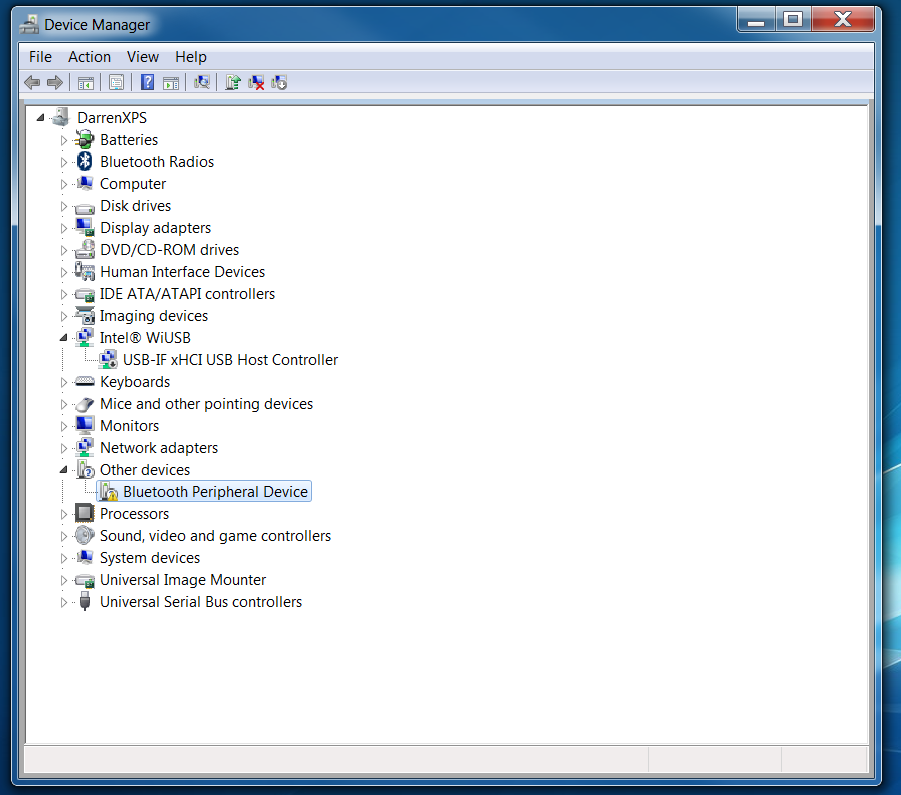
I noticed on the Device Manager, i have the following screen shot.
bt-1.png


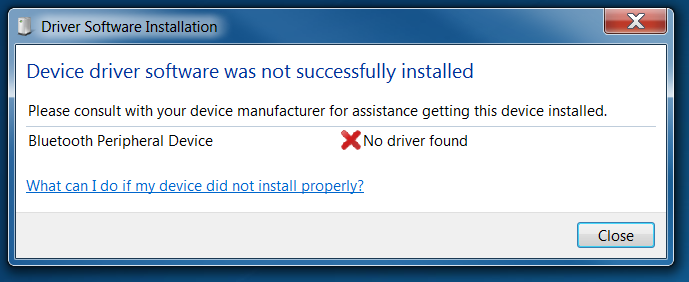
I then try to update the driver, and get this:
bt-2.png


Not sure what it is. Are there any scan utilities than can my drivers, and update the correct ones? Not sure if they are causing it.
Thanks,
Darren.
 

My Computer My Computer

At a glance

Windows 7Intel Core i7 @ 2.80GHz: Sandy Bridge 32nm Te...Total memory slots: 2 Used memory slots: 2 Fr...NVIDIA GeForce GT 525M, Intel(R) HD Graphics ...
Computer type
PC/Desktop
Computer Manufacturer/Model Number
Dell XPS 15z
OS
Windows 7
CPU
Intel Core i7 @ 2.80GHz: Sandy Bridge 32nm Technology
Motherboard
Dell Inc. 00WW5M
Memory
Total memory slots: 2 Used memory slots: 2 Free. 8Gb Total
Graphics Card(s)
NVIDIA GeForce GT 525M, Intel(R) HD Graphics 3000
Sound Card
Realtek High Definition Audio, NVIDIA Virtual Audio Device
Monitor(s) Displays
Generic PnP Monitor, 22EA53
Screen Resolution
(1920x1080@60Hz), (1920x1080@60Hz)
Hard Drives
733GB Western Digital WDC WD7500BPKT-75PK4 SCSI Disk Device (SATA)
Case
Dell
Keyboard
Dell
Mouse
Generic BT wireless mouse
Internet Speed
40Gb Fiber
Antivirus
ESET Nod 32
Browser
Chrome
Anyone else have any ideas?
Thanks.
 

My Computer My Computer

At a glance

Windows 7Intel Core i7 @ 2.80GHz: Sandy Bridge 32nm Te...Total memory slots: 2 Used memory slots: 2 Fr...NVIDIA GeForce GT 525M, Intel(R) HD Graphics ...
Computer type
PC/Desktop
Computer Manufacturer/Model Number
Dell XPS 15z
OS
Windows 7
CPU
Intel Core i7 @ 2.80GHz: Sandy Bridge 32nm Technology
Motherboard
Dell Inc. 00WW5M
Memory
Total memory slots: 2 Used memory slots: 2 Free. 8Gb Total
Graphics Card(s)
NVIDIA GeForce GT 525M, Intel(R) HD Graphics 3000
Sound Card
Realtek High Definition Audio, NVIDIA Virtual Audio Device
Monitor(s) Displays
Generic PnP Monitor, 22EA53
Screen Resolution
(1920x1080@60Hz), (1920x1080@60Hz)
Hard Drives
733GB Western Digital WDC WD7500BPKT-75PK4 SCSI Disk Device (SATA)
Case
Dell
Keyboard
Dell
Mouse
Generic BT wireless mouse
Internet Speed
40Gb Fiber
Antivirus
ESET Nod 32
Browser
Chrome
Hmm this is quite a pickle, have you had any new BSOD's?
 

My Computer My Computer

At a glance

Windows 10Intel Core i5 3570K16GB 1600Mhz G.SkillGigabyte GTX 970 G1-Gaming
Computer type
PC/Desktop
OS
Windows 10
CPU
Intel Core i5 3570K
Motherboard
Asus P8Z77V-PRO
Memory
16GB 1600Mhz G.Skill
Graphics Card(s)
Gigabyte GTX 970 G1-Gaming
PSU
Seasonic 1000W Platinum
Case
Fractal Design Define R4
Cooling
Noctua NH-D14
Hi, no blue screens, just blank black / screen awaking from sleep mode. Same story.
 

My Computer My Computer

At a glance

Windows 7Intel Core i7 @ 2.80GHz: Sandy Bridge 32nm Te...Total memory slots: 2 Used memory slots: 2 Fr...NVIDIA GeForce GT 525M, Intel(R) HD Graphics ...
Computer type
PC/Desktop
Computer Manufacturer/Model Number
Dell XPS 15z
OS
Windows 7
CPU
Intel Core i7 @ 2.80GHz: Sandy Bridge 32nm Technology
Motherboard
Dell Inc. 00WW5M
Memory
Total memory slots: 2 Used memory slots: 2 Free. 8Gb Total
Graphics Card(s)
NVIDIA GeForce GT 525M, Intel(R) HD Graphics 3000
Sound Card
Realtek High Definition Audio, NVIDIA Virtual Audio Device
Monitor(s) Displays
Generic PnP Monitor, 22EA53
Screen Resolution
(1920x1080@60Hz), (1920x1080@60Hz)
Hard Drives
733GB Western Digital WDC WD7500BPKT-75PK4 SCSI Disk Device (SATA)
Case
Dell
Keyboard
Dell
Mouse
Generic BT wireless mouse
Internet Speed
40Gb Fiber
Antivirus
ESET Nod 32
Browser
Chrome
Hey guys,

Im having the exact same symptoms as described by dmaco.
I'm really frustrated :(
Can anyone of the involved tell me if there has been resolution for this?
 

My Computer My Computer

At a glance

Windows 7 Home Premium 64bit
Computer type
PC/Desktop
OS
Windows 7 Home Premium 64bit

My Computer My Computer

At a glance

x64 (6.3.9600) Win8.1 Pro & soon dual boot x6...AMD A6-3420M APU with Radeon(tm) HD Graphics6.00 GBAMD Radeon(TM) HD 6520G
Computer type
Laptop
Computer Manufacturer/Model Number
HP Pavilion dv6-6c10us
OS
x64 (6.3.9600) Win8.1 Pro & soon dual boot x64 (6.1.7601) Win7_SP1 HomePrem
CPU
AMD A6-3420M APU with Radeon(tm) HD Graphics
Motherboard
Hewlett-Packard 1805
Memory
6.00 GB
Graphics Card(s)
AMD Radeon(TM) HD 6520G
Sound Card
(1) AMD High Definition Audio Device (2) IDT High Definiti
Monitor(s) Displays
HP W2072a 20" LCD (1600 x 900) @ 60 Hz
Screen Resolution
1366 x 768 x 32 bits (4294967296 colors) @ 60 Hz
Hard Drives
ST640LM0 00 HM641JI SATA Disk Device
Keyboard
Logitech k520 wireless KB
Mouse
Logitech m320 wireless mouse (bundled with KB)
Internet Speed
15/5 | 54 MB Wireless 'n'
Antivirus
Realtime: Defender or Avast | On-demand: Malwarebytes, ESET
Browser
IE 11 on Win8, IE 10 on win 7
Other Info
Media: [Gimp, Audacity, VLC] || Comm: [WEmail 2012, Skype] || Productivity: [OpenOffice,| Textpad] || Utils: [Sysinternals, cCleaner, Speccy, Defraggler]
Wow, so i find the solution for my problem myself...
Out of frustration i disconnected every single device from my computer, only leaving the screen and a ps2 keyboard connected. And a miracle happened all the problems were gone. So i started to plug in one device at a time and tested. I found out that one usb 3.0 port was causing the system hang. Is this plausible? Can there be a hardware malfunction with one specific USB port?

Maybe if OP hasnt found a solution yet (which i doubt) he can try this...
 

My Computer My Computer

At a glance

Windows 7 Home Premium 64bit
Computer type
PC/Desktop
OS
Windows 7 Home Premium 64bit
Brilliant tsur1 - that is troubleshooting 101

It might not be the port, what device did you connect ?
 

My Computer My Computer

At a glance

x64 (6.3.9600) Win8.1 Pro & soon dual boot x6...AMD A6-3420M APU with Radeon(tm) HD Graphics6.00 GBAMD Radeon(TM) HD 6520G
Computer type
Laptop
Computer Manufacturer/Model Number
HP Pavilion dv6-6c10us
OS
x64 (6.3.9600) Win8.1 Pro & soon dual boot x64 (6.1.7601) Win7_SP1 HomePrem
CPU
AMD A6-3420M APU with Radeon(tm) HD Graphics
Motherboard
Hewlett-Packard 1805
Memory
6.00 GB
Graphics Card(s)
AMD Radeon(TM) HD 6520G
Sound Card
(1) AMD High Definition Audio Device (2) IDT High Definiti
Monitor(s) Displays
HP W2072a 20" LCD (1600 x 900) @ 60 Hz
Screen Resolution
1366 x 768 x 32 bits (4294967296 colors) @ 60 Hz
Hard Drives
ST640LM0 00 HM641JI SATA Disk Device
Keyboard
Logitech k520 wireless KB
Mouse
Logitech m320 wireless mouse (bundled with KB)
Internet Speed
15/5 | 54 MB Wireless 'n'
Antivirus
Realtime: Defender or Avast | On-demand: Malwarebytes, ESET
Browser
IE 11 on Win8, IE 10 on win 7
Other Info
Media: [Gimp, Audacity, VLC] || Comm: [WEmail 2012, Skype] || Productivity: [OpenOffice,| Textpad] || Utils: [Sysinternals, cCleaner, Speccy, Defraggler]
Steelseries Sensei Mouse.
But on other ports the mouse works fine and system doesnt freeze on shutdown/restart/sleep
 

My Computer My Computer

At a glance

Windows 7 Home Premium 64bit
Computer type
PC/Desktop
OS
Windows 7 Home Premium 64bit
Thanks for the update.

The other side of the coin is: Will some other device connected to that port cause the same symptoms?

Try something that doesn't require a lot of USB entries in Dev Mgr (Hard drives, Printers and some mice add a lot)
Another simple USB mouse if you have one - again, nothing that has extra baggage (game input devices carry a lot with them).

There might be a "ghost" entry in Dev Mgr causing the issue. There's a utility that will clear those up, I just have to find the link. Go ahead and post the results of the "other device in that port" test while I look through my links.
 

My Computer My Computer

At a glance

x64 (6.3.9600) Win8.1 Pro & soon dual boot x6...AMD A6-3420M APU with Radeon(tm) HD Graphics6.00 GBAMD Radeon(TM) HD 6520G
Computer type
Laptop
Computer Manufacturer/Model Number
HP Pavilion dv6-6c10us
OS
x64 (6.3.9600) Win8.1 Pro & soon dual boot x64 (6.1.7601) Win7_SP1 HomePrem
CPU
AMD A6-3420M APU with Radeon(tm) HD Graphics
Motherboard
Hewlett-Packard 1805
Memory
6.00 GB
Graphics Card(s)
AMD Radeon(TM) HD 6520G
Sound Card
(1) AMD High Definition Audio Device (2) IDT High Definiti
Monitor(s) Displays
HP W2072a 20" LCD (1600 x 900) @ 60 Hz
Screen Resolution
1366 x 768 x 32 bits (4294967296 colors) @ 60 Hz
Hard Drives
ST640LM0 00 HM641JI SATA Disk Device
Keyboard
Logitech k520 wireless KB
Mouse
Logitech m320 wireless mouse (bundled with KB)
Internet Speed
15/5 | 54 MB Wireless 'n'
Antivirus
Realtime: Defender or Avast | On-demand: Malwarebytes, ESET
Browser
IE 11 on Win8, IE 10 on win 7
Other Info
Media: [Gimp, Audacity, VLC] || Comm: [WEmail 2012, Skype] || Productivity: [OpenOffice,| Textpad] || Utils: [Sysinternals, cCleaner, Speccy, Defraggler]
Back
Top