
set the BIOS to have the CD or DVD drive listed first

k. will do. thought that was for after I got the thing back up. sigh. this is gonna be a cluster. I can just tell.

The disk to download in message 7 is a Windows 7 disk. It also has a Repair disk on it. This should boot your computer and come to a screen that has two options. Install Windows and Repair Windows. Of course you will repair in an attempt to get your PC going without losing any files. As a last resort there is always the http://www.sevenforums.com/tutorials/1649-clean-install-windows-7-a.html in which you will lose all of your personal files unless they are on a different partition.
 

My Computer My Computer

At a glance

Windows 7 Home Premium 32-Bit - Build 7600 SP1Intel Core i3-2120 3.30GhzKingston 4 GB DDR3 1333 mhzAMD Radeon HD6670
Computer type
PC/Desktop
Computer Manufacturer/Model Number
Custom Build
OS
Windows 7 Home Premium 32-Bit - Build 7600 SP1
CPU
Intel Core i3-2120 3.30Ghz
Motherboard
Asus P8Z68-V LX Intel Z68 Socket H2 ATX
Memory
Kingston 4 GB DDR3 1333 mhz
Graphics Card(s)
AMD Radeon HD6670
Sound Card
Sound Blaster Audigy SE 24-Bit
Monitor(s) Displays
Asus VE228
Screen Resolution
1440 X 900
Hard Drives
OCZ Vertex 3 120 GB Sata 3 SSD ==
Kingston SH103/S3 120 G Hyper X 120 GB SSD ==
Western Digital 500 GB Caviar Green 7200 RPM ==
PSU
Corsair CX600M == 600 Watt
Case
NZXT Apollo - Silver with Clear Side Panel
Cooling
Three 120 mm Fans
Keyboard
Microsoft Natural 4000
Mouse
Microsoft Custom Optical 3000
Internet Speed
AT&T Fiber Optic Wireless Network
Antivirus
Microsoft Security Essentials
Browser
Chrome
Other Info
120 mm Blue LED Fan -- Three Blue LED Lazer Light Sticks
ok. I dl'd the iso file. I burned it to a dvd using freeisoburner. slowest speed. I put the disk into the dvd drive and restart (and yes, dvd is first, hd is second). it ends up on the logon page. so I try going to safe mode. I choose repair my computer. I get these choices:

startup repair: already tried, doesn't help, and it's not a startup problem
system restore: the restore point isn't far enough back
system image recovery: maybe this is it??? disk is not my entire hd. just the win7 I was told to dl and burn
memory diagnostics
command prompt

am I doing something wrong? I have the iso burned to dvd. if I don't put it in the drive and boot/restart, what am I supposed to do with it?
 

My Computer My Computer

At a glance

windows 7 home premium 64biti7 740q 1.738gnvidia geforce gtx 460m
Computer type
PC/Desktop
Computer Manufacturer/Model Number
asus g73jw series
OS
windows 7 home premium 64bit
CPU
i7 740q 1.73
Memory
8g
Graphics Card(s)
nvidia geforce gtx 460m
Sound Card
2 listed: nvidia hi def realtek hi def
Screen Resolution
1920x1080
Hard Drives
st9500420as
Cooling
yes. big ole fan under laptop
Mouse
logitech m325
Internet Speed
6mps
Antivirus
malwarebytes anti-malware premium
Browser
explorer & firefox
ok. I dl'd the iso file. I burned it to a dvd using freeisoburner. slowest speed. I put the disk into the dvd drive and restart (and yes, dvd is first, hd is second). it ends up on the logon page. so I try going to safe mode. I choose repair my computer. I get these choices:

startup repair: already tried, doesn't help, and it's not a startup problem
system restore: the restore point isn't far enough back
system image recovery: maybe this is it??? disk is not my entire hd. just the win7 I was told to dl and burn
memory diagnostics
command prompt

am I doing something wrong? I have the iso burned to dvd. if I don't put it in the drive and boot/restart, what am I supposed to do with it?


Did you try the Startup Repair or are you saying you tried it previously? If you did not try it with the Windows 7 DVD, give it a try. == If you did try it with the Win 7 DVD, I think you have run the course of trying things and a Clean Install is your only option. The Clean Install link is in message 21. This will erase all of your personal files and you will have to reinstall all programs.
 

My Computer My Computer

At a glance

Windows 7 Home Premium 32-Bit - Build 7600 SP1Intel Core i3-2120 3.30GhzKingston 4 GB DDR3 1333 mhzAMD Radeon HD6670
Computer type
PC/Desktop
Computer Manufacturer/Model Number
Custom Build
OS
Windows 7 Home Premium 32-Bit - Build 7600 SP1
CPU
Intel Core i3-2120 3.30Ghz
Motherboard
Asus P8Z68-V LX Intel Z68 Socket H2 ATX
Memory
Kingston 4 GB DDR3 1333 mhz
Graphics Card(s)
AMD Radeon HD6670
Sound Card
Sound Blaster Audigy SE 24-Bit
Monitor(s) Displays
Asus VE228
Screen Resolution
1440 X 900
Hard Drives
OCZ Vertex 3 120 GB Sata 3 SSD ==
Kingston SH103/S3 120 G Hyper X 120 GB SSD ==
Western Digital 500 GB Caviar Green 7200 RPM ==
PSU
Corsair CX600M == 600 Watt
Case
NZXT Apollo - Silver with Clear Side Panel
Cooling
Three 120 mm Fans
Keyboard
Microsoft Natural 4000
Mouse
Microsoft Custom Optical 3000
Internet Speed
AT&T Fiber Optic Wireless Network
Antivirus
Microsoft Security Essentials
Browser
Chrome
Other Info
120 mm Blue LED Fan -- Three Blue LED Lazer Light Sticks
ok I did try the startup repair w/ win 7 dvd. didn't work. but I did find this:

http://www.sevenforums.com/tutorials/3413-repair-install.html

if this is what I want, my concern is this:

You must have at least 8.87 GB + what is currently being used of free space, more if you have a larger installation, on the hard drive/partition Windows 7 is installed on to do a repair install.

c: drive has 116g so 116-9 is 107 then div by 2 for 53.5+9 for approx. 62.5g of free space needed?
 

My Computer My Computer

At a glance

windows 7 home premium 64biti7 740q 1.738gnvidia geforce gtx 460m
Computer type
PC/Desktop
Computer Manufacturer/Model Number
asus g73jw series
OS
windows 7 home premium 64bit
CPU
i7 740q 1.73
Memory
8g
Graphics Card(s)
nvidia geforce gtx 460m
Sound Card
2 listed: nvidia hi def realtek hi def
Screen Resolution
1920x1080
Hard Drives
st9500420as
Cooling
yes. big ole fan under laptop
Mouse
logitech m325
Internet Speed
6mps
Antivirus
malwarebytes anti-malware premium
Browser
explorer & firefox
Just go ahead and burn the WIn7 installation DVD for your licensed version from Clean Reinstall - Factory OEM Windows 7 which has the System Recovery Options on it and gives you in hand as well the ability to have a perfect reinstall if you need it following the steps in the tutorial.

The Asus Factory preinstall is the worst possible install of Win7 one could have, larded with bloatware and useless duplicate utilties that interfere with better versions built into Win7. You'll never even experience native Win7 performance until you shed it and set Win7 free.

Since this is a specialty of these forums we can help you get it perfect. Otherwise it will likely take just as long to fix the worst install one can have using the Troubleshooting Steps for Windows 7
 
i think that will wipe my stuff, right? i'm trying my best to NOT do that. hence, repair, not recovery at this time.
 

My Computer My Computer

At a glance

windows 7 home premium 64biti7 740q 1.738gnvidia geforce gtx 460m
Computer type
PC/Desktop
Computer Manufacturer/Model Number
asus g73jw series
OS
windows 7 home premium 64bit
CPU
i7 740q 1.73
Memory
8g
Graphics Card(s)
nvidia geforce gtx 460m
Sound Card
2 listed: nvidia hi def realtek hi def
Screen Resolution
1920x1080
Hard Drives
st9500420as
Cooling
yes. big ole fan under laptop
Mouse
logitech m325
Internet Speed
6mps
Antivirus
malwarebytes anti-malware premium
Browser
explorer & firefox
Then use the disk for repairs. What exactly are you trying to repair? This is where we should start, although having the disk is valuable and may be needed in the process or if Win7 ever becomes unbootable.
 
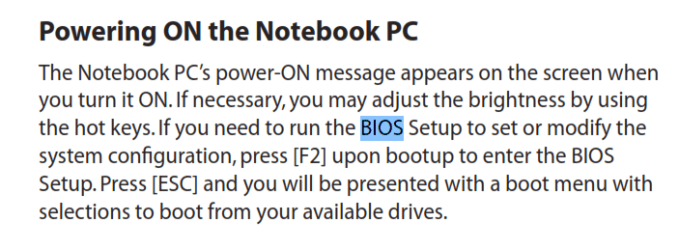
When You Return to Boot

This is from your manual:

Power.PNG
 

My Computer My Computer

At a glance

win 7 X64 Ultimate SP1I3770KG Skill F3-14900CL9-4GBXL x 4NVIDIA GeForce GTX670 + Intel 4000
Computer Manufacturer/Model Number
BGC (Bob's Garage Crew)
OS
win 7 X64 Ultimate SP1
CPU
I3770K
Motherboard
Asus P8Z77-V Deluxe
Memory
G Skill F3-14900CL9-4GBXL x 4
Graphics Card(s)
NVIDIA GeForce GTX670 + Intel 4000
Sound Card
Realtek HD 5.1 (MOB)
Monitor(s) Displays
Asus VW224T (1)
Screen Resolution
1920 x 1080
Hard Drives
SATA Corsair Force GT 2.5" 180GB (System) Sata 3
OCZ Vertex3 120GB
OCZ Vertex 2 120GB 2.5" SATA II
ST31000524AS 1000.2GB
WD15EARS (External)
PSU
CoolerMaster 1000 Watt
Case
CoolerMaster HAF X
Cooling
CPU -- CoolerMaster 520N
Keyboard
MS Wireless 3000 V2
Mouse
MS Wireless 3000 V2
Internet Speed
Cable
Antivirus
Norton Internet Security
Browser
IE9
Other Info
AMI Bios 1805
OC'd 3%

My Computer My Computer

At a glance

windows 7 home premium 64biti7 740q 1.738gnvidia geforce gtx 460m
Computer type
PC/Desktop
Computer Manufacturer/Model Number
asus g73jw series
OS
windows 7 home premium 64bit
CPU
i7 740q 1.73
Memory
8g
Graphics Card(s)
nvidia geforce gtx 460m
Sound Card
2 listed: nvidia hi def realtek hi def
Screen Resolution
1920x1080
Hard Drives
st9500420as
Cooling
yes. big ole fan under laptop
Mouse
logitech m325
Internet Speed
6mps
Antivirus
malwarebytes anti-malware premium
Browser
explorer & firefox
that couldn't be resolved in any way I was able to find (going into the registry), so now I want to do a repair, but the repair dvd won't boot. goes to logon screen instead. nor will the burned iso dvd as bigmac suggested.

I have found this:

ASUSTeK Computer Inc. -Support- Troubleshooting G73Jw

it would seem to indicate that my recovery disks can be used to just recover ONLY the c: drive? thereby keeping most of my programs usable? I put all I can on the D: drive to not fill up the C drive since it needs to have room left on it. but even if the installed programs are no longer usable, it would mean there were non program files on the D drive that I wouldn't have to reinstall.
 

My Computer My Computer

At a glance

windows 7 home premium 64biti7 740q 1.738gnvidia geforce gtx 460m
Computer type
PC/Desktop
Computer Manufacturer/Model Number
asus g73jw series
OS
windows 7 home premium 64bit
CPU
i7 740q 1.73
Memory
8g
Graphics Card(s)
nvidia geforce gtx 460m
Sound Card
2 listed: nvidia hi def realtek hi def
Screen Resolution
1920x1080
Hard Drives
st9500420as
Cooling
yes. big ole fan under laptop
Mouse
logitech m325
Internet Speed
6mps
Antivirus
malwarebytes anti-malware premium
Browser
explorer & firefox
this isn't quite correct

pressing f2 takes me to bios, then there are selection tabs to choose from. esc just asks if you wanna save. there is a tab to see the order, and my dvd drive is first, followed by my hd


This is from your manual:

View attachment 323876
 

My Computer My Computer

At a glance

windows 7 home premium 64biti7 740q 1.738gnvidia geforce gtx 460m
Computer type
PC/Desktop
Computer Manufacturer/Model Number
asus g73jw series
OS
windows 7 home premium 64bit
CPU
i7 740q 1.73
Memory
8g
Graphics Card(s)
nvidia geforce gtx 460m
Sound Card
2 listed: nvidia hi def realtek hi def
Screen Resolution
1920x1080
Hard Drives
st9500420as
Cooling
yes. big ole fan under laptop
Mouse
logitech m325
Internet Speed
6mps
Antivirus
malwarebytes anti-malware premium
Browser
explorer & firefox
If you have your Personal Files on D: drive, doing the install of Windows 7 on C: will not harm D: drive. I did not know they were separate. If you only have Win 7 and your programs on C:, then you can do a Clean Install as I outlined before and you will keep your Personal files. You will only have to reinstall your programs that are on C:. You can use the Windows 7 Disk that you made to do the install. The instructions are on message 21. Let us know how the install goes.
 

My Computer My Computer

At a glance

Windows 7 Home Premium 32-Bit - Build 7600 SP1Intel Core i3-2120 3.30GhzKingston 4 GB DDR3 1333 mhzAMD Radeon HD6670
Computer type
PC/Desktop
Computer Manufacturer/Model Number
Custom Build
OS
Windows 7 Home Premium 32-Bit - Build 7600 SP1
CPU
Intel Core i3-2120 3.30Ghz
Motherboard
Asus P8Z68-V LX Intel Z68 Socket H2 ATX
Memory
Kingston 4 GB DDR3 1333 mhz
Graphics Card(s)
AMD Radeon HD6670
Sound Card
Sound Blaster Audigy SE 24-Bit
Monitor(s) Displays
Asus VE228
Screen Resolution
1440 X 900
Hard Drives
OCZ Vertex 3 120 GB Sata 3 SSD ==
Kingston SH103/S3 120 G Hyper X 120 GB SSD ==
Western Digital 500 GB Caviar Green 7200 RPM ==
PSU
Corsair CX600M == 600 Watt
Case
NZXT Apollo - Silver with Clear Side Panel
Cooling
Three 120 mm Fans
Keyboard
Microsoft Natural 4000
Mouse
Microsoft Custom Optical 3000
Internet Speed
AT&T Fiber Optic Wireless Network
Antivirus
Microsoft Security Essentials
Browser
Chrome
Other Info
120 mm Blue LED Fan -- Three Blue LED Lazer Light Sticks
we have decided that since my computer is almost 4 yrs old, that maybe it is time to get a new one to keep up. it is beginning to show it's age just a tad. I will clear out the stuff I've used admin for for the last couple of weeks and then take it offline and only use it (in admin acct) when we want to access the programs on it. it's just not gonna be worth the frustration I am in for, on top of all the frustration trying to fix it over the last 10 days. transferring my email, etc is about all I can take at this point. oh and I did try to download the ms virus program, but it stopped installing and gave me an error code. not surprising given the last 10 days.

ty everyone for all your help and advice.
 

My Computer My Computer

At a glance

windows 7 home premium 64biti7 740q 1.738gnvidia geforce gtx 460m
Computer type
PC/Desktop
Computer Manufacturer/Model Number
asus g73jw series
OS
windows 7 home premium 64bit
CPU
i7 740q 1.73
Memory
8g
Graphics Card(s)
nvidia geforce gtx 460m
Sound Card
2 listed: nvidia hi def realtek hi def
Screen Resolution
1920x1080
Hard Drives
st9500420as
Cooling
yes. big ole fan under laptop
Mouse
logitech m325
Internet Speed
6mps
Antivirus
malwarebytes anti-malware premium
Browser
explorer & firefox
I just noticed that your PC has an i7 CPU. Don't buy a new one. Yours is top notch. Just try installing Windows 7 from the disk you made. It will only take 45 minutes to install. You have spent a lot of time on this. Give it 45 minutes more. It will be worth it.
 
Last edited:

My Computer My Computer

At a glance

Windows 7 Home Premium 32-Bit - Build 7600 SP1Intel Core i3-2120 3.30GhzKingston 4 GB DDR3 1333 mhzAMD Radeon HD6670
Computer type
PC/Desktop
Computer Manufacturer/Model Number
Custom Build
OS
Windows 7 Home Premium 32-Bit - Build 7600 SP1
CPU
Intel Core i3-2120 3.30Ghz
Motherboard
Asus P8Z68-V LX Intel Z68 Socket H2 ATX
Memory
Kingston 4 GB DDR3 1333 mhz
Graphics Card(s)
AMD Radeon HD6670
Sound Card
Sound Blaster Audigy SE 24-Bit
Monitor(s) Displays
Asus VE228
Screen Resolution
1440 X 900
Hard Drives
OCZ Vertex 3 120 GB Sata 3 SSD ==
Kingston SH103/S3 120 G Hyper X 120 GB SSD ==
Western Digital 500 GB Caviar Green 7200 RPM ==
PSU
Corsair CX600M == 600 Watt
Case
NZXT Apollo - Silver with Clear Side Panel
Cooling
Three 120 mm Fans
Keyboard
Microsoft Natural 4000
Mouse
Microsoft Custom Optical 3000
Internet Speed
AT&T Fiber Optic Wireless Network
Antivirus
Microsoft Security Essentials
Browser
Chrome
Other Info
120 mm Blue LED Fan -- Three Blue LED Lazer Light Sticks
I regularly get computers to run fast with Win7 for 10 years. In this case you haven't really even experienced Win7 on that PC if you have the inferior factory install of the OS. This is larded with factory bloatware and duplicate OEM utilities which have better versions built into Win7.

We have helped tens of thousands of users here directly do a Clean Reinstall - Factory OEM Windows 7
achieving a perfect install no matter what their abilities. The first third are steps to get backed up and prepared, the middle pertain to the actual physical install, and the last third are setting it up with the tools and methods that will keep it perfect going forward.

We will be happy to help you achieve this to finally experience Win7 perfect performance on that PC. You'll find your laptop is actually better than a brand new one since it finally runs without all of the crapware on its back.
 
Back
Top