"the default gateway is not available"

ZoSolised

New member
Local time
8:45 AM
Messages
17
Hey guys!

Hope you can help me fix this problem. Ever since I first installed Win 7 I have bin having problems with my internet connection going down, while the internet on my other Vista PC:s works fine.

As soon as the internet goes down, I go to the Troubleshooter and repair the Network adapter and its finds that the "default gateway is not available"

I have bin searching around all over the net trying to find a straight awnser and couldnt find anything. Most of the awnsers are hardwere related and seems to hit people with nVidia adapters etc.

But I have an integrated Realtek RTL 8168B card on my PC and my problem seems to be the same as everyone esle. (Drivers on my PC are the latest as well)

Dosent matter if I connect via the router or straight from the modem, still have the same issue. Even tryde new cables just to be on the safe side :)

So please help a Swede out here! :D
 

My Computer

OS
Windows 7
Hey guys!

Hope you can help me fix this problem. Ever since I first installed Win 7 I have bin having problems with my internet connection going down, while the internet on my other Vista PC:s works fine.

As soon as the internet goes down, I go to the Troubleshooter and repair the Network adapter and its finds that the "default gateway is not available"

I have bin searching around all over the net trying to find a straight awnser and couldnt find anything. Most of the awnsers are hardwere related and seems to hit people with nVidia adapters etc.

But I have an integrated Realtek RTL 8168B card on my PC and my problem seems to be the same as everyone esle. (Drivers on my PC are the latest as well)

Dosent matter if I connect via the router or straight from the modem, still have the same issue. Even tryde new cables just to be on the safe side :)

So please help a Swede out here! :D

Z

If you have a router the default gateway is the router. Could we get you network setup?

Ken
 

My Computer

Computer Manufacturer/Model Number
HP Pavillion dv-7 1005 Tx
OS
Win 8 Release candidate 8400
CPU
[email protected]
Memory
4 gigs
Graphics Card(s)
Nvidia 9600M
Sound Card
HD built-in
Monitor(s) Displays
17" Wxga
Screen Resolution
1440x900
Cooling
none
Internet Speed
45Mb down 5Mb up
Where do i find the network setup, i mean wich details you need? Was talking to another friend just now, and he was talking something about the MAC adress :S
But it feels like it's because of Win 7, that my internet fails. Cause I can have my other laptops on at the same time with vista, and there is no problem there :confused:
 

My Computer

OS
Windows 7
OS Name Microsoft Windows 7 Ultimate
Version 6.1.7100 Build 7100
Other OS Description Not Available
OS Manufacturer Microsoft Corporation
System Manufacturer Gigabyte Technology Co., Ltd.
System Model EP45-DS3L
System Type x64-based PC
Processor Intel(R) Core(TM)2 Quad CPU Q8300 @ 2.50GHz, 2500 Mhz, 4 Core(s), 4 Logical Processor(s)
BIOS Version/Date Award Software International, Inc. F8, 2008-08-18
SMBIOS Version 2.4
Windows Directory C:\Windows
System Directory C:\Windows\system32
Boot Device \Device\HarddiskVolume1
Hardware Abstraction Layer Version = "6.1.7100.0"
Installed Physical Memory (RAM) 4,00 GB
Total Physical Memory 4,00 GB
Available Physical Memory 2,37 GB
Total Virtual Memory 8,00 GB
Available Virtual Memory 5,82 GB
Page File Space 4,00 GB
Page File C:\pagefile.sys
Name [00000000] WAN Miniport (SSTP)
Adapter Type Not Available
Product Type WAN Miniport (SSTP)
Installed Yes
PNP Device ID ROOT\MS_SSTPMINIPORT\0000
Last Reset 2009-09-21 20:02
Index 0
Service Name RasSstp
IP Address Not Available
IP Subnet Not Available
Default IP Gateway Not Available
DHCP Enabled No
DHCP Server Not Available
DHCP Lease Expires Not Available
DHCP Lease Obtained Not Available
MAC Address Not Available
Driver c:\windows\system32\drivers\rassstp.sys (6.1.7100.0, 81,50 KB (83 456 bytes), 2009-04-22 06:19)
 
Name [00000001] WAN Miniport (IKEv2)
Adapter Type Not Available
Product Type WAN Miniport (IKEv2)
Installed Yes
PNP Device ID ROOT\MS_AGILEVPNMINIPORT\0000
Last Reset 2009-09-21 20:02
Index 1
Service Name RasAgileVpn
IP Address Not Available
IP Subnet Not Available
Default IP Gateway Not Available
DHCP Enabled No
DHCP Server Not Available
DHCP Lease Expires Not Available
DHCP Lease Obtained Not Available
MAC Address Not Available

This is what i got from the system info. My hardware and the Network adapter specifics, is there more you need to might help me find an awnser, just say :D
 

My Computer

OS
Windows 7
Also found this report when I made the repairs:

Network Adapter Publisher details
Issues found
The default gateway is not availableThe default gateway is not available
The default gateway is a device that connects a local network or computer to the Internet. A broadband modem or router is usually the default gateway. Fixed
Reset the "Local Area Connection" adapter Completed
Investigate router or broadband modem issues Not run

Issues found Detection details
6 The default gateway is not available Fixed

The default gateway is a device that connects a local network or computer to the Internet. A broadband modem or router is usually the default gateway.
Reset the "Local Area Connection" adapter Completed

This can sometimes resolve an intermittent problem.
Network Diagnostics Log
File Name: 20C601C2-8557-4FD5-98DA-A08DBE6E53BB.Repair.1.etl


Investigate router or broadband modem issues Not run

If you're connected to a hotspot or domain network, contact the network administrator. Otherwise: 1. Unplug or turn off the device. 2. After all the lights on the device are off, wait at least 10 seconds. 3. Turn the device on or plug it back into the power outlet. To restart a router or modem that has a built-in battery, press and quickly release the Reset button.

Detection details
Diagnostics Information (Network Adapter)
Details about network adapter diagnosis:
Network adapter Local Area Connection driver information:
Description . . . . . . . . . . : Realtek RTL8168B/8111B Family PCI-E Gigabit Ethernet NIC (NDIS 6.0)
Manufacturer . . . . . . . . . : Realtek
Provider . . . . . . . . . . . : Microsoft
Version . . . . . . . . . . . : 7.2.1127.2008
Inf File Name . . . . . . . . . : C:\Windows\INF\netrtx64.inf
Inf File Date . . . . . . . . . : den 22 april 2009 00:41:57
Section Name . . . . . . . . . : RTL8168C.ndi
Hardware ID . . . . . . . . . . : pci\ven_10ec&dev_8168&rev_02
Instance Status Flags . . . . . : 0x180200a
Device Manager Status Code . . : 0
IfType . . . . . . . . . . . . : 6
Physical Media Type . . . . . . : 14


Network Diagnostics Log
File Name: 20C601C2-8557-4FD5-98DA-A08DBE6E53BB.Diagnose.0.etl

Other Networking Configuration and Logs
File Name: NetworkConfiguration.cab

Collection information

Windows Version: 6.1
Architecture: amd64
Time: Wednesday, September 23, 2009 1:13:46 AM
Publisher details
Windows Network Diagnostics
Detects problems with network connectivity.
Package Version: 1.0
Publisher: Microsoft Windows
Network Adapter
Troubleshoot Ethernet, wireless, or other network adapters.
Package Version: 1.0
Publisher: Microsoft Corporation
 

My Computer

OS
Windows 7
Please tell us the make and the model of your router.
 

My Computer

Computer type
Laptop
Computer Manufacturer/Model Number
HP ENVY 17-1150eg
OS
Windows 10 Pro x64 EN-GB
CPU
1.6 GHz Intel Core i7-720QM Processor
Memory
6 GB
Graphics Card(s)
ATI Mobility Radeon HD 5850 Graphics
Sound Card
Beats sound system with integrated subwoofer
Monitor(s) Displays
17" laptop display, 22" LED and 32" Full HD TV through HDMI
Screen Resolution
1600*900 (1), 1920*1080 (2&3)
Hard Drives
Internal: 2 x 500 GB SATA Hard Disk Drive 7200 rpm
External: 2TB for backups, 3TB USB3 network drive for media
Cooling
As Envy runs a bit warm, I have it on a Cooler Master pad
Keyboard
Logitech diNovo Media Desktop Laser (bluetooth)
Mouse
Logitech Performance Mouse MX
Internet Speed
50/10 Mbps VDSL
Antivirus
Windows Defender 4.3.9431.0
Browser
Maxthon 3.5.2., IE11
Haha heres more that you might use. This is the infopage when i log in at my router, a D-Link DI-524

MAC Address 00-22-B0-AB-*****IP Address 192.168.0.1Subnet Mask 255.255.255.0DHCP Server Enabled WAN MAC Address 00-22-B0-AB-****Connection DHCP Client Connected.
Remaining Lease Time 00:58:52IP Address 83.249.216 Subnet Mask 255.255.240.0Gateway 83.249.208.1Domain Name Server 83.255.249.10, 83.255.245.10 Wireless MAC Address 00-22-B0-AB-*****ESSID dlinkSecurity 64-bit WEP Enabled Channel 6
 

My Computer

OS
Windows 7
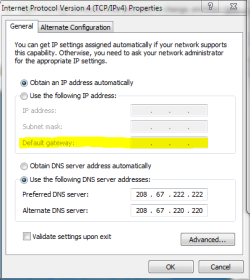
OK. If your NIC obtains an IP address automatically, it should work. So maybe you have chosen to give your system a static address? If so, do this:

  • Click Start
  • Type Network Connections to the search field
  • Right click Local Area Connection, choose Properties
  • Click Internet Protocol Version 4 (TCP /IPv4)
  • Click Properties
    Gateway.PNG
  • If you have chosen to obtain IP automatically, the IP, Subnet and Default Gateway fields are grayed out and everything should be OK.
  • If you have chosen to use static IP, the IP address should be 192.168.0.X, where X can be anything from 2 to 255, Subnet should be 255.255.255.0 and Default Gateway 192.168.0.1
Check this first, come back to tell what you found.

Kari
 

My Computer

Computer type
Laptop
Computer Manufacturer/Model Number
HP ENVY 17-1150eg
OS
Windows 10 Pro x64 EN-GB
CPU
1.6 GHz Intel Core i7-720QM Processor
Memory
6 GB
Graphics Card(s)
ATI Mobility Radeon HD 5850 Graphics
Sound Card
Beats sound system with integrated subwoofer
Monitor(s) Displays
17" laptop display, 22" LED and 32" Full HD TV through HDMI
Screen Resolution
1600*900 (1), 1920*1080 (2&3)
Hard Drives
Internal: 2 x 500 GB SATA Hard Disk Drive 7200 rpm
External: 2TB for backups, 3TB USB3 network drive for media
Cooling
As Envy runs a bit warm, I have it on a Cooler Master pad
Keyboard
Logitech diNovo Media Desktop Laser (bluetooth)
Mouse
Logitech Performance Mouse MX
Internet Speed
50/10 Mbps VDSL
Antivirus
Windows Defender 4.3.9431.0
Browser
Maxthon 3.5.2., IE11
Hey Kari!

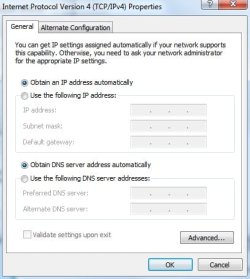
When I checkt, it was all blank. All on auto. Talked to the guys at ComHem, my broadband deliveriguys and they had no clue. Just that i was gonna keep a log of my connection via www.bredbandskollen.se just to see my speed.
But I also downloaded a monitor program that keeps track of everytime it crashes. The microsoft support dosent open anything for Win 7 untill the release in october, so im pretty clueless.

Should I try filling in the IP, subnet and gateway manually? Or you know where to check next?
 

Attachments

  • 1.jpg
    1.jpg
    27.4 KB · Views: 218

My Computer

OS
Windows 7
Haha heres more that you might use. This is the infopage when i log in at my router, a D-Link DI-524

MAC Address 00-22-B0-AB-*****IP Address 192.168.0.1Subnet Mask 255.255.255.0DHCP Server Enabled WAN MAC Address 00-22-B0-AB-****Connection DHCP Client Connected.
Remaining Lease Time 00:58:52IP Address 83.249.216 Subnet Mask 255.255.240.0Gateway 83.249.208.1Domain Name Server 83.255.249.10, 83.255.245.10 Wireless MAC Address 00-22-B0-AB-*****ESSID dlinkSecurity 64-bit WEP Enabled Channel 6
Please clear up something for me? The DI-524 has wireless capability, so which computers are connecting with a network cable and which are connecting wirelessly?

Cheers!

Robert
 

My Computer

OS
...
Hey Kari!

When I checkt, it was all blank. All on auto. Talked to the guys at ComHem, my broadband deliveriguys and they had no clue. Just that i was gonna keep a log of my connection via www.bredbandskollen.se just to see my speed.
But I also downloaded a monitor program that keeps track of everytime it crashes. The microsoft support dosent open anything for Win 7 untill the release in october, so im pretty clueless.

Should I try filling in the IP, subnet and gateway manually? Or you know where to check next?
Sweden_small.png
Jag visste inte att du är svensk. Har redan glömt min svenska, men det är rolig att prova om jag fortfarande kan minnas nånting.

US-UK.png
You can try that. Important thing to remember is not to cause IP conflicts. To avoid this, open the routers web interface and see what IP's are currently used (DHCP Client list in my BElkin router, something llike that in yours).

Kari
 

My Computer

Computer type
Laptop
Computer Manufacturer/Model Number
HP ENVY 17-1150eg
OS
Windows 10 Pro x64 EN-GB
CPU
1.6 GHz Intel Core i7-720QM Processor
Memory
6 GB
Graphics Card(s)
ATI Mobility Radeon HD 5850 Graphics
Sound Card
Beats sound system with integrated subwoofer
Monitor(s) Displays
17" laptop display, 22" LED and 32" Full HD TV through HDMI
Screen Resolution
1600*900 (1), 1920*1080 (2&3)
Hard Drives
Internal: 2 x 500 GB SATA Hard Disk Drive 7200 rpm
External: 2TB for backups, 3TB USB3 network drive for media
Cooling
As Envy runs a bit warm, I have it on a Cooler Master pad
Keyboard
Logitech diNovo Media Desktop Laser (bluetooth)
Mouse
Logitech Performance Mouse MX
Internet Speed
50/10 Mbps VDSL
Antivirus
Windows Defender 4.3.9431.0
Browser
Maxthon 3.5.2., IE11
Im on a cabel to this PC since im an epicgamingnerd :) And my girlfriends laptop and my other laptop are on the wireless, the two laptops both run Vista.
 

My Computer

OS
Windows 7
Hej Kari!
Tycker det låter som det sitter kvar nånstans i huvudet ;)

But okay, ill give it a shot tonight and see how it goes :D
 

My Computer

OS
Windows 7
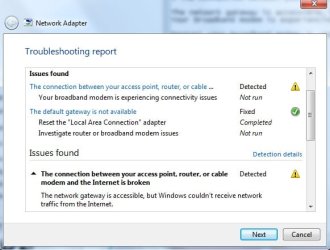
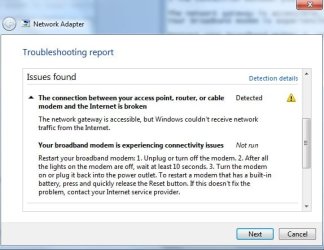
Just now i got another error message at the same time as "the default gateway is not available"- Posted some picks of it. It has happend before, at the same time as the gateway thing. They come in pairs sometimes. Either I just get the "the default gateway" msg.. or the both together.
 

Attachments

  • 2.jpg
    2.jpg
    32 KB · Views: 658
  • 3.jpg
    3.jpg
    37.7 KB · Views: 401

My Computer

OS
Windows 7
Im on a cabel to this PC since im an epicgamingnerd :) And my girlfriends laptop and my other laptop are on the wireless, the two laptops both run Vista.
Just so you will know before: Windows 7 does not support WEP. So if and when you add a Windows 7 computer to your home network you will need to use WPA2-PSK (sometimes referred to as WPA2-Personal) instead of WEP. Doesn't affect your current situation.

Just now i got another error message at the same time as "the default gateway is not available"- Posted some picks of it. It has happend before, at the same time as the gateway thing. They come in pairs sometimes. Either I just get the "the default gateway" msg.. or the both together.
If I understand correctly, your Vista computers maintain connection even when this computer drops the connection and gives these errors. That would indicate to me the NIC card. I have experienced similar with integrated devices and have gotten better results using the NIC driver from the motherboard web site over the default windows driver or a generic realtek driver. Since you have not filled in your computer specs, we cannot know what manufacturer or model of motherboard you have. Do suppose a Swede could help out the techs here and fill in your computer specs?

Cheers!

Robert
 

My Computer

OS
...
I have a Gigabyte EP45-DS3L.

But do you think the solution might be a extern network card?
 

My Computer

OS
Windows 7
I have a Gigabyte EP45-DS3L.

But do you think the solution might be a extern network card?
I think the solution would be to install the latest chipset driver package from Gigabyte for your motherboard.

However, if a NIC performs better than the motherboard network, that would tend to support either a hardware (motherboard) issue or an issue with the motherboard network driver?

Cheers!

Robert
 

My Computer

OS
...
You could try to set static IP instead of automatic.

In the network properties set all of the next by hand.

IP 192.168.0.50 (or any other IP you are sure is free)
Sub 255.255.255.0
Gateway 192.168.0.1

DNS1 192.168.0.1
DNS2 leave empty

Good luck
 

My Computer

OS
Win7 Build 7600 x86
CPU
Pentium II 300MHz
Motherboard
Asus
Memory
32mb EDO RAM
Graphics Card(s)
Diamond Viper
Sound Card
Soundblaster 16
Monitor(s) Displays
14" AOC CRT 16K color
Screen Resolution
800x600
Hard Drives
300mb Quantum fireball
PSU
110 Watts
Cooling
Passive
Keyboard
Trust Ergonomic
Mouse
Generic
Internet Speed
256K u 128K d
Okaj guys =)
Found 1 new driver publisht on the gigabyte webpage, so I downloaded and installed it. Aslo trying with a static IP. Lets hope this works out :D
 

My Computer

OS
Windows 7
I have the same problem.. Linksys ADSL2 gateway AG241 - Wired Modem/Router combo, Atheros L1 Gigabit Ethernet 10/100/1000 Driver, Dynamic IP (Automatic)

This has been going on since my Win 7 install on Sunday, and I can't find any fix either... If I try a Static IP, it Immediately disconnects.... Otherwise, with Dynamic IP, it disconnects every few minutes.. then on Sunday night after hours of fiddling around it finally stayed on the rest of the night... But next day after I got home from work and turn computer back on... Same Same as we say here in Thailand.

Now I have to reset the driver (Diagnose the connection) every 5 minutes or less, just to stay on and post this.

HELP... PLEASE !!!!!
CS
 

My Computer

OS
Windows 7 Pro RTM
CPU
Intel Core2Duo E6750 @ 2.66 GHz
Motherboard
ASUS P5KR
Memory
2x 1GB + 2x 500MB = 3GB GEIL DDR2
Graphics Card(s)
EVGA GeoForce 9500GT 1GB DDR2 PCI
Sound Card
Creative Sound Blaster X-Fi Xtreme Audio
Monitor(s) Displays
Samsung 22" LCD 2232GW 2ms
Screen Resolution
3000:1
Hard Drives
Internal:
Seagate 80 GB SATA/7200/32MB-O/S
Seagate 250 GB SATA/7200/32MB-Applications
2x Seagate 1 TB SATA/7200/32MB-Data
Externals (3x Cases):
Seagate 1 TB SATA/7200/32MB-Data
2x Seagate 500GB SATA/7200/32MB/RAID1-Backups
Maxtor 250GB/EDI-Old
PSU
Enermax 460
Case
Thermaltake Kandalf SL
Cooling
7x Internal Fans in Case
Keyboard
Microsoft Wired RT2300
Mouse
Logitech Trackman
Other Info
Internet Modem/Router -
Linksys ADSL2 Gateway 4-Port
AG241
Back
Top