Vista - Clean install w OEM disc - Think I messed up BIG TIME

jsmith71292

New member
Local time
3:14 PM
Messages
9
PLEASE HELP!!!

A friend of mine upgraded my machine (that came with Vista pre installed) with a crappy version of Windows 7. My machine has been pretty much useless for a year bc the admin/system password was changed somehow. I called Dell and they gave me a new password and it got me in so I could get all of my pictures, music etc off of the hard drive. I thought that was all I had to "back up". Boy was I wrong it seems. :cry:

I thought I could use the OEM disc and do a reinstall and start over with a clean slate. So I did and it worked fine, until I realized that I didn't back up things like MICROSOFT OFFICE!!! I called Dell and they said I would have to repurchase it. I already purchased it once though, why again? I checked the product key and noticed that is has changed since the clean install.

Now I have no idea how I can get it back on my Dell laptop. I only have the OEM discs (one for the OS and one for the drivers and utilities) since my version of Windows came pre-installed. Now it's back to asking for not only the admin/system password but now a WINDOWS password as well! I asked Dell about this as well and they said there was a way to disable this but it would cost me $130+ to get it! I think I am seriously getting the run around and I'm beyond sick about it. :sick:


So my questions are:
1. Am I screwed and will never have my Microsoft office again?
2. Why did my product key change?
3. Is there anyway to fix this?

Please help if possible!!! Thanks so much in advance!!!!!
 

My Computer My Computer

At a glance

vista
Computer type
Laptop
Computer Manufacturer/Model Number
dell
OS
vista
A crappy version of Windows 7 ? There`s no such thing ;)

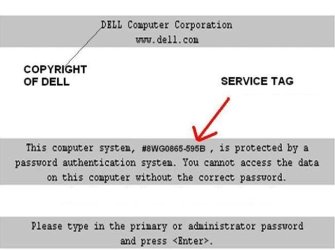
An admin/system password ? Do you mean a bios password ?

And windows only has a password if you give it a password.

If you don`t have Office but have your key, you`ll have to download it from somewhere. Google it.

You could also consider joining http://www.vistax64.com/
 

My Computer My Computer

At a glance

Windows 10 Pro x64Intel Core i7 6700KGSkill TridentZ RGB 16GB 3600 16-16-16-36EVGA GTX 980 Ti SC x2
Computer type
PC/Desktop
Computer Manufacturer/Model Number
Skylake Special #666
OS
Windows 10 Pro x64
CPU
Intel Core i7 6700K
Motherboard
Asus Sabertooth Z170 Mark 1
Memory
GSkill TridentZ RGB 16GB 3600 16-16-16-36
Graphics Card(s)
EVGA GTX 980 Ti SC x2
Sound Card
Realtek High Definition
Monitor(s) Displays
AOC G2460PG
Screen Resolution
1920 x 1080 144Hz
Hard Drives
Samsung 860 Pro 256GB, Seagate Barracuda 4TB x2
PSU
EVGA 1000 P2, EVGA White Custom Braided Cables
Case
Corsair Vengeance C70 Gunmetal Black
Cooling
Corsair H100i v2, Corsair ML120 x2, Thermal Grizzly Kryonaut
Keyboard
Logitech G910 Orion Spectrum
Mouse
Logitech G700s
Internet Speed
Verizon Fios Quantum Gateway 75/75
Antivirus
Windows Defender, Malwarebytes Free 3.8.3
Browser
Chrome
Other Info
Corsair SP120 x4, LG Blu-ray Drive, Durabrand HT-395 100 Watt Dolby Digital Amp, Corsair H2100 Wireless 7.1 Headset
Ok... crappy may have been a bad choice of words. hehe! It never worked correctly so to me, it was indeed crappy. ;-)

Yes, it is the BIOS password. I called Dell and got a new one. I clean installed so I'm not sure why it's back. :huh:

I never gave Windows a password, except for my profile. If that makes sense. I tried it and it didn't work anyway. Blahhhh!!!

I will join the suggested group.. thank you so much!!!!!!!
 

Attachments

  • Bios_removal_2.jpg
    Bios_removal_2.jpg
    26.3 KB · Views: 25

My Computer My Computer

At a glance

vista
Computer type
Laptop
Computer Manufacturer/Model Number
dell
OS
vista
You should be able to go into the bios and remove the password, (maybe) under the security tab. If it bothers you ;) After you installed Vista you should have come to a window with an option to put in a password, you`re saying you didn`t enter a password here ?
 
Last edited:

My Computer My Computer

At a glance

Windows 10 Pro x64Intel Core i7 6700KGSkill TridentZ RGB 16GB 3600 16-16-16-36EVGA GTX 980 Ti SC x2
Computer type
PC/Desktop
Computer Manufacturer/Model Number
Skylake Special #666
OS
Windows 10 Pro x64
CPU
Intel Core i7 6700K
Motherboard
Asus Sabertooth Z170 Mark 1
Memory
GSkill TridentZ RGB 16GB 3600 16-16-16-36
Graphics Card(s)
EVGA GTX 980 Ti SC x2
Sound Card
Realtek High Definition
Monitor(s) Displays
AOC G2460PG
Screen Resolution
1920 x 1080 144Hz
Hard Drives
Samsung 860 Pro 256GB, Seagate Barracuda 4TB x2
PSU
EVGA 1000 P2, EVGA White Custom Braided Cables
Case
Corsair Vengeance C70 Gunmetal Black
Cooling
Corsair H100i v2, Corsair ML120 x2, Thermal Grizzly Kryonaut
Keyboard
Logitech G910 Orion Spectrum
Mouse
Logitech G700s
Internet Speed
Verizon Fios Quantum Gateway 75/75
Antivirus
Windows Defender, Malwarebytes Free 3.8.3
Browser
Chrome
Other Info
Corsair SP120 x4, LG Blu-ray Drive, Durabrand HT-395 100 Watt Dolby Digital Amp, Corsair H2100 Wireless 7.1 Headset
Did you try typing Dell ?
 

My Computers My Computers

  • At a glance

    7 X64i5 84002x8gb 3200mhz
    Computer type
    PC/Desktop
    OS
    7 X64
    CPU
    i5 8400
    Motherboard
    gigabyte b365m ds3h
    Memory
    2x8gb 3200mhz
    Hard Drives
    various
    PSU
    pure power 11 400w cm
    Case
    Coolermaster
    Cooling
    cryorig m9i
  • At a glance

    7x64g54008gb ddr4 2400
    Computer type
    PC/Desktop
    OS
    7x64
    CPU
    g5400
    Motherboard
    ga b365m ds3h
    Memory
    8gb ddr4 2400
    PSU
    xfx pro 450w
You should be able to go into the bios and remove the password, (maybe) under the security tab. If it bothers you ;) After you installed Vista you should have come to a window with an option to put in a password, you`re saying you didn`t enter a password here ?


Yes, now that I see this I'm almost positive I did because I remember having to add the "hint". I tried that password and it did not work.
 

My Computer My Computer

At a glance

vista
Computer type
Laptop
Computer Manufacturer/Model Number
dell
OS
vista
Yes.. I know. I'm still kicking myself in the tail for not researching more than I did. I thought I had all the stuff I needed backed up. Boy was I wrong!!!
 

My Computer My Computer

At a glance

vista
Computer type
Laptop
Computer Manufacturer/Model Number
dell
OS
vista
Everything needed is here to Clean Reinstall - Factory OEM Windows 7.

You would have saved yourself a lot of time and headache had you asked before you jumped.

The Office key doesn't change. You insert it to activate during reinstall of Office. Do you have the disk? If not you can find them online: Office 2007 Direct Download Links or use the comparable free OpenOffice - The Free and Open Productivity Suite


So what are the odds that I will be able to have a usable computer??? I'm mainly in need of a computer to update my resume and apply for jobs. So some form of office utilities and internet. :(
 

My Computer My Computer

At a glance

vista
Computer type
Laptop
Computer Manufacturer/Model Number
dell
OS
vista
What do you want to do? Reinstall Vista, Win7 and/or Office?

You would not have a BIOS password unless you set one or the PC is not yours. You'll have to convince Dell you're the owner to get it unlocked again, otherwise nothing can be reinstalled.
 
Back
Top