Solved Driver for USB 3.0 PCIe Card

bigmck

Very Senior Member
Guru
Gold Member
VIP
Local time
10:09 AM
Messages
4,745
Location
Houston, Texas
I got a new USB 3.0 4-port card in the mail today. I installed the card and Windows could not find the driver for it. It came with a CD which has drivers for every product they make so I don't know which one to install. Of course there were no instructions and it came from, right China and I don't see a product brand on the box. I contacted the shipper but don't hold out much hope for a reply. I am about to write this off as a loss. Anyone have any ideas on where I might find a driver?
Thanks, :(
 

My Computer My Computer

Computer type
PC/Desktop
Computer Manufacturer/Model Number
Custom Build
OS
Windows 7 Home Premium 32-Bit - Build 7600 SP1
CPU
Intel Core i3-2120 3.30Ghz
Motherboard
Asus P8Z68-V LX Intel Z68 Socket H2 ATX
Memory
Kingston 4 GB DDR3 1333 mhz
Graphics Card(s)
AMD Radeon HD6670
Sound Card
Sound Blaster Audigy SE 24-Bit
Monitor(s) Displays
Asus VE228
Screen Resolution
1440 X 900
Hard Drives
OCZ Vertex 3 120 GB Sata 3 SSD ==
Kingston SH103/S3 120 G Hyper X 120 GB SSD ==
Western Digital 500 GB Caviar Green 7200 RPM ==
PSU
Corsair CX600M == 600 Watt
Case
NZXT Apollo - Silver with Clear Side Panel
Cooling
Three 120 mm Fans
Keyboard
Microsoft Natural 4000
Mouse
Microsoft Custom Optical 3000
Internet Speed
AT&T Fiber Optic Wireless Network
Antivirus
Microsoft Security Essentials
Browser
Chrome
Other Info
120 mm Blue LED Fan -- Three Blue LED Lazer Light Sticks

My Computer My Computer

Computer type
PC/Desktop
Computer Manufacturer/Model Number
Home Built
OS
Windows 8.1 Pro w/Media Center 64bit, Windows 7 HP 64bit
CPU
Phenom II X6 1100T
Motherboard
ASUS M5A99X EVO
Memory
Crucial Balistic 8gb DDR3-1866 CL9
Graphics Card(s)
MSI R6850 Cyclone IGD5 PE
Sound Card
On Board
Monitor(s) Displays
ASUS VE258Q 25" LED with DVI-HDMI-DisplayPort
Screen Resolution
1920 x 1080
Hard Drives
Two WD Cavier Black 2TB Sata III, WD My Book Essential 2TB USB 3.0
PSU
Seasonic X650 80 Plus GOLD Modular
Case
Corsair 400R
Cooling
Antec Kuhler H2O 620, Two 120mm and four 140mm
Keyboard
Logitech K120
Mouse
Logitech Marble Mouse USB, Logitech Precision Game Pad
Internet Speed
15MB
Antivirus
Norton IS 2013, Malwarebytes Pro Beta 2
Browser
IE-11, FF-27
Other Info
APC UPS ES 750, Netgear WNR3500L Gigabit & Wireless N Router with SamKnows Test Program, Motorola SB6120 Gigabit Cable Modem. Brother HL-2170W Laser Printer, Epson V300 Scanner
Thanks Phone Man I bookmarked that puppy.
 

My Computer My Computer

Computer type
PC/Desktop
Computer Manufacturer/Model Number
Home made Desktop
OS
Windows 10 Pro. 64/ version 1709 Windows 7 Pro/64
CPU
Intel i7-6800K @ 4.3
Motherboard
ASUS X-99 Deluxe II
Memory
Corsair Platinum 16 gig @2400
Graphics Card(s)
EVGA GTX 1070 OC
Monitor(s) Displays
Asus 27" LED LCD/VE278Q
Screen Resolution
1920-1080 or 1280-720 HDMI
Hard Drives
INTEL SSD 730-240 Gb Sata 3.0/
PSU
EVGA Platium 1200W
Case
Phanteks Luxe Tempered Glass 8 fans/ one radiator
Cooling
XSPC/ Water Cooled CPU
Keyboard
Das 4 Professional
Mouse
Logitech M705/MX Anywhere 2-S
Internet Speed
100 mbits
Antivirus
Microsoft Security Essentials/ Malwarebytes Premium 3.0/ SAS
Browser
I.E. 11 default/Firefox/ ISP Time Warner Cable/Spectrum
Other Info
LG BluRay Burner/
Sound system-KLipsch-THX/
Icy Dock ssd Hot Swap bays.

My Computer My Computer

Computer type
PC/Desktop
Computer Manufacturer/Model Number
Custom Build
OS
Windows 7 Home Premium 32-Bit - Build 7600 SP1
CPU
Intel Core i3-2120 3.30Ghz
Motherboard
Asus P8Z68-V LX Intel Z68 Socket H2 ATX
Memory
Kingston 4 GB DDR3 1333 mhz
Graphics Card(s)
AMD Radeon HD6670
Sound Card
Sound Blaster Audigy SE 24-Bit
Monitor(s) Displays
Asus VE228
Screen Resolution
1440 X 900
Hard Drives
OCZ Vertex 3 120 GB Sata 3 SSD ==
Kingston SH103/S3 120 G Hyper X 120 GB SSD ==
Western Digital 500 GB Caviar Green 7200 RPM ==
PSU
Corsair CX600M == 600 Watt
Case
NZXT Apollo - Silver with Clear Side Panel
Cooling
Three 120 mm Fans
Keyboard
Microsoft Natural 4000
Mouse
Microsoft Custom Optical 3000
Internet Speed
AT&T Fiber Optic Wireless Network
Antivirus
Microsoft Security Essentials
Browser
Chrome
Other Info
120 mm Blue LED Fan -- Three Blue LED Lazer Light Sticks
I got a new USB 3.0 4-port card in the mail today.
You bought in online? What is the URL of the page advertising the product that you bought? That should presumably provide some info regarding what this device is?


I installed the card and Windows could not find the driver for it. It came with a CD which has drivers for every product they make so I don't know which one to install.
Is it from Transcend? StarTech?

Many vendors use electronics from Renesas, so the drivers are for Renesas.


Of course there were no instructions and it came from, right China and I don't see a product brand on the box.
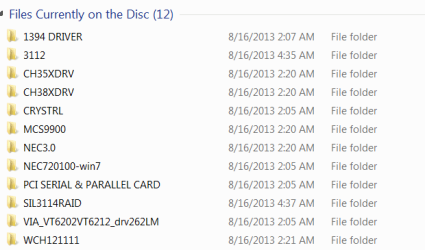
What are the names of the folders/files on the CD that supposedly has the correct driver for your particular card?

If you go into Device Manager (right-click on Computer, select Properties, then select Device Manager) you should show some unknown device as "other", probably with yellow exclamation mark on it or something like that.

Right-click on the unknown item, select Properties, then select Details tab. It might show something in the value details for the first item (device description) in the Property dropdown list. Does it? Something like Renesas USB 3.0 controller?

If you select the second item (Hardware ID's) in the Property dropdown list for your unknown card you will hopefully see a series of values. These define the manufacturer and hardware device codes, which correspond to the required driver. Can you please post a screenshot of the values shown here.


Finally, are the supposed driver installers on the CD in "EXE" form, or are they folders which somewhere in a sub-folder they contain an "INF" file? The EXE driver installers might be unpacked/extracted by running them (if they are self-installing), and the imbedded folders could then be examined to look for a README or INF file (which provides detailed driver info).

If they are already expanded driver installation folders (which contain INF files), you could try getting Windows to do all of the searching for you. Again, right-click on the unknown item in Device Manager, and select "update driver software.... Then from the resulting dialog window asking "how to search", select "browse my computer for driver software", navigate to the CD, be sure the "check sub-folders" item is checked, and OK. Hopefully Windows will drill down through all sub-folders on the CD, and will hopefully find the matching INF file to correspond to that Hardware ID I asked for earlier, and then perform the correct driver install automatically.


Report back.
 

My Computer My Computer

Computer type
PC/Desktop
Computer Manufacturer/Model Number
Home-built, two systems (1) and (2)
OS
Windows 7 Pro x64 (1), Win7 Pro X64 (2)
CPU
i5-3350p 3.1Ghz/6MB-cache (1); E8400 3.0Ghz/6MB-cache (2)
Motherboard
ASUS P8Z77-V Pro (1); ASUS P5Q3 (2)
Memory
8GB PC3-12800 DDR3 (1); 4GB PC3-10600 DDR3 (2)
Graphics Card(s)
ATI HD7750 (1), (see TV cards); ATI R7 250 (2)
Sound Card
Realtek ALC892 HD Audio (1); Realtek ALC1200 HD Audio (2)
Monitor(s) Displays
Eizo HD2441W LCD, Eizo S2433W (1); Eizo 24" S2433W (2)
Screen Resolution
1920x1200, 1920x1200 (1); 1920x1200 (2)
Hard Drives
(1) 1TB SATA-II (7200RPM), 2x2TB SATA-III (7200RPM), 250GB SATA-III (10000RPM) for OS; 2x2TB external USB 3.0

(2) 320GB SATA-II (7200RPM), 750GB SATA-II (7200RPM), 150GB SATA-II (10000RPM) for OS; 2TB external USB 3.0
PSU
Nesteq ECS-6001 600W (1); Nesteq ECS-5001 500W (2)
Case
Acousti-Case 360 (1) and (2)
Cooling
Noctua NH-U12P SE2 for CPU, 2x120mm case fans (1) and (2)
Keyboard
IBM PS/2 (1) and (2)
Mouse
Logitech MX Revolution wireless (1); Microsoft wired (2)
Internet Speed
100mbps down / 10mbps up
Antivirus
Microsoft Security Essentials; Malwarebyte Anti-Malware Pro
Browser
Firefox
Other Info
Ceton InfiniTV 4-tuner cablecard-enabled TV card as well as Hauppauge HVR-2250 OTA/ATSC 2-tuner TV card in (1), running under Win7 WMC
I got a new USB 3.0 4-port card in the mail today.
You bought in online? What is the URL of the page advertising the product that you bought? That should presumably provide some info regarding what this device is?

New 4 Port USB 3.0 Hub PCI-E Express Card Adapter 5Gbps For Windows 2000 XP Vista Win 7 - Newegg.com


I installed the card and Windows could not find the driver for it. It came with a CD which has drivers for every product they make so I don't know which one to install.
Is it from Transcend? StarTech?

Many vendors use electronics from Renesas, so the drivers are for Renesas.


Of course there were no instructions and it came from, right China and I don't see a product brand on the box.
What are the names of the folders/files on the CD that supposedly has the correct driver for your particular card?

See Below

If you go into Device Manager (right-click on Computer, select Properties, then select Device Manager) you should show some unknown device as "other", probably with yellow exclamation mark on it or something like that.

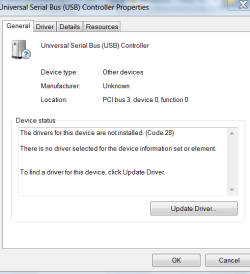
Right-click on the unknown item, select Properties, then select Details tab. It might show something in the value details for the first item (device description) in the Property dropdown list. Does it? Something like Renesas USB 3.0 controller?

See Below == It is not Unknown. No Yellow Mark. I clicked on the "Update Driver" below but Windows could not find one and also I installed Renesas but that didn't work either. == I also install the "NEC 3.0" from the CD, but no help there.

If you select the second item (Hardware ID's) in the Property dropdown list for your unknown card you will hopefully see a series of values. These define the manufacturer and hardware device codes, which correspond to the required driver. Can you please post a screenshot of the values shown here.


Finally, are the supposed driver installers on the CD in "EXE" form, or are they folders which somewhere in a sub-folder they contain an "INF" file? The EXE driver installers might be unpacked/extracted by running them (if they are self-installing), and the imbedded folders could then be examined to look for a README or INF file (which provides detailed driver info).

There are many different ones, appears to be for different products.

If they are already expanded driver installation folders (which contain INF files), you could try getting Windows to do all of the searching for you. Again, right-click on the unknown item in Device Manager, and select "update driver software.... Then from the resulting dialog window asking "how to search", select "browse my computer for driver software", navigate to the CD, be sure the "check sub-folders" item is checked, and OK. Hopefully Windows will drill down through all sub-folders on the CD, and will hopefully find the matching INF file to correspond to that Hardware ID I asked for earlier, and then perform the correct driver install automatically.

I was not able to get Windows to search the CD. == There were a couple Help files, but they were written in broken English and not much help. This is the last time I buy a "no-name" product from China. Luckily it was only $11 so not a big loss.


Report back.



I appreciate the help on this and hopefully you can decider something from my attachements.
 

Attachments

  • CD.PNG
    CD.PNG
    7.9 KB · Views: 79
  • USB.PNG
    USB.PNG
    13.3 KB · Views: 78
  • USB2.PNG
    USB2.PNG
    11.3 KB · Views: 79
Last edited:

My Computer My Computer

Computer type
PC/Desktop
Computer Manufacturer/Model Number
Custom Build
OS
Windows 7 Home Premium 32-Bit - Build 7600 SP1
CPU
Intel Core i3-2120 3.30Ghz
Motherboard
Asus P8Z68-V LX Intel Z68 Socket H2 ATX
Memory
Kingston 4 GB DDR3 1333 mhz
Graphics Card(s)
AMD Radeon HD6670
Sound Card
Sound Blaster Audigy SE 24-Bit
Monitor(s) Displays
Asus VE228
Screen Resolution
1440 X 900
Hard Drives
OCZ Vertex 3 120 GB Sata 3 SSD ==
Kingston SH103/S3 120 G Hyper X 120 GB SSD ==
Western Digital 500 GB Caviar Green 7200 RPM ==
PSU
Corsair CX600M == 600 Watt
Case
NZXT Apollo - Silver with Clear Side Panel
Cooling
Three 120 mm Fans
Keyboard
Microsoft Natural 4000
Mouse
Microsoft Custom Optical 3000
Internet Speed
AT&T Fiber Optic Wireless Network
Antivirus
Microsoft Security Essentials
Browser
Chrome
Other Info
120 mm Blue LED Fan -- Three Blue LED Lazer Light Sticks
The NEC 3.0 folder has your USB 3.0 drivers
 

My Computer My Computer

Computer type
PC/Desktop
Computer Manufacturer/Model Number
Dell Optiplex 360 and Optiplex 755
OS
Desk 1: Win 7 Pro x32; Desk 2: Windows 10 x64
Hard Drives
500GB Crucial SSD in both Desktops
Other Info
Buffalo 6TB NAS, Raid 1
The NEC 3.0 folder has your USB 3.0 drivers
I would agree that this seems the most likely place.

Also, if Windows was unsuccessful in "browsing for drivers", then the contents of this NEC 3.0 folder is probably some EXE to run to install the software.

Bigmck, can you please expand that folder and show us the contents? Is there an EXE to run in it? This would seem to be the required software.

Is there a "\Drivers" or "\Bin" sub-folder in it (probably not, since Windows didn't find it if you "browsed" correctly)? Is there an *.INF file down in that sub-folder structure?

Please show the contents of that particular NEC 3.0 folder and all sub-folders.
 

My Computer My Computer

Computer type
PC/Desktop
Computer Manufacturer/Model Number
Home-built, two systems (1) and (2)
OS
Windows 7 Pro x64 (1), Win7 Pro X64 (2)
CPU
i5-3350p 3.1Ghz/6MB-cache (1); E8400 3.0Ghz/6MB-cache (2)
Motherboard
ASUS P8Z77-V Pro (1); ASUS P5Q3 (2)
Memory
8GB PC3-12800 DDR3 (1); 4GB PC3-10600 DDR3 (2)
Graphics Card(s)
ATI HD7750 (1), (see TV cards); ATI R7 250 (2)
Sound Card
Realtek ALC892 HD Audio (1); Realtek ALC1200 HD Audio (2)
Monitor(s) Displays
Eizo HD2441W LCD, Eizo S2433W (1); Eizo 24" S2433W (2)
Screen Resolution
1920x1200, 1920x1200 (1); 1920x1200 (2)
Hard Drives
(1) 1TB SATA-II (7200RPM), 2x2TB SATA-III (7200RPM), 250GB SATA-III (10000RPM) for OS; 2x2TB external USB 3.0

(2) 320GB SATA-II (7200RPM), 750GB SATA-II (7200RPM), 150GB SATA-II (10000RPM) for OS; 2TB external USB 3.0
PSU
Nesteq ECS-6001 600W (1); Nesteq ECS-5001 500W (2)
Case
Acousti-Case 360 (1) and (2)
Cooling
Noctua NH-U12P SE2 for CPU, 2x120mm case fans (1) and (2)
Keyboard
IBM PS/2 (1) and (2)
Mouse
Logitech MX Revolution wireless (1); Microsoft wired (2)
Internet Speed
100mbps down / 10mbps up
Antivirus
Microsoft Security Essentials; Malwarebyte Anti-Malware Pro
Browser
Firefox
Other Info
Ceton InfiniTV 4-tuner cablecard-enabled TV card as well as Hauppauge HVR-2250 OTA/ATSC 2-tuner TV card in (1), running under Win7 WMC
The NEC 3.0 folder has your USB 3.0 drivers
NOTE: if this is an NEC chip, rather than a Renesas chip, that certainly would explain why the Renesas driver software did not install correctly, and why Device Manager shows "card did not start" as status.

Which is why I wanted to see the screenshot of Hardware ID's. This would tell us EXACTLY what that "generic" card has inside it, and whether it is from Renesas or NEC or what.

Bigmck... again, can you please provide this requested screenshot of Hardware ID's (in Device Manager, details tab, second item in the dropdown list). That is REQUIRED INFO for us to help.

Also, show the contents of that NEC 3.0 folder on the CD, as well as sub-folders.
 

My Computer My Computer

Computer type
PC/Desktop
Computer Manufacturer/Model Number
Home-built, two systems (1) and (2)
OS
Windows 7 Pro x64 (1), Win7 Pro X64 (2)
CPU
i5-3350p 3.1Ghz/6MB-cache (1); E8400 3.0Ghz/6MB-cache (2)
Motherboard
ASUS P8Z77-V Pro (1); ASUS P5Q3 (2)
Memory
8GB PC3-12800 DDR3 (1); 4GB PC3-10600 DDR3 (2)
Graphics Card(s)
ATI HD7750 (1), (see TV cards); ATI R7 250 (2)
Sound Card
Realtek ALC892 HD Audio (1); Realtek ALC1200 HD Audio (2)
Monitor(s) Displays
Eizo HD2441W LCD, Eizo S2433W (1); Eizo 24" S2433W (2)
Screen Resolution
1920x1200, 1920x1200 (1); 1920x1200 (2)
Hard Drives
(1) 1TB SATA-II (7200RPM), 2x2TB SATA-III (7200RPM), 250GB SATA-III (10000RPM) for OS; 2x2TB external USB 3.0

(2) 320GB SATA-II (7200RPM), 750GB SATA-II (7200RPM), 150GB SATA-II (10000RPM) for OS; 2TB external USB 3.0
PSU
Nesteq ECS-6001 600W (1); Nesteq ECS-5001 500W (2)
Case
Acousti-Case 360 (1) and (2)
Cooling
Noctua NH-U12P SE2 for CPU, 2x120mm case fans (1) and (2)
Keyboard
IBM PS/2 (1) and (2)
Mouse
Logitech MX Revolution wireless (1); Microsoft wired (2)
Internet Speed
100mbps down / 10mbps up
Antivirus
Microsoft Security Essentials; Malwarebyte Anti-Malware Pro
Browser
Firefox
Other Info
Ceton InfiniTV 4-tuner cablecard-enabled TV card as well as Hauppauge HVR-2250 OTA/ATSC 2-tuner TV card in (1), running under Win7 WMC
I'd say, if the folder contains a Setup.exe (or similar file present with "setup" in its name), Run it.

Otherwise, right click the device in Device Manager->Update, select Update Driver, the select Browse My Computer and browse to the NEC3.0 folder. Make sure the Include subfolders box is checked. Then click Next and allow windows to do the install
 

My Computer My Computer

Computer type
PC/Desktop
Computer Manufacturer/Model Number
Dell Optiplex 360 and Optiplex 755
OS
Desk 1: Win 7 Pro x32; Desk 2: Windows 10 x64
Hard Drives
500GB Crucial SSD in both Desktops
Other Info
Buffalo 6TB NAS, Raid 1
Rensas and NEC are the same company. They merged in 2010.

I just skimmed the thread so don't think OP has actually tried installing this driver yet. If NEC3.0 doesn't have a setup.exe, OP needs to point Windows to the folder when doing the Update Driver.
 

My Computer My Computer

Computer type
PC/Desktop
Computer Manufacturer/Model Number
Dell Optiplex 360 and Optiplex 755
OS
Desk 1: Win 7 Pro x32; Desk 2: Windows 10 x64
Hard Drives
500GB Crucial SSD in both Desktops
Other Info
Buffalo 6TB NAS, Raid 1
The NEC 3.0 folder has your USB 3.0 drivers
NOTE: if this is an NEC chip, rather than a Renesas chip, that certainly would explain why the Renesas driver software did not install correctly, and why Device Manager shows "card did not start" as status.

Which is why I wanted to see the screenshot of Hardware ID's. This would tell us EXACTLY what that "generic" card has inside it, and whether it is from Renesas or NEC or what.

Bigmck... again, can you please provide this requested screenshot of Hardware ID's (in Device Manager, details tab, second item in the dropdown list). That is REQUIRED INFO for us to help.

Also, show the contents of that NEC 3.0 folder on the CD, as well as sub-folders.

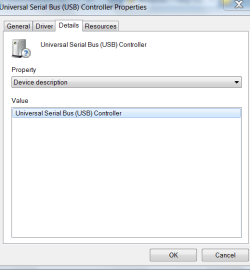
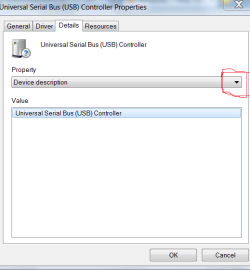
The Details tab is shown in Message 6, but no Hardware ID shows as the device is identified.

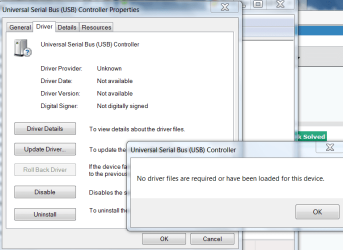
The first screenshot below is when I press the Driver Details button. It says no driver required which is strange.

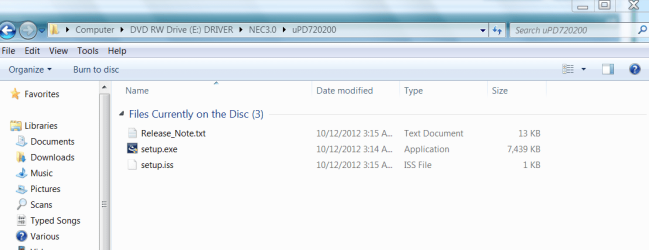
The second screenshot has the setup file, which I installed but no dice.

I think all of us have spent enough time on this $11 problem. I am going to just ditch it and get a reputable brand that should install easily. Thanks for your help.
 

Attachments

  • USB3.PNG
    USB3.PNG
    33.8 KB · Views: 3
  • USB4.PNG
    USB4.PNG
    31.3 KB · Views: 3

My Computer My Computer

Computer type
PC/Desktop
Computer Manufacturer/Model Number
Custom Build
OS
Windows 7 Home Premium 32-Bit - Build 7600 SP1
CPU
Intel Core i3-2120 3.30Ghz
Motherboard
Asus P8Z68-V LX Intel Z68 Socket H2 ATX
Memory
Kingston 4 GB DDR3 1333 mhz
Graphics Card(s)
AMD Radeon HD6670
Sound Card
Sound Blaster Audigy SE 24-Bit
Monitor(s) Displays
Asus VE228
Screen Resolution
1440 X 900
Hard Drives
OCZ Vertex 3 120 GB Sata 3 SSD ==
Kingston SH103/S3 120 G Hyper X 120 GB SSD ==
Western Digital 500 GB Caviar Green 7200 RPM ==
PSU
Corsair CX600M == 600 Watt
Case
NZXT Apollo - Silver with Clear Side Panel
Cooling
Three 120 mm Fans
Keyboard
Microsoft Natural 4000
Mouse
Microsoft Custom Optical 3000
Internet Speed
AT&T Fiber Optic Wireless Network
Antivirus
Microsoft Security Essentials
Browser
Chrome
Other Info
120 mm Blue LED Fan -- Three Blue LED Lazer Light Sticks
Jim, you missed a step. In the Detail tab click the down arrow and look for Hardware ID (it should be near the top) and select it.

USB2.PNG

Jim :cool:
 

My Computer My Computer

Computer type
PC/Desktop
Computer Manufacturer/Model Number
Home Built
OS
Windows 8.1 Pro w/Media Center 64bit, Windows 7 HP 64bit
CPU
Phenom II X6 1100T
Motherboard
ASUS M5A99X EVO
Memory
Crucial Balistic 8gb DDR3-1866 CL9
Graphics Card(s)
MSI R6850 Cyclone IGD5 PE
Sound Card
On Board
Monitor(s) Displays
ASUS VE258Q 25" LED with DVI-HDMI-DisplayPort
Screen Resolution
1920 x 1080
Hard Drives
Two WD Cavier Black 2TB Sata III, WD My Book Essential 2TB USB 3.0
PSU
Seasonic X650 80 Plus GOLD Modular
Case
Corsair 400R
Cooling
Antec Kuhler H2O 620, Two 120mm and four 140mm
Keyboard
Logitech K120
Mouse
Logitech Marble Mouse USB, Logitech Precision Game Pad
Internet Speed
15MB
Antivirus
Norton IS 2013, Malwarebytes Pro Beta 2
Browser
IE-11, FF-27
Other Info
APC UPS ES 750, Netgear WNR3500L Gigabit & Wireless N Router with SamKnows Test Program, Motorola SB6120 Gigabit Cable Modem. Brother HL-2170W Laser Printer, Epson V300 Scanner
The Details tab is shown in Message 6, but no Hardware ID shows as the device is identified.
No, you have NOT shown the Hardware ID in the screenshot of Details tab shown in message 6. The "Hardware ID" is the SECOND DROPDOWN ITEM in the "Property" listbox. You are showing the FIRST DROPDOWN item, which is "Device Description".

Click on the down-arrow at the right of the Property listbox, and you'll be presented with a dropdown list.

2dxv.jpg


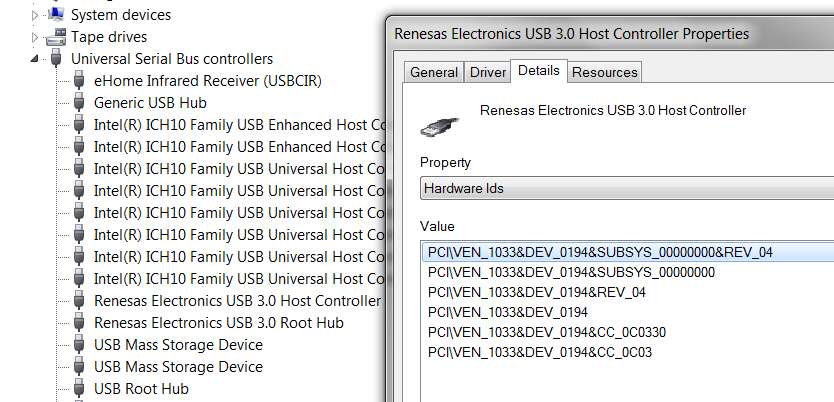
The SECOND item on the dropdown list is "Hardware IDs". Select it, and then you'll see something like I posted earlier:

b1rh.jpg


Unless you post your version of the above "hardware IDs" screenshot, we don't know what your hardware really is. With that screenshot, we can at least move forward properly to try and get your driver installed correctly for this hardware.


The first screenshot below is when I press the Driver Details button. It says no driver required which is strange.
YOU DO NOT CURRENTLY HAVE THE PROPER DRIVER INSTALLED!!! That's the problem we're trying to solve!

The "Driver Details" button on the Driver tab simply repeats what we already know... that you did NOT run the SETUP driver installer EXE file in that NEC 3.0 folder on the CD as you should have!! THAT IS THE PROPER DRIVER (or else there is a BIN or DRIVER sub-folder underneath that, which has an INF file which could be installed if you would "update driver software"on this device through Device Manager).

If you would provide an expanded screenshot of that NEC 3.0 folder on the CD, we could tell you exactly what to do next. The problem is not that the generic Chinese hardware is broken or crap, it's that you haven't run the driver software installation correctly.

So show us the contents of the NEC 3.0 folder on the CD, and we'll probably be able to make progress. The card is probably working, but you just haven't installed the driver software correctly yet.


The second screenshot has the setup file, which I installed but no dice.
Well, this is promising. What does "no dice" mean??

There's also a "Release_note.txt" file in that \Nec 3.0\Upd720200 sub-folder. What does that TXT file say?

Also, you didn't show the expansion of the Nec 3.0 folder itself. Is \Upd720200 the only contents below the \Nec 3.0 folder? Or is there something else we should know about?


I think all of us have spent enough time on this $11 problem. I am going to just ditch it and get a reputable brand that should install easily. Thanks for your help.
(1) What does the Release_note.txt file in \Upd720200 sub-folder say?

(2) What do you get when you run that Setup.exe? Any error messages? Normal successful completion with confirmation?

(3) What does "no dice" mean? Yes, it doesn't appear you have the card driver software installed correctly yet as you'd have TWO items in Device Manager (Renesas USB 3.0 Root Hub, and Renesas USB 3.0 Host Controller) and you only have one right now... with a yellow exclamation mark indicating "no driver installed". But what happens when you run Setup.exe... since I'm sure it must be failing with some kind of message about a problem.

(4) What does the "Hardware ID" (second dropdown item) screenshot look like in the Details tab of Device Manager?

(5) What is the contents of \NEC 3.0 folder on the CD?
 

My Computer My Computer

Computer type
PC/Desktop
Computer Manufacturer/Model Number
Home-built, two systems (1) and (2)
OS
Windows 7 Pro x64 (1), Win7 Pro X64 (2)
CPU
i5-3350p 3.1Ghz/6MB-cache (1); E8400 3.0Ghz/6MB-cache (2)
Motherboard
ASUS P8Z77-V Pro (1); ASUS P5Q3 (2)
Memory
8GB PC3-12800 DDR3 (1); 4GB PC3-10600 DDR3 (2)
Graphics Card(s)
ATI HD7750 (1), (see TV cards); ATI R7 250 (2)
Sound Card
Realtek ALC892 HD Audio (1); Realtek ALC1200 HD Audio (2)
Monitor(s) Displays
Eizo HD2441W LCD, Eizo S2433W (1); Eizo 24" S2433W (2)
Screen Resolution
1920x1200, 1920x1200 (1); 1920x1200 (2)
Hard Drives
(1) 1TB SATA-II (7200RPM), 2x2TB SATA-III (7200RPM), 250GB SATA-III (10000RPM) for OS; 2x2TB external USB 3.0

(2) 320GB SATA-II (7200RPM), 750GB SATA-II (7200RPM), 150GB SATA-II (10000RPM) for OS; 2TB external USB 3.0
PSU
Nesteq ECS-6001 600W (1); Nesteq ECS-5001 500W (2)
Case
Acousti-Case 360 (1) and (2)
Cooling
Noctua NH-U12P SE2 for CPU, 2x120mm case fans (1) and (2)
Keyboard
IBM PS/2 (1) and (2)
Mouse
Logitech MX Revolution wireless (1); Microsoft wired (2)
Internet Speed
100mbps down / 10mbps up
Antivirus
Microsoft Security Essentials; Malwarebyte Anti-Malware Pro
Browser
Firefox
Other Info
Ceton InfiniTV 4-tuner cablecard-enabled TV card as well as Hauppauge HVR-2250 OTA/ATSC 2-tuner TV card in (1), running under Win7 WMC
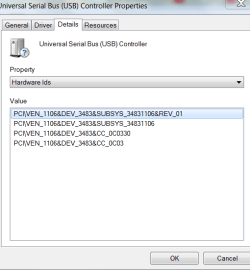
Here is the Hardware ID

No Dice means No Luck.

I appreciate everyone's help but I am tired of fooling with this. It is not worth the trouble for $11.

Thanks,
 

Attachments

  • USB5.PNG
    USB5.PNG
    11.8 KB · Views: 61

My Computer My Computer

Computer type
PC/Desktop
Computer Manufacturer/Model Number
Custom Build
OS
Windows 7 Home Premium 32-Bit - Build 7600 SP1
CPU
Intel Core i3-2120 3.30Ghz
Motherboard
Asus P8Z68-V LX Intel Z68 Socket H2 ATX
Memory
Kingston 4 GB DDR3 1333 mhz
Graphics Card(s)
AMD Radeon HD6670
Sound Card
Sound Blaster Audigy SE 24-Bit
Monitor(s) Displays
Asus VE228
Screen Resolution
1440 X 900
Hard Drives
OCZ Vertex 3 120 GB Sata 3 SSD ==
Kingston SH103/S3 120 G Hyper X 120 GB SSD ==
Western Digital 500 GB Caviar Green 7200 RPM ==
PSU
Corsair CX600M == 600 Watt
Case
NZXT Apollo - Silver with Clear Side Panel
Cooling
Three 120 mm Fans
Keyboard
Microsoft Natural 4000
Mouse
Microsoft Custom Optical 3000
Internet Speed
AT&T Fiber Optic Wireless Network
Antivirus
Microsoft Security Essentials
Browser
Chrome
Other Info
120 mm Blue LED Fan -- Three Blue LED Lazer Light Sticks

My Computer My Computer

Computer type
PC/Desktop
Computer Manufacturer/Model Number
Home Built
OS
Windows 8.1 Pro w/Media Center 64bit, Windows 7 HP 64bit
CPU
Phenom II X6 1100T
Motherboard
ASUS M5A99X EVO
Memory
Crucial Balistic 8gb DDR3-1866 CL9
Graphics Card(s)
MSI R6850 Cyclone IGD5 PE
Sound Card
On Board
Monitor(s) Displays
ASUS VE258Q 25" LED with DVI-HDMI-DisplayPort
Screen Resolution
1920 x 1080
Hard Drives
Two WD Cavier Black 2TB Sata III, WD My Book Essential 2TB USB 3.0
PSU
Seasonic X650 80 Plus GOLD Modular
Case
Corsair 400R
Cooling
Antec Kuhler H2O 620, Two 120mm and four 140mm
Keyboard
Logitech K120
Mouse
Logitech Marble Mouse USB, Logitech Precision Game Pad
Internet Speed
15MB
Antivirus
Norton IS 2013, Malwarebytes Pro Beta 2
Browser
IE-11, FF-27
Other Info
APC UPS ES 750, Netgear WNR3500L Gigabit & Wireless N Router with SamKnows Test Program, Motorola SB6120 Gigabit Cable Modem. Brother HL-2170W Laser Printer, Epson V300 Scanner

My Computer My Computer

Computer type
PC/Desktop
Computer Manufacturer/Model Number
Custom Build
OS
Windows 7 Home Premium 32-Bit - Build 7600 SP1
CPU
Intel Core i3-2120 3.30Ghz
Motherboard
Asus P8Z68-V LX Intel Z68 Socket H2 ATX
Memory
Kingston 4 GB DDR3 1333 mhz
Graphics Card(s)
AMD Radeon HD6670
Sound Card
Sound Blaster Audigy SE 24-Bit
Monitor(s) Displays
Asus VE228
Screen Resolution
1440 X 900
Hard Drives
OCZ Vertex 3 120 GB Sata 3 SSD ==
Kingston SH103/S3 120 G Hyper X 120 GB SSD ==
Western Digital 500 GB Caviar Green 7200 RPM ==
PSU
Corsair CX600M == 600 Watt
Case
NZXT Apollo - Silver with Clear Side Panel
Cooling
Three 120 mm Fans
Keyboard
Microsoft Natural 4000
Mouse
Microsoft Custom Optical 3000
Internet Speed
AT&T Fiber Optic Wireless Network
Antivirus
Microsoft Security Essentials
Browser
Chrome
Other Info
120 mm Blue LED Fan -- Three Blue LED Lazer Light Sticks
On your driver CD, the 2nd-to-last folder is for VIA_VT6202VT6212_drv262LM.

Could be that this is the VIA driver installer folder for your VIA chipset card, instead of that NEC 3.0 folder whose SETUP.EXE obviously failed. Clearly the card you have does NOT have Renesas/NEC chipset on it.

What is in that VIA folder on the driver CD? Is there a README? What does it say? Is there a SETUP.EXE that you can run and try it?

NOTE: Just to be sure, I'd probably first UNINSTALL whatever remnants got installed from the failed earlier attempts to install a Renesas driver, or that SETUP.EXE from the NEC 3.0 folder. Go to Control Panel and uninstall whatever remnants you see in the Installed Programs list that looks relevant.
 

My Computer My Computer

Computer type
PC/Desktop
Computer Manufacturer/Model Number
Home-built, two systems (1) and (2)
OS
Windows 7 Pro x64 (1), Win7 Pro X64 (2)
CPU
i5-3350p 3.1Ghz/6MB-cache (1); E8400 3.0Ghz/6MB-cache (2)
Motherboard
ASUS P8Z77-V Pro (1); ASUS P5Q3 (2)
Memory
8GB PC3-12800 DDR3 (1); 4GB PC3-10600 DDR3 (2)
Graphics Card(s)
ATI HD7750 (1), (see TV cards); ATI R7 250 (2)
Sound Card
Realtek ALC892 HD Audio (1); Realtek ALC1200 HD Audio (2)
Monitor(s) Displays
Eizo HD2441W LCD, Eizo S2433W (1); Eizo 24" S2433W (2)
Screen Resolution
1920x1200, 1920x1200 (1); 1920x1200 (2)
Hard Drives
(1) 1TB SATA-II (7200RPM), 2x2TB SATA-III (7200RPM), 250GB SATA-III (10000RPM) for OS; 2x2TB external USB 3.0

(2) 320GB SATA-II (7200RPM), 750GB SATA-II (7200RPM), 150GB SATA-II (10000RPM) for OS; 2TB external USB 3.0
PSU
Nesteq ECS-6001 600W (1); Nesteq ECS-5001 500W (2)
Case
Acousti-Case 360 (1) and (2)
Cooling
Noctua NH-U12P SE2 for CPU, 2x120mm case fans (1) and (2)
Keyboard
IBM PS/2 (1) and (2)
Mouse
Logitech MX Revolution wireless (1); Microsoft wired (2)
Internet Speed
100mbps down / 10mbps up
Antivirus
Microsoft Security Essentials; Malwarebyte Anti-Malware Pro
Browser
Firefox
Other Info
Ceton InfiniTV 4-tuner cablecard-enabled TV card as well as Hauppauge HVR-2250 OTA/ATSC 2-tuner TV card in (1), running under Win7 WMC
The VT6202 and VT6212 are USB 2 chips and not what he has.

Jim :cool:
 

My Computer My Computer

Computer type
PC/Desktop
Computer Manufacturer/Model Number
Home Built
OS
Windows 8.1 Pro w/Media Center 64bit, Windows 7 HP 64bit
CPU
Phenom II X6 1100T
Motherboard
ASUS M5A99X EVO
Memory
Crucial Balistic 8gb DDR3-1866 CL9
Graphics Card(s)
MSI R6850 Cyclone IGD5 PE
Sound Card
On Board
Monitor(s) Displays
ASUS VE258Q 25" LED with DVI-HDMI-DisplayPort
Screen Resolution
1920 x 1080
Hard Drives
Two WD Cavier Black 2TB Sata III, WD My Book Essential 2TB USB 3.0
PSU
Seasonic X650 80 Plus GOLD Modular
Case
Corsair 400R
Cooling
Antec Kuhler H2O 620, Two 120mm and four 140mm
Keyboard
Logitech K120
Mouse
Logitech Marble Mouse USB, Logitech Precision Game Pad
Internet Speed
15MB
Antivirus
Norton IS 2013, Malwarebytes Pro Beta 2
Browser
IE-11, FF-27
Other Info
APC UPS ES 750, Netgear WNR3500L Gigabit & Wireless N Router with SamKnows Test Program, Motorola SB6120 Gigabit Cable Modem. Brother HL-2170W Laser Printer, Epson V300 Scanner
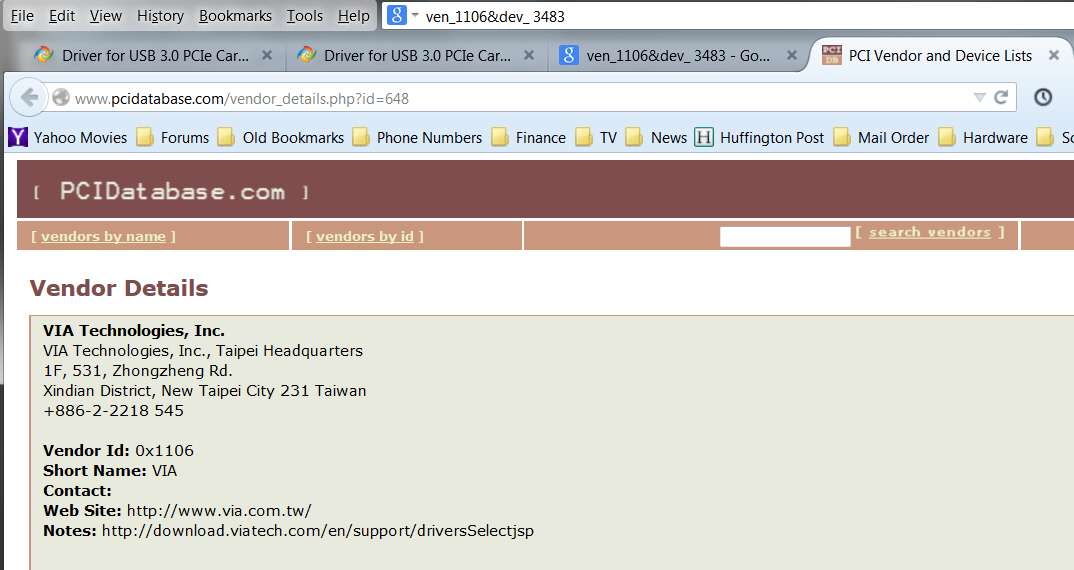
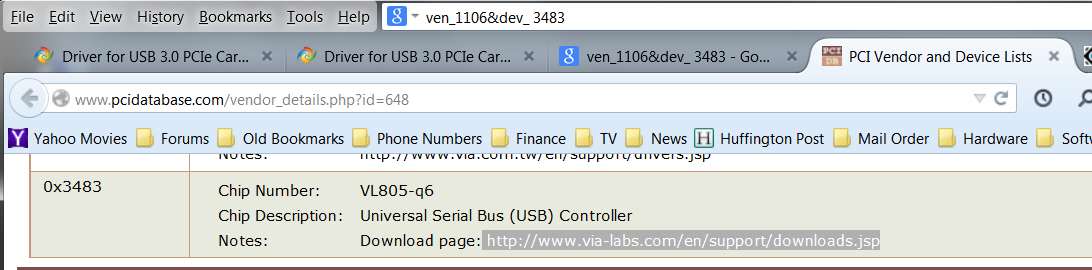
That's a Via chip. Here is what I found. On first link at bottom of page is the 3483 Dev. and a VL805-q6 chip.
Absolutely.

w15b.jpg


30wtd.jpg


0brr4.jpg


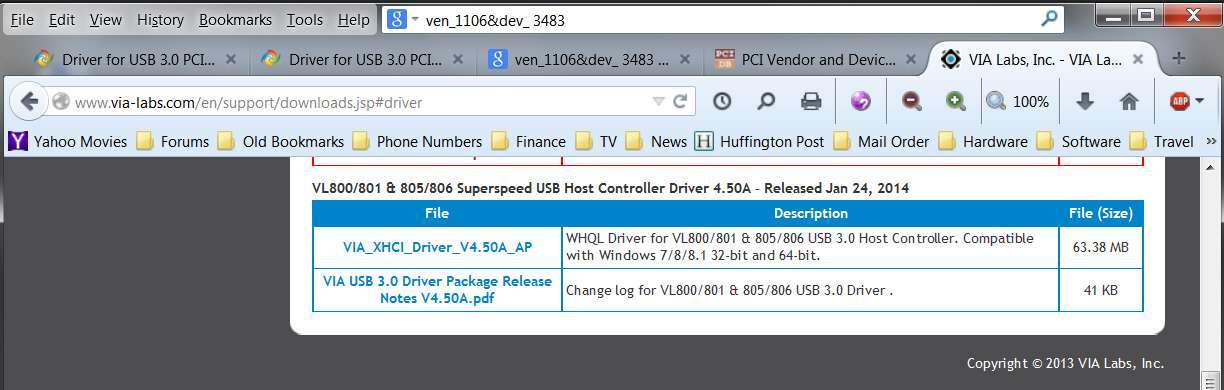
Clicking on the download link URL in that last screenshot page should download a ZIP file containing the proper driver installer file for the VIA VL805/VL806 XHCI Host Controller, which is your card's chipset.

NOTE #1: it's a 63MB download, and it's coming from Taiwan at a VERY SLOW speed... so it'll take a bit of time. Be patient.

NOTE #2: while this should be be the latest driver installer file (released Jan 24, 2014) for this card, I still think the VIA folder on the driver CD you have could possibly contain the same content. Worth a look-see anyway, as it will save you at least 30 minutes of download time from Taiwan for the absolute most-current driver.

There's also a download link URL for the changelog PDF for the driver file.
 

My Computer My Computer

Computer type
PC/Desktop
Computer Manufacturer/Model Number
Home-built, two systems (1) and (2)
OS
Windows 7 Pro x64 (1), Win7 Pro X64 (2)
CPU
i5-3350p 3.1Ghz/6MB-cache (1); E8400 3.0Ghz/6MB-cache (2)
Motherboard
ASUS P8Z77-V Pro (1); ASUS P5Q3 (2)
Memory
8GB PC3-12800 DDR3 (1); 4GB PC3-10600 DDR3 (2)
Graphics Card(s)
ATI HD7750 (1), (see TV cards); ATI R7 250 (2)
Sound Card
Realtek ALC892 HD Audio (1); Realtek ALC1200 HD Audio (2)
Monitor(s) Displays
Eizo HD2441W LCD, Eizo S2433W (1); Eizo 24" S2433W (2)
Screen Resolution
1920x1200, 1920x1200 (1); 1920x1200 (2)
Hard Drives
(1) 1TB SATA-II (7200RPM), 2x2TB SATA-III (7200RPM), 250GB SATA-III (10000RPM) for OS; 2x2TB external USB 3.0

(2) 320GB SATA-II (7200RPM), 750GB SATA-II (7200RPM), 150GB SATA-II (10000RPM) for OS; 2TB external USB 3.0
PSU
Nesteq ECS-6001 600W (1); Nesteq ECS-5001 500W (2)
Case
Acousti-Case 360 (1) and (2)
Cooling
Noctua NH-U12P SE2 for CPU, 2x120mm case fans (1) and (2)
Keyboard
IBM PS/2 (1) and (2)
Mouse
Logitech MX Revolution wireless (1); Microsoft wired (2)
Internet Speed
100mbps down / 10mbps up
Antivirus
Microsoft Security Essentials; Malwarebyte Anti-Malware Pro
Browser
Firefox
Other Info
Ceton InfiniTV 4-tuner cablecard-enabled TV card as well as Hauppauge HVR-2250 OTA/ATSC 2-tuner TV card in (1), running under Win7 WMC
Back
Top