Solved Driver for USB 3.0 PCIe Card

The VT6202 and VT6212 are USB 2 chips and not what he has.
Fascinating.

Then where on the driver CD might the drivers be for this card??

Ridiculous.

Anyway, the official VIA driver download site URL's for downloading the correct and latest driver for the VL805/VL806 chip should produce what is required (fingers crossed)... although it's more than 30 minutes to get from Taiwan at the slow speed they connect at.
 

My Computer My Computer

Computer type
PC/Desktop
Computer Manufacturer/Model Number
Home-built, two systems (1) and (2)
OS
Windows 7 Pro x64 (1), Win7 Pro X64 (2)
CPU
i5-3350p 3.1Ghz/6MB-cache (1); E8400 3.0Ghz/6MB-cache (2)
Motherboard
ASUS P8Z77-V Pro (1); ASUS P5Q3 (2)
Memory
8GB PC3-12800 DDR3 (1); 4GB PC3-10600 DDR3 (2)
Graphics Card(s)
ATI HD7750 (1), (see TV cards); ATI R7 250 (2)
Sound Card
Realtek ALC892 HD Audio (1); Realtek ALC1200 HD Audio (2)
Monitor(s) Displays
Eizo HD2441W LCD, Eizo S2433W (1); Eizo 24" S2433W (2)
Screen Resolution
1920x1200, 1920x1200 (1); 1920x1200 (2)
Hard Drives
(1) 1TB SATA-II (7200RPM), 2x2TB SATA-III (7200RPM), 250GB SATA-III (10000RPM) for OS; 2x2TB external USB 3.0

(2) 320GB SATA-II (7200RPM), 750GB SATA-II (7200RPM), 150GB SATA-II (10000RPM) for OS; 2TB external USB 3.0
PSU
Nesteq ECS-6001 600W (1); Nesteq ECS-5001 500W (2)
Case
Acousti-Case 360 (1) and (2)
Cooling
Noctua NH-U12P SE2 for CPU, 2x120mm case fans (1) and (2)
Keyboard
IBM PS/2 (1) and (2)
Mouse
Logitech MX Revolution wireless (1); Microsoft wired (2)
Internet Speed
100mbps down / 10mbps up
Antivirus
Microsoft Security Essentials; Malwarebyte Anti-Malware Pro
Browser
Firefox
Other Info
Ceton InfiniTV 4-tuner cablecard-enabled TV card as well as Hauppauge HVR-2250 OTA/ATSC 2-tuner TV card in (1), running under Win7 WMC

My Computer My Computer

Computer type
PC/Desktop
Computer Manufacturer/Model Number
Home Built
OS
Windows 8.1 Pro w/Media Center 64bit, Windows 7 HP 64bit
CPU
Phenom II X6 1100T
Motherboard
ASUS M5A99X EVO
Memory
Crucial Balistic 8gb DDR3-1866 CL9
Graphics Card(s)
MSI R6850 Cyclone IGD5 PE
Sound Card
On Board
Monitor(s) Displays
ASUS VE258Q 25" LED with DVI-HDMI-DisplayPort
Screen Resolution
1920 x 1080
Hard Drives
Two WD Cavier Black 2TB Sata III, WD My Book Essential 2TB USB 3.0
PSU
Seasonic X650 80 Plus GOLD Modular
Case
Corsair 400R
Cooling
Antec Kuhler H2O 620, Two 120mm and four 140mm
Keyboard
Logitech K120
Mouse
Logitech Marble Mouse USB, Logitech Precision Game Pad
Internet Speed
15MB
Antivirus
Norton IS 2013, Malwarebytes Pro Beta 2
Browser
IE-11, FF-27
Other Info
APC UPS ES 750, Netgear WNR3500L Gigabit & Wireless N Router with SamKnows Test Program, Motorola SB6120 Gigabit Cable Modem. Brother HL-2170W Laser Printer, Epson V300 Scanner
Finally completed the download of the ZIP file from Taiwan. It unzips to VIA_XHCI_Driver_V4.50A_AP.exe.

I ran this self-extracting installer (even though I don't have that particular card installed my machine), knowing it would fail because of the missing hardware. But I wanted to examine the expanded installer folders, to verify from the INF (which I expected to find somewhere down in the sub-folder structure) that it was for the Hardware ID we now know to be for this card.

The running of SETUP.EXE expanded into a \Appdata\Local\Temp\is-1DHFO.tmp folder. Inside of here are some sub-folders, and eventually I found the proper sub-folder which contained the INF files for both USB Root Hub and USB XCHI Host Controller.

And sure enough, that VEN_1106&DEV_3483 is present for XHCI:

; For XP and later
[VIA.NTamd64]
; DisplayName Section DeviceId
; ----------- ------- --------
%XHC.DRVDESC% = xHC_Inst, PCI\VEN_1106&DEV_9201
%XHC.DRVDESC% = xHC_Inst, PCI\VEN_1106&DEV_3432
%XHC.DRVDESC% = xHC_Inst, PCI\VEN_1106&DEV_3483

along with:

[Strings]
VIA = "VIA"
ClassName = "VIA USB eXtensible Host Controller"
xHC.SVCDESC = "VIA USB eXtensible Host Controller Service"
xHC.DRVDESC = "VIA USB eXtensible Host Controller"
DISK_NAME = "VIA USB eXtensible Host Controller Install Disk"


And for the Root Hub:

; For XP and later
[VIA.NTamd64]
; DisplayName Section DeviceId
; ----------- ------- --------
%VUSB3\ROOT_HUB30.DeviceDesc% = VUSB3HUB, USB\VIA_ROOT_HUB
%VUSB3\CLASS_09.DeviceDesc% = VUSB3HUB, VUSB3\CLASS_09
%VUSB2\CLASS_09.DeviceDesc% = VUSB3HUB, VUSB2\CLASS_09
%VUSB1\CLASS_09.DeviceDesc% = VUSB3HUB, VUSB1\CLASS_09
%VUSB2\CLASS_09&SUBCLASS_00&PROT_02.DeviceDesc% = VUSB3HUB, VUSB2\CLASS_09&SUBCLASS_00&PROT_02

and:

[Strings]
VIA = "VIA"
DISK_NAME = "USB3.0 HUB Installation Disk"
VUSB3\ROOT_HUB30.DeviceDesc = "VIA USB 3 Root Hub"
VUSB3\CLASS_09.DeviceDesc = "VIA USB 3 Hub"
VUSB2\CLASS_09.DeviceDesc = "VIA USB 2 Hub"
VUSB1\CLASS_09.DeviceDesc = "VIA USB 1 Hub"
VUSB2\CLASS_09&SUBCLASS_00&PROT_02.DeviceDesc = "VIA USB 2 MTT Hub"
VUSB3HUB.SvcDesc = "VIA USB 3 Root Hub Service"


So by downloading and running this EXE provided on the VIA driver download site, you should end up with two new devices showing up in Device Manager for USB:

(1) VIA USB 3 Root Hub
(2) VIA USB eXtensible Host Controller

This is ABSOLUTELY the driver file for this card. Should work. No need to return it... just give this driver file a shot and see if it works.

My money is on "it will work".


Note: finding out the Hardware IDs for the unknown item in Device Manager is how any such detective job should start, when drivers are missing and clearly required. That is the #1 most important and undisputable fact providing both the vendor and device code id, no matter what country the card was manufactured in.

Searching the Microsoft Windows Update Driver Catalog site (must use IE, not Firefox) for the vendor\device will reveal if (a) the correct driver is available from Microsoft and can be downloaded using Windows Update (or directly from the MS site following the search with IE), or (b) if the correct driver is NOT available from Microsoft, where then hopefully it can be obtained from the manufacturer's driver download support site.

In this case, the required VIA drivers are NOT found on the MS Windows Update Driver Catalog site. So the VIA support site is the only place to find them.

==> They obviously should have been somewhere on that driver CD provided with the card, in my opinion. But who knows without looking through each folder for a README or something.

 

My Computer My Computer

Computer type
PC/Desktop
Computer Manufacturer/Model Number
Home-built, two systems (1) and (2)
OS
Windows 7 Pro x64 (1), Win7 Pro X64 (2)
CPU
i5-3350p 3.1Ghz/6MB-cache (1); E8400 3.0Ghz/6MB-cache (2)
Motherboard
ASUS P8Z77-V Pro (1); ASUS P5Q3 (2)
Memory
8GB PC3-12800 DDR3 (1); 4GB PC3-10600 DDR3 (2)
Graphics Card(s)
ATI HD7750 (1), (see TV cards); ATI R7 250 (2)
Sound Card
Realtek ALC892 HD Audio (1); Realtek ALC1200 HD Audio (2)
Monitor(s) Displays
Eizo HD2441W LCD, Eizo S2433W (1); Eizo 24" S2433W (2)
Screen Resolution
1920x1200, 1920x1200 (1); 1920x1200 (2)
Hard Drives
(1) 1TB SATA-II (7200RPM), 2x2TB SATA-III (7200RPM), 250GB SATA-III (10000RPM) for OS; 2x2TB external USB 3.0

(2) 320GB SATA-II (7200RPM), 750GB SATA-II (7200RPM), 150GB SATA-II (10000RPM) for OS; 2TB external USB 3.0
PSU
Nesteq ECS-6001 600W (1); Nesteq ECS-5001 500W (2)
Case
Acousti-Case 360 (1) and (2)
Cooling
Noctua NH-U12P SE2 for CPU, 2x120mm case fans (1) and (2)
Keyboard
IBM PS/2 (1) and (2)
Mouse
Logitech MX Revolution wireless (1); Microsoft wired (2)
Internet Speed
100mbps down / 10mbps up
Antivirus
Microsoft Security Essentials; Malwarebyte Anti-Malware Pro
Browser
Firefox
Other Info
Ceton InfiniTV 4-tuner cablecard-enabled TV card as well as Hauppauge HVR-2250 OTA/ATSC 2-tuner TV card in (1), running under Win7 WMC
That's a Via chip. Here is what I found. On first link at bottom of page is the 3483 Dev. and a VL805-q6 chip.
On the 2nd link at bottom of page is the Driver for the VL805 chip.

PCI Vendor and Device Lists

VIA Labs, Inc. - VIA Labs Collaborates with American Megatrends to Deliver xHCI Compliant UEFI Support for the VL800 USB 3.0 Host Controller

Jim :cool:

Thanks very much Jim. Your instructions got the Driver installed. Thanks so much. == By the way, it took almost an hour to download the Driver. That is the speed back in the DOS days. :)
 

My Computer My Computer

Computer type
PC/Desktop
Computer Manufacturer/Model Number
Custom Build
OS
Windows 7 Home Premium 32-Bit - Build 7600 SP1
CPU
Intel Core i3-2120 3.30Ghz
Motherboard
Asus P8Z68-V LX Intel Z68 Socket H2 ATX
Memory
Kingston 4 GB DDR3 1333 mhz
Graphics Card(s)
AMD Radeon HD6670
Sound Card
Sound Blaster Audigy SE 24-Bit
Monitor(s) Displays
Asus VE228
Screen Resolution
1440 X 900
Hard Drives
OCZ Vertex 3 120 GB Sata 3 SSD ==
Kingston SH103/S3 120 G Hyper X 120 GB SSD ==
Western Digital 500 GB Caviar Green 7200 RPM ==
PSU
Corsair CX600M == 600 Watt
Case
NZXT Apollo - Silver with Clear Side Panel
Cooling
Three 120 mm Fans
Keyboard
Microsoft Natural 4000
Mouse
Microsoft Custom Optical 3000
Internet Speed
AT&T Fiber Optic Wireless Network
Antivirus
Microsoft Security Essentials
Browser
Chrome
Other Info
120 mm Blue LED Fan -- Three Blue LED Lazer Light Sticks
Glad you got it going.

Jim :cool:
 

My Computer My Computer

Computer type
PC/Desktop
Computer Manufacturer/Model Number
Home Built
OS
Windows 8.1 Pro w/Media Center 64bit, Windows 7 HP 64bit
CPU
Phenom II X6 1100T
Motherboard
ASUS M5A99X EVO
Memory
Crucial Balistic 8gb DDR3-1866 CL9
Graphics Card(s)
MSI R6850 Cyclone IGD5 PE
Sound Card
On Board
Monitor(s) Displays
ASUS VE258Q 25" LED with DVI-HDMI-DisplayPort
Screen Resolution
1920 x 1080
Hard Drives
Two WD Cavier Black 2TB Sata III, WD My Book Essential 2TB USB 3.0
PSU
Seasonic X650 80 Plus GOLD Modular
Case
Corsair 400R
Cooling
Antec Kuhler H2O 620, Two 120mm and four 140mm
Keyboard
Logitech K120
Mouse
Logitech Marble Mouse USB, Logitech Precision Game Pad
Internet Speed
15MB
Antivirus
Norton IS 2013, Malwarebytes Pro Beta 2
Browser
IE-11, FF-27
Other Info
APC UPS ES 750, Netgear WNR3500L Gigabit & Wireless N Router with SamKnows Test Program, Motorola SB6120 Gigabit Cable Modem. Brother HL-2170W Laser Printer, Epson V300 Scanner
No Dice means No Luck.
Just for closure on this thread (since I'm sure running the downloaded correct VIA driver will bring your 4-port USB 3.0 PCIe card to life properly), what I was looking for was a more definitive description of what "no dice" or "no luck" means. Like an error message or something, telling us that the driver installer from the \NEC 3.0 folder couldn't find the hardware it was looking for or something. This would have tipped us off early on that this was NOT a Renesas-based chipset on the card, but something else.

Eventually, when you provided the requested Hardware ID screenshot, we were able to determine that it was a VIA VL805 chip, and then were able to find the correct driver from the VIA support site. But if we knew early on that it was NOT a Renesas chip, that probably would have saved a little time during this thread's back and forth.


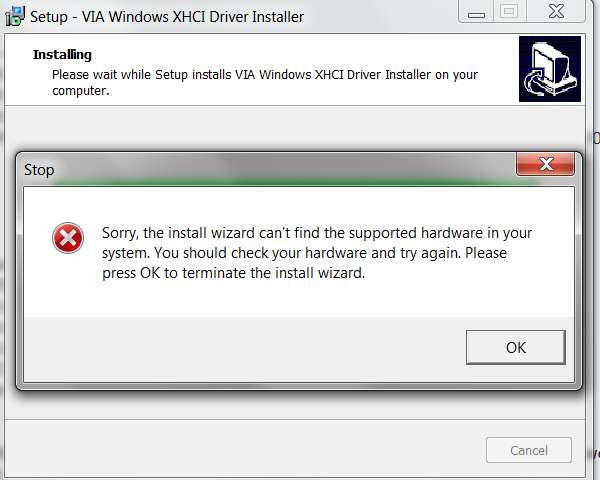
Anyway, what I was looking for from you was something more informative than "no luck", like the following screenshot, which is what I myself got when running the downloaded VIA driver installer on my own machine... where there is no such card currently installed:

nixg.jpg


So, please keep us up-to-date after you run that downloaded VIA driver installer file.

I'm quite certain it will work perfectly, and you'll have your 4-port USB 3.0 controller installed properly in Device Manager, and fully operational to connect USB 3.0 devices to.

Please let us know what happens.
 

My Computer My Computer

Computer type
PC/Desktop
Computer Manufacturer/Model Number
Home-built, two systems (1) and (2)
OS
Windows 7 Pro x64 (1), Win7 Pro X64 (2)
CPU
i5-3350p 3.1Ghz/6MB-cache (1); E8400 3.0Ghz/6MB-cache (2)
Motherboard
ASUS P8Z77-V Pro (1); ASUS P5Q3 (2)
Memory
8GB PC3-12800 DDR3 (1); 4GB PC3-10600 DDR3 (2)
Graphics Card(s)
ATI HD7750 (1), (see TV cards); ATI R7 250 (2)
Sound Card
Realtek ALC892 HD Audio (1); Realtek ALC1200 HD Audio (2)
Monitor(s) Displays
Eizo HD2441W LCD, Eizo S2433W (1); Eizo 24" S2433W (2)
Screen Resolution
1920x1200, 1920x1200 (1); 1920x1200 (2)
Hard Drives
(1) 1TB SATA-II (7200RPM), 2x2TB SATA-III (7200RPM), 250GB SATA-III (10000RPM) for OS; 2x2TB external USB 3.0

(2) 320GB SATA-II (7200RPM), 750GB SATA-II (7200RPM), 150GB SATA-II (10000RPM) for OS; 2TB external USB 3.0
PSU
Nesteq ECS-6001 600W (1); Nesteq ECS-5001 500W (2)
Case
Acousti-Case 360 (1) and (2)
Cooling
Noctua NH-U12P SE2 for CPU, 2x120mm case fans (1) and (2)
Keyboard
IBM PS/2 (1) and (2)
Mouse
Logitech MX Revolution wireless (1); Microsoft wired (2)
Internet Speed
100mbps down / 10mbps up
Antivirus
Microsoft Security Essentials; Malwarebyte Anti-Malware Pro
Browser
Firefox
Other Info
Ceton InfiniTV 4-tuner cablecard-enabled TV card as well as Hauppauge HVR-2250 OTA/ATSC 2-tuner TV card in (1), running under Win7 WMC
Guess we overlapped in our last posts. Looks like that VIA driver WAS your solution.

Glad I didn't give up trying to get the Hardware ID from you, as it was "the GIANT clue" of course.

Thanks.
 

My Computer My Computer

Computer type
PC/Desktop
Computer Manufacturer/Model Number
Home-built, two systems (1) and (2)
OS
Windows 7 Pro x64 (1), Win7 Pro X64 (2)
CPU
i5-3350p 3.1Ghz/6MB-cache (1); E8400 3.0Ghz/6MB-cache (2)
Motherboard
ASUS P8Z77-V Pro (1); ASUS P5Q3 (2)
Memory
8GB PC3-12800 DDR3 (1); 4GB PC3-10600 DDR3 (2)
Graphics Card(s)
ATI HD7750 (1), (see TV cards); ATI R7 250 (2)
Sound Card
Realtek ALC892 HD Audio (1); Realtek ALC1200 HD Audio (2)
Monitor(s) Displays
Eizo HD2441W LCD, Eizo S2433W (1); Eizo 24" S2433W (2)
Screen Resolution
1920x1200, 1920x1200 (1); 1920x1200 (2)
Hard Drives
(1) 1TB SATA-II (7200RPM), 2x2TB SATA-III (7200RPM), 250GB SATA-III (10000RPM) for OS; 2x2TB external USB 3.0

(2) 320GB SATA-II (7200RPM), 750GB SATA-II (7200RPM), 150GB SATA-II (10000RPM) for OS; 2TB external USB 3.0
PSU
Nesteq ECS-6001 600W (1); Nesteq ECS-5001 500W (2)
Case
Acousti-Case 360 (1) and (2)
Cooling
Noctua NH-U12P SE2 for CPU, 2x120mm case fans (1) and (2)
Keyboard
IBM PS/2 (1) and (2)
Mouse
Logitech MX Revolution wireless (1); Microsoft wired (2)
Internet Speed
100mbps down / 10mbps up
Antivirus
Microsoft Security Essentials; Malwarebyte Anti-Malware Pro
Browser
Firefox
Other Info
Ceton InfiniTV 4-tuner cablecard-enabled TV card as well as Hauppauge HVR-2250 OTA/ATSC 2-tuner TV card in (1), running under Win7 WMC
Thanks very much Jim. Your instructions got the Driver installed. Thanks so much.
Ehh...

Were there SEVERAL forum members working hard COLLECTIVELY to try and help solve your problem, who possibly also deserved some thanks?

I think so.
 

My Computer My Computer

Computer type
PC/Desktop
Computer Manufacturer/Model Number
Home-built, two systems (1) and (2)
OS
Windows 7 Pro x64 (1), Win7 Pro X64 (2)
CPU
i5-3350p 3.1Ghz/6MB-cache (1); E8400 3.0Ghz/6MB-cache (2)
Motherboard
ASUS P8Z77-V Pro (1); ASUS P5Q3 (2)
Memory
8GB PC3-12800 DDR3 (1); 4GB PC3-10600 DDR3 (2)
Graphics Card(s)
ATI HD7750 (1), (see TV cards); ATI R7 250 (2)
Sound Card
Realtek ALC892 HD Audio (1); Realtek ALC1200 HD Audio (2)
Monitor(s) Displays
Eizo HD2441W LCD, Eizo S2433W (1); Eizo 24" S2433W (2)
Screen Resolution
1920x1200, 1920x1200 (1); 1920x1200 (2)
Hard Drives
(1) 1TB SATA-II (7200RPM), 2x2TB SATA-III (7200RPM), 250GB SATA-III (10000RPM) for OS; 2x2TB external USB 3.0

(2) 320GB SATA-II (7200RPM), 750GB SATA-II (7200RPM), 150GB SATA-II (10000RPM) for OS; 2TB external USB 3.0
PSU
Nesteq ECS-6001 600W (1); Nesteq ECS-5001 500W (2)
Case
Acousti-Case 360 (1) and (2)
Cooling
Noctua NH-U12P SE2 for CPU, 2x120mm case fans (1) and (2)
Keyboard
IBM PS/2 (1) and (2)
Mouse
Logitech MX Revolution wireless (1); Microsoft wired (2)
Internet Speed
100mbps down / 10mbps up
Antivirus
Microsoft Security Essentials; Malwarebyte Anti-Malware Pro
Browser
Firefox
Other Info
Ceton InfiniTV 4-tuner cablecard-enabled TV card as well as Hauppauge HVR-2250 OTA/ATSC 2-tuner TV card in (1), running under Win7 WMC
Thanks very much Jim. Your instructions got the Driver installed. Thanks so much.
Ehh...

Were there SEVERAL forum members working hard COLLECTIVELY to try and help solve your problem, who possibly also deserved some thanks?

I think so.

Jim was the one that gave me the instructions to get it going. I thanked him. Thanks everyone for your efforts in helping me.
 

My Computer My Computer

Computer type
PC/Desktop
Computer Manufacturer/Model Number
Custom Build
OS
Windows 7 Home Premium 32-Bit - Build 7600 SP1
CPU
Intel Core i3-2120 3.30Ghz
Motherboard
Asus P8Z68-V LX Intel Z68 Socket H2 ATX
Memory
Kingston 4 GB DDR3 1333 mhz
Graphics Card(s)
AMD Radeon HD6670
Sound Card
Sound Blaster Audigy SE 24-Bit
Monitor(s) Displays
Asus VE228
Screen Resolution
1440 X 900
Hard Drives
OCZ Vertex 3 120 GB Sata 3 SSD ==
Kingston SH103/S3 120 G Hyper X 120 GB SSD ==
Western Digital 500 GB Caviar Green 7200 RPM ==
PSU
Corsair CX600M == 600 Watt
Case
NZXT Apollo - Silver with Clear Side Panel
Cooling
Three 120 mm Fans
Keyboard
Microsoft Natural 4000
Mouse
Microsoft Custom Optical 3000
Internet Speed
AT&T Fiber Optic Wireless Network
Antivirus
Microsoft Security Essentials
Browser
Chrome
Other Info
120 mm Blue LED Fan -- Three Blue LED Lazer Light Sticks
Many thanks for the solution. Very helpful.
Just bought a USB 3 card online and been having similar problems. The enclosed drivers discs has 4 folders NEC, Renesas, Via and another I don't recall off the top of my head. No manual with it. And the VIA install file is corrupt, just to add to the frustration.
Now downloading the file from Via, very slowly........
 

My Computer My Computer

Computer type
PC/Desktop
Computer Manufacturer/Model Number
unknown
OS
WIN7
CPU
AMD 64 dual core
Hello there, I'm a complete newby to formums so apologies in advance if I make a mistake.

I too have exactly the same problem with the 'Dynamode 4-port PCI-Express Card Superspeed USB3.0 plug n paly'. The drivers on the disc supplied did nothing, so I looked at the chip on the card ' VLI VL805-Q6' and did a search which lead me to the VIA website as mentionied in a previous post one this thread, were I downloaded the 2 driver files, VIA_XHCI_Driver_V4.50A_AP.exe & VIA_XHCI_Driver_V4.40D_AP.exe . The card was recognised after installing the V4.40D. exe program from the VIA website but was not running at 'superspeed' transfer rates of 5Gbps more like 50Mbps with a USB 3.0 HDD! However, when I logged off my PC for the night and logged on the next day the 2 HDD drives plugged into the PCI card were not showing, on checking device manager the yellow ! triangle appeared next to the VIA USB 3 root hub again. Anyone help further with this issue? My system is Win7 Home Premium 64bit.
 

My Computer My Computer

Computer type
PC/Desktop
Computer Manufacturer/Model Number
MEDIONPC MS-7646 1.0
OS
Windows 7 64bit Home Premium SP1
CPU
AMD Phenom(tm) II X4 820 processor 2.80GHz
Motherboard
MEDIONPC MS-7646 1.0 . bus clock 200 megahertz. BIOS: Americ
Memory
8GB
Graphics Card(s)
ATI Radeon HD 5670
Antivirus
MSE, Malwarebytes
Browser
Google Chrome
If you are referring to the download of the files being extra slow, yea that is right. It took me about an hour to download the file that you are speaking of. The file with the V4.50A in the title is the newer one so use that. You might try uninstalling the V4.40D file. Make sure it is not loaded and try loading the V4.50A. The PCI card is not working is the reason your HDD is not recognized. Plug them in a port from the motherboard until you get the card working. == Let us know your progress.
 

My Computer My Computer

Computer type
PC/Desktop
Computer Manufacturer/Model Number
Custom Build
OS
Windows 7 Home Premium 32-Bit - Build 7600 SP1
CPU
Intel Core i3-2120 3.30Ghz
Motherboard
Asus P8Z68-V LX Intel Z68 Socket H2 ATX
Memory
Kingston 4 GB DDR3 1333 mhz
Graphics Card(s)
AMD Radeon HD6670
Sound Card
Sound Blaster Audigy SE 24-Bit
Monitor(s) Displays
Asus VE228
Screen Resolution
1440 X 900
Hard Drives
OCZ Vertex 3 120 GB Sata 3 SSD ==
Kingston SH103/S3 120 G Hyper X 120 GB SSD ==
Western Digital 500 GB Caviar Green 7200 RPM ==
PSU
Corsair CX600M == 600 Watt
Case
NZXT Apollo - Silver with Clear Side Panel
Cooling
Three 120 mm Fans
Keyboard
Microsoft Natural 4000
Mouse
Microsoft Custom Optical 3000
Internet Speed
AT&T Fiber Optic Wireless Network
Antivirus
Microsoft Security Essentials
Browser
Chrome
Other Info
120 mm Blue LED Fan -- Three Blue LED Lazer Light Sticks
I did notice on the download page there were extra files relating to the 05/06 chipset - I know its a pain downloading them from the site - don't recall now what exactly they were for, but they may help.
BTW - an hour for downloading - I WISH !! Took me nearly 36 hours to get 4.5 completed - kept timing out on me and failing.
 

My Computer My Computer

Computer type
PC/Desktop
Computer Manufacturer/Model Number
unknown
OS
WIN7
CPU
AMD 64 dual core
I was having trouble with my startech usb 3.0 pci card. When connecting even a 2.0 thumb drive to the 3.0 port I'd get the message that it could go faster. The drivers on the cd that came with the card were from 2012. I d/l'd the VIA driver mentioned above 4.50 dated 2014. Installed it and now no notification of thumb drives able to go faster.

Though my galaxy S5 still created the alert when connecting to the computer. Found that the S5 defaults to usb 2.0 and you have to tell it to use usb 3.0. by swiping down on the phone screen when it is connected to the computer. A menu is listed with different connections. On mine the bottom one is usb 3.0. Select that and its done. While the phone is in usb 3.0 mode the phone goes into airplane mode. So no texts and such while usb 3.0 is in effect. Also once it has 5 minutes of inactivity the phone goes back to usb 2.0 speeds. Hope this helps.
 

My Computer My Computer

Computer type
PC/Desktop
Computer Manufacturer/Model Number
Custom Build
OS
Microsoft Windows 7 Home Premium 64-bit 7601 Multiprocessor Free Service Pack 1
CPU
AMD Phenom(tm) II X4 965 Processor
Motherboard
ASUSTeK Computer INC. M4A785-M
Memory
8.0 GB
Graphics Card(s)
NVIDIA GeForce GTX 560 Ti
Sound Card
(1) NVIDIA High Definition Audio (2) NVIDIA High Definitio
Monitor(s) Displays
Samsung SyncMaster T220G
Screen Resolution
1680 x 1050 x 32 bits (4294967296 colors) @ 59 Hz
Hard Drives
WDC WD7500AADS-00M2B0
PSU
650 Watt
Case
Cooler Master HAF XM
Cooling
Air
Keyboard
CompUSA SK-6200
Mouse
Logitech M-510
Internet Speed
Comcast
Antivirus
MSE
Browser
Firefox 27.0 IE 11
Other Info
Belkin Hub To Go F5U706

It worked for me too.

Finally completed the download of the ZIP file from Taiwan. It unzips to VIA_XHCI_Driver_V4.50A_AP.exe.
..trim..
And sure enough, that VEN_1106&DEV_3483 is present for XHCI:
..trim..

Thank you very much for research and proof of correctness of this driver.

If somebody wants to find out, whether this driver is the correct one for him, he can check out this download link on gigabyte site:
GIGABYTE Motherboard GA-970A-DS3P (VIA USB 3.0 Driver)
It's quite outdated though.

It's ridiculously big (100MB) since it contains some weird "control tool" and .net redist, but downloads in minutes. It's a self-extracting archive you can open by 7-zip, and extract just the 14.6MB setup.exe.
 

My Computer My Computer

Computer type
PC/Desktop
OS
Windows 7 Home Premium 64bit
CPU
AMD FX-6350
Motherboard
Gigabyte
Memory
8GB
Graphics Card(s)
Radeon HD6850
Antivirus
AVG
Browser
Opera
Just another guy with a Protronix 4 port USB3.0 card looking for the driver after the ones on the mini-CD provided didn't work. Downloaded the latest from the Via site (VIA_XHCI_Driver_V4.90A_AP.zip as of 4/14/15) and it worked fine. One note: My system drive is I:, and the install failed with a message about an invalid path to C:. I did a "subst c: i:\FakeDriveC" to allow "C:" to resolve, and the install worked. (Didn't leave anything in that directory.)

Just wanted to say thanks to all you folks for providing the legwork that led me to the driver!

I got mine from JacobsParts via Ebay. I posted an offer to the vendor of the board I bought that I'd leave positive feedback if he'd modify his Ebay posting mentioning that the included CD may not contain the correct driver but that it may be downloaded from the Via site <with link>. JacobsParts declined my offer/recommendation, saying if I'd just contacted them they would have provided the driver link.

Anyway, thanks again!
 
Last edited:

My Computer My Computer

Computer type
PC/Desktop
Computer Manufacturer/Model Number
custom built
OS
Win7 home premium 32 bit
CPU
Intel Core2 Duo 3GHz
Motherboard
ASUS P5K
Memory
3GB
Graphics Card(s)
ATI Radeon HD 3400 Series
Hard Drives
0.5 + 1.0 + 1.5TB
Antivirus
McAfee (free from AT&T ISP)
Browser
mostly Firefox
Thankyou thankyou thankyou

:D 17 hours later I decided to check out Ye Olde Windows 7 Forums and solved my problem within the hour.

I should have came here first instead of playing Mr.Independent to no avail. For those of us who have USB 3.0 HUBS and card readers running on Win 7 (because we stubbornly hold onto the last real o/s Microsoft ever made) this thread is Priceless. No more ugly yellow triangles in device manager! :geek: More importantly, usb 3.0 works front top and back! The wife will be impressed because she won't have to dual boot back to 8.1 to use all the hardware.
 

My Computers My Computers

System One System Two

  • Computer type
    PC/Desktop
    Computer Manufacturer/Model Number
    ASUS CUSTOM BUILD IN THERMALTAKE LEVEL 10 GT CASE
    OS
    Windows 7 Ultimate, Windows 8.1 Pro, Linux Mint/Cinnimon (Triple Boot)
    CPU
    INTEL 6900K
    Motherboard
    X99-E WS USB 3.1
    Memory
    CORSAIR DOMINATOR PLATINUM 128GB
    Graphics Card(s)
    EVGA GTX 1070 FTW
    Sound Card
    Onboard Crystal Sound - very nice ;)
    Monitor(s) Displays
    SAMSUNG 4K 28"
    Screen Resolution
    3140 x 2160 - A little extreme. Need to change it.
    Hard Drives
    1) LSI LOGICAL VOLUME RAID 10 (250 GBX4) SSD ARRAY
    2) INTEL RAID 0 KINGSTON (2) SSD ARRAY
    3) INTEL RAID 1 SEAGATE (2) 1TB ARRAY (secured backup)
    4) INTEL RAID 1 SEAGATE HYBRID (2) (secure secured backup)
    5) AHCI SEAGATE 3TB (1) BACKUP & STORAGE (back
    PSU
    CORSAIR HX 1000i
    Case
    THERMAL TAKE LEVEL 10 GT
    Cooling
    NOCTUA TOWER COOLING - PUSH/PULL
    Keyboard
    LOGITECH PRODIGY (One day I'll get a real keyboard.)
    Mouse
    LOGITECH (One day I'll get a real mouse.)
    Internet Speed
    300 Gb down 12 up Intel(R) I210 Gigabit Network Connection
    Antivirus
    several - Network implementing vs from other PCs - ask me
    Browser
    Mostly FireFox these days
    Other Info
    NOT ENOUGH ROOM TO LIST ALL HARD DRIVES HERE. Cuts me off at 5. Did you know that if you run a network you can scan your PC for viruses via other PCs using several different virus scanners? No virus scanner gets it all. This is narrows down the window for contracting a virus. By using multiple operating systems you can use different virus scanners with no risk of conflict.
  • Antivirus
    KASPERSKY
Hi, I decided to refresh the topic. I have a no-name card with the VIA VL805 chipset and the same problems: controller disappearing from CP, ports not working. I searched internet forums. There are different versions of the drivers - unfortunately only by VIA "for Evaluation Board reference only". Some suggest replacing the card firmware. There is also a possible problem with the power supply via the internal Molex connector. And here's my question - in not-working card are there voltages on the outputs or not?
 

My Computer My Computer

OS
both, 64 and 32, professional
Back
Top