Solved Image your system with free Macrium

Thanks essenbe and whs for the help. When I mentioned buying another 1 TB internal disk, that would be the potential restore disk should my current disk drive ever fail.

My concern is not storing the image file somewhere but rather restoring it and then booting from it.

At present I am storing images on an external 500 GB Seagate backup drive.

I believe essenbe is saying that it is OK as long as the new boot disk is larger than the restored image file. It would then boot up and work like the original disk.
 

My Computer My Computer

Computer type
PC/Desktop
OS
Windows 7 Home Premium 64 Bit
Yes that is correct.
 

My Computer My Computer

Computer type
Laptop
Computer Manufacturer/Model Number
Hewlett-Packard/G62-107SA Notebook
OS
Microsoft Windows 7 Home Premium 64-bit Service Pack 1
CPU
Intel(R) Core(TM) i3 CPU M 330 @ 2.13GHz
Motherboard
Hewlett-Packard 1425
Memory
8 GB DDR3
Graphics Card(s)
Intel(R) HD Graphics
Sound Card
Realtek High Definition Audio
Monitor(s) Displays
Builtin
Screen Resolution
1366 x 768 x 32 bits (4294967296 colors) @ 60 Hz
Hard Drives
250 GB SATA Hard Disk Drive 7200 rpm
2TB Seagate GoFlex USB 2 Drive
1TB Iomega Prestige USB 2 Drive
1.5TB Iomega Prestige USB 2 Drive (Samsung)
2TB WD MyBook Live NAS.
Mouse
Logitech Anywhere MX
Internet Speed
152 Mbs download 10 Mbs upload
Antivirus
Norton 360
Browser
Chrome
Just make sure that you do not forget to image/restore the 100MB system partition. You need that plus the C partition for an operational system.
 

My Computer My Computer

Computer Manufacturer/Model Number
HP, Dell, Gateway, Toshiba - 4 laptops and 2 desktops
OS
Vista, Windows7, Mint Mate, Zorin, Windows 8
CPU
from 1.6GHz Duo to i7
Monitor(s) Displays
2x HP w2207
Hard Drives
5x HDD, 7x SSD, 12x Externals
Keyboard
with trackball - no mices
Mouse
Trackball mice
Internet Speed
DSL 6000
A good point.
 

My Computer My Computer

Computer type
Laptop
Computer Manufacturer/Model Number
Hewlett-Packard/G62-107SA Notebook
OS
Microsoft Windows 7 Home Premium 64-bit Service Pack 1
CPU
Intel(R) Core(TM) i3 CPU M 330 @ 2.13GHz
Motherboard
Hewlett-Packard 1425
Memory
8 GB DDR3
Graphics Card(s)
Intel(R) HD Graphics
Sound Card
Realtek High Definition Audio
Monitor(s) Displays
Builtin
Screen Resolution
1366 x 768 x 32 bits (4294967296 colors) @ 60 Hz
Hard Drives
250 GB SATA Hard Disk Drive 7200 rpm
2TB Seagate GoFlex USB 2 Drive
1TB Iomega Prestige USB 2 Drive
1.5TB Iomega Prestige USB 2 Drive (Samsung)
2TB WD MyBook Live NAS.
Mouse
Logitech Anywhere MX
Internet Speed
152 Mbs download 10 Mbs upload
Antivirus
Norton 360
Browser
Chrome
Thanks all again for the help. The more I think about Imaging the more complex it seems.

If you looked at one of our Windows 7 disks, the first 70 GB might be mostly filled up followed by empty space and then more files which are often restore points, system files, or new data. Let's assume for the moment that all data is below the 500 GB point on a 1 TB disk.

That empty space in the first half of the disk is not actually stored in the Image file, but I assume it reappears in the restored image. If the image is written to a 500 GB disk, everything would fit but with little empty space after the last files on disk.

I believe everyone is stating that Macrium would image a 1 TB disk to 500 GB disk in this way and that it would boot and run the same.

But aren't there other factors such as the MBR? The MBR knows about things like partition size so I wonder if Macrium has to make changes to the MBR. Lastly, Windows usually detects all hardware changes so I wonder how that impacts the first boot.
 

My Computer My Computer

Computer type
PC/Desktop
OS
Windows 7 Home Premium 64 Bit
1) Restore image to Same machine;

Windows will be fine if restored to the same or different HD on the same machine.
All imaging programs will take care of the details. It will boot up fine on the same machine.

2) Restore image to different machine:

You might have trouble restoring to machine with a different motherboard.
If you transfer to different machine/motherboard, most imaging programs have a function to cope with that - but only in the paid versions as a rule. You will also need to reactivate windows, which sometimes means calling MS on a toll free number to get them to do it for you. Type slui 4 at cmd prompt to get the toll free number.
 

My Computers My Computers

System One System Two

  • Computer type
    PC/Desktop
    OS
    7 X64
    CPU
    i5 8400
    Motherboard
    gigabyte b365m ds3h
    Memory
    2x8gb 3200mhz
    Hard Drives
    various
    PSU
    pure power 11 400w cm
    Case
    Coolermaster
    Cooling
    cryorig m9i
  • Computer type
    PC/Desktop
    OS
    7x64
    CPU
    g5400
    Motherboard
    ga b365m ds3h
    Memory
    8gb ddr4 2400
    PSU
    xfx pro 450w
Thanks all again for the help. The more I think about Imaging the more complex it seems.

If you looked at one of our Windows 7 disks, the first 70 GB might be mostly filled up followed by empty space and then more files which are often restore points, system files, or new data. Let's assume for the moment that all data is below the 500 GB point on a 1 TB disk.

That empty space in the first half of the disk is not actually stored in the Image file, but I assume it reappears in the restored image. If the image is written to a 500 GB disk, everything would fit but with little empty space after the last files on disk.

I believe everyone is stating that Macrium would image a 1 TB disk to 500 GB disk in this way and that it would boot and run the same.

But aren't there other factors such as the MBR? The MBR knows about things like partition size so I wonder if Macrium has to make changes to the MBR. Lastly, Windows usually detects all hardware changes so I wonder how that impacts the first boot.
You are complicating your life. Why don't you just make an image and let Macrium take care of the rest. It has worked thousands of time - so why wouldn't it work for you.

All you need to know is that the image is appr. 65% of all data in your C partition (OS, system generated data, your own data - it does not matter) and that you can restore the image where the full data content fits (not the 65%). All other settings like MBR etc. are automatically taken care of during the restore. You don't worry about the MBR during the installation of the OS - do you ??
 

My Computer My Computer

Computer Manufacturer/Model Number
HP, Dell, Gateway, Toshiba - 4 laptops and 2 desktops
OS
Vista, Windows7, Mint Mate, Zorin, Windows 8
CPU
from 1.6GHz Duo to i7
Monitor(s) Displays
2x HP w2207
Hard Drives
5x HDD, 7x SSD, 12x Externals
Keyboard
with trackball - no mices
Mouse
Trackball mice
Internet Speed
DSL 6000
Thanks once again, and you're right that I should just use the program and forget the fine details of what really goes on.

Unfortunately, I worked in Engineering for many years and really like to understand as much as I can. This is especially true in this case where I might be imaging onto a disk that is smaller than the original.

I've heard mention that the paid versions of the various imaging programs can work with different sized disks where the unpaid versions might not. I know that some of that might involve changes in partition sizes but one also wonders about the MBR.
 

My Computer My Computer

Computer type
PC/Desktop
OS
Windows 7 Home Premium 64 Bit
Macrium Reflect will restore an image to a smaller disk as long as the destination disk is larger than the original data amount in the image. Example: You image a 1TB disk that has 350GB of data on it. You will be able to restore that image to a smaller disk as long as that disk has room for at least 350GB of data.
 

My Computer My Computer

Computer type
PC/Desktop
Computer Manufacturer/Model Number
Custom Build
OS
Win 7 Ultimate 64 bit
CPU
Intel i7-3930K
Motherboard
ASUS P9X79 WS
Memory
Kingston HyperX Genesis 32GB Kit (8x4GB Modules) 1600MHz DDR
Graphics Card(s)
MSI R7850 Twin Frozr 2GD5/OC Radeon HD 7850 2GB 256-bit GDDR
Sound Card
Asus Xonar Essence STX
Monitor(s) Displays
3x Asus VG248QE 24", Vizio 32" TV
Screen Resolution
1920 x 1080, ?
Hard Drives
Samsung 128GB 840 Pro SSD (1),
Samsung 4TB 850 EVO SSDs (4)
Samsung 4TB 850 EVO SSDs (16) external backup drives used in 2.5" hot swap bays in the computer.
PSU
Corsair HX750w
Case
Antec Two Hundred v2 (modified)
Cooling
Cooler Master GeminII S524 120mm (fan replaced with a 140mm)
Keyboard
Logitech G510s
Mouse
Logitech M525 (two in use)
Internet Speed
=< 32Mbps down, 8Mbps up
Antivirus
AVAST!, MBAM, SAS, Spybot S&D (all but MBAM free) Glary Util
Browser
IE11
Other Info
LSI 9211-8i HBA card (8 SATA III ports), 2.5" & 3.5" Hot Swap Bays, HooToo HT-CR001 PCI-E to USB 3.0 Internal Hub + 6 Slot Card Reader, and LG Model CH12LS28 BD-ROM Optical Drive. Also, ScanSnap S1500 ADF duplexing scanner, Canon 9000F flat bed scanner, Corsair SP2500 2.1 speakers, Samsung CLP 415nw laser color printer, Cyberpower PP2200SW UPS
Free Macrium can work with different size disks - since the last releases. And the MBR is dealt with at the recovery stage - similar to an original installation. You are reading too much into it. It is straight forward.

I suggest you study what happens between the MBR > active partition > bootmgr > OS. Maybe then you will see that this is no rocket science.
 

My Computer My Computer

Computer Manufacturer/Model Number
HP, Dell, Gateway, Toshiba - 4 laptops and 2 desktops
OS
Vista, Windows7, Mint Mate, Zorin, Windows 8
CPU
from 1.6GHz Duo to i7
Monitor(s) Displays
2x HP w2207
Hard Drives
5x HDD, 7x SSD, 12x Externals
Keyboard
with trackball - no mices
Mouse
Trackball mice
Internet Speed
DSL 6000
Example: You image a 1TB disk that has 350GB of data on it. You will be able to restore that image to a smaller disk as long as that disk has room for at least 350GB of data.
Now we are getting into the interesting details.

Do you mean just 350 GB of actual file data, or more specifically all inner data plus unused sectors plus outermost data that resides within a 350 GB radius on the disk. I'm assuming that no files are moved which would require changes to whatever table is used to reference file locations.
 

My Computer My Computer

Computer type
PC/Desktop
OS
Windows 7 Home Premium 64 Bit
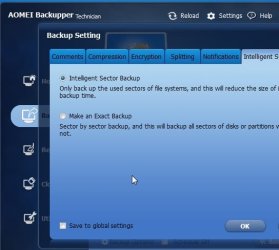
Normally you would image used sectors. That is default for any decent imaging program.

It is possible to image all sectors, no point unless you want it for forensic analysis.

ab1.jpg
 

My Computers My Computers

System One System Two

  • Computer type
    PC/Desktop
    OS
    7 X64
    CPU
    i5 8400
    Motherboard
    gigabyte b365m ds3h
    Memory
    2x8gb 3200mhz
    Hard Drives
    various
    PSU
    pure power 11 400w cm
    Case
    Coolermaster
    Cooling
    cryorig m9i
  • Computer type
    PC/Desktop
    OS
    7x64
    CPU
    g5400
    Motherboard
    ga b365m ds3h
    Memory
    8gb ddr4 2400
    PSU
    xfx pro 450w
When I mentioned buying another 1 TB internal disk, that would be the potential restore disk should my current disk drive ever fail.
If this is still your goal then you should make a partition up the front of the new 1TB to take a Macrium system image restore. If your OS partition is using more than say 100GB then it's too large IMO and you are imaging data which should be stored elsewhere. 200GB should be plenty for the first partition. If you need to reimage to this partition (on the 1TB) then what was on there previously will be gone.
The other partition(s) presumably would have data on it which you'd want in tact when the day came to use the first partition of this drive as your OS drive.

Note: Macrium will do this. Windows inbuilt imaging will not.
 

My Computer My Computer

Computer type
PC/Desktop
Computer Manufacturer/Model Number
Own build
OS
Windows 7x64 Home Premium SP1
CPU
Intel i7 2600k
Motherboard
ASUS P8Z68 Deluxe
Memory
G.Skill Ripjaws (DDR3-1600) 2x4GB
Graphics Card(s)
Nvidia GeForce GTS 450; Intel HD Graphics 3000(GT2+)
Monitor(s) Displays
Dell Ultrasharp IPS panel U2311H, Samsung SyncMaster P2350
Screen Resolution
1920x1080
Hard Drives
Samsung 850 Pro SSD 256GB, Samsung SSD 840 120GB, Seagates 1TB Barracuda ST31000528AS x2
PSU
Seasonic M12II 520W
Case
Lian Li Lancool PC-K60
Cooling
Case: 1x120mm, 3x140mm CPU: Hyper 212+
Keyboard
Logitech MK520 (wireless)
Mouse
Logitech MK520
Internet Speed
6-7 Mbps
Antivirus
Norton Security Premium, Malwarebytes on 2 (MSE on 3rd PC)
Browser
FireFox
Other Info
Audio: Logitech Z523 2.1
SIW2 - I agree that these programs are only imaging used sectors. However, I believe they may be inserting a lot of empty sectors between data during the restore process so that the restored image is identical to the original. That would all be part of the compression process. That observation then argues my point that the new disk must be at least as large as the fraction of the original disk that was being used including empty sectors between used sectors.

mjf - Thanks for the information and observations including Macrium versus Windows 7 capabilities. My Windows 7 disk is currently using about 70 GB on a 1 TB disk. I like your idea about creating partitions so that a portion of the drive could be used for functions other than the imaged operating system.

Since my images are stored on a USB backup drive, I really don't need to partition either internal drive although I can now see the benefit.

Your suggestion on the 200 GB Windows partition does really have a benefit compared with my current single partition setup. This is because I have a large empty space between most of the used sectors and other used sectors in the middle of the drive. That would increase the partition size required in the replacement disk.
 

My Computer My Computer

Computer type
PC/Desktop
OS
Windows 7 Home Premium 64 Bit
Yes, of course, the target partition must be at least the size of the used sectors of the source partition.

No need to stick a lot of unused sectors back.
 

My Computers My Computers

System One System Two

  • Computer type
    PC/Desktop
    OS
    7 X64
    CPU
    i5 8400
    Motherboard
    gigabyte b365m ds3h
    Memory
    2x8gb 3200mhz
    Hard Drives
    various
    PSU
    pure power 11 400w cm
    Case
    Coolermaster
    Cooling
    cryorig m9i
  • Computer type
    PC/Desktop
    OS
    7x64
    CPU
    g5400
    Motherboard
    ga b365m ds3h
    Memory
    8gb ddr4 2400
    PSU
    xfx pro 450w
Yes, of course, the target partition must be at least the size of the used sectors of the source partition. No need to stick a lot of unused sectors back.
I may not have explained my situation well enough for everyone to understand. My system has a 1 TB disk with a single partition. Windows has placed most of the files at the beginning of the disk but there are some files out in the middle. There is a large empty space in between.

I view this with the Auslogics Defragmenter program which shows a "map" of the clusters on the drive. The files out in the middle of the drive are mostly marked "unmovable" and I believe include Restore Points and some other files.

If this arrangement was perfectly imaged to another disk, I believe it would require roughly a 500 GB partition even though Windows is currently only using about 70 GB. I'm assuming that Macrium does not move any files and especially unmovable files.

Am I correct that this situation would require a 500 GB disk or partition? My feeling is that Window's current usage of about 70 GB is not very relevant in this kind of situation with a single large partition and some files out in the middle of the disk.
 

My Computer My Computer

Computer type
PC/Desktop
OS
Windows 7 Home Premium 64 Bit
my understanding is that the placement of the data is irrelevant it is the quantity that matters.
 

My Computer My Computer

Computer type
Laptop
Computer Manufacturer/Model Number
Hewlett-Packard/G62-107SA Notebook
OS
Microsoft Windows 7 Home Premium 64-bit Service Pack 1
CPU
Intel(R) Core(TM) i3 CPU M 330 @ 2.13GHz
Motherboard
Hewlett-Packard 1425
Memory
8 GB DDR3
Graphics Card(s)
Intel(R) HD Graphics
Sound Card
Realtek High Definition Audio
Monitor(s) Displays
Builtin
Screen Resolution
1366 x 768 x 32 bits (4294967296 colors) @ 60 Hz
Hard Drives
250 GB SATA Hard Disk Drive 7200 rpm
2TB Seagate GoFlex USB 2 Drive
1TB Iomega Prestige USB 2 Drive
1.5TB Iomega Prestige USB 2 Drive (Samsung)
2TB WD MyBook Live NAS.
Mouse
Logitech Anywhere MX
Internet Speed
152 Mbs download 10 Mbs upload
Antivirus
Norton 360
Browser
Chrome
my understanding is that the placement of the data is irrelevant it is the quantity that matters.

:ditto: Seriously, methinks you are over thinking this. Many of us here, including me, have used Macrium Reflect to restore disks and move data to new disks without problems.
 

My Computer My Computer

Computer type
PC/Desktop
Computer Manufacturer/Model Number
Custom Build
OS
Win 7 Ultimate 64 bit
CPU
Intel i7-3930K
Motherboard
ASUS P9X79 WS
Memory
Kingston HyperX Genesis 32GB Kit (8x4GB Modules) 1600MHz DDR
Graphics Card(s)
MSI R7850 Twin Frozr 2GD5/OC Radeon HD 7850 2GB 256-bit GDDR
Sound Card
Asus Xonar Essence STX
Monitor(s) Displays
3x Asus VG248QE 24", Vizio 32" TV
Screen Resolution
1920 x 1080, ?
Hard Drives
Samsung 128GB 840 Pro SSD (1),
Samsung 4TB 850 EVO SSDs (4)
Samsung 4TB 850 EVO SSDs (16) external backup drives used in 2.5" hot swap bays in the computer.
PSU
Corsair HX750w
Case
Antec Two Hundred v2 (modified)
Cooling
Cooler Master GeminII S524 120mm (fan replaced with a 140mm)
Keyboard
Logitech G510s
Mouse
Logitech M525 (two in use)
Internet Speed
=< 32Mbps down, 8Mbps up
Antivirus
AVAST!, MBAM, SAS, Spybot S&D (all but MBAM free) Glary Util
Browser
IE11
Other Info
LSI 9211-8i HBA card (8 SATA III ports), 2.5" & 3.5" Hot Swap Bays, HooToo HT-CR001 PCI-E to USB 3.0 Internal Hub + 6 Slot Card Reader, and LG Model CH12LS28 BD-ROM Optical Drive. Also, ScanSnap S1500 ADF duplexing scanner, Canon 9000F flat bed scanner, Corsair SP2500 2.1 speakers, Samsung CLP 415nw laser color printer, Cyberpower PP2200SW UPS

My Computer My Computer

Computer type
Laptop
Computer Manufacturer/Model Number
Hewlett-Packard/G62-107SA Notebook
OS
Microsoft Windows 7 Home Premium 64-bit Service Pack 1
CPU
Intel(R) Core(TM) i3 CPU M 330 @ 2.13GHz
Motherboard
Hewlett-Packard 1425
Memory
8 GB DDR3
Graphics Card(s)
Intel(R) HD Graphics
Sound Card
Realtek High Definition Audio
Monitor(s) Displays
Builtin
Screen Resolution
1366 x 768 x 32 bits (4294967296 colors) @ 60 Hz
Hard Drives
250 GB SATA Hard Disk Drive 7200 rpm
2TB Seagate GoFlex USB 2 Drive
1TB Iomega Prestige USB 2 Drive
1.5TB Iomega Prestige USB 2 Drive (Samsung)
2TB WD MyBook Live NAS.
Mouse
Logitech Anywhere MX
Internet Speed
152 Mbs download 10 Mbs upload
Antivirus
Norton 360
Browser
Chrome
my understanding is that the placement of the data is irrelevant it is the quantity that matters.
That seems to be what everyone is saying but that would require that some files are moved to different locations as part of the restore process. In that case the Original Partition and Imaged Partition would not be identical.

Can Macrium move files to accomplish that? What about the unmovable files that I have near the center (approximate 500 GB point) of my 1TB disk as described above?
 

My Computer My Computer

Computer type
PC/Desktop
OS
Windows 7 Home Premium 64 Bit
Back
Top