is Corsair VS450 good build for my pc

nfsworldrace

New member
Member
VIP
Local time
5:09 PM
Messages
139
i currently have this pc
biostar h61mgv3 mobo
Intel Pentium G2020 (2.9Ghz) ivy bridge
2gb 1333 ddr3 ram, plan to upgrade 4gb
integrated hd graphics 2500, plan to upgrade powercolor HD 7730 GDDR5
80Gb sata :P, plan to upgrade 1TB seagate barracuda 6.0gbps
and a 730 watts not true rated PSU

i plan to replace it with corsair VS450 just to be sure on reliability i dont plan for more future upgrades except whats mentioned in above. i also used power calculator and says my minimum psu is 350w and recommended 430w

agree? any comments?
 

My Computer My Computer

At a glance

windows 7 ultimate 32-bit
OS
windows 7 ultimate 32-bit
NFS mate try running this to calculate what power you will need it will give you an average and a value that will allow for some leeway.
eXtreme Power Supply Calculator

The VS series I ma not hat sure of and the RM series in Corsair is not worth much at all I think the CX series is better but more expensive.
 

My Computer My Computer

At a glance

Desk1 7 Home Prem / Desk2 10 Pro / Main lap A...Desk1 i5 3750K / Laptop i7 GTX 860M / Desk2 i...Desk1 8GB (1866) / Desk2 16GB (1333) / Laptop...Desk 1& 2NVidia GTX 650 & Laptops on board Intel
Computer type
PC/Desktop
Computer Manufacturer/Model Number
Own build (new) Desk1 / Asus ROG Win 7 / Desk2 1st build
OS
Desk1 7 Home Prem / Desk2 10 Pro / Main lap Asus ROG 10 Pro 2 laptop Toshiba 7 Pro Asus P2520 7 & 10
CPU
Desk1 i5 3750K / Laptop i7 GTX 860M / Desk2 i5 2500
Motherboard
Desk1 Asus P877-V / Desk2 Gigabyte H67 UD3H / Laptop ?
Memory
Desk1 8GB (1866) / Desk2 16GB (1333) / Laptop 8Gb DDR3
Graphics Card(s)
Desk 1& 2NVidia GTX 650 & Laptops on board Intel
Sound Card
Desk 1 & 2 -XONAR DG Realtek High Def audio Laptop
Monitor(s) Displays
Desk 1 Benq HD 2450 / Desk2 Philips 24" / Laptop 17.5"
Screen Resolution
1920x1080 D1 & D2 & Laptop 1
Hard Drives
Desk1 Samsung 120GB 830 SSD
Asus ROG 256GB 850 Pro SSD
Desk2 Samsung 840 256 SSD
Toshiba 120GB EVO
PSU
Desk 1 Corsair HX 1050/ Laptop ? / Desk 2 Corsair HX 650
Case
Desk 1 Cooler HAF XM ? Toshiba laptop / Desk2 Coolermaster
Cooling
Fans on all Desk1 -2 Desk2 - all Coolermasters 5 Laptop ?
Keyboard
Desk 1 MS Sidewinder X6 Desk 2 MS Sidewinder X 4
Mouse
Desk 1&2 - Gigabyte MS 900 gamer - laptop - Logitec wireless
Internet Speed
ADSL2+
Other Info
One other Desktop (tester) and spare Toshba laptop both with SSD's
Running Kaspersky 2016 ISS on all machines config'd identically
Logitec audio stereo systems on each machine (x3)
Canon MG5250MFC
Router/modem TP-Link running WPA2SK
i dont expect massive performance output of the psu, just want an affordable but still reliable psu that wont blow your system
 

My Computer My Computer

At a glance

windows 7 ultimate 32-bit
OS
windows 7 ultimate 32-bit
and also how do i know if i need to change my psu if its lifespan come near to its end. approximately a true rated psu like corsair vs450 if i just use it for light gaming with those components above how many years does it last
atleast 4 yrs ?
 

My Computer My Computer

At a glance

windows 7 ultimate 32-bit
OS
windows 7 ultimate 32-bit
I run my computer using a Corsair VS450 PSU & it has been in use for a year now & I have been quite satisfied with it. I am using an Intel Ivy Bridge i5 CPU with a Gigabyte NVIDIA GT610 VGA, but I don't play any games other that the ones supplied with Windows 7.
Life expectancy of any electrical component is very much like asking "how long is a piece of string". Sometimes they will last for years & years & sometimes only a few years.
 

My Computer My Computer

At a glance

Windows 7 Home Premium 64 bit sp1Intel i5 3570 3.4Ghz Ivy Bridge SKT 1155 quad...G-Skill Rip Jaws 16Gb (8x2) DDR3 -1600 PC3 12...Gigabyte NVIDIA GT610 1Gb DDR3 810/1200 PCI-E...
Computer type
PC/Desktop
Computer Manufacturer/Model Number
Self built using existing case
OS
Windows 7 Home Premium 64 bit sp1
CPU
Intel i5 3570 3.4Ghz Ivy Bridge SKT 1155 quad core
Motherboard
Gigabyte Z77-HD3 SKT 1155 2xSata 3, 4x USB 3.0
Memory
G-Skill Rip Jaws 16Gb (8x2) DDR3 -1600 PC3 12800 CL 10 red
Graphics Card(s)
Gigabyte NVIDIA GT610 1Gb DDR3 810/1200 PCI-E 2.0 Silent
Sound Card
NVIDIA High Definition & Realtech High Definition Audio
Monitor(s) Displays
2 x Philips 226V4L 16:9 aspect ratio
Screen Resolution
1920 x 1080 HD
Hard Drives
Samsung 840 Pro 256gb SSD, SATA 3.
Hitachi Touro Portable 1tb, USB 3.0 HDD used for image b/ups.
PSU
Corsair VS450
Case
Codeng
Cooling
PSU fan & CPU fan
Keyboard
Logitech
Mouse
Logitech Wireless trackball M570
Internet Speed
Wireless 3G. 3mg down & 550kb up.
Antivirus
Bitdefender Internet Security 2020
Browser
Opera (Current Version) & Firefox
Other Info
MS Office 2013 Pro. Davis weather station software. MGE Nova 600 avr UPS.
and also how do i know if i need to change my psu if its lifespan come near to its end. approximately a true rated psu like corsair vs450 if i just use it for light gaming with those components above how many years does it last
atleast 4 yrs ?
As Ranger says mate it really depends on how hard you push it I have a set uo similar to Ranger only I have a HX 1050 as it was on special otherwise I would have gone a HX 650 / 750 but if I ma not sadly mistaken that PSU comes with a 3 year warranty - I stand to be corrected.
If you are worried about it you can always use these to check out the outputs.


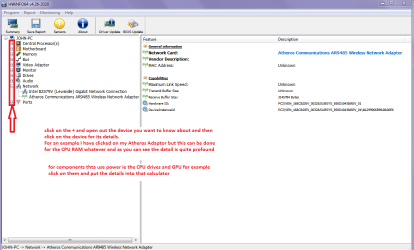
Using HW Info general components

DownloadHW Info and pick the right bit version - HWiNFO, HWiNFO32/64 - Download - (copy andpaste this site into the search bar) If you do not need the running informationin the smaller right hand panel close it. In the left hand window click on the+ for the individual device groupings and they will open out to the variouscomponents.

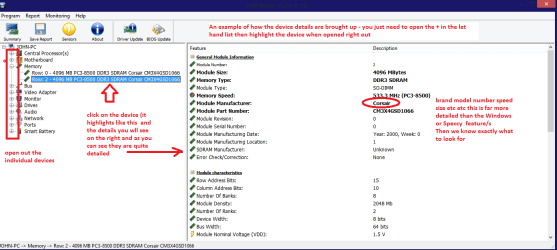
Goon opening out further until you get to the device itself. click on it and itwill highlight. In the right hand window there will be a very detaileddescription of that device as in brand, speeds model number etc etc These arevery detailed and are just what is needed for searching for drivers etc.

Seemy pic for an example - in this I have opened out my memory and thenhighlighted one of the sticks and you can see the detail.

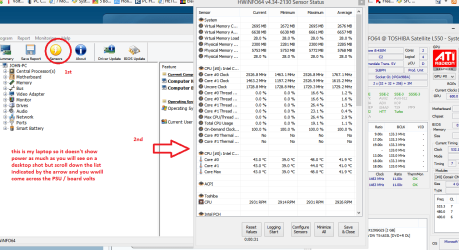
Using HW Info PSU

Download HW Info and pick the right bit version -
HWiNFO, HWiNFO32/64 -Download -(copy and paste thissite into the search bar) If you do not need the running information in thesmaller right hand panel close it. In the left hand window click on the + forthe individual device groupings and they will open out to the variouscomponents.

Goon opening out further until you get to the device itself. click on it and itwill highlight. In the right hand window there will be a very detaileddescription of that device as in brand, speeds model number etc etc These arevery detailed and are just what is needed for searching for drivers etc.

See my pic for an example - in this I have shown my power but it is a laptopand a desktop will show more details if you scroll down that listing.


Plus this only use a DIGITAL multimeter as the old analogue ones inject volts into what you are testing and they usually work off 9 volts and you don't want that straying into say a 5 volts rail.

http://www.sevenforums.com/tutorials/301799-psu-test-dc-output-voltage.html
 

Attachments

  • HWINFO-POWER.PNG
    HWINFO-POWER.PNG
    50.5 KB · Views: 2
  • HW INFO DEVICES.PNG
    HW INFO DEVICES.PNG
    32.3 KB · Views: 2
  • HW DEVICES INFO  RAM.PNG
    HW DEVICES INFO RAM.PNG
    34.2 KB · Views: 2

My Computer My Computer

At a glance

Desk1 7 Home Prem / Desk2 10 Pro / Main lap A...Desk1 i5 3750K / Laptop i7 GTX 860M / Desk2 i...Desk1 8GB (1866) / Desk2 16GB (1333) / Laptop...Desk 1& 2NVidia GTX 650 & Laptops on board Intel
Computer type
PC/Desktop
Computer Manufacturer/Model Number
Own build (new) Desk1 / Asus ROG Win 7 / Desk2 1st build
OS
Desk1 7 Home Prem / Desk2 10 Pro / Main lap Asus ROG 10 Pro 2 laptop Toshiba 7 Pro Asus P2520 7 & 10
CPU
Desk1 i5 3750K / Laptop i7 GTX 860M / Desk2 i5 2500
Motherboard
Desk1 Asus P877-V / Desk2 Gigabyte H67 UD3H / Laptop ?
Memory
Desk1 8GB (1866) / Desk2 16GB (1333) / Laptop 8Gb DDR3
Graphics Card(s)
Desk 1& 2NVidia GTX 650 & Laptops on board Intel
Sound Card
Desk 1 & 2 -XONAR DG Realtek High Def audio Laptop
Monitor(s) Displays
Desk 1 Benq HD 2450 / Desk2 Philips 24" / Laptop 17.5"
Screen Resolution
1920x1080 D1 & D2 & Laptop 1
Hard Drives
Desk1 Samsung 120GB 830 SSD
Asus ROG 256GB 850 Pro SSD
Desk2 Samsung 840 256 SSD
Toshiba 120GB EVO
PSU
Desk 1 Corsair HX 1050/ Laptop ? / Desk 2 Corsair HX 650
Case
Desk 1 Cooler HAF XM ? Toshiba laptop / Desk2 Coolermaster
Cooling
Fans on all Desk1 -2 Desk2 - all Coolermasters 5 Laptop ?
Keyboard
Desk 1 MS Sidewinder X6 Desk 2 MS Sidewinder X 4
Mouse
Desk 1&2 - Gigabyte MS 900 gamer - laptop - Logitec wireless
Internet Speed
ADSL2+
Other Info
One other Desktop (tester) and spare Toshba laptop both with SSD's
Running Kaspersky 2016 ISS on all machines config'd identically
Logitec audio stereo systems on each machine (x3)
Canon MG5250MFC
Router/modem TP-Link running WPA2SK
Ranger4 a piece of string is twice as long as it is from one end to the middle.
 

My Computer My Computer

At a glance

Windows 10 Pro. 64/ version 1709 Windows 7 Pr...Intel i7-6800K @ 4.3Corsair Platinum 16 gig @2400EVGA GTX 1070 OC
Computer type
PC/Desktop
Computer Manufacturer/Model Number
Home made Desktop
OS
Windows 10 Pro. 64/ version 1709 Windows 7 Pro/64
CPU
Intel i7-6800K @ 4.3
Motherboard
ASUS X-99 Deluxe II
Memory
Corsair Platinum 16 gig @2400
Graphics Card(s)
EVGA GTX 1070 OC
Monitor(s) Displays
Asus 27" LED LCD/VE278Q
Screen Resolution
1920-1080 or 1280-720 HDMI
Hard Drives
INTEL SSD 730-240 Gb Sata 3.0/
PSU
EVGA Platium 1200W
Case
Phanteks Luxe Tempered Glass 8 fans/ one radiator
Cooling
XSPC/ Water Cooled CPU
Keyboard
Das 4 Professional
Mouse
Logitech M705/MX Anywhere 2-S
Internet Speed
100 mbits
Antivirus
Microsoft Security Essentials/ Malwarebytes Premium 3.0/ SAS
Browser
I.E. 11 default/Firefox/ ISP Time Warner Cable/Spectrum
Other Info
LG BluRay Burner/
Sound system-KLipsch-THX/
Icy Dock ssd Hot Swap bays.

My Computer My Computer

At a glance

10 Pro x64Ryzen 9 3900X64GB(4x16GB) DDR4EVGA 1080ti FTW3
Computer type
PC/Desktop
Computer Manufacturer/Model Number
Custom
OS
10 Pro x64
CPU
Ryzen 9 3900X
Motherboard
Asrock x370 Tachi
Memory
64GB(4x16GB) DDR4
Graphics Card(s)
EVGA 1080ti FTW3
Sound Card
ASUS Xonar Essence STX (V4 Bursons), ODAC rev B, NFB-11, O2
Monitor(s) Displays
3xASUS PB278Q/R, Optoma HD142X
Screen Resolution
3x1440p, 1080p
Hard Drives
512GB 850 EVO(OS, Programs)
4TB (Movies)
3TB (Downloads)
3TB (Programs)
1TB HDD (Games)
2x6TB R1 (videos)
PSU
AX760
Case
Fractal Define R5
Cooling
NH-D15S
Keyboard
Massdrop Ctrl with Box Navy's
Mouse
G903, Alioth XXL Mat
Internet Speed
280/40
Antivirus
MBAM, ESET
Browser
Canary 64 Bit
Other Info
I also own a Thinkpad P50 Xeon 4K, X220T, X1C5
i currently have this pc
biostar h61mgv3 mobo
Intel Pentium G2020 (2.9Ghz) ivy bridge
2gb 1333 ddr3 ram, plan to upgrade 4gb
integrated hd graphics 2500, plan to upgrade powercolor HD 7730 GDDR5
80Gb sata :P, plan to upgrade 1TB seagate barracuda 6.0gbps
and a 730 watts not true rated PSU

i plan to replace it with corsair VS450 just to be sure on reliability i dont plan for more future upgrades except whats mentioned in above. i also used power calculator and says my minimum psu is 350w and recommended 430w

agree? any comments?

I have been using Corsair 430 and 450W power supplies (4 in total) on more demanding machines than yours with no problems at all over the past 6 years.

I would not go any bigger than 450 - especially as PSUs become much less efficient at low loads. (I draw less than 200W on a Q6600 with 6 hard drives and a 9600GT max). You will draw less.

mtp
 

My Computer My Computer

At a glance

Server 2012 R2, Windows 8.1 , W7 ultimate x64Q6600,8G, 4G, 2G7300GS, 9600GT, 8600GT
Computer type
PC/Desktop
Computer Manufacturer/Model Number
3 Home Built Computers
OS
Server 2012 R2, Windows 8.1 , W7 ultimate x64
CPU
Q6600,
Motherboard
Gigabyte ga-p35-ds4, ga-ep45-ud3p, ga-p35-dq6
Memory
8G, 4G, 2G
Graphics Card(s)
7300GS, 9600GT, 8600GT
Sound Card
onboard ALC889
Monitor(s) Displays
dell, TV
Screen Resolution
1280x1024, PAL SD TV
Hard Drives
WD 1.0T GP x2,wd 320G x2,WD 1.0T GP x2
PSU
corsair HX520,corsair HX520,corsair HX520
Case
Antec Solo, Antec Solo,Thermaltake DH101
Cooling
Thermalright TRUE, Thermalright TRUE, Ninja mini
Internet Speed
not too fast
Mtp where did you find this piece of information.

From post # 9

I would not go any bigger than 450 - especially as PSUs become much less efficient at low loads.
 

My Computer My Computer

At a glance

Windows 10 Pro. 64/ version 1709 Windows 7 Pr...Intel i7-6800K @ 4.3Corsair Platinum 16 gig @2400EVGA GTX 1070 OC
Computer type
PC/Desktop
Computer Manufacturer/Model Number
Home made Desktop
OS
Windows 10 Pro. 64/ version 1709 Windows 7 Pro/64
CPU
Intel i7-6800K @ 4.3
Motherboard
ASUS X-99 Deluxe II
Memory
Corsair Platinum 16 gig @2400
Graphics Card(s)
EVGA GTX 1070 OC
Monitor(s) Displays
Asus 27" LED LCD/VE278Q
Screen Resolution
1920-1080 or 1280-720 HDMI
Hard Drives
INTEL SSD 730-240 Gb Sata 3.0/
PSU
EVGA Platium 1200W
Case
Phanteks Luxe Tempered Glass 8 fans/ one radiator
Cooling
XSPC/ Water Cooled CPU
Keyboard
Das 4 Professional
Mouse
Logitech M705/MX Anywhere 2-S
Internet Speed
100 mbits
Antivirus
Microsoft Security Essentials/ Malwarebytes Premium 3.0/ SAS
Browser
I.E. 11 default/Firefox/ ISP Time Warner Cable/Spectrum
Other Info
LG BluRay Burner/
Sound system-KLipsch-THX/
Icy Dock ssd Hot Swap bays.
Mtp where did you find this piece of information.

From post # 9

I would not go any bigger than 450 - especially as PSUs become much less efficient at low loads.
:ditto:MTP as my understanding of the machinations of PSU's is that they adapt the power draw from the mains in direct correlation to what the machine is using = say the machine is requiring 200 watts of DC power at idle then the power from the mains will be accordingly similar and that may be 220 watts of AC power (very rough example) when at high machine usage say 350 watts DC power is being required then the draw from the mains may well be 420watts of AC power. The efficiency is built into the PSU circuitry to sense the amount of power being used and adjust the power being drawn.
Now that efficiency of any PSU is measured by the manufacturers as a percentage of the power converted from AC to DC. The figures quoted as 80% is then rated by colours meaning that a gold 80% rated device is better than a silver 80% PSU. See the efficiency levels in this link 80 Plus - Wikipedia, the free encyclopedia
So in reality the PSU will always draw more watts (AC) than what (no pun) is being produced as watts (DC) power. That is simply because there is always some power loss in every component in any electronic device.
To give you an idea say pass an electric current through a resistor the amount of power at the "outlet" end will be less than the input because the passage of the electrons causes heat to be produced by the mechanism of friction for want of a better analogy and therefore taking the laws of the conservation of energy the total energy in will not equal the energy put out.
The same goes for all electronic components and a good example of this is of course the CPU!
So wherever that information came from is wrong especially of the technology behind how those electronic components and devices are now made. Again and lastly for an example of the power being dissipated - a power transistor of this day and age compared to the old power output vacuum tubes of a few decades ago is light years apart.
 

My Computer My Computer

At a glance

Desk1 7 Home Prem / Desk2 10 Pro / Main lap A...Desk1 i5 3750K / Laptop i7 GTX 860M / Desk2 i...Desk1 8GB (1866) / Desk2 16GB (1333) / Laptop...Desk 1& 2NVidia GTX 650 & Laptops on board Intel
Computer type
PC/Desktop
Computer Manufacturer/Model Number
Own build (new) Desk1 / Asus ROG Win 7 / Desk2 1st build
OS
Desk1 7 Home Prem / Desk2 10 Pro / Main lap Asus ROG 10 Pro 2 laptop Toshiba 7 Pro Asus P2520 7 & 10
CPU
Desk1 i5 3750K / Laptop i7 GTX 860M / Desk2 i5 2500
Motherboard
Desk1 Asus P877-V / Desk2 Gigabyte H67 UD3H / Laptop ?
Memory
Desk1 8GB (1866) / Desk2 16GB (1333) / Laptop 8Gb DDR3
Graphics Card(s)
Desk 1& 2NVidia GTX 650 & Laptops on board Intel
Sound Card
Desk 1 & 2 -XONAR DG Realtek High Def audio Laptop
Monitor(s) Displays
Desk 1 Benq HD 2450 / Desk2 Philips 24" / Laptop 17.5"
Screen Resolution
1920x1080 D1 & D2 & Laptop 1
Hard Drives
Desk1 Samsung 120GB 830 SSD
Asus ROG 256GB 850 Pro SSD
Desk2 Samsung 840 256 SSD
Toshiba 120GB EVO
PSU
Desk 1 Corsair HX 1050/ Laptop ? / Desk 2 Corsair HX 650
Case
Desk 1 Cooler HAF XM ? Toshiba laptop / Desk2 Coolermaster
Cooling
Fans on all Desk1 -2 Desk2 - all Coolermasters 5 Laptop ?
Keyboard
Desk 1 MS Sidewinder X6 Desk 2 MS Sidewinder X 4
Mouse
Desk 1&2 - Gigabyte MS 900 gamer - laptop - Logitec wireless
Internet Speed
ADSL2+
Other Info
One other Desktop (tester) and spare Toshba laptop both with SSD's
Running Kaspersky 2016 ISS on all machines config'd identically
Logitec audio stereo systems on each machine (x3)
Canon MG5250MFC
Router/modem TP-Link running WPA2SK
Mtp where did you find this piece of information.

From post # 9

I would not go any bigger than 450 - especially as PSUs become much less efficient at low loads.
:ditto:MTP as my understanding of the machinations of PSU's is that they adapt the power draw from the mains in direct correlation to what the machine is using = say the machine is requiring 200 watts of DC power at idle then the power from the mains will be accordingly similar and that may be 220 watts of AC power (very rough example) when at high machine usage say 350 watts DC power is being required then the draw from the mains may well be 420watts of AC power.

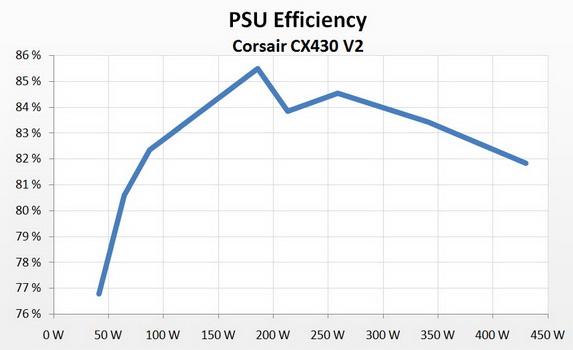
Using your numbers as an example. Your theoretical power supply is 200/220 = 91% efficient at a 200W draw and 350/420 = 83% efficient at a 350W draw.

Yor computer, at idle will likely be less than 50W. If delivering 50W requires 65W then it is 77% efficient. All power supplies follow this basic curve less efficient at low and high power relative to max rated output and more efficient in the middle. I did a quick google for power supply efficency and found the found the following for a corsair psu:

efficiency.jpg


Below 50W - efficiency continues to drop steeply.

When Hardware is Free, Power is Expensive

Here is a chart from Anandtech that shows comparisons across different wattage psus.

eff-comp-s1.png


Mark
 

My Computer My Computer

At a glance

Server 2012 R2, Windows 8.1 , W7 ultimate x64Q6600,8G, 4G, 2G7300GS, 9600GT, 8600GT
Computer type
PC/Desktop
Computer Manufacturer/Model Number
3 Home Built Computers
OS
Server 2012 R2, Windows 8.1 , W7 ultimate x64
CPU
Q6600,
Motherboard
Gigabyte ga-p35-ds4, ga-ep45-ud3p, ga-p35-dq6
Memory
8G, 4G, 2G
Graphics Card(s)
7300GS, 9600GT, 8600GT
Sound Card
onboard ALC889
Monitor(s) Displays
dell, TV
Screen Resolution
1280x1024, PAL SD TV
Hard Drives
WD 1.0T GP x2,wd 320G x2,WD 1.0T GP x2
PSU
corsair HX520,corsair HX520,corsair HX520
Case
Antec Solo, Antec Solo,Thermaltake DH101
Cooling
Thermalright TRUE, Thermalright TRUE, Ninja mini
Internet Speed
not too fast
Yes Mark my figures were exactly that - plucked out the air as an example. I know one can get these sites up - but the bottom line and my point is that what goes in is not what comes out. As Layback Bear was probably thinking as I did what you were saying sounded like the size of the PSU doesn't matter and personally I like to have a fairly large margin of error when buying my PSU's and am not happy with anything less than 500 watt devices. The saving if there is any at all using a smaller device is really minimal and one runs the risk if one can put it tht way of over driving the small PSU.
Better to have a tad overkill than not and fry the device. I did post that link to the calculator and it is very good as you can see by it recommending the size of the PSU as well as detailing the actual power usage of the system.

But the choice is yours and now I am wondering why you asked the question in the first post?? if you have already stated what you are going to do. Again personally I would not use a VS even though it is Corsair I would use the CX models in preference. That is simply because the Corsairs like all other brands are not made by the same manufacturer, and thereby so does the quality go too - IMHO.
See this PSU Makers: C-D - Who's Who In Power Supplies, 2013: Brands Vs. Manufacturers
 

My Computer My Computer

At a glance

Desk1 7 Home Prem / Desk2 10 Pro / Main lap A...Desk1 i5 3750K / Laptop i7 GTX 860M / Desk2 i...Desk1 8GB (1866) / Desk2 16GB (1333) / Laptop...Desk 1& 2NVidia GTX 650 & Laptops on board Intel
Computer type
PC/Desktop
Computer Manufacturer/Model Number
Own build (new) Desk1 / Asus ROG Win 7 / Desk2 1st build
OS
Desk1 7 Home Prem / Desk2 10 Pro / Main lap Asus ROG 10 Pro 2 laptop Toshiba 7 Pro Asus P2520 7 & 10
CPU
Desk1 i5 3750K / Laptop i7 GTX 860M / Desk2 i5 2500
Motherboard
Desk1 Asus P877-V / Desk2 Gigabyte H67 UD3H / Laptop ?
Memory
Desk1 8GB (1866) / Desk2 16GB (1333) / Laptop 8Gb DDR3
Graphics Card(s)
Desk 1& 2NVidia GTX 650 & Laptops on board Intel
Sound Card
Desk 1 & 2 -XONAR DG Realtek High Def audio Laptop
Monitor(s) Displays
Desk 1 Benq HD 2450 / Desk2 Philips 24" / Laptop 17.5"
Screen Resolution
1920x1080 D1 & D2 & Laptop 1
Hard Drives
Desk1 Samsung 120GB 830 SSD
Asus ROG 256GB 850 Pro SSD
Desk2 Samsung 840 256 SSD
Toshiba 120GB EVO
PSU
Desk 1 Corsair HX 1050/ Laptop ? / Desk 2 Corsair HX 650
Case
Desk 1 Cooler HAF XM ? Toshiba laptop / Desk2 Coolermaster
Cooling
Fans on all Desk1 -2 Desk2 - all Coolermasters 5 Laptop ?
Keyboard
Desk 1 MS Sidewinder X6 Desk 2 MS Sidewinder X 4
Mouse
Desk 1&2 - Gigabyte MS 900 gamer - laptop - Logitec wireless
Internet Speed
ADSL2+
Other Info
One other Desktop (tester) and spare Toshba laptop both with SSD's
Running Kaspersky 2016 ISS on all machines config'd identically
Logitec audio stereo systems on each machine (x3)
Canon MG5250MFC
Router/modem TP-Link running WPA2SK
... but the bottom line and my point is that what goes in is not what comes out.

We agree 100% - This is what the efficiency curve shows ...

As Layback Bear was probably thinking as I did what you were saying sounded like the size of the PSU doesn't matter ...

My suggestion that I would not go bigger than 450W was based on the OPs planned upgraded specs. In fact if you use the extremetech calculator they recommend a 200W supply.

and personally I like to have a fairly large margin of error when buying my PSU's and am not happy with anything less than 500 watt devices.

Fair enough - everyone should make decisions based on what is important to them. Personally, I estimate the max usage and then add an additional 25 to 50%.

The saving if there is any at all using a smaller device is really minimal

I did some back of the envelope calculations comparing what a 10% difference (absolute e.g. 80% vs. 90%) and it came to about $3 per year per psu. However I run 5 psus. Assuming that a small psu will cost $30 less than a bigger one and that a psu will last 5 years. I save $9 per year per psu. probably not a major factor for most people.

For me, personally, there is another cost - heat and noise. A less efficient power supply will generate more heat which will make the cooling louder. I like silent pcs.


and one runs the risk if one can put it tht way of over driving the small PSU.
Better to have a tad overkill than not and fry the device. I did post that link to the calculator and it is very good as you can see by it recommending the size of the PSU as well as detailing the actual power usage of the system.

Agree - if the psu is too small. Your calculater indicates 200W is sufficient for the OPs needs. IMO, saying I would not go beyond 450W is leaving more than sufficient margin.

But the choice is yours and now I am wondering why you asked the question in the first post?? if you have already stated what you are going to do.

I think you have me confused with the OP.

Again personally I would not use a VS even though it is Corsair I would use the CX models in preference. That is simply because the Corsairs like all other brands are not made by the same manufacturer, and thereby so does the quality go too - IMHO.
See this PSU Makers: C-D - Who's Who In Power Supplies, 2013: Brands Vs. Manufacturers

Agree
 

My Computer My Computer

At a glance

Server 2012 R2, Windows 8.1 , W7 ultimate x64Q6600,8G, 4G, 2G7300GS, 9600GT, 8600GT
Computer type
PC/Desktop
Computer Manufacturer/Model Number
3 Home Built Computers
OS
Server 2012 R2, Windows 8.1 , W7 ultimate x64
CPU
Q6600,
Motherboard
Gigabyte ga-p35-ds4, ga-ep45-ud3p, ga-p35-dq6
Memory
8G, 4G, 2G
Graphics Card(s)
7300GS, 9600GT, 8600GT
Sound Card
onboard ALC889
Monitor(s) Displays
dell, TV
Screen Resolution
1280x1024, PAL SD TV
Hard Drives
WD 1.0T GP x2,wd 320G x2,WD 1.0T GP x2
PSU
corsair HX520,corsair HX520,corsair HX520
Case
Antec Solo, Antec Solo,Thermaltake DH101
Cooling
Thermalright TRUE, Thermalright TRUE, Ninja mini
Internet Speed
not too fast
MTP thank you for the charts.

I will use no charts. I will use my rule of thumb.

1. Get more power supply than you need.
The reason is if your system has the capability of a 400W demand a 500W power supply would have to work very hard to keep up. That would create lots of heat and noise from the fan. It would also shorten the life of the power supply.

2. With today's quality power supplies the efficiency at all loads is close to 80 to 90%.
Once again no charts or websites just by my memory and all the research I have done.
Smaller wattage power supplies actually draw more power from the wall socket that a larger higher wattage power supply because you are asking it to work in the 40 to 50% range to keep up and produce heat and noise. A higher wattage power supply would only be working in the 15 to 20% range to do the same job. The fans on my AX-860 and AX-860i seldom come on because they can handle the work load without a sweat and not produce a lot of heat doing so.

3. A higher wattage quality power supply gives you the ability to add things to a computer without upgrading a power supply. Or with a new build you could take the power supply out of old Betsey and use in your new system if need be.

4. Their is no such things as to big of power supply if you are willing to spend the money.
A power supply will only supply the power needed for a system according to the demand.
If your system demands 300W a 500W or a 1000W power supply will give the system 300W and no more. The difference is the 500W power supply has to work harder to do it. Therefor it draws more from the wall socket.

5. The price of electricity varies from location to location.
In my home I have one or two computers running about 12 to 16 hours a day.
The power savings if at all if I went to a so called Green power supply I could make up by turning off a lamp. It cost pennies a day to run my two computer systems. The last time I figured out the price of electricity using my computer systems was less than a Starbuck Coffee per month.

6. Always use a modular power supply. They make a build soooo much easier and neater.
---------------------------
One of the reasons I don't post a bunch of charts and graphs is because I went through this about year or so ago with another member and all the charts and graphs did was confuse the members trying to select a power supply.
The only reason I don't have a 1000W power supply is because the new build was sneaking up on $3000.00 as it was.
My system will run on a lower wattage power supply quite well but with the AX-860i it will do it cooler and quieter with room to grow.

PS: If one wants the charts and graphs their thousands of website, maybe millions that one can Google.
I think the last site I looked on was Jonny Guru about power supplies but it was a year or so ago.

Please note I keep posting a quality power supply.
If you by a 500W or a 1000W low quality junk power supply you still got a junk low quality power supply.

PC Power Supply Discussion - jonnyGURU Forums


I hope my rule of the thumb helps.

 

My Computer My Computer

At a glance

Windows 10 Pro. 64/ version 1709 Windows 7 Pr...Intel i7-6800K @ 4.3Corsair Platinum 16 gig @2400EVGA GTX 1070 OC
Computer type
PC/Desktop
Computer Manufacturer/Model Number
Home made Desktop
OS
Windows 10 Pro. 64/ version 1709 Windows 7 Pro/64
CPU
Intel i7-6800K @ 4.3
Motherboard
ASUS X-99 Deluxe II
Memory
Corsair Platinum 16 gig @2400
Graphics Card(s)
EVGA GTX 1070 OC
Monitor(s) Displays
Asus 27" LED LCD/VE278Q
Screen Resolution
1920-1080 or 1280-720 HDMI
Hard Drives
INTEL SSD 730-240 Gb Sata 3.0/
PSU
EVGA Platium 1200W
Case
Phanteks Luxe Tempered Glass 8 fans/ one radiator
Cooling
XSPC/ Water Cooled CPU
Keyboard
Das 4 Professional
Mouse
Logitech M705/MX Anywhere 2-S
Internet Speed
100 mbits
Antivirus
Microsoft Security Essentials/ Malwarebytes Premium 3.0/ SAS
Browser
I.E. 11 default/Firefox/ ISP Time Warner Cable/Spectrum
Other Info
LG BluRay Burner/
Sound system-KLipsch-THX/
Icy Dock ssd Hot Swap bays.
My apologies for the confusion with the OP and as with everything you will never get total agreement from everyone.

My Ivy Bridge only has the HX 1050 because it was on offer otherwise I was going the HX 750.

Plus I think it was essenbe pointed out once that modulars are good because they can be removed without disassembling the whole machine - something that had not even occurred to me. So it is modular for me in the future or even a semi mod would be better because there are only the essentials in situ.
 

My Computer My Computer

At a glance

Desk1 7 Home Prem / Desk2 10 Pro / Main lap A...Desk1 i5 3750K / Laptop i7 GTX 860M / Desk2 i...Desk1 8GB (1866) / Desk2 16GB (1333) / Laptop...Desk 1& 2NVidia GTX 650 & Laptops on board Intel
Computer type
PC/Desktop
Computer Manufacturer/Model Number
Own build (new) Desk1 / Asus ROG Win 7 / Desk2 1st build
OS
Desk1 7 Home Prem / Desk2 10 Pro / Main lap Asus ROG 10 Pro 2 laptop Toshiba 7 Pro Asus P2520 7 & 10
CPU
Desk1 i5 3750K / Laptop i7 GTX 860M / Desk2 i5 2500
Motherboard
Desk1 Asus P877-V / Desk2 Gigabyte H67 UD3H / Laptop ?
Memory
Desk1 8GB (1866) / Desk2 16GB (1333) / Laptop 8Gb DDR3
Graphics Card(s)
Desk 1& 2NVidia GTX 650 & Laptops on board Intel
Sound Card
Desk 1 & 2 -XONAR DG Realtek High Def audio Laptop
Monitor(s) Displays
Desk 1 Benq HD 2450 / Desk2 Philips 24" / Laptop 17.5"
Screen Resolution
1920x1080 D1 & D2 & Laptop 1
Hard Drives
Desk1 Samsung 120GB 830 SSD
Asus ROG 256GB 850 Pro SSD
Desk2 Samsung 840 256 SSD
Toshiba 120GB EVO
PSU
Desk 1 Corsair HX 1050/ Laptop ? / Desk 2 Corsair HX 650
Case
Desk 1 Cooler HAF XM ? Toshiba laptop / Desk2 Coolermaster
Cooling
Fans on all Desk1 -2 Desk2 - all Coolermasters 5 Laptop ?
Keyboard
Desk 1 MS Sidewinder X6 Desk 2 MS Sidewinder X 4
Mouse
Desk 1&2 - Gigabyte MS 900 gamer - laptop - Logitec wireless
Internet Speed
ADSL2+
Other Info
One other Desktop (tester) and spare Toshba laptop both with SSD's
Running Kaspersky 2016 ISS on all machines config'd identically
Logitec audio stereo systems on each machine (x3)
Canon MG5250MFC
Router/modem TP-Link running WPA2SK
I have a Corsair Builder Series CXM 600W Modular and have had no issues with it at all. I went with Corsair because they have a good reputation, it was easy to install and has zero noise, not even sure if it gets hot lol. Its possible 600W is too much for my rig, but its always better to have too much then not enough

Knowing my luck if I had gone smaller it wouldn't have worked and it would have got launched out of a window :D

My two cents :)

Phill
 

My Computer My Computer

At a glance

Windows 7 Home Premium x64Intel(R) Core(TM) i5-4670k CPU @ 3.40 GHz, 4 ...Corsair Vengeance 8GB (2x4GB) DDR3 1600 MHzGeForce GTX 660
Computer type
PC/Desktop
Computer Manufacturer/Model Number
Custom Build
OS
Windows 7 Home Premium x64
CPU
Intel(R) Core(TM) i5-4670k CPU @ 3.40 GHz, 4 Cores
Motherboard
MSI Z87 - G45 Gaming ATX Motherboard
Memory
Corsair Vengeance 8GB (2x4GB) DDR3 1600 MHz
Graphics Card(s)
GeForce GTX 660
Sound Card
Realtek HD Audio, Sound Blaster Cinema
Monitor(s) Displays
ACER S236HL 23" HDMI Monitor
Screen Resolution
1920x1080
Hard Drives
2TB HDD
PSU
Corsair Builder Series CXM 600W Modular 80 PLUS ATX/EPS PSU
Case
Zalman Z11 PLUS Midi Tower Case
Cooling
Cooler Master Hyper 212 EVO (120mm) CPU Cooling, 5x Case Fan
Keyboard
Saitek Cyborg V.5 USB Gaming Keyboard
Mouse
Sharkoon Drakonia Gaming Mouse
Internet Speed
16.96 MB
Antivirus
Avast (Free Version), MalwareBytes, SuperantiSpyware
Browser
Google Chrome
Other Info
Samsung 24x Retail SATA DVD Writer, Creative Inspire T10 Multimedia Speakers, Also have a: Toshiba CT30 Chromebook
I agree with Phill as one might have guessed for the small extra a bit of overkill goes a long way.
Bit like having a 200hp engine in a car as opposed to having a 150hp one - it simply doesn't have to work so hard. A no brainer really.
 

My Computer My Computer

At a glance

Desk1 7 Home Prem / Desk2 10 Pro / Main lap A...Desk1 i5 3750K / Laptop i7 GTX 860M / Desk2 i...Desk1 8GB (1866) / Desk2 16GB (1333) / Laptop...Desk 1& 2NVidia GTX 650 & Laptops on board Intel
Computer type
PC/Desktop
Computer Manufacturer/Model Number
Own build (new) Desk1 / Asus ROG Win 7 / Desk2 1st build
OS
Desk1 7 Home Prem / Desk2 10 Pro / Main lap Asus ROG 10 Pro 2 laptop Toshiba 7 Pro Asus P2520 7 & 10
CPU
Desk1 i5 3750K / Laptop i7 GTX 860M / Desk2 i5 2500
Motherboard
Desk1 Asus P877-V / Desk2 Gigabyte H67 UD3H / Laptop ?
Memory
Desk1 8GB (1866) / Desk2 16GB (1333) / Laptop 8Gb DDR3
Graphics Card(s)
Desk 1& 2NVidia GTX 650 & Laptops on board Intel
Sound Card
Desk 1 & 2 -XONAR DG Realtek High Def audio Laptop
Monitor(s) Displays
Desk 1 Benq HD 2450 / Desk2 Philips 24" / Laptop 17.5"
Screen Resolution
1920x1080 D1 & D2 & Laptop 1
Hard Drives
Desk1 Samsung 120GB 830 SSD
Asus ROG 256GB 850 Pro SSD
Desk2 Samsung 840 256 SSD
Toshiba 120GB EVO
PSU
Desk 1 Corsair HX 1050/ Laptop ? / Desk 2 Corsair HX 650
Case
Desk 1 Cooler HAF XM ? Toshiba laptop / Desk2 Coolermaster
Cooling
Fans on all Desk1 -2 Desk2 - all Coolermasters 5 Laptop ?
Keyboard
Desk 1 MS Sidewinder X6 Desk 2 MS Sidewinder X 4
Mouse
Desk 1&2 - Gigabyte MS 900 gamer - laptop - Logitec wireless
Internet Speed
ADSL2+
Other Info
One other Desktop (tester) and spare Toshba laptop both with SSD's
Running Kaspersky 2016 ISS on all machines config'd identically
Logitec audio stereo systems on each machine (x3)
Canon MG5250MFC
Router/modem TP-Link running WPA2SK
Back
Top