Solved Created a Windows 7 Ultimate x64 Bootable USB, On a Windows 7 x32

Kyrotix

New member
Local time
2:04 PM
Messages
7
Well I am going to build a gaming pc rig and not buying a dvd optical drive at all just to save some money. So I made a bootable Windows 7 Ultimate x64 USB because my rig has 8gb ram. So continue I made one on a 32 bit and I was wondering if there will be any incompatibilities like it somehow installs a 32 bit on a computer with 8gb of ram or something. So I was wondering if something will happen and if there will be any type of problem of any how, I'm really worried about this because I'm going to be building my pc on August 1st, so yeah please help me out here. :S
 

My Computer My Computer

At a glance

Windows 7 Professional 32 bit
Computer type
PC/Desktop
OS
Windows 7 Professional 32 bit
Not sure I follow you, but I assume you mean that you have 2 different Windows 7 installation USB drives: one would install 32-bit Windows and the other would install 64-bit Windows.

You can install either. If you install the 32-bit version, Windows will recognize only about 3.2 GB of RAM.

It doesn't matter whether you used a 32-bit or 64-bit machine to make the installation media. What matters is whether the ISO you used is the 32-bit version or the 64-bit version.
 

My Computer My Computer

At a glance

Windows 7 Home Premium SP1, 64-bitIntel Skylake i5-6600K, not overclocked8 GB HyperX DDR4-2666 (2 x 4 GB)none; graphics are integrated on CPU
Computer type
PC/Desktop
Computer Manufacturer/Model Number
Ignatz Special; 4 speed manual gearbox; factory air conditioning; one of one
OS
Windows 7 Home Premium SP1, 64-bit
CPU
Intel Skylake i5-6600K, not overclocked
Motherboard
AsRock Z170M Extreme 4, micro ATX
Memory
8 GB HyperX DDR4-2666 (2 x 4 GB)
Graphics Card(s)
none; graphics are integrated on CPU
Sound Card
onboard: Realtek ALC1150; external: USB Behringer UF0-202
Monitor(s) Displays
Dell S2340M 23 inch IPS
Screen Resolution
1600 x 900
Hard Drives
System: Crucial MX100 series SSD, 128 GB;
Data: Samsung Spinpoint 103SJ, 1 TB;
Backup: WD Caviar Green WD30EZRX-00D8PB0, 3 TB
PSU
Rosewill SilentNight 500 watt fanless, semi-modular
Case
Antec Solo II
Cooling
Noctua NH-U12S; Noctua F12 intake, Noctua S12A exhaust
Keyboard
Microsoft 200 6JH-00001 USB
Mouse
Dell or Microsoft optical wired; USB
Antivirus
Microsoft Security Essentials and Malwarebytes Premium
Browser
Pale Moon
Other Info
All fans PWM; speeds at idle: CPU circa 500 rpm; intake circa 600 rpm; exhaust circa 600 rpm; CPU temps 27 idle and 47 C load in a warm room (27 C/81 F) when running Intel Extreme Tuning Utility stress test.
How did you create the flash drive? What program did you use, what steps did you follow.

The times I've tried to create a 64 bit install flash drive on a 32 but system it failed, every time.
 

My Computer My Computer

At a glance

Windows 10 Pro X64Intel Quad Core i7-4770 @ 3.4Ghz16.0GB PC3-12800 DDR3 SDRAM 1600 MHzIntel Integrated HD Graphics
Computer type
PC/Desktop
Computer Manufacturer/Model Number
Lenovo IdeaCenter 450
OS
Windows 10 Pro X64
CPU
Intel Quad Core i7-4770 @ 3.4Ghz
Memory
16.0GB PC3-12800 DDR3 SDRAM 1600 MHz
Graphics Card(s)
Intel Integrated HD Graphics
Sound Card
Realtek HD Audio
Monitor(s) Displays
HP 22" LCD
Screen Resolution
1680 x 1050
Hard Drives
250GB Samsung EVO SATA-3 SSD
2TB Seagate ST2000DM001 SATA-2
1.5TB Seagate ST3150041AS SATA
Keyboard
Dell USB
Mouse
Lenovo USB
Internet Speed
Cable via Road Runner 3MB Upload, 30MB Download
Antivirus
Windows Defender, MBAM Pro, MBAE
Browser
Seamonkey
Other Info
UEFI/GPT
PLDS DVD-RW DH16AERSH
How did you create the flash drive? What program did you use, what steps did you follow.

The times I've tried to create a 64 bit install flash drive on a 32 but system it failed, every time.

I used windows 7 usb dvd download tool. And a Windows 7 ISO. How can I tell if it's x64 just by looking in the files.
 

My Computer My Computer

At a glance

Windows 7 Professional 32 bit
Computer type
PC/Desktop
OS
Windows 7 Professional 32 bit
Not sure I follow you, but I assume you mean that you have 2 different Windows 7 installation USB drives: one would install 32-bit Windows and the other would install 64-bit Windows.

You can install either. If you install the 32-bit version, Windows will recognize only about 3.2 GB of RAM.

It doesn't matter whether you used a 32-bit or 64-bit machine to make the installation media. What matters is whether the ISO you used is the 32-bit version or the 64-bit version.

The ISO I used was a 64 bit version. And I made it on a 32 bit. So it doesn't matter?
 

My Computer My Computer

At a glance

Windows 7 Professional 32 bit
Computer type
PC/Desktop
OS
Windows 7 Professional 32 bit
If I remember correctly the x64 should be about 3.2gb, the x86 is less.
 

My Computer My Computer

At a glance

Win7 Enterprise, Win7 x86 (Ult 7600), Win7 x6...AMD fx8350 4ghz, AMD-32 2400mhz, AMD-64 3200m...2gb, 4gb on the Ult 7600, 4gb on Technet RTM,...Draw my own Graphics, several nVidia cards
Computer type
PC/Desktop
Computer Manufacturer/Model Number
Built them myself, Science Experiments !
OS
Win7 Enterprise, Win7 x86 (Ult 7600), Win7 x64 Ult 7600, TechNet RTM on AMD x64 (2.8Ghz)
CPU
AMD fx8350 4ghz, AMD-32 2400mhz, AMD-64 3200mhz, AMDx64 2.8G
Motherboard
SIS 755, ECS-K8M890M-M (Ult 7600), GigaByte & others
Memory
2gb, 4gb on the Ult 7600, 4gb on Technet RTM, 32gb on FX8350
Graphics Card(s)
Draw my own Graphics, several nVidia cards
Sound Card
on motherboard
Monitor(s) Displays
19" flat scr, 28" I-Inc widescr,22" Emprex Widescr, 23" Acer
Screen Resolution
1280 x 1024, 1440 x 900, 1920 x 1080
Hard Drives
6 pata Ide HD's & 2 Sata HD's
added 80gb external on Ult 7600 computer,
numerous extra 1tb, 2TB, 3Tb SATA HD's
A collection of ext HD Docks w/ HDs
PSU
430w, 550w, 600w, 700, 800, etc
Case
All Generic Full Towers
Cooling
Open Air & a few fans, some w/ colored LEDs
Keyboard
Compaq & Dell recycled from GoodWill
Mouse
Made in China Optical Wired Mouse
Internet Speed
Fast Cable InterNet
Antivirus
AVG Free on 24 different Desktops, NO Problems!
Browser
IE 8 is preferred, but use FireFox sometimes
Other Info
Linksys Routers, switches, & Hubs
Too Many USB Flash Drives to count, Biggest is 64GB !
Eight computers in my home network.
Sixteen computers at my business network.
Linked via TeamViewer !
Lots of old used spare computer parts everywhere!
If I remember correctly the x64 should be about 3.2gb, the x86 is less.

It's Windows 7 Ultimate 64 bit, It can hold 192gb of ram Lool if u got a super pc. and it's also going to be a fresh installation on a gaming pc, 64 bit.

Physical Memory (RAM) Limits In 32-bit Windows

Windows 7 Ultimate: 4GB
Windows 7 Enterprise: 4GB
Windows 7 Professional: 4GB
Windows 7 Home Premium: 4GB
Windows 7 Home Basic: 4GB
Windows 7 Starter: 2GB
-----------------------------------------------------------------------------------

Physical Memory (RAM) Limit in 64-bit Windows

Windows 7 Ultimate: 192GB
Windows 7 Enterprise: 192GB
Windows 7 Professional: 192GB
Windows 7 Home Premium: 16GB
Windows 7 Home Basic: 8GB
Windows 7 Starter: N/A
-----------------------------------------------------------------------------------
 

My Computer My Computer

At a glance

Windows 7 Professional 32 bit
Computer type
PC/Desktop
OS
Windows 7 Professional 32 bit
I am talking about the file size of the .ISO before you burn it to DVD or USB
 

Attachments

  • Iso_file_sized.JPG
    Iso_file_sized.JPG
    45.6 KB · Views: 1

My Computer My Computer

At a glance

Win7 Enterprise, Win7 x86 (Ult 7600), Win7 x6...AMD fx8350 4ghz, AMD-32 2400mhz, AMD-64 3200m...2gb, 4gb on the Ult 7600, 4gb on Technet RTM,...Draw my own Graphics, several nVidia cards
Computer type
PC/Desktop
Computer Manufacturer/Model Number
Built them myself, Science Experiments !
OS
Win7 Enterprise, Win7 x86 (Ult 7600), Win7 x64 Ult 7600, TechNet RTM on AMD x64 (2.8Ghz)
CPU
AMD fx8350 4ghz, AMD-32 2400mhz, AMD-64 3200mhz, AMDx64 2.8G
Motherboard
SIS 755, ECS-K8M890M-M (Ult 7600), GigaByte & others
Memory
2gb, 4gb on the Ult 7600, 4gb on Technet RTM, 32gb on FX8350
Graphics Card(s)
Draw my own Graphics, several nVidia cards
Sound Card
on motherboard
Monitor(s) Displays
19" flat scr, 28" I-Inc widescr,22" Emprex Widescr, 23" Acer
Screen Resolution
1280 x 1024, 1440 x 900, 1920 x 1080
Hard Drives
6 pata Ide HD's & 2 Sata HD's
added 80gb external on Ult 7600 computer,
numerous extra 1tb, 2TB, 3Tb SATA HD's
A collection of ext HD Docks w/ HDs
PSU
430w, 550w, 600w, 700, 800, etc
Case
All Generic Full Towers
Cooling
Open Air & a few fans, some w/ colored LEDs
Keyboard
Compaq & Dell recycled from GoodWill
Mouse
Made in China Optical Wired Mouse
Internet Speed
Fast Cable InterNet
Antivirus
AVG Free on 24 different Desktops, NO Problems!
Browser
IE 8 is preferred, but use FireFox sometimes
Other Info
Linksys Routers, switches, & Hubs
Too Many USB Flash Drives to count, Biggest is 64GB !
Eight computers in my home network.
Sixteen computers at my business network.
Linked via TeamViewer !
Lots of old used spare computer parts everywhere!
I am talking about the file size of the .ISO before you burn it to DVD or USB

Do you know if I made it on a 32 bit, but the media is a 64 bit how will it install on a fresh pc rig that I'm building will it install it as a 32 bit because I made it on a 32 bit? Or will the media install at a 64 bit on my new pc im building on the media made on a 32 bit. Make sense? Cuz im not sure lol.
 

My Computer My Computer

At a glance

Windows 7 Professional 32 bit
Computer type
PC/Desktop
OS
Windows 7 Professional 32 bit
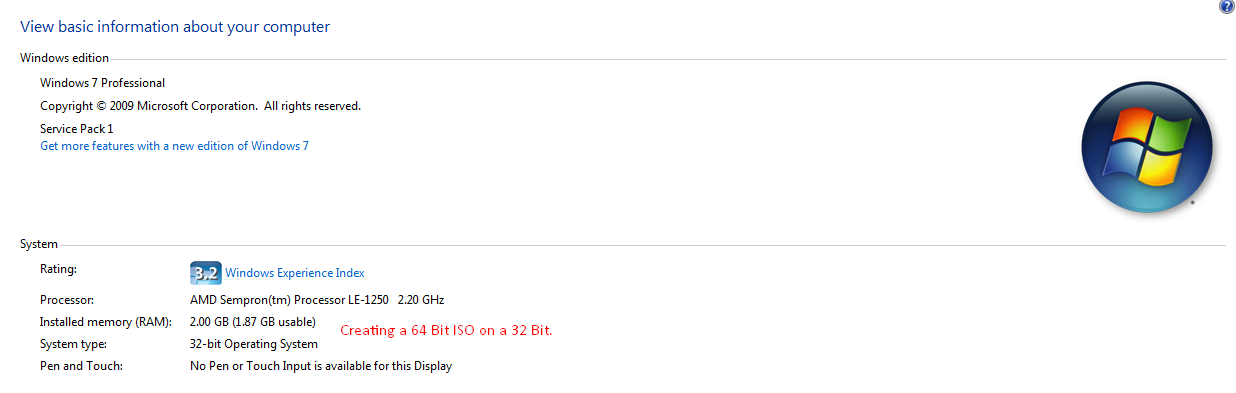
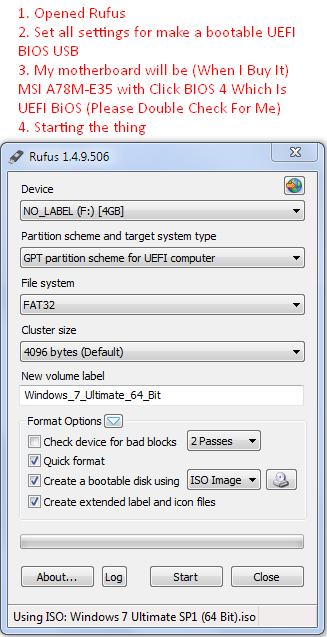
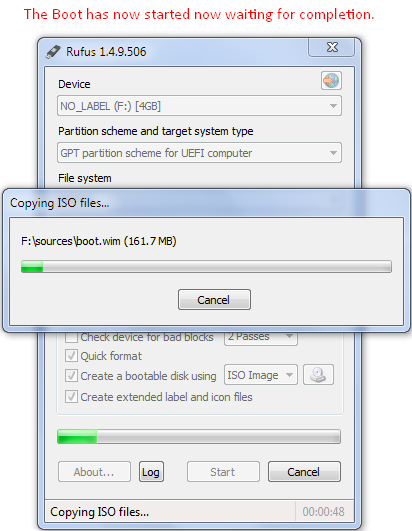
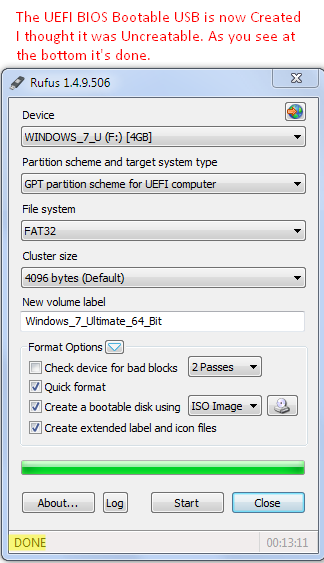
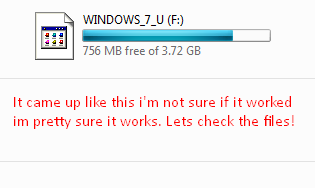
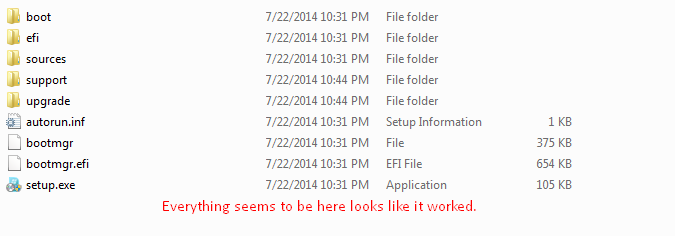
Here's what I did. If you guys also wanted to know I'm not going to be booting the USB on this computer I just made it with. Btw these are all screenies I just took. Also guys the motherboard I'm going to be installing this on is a (MSI A78M-E35 Motherboard With Click BIOS 4 "UEFI BIOS".)

1.
1kd3oN8.png


2.
L7zOYBH.png


3.
8P3KLbo.png


The creation of the 64 bit Windows 7 Ultimate ISO Seems to be creating good without any problems on a 32 bit Windows 7 Professional, hmm... I though it was un create able but why can I make it?

4.
1iFcoCN.png


5.
jg4IqxV.png


6.
ei5ivtG.png


Please tell me if there will be any problems of any kind I read all replies, I need help with this really badly or else I aint going to have no os for my pc and im ****ed.
 

My Computer My Computer

At a glance

Windows 7 Professional 32 bit
Computer type
PC/Desktop
OS
Windows 7 Professional 32 bit
I am talking about the file size of the .ISO before you burn it to DVD or USB

Do you know if I made it on a 32 bit, but the media is a 64 bit how will it install on a fresh pc rig that I'm building will it install it as a 32 bit because I made it on a 32 bit? Or will the media install at a 64 bit on my new pc im building on the media made on a 32 bit. Make sense? Cuz im not sure lol.

If you used the 64 bit iso then it will install the 64 bit version of windows.

As stated in post #2

Same thing if you burned the 64 bit iso to dvd.

Do you have a W7 Ultimate key for activation, when the time comes ?

Not sure why your icon is lookin like that, should look like this. But the files look fine.
 
Last edited:

My Computer My Computer

At a glance

Windows 10 Pro x64Intel Core i7 6700KGSkill TridentZ RGB 16GB 3600 16-16-16-36EVGA GTX 980 Ti SC x2
Computer type
PC/Desktop
Computer Manufacturer/Model Number
Skylake Special #666
OS
Windows 10 Pro x64
CPU
Intel Core i7 6700K
Motherboard
Asus Sabertooth Z170 Mark 1
Memory
GSkill TridentZ RGB 16GB 3600 16-16-16-36
Graphics Card(s)
EVGA GTX 980 Ti SC x2
Sound Card
Realtek High Definition
Monitor(s) Displays
AOC G2460PG
Screen Resolution
1920 x 1080 144Hz
Hard Drives
Samsung 860 Pro 256GB, Seagate Barracuda 4TB x2
PSU
EVGA 1000 P2, EVGA White Custom Braided Cables
Case
Corsair Vengeance C70 Gunmetal Black
Cooling
Corsair H100i v2, Corsair ML120 x2, Thermal Grizzly Kryonaut
Keyboard
Logitech G910 Orion Spectrum
Mouse
Logitech G700s
Internet Speed
Verizon Fios Quantum Gateway 75/75
Antivirus
Windows Defender, Malwarebytes Free 3.8.3
Browser
Chrome
Other Info
Corsair SP120 x4, LG Blu-ray Drive, Durabrand HT-395 100 Watt Dolby Digital Amp, Corsair H2100 Wireless 7.1 Headset
How did you create the flash drive? What program did you use, what steps did you follow.

The times I've tried to create a 64 bit install flash drive on a 32 but system it failed, every time.

When I create mine I use "Universal-USB-Installer" It works every times for me.
 

My Computer My Computer

At a glance

Windows 7 Ultimate x64AMD FX-959012gbMSI R9 290X LIGHTNING
Computer type
PC/Desktop
Computer Manufacturer/Model Number
Custom
OS
Windows 7 Ultimate x64
CPU
AMD FX-9590
Motherboard
ASUS crosshair Vformula-z
Memory
12gb
Graphics Card(s)
MSI R9 290X LIGHTNING
Hard Drives
2x WD 2tb
2x toshiba 2 tb externals
Antivirus
bitdefender
Browser
google chrome

My Computer My Computer

At a glance

Windows 10 Pro x64Intel Core i7 6700KGSkill TridentZ RGB 16GB 3600 16-16-16-36EVGA GTX 980 Ti SC x2
Computer type
PC/Desktop
Computer Manufacturer/Model Number
Skylake Special #666
OS
Windows 10 Pro x64
CPU
Intel Core i7 6700K
Motherboard
Asus Sabertooth Z170 Mark 1
Memory
GSkill TridentZ RGB 16GB 3600 16-16-16-36
Graphics Card(s)
EVGA GTX 980 Ti SC x2
Sound Card
Realtek High Definition
Monitor(s) Displays
AOC G2460PG
Screen Resolution
1920 x 1080 144Hz
Hard Drives
Samsung 860 Pro 256GB, Seagate Barracuda 4TB x2
PSU
EVGA 1000 P2, EVGA White Custom Braided Cables
Case
Corsair Vengeance C70 Gunmetal Black
Cooling
Corsair H100i v2, Corsair ML120 x2, Thermal Grizzly Kryonaut
Keyboard
Logitech G910 Orion Spectrum
Mouse
Logitech G700s
Internet Speed
Verizon Fios Quantum Gateway 75/75
Antivirus
Windows Defender, Malwarebytes Free 3.8.3
Browser
Chrome
Other Info
Corsair SP120 x4, LG Blu-ray Drive, Durabrand HT-395 100 Watt Dolby Digital Amp, Corsair H2100 Wireless 7.1 Headset
I am talking about the file size of the .ISO before you burn it to DVD or USB

Do you know if I made it on a 32 bit, but the media is a 64 bit how will it install on a fresh pc rig that I'm building will it install it as a 32 bit because I made it on a 32 bit? Or will the media install at a 64 bit on my new pc im building on the media made on a 32 bit. Make sense? Cuz im not sure lol.

If you used the 64 bit iso then it will install the 64 bit version of windows.

As stated in post #2

Same thing if you burned the 64 bit iso to dvd.

Do you have a W7 Ultimate key for activation, when the time comes ?

Not sure why your icon is lookin like that, should look like this. But the files look fine.

Okay so I'm done? Thanks man u helped me just needed a double confirm that made sence. And yes I have a product key.
 

My Computer My Computer

At a glance

Windows 7 Professional 32 bit
Computer type
PC/Desktop
OS
Windows 7 Professional 32 bit
Now remember, when you go to use that flash drive, don`t change the boot order in the Bios, just use the one time boot key to choose the flash drive, if not it will just keep booting from the flash drive over and over and you`ll never get done LOL ;)

Nothing left to do now but try it out :D
 

My Computer My Computer

At a glance

Windows 10 Pro x64Intel Core i7 6700KGSkill TridentZ RGB 16GB 3600 16-16-16-36EVGA GTX 980 Ti SC x2
Computer type
PC/Desktop
Computer Manufacturer/Model Number
Skylake Special #666
OS
Windows 10 Pro x64
CPU
Intel Core i7 6700K
Motherboard
Asus Sabertooth Z170 Mark 1
Memory
GSkill TridentZ RGB 16GB 3600 16-16-16-36
Graphics Card(s)
EVGA GTX 980 Ti SC x2
Sound Card
Realtek High Definition
Monitor(s) Displays
AOC G2460PG
Screen Resolution
1920 x 1080 144Hz
Hard Drives
Samsung 860 Pro 256GB, Seagate Barracuda 4TB x2
PSU
EVGA 1000 P2, EVGA White Custom Braided Cables
Case
Corsair Vengeance C70 Gunmetal Black
Cooling
Corsair H100i v2, Corsair ML120 x2, Thermal Grizzly Kryonaut
Keyboard
Logitech G910 Orion Spectrum
Mouse
Logitech G700s
Internet Speed
Verizon Fios Quantum Gateway 75/75
Antivirus
Windows Defender, Malwarebytes Free 3.8.3
Browser
Chrome
Other Info
Corsair SP120 x4, LG Blu-ray Drive, Durabrand HT-395 100 Watt Dolby Digital Amp, Corsair H2100 Wireless 7.1 Headset
That looks good to me. I used Universal USB Installer, not Rufus and it complained about trying to create a 64bit flash drive on a 32 bit system. Rufus looks like it handled it so you should be okay.

Easy enough to check, just boot it.
 

My Computer My Computer

At a glance

Windows 10 Pro X64Intel Quad Core i7-4770 @ 3.4Ghz16.0GB PC3-12800 DDR3 SDRAM 1600 MHzIntel Integrated HD Graphics
Computer type
PC/Desktop
Computer Manufacturer/Model Number
Lenovo IdeaCenter 450
OS
Windows 10 Pro X64
CPU
Intel Quad Core i7-4770 @ 3.4Ghz
Memory
16.0GB PC3-12800 DDR3 SDRAM 1600 MHz
Graphics Card(s)
Intel Integrated HD Graphics
Sound Card
Realtek HD Audio
Monitor(s) Displays
HP 22" LCD
Screen Resolution
1680 x 1050
Hard Drives
250GB Samsung EVO SATA-3 SSD
2TB Seagate ST2000DM001 SATA-2
1.5TB Seagate ST3150041AS SATA
Keyboard
Dell USB
Mouse
Lenovo USB
Internet Speed
Cable via Road Runner 3MB Upload, 30MB Download
Antivirus
Windows Defender, MBAM Pro, MBAE
Browser
Seamonkey
Other Info
UEFI/GPT
PLDS DVD-RW DH16AERSH
That looks good to me. I used Universal USB Installer, not Rufus and it complained about trying to create a 64bit flash drive on a 32 bit system. Rufus looks like it handled it so you should be okay.

Easy enough to check, just boot it.

Strange, I have a flashdrive with an all in one flashdrive of windows 7. It has around 30 versions of 32 and 64 bit on it, My other flash drive is a 20 in 1 win8 with 32 and 64 bit versions also, both have been used plenty of times for installing and repairing window's pc's. I made a tutorial a while back if you want to watch it. https://www.youtube.com/watch?v=hf-Lj6J3QFo
 

My Computer My Computer

At a glance

Windows 7 Ultimate x64AMD FX-959012gbMSI R9 290X LIGHTNING
Computer type
PC/Desktop
Computer Manufacturer/Model Number
Custom
OS
Windows 7 Ultimate x64
CPU
AMD FX-9590
Motherboard
ASUS crosshair Vformula-z
Memory
12gb
Graphics Card(s)
MSI R9 290X LIGHTNING
Hard Drives
2x WD 2tb
2x toshiba 2 tb externals
Antivirus
bitdefender
Browser
google chrome
I have one also but I built it on a Win 7 Pro X64 system.
 

My Computer My Computer

At a glance

Windows 10 Pro X64Intel Quad Core i7-4770 @ 3.4Ghz16.0GB PC3-12800 DDR3 SDRAM 1600 MHzIntel Integrated HD Graphics
Computer type
PC/Desktop
Computer Manufacturer/Model Number
Lenovo IdeaCenter 450
OS
Windows 10 Pro X64
CPU
Intel Quad Core i7-4770 @ 3.4Ghz
Memory
16.0GB PC3-12800 DDR3 SDRAM 1600 MHz
Graphics Card(s)
Intel Integrated HD Graphics
Sound Card
Realtek HD Audio
Monitor(s) Displays
HP 22" LCD
Screen Resolution
1680 x 1050
Hard Drives
250GB Samsung EVO SATA-3 SSD
2TB Seagate ST2000DM001 SATA-2
1.5TB Seagate ST3150041AS SATA
Keyboard
Dell USB
Mouse
Lenovo USB
Internet Speed
Cable via Road Runner 3MB Upload, 30MB Download
Antivirus
Windows Defender, MBAM Pro, MBAE
Browser
Seamonkey
Other Info
UEFI/GPT
PLDS DVD-RW DH16AERSH
Back
Top