Inexplicable (to me, at least) sleep problem

If I hadn't asked for your startup and services screen shots I would of asked for your uninstall a program list,
Which I suppose they are the same size in your case :confused:
The only difference would be the uninstall a program list might show Installed dates "if" the page view is setup correctly,
The startup and services is usually the easiest for an op to gather "in a normal world" your being not so normal ;)

That is exactly why I asked for the list to see what we here at SevenForums are facing by attempting to help others and yourself,
Resistance is futile :D
Cheers.

1. I have never claimed to be normal. Among other things, with degrees in Medieval Studies and having taught and coached at college prep schools, I have also started two volunteer fire departments, both of which I served as fire chief (and, later, as the career chief at the first department.) I doubt that many people would consider that "normal."

2. Ubi est une "uninstall program list"? I would like to know, just out of curiosity, and if I learn its location and you would like to see it, I can oblige--and if posting such a list would lead even a miniscule step towards solving the mystery of the missing sleep (hmm, nice title for a book...) I'd be happy to clutter up this thread yet further.

3. Resistance is not only not futile, it is mandatory in electronics, and likely in other areas as well.
 

My Computer My Computer

At a glance

Microsoft Windows 7 Home Premium 64-bit 7601 ...Intel(R) Core(TM) i5-2320 CPU @ 3.00GHz8.00 GBIntel(R) HD Graphics
Computer type
PC/Desktop
Computer Manufacturer/Model Number
Intel(R) Core(TM) i5-2320 CPU @ 3.00GHz (Gateway computer)
OS
Microsoft Windows 7 Home Premium 64-bit 7601 Multiprocessor Free Service Pack 1
CPU
Intel(R) Core(TM) i5-2320 CPU @ 3.00GHz
Motherboard
Gateway IPISB-VR
Memory
8.00 GB
Graphics Card(s)
Intel(R) HD Graphics
Sound Card
(1) Realtek High Definition Audio (2) Intel(R) Display Aud
Monitor(s) Displays
ViewSonic 2250 Series
Screen Resolution
1920 x 1080 x 32 bits (4294967296 colors) @ 60 Hz
Hard Drives
(1) WDC WD10EADX-22TDHB0 (2) Generic Mini SD Reader USB Device (3) Generic USB CF Reader USB Device (4) Generic USB MS Reader USB Device (5) Generic USB SD Reader USB Device (6) Generic USB xD/SM Reader USB Device (7) Seagate FreeAgent Go
Keyboard
Gateway
Mouse
Logitech
Internet Speed
20 Mbps (Theoretical.)
Antivirus
Avast
Browser
Firefox
Hi,
Click Start and type uninstall a program in the search box,
Enter key or click on the suggestion,
I'm mildly curious ;)
Just make sure the install dates are showing,
We already know the time frame when the issue started ;)

These sections "Startup and services/ Uninstall a program" tell us more than any op can ever put into words :)
Cheers.
 

My Computer My Computer

At a glance

Win-7-Pro64bit 7-H-Prem-64biti7-5930K 2nd i9-9940x both water blocked VRM'...Trident-z 3200C14 2nd Trident-z 3600C16EVGA 1080ti ftw3 2nd Titan Xp both water blocked
Computer type
PC/Desktop
Computer Manufacturer/Model Number
Custom assembled by me :}
OS
Win-7-Pro64bit 7-H-Prem-64bit
CPU
i7-5930K 2nd i9-9940x both water blocked VRM's too
Motherboard
ASUS SABERTOOTH X99 2nd ASUS x299 Apex
Memory
Trident-z 3200C14 2nd Trident-z 3600C16
Graphics Card(s)
EVGA 1080ti ftw3 2nd Titan Xp both water blocked
Sound Card
Built-in Realtek
Monitor(s) Displays
1-AOC G2460PG 24"G-Sync 144Hz/ 2nd 1-ASUS VG248QE 24" 144Hz
Screen Resolution
1920 x 1080 144Hz
Hard Drives
2-Samsung M.2 Evo & Evo Plus
2-Samsung 850 EVO 500GB SSD's/ 3-2.5 W.D. Black 1tb-&3-1tb/3-3.5 WD Black 1tb hdd's
PSU
EVGA SuperNOVA 1000-P2 2nd 1200-P2
Case
2-Corsair Obsidian Series 450D Black ATX Mid Tower
Cooling
Custom water loops
Keyboard
Logitech G710+/ 2nd Logitech G910
Mouse
2-RedDragon M901 Perdition 16400 dpi Gaming mouse = wired
Internet Speed
Comcast Ping 19ms 89.31mbps download speed 6.12mbps upload
Antivirus
Malwarebytes Pro/ Superantispyware Pro
Browser
FireFox & Pale moon
Other Info
2nd ASUS X299 Apex/Intel i9-9940x with Custom water loop/7H-Prem-x64/Corsair 450D case/Ram Trident-z 3600C16 4x8gb / Samsung970Evo plus 500gb SSD/Dual ssd EZ swap evo/PSU EVGA SuperNova 1200w-P2 80+Platinum/GPU Titan Xp /8-ML-140 on push-pull on 2-280GTX rads
Hi,
Click Start and type uninstall a program in the search box,
Enter key or click on the suggestion,
I'm mildly curious ;)
Just make sure the install dates are showing,
We already know the time frame when the issue started ;)

These sections "Startup and services/ Uninstall a program" tell us more than any op can ever put into words :)
Cheers.

I am amused, not to mention that, as often as I have opened that page in the Control Panel, I had quite forgotten what is says at the top; I simply open the page, find what for which I am looking, not really needing to know what is at the top. Amused? Yes, as I thought you were referring to some esoteric and well-hidden Windows feature.

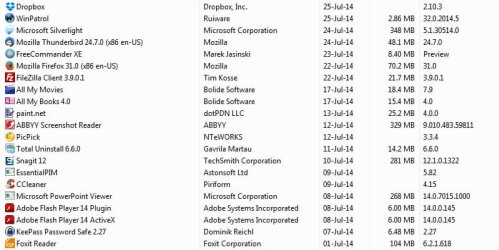
I'll do a screen shot, but first, how far back in the install date column would you like me to put in that shot? Would 01July14 through 25July be enough?

I notice that the most recent install is Dropbox, which I use very infrequently, and which I was not even aware apparently updates automatically. I did see a listing for new version earlier today, but did not download nor install it myself.
 

My Computer My Computer

At a glance

Microsoft Windows 7 Home Premium 64-bit 7601 ...Intel(R) Core(TM) i5-2320 CPU @ 3.00GHz8.00 GBIntel(R) HD Graphics
Computer type
PC/Desktop
Computer Manufacturer/Model Number
Intel(R) Core(TM) i5-2320 CPU @ 3.00GHz (Gateway computer)
OS
Microsoft Windows 7 Home Premium 64-bit 7601 Multiprocessor Free Service Pack 1
CPU
Intel(R) Core(TM) i5-2320 CPU @ 3.00GHz
Motherboard
Gateway IPISB-VR
Memory
8.00 GB
Graphics Card(s)
Intel(R) HD Graphics
Sound Card
(1) Realtek High Definition Audio (2) Intel(R) Display Aud
Monitor(s) Displays
ViewSonic 2250 Series
Screen Resolution
1920 x 1080 x 32 bits (4294967296 colors) @ 60 Hz
Hard Drives
(1) WDC WD10EADX-22TDHB0 (2) Generic Mini SD Reader USB Device (3) Generic USB CF Reader USB Device (4) Generic USB MS Reader USB Device (5) Generic USB SD Reader USB Device (6) Generic USB xD/SM Reader USB Device (7) Seagate FreeAgent Go
Keyboard
Gateway
Mouse
Logitech
Internet Speed
20 Mbps (Theoretical.)
Antivirus
Avast
Browser
Firefox
Well I would go back a least a couple of weeks before the issue started,
Ideally a complete list but I fear the list would be too long 20 screen captures :roflmao:
 

My Computer My Computer

At a glance

Win-7-Pro64bit 7-H-Prem-64biti7-5930K 2nd i9-9940x both water blocked VRM'...Trident-z 3200C14 2nd Trident-z 3600C16EVGA 1080ti ftw3 2nd Titan Xp both water blocked
Computer type
PC/Desktop
Computer Manufacturer/Model Number
Custom assembled by me :}
OS
Win-7-Pro64bit 7-H-Prem-64bit
CPU
i7-5930K 2nd i9-9940x both water blocked VRM's too
Motherboard
ASUS SABERTOOTH X99 2nd ASUS x299 Apex
Memory
Trident-z 3200C14 2nd Trident-z 3600C16
Graphics Card(s)
EVGA 1080ti ftw3 2nd Titan Xp both water blocked
Sound Card
Built-in Realtek
Monitor(s) Displays
1-AOC G2460PG 24"G-Sync 144Hz/ 2nd 1-ASUS VG248QE 24" 144Hz
Screen Resolution
1920 x 1080 144Hz
Hard Drives
2-Samsung M.2 Evo & Evo Plus
2-Samsung 850 EVO 500GB SSD's/ 3-2.5 W.D. Black 1tb-&3-1tb/3-3.5 WD Black 1tb hdd's
PSU
EVGA SuperNOVA 1000-P2 2nd 1200-P2
Case
2-Corsair Obsidian Series 450D Black ATX Mid Tower
Cooling
Custom water loops
Keyboard
Logitech G710+/ 2nd Logitech G910
Mouse
2-RedDragon M901 Perdition 16400 dpi Gaming mouse = wired
Internet Speed
Comcast Ping 19ms 89.31mbps download speed 6.12mbps upload
Antivirus
Malwarebytes Pro/ Superantispyware Pro
Browser
FireFox & Pale moon
Other Info
2nd ASUS X299 Apex/Intel i9-9940x with Custom water loop/7H-Prem-x64/Corsair 450D case/Ram Trident-z 3600C16 4x8gb / Samsung970Evo plus 500gb SSD/Dual ssd EZ swap evo/PSU EVGA SuperNova 1200w-P2 80+Platinum/GPU Titan Xp /8-ML-140 on push-pull on 2-280GTX rads
Well I would go back a least a couple of weeks before the issue started,
Ideally a complete list but I fear the list would be too long 20 screen captures :roflmao:
I could post the entire list as a single screen shot, as I've done with the two other shots in this thread: Snagit has a scroll feature which scrolls an entire page or box creating a single image.

For your delectation:


Install_dates.jpg
 

My Computer My Computer

At a glance

Microsoft Windows 7 Home Premium 64-bit 7601 ...Intel(R) Core(TM) i5-2320 CPU @ 3.00GHz8.00 GBIntel(R) HD Graphics
Computer type
PC/Desktop
Computer Manufacturer/Model Number
Intel(R) Core(TM) i5-2320 CPU @ 3.00GHz (Gateway computer)
OS
Microsoft Windows 7 Home Premium 64-bit 7601 Multiprocessor Free Service Pack 1
CPU
Intel(R) Core(TM) i5-2320 CPU @ 3.00GHz
Motherboard
Gateway IPISB-VR
Memory
8.00 GB
Graphics Card(s)
Intel(R) HD Graphics
Sound Card
(1) Realtek High Definition Audio (2) Intel(R) Display Aud
Monitor(s) Displays
ViewSonic 2250 Series
Screen Resolution
1920 x 1080 x 32 bits (4294967296 colors) @ 60 Hz
Hard Drives
(1) WDC WD10EADX-22TDHB0 (2) Generic Mini SD Reader USB Device (3) Generic USB CF Reader USB Device (4) Generic USB MS Reader USB Device (5) Generic USB SD Reader USB Device (6) Generic USB xD/SM Reader USB Device (7) Seagate FreeAgent Go
Keyboard
Gateway
Mouse
Logitech
Internet Speed
20 Mbps (Theoretical.)
Antivirus
Avast
Browser
Firefox
Thanks,
Looks as though All my movies and books is around the date the issue started ?
Do these two access the internet to catalog online content for you ?
 

My Computer My Computer

At a glance

Win-7-Pro64bit 7-H-Prem-64biti7-5930K 2nd i9-9940x both water blocked VRM'...Trident-z 3200C14 2nd Trident-z 3600C16EVGA 1080ti ftw3 2nd Titan Xp both water blocked
Computer type
PC/Desktop
Computer Manufacturer/Model Number
Custom assembled by me :}
OS
Win-7-Pro64bit 7-H-Prem-64bit
CPU
i7-5930K 2nd i9-9940x both water blocked VRM's too
Motherboard
ASUS SABERTOOTH X99 2nd ASUS x299 Apex
Memory
Trident-z 3200C14 2nd Trident-z 3600C16
Graphics Card(s)
EVGA 1080ti ftw3 2nd Titan Xp both water blocked
Sound Card
Built-in Realtek
Monitor(s) Displays
1-AOC G2460PG 24"G-Sync 144Hz/ 2nd 1-ASUS VG248QE 24" 144Hz
Screen Resolution
1920 x 1080 144Hz
Hard Drives
2-Samsung M.2 Evo & Evo Plus
2-Samsung 850 EVO 500GB SSD's/ 3-2.5 W.D. Black 1tb-&3-1tb/3-3.5 WD Black 1tb hdd's
PSU
EVGA SuperNOVA 1000-P2 2nd 1200-P2
Case
2-Corsair Obsidian Series 450D Black ATX Mid Tower
Cooling
Custom water loops
Keyboard
Logitech G710+/ 2nd Logitech G910
Mouse
2-RedDragon M901 Perdition 16400 dpi Gaming mouse = wired
Internet Speed
Comcast Ping 19ms 89.31mbps download speed 6.12mbps upload
Antivirus
Malwarebytes Pro/ Superantispyware Pro
Browser
FireFox & Pale moon
Other Info
2nd ASUS X299 Apex/Intel i9-9940x with Custom water loop/7H-Prem-x64/Corsair 450D case/Ram Trident-z 3600C16 4x8gb / Samsung970Evo plus 500gb SSD/Dual ssd EZ swap evo/PSU EVGA SuperNova 1200w-P2 80+Platinum/GPU Titan Xp /8-ML-140 on push-pull on 2-280GTX rads
Thanks,
Looks as though All my movies and books is around the date the issue started ?
Do these two access the internet to catalog online content for you ?

Yes, but only when I use them and/or check for updates; otherwise, they are not running. All My Books was an install of an entirely new version, All My Movies an update. In both cases, I opened them, they checked for new versions/updates, and when I asked that the relevant files be downloaded, I closed the programs.

After installing/updating, I opened both to ascertain that they were functional and closed them. I do have a few books to index, and quite a few DVDs for which Movies will be used; most of the DVDs won't even be cataloged on-line, as they are train and aircraft videos, not movies.

At any rate, given that neither program is resident, I doubt seriously that they have anything to do with the proximate problem.
 

My Computer My Computer

At a glance

Microsoft Windows 7 Home Premium 64-bit 7601 ...Intel(R) Core(TM) i5-2320 CPU @ 3.00GHz8.00 GBIntel(R) HD Graphics
Computer type
PC/Desktop
Computer Manufacturer/Model Number
Intel(R) Core(TM) i5-2320 CPU @ 3.00GHz (Gateway computer)
OS
Microsoft Windows 7 Home Premium 64-bit 7601 Multiprocessor Free Service Pack 1
CPU
Intel(R) Core(TM) i5-2320 CPU @ 3.00GHz
Motherboard
Gateway IPISB-VR
Memory
8.00 GB
Graphics Card(s)
Intel(R) HD Graphics
Sound Card
(1) Realtek High Definition Audio (2) Intel(R) Display Aud
Monitor(s) Displays
ViewSonic 2250 Series
Screen Resolution
1920 x 1080 x 32 bits (4294967296 colors) @ 60 Hz
Hard Drives
(1) WDC WD10EADX-22TDHB0 (2) Generic Mini SD Reader USB Device (3) Generic USB CF Reader USB Device (4) Generic USB MS Reader USB Device (5) Generic USB SD Reader USB Device (6) Generic USB xD/SM Reader USB Device (7) Seagate FreeAgent Go
Keyboard
Gateway
Mouse
Logitech
Internet Speed
20 Mbps (Theoretical.)
Antivirus
Avast
Browser
Firefox
You have probably already tried these but check out some of these:

How to Fix a Computer that Keeps Waking Up

Sometimes its the smallest things that cause the biggest issues, double check that something doesn't have the 'power' to wake from sleep. My bothers PC did this, turned out one of his programmes had 'waking' power and woke the PC to use the network a few seconds after it went to sleep.

Hope it helps,

Phill3990:cool:
 
Last edited:

My Computer My Computer

At a glance

Windows 7 Home Premium x64Intel(R) Core(TM) i5-4670k CPU @ 3.40 GHz, 4 ...Corsair Vengeance 8GB (2x4GB) DDR3 1600 MHzGeForce GTX 660
Computer type
PC/Desktop
Computer Manufacturer/Model Number
Custom Build
OS
Windows 7 Home Premium x64
CPU
Intel(R) Core(TM) i5-4670k CPU @ 3.40 GHz, 4 Cores
Motherboard
MSI Z87 - G45 Gaming ATX Motherboard
Memory
Corsair Vengeance 8GB (2x4GB) DDR3 1600 MHz
Graphics Card(s)
GeForce GTX 660
Sound Card
Realtek HD Audio, Sound Blaster Cinema
Monitor(s) Displays
ACER S236HL 23" HDMI Monitor
Screen Resolution
1920x1080
Hard Drives
2TB HDD
PSU
Corsair Builder Series CXM 600W Modular 80 PLUS ATX/EPS PSU
Case
Zalman Z11 PLUS Midi Tower Case
Cooling
Cooler Master Hyper 212 EVO (120mm) CPU Cooling, 5x Case Fan
Keyboard
Saitek Cyborg V.5 USB Gaming Keyboard
Mouse
Sharkoon Drakonia Gaming Mouse
Internet Speed
16.96 MB
Antivirus
Avast (Free Version), MalwareBytes, SuperantiSpyware
Browser
Google Chrome
Other Info
Samsung 24x Retail SATA DVD Writer, Creative Inspire T10 Multimedia Speakers, Also have a: Toshiba CT30 Chromebook
You have probably already tried these but check out some of these:

How to Fix a Computer that Keeps Waking Up

Sometimes its the smallest things that cause the biggest issues, double check that something doesn't have the 'power' to wake from sleep. My bothers PC did this, turned out one of his programmes had 'waking' power and woke the PC to use the network a few seconds after it went to sleep.

Hope it helps,

Phill3990:cool:

Minor detail: Computer never wakes up when asleep other than for the scheduled daily backup and SuperAntiSpyware scan; it is going to sleep that is the problem. Anyway, I know about the settings in that article, and the are all as they ought to be.
 

My Computer My Computer

At a glance

Microsoft Windows 7 Home Premium 64-bit 7601 ...Intel(R) Core(TM) i5-2320 CPU @ 3.00GHz8.00 GBIntel(R) HD Graphics
Computer type
PC/Desktop
Computer Manufacturer/Model Number
Intel(R) Core(TM) i5-2320 CPU @ 3.00GHz (Gateway computer)
OS
Microsoft Windows 7 Home Premium 64-bit 7601 Multiprocessor Free Service Pack 1
CPU
Intel(R) Core(TM) i5-2320 CPU @ 3.00GHz
Motherboard
Gateway IPISB-VR
Memory
8.00 GB
Graphics Card(s)
Intel(R) HD Graphics
Sound Card
(1) Realtek High Definition Audio (2) Intel(R) Display Aud
Monitor(s) Displays
ViewSonic 2250 Series
Screen Resolution
1920 x 1080 x 32 bits (4294967296 colors) @ 60 Hz
Hard Drives
(1) WDC WD10EADX-22TDHB0 (2) Generic Mini SD Reader USB Device (3) Generic USB CF Reader USB Device (4) Generic USB MS Reader USB Device (5) Generic USB SD Reader USB Device (6) Generic USB xD/SM Reader USB Device (7) Seagate FreeAgent Go
Keyboard
Gateway
Mouse
Logitech
Internet Speed
20 Mbps (Theoretical.)
Antivirus
Avast
Browser
Firefox
You have probably already tried these but check out some of these:

How to Fix a Computer that Keeps Waking Up

Sometimes its the smallest things that cause the biggest issues, double check that something doesn't have the 'power' to wake from sleep. My bothers PC did this, turned out one of his programmes had 'waking' power and woke the PC to use the network a few seconds after it went to sleep.

Hope it helps,

Phill3990:cool:

Minor detail: Computer never wakes up when asleep other than for the scheduled daily backup and SuperAntiSpyware scan; it is going to sleep that is the problem. Anyway, I know about the settings in that article, and the are all as they ought to be.

You want it to go to sleep or not to sleep?Your last post contradicts your other ones? at the start it was more about it staying asleep now the problem is that is sleeps? :huh:

Phill3990
 

My Computer My Computer

At a glance

Windows 7 Home Premium x64Intel(R) Core(TM) i5-4670k CPU @ 3.40 GHz, 4 ...Corsair Vengeance 8GB (2x4GB) DDR3 1600 MHzGeForce GTX 660
Computer type
PC/Desktop
Computer Manufacturer/Model Number
Custom Build
OS
Windows 7 Home Premium x64
CPU
Intel(R) Core(TM) i5-4670k CPU @ 3.40 GHz, 4 Cores
Motherboard
MSI Z87 - G45 Gaming ATX Motherboard
Memory
Corsair Vengeance 8GB (2x4GB) DDR3 1600 MHz
Graphics Card(s)
GeForce GTX 660
Sound Card
Realtek HD Audio, Sound Blaster Cinema
Monitor(s) Displays
ACER S236HL 23" HDMI Monitor
Screen Resolution
1920x1080
Hard Drives
2TB HDD
PSU
Corsair Builder Series CXM 600W Modular 80 PLUS ATX/EPS PSU
Case
Zalman Z11 PLUS Midi Tower Case
Cooling
Cooler Master Hyper 212 EVO (120mm) CPU Cooling, 5x Case Fan
Keyboard
Saitek Cyborg V.5 USB Gaming Keyboard
Mouse
Sharkoon Drakonia Gaming Mouse
Internet Speed
16.96 MB
Antivirus
Avast (Free Version), MalwareBytes, SuperantiSpyware
Browser
Google Chrome
Other Info
Samsung 24x Retail SATA DVD Writer, Creative Inspire T10 Multimedia Speakers, Also have a: Toshiba CT30 Chromebook
I believe the computer will sleep on a 1 hour setting to sleep,

2 hour setting the computer will not sleep,
Not sure if there's a breaking point between the 1-2 hour increment though ?
Does 90 minutes work.... or sleep as it should ?
 

My Computer My Computer

At a glance

Win-7-Pro64bit 7-H-Prem-64biti7-5930K 2nd i9-9940x both water blocked VRM'...Trident-z 3200C14 2nd Trident-z 3600C16EVGA 1080ti ftw3 2nd Titan Xp both water blocked
Computer type
PC/Desktop
Computer Manufacturer/Model Number
Custom assembled by me :}
OS
Win-7-Pro64bit 7-H-Prem-64bit
CPU
i7-5930K 2nd i9-9940x both water blocked VRM's too
Motherboard
ASUS SABERTOOTH X99 2nd ASUS x299 Apex
Memory
Trident-z 3200C14 2nd Trident-z 3600C16
Graphics Card(s)
EVGA 1080ti ftw3 2nd Titan Xp both water blocked
Sound Card
Built-in Realtek
Monitor(s) Displays
1-AOC G2460PG 24"G-Sync 144Hz/ 2nd 1-ASUS VG248QE 24" 144Hz
Screen Resolution
1920 x 1080 144Hz
Hard Drives
2-Samsung M.2 Evo & Evo Plus
2-Samsung 850 EVO 500GB SSD's/ 3-2.5 W.D. Black 1tb-&3-1tb/3-3.5 WD Black 1tb hdd's
PSU
EVGA SuperNOVA 1000-P2 2nd 1200-P2
Case
2-Corsair Obsidian Series 450D Black ATX Mid Tower
Cooling
Custom water loops
Keyboard
Logitech G710+/ 2nd Logitech G910
Mouse
2-RedDragon M901 Perdition 16400 dpi Gaming mouse = wired
Internet Speed
Comcast Ping 19ms 89.31mbps download speed 6.12mbps upload
Antivirus
Malwarebytes Pro/ Superantispyware Pro
Browser
FireFox & Pale moon
Other Info
2nd ASUS X299 Apex/Intel i9-9940x with Custom water loop/7H-Prem-x64/Corsair 450D case/Ram Trident-z 3600C16 4x8gb / Samsung970Evo plus 500gb SSD/Dual ssd EZ swap evo/PSU EVGA SuperNova 1200w-P2 80+Platinum/GPU Titan Xp /8-ML-140 on push-pull on 2-280GTX rads
I'm still not myself, but here's my reply:

All of the startup programs that I have added are for programs that I use and/or are ones that monitor things I use or do, so, no, I won't disable them, as they are needed for my purposes.

Last night, when I saw that the computer was still asleep, I had to wake the monitor to put the machine to sleep, as the manual sleep keys does that anyway. I saw your email about your latest contribution, which later led me to recall that WinPatrol had had two updates recently.

This morning, the first thing I did, with but little hope, was to exit WinPatrol, then set sleep to one minute. To my great surprise, both the monitor and computer went to sleep. I should have tested sleep before exiting WinPatrol, so my test of exiting the program was not, unfortunately conclusive. I did not run the sleep test first, assuming that, as the computer had not gone to sleep last night, sleep was not working.

I subsequently found that there was another WinPatrol update yesterday, to fix a few errors in the previous version, none of which seemed to be connected to the sleep problem I've been encountering, but I have no way of knowing if there might be a connection.

I now have at least one possible culprit to test. If no luck, then I shall progress to your other suggestions.

ok, I will wait on the to do list of those 6 things listed which should resolve the issue.
 
Last edited:

My Computer My Computer

At a glance

Windows 10 ProAMD Ryzen 5 2400G Processor with Radeon RX Ve...G.SKILL Ripjaws V Series 16GB (2 x 8GB) 288-P...2047MB NVIDIA GeForce GTX 1060 6GB (EVGA)
Computer type
PC/Desktop
Computer Manufacturer/Model Number
Custom Built
OS
Windows 10 Pro
CPU
AMD Ryzen 5 2400G Processor with Radeon RX Vega 11 Graphics
Motherboard
ASRock X470 Master SLI/AC AM4 AMD Promontory X470 SATA 6Gb/s
Memory
G.SKILL Ripjaws V Series 16GB (2 x 8GB) 288-Pin DDR4 SDRAM D
Graphics Card(s)
2047MB NVIDIA GeForce GTX 1060 6GB (EVGA)
Sound Card
Motherboard Built in
Monitor(s) Displays
Acer R240HY bidx 23.8-Inch IPS HDMI DVI VGA (1920 x 1080) Wi
Screen Resolution
1920 x 1080
Hard Drives
1TB Sandisk SSD PLUS (Main drive)
500 GB Seagate 7200 RPM (Games)
500 GB Western Digital 7200 RPM (Virtual Machines)
PSU
CORSAIR TX Series TX650M 650W 80+ Gold Modular Power Supply
Case
CORSAIR CARBIDE SPEC-02 Mid-Tower Gaming Case, Red LED Fan
Cooling
220mm, two 120mm, and four 60mm fans
Keyboard
Wired Dell keyboard
Mouse
Wireless Logitech mouse
Internet Speed
250mb down, 30mb up
Antivirus
Panda Cloud Antivirus
Browser
Chrome-ish x64
Other Info
Your awesome for reading this.
I believe the computer will sleep on a 1 hour setting to sleep,

2 hour setting the computer will not sleep,
Not sure if there's a breaking point between the 1-2 hour increment though ?
Does 90 minutes work.... or sleep as it should ?

The day that I did extensive testing, the computer went to sleep using every step in Power Options until I got to two hours. My setting has been two hours for at least a few years, so that has worked until recently.

I have been meaning to reset the time to ninety minutes again to see if that works, and will do so when there is a time that I don't need the computer awake.

Well, I guess that I won't set it to ninety minutes, as apparently there is no such interval in Power Options; given that lack, I've set sleep to one hour.
 
Last edited:

My Computer My Computer

At a glance

Microsoft Windows 7 Home Premium 64-bit 7601 ...Intel(R) Core(TM) i5-2320 CPU @ 3.00GHz8.00 GBIntel(R) HD Graphics
Computer type
PC/Desktop
Computer Manufacturer/Model Number
Intel(R) Core(TM) i5-2320 CPU @ 3.00GHz (Gateway computer)
OS
Microsoft Windows 7 Home Premium 64-bit 7601 Multiprocessor Free Service Pack 1
CPU
Intel(R) Core(TM) i5-2320 CPU @ 3.00GHz
Motherboard
Gateway IPISB-VR
Memory
8.00 GB
Graphics Card(s)
Intel(R) HD Graphics
Sound Card
(1) Realtek High Definition Audio (2) Intel(R) Display Aud
Monitor(s) Displays
ViewSonic 2250 Series
Screen Resolution
1920 x 1080 x 32 bits (4294967296 colors) @ 60 Hz
Hard Drives
(1) WDC WD10EADX-22TDHB0 (2) Generic Mini SD Reader USB Device (3) Generic USB CF Reader USB Device (4) Generic USB MS Reader USB Device (5) Generic USB SD Reader USB Device (6) Generic USB xD/SM Reader USB Device (7) Seagate FreeAgent Go
Keyboard
Gateway
Mouse
Logitech
Internet Speed
20 Mbps (Theoretical.)
Antivirus
Avast
Browser
Firefox
Phill3990: For some reason, or lack thereof, the software won't allow me to quote you message and reply to it.

As for there being a contradiction, that is incorrect. The thread has always been about a failure to go to sleep, not about it waking up unbidden. What I stated, rather succinctly I thought, is that the only time it wakes is when, if asleep, either the daily backup or the daily SuperAntiSpyware issues a command to wake up.
 

My Computer My Computer

At a glance

Microsoft Windows 7 Home Premium 64-bit 7601 ...Intel(R) Core(TM) i5-2320 CPU @ 3.00GHz8.00 GBIntel(R) HD Graphics
Computer type
PC/Desktop
Computer Manufacturer/Model Number
Intel(R) Core(TM) i5-2320 CPU @ 3.00GHz (Gateway computer)
OS
Microsoft Windows 7 Home Premium 64-bit 7601 Multiprocessor Free Service Pack 1
CPU
Intel(R) Core(TM) i5-2320 CPU @ 3.00GHz
Motherboard
Gateway IPISB-VR
Memory
8.00 GB
Graphics Card(s)
Intel(R) HD Graphics
Sound Card
(1) Realtek High Definition Audio (2) Intel(R) Display Aud
Monitor(s) Displays
ViewSonic 2250 Series
Screen Resolution
1920 x 1080 x 32 bits (4294967296 colors) @ 60 Hz
Hard Drives
(1) WDC WD10EADX-22TDHB0 (2) Generic Mini SD Reader USB Device (3) Generic USB CF Reader USB Device (4) Generic USB MS Reader USB Device (5) Generic USB SD Reader USB Device (6) Generic USB xD/SM Reader USB Device (7) Seagate FreeAgent Go
Keyboard
Gateway
Mouse
Logitech
Internet Speed
20 Mbps (Theoretical.)
Antivirus
Avast
Browser
Firefox
Well, I guess that I won't set it to ninety minutes, as apparently there is no such interval in Power Options; given that lack, I've set sleep to one hour.

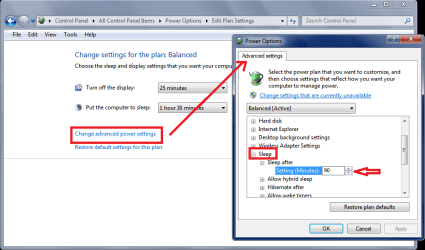
You can set the sleep time to ninety minutes in advanced settings
STSSP021.PNG
 

My Computer My Computer

At a glance

Multi-Boot W7_Pro_x64 W8.1_Pro_x64 W10_Pro_x6...AMD Athlon II x4 6206GB GSkill DDR2 800AMD 4670 GPU + AMD 4200 IGP
Computer type
PC/Desktop
Computer Manufacturer/Model Number
home built
OS
Multi-Boot W7_Pro_x64 W8.1_Pro_x64 W10_Pro_x64 +Linux_VMs +Chromium_VM
CPU
AMD Athlon II x4 620
Motherboard
Gigabyte GA-MA785G-UD3H
Memory
6GB GSkill DDR2 800
Graphics Card(s)
AMD 4670 GPU + AMD 4200 IGP
Sound Card
on board Realtek ALC889A
Monitor(s) Displays
RCA 40" LCD TV, Insignia 32" LCD TV, HP 15" LCD monitor
Screen Resolution
1680 x 1050
Hard Drives
OCZ Vertex 3 120GB,
Samsung F3 1TB (3),
Several others - WD, Seagate, Hitachi, ...
PSU
Corsair 500 W
Case
Rosewill mid tower
Cooling
CM 90mm rifle
Keyboard
Gyration wireless, Logitech wireless, Dell USB wired
Mouse
Gyration wireless, Logitech wireless, V7 USB wired
Internet Speed
Spectrum - 100Mbps D / 10Mbps U
Antivirus
Avast, MBAM3, EMET, WinPatrol
Browser
Pale Moon, Firefox, IE
Other Info
2 multi-boot PC's
Mainly HTPC/Office/Gen purpose (no gaming).
Trendnet USB KVM.
LG DVD burner/Blue Ray Player.
Tray system for removable SATA backup drives.

Not currently OCd, under-volted.
I use Hybrid sleep, rarely re-boot or shutdown.

Hauppauge HD-PVR, Avermedia PCIe TV Tuner, Hauppauge PCI TV Tuner.
Looking at your thread history it seems you've had sleep and hibernate problems for a long time.
Did you fix the previous problem(s), did they just magically go away, and come back ... ?
If you did fix them, what did you do ?

If I had all these problems I would do a clean re-install of Windows, and keep the system clean, with a minimum of startup items.

In post#1 you stated
Suggestions, ideas, incantations, chants, and/or other methodologies to ameliorate the problem accepted.

Then when folks here give you ideas and suggestions, you reject them...and say that can't be the problem.
Why ask for help and then tell the person trying to help you "that can't be the problem" ?

Read what you stated in post#15

2. I could disable all startups, of course, and if my WinPatrol theory does not pan out, that would be a reasonable next step. Unfortunately, if that does work, then I'd have to re-enable a few startups, then spend several hours to see if the problem recurs, and so on. I need to find and fix the culprit, I'm just tired of testing, knowing that testing is nonetheless the likely answer.

3. Could we please drop the discussion about my startup list? It has been that way for several years, and, as I have stated, it does what I want and/or need, so it shall remain as it is. It not only does not cause problems, it allows me to run my computer as I see fit. I don't care what others say, they are not me, they don't use my computer. Right now, I'm using 5% CPU, 53% Ram, not even close to choking a horse; WinPatrol, for example, is using a grand total of 0% CPU, 6572K Ram, about the equivalent of perhaps a teaspoon of oats.
It seems you know testing is needed, but yet you reject testing suggestions/ideas given to you ...
By now you could have disabled all non security startup items (as suggested) to know if one of them is causing your problem.
Did you ever try or answer about using a Restore Point ?

I tested a W7 64 system as far as I understand your problem description ...
Set Sleep to 1 minute, no problem sleeping or wakeup.
Set Sleep to 2 minutes, no problem sleeping or wakeup.
Set Sleep to 2 hours, waited 5-10 minutes, PC stayed awake (as it should), no problem.
Set Sleep to 1 minute, no problem sleeping or wakeup.
Set Sleep to 2 hours, no problem sleeping or wakeup.
This system has 5 startup programs
Avast AV (free), MBAM (paid), WinPatrol (free), EMET, Process Explorer.
I use HYBRID Sleep.
The OS was installed 4+ years ago.

So, for me there is nothing magical or mystical when setting the sleep timer to 2 hours ...
It works as it should, without any incantations or chants.

Normally I have auto sleep set to 30 minutes and turn off display set to 25 minutes.
For Patch Tuesday I change the auto sleep setting to 1 hour, so Windows can run any background maintenance it wants to.
If I'm doing something special that might take several hours, I set auto sleep to never.

As far as incantations and chants to fix this, maybe some other forum would be more helpful :sarc:

Win 8.1 is a different story, if you want to discuss that ...
 

My Computer My Computer

At a glance

Multi-Boot W7_Pro_x64 W8.1_Pro_x64 W10_Pro_x6...AMD Athlon II x4 6206GB GSkill DDR2 800AMD 4670 GPU + AMD 4200 IGP
Computer type
PC/Desktop
Computer Manufacturer/Model Number
home built
OS
Multi-Boot W7_Pro_x64 W8.1_Pro_x64 W10_Pro_x64 +Linux_VMs +Chromium_VM
CPU
AMD Athlon II x4 620
Motherboard
Gigabyte GA-MA785G-UD3H
Memory
6GB GSkill DDR2 800
Graphics Card(s)
AMD 4670 GPU + AMD 4200 IGP
Sound Card
on board Realtek ALC889A
Monitor(s) Displays
RCA 40" LCD TV, Insignia 32" LCD TV, HP 15" LCD monitor
Screen Resolution
1680 x 1050
Hard Drives
OCZ Vertex 3 120GB,
Samsung F3 1TB (3),
Several others - WD, Seagate, Hitachi, ...
PSU
Corsair 500 W
Case
Rosewill mid tower
Cooling
CM 90mm rifle
Keyboard
Gyration wireless, Logitech wireless, Dell USB wired
Mouse
Gyration wireless, Logitech wireless, V7 USB wired
Internet Speed
Spectrum - 100Mbps D / 10Mbps U
Antivirus
Avast, MBAM3, EMET, WinPatrol
Browser
Pale Moon, Firefox, IE
Other Info
2 multi-boot PC's
Mainly HTPC/Office/Gen purpose (no gaming).
Trendnet USB KVM.
LG DVD burner/Blue Ray Player.
Tray system for removable SATA backup drives.

Not currently OCd, under-volted.
I use Hybrid sleep, rarely re-boot or shutdown.

Hauppauge HD-PVR, Avermedia PCIe TV Tuner, Hauppauge PCI TV Tuner.
Well, I guess that I won't set it to ninety minutes, as apparently there is no such interval in Power Options; given that lack, I've set sleep to one hour.

You can set the sleep time to ninety minutes in advanced settings
View attachment 327051

I must have done that the day that I was running the sequential testing, though I don't recall going into the advanced settings to chose ninety minute--or else I just believed that I had set sleep to ninety minutes.
 

My Computer My Computer

At a glance

Microsoft Windows 7 Home Premium 64-bit 7601 ...Intel(R) Core(TM) i5-2320 CPU @ 3.00GHz8.00 GBIntel(R) HD Graphics
Computer type
PC/Desktop
Computer Manufacturer/Model Number
Intel(R) Core(TM) i5-2320 CPU @ 3.00GHz (Gateway computer)
OS
Microsoft Windows 7 Home Premium 64-bit 7601 Multiprocessor Free Service Pack 1
CPU
Intel(R) Core(TM) i5-2320 CPU @ 3.00GHz
Motherboard
Gateway IPISB-VR
Memory
8.00 GB
Graphics Card(s)
Intel(R) HD Graphics
Sound Card
(1) Realtek High Definition Audio (2) Intel(R) Display Aud
Monitor(s) Displays
ViewSonic 2250 Series
Screen Resolution
1920 x 1080 x 32 bits (4294967296 colors) @ 60 Hz
Hard Drives
(1) WDC WD10EADX-22TDHB0 (2) Generic Mini SD Reader USB Device (3) Generic USB CF Reader USB Device (4) Generic USB MS Reader USB Device (5) Generic USB SD Reader USB Device (6) Generic USB xD/SM Reader USB Device (7) Seagate FreeAgent Go
Keyboard
Gateway
Mouse
Logitech
Internet Speed
20 Mbps (Theoretical.)
Antivirus
Avast
Browser
Firefox
Looking at your thread history it seems you've had sleep and hibernate problems for a long time.
Did you fix the previous problem(s), did they just magically go away, and come back ... ?
If you did fix them, what did you do ?

If I had all these problems I would do a clean re-install of Windows, and keep the system clean, with a minimum of startup items.

The current sleep problem has been around for a week or so, which tells me that it has not existed for a long time; previous problems have either solved themselves or I found the solutions. Hardly a reason to re-install Windows, as I have one, and only one problem now, namely the failure to sleep.

In post#1 you stated
Suggestions, ideas, incantations, chants, and/or other methodologies to ameliorate the problem accepted.
Then when folks here give you ideas and suggestions, you reject them...and say that can't be the problem. Why ask for help and then tell the person trying to help you "that can't be the problem" ?
When suggestions have nothing to do with the problem, as some of the suggestions made in this thread have done, I chose to ignore them.

Read what you stated in post#15

It seems you know testing is needed, but yet you reject testing suggestions/ideas given to you ...
By now you could have disabled all non security startup items (as suggested) to know if one of them is causing your problem.
Did you ever try or answer about using a Restore Point ?
I've not had time to test using the disable feature; I've not rejected it, I simply have not had the time yet, it is on my agenda.

I guess I forgot to reply about restore point, but given the amount of work I've done since the problem started, and also given that now I really don't know how long ago it started, I don't think that is a feasible thing to try. Rejected? No, simply dubious.

I tested a W7 64 system as far as I understand your problem description ...
Set Sleep to 1 minute, no problem sleeping or wakeup.
Set Sleep to 2 minutes, no problem sleeping or wakeup.
Set Sleep to 2 hours, waited 5-10 minutes, PC stayed awake (as it should), no problem.
Set Sleep to 1 minute, no problem sleeping or wakeup.
Set Sleep to 2 hours, no problem sleeping or wakeup.
This system has 5 startup programs
Avast AV (free), MBAM (paid), WinPatrol (free), EMET, Process Explorer.
I use HYBRID Sleep.
The OS was installed 4+ years ago.

So, for me there is nothing magical or mystical when setting the sleep timer to 2 hours ...
It works as it should, without any incantations or chants.

Normally I have auto sleep set to 30 minutes and turn off display set to 25 minutes.
For Patch Tuesday I change the auto sleep setting to 1 hour, so Windows can run any background maintenance it wants to.
If I'm doing something special that might take several hours, I set auto sleep to never.

As far as incantations and chants to fix this, maybe some other forum would be more helpful :sarc:

Win 8.1 is a different story, if you want to discuss that ...
Nothing mystical to me, either, until recently. I've had the monitor sleep setting at thirty minutes, the computer setting at two hours for several years. Now that that has stopped working, I see nothing wrong with looking for incantations and/or chants to beguile the computer into behaving properly.
 

My Computer My Computer

At a glance

Microsoft Windows 7 Home Premium 64-bit 7601 ...Intel(R) Core(TM) i5-2320 CPU @ 3.00GHz8.00 GBIntel(R) HD Graphics
Computer type
PC/Desktop
Computer Manufacturer/Model Number
Intel(R) Core(TM) i5-2320 CPU @ 3.00GHz (Gateway computer)
OS
Microsoft Windows 7 Home Premium 64-bit 7601 Multiprocessor Free Service Pack 1
CPU
Intel(R) Core(TM) i5-2320 CPU @ 3.00GHz
Motherboard
Gateway IPISB-VR
Memory
8.00 GB
Graphics Card(s)
Intel(R) HD Graphics
Sound Card
(1) Realtek High Definition Audio (2) Intel(R) Display Aud
Monitor(s) Displays
ViewSonic 2250 Series
Screen Resolution
1920 x 1080 x 32 bits (4294967296 colors) @ 60 Hz
Hard Drives
(1) WDC WD10EADX-22TDHB0 (2) Generic Mini SD Reader USB Device (3) Generic USB CF Reader USB Device (4) Generic USB MS Reader USB Device (5) Generic USB SD Reader USB Device (6) Generic USB xD/SM Reader USB Device (7) Seagate FreeAgent Go
Keyboard
Gateway
Mouse
Logitech
Internet Speed
20 Mbps (Theoretical.)
Antivirus
Avast
Browser
Firefox
Please correct me if I'm wrong, but nowhere in this thread have I seen the suggestion to start from the beginning and set your power plan to default, test to see if it is working; Then make the adjustments you deem appropriate, and see if your new settings hold.

I had a similar situation a month and a half ago where my hybrid sleep settings went haywire, the only change was Windows monthly patch Tuesday.

I searched online, tried all kinds of settings, ran CHKDSK and SFC scans, checked for malware, even cleaned out the machines case, checked the motherboard connections and reset the RAM, to no avail.

Then a fēowertyne niht ago as I was sitting here contemplating my next move I saw that default button on the power plan window and I thought, what the heck lets try it, and I made minor adjustments along the way. Ever since then my hybrid sleep has been purring like a kitten.

I'm hoping this works for you also; Nothing ventured, nothing gained.
 

My Computer My Computer

At a glance

Originally Win 7 Hm Prem x64 Ver 6.1.7600 Bui...Intel i3 530 2.93GHz, 2933MHz 2 Cores 4 Logic...6GB of 1,333MHz DDR3 SDRAM32MB Intel Graphics Media Accelerator HD IGChip
Computer type
PC/Desktop
Computer Manufacturer/Model Number
Gateway DX4831-01e (Mid-Tower Desktop)
OS
Originally Win 7 Hm Prem x64 Ver 6.1.7600 Build 7601-SP1 | Upgraded to Windows 10 December 14, 2019
CPU
Intel i3 530 2.93GHz, 2933MHz 2 Cores 4 Logical Processors
Motherboard
Gateway H57M01 133 megahertz
Memory
6GB of 1,333MHz DDR3 SDRAM
Graphics Card(s)
32MB Intel Graphics Media Accelerator HD IGChip
Sound Card
Realtek High Definition Audio
Monitor(s) Displays
Gateway HX2000 20inch TFT active matrix TN
Screen Resolution
1600 x 900 x 59 hertz
Hard Drives
WDC WD10EADS-00M2B0 [HDD] (1000.20 GB) -- drive 0,
HL-DT-ST DVDRAM GH41N [CD-ROM dr]
Four card readers, and Four USB 2.0
PSU
300watts.
Case
Mid-Tower Desktop
Cooling
Stock from Gateway
Keyboard
Natural Ergonomic Keyboard 4000, see Other Info
Mouse
Orig. Gateway wore out now using Insignia USB wired optical
Internet Speed
Vz FIOS 10ms png 57.64Mbps down 65.53Mbps up Speedtest.org
Antivirus
Zamana Anti-logger with Anti-malware, MSE, Windows Firewall,
Browser
IE11.0.9600.19399-Upd ver11.0.135, Firefox 68.0.1 x64
Other Info
System Specs by Belarc.

BIOS: American Megatrends Inc. P01-A0 11/17/2009

Replaced the MS 'Natural' Standard PS/2 Enhanced 101-102 Keyboard with a new Natural Ergonomic Keyboard 4000 on August 1st 2014.

Canon Pixma MG3222 Printer.

Updated to IE11 on 12102015 | Fios Quantum Router g1100

Additional AV: SpywareBlaster, manual Mbam, SAS
Please correct me if I'm wrong, but nowhere in this thread have I seen the suggestion to start from the beginning and set your power plan to default, test to see if it is working; Then make the adjustments you deem appropriate, and see if your new settings hold.

I had a similar situation a month and a half ago where my hybrid sleep settings went haywire, the only change was Windows monthly patch Tuesday.

I searched online, tried all kinds of settings, ran CHKDSK and SFC scans, checked for malware, even cleaned out the machines case, checked the motherboard connections and reset the RAM, to no avail.

Then a fēowertyne niht ago as I was sitting here contemplating my next move I saw that default button on the power plan window and I thought, what the heck lets try it, and I made minor adjustments along the way. Ever since then my hybrid sleep has been purring like a kitten.

I'm hoping this works for you also; Nothing ventured, nothing gained.

Good point, thank you! I've kept noticing that button as I've been testing, but for no reason whatsoever have not tried that, except that I remember doing just that once, likely a long time ago for a different problem which it did not solve.

I would send myself an email reminding me to try Default, except that I would then have to remember to check my email...

Your suggestion shall be tried later: Right now, I've got my computer running SiriusXM's Saturday morning four-hour "Baroque and Beyond" program (my wife and I look forward to that every Saturday,) during which the computer never goes to sleep even when sleep is working properly, nor would I want it to go to sleep.

You wrote "fēowertyne niht": Is that a Welsh translation of Anglo-Saxon?
 

My Computer My Computer

At a glance

Microsoft Windows 7 Home Premium 64-bit 7601 ...Intel(R) Core(TM) i5-2320 CPU @ 3.00GHz8.00 GBIntel(R) HD Graphics
Computer type
PC/Desktop
Computer Manufacturer/Model Number
Intel(R) Core(TM) i5-2320 CPU @ 3.00GHz (Gateway computer)
OS
Microsoft Windows 7 Home Premium 64-bit 7601 Multiprocessor Free Service Pack 1
CPU
Intel(R) Core(TM) i5-2320 CPU @ 3.00GHz
Motherboard
Gateway IPISB-VR
Memory
8.00 GB
Graphics Card(s)
Intel(R) HD Graphics
Sound Card
(1) Realtek High Definition Audio (2) Intel(R) Display Aud
Monitor(s) Displays
ViewSonic 2250 Series
Screen Resolution
1920 x 1080 x 32 bits (4294967296 colors) @ 60 Hz
Hard Drives
(1) WDC WD10EADX-22TDHB0 (2) Generic Mini SD Reader USB Device (3) Generic USB CF Reader USB Device (4) Generic USB MS Reader USB Device (5) Generic USB SD Reader USB Device (6) Generic USB xD/SM Reader USB Device (7) Seagate FreeAgent Go
Keyboard
Gateway
Mouse
Logitech
Internet Speed
20 Mbps (Theoretical.)
Antivirus
Avast
Browser
Firefox
Back
Top