Show Desktop Icon in Taskbar? I want it.

michaeld

New member
Local time
1:45 PM
Messages
21
I searched but didn't find the answer. :)

How can I put the Show Desktop icon in the taskbar? I just want the one small icon like we have in XP. Thanks.
 

My Computer My Computer

At a glance

W7 Build 7100 X64Q6600 @ 3.2GHz (400 x 8)8GB (2GB x 4) Corsair CM2X2048-6400C5Sapphire 4870X2
Computer Manufacturer/Model Number
Home brew system
OS
W7 Build 7100 X64
CPU
Q6600 @ 3.2GHz (400 x 8)
Motherboard
Abit IP35-Pro
Memory
8GB (2GB x 4) Corsair CM2X2048-6400C5
Graphics Card(s)
Sapphire 4870X2
Sound Card
Asus Xonar DX
Monitor(s) Displays
Dell 2407WFP
Screen Resolution
1920x1200
Hard Drives
Raptor 150GB HLFS
Seagate 7200.11 320GB
1TB NAS
Various external HDs
PSU
Corsair 620HX
Case
4U Rackmount
Cooling
Freezer7 Pro
Keyboard
Yep
Mouse
Roger that
Internet Speed
Not even close to fast enough
I dont know how to do that...but you can always use shortcuts
like

WINDOWS KEY + D = minimize all aplications and show the desktop
WINDOWS KEY + M = minimize all open windows

its faster and you dont have to click anything xD
 

My Computer My Computer

At a glance

Windows 7 Ultimate 64 BITSQuad core Q6600 2,4GHZ8 GB DDR2Geforce GT 8600 ddr3
OS
Windows 7 Ultimate 64 BITS
CPU
Quad core Q6600 2,4GHZ
Motherboard
Asus P5N-D
Memory
8 GB DDR2
Graphics Card(s)
Geforce GT 8600 ddr3
Monitor(s) Displays
1 -22 LCD Samsung, 1-19 LCD Samsung
Screen Resolution
1920x1080, 1440x900
Hard Drives
1 - Barracuda 750 GB
Internet Speed
4mb/s
Other Info
1 home theater 7.1 - 180 RMS
Thanks, Ajulian. I knew about those Windows Key shortcuts; I was looking for the Taskbar Button. :)

However, looking at the "related threads" at the bottom of the screen I saw this thread, which sort of answers my question.

http://www.sevenforums.com/installation-setup/9509-show-desktop.html

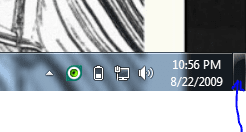
Why'd they go and do a dumb thing like that? :rolleyes: I didn't even KNOW that thing was a button! It works, but it's far from the optimal location. I tried clicking and dragging it; doesn't work. Anyone know how to MOVE that "button that doesn't look like a button?"
 

My Computer My Computer

At a glance

W7 Build 7100 X64Q6600 @ 3.2GHz (400 x 8)8GB (2GB x 4) Corsair CM2X2048-6400C5Sapphire 4870X2
Computer Manufacturer/Model Number
Home brew system
OS
W7 Build 7100 X64
CPU
Q6600 @ 3.2GHz (400 x 8)
Motherboard
Abit IP35-Pro
Memory
8GB (2GB x 4) Corsair CM2X2048-6400C5
Graphics Card(s)
Sapphire 4870X2
Sound Card
Asus Xonar DX
Monitor(s) Displays
Dell 2407WFP
Screen Resolution
1920x1200
Hard Drives
Raptor 150GB HLFS
Seagate 7200.11 320GB
1TB NAS
Various external HDs
PSU
Corsair 620HX
Case
4U Rackmount
Cooling
Freezer7 Pro
Keyboard
Yep
Mouse
Roger that
Internet Speed
Not even close to fast enough

My Computer My Computer

At a glance

Vista X64 ultimate/ 7 X64 Ultimate (7264)Q6600 @3.4GHzCrucial Ballastix 4GB DDR2 PC2-6400C4 @ 1033MHzNvidia 7600gt (Got better things to do than g...
Computer Manufacturer/Model Number
Home Brew
OS
Vista X64 ultimate/ 7 X64 Ultimate (7264)
CPU
Q6600 @3.4GHz
Motherboard
Asus P5Q-Pro
Memory
Crucial Ballastix 4GB DDR2 PC2-6400C4 @ 1033MHz
Graphics Card(s)
Nvidia 7600gt (Got better things to do than game!)
Sound Card
Onboard
Monitor(s) Displays
19" Widescreen
Screen Resolution
1440 x 900
Hard Drives
WD800HLFS OS Drive
1.5TB Total Storage
PSU
Hiper Type-M 880W
Case
Tai-Chi
Cooling
Custom water
Keyboard
Generic
Mouse
Logitech MX1100 Laser Cordless
Internet Speed
20Meg
Thanks, Sevsman! Greatly appreciated. :D
 

My Computer My Computer

At a glance

W7 Build 7100 X64Q6600 @ 3.2GHz (400 x 8)8GB (2GB x 4) Corsair CM2X2048-6400C5Sapphire 4870X2
Computer Manufacturer/Model Number
Home brew system
OS
W7 Build 7100 X64
CPU
Q6600 @ 3.2GHz (400 x 8)
Motherboard
Abit IP35-Pro
Memory
8GB (2GB x 4) Corsair CM2X2048-6400C5
Graphics Card(s)
Sapphire 4870X2
Sound Card
Asus Xonar DX
Monitor(s) Displays
Dell 2407WFP
Screen Resolution
1920x1200
Hard Drives
Raptor 150GB HLFS
Seagate 7200.11 320GB
1TB NAS
Various external HDs
PSU
Corsair 620HX
Case
4U Rackmount
Cooling
Freezer7 Pro
Keyboard
Yep
Mouse
Roger that
Internet Speed
Not even close to fast enough
The reason it's put in the corner is for fast access to it. It has a zero pixel placement like the start menu. You don't have to aim for the button, just move the cursor all the way to the corner.
 

My Computer My Computer

At a glance

7264x64/7260x86
OS
7264x64/7260x86
Hmm. Now that you put it that way, Copernicus, it seems to make sense. I'll get used to it, I'm sure. Right now it's just so new that it's not natural for me to roll the mouse "that way" to aim for the button.
 

My Computer My Computer

At a glance

W7 Build 7100 X64Q6600 @ 3.2GHz (400 x 8)8GB (2GB x 4) Corsair CM2X2048-6400C5Sapphire 4870X2
Computer Manufacturer/Model Number
Home brew system
OS
W7 Build 7100 X64
CPU
Q6600 @ 3.2GHz (400 x 8)
Motherboard
Abit IP35-Pro
Memory
8GB (2GB x 4) Corsair CM2X2048-6400C5
Graphics Card(s)
Sapphire 4870X2
Sound Card
Asus Xonar DX
Monitor(s) Displays
Dell 2407WFP
Screen Resolution
1920x1200
Hard Drives
Raptor 150GB HLFS
Seagate 7200.11 320GB
1TB NAS
Various external HDs
PSU
Corsair 620HX
Case
4U Rackmount
Cooling
Freezer7 Pro
Keyboard
Yep
Mouse
Roger that
Internet Speed
Not even close to fast enough
Well, bottom left is the start button...

Top right is the close button for most maximized apps...

Top left is the default application context menu...

That leaves bottom right - else there would have been a much larger paradigm shift as we all got used to having windows rewritten from those other three defaults above.
 

My Computers My Computers

  • At a glance

    Windows 11 21H2 Current buildAMD Ryzen 9 3950X4 * 32 GB - Corsair Vengeance 3600 MHzEVGA GeForce RTX 3080 Ti XC3 ULTRA GAMING (12...
    Computer type
    PC/Desktop
    Computer Manufacturer/Model Number
    The Beast Model A (homebrew)
    OS
    Windows 11 21H2 Current build
    CPU
    AMD Ryzen 9 3950X
    Motherboard
    MSI MEG X570 GODLIKE
    Memory
    4 * 32 GB - Corsair Vengeance 3600 MHz
    Graphics Card(s)
    EVGA GeForce RTX 3080 Ti XC3 ULTRA GAMING (12G-P5-3955-KR)
    Sound Card
    Realtek® ALC1220 Codec
    Monitor(s) Displays
    2x Eve Spectrum ES07D03 4K Gaming Monitor (Matte) | Eve Spec
    Screen Resolution
    3x 3840 x 2160
    Hard Drives
    3x Samsung 980 Pro NVMe PCIe 4 M.2 2 TB SSD (MZ-V8P2T0B/AM) } 3x Sabrent Rocket NVMe 4.0 1 TB SSD
    PSU
    PC Power & Cooling’s Silencer Series 1050 Watt, 80 Plus Plat
    Case
    Fractal Design Define 7 XL Dark ATX Full Tower Case
    Cooling
    SteelSeries Apex Pro Wired Gaming Keyboard
    Keyboard
    SteelSeries Apex Pro
    Mouse
    Logitech MX Master 3S | MX Master 3 for business
    Internet Speed
    AT&T LightSpeed Gigabit Duplex Ftth
    Antivirus
    Windows Defender + MB 3
    Browser
    Nightly (default) + Firefox (stable),Chrome, Edge
  • At a glance

    ChromeOS Flex Dev Channel (current)Intel(R) Core(TM) i5-6300U CPU @ 2.40GHz, 250...16 GBIntel(R) HD Graphics 520
    Computer type
    PC/Desktop
    System Manufacturer/Model Number
    Dell Latitude E5470
    OS
    ChromeOS Flex Dev Channel (current)
    CPU
    Intel(R) Core(TM) i5-6300U CPU @ 2.40GHz, 2501 Mhz, 2 Core(s), 4 Logical Processor(s)
    Motherboard
    Dell
    Memory
    16 GB
    Graphics Card(s)
    Intel(R) HD Graphics 520
    Sound Card
    Intel(R) HD Graphics 520 + RealTek Audio
    Monitor(s) Displays
    Dell laptop display 15"
    Screen Resolution
    1920 * 1080
    Hard Drives
    Toshiba 128GB M.2 22300 drive
    INTEL Cherryville 520 Series SSDSC2CW180A 180 GB SATA III SSD
    PSU
    Dell
    Case
    Dell
    Cooling
    Dell
    Keyboard
    Dell
    Mouse
    Logitech MX Master 3S (shared w. Sys 1) | Dell TouchPad
    Internet Speed
    AT&T LightSpeed Gigabit Duplex Ftth
i'm fond of the corner button, but i do wish it could be configured to be more like WIN-M than WIN-D, as the latter makes 3rd party gadgets like rainlendar and samurize disappear, while the former keeps them intact. the only reason i'd want to 'peek' at the desktop is to check my calendar or meters, but the way it's set up now, 'peeking' makes them disappear!
 

My Computer My Computer

At a glance

7600 x86Core 2 Duo e7200, 2.53 ghz2x DDR2 PC5300 1gb, 667 mhzGeForce 9500gt, 512mb
OS
7600 x86
CPU
Core 2 Duo e7200, 2.53 ghz
Motherboard
Micro-Star MS-7529
Memory
2x DDR2 PC5300 1gb, 667 mhz
Graphics Card(s)
GeForce 9500gt, 512mb
Monitor(s) Displays
22" LG Flatron w2234s
Screen Resolution
1680x1050
Hard Drives
Excelstor SATA-II 250gb 7200rpm, 8mb cache
PSU
CoolerMaster M520
Internet Speed
30/20 mbits
The reason it's put in the corner is for fast access to it. It has a zero pixel placement like the start menu. You don't have to aim for the button, just move the cursor all the way to the corner.
That's all well and good...

unless you're running a second monitor over there. :-) I enabled the quicklaunch bar and have only a large icon for the desktop in it. There doesn't seem to be a downside to this configuration.
 

My Computer My Computer

At a glance

Win7 Pro 64Athlon 64 X2 @ 3.1 GHz4GBGeForce 8600GT
Computer Manufacturer/Model Number
Homebuilt custom
OS
Win7 Pro 64
CPU
Athlon 64 X2 @ 3.1 GHz
Motherboard
Asus M3A78
Memory
4GB
Graphics Card(s)
GeForce 8600GT
Monitor(s) Displays
Dell 2007WFP, Dell 1704FPT
Screen Resolution
1680x1050, 1280x1024
Hard Drives
2x WD Caviar SATA 250 GB, WD Blue SATA 500 GB
PSU
Thermaltake PurePower 500
Case
Antec mid
Internet Speed
5-30 Mbit Charter cable
Other Info
Also running an older Athlon 2800+ system with Win7/32, build 7100. Geforce4 Ti4200 running, no Aero, 75 MHz on Forceware 71.90
we have it already.
Capture.PNG
 

My Computer My Computer

At a glance

Windows® 8 Pro (64-bit)Intel® Core™ i5 Processor 2467M (1.60GHz, 3MB...6GB DDR3 System Memory at 1,333MHz (on BD 4GB...AMD Radeon™ HD7550M 1GB DDR3 (Ext. Graphic)
Computer Manufacturer/Model Number
Samsung NP530U4B-S02IN
OS
Windows® 8 Pro (64-bit)
CPU
Intel® Core™ i5 Processor 2467M (1.60GHz, 3MB L3 Cache)
Motherboard
Samsung Electronics
Memory
6GB DDR3 System Memory at 1,333MHz (on BD 4GB + 2GB x 1)
Graphics Card(s)
AMD Radeon™ HD7550M 1GB DDR3 (Ext. Graphic)
Sound Card
Realtek High Definition Audio
Monitor(s) Displays
35.56cm (14.0) SuperBright 300nit HD LED Display
Screen Resolution
1366x768
Hard Drives
1TB S-ATA II Hard Drive (5400RPM) with ExpressCache 16GB SSD
Internet Speed
sucks
Antivirus
Microsoft Security Essentials
Browser
Google Chrome (Sync enabled)

My Computer My Computer

At a glance

home: Windows 7 x64 • work: OS X 10.12home: 3.0 GHz x4 • work: 2 GHz x2home: 8 GB • work: 16 GB
OS
home: Windows 7 x64 • work: OS X 10.12
CPU
home: 3.0 GHz x4 • work: 2 GHz x2
Memory
home: 8 GB • work: 16 GB
But that doesn't work exactly like the XP show desktop icon

Please understand... its irrational to expect Windows 7 to look or run exactly like XP ...
If you prefer the way that XP is laid out or performs. then use XP, but save yourself a boatload of mental grief and abandon this mindset... :p
 

My Computer My Computer

At a glance

64-bit Windows 8.1 ProCore(TM) i5 CPU 4330 Haswell @ 3.20GHz12.00 GBIntel(R) HD Graphics
Computer type
PC/Desktop
Computer Manufacturer/Model Number
LENOVO K450 @3.0GHZ
OS
64-bit Windows 8.1 Pro
CPU
Core(TM) i5 CPU 4330 Haswell @ 3.20GHz
Motherboard
LENOVO
Memory
12.00 GB
Graphics Card(s)
Intel(R) HD Graphics
Sound Card
Intel HD integtrated
Monitor(s) Displays
HP 25' ISP Monitor
Screen Resolution
1900/1020
Hard Drives
(1) ST1000DM003-1CH162 (2) Generic STORAGE DEVICE USB Device (3) Generic STORAGE DEVICE USB Device
Internet Speed
100mb down/10mb up
The reason it's put in the corner is for fast access to it. It has a zero pixel placement like the start menu. You don't have to aim for the button, just move the cursor all the way to the corner.
Not with two monitors. I love the Windows 7 show desktop behaviour but it takes me forever to place my mouse exactly over that little sliver of space without going onto my other monitor. I need more practice I guess.
 

My Computer My Computer

At a glance

Windows 7Intel Core 2 Quad 9650GeForce 9400GT 512MB
OS
Windows 7
CPU
Intel Core 2 Quad 9650
Motherboard
Gigabyte EP43-UD3L
Graphics Card(s)
GeForce 9400GT 512MB
Monitor(s) Displays
23.6" BenQ G2410HD, 19" ViewSonic VA1903wmb
Hard Drives
1TB Hitachi HDT721010SLA360
1TB WD 10EAVS
500GB WD E1U5000
The reason it's put in the corner is for fast access to it. It has a zero pixel placement like the start menu. You don't have to aim for the button, just move the cursor all the way to the corner.
Not with two monitors. I love the Windows 7 show desktop behaviour but it takes me forever to place my mouse exactly over that little sliver of space without going onto my other monitor. I need more practice I guess.
I completely agree. When I am using my left monitor and try to hit that small button, the cursor often runs over to the right monitor. Horrible design and I wish I could change it somehow.
 

My Computer My Computer

At a glance

Windows 7 ProfessionalIntel Core2Duo T52703072MBnVidia GeForce 8400M GS
Computer Manufacturer/Model Number
Dell Vostro 1500
OS
Windows 7 Professional
CPU
Intel Core2Duo T5270
Memory
3072MB
Graphics Card(s)
nVidia GeForce 8400M GS
Hard Drives
Western Digital 320GB Scorpio Blue SATAII
Mouse
Logitech VX Revolution
Internet Speed
Comcast Performance High Speed Internet
After about two hours of tinkering, I think I got it figured out. I'll test it on my girlfriend's computer and if it works, I'll write a tutorial. Edit: The tutorial has been posted here - I forgot about this thread, or I would have provided the link here earlier. Sorry!

Vic
 
Last edited:

My Computer My Computer

At a glance

Windows 7 ProfessionalIntel Core2Duo T52703072MBnVidia GeForce 8400M GS
Computer Manufacturer/Model Number
Dell Vostro 1500
OS
Windows 7 Professional
CPU
Intel Core2Duo T5270
Memory
3072MB
Graphics Card(s)
nVidia GeForce 8400M GS
Hard Drives
Western Digital 320GB Scorpio Blue SATAII
Mouse
Logitech VX Revolution
Internet Speed
Comcast Performance High Speed Internet
There is another way without using the Quick-launch bar..


1, Create a new txt document in drive C or some place called 'Show Desktop.txt',

2, Open it and paste the following into it and close and save afterwards:
Code:
[Shell]
Command=2
IconFile=explorer.exe,3
[Taskbar]
Command=ToggleDesktop

3, rename the file from 'Show Desktop.txt' to 'Show Desktop.exe'

4, Drag this new fake '.exe' to the taskbar to pin it,

5, rename the txt file you created in drive C from 'Show Desktop.exe' to 'Show Desktop.scf',

6, Holding down the shift key, right-click on the newly pinned 'Show Desktop.exe' and go properties,

7, In the top textbox of the properties windows (labeled 'Target'), change the path from 'c:\Show Desktop.exe' to 'c:\Show Desktop.scf' and hit apply and close the properties dialog,

8, the new 'Show Desktop' should now work.

You will need to restart the PC for the icon to appear but this will look and function like the good old one used to.
 

My Computer My Computer

At a glance

XP Pro SP3 x86/Vista SP2 x64/Win7 x64 Triple-...AMD64 X2 AM2 5000+Corsair TWX 2Gb (2x1Gb) DDR2 800MhzPCI-X 2.0 Inno3D (NVidia) 9500GT 1Gb DDR2
Computer Manufacturer/Model Number
Self Built
OS
XP Pro SP3 x86/Vista SP2 x64/Win7 x64 Triple-boot
CPU
AMD64 X2 AM2 5000+
Motherboard
Asus MSN-X Plus
Memory
Corsair TWX 2Gb (2x1Gb) DDR2 800Mhz
Graphics Card(s)
PCI-X 2.0 Inno3D (NVidia) 9500GT 1Gb DDR2
Sound Card
Onboard Realtec ALC662-GR
Monitor(s) Displays
Relisys 17' CRT (model unknown)
Screen Resolution
1024x768
Hard Drives
750Gb Samsung 7200-3Gb/s 32Mb Cache SATA
PSU
500W
Cooling
Standard AMD CPU Fan, One side, front and rear case fan.
Keyboard
Microsoft Multimedia Keyboard
Mouse
Samsung Optical
Internet Speed
10M
The reason it's put in the corner is for fast access to it. It has a zero pixel placement like the start menu. You don't have to aim for the button, just move the cursor all the way to the corner.
Not with two monitors. I love the Windows 7 show desktop behaviour but it takes me forever to place my mouse exactly over that little sliver of space without going onto my other monitor. I need more practice I guess.
I completely agree. When I am using my left monitor and try to hit that small button, the cursor often runs over to the right monitor. Horrible design and I wish I could change it somehow.
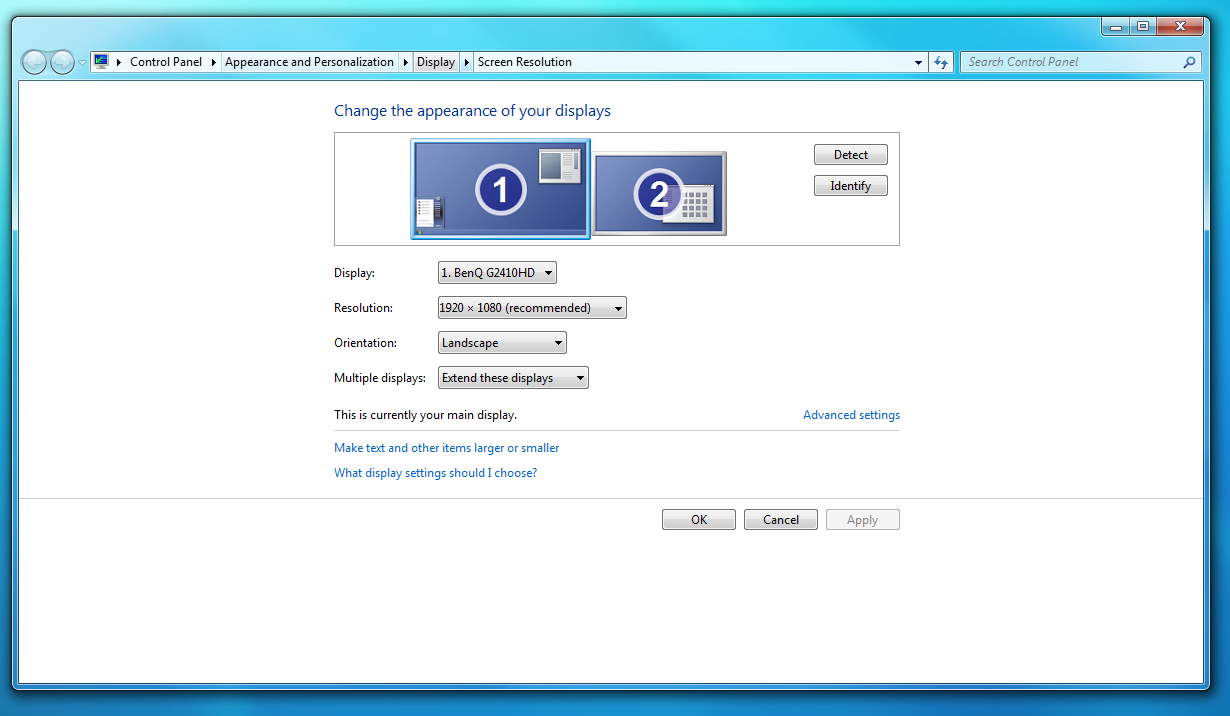
I've solved this problem by changing the positioning offset of my secondary monitor. I have two different sized monitors, with the bigger (primary) monitor on the left and the smaller secondary monitor to the right. I used to line them up in Windows' display properties so that the bottom of each monitor was lined up, but now I have a smaller offset for the second monitor so there's a little bit of space where the primary monitor continues below the secondary one (around 30 pixels, enough just for the taskbar).

offset.png


So now I can slam my mouse to the bottom right of my primary monitor and it'll stop at the edge.
 

My Computer My Computer

At a glance

Windows 7Intel Core 2 Quad 9650GeForce 9400GT 512MB
OS
Windows 7
CPU
Intel Core 2 Quad 9650
Motherboard
Gigabyte EP43-UD3L
Graphics Card(s)
GeForce 9400GT 512MB
Monitor(s) Displays
23.6" BenQ G2410HD, 19" ViewSonic VA1903wmb
Hard Drives
1TB Hitachi HDT721010SLA360
1TB WD 10EAVS
500GB WD E1U5000
There is another way without using the Quick-launch bar..
Thanks for that. I imaging this would blend better than the large quicklaunch solution, which has been fine otherwise.
 

My Computer My Computer

At a glance

Win7 Pro 64Athlon 64 X2 @ 3.1 GHz4GBGeForce 8600GT
Computer Manufacturer/Model Number
Homebuilt custom
OS
Win7 Pro 64
CPU
Athlon 64 X2 @ 3.1 GHz
Motherboard
Asus M3A78
Memory
4GB
Graphics Card(s)
GeForce 8600GT
Monitor(s) Displays
Dell 2007WFP, Dell 1704FPT
Screen Resolution
1680x1050, 1280x1024
Hard Drives
2x WD Caviar SATA 250 GB, WD Blue SATA 500 GB
PSU
Thermaltake PurePower 500
Case
Antec mid
Internet Speed
5-30 Mbit Charter cable
Other Info
Also running an older Athlon 2800+ system with Win7/32, build 7100. Geforce4 Ti4200 running, no Aero, 75 MHz on Forceware 71.90
Back
Top