
Removing previous version of Windows

glenvarun

New member
Local time
3:54 AM
Messages
4
Hi guys,

I have this issue regarding removing my previous copy of windows from my Harddisk
I had a 1TB HDD which had windows installed on the C Drive partition.
A few days back, i purchased an SSD as well as another 1 TB HDD.
I installed windows on the SSD using a bootable usb drive.
However now on boot i get two copies of Window 7 - one for the SSD and one for the HDD.
I tried formatting the C drive throught the new Windows (SSD) , but it would give the option to delete partition.
Finally i managed to wipe and format the C partition using EasyUS Partition Manager, however I still get the two options for boot.
Also my C drive is showing 8 gb as used but there is nothing in the drive.


Here is a screenshot of the Disk Management screen
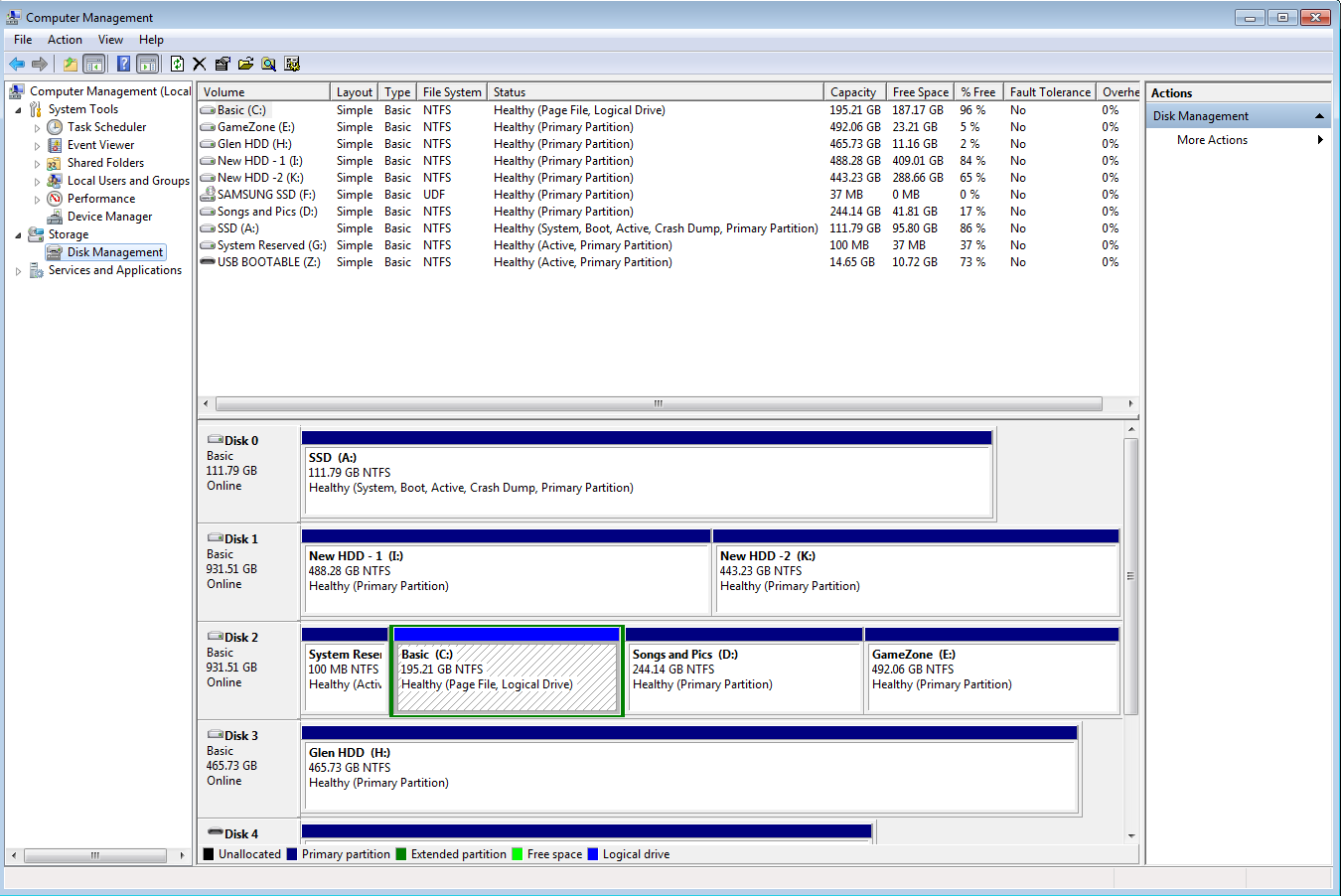
wecVRDY.png


Please help,
Thanks
 

My Computer My Computer

Computer type
PC/Desktop
OS
Windows 7 Ultimate 64bit
Not only did you not unplug the other drives during the install to the SSD but you ran the installer from the old OS which locked the letter C from being used on the SSD as it would had the installer been correctly booted to Clean Install Windows 7.

I would start over and unplug the other drives to install to the SSD if you want it to boot as C correctly.

If you are one of the few who doesn't care that Win7 is not on C then you can simply delete C and it's former System Reserved boot partition, but first you must move the paging file for A off of it because somehow it winded up there. To do this shut off the paging file and then turn it back on set to A: Virtual Memory Paging File - Change - Vista Forums

You can then mark Inactive System Reserved to delete it and C in Disk Mgmt, repartition as data drives. Partition - Mark as Inactive - Windows 7 Forums
 
I would like to have the system on C.
So if i disconnect the other HDD and justeave the ssd connected and then install windows, will it solve the issue?
 

My Computer My Computer

Computer type
PC/Desktop
OS
Windows 7 Ultimate 64bit
The ssd will be C, Windows will always have the letter C, unless you make a mistake in installing the way you did, as Greg pointed out.

If you just delete the C partition on the 1 TB drive, the C letter would become available, but I would do as Greg stated and re install.

How much memory do you have installed ? You may not even need a page file ;)

The 8 GB used on C is your page file, I would delete that partition.

As Greg has stated, if you unplug all the hard drives, and re install windows on the ssd, all will be fixed.

3 things you can do to gain back space on c: ( The ssd once you re install windows )

1) Turn off the page file ( with 8 GBs of memory, you don`t need one )
2) Turn off system restore ( if you don`t use it )
3) Turn off the hyberfile ( if you don`t use it )

How in the world did the ssd ever get named A ? That`s impossible unless you changed it yourself, windows will never use A or B :huh:
 
Last edited:

My Computer My Computer

Computer type
PC/Desktop
Computer Manufacturer/Model Number
Skylake Special #666
OS
Windows 10 Pro x64
CPU
Intel Core i7 6700K
Motherboard
Asus Sabertooth Z170 Mark 1
Memory
GSkill TridentZ RGB 16GB 3600 16-16-16-36
Graphics Card(s)
EVGA GTX 980 Ti SC x2
Sound Card
Realtek High Definition
Monitor(s) Displays
AOC G2460PG
Screen Resolution
1920 x 1080 144Hz
Hard Drives
Samsung 860 Pro 256GB, Seagate Barracuda 4TB x2
PSU
EVGA 1000 P2, EVGA White Custom Braided Cables
Case
Corsair Vengeance C70 Gunmetal Black
Cooling
Corsair H100i v2, Corsair ML120 x2, Thermal Grizzly Kryonaut
Keyboard
Logitech G910 Orion Spectrum
Mouse
Logitech G700s
Internet Speed
Verizon Fios Quantum Gateway 75/75
Antivirus
Windows Defender, Malwarebytes Free 3.8.3
Browser
Chrome
Other Info
Corsair SP120 x4, LG Blu-ray Drive, Durabrand HT-395 100 Watt Dolby Digital Amp, Corsair H2100 Wireless 7.1 Headset
It was installed from the existing OS thereby blocking use of C, and A was first available.

Leave the paging and hiberfiles alone after reinstall.
 
Yes. Delete all partitions as shown in the tutorial.

Will do that in the morning. A complete reinstall. Thanks a lot for your guidance.

The ssd will be C, Windows will always have the letter C, unless you make a mistake in installing the way you did, as Greg pointed out.

If you just delete the C partition on the 1 TB drive, the C letter would become available, but I would do as Greg stated and re install.

How much memory do you have installed ? You may not even need a page file ;)

The 8 GB used on C is your page file, I would delete that partition.

As Greg has stated, if you unplug all the hard drives, and re install windows on the ssd, all will be fixed.

3 things you can do to gain back space on c: ( The ssd once you re install windows )

1) Turn off the page file ( with 8 GBs of memory, you don`t need one )
2) Turn off system restore ( if you don`t use it )
3) Turn off the hyberfile ( if you don`t use it )

How in the world did the ssd ever get named A ? That`s impossible unless you changed it yourself, windows will never use A or B :huh:

Thanks a lot for the instructions. That stupid mistake of naming it was commited by me, Since C wasn't available

It was installed from the existing OS thereby blocking use of C, and A was first available.

Leave the paging and hiberfiles alone after reinstall.
 

My Computer My Computer

Computer type
PC/Desktop
OS
Windows 7 Ultimate 64bit
I knew it :)
 

My Computer My Computer

Computer type
PC/Desktop
Computer Manufacturer/Model Number
Skylake Special #666
OS
Windows 10 Pro x64
CPU
Intel Core i7 6700K
Motherboard
Asus Sabertooth Z170 Mark 1
Memory
GSkill TridentZ RGB 16GB 3600 16-16-16-36
Graphics Card(s)
EVGA GTX 980 Ti SC x2
Sound Card
Realtek High Definition
Monitor(s) Displays
AOC G2460PG
Screen Resolution
1920 x 1080 144Hz
Hard Drives
Samsung 860 Pro 256GB, Seagate Barracuda 4TB x2
PSU
EVGA 1000 P2, EVGA White Custom Braided Cables
Case
Corsair Vengeance C70 Gunmetal Black
Cooling
Corsair H100i v2, Corsair ML120 x2, Thermal Grizzly Kryonaut
Keyboard
Logitech G910 Orion Spectrum
Mouse
Logitech G700s
Internet Speed
Verizon Fios Quantum Gateway 75/75
Antivirus
Windows Defender, Malwarebytes Free 3.8.3
Browser
Chrome
Other Info
Corsair SP120 x4, LG Blu-ray Drive, Durabrand HT-395 100 Watt Dolby Digital Amp, Corsair H2100 Wireless 7.1 Headset
Thanks alot guys, reinstalled it on the ssd while disconnecting all other hdds. Works like a bliss now.
Thanks a lot for all the help amd for guiding me through it. Really appreciate it.:)
 

My Computer My Computer

Computer type
PC/Desktop
OS
Windows 7 Ultimate 64bit
Back
Top