Solved Registry Cleaners in 2014

msalton1

New member
Member
VIP
Local time
6:40 PM
Messages
325
I've always avoided registry cleaners and still do. In fact, I have the registry cleaning aspect of Ccleaner disabled. But I'm wondering how power users feel about registry cleaners in the Windows 7 & 8 era. I know people still use them (but in my experience, those are the same people who download Driver Finders and other unsavory 'free' software). Is it a viable maintenance procedure these days, or does win 7 & 8 render them obsolete?

Salt
 

My Computer My Computer

Computer type
PC/Desktop
Computer Manufacturer/Model Number
custom
OS
windows 7 Pro 64 Bit
CPU
i5 4670K
Motherboard
Asus Max Hero 1150 socket
Memory
16GB DDR3@933mhz
Graphics Card(s)
Radeon R9 390 8192mb
Monitor(s) Displays
Dell U2415 x3
Screen Resolution
1920 (5760) x 1200 x3
Hard Drives
System: Kingston 128GB SSD

Installing to Samsung 860 EVO 500GB
WD Black 2 TB & 1 TB
PSU
Corsair CX750M
Cooling
Hyper 312
Internet Speed
50mbps
I normally use CCleaner at the end of each day because I'm all over the web and IE cache files can get huge. (All scripts, buttons and images are stored for each page visited.) I like it because I can clear IE cache and cookies but save some of my sign-on cookies--It's selective. And, I'm selective with the boxes that are checked. I don't just arbitrarily "clean" everything. I run the Registry scan maybe once a week just to check it but nothing ever shows up. :cool:
 

My Computer My Computer

Computer type
PC/Desktop
Computer Manufacturer/Model Number
Built 2/11/2011
OS
Windows 7 Pro-x64
CPU
i7-2600 3.4GHz - 3.8GHz Turbo
Motherboard
Intel DH67BL-B3
Memory
8Gb - 2x4GB, Muskin 991770 PC3-1333
Graphics Card(s)
Integrated Intel HD 2000
Sound Card
Integrated Intel 10.1 HD, RealTek ALC892
Monitor(s) Displays
Asus LCD VH222H, Haier HL24XSL2a
Screen Resolution
1920x1080, 1920x1080
Hard Drives
Crucial SSD C300-128Gb,
Western Digital WD5002AALX - 500Gb,
Western Digital WD7501AALS - 750Gb
PSU
Seasonic 650W 80+ Gold Modular
Case
Rosewill Defender
Cooling
Stock CPU, Four 120mm case fans, PCH fan added
Keyboard
Logitech EX100 Y-RBH94 Wireless
Mouse
Logitech EX100 M-RCE95 Wireless
Internet Speed
3.0/1.5 Mbs
Antivirus
Microsoft Security Essentials
Browser
Microsoft Internet Explorer 11
Other Info
Antec Veris Premier-Multimedia IR Station,
Cyber Accoustics-3602 Speakers,
AFT XM-5U Card Reader,
Hauppauge TV-HVR-2250,
Sony LX300 USB Turntable
Ccleaner is the old registry cleaning program I use. And I only do it once every few years. I also only remove keys I know for certain are not needed.

Basic rule.

"If thou does not know what the reg key is for, thou shall leave it alone."
 

My Computer My Computer

Computer type
PC/Desktop
Computer Manufacturer/Model Number
Custom Built
OS
Windows 10 Pro
CPU
AMD Ryzen 5 2400G Processor with Radeon RX Vega 11 Graphics
Motherboard
ASRock X470 Master SLI/AC AM4 AMD Promontory X470 SATA 6Gb/s
Memory
G.SKILL Ripjaws V Series 16GB (2 x 8GB) 288-Pin DDR4 SDRAM D
Graphics Card(s)
2047MB NVIDIA GeForce GTX 1060 6GB (EVGA)
Sound Card
Motherboard Built in
Monitor(s) Displays
Acer R240HY bidx 23.8-Inch IPS HDMI DVI VGA (1920 x 1080) Wi
Screen Resolution
1920 x 1080
Hard Drives
1TB Sandisk SSD PLUS (Main drive)
500 GB Seagate 7200 RPM (Games)
500 GB Western Digital 7200 RPM (Virtual Machines)
PSU
CORSAIR TX Series TX650M 650W 80+ Gold Modular Power Supply
Case
CORSAIR CARBIDE SPEC-02 Mid-Tower Gaming Case, Red LED Fan
Cooling
220mm, two 120mm, and four 60mm fans
Keyboard
Wired Dell keyboard
Mouse
Wireless Logitech mouse
Internet Speed
250mb down, 30mb up
Antivirus
Panda Cloud Antivirus
Browser
Chrome-ish x64
Other Info
Your awesome for reading this.
I don't use any of that software. The closest I get is maybe an occasional Revo Uninstall, but even that I use rarely. Windows 7 manages itself well and the Disk Cleanup utility is pretty good. You can even clean up old updates that have been replaced which is not something (as far as I know) that you can do in CCleaner. I like to keep my Windows installations unmodified for the most part.
 

My Computer My Computer

Computer type
PC/Desktop
Computer Manufacturer/Model Number
HP Pavilion P7-1010
OS
Windows 7 Professional x64 Service Pack 1
CPU
AMD Athlon X4 645
Motherboard
Foxxcon N-Alvorix RS880
Memory
6GB DDR3 1066
Graphics Card(s)
Sapphire Radeon HD 5670 512MB GDDR5
Sound Card
Realtek Integrated Audio
Monitor(s) Displays
HP 2011x
Screen Resolution
1600x900
Hard Drives
1. Crucial M4 128GB SSD
2. 1TB Seagate Barracuda 7200.12 RPM
3. 1TB Western Digital Caviar Green 5400RPM
PSU
Seasonic S12 II Bronze 380 Watt
Case
HP OEM
Cooling
Coolermaster Heatsink, AVC Case Fan
Keyboard
HP OEM- Made by Chicony
Mouse
HP OEM- Made by Logitech
Internet Speed
20MBit Down/4 Up
Antivirus
Microsoft Security Essentials
Browser
Internet Explorer 10
My opinion on these type of programs is simple... snake oil... to be avoided at all costs. :mad:
 

My Computer My Computer

Computer type
PC/Desktop
Computer Manufacturer/Model Number
LENOVO K450 @3.0GHZ
OS
64-bit Windows 8.1 Pro
CPU
Core(TM) i5 CPU 4330 Haswell @ 3.20GHz
Motherboard
LENOVO
Memory
12.00 GB
Graphics Card(s)
Intel(R) HD Graphics
Sound Card
Intel HD integtrated
Monitor(s) Displays
HP 25' ISP Monitor
Screen Resolution
1900/1020
Hard Drives
(1) ST1000DM003-1CH162 (2) Generic STORAGE DEVICE USB Device (3) Generic STORAGE DEVICE USB Device
Internet Speed
100mb down/10mb up
I use CCleaner for both the file system and the registry at least twice a day. Before I shutdown, I clean both the file system and the registry and after each reboot. It's especially good to run it after removing programs and after updates. I've never had a problem with CCleaner since I started using it at least five years ago. If you use it regularly, your system doesn't have a chance to get cluttered with crap.

It's free and it works well. Be careful with the free download and install though, because it will attempt to install free toolbar crap. I always have to disable my virus protection and firewall to download, because they block anything with toolbar crap hitching along for the ride. During the install, be careful to uncheck any free toolbar options.

Regards
 

My Computer My Computer

Computer type
PC/Desktop
Computer Manufacturer/Model Number
Custom Build
OS
Windows 7 Professional x64 SP1
CPU
Intel i7-980x @ 3.6GHz
Motherboard
Intel DX58SO
Memory
Corsair 12GB DDR3 RAM (3x4GB)
Graphics Card(s)
EVGA NVIDIA GeForce GTX 760 SC
Sound Card
Intel High Definition 7.1 Audio Subsystem - Realtek ALC889
Monitor(s) Displays
Dual Display - LG Electronics Flatron L227WTG
Screen Resolution
1680 x 1050 60Hz 32-bit
Hard Drives
2 Seagate Constellation ST1000NM0033 1TB SATA 6Gb/s HDDs configured as Intel SATA Array 0, RST RAID 1, Vol. 0 (C:\) & Vol. 1 (D:\), & 2 Seagate Barracuda ST500DM002 500GB SATA 6Gb/s HDDs configured as Intel SATA Array 1 RST RAID 1, Vol. 0 (E:\)
PSU
Corsair HX850W
Case
Antec P182
Cooling
Stock Intel i7-980x Cooling Solution + 4 120mm Case Fans
Keyboard
Microsoft Wireless Multimedia Keyboard 1.1
Mouse
Microsoft Standard Wireless Optical Mouse
Internet Speed
DSL - 3.0 Mb/s download 768 Kb/s upload
Antivirus
ESET Smart Security 12, Defender & SuperAntiSpyware Pro
Browser
Firefox Quantum 64-bit
Other Info
Optical Drives: Pioneer DVR-216R & TSSTcorp SH-S223Q, Anker USB 3.0 PCI-E Card, Hauppauge WinTV-HVR 2250 Dual TV Tuner Board for Windows Media Center, Bose Companion 3 Series II multimedia speaker system, APC Smart-UPS SMT1500
I use CCleaner and sometime the Registry part.
If I find something that I don't know what it is I don't remove it. When I get in the mode I will Google the unknown items to see if I can find out what they are.

I NEVER turn off my security programs to download anything.
If my security programs don't like something I don't want it.
 

My Computer My Computer

Computer type
PC/Desktop
Computer Manufacturer/Model Number
Home made Desktop
OS
Windows 10 Pro. 64/ version 1709 Windows 7 Pro/64
CPU
Intel i7-6800K @ 4.3
Motherboard
ASUS X-99 Deluxe II
Memory
Corsair Platinum 16 gig @2400
Graphics Card(s)
EVGA GTX 1070 OC
Monitor(s) Displays
Asus 27" LED LCD/VE278Q
Screen Resolution
1920-1080 or 1280-720 HDMI
Hard Drives
INTEL SSD 730-240 Gb Sata 3.0/
PSU
EVGA Platium 1200W
Case
Phanteks Luxe Tempered Glass 8 fans/ one radiator
Cooling
XSPC/ Water Cooled CPU
Keyboard
Das 4 Professional
Mouse
Logitech M705/MX Anywhere 2-S
Internet Speed
100 mbits
Antivirus
Microsoft Security Essentials/ Malwarebytes Premium 3.0/ SAS
Browser
I.E. 11 default/Firefox/ ISP Time Warner Cable/Spectrum
Other Info
LG BluRay Burner/
Sound system-KLipsch-THX/
Icy Dock ssd Hot Swap bays.
I use CCleaner and sometime the Registry part.
If I find something that I don't know what it is I don't remove it. When I get in the mode I will Google the unknown items to see if I can find out what they are.

I NEVER turn off my security programs to download anything.
If my security programs don't like something I don't want it.

I only turn off the security for a download from the Piriform website. CCleaner is well established as a reliable utility, but you get toolbars with the free version. My security is so tight, it won't allow anything to download if it has a Google toolbar included. I ensure the toolbar option is not checked during the install.
 

My Computer My Computer

Computer type
PC/Desktop
Computer Manufacturer/Model Number
Custom Build
OS
Windows 7 Professional x64 SP1
CPU
Intel i7-980x @ 3.6GHz
Motherboard
Intel DX58SO
Memory
Corsair 12GB DDR3 RAM (3x4GB)
Graphics Card(s)
EVGA NVIDIA GeForce GTX 760 SC
Sound Card
Intel High Definition 7.1 Audio Subsystem - Realtek ALC889
Monitor(s) Displays
Dual Display - LG Electronics Flatron L227WTG
Screen Resolution
1680 x 1050 60Hz 32-bit
Hard Drives
2 Seagate Constellation ST1000NM0033 1TB SATA 6Gb/s HDDs configured as Intel SATA Array 0, RST RAID 1, Vol. 0 (C:\) & Vol. 1 (D:\), & 2 Seagate Barracuda ST500DM002 500GB SATA 6Gb/s HDDs configured as Intel SATA Array 1 RST RAID 1, Vol. 0 (E:\)
PSU
Corsair HX850W
Case
Antec P182
Cooling
Stock Intel i7-980x Cooling Solution + 4 120mm Case Fans
Keyboard
Microsoft Wireless Multimedia Keyboard 1.1
Mouse
Microsoft Standard Wireless Optical Mouse
Internet Speed
DSL - 3.0 Mb/s download 768 Kb/s upload
Antivirus
ESET Smart Security 12, Defender & SuperAntiSpyware Pro
Browser
Firefox Quantum 64-bit
Other Info
Optical Drives: Pioneer DVR-216R & TSSTcorp SH-S223Q, Anker USB 3.0 PCI-E Card, Hauppauge WinTV-HVR 2250 Dual TV Tuner Board for Windows Media Center, Bose Companion 3 Series II multimedia speaker system, APC Smart-UPS SMT1500
The registry cleanup concept looks to be pretty much as it's always been...mixed opinions.

Thanks for the opinions. I guess my current (and long held) philosophy can stand...don't really use them.

CCleaner is well established as a reliable utility, but you get toolbars with the free version

I use the portable version...no installer and no toolbars. It comes in a zip file on the builds page. Not sure what the difference is between the portable and the installed function-wise, but I don't think I'm missing anything.

Again, thanks for all of your comments.

Salt
 

My Computer My Computer

Computer type
PC/Desktop
Computer Manufacturer/Model Number
custom
OS
windows 7 Pro 64 Bit
CPU
i5 4670K
Motherboard
Asus Max Hero 1150 socket
Memory
16GB DDR3@933mhz
Graphics Card(s)
Radeon R9 390 8192mb
Monitor(s) Displays
Dell U2415 x3
Screen Resolution
1920 (5760) x 1200 x3
Hard Drives
System: Kingston 128GB SSD

Installing to Samsung 860 EVO 500GB
WD Black 2 TB & 1 TB
PSU
Corsair CX750M
Cooling
Hyper 312
Internet Speed
50mbps
On my last session with MS Support to resolve a genuine Win 7 issue, the MS Support tech took control of my desktop to check my system. He downloaded a few third party malicious software tools, but also used my CCleaner that I had installed. He used the CCleaner registry cleaner and recommended that I do so regularly. I viewed that incident as a validation for the CCleaner registry cleaner. If you Google registry cleaners, you find an enormous number of sites offering free registry cleaner that are your typical scam crap loading software. CCleaner is very different from this crowd. Most of the registry cleaners you find on the web are the equivalent of the driver update software, which is another load of crap.
 

My Computer My Computer

Computer type
PC/Desktop
Computer Manufacturer/Model Number
Custom Build
OS
Windows 7 Professional x64 SP1
CPU
Intel i7-980x @ 3.6GHz
Motherboard
Intel DX58SO
Memory
Corsair 12GB DDR3 RAM (3x4GB)
Graphics Card(s)
EVGA NVIDIA GeForce GTX 760 SC
Sound Card
Intel High Definition 7.1 Audio Subsystem - Realtek ALC889
Monitor(s) Displays
Dual Display - LG Electronics Flatron L227WTG
Screen Resolution
1680 x 1050 60Hz 32-bit
Hard Drives
2 Seagate Constellation ST1000NM0033 1TB SATA 6Gb/s HDDs configured as Intel SATA Array 0, RST RAID 1, Vol. 0 (C:\) & Vol. 1 (D:\), & 2 Seagate Barracuda ST500DM002 500GB SATA 6Gb/s HDDs configured as Intel SATA Array 1 RST RAID 1, Vol. 0 (E:\)
PSU
Corsair HX850W
Case
Antec P182
Cooling
Stock Intel i7-980x Cooling Solution + 4 120mm Case Fans
Keyboard
Microsoft Wireless Multimedia Keyboard 1.1
Mouse
Microsoft Standard Wireless Optical Mouse
Internet Speed
DSL - 3.0 Mb/s download 768 Kb/s upload
Antivirus
ESET Smart Security 12, Defender & SuperAntiSpyware Pro
Browser
Firefox Quantum 64-bit
Other Info
Optical Drives: Pioneer DVR-216R & TSSTcorp SH-S223Q, Anker USB 3.0 PCI-E Card, Hauppauge WinTV-HVR 2250 Dual TV Tuner Board for Windows Media Center, Bose Companion 3 Series II multimedia speaker system, APC Smart-UPS SMT1500
I don't use any of that software. The closest I get is maybe an occasional Revo Uninstall, but even that I use rarely. Windows 7 manages itself well and the Disk Cleanup utility is pretty good. You can even clean up old updates that have been replaced which is not something (as far as I know) that you can do in CCleaner. I like to keep my Windows installations unmodified for the most part.

Before disk cleanup added that function, disk cleanup imho was not worth running. CCleaner was also faster. Since Microsoft added that function to disk cleanup (and ccleaner does not offer it, nor would I trust it for that function) I use both disk cleanup and then ccleaner.

Take note though:

Cleaning this stuff will not increase performance. The only time it does is when a pc has been running for 6 months to a year or more without any of the cleaning being done. For example, the only time you notice a improvement is when ccleaner cleans a 1GB or more off, then you will notice.

Windows does manage itself quite well. In windows xp days, ccleaner was almost a must.

In windows 7, it has maintenance checks and performance checks that run every 2 weeks and attempts to improve performance.
 

My Computer My Computer

Computer type
PC/Desktop
Computer Manufacturer/Model Number
Custom Built
OS
Windows 10 Pro
CPU
AMD Ryzen 5 2400G Processor with Radeon RX Vega 11 Graphics
Motherboard
ASRock X470 Master SLI/AC AM4 AMD Promontory X470 SATA 6Gb/s
Memory
G.SKILL Ripjaws V Series 16GB (2 x 8GB) 288-Pin DDR4 SDRAM D
Graphics Card(s)
2047MB NVIDIA GeForce GTX 1060 6GB (EVGA)
Sound Card
Motherboard Built in
Monitor(s) Displays
Acer R240HY bidx 23.8-Inch IPS HDMI DVI VGA (1920 x 1080) Wi
Screen Resolution
1920 x 1080
Hard Drives
1TB Sandisk SSD PLUS (Main drive)
500 GB Seagate 7200 RPM (Games)
500 GB Western Digital 7200 RPM (Virtual Machines)
PSU
CORSAIR TX Series TX650M 650W 80+ Gold Modular Power Supply
Case
CORSAIR CARBIDE SPEC-02 Mid-Tower Gaming Case, Red LED Fan
Cooling
220mm, two 120mm, and four 60mm fans
Keyboard
Wired Dell keyboard
Mouse
Wireless Logitech mouse
Internet Speed
250mb down, 30mb up
Antivirus
Panda Cloud Antivirus
Browser
Chrome-ish x64
Other Info
Your awesome for reading this.
I don't use any of that software. The closest I get is maybe an occasional Revo Uninstall, but even that I use rarely. Windows 7 manages itself well and the Disk Cleanup utility is pretty good. You can even clean up old updates that have been replaced which is not something (as far as I know) that you can do in CCleaner. I like to keep my Windows installations unmodified for the most part.

Before disk cleanup added that function, disk cleanup imho was not worth running. CCleaner was also faster. Since Microsoft added that function to disk cleanup (and ccleaner does not offer it, nor would I trust it for that function) I use both disk cleanup and then ccleaner.

Take note though:

Cleaning this stuff will not increase performance. The only time it does is when a pc has been running for 6 months to a year or more without any of the cleaning being done. For example, the only time you notice a improvement is when ccleaner cleans a 1GB or more off, then you will notice.

Windows does manage itself quite well. In windows xp days, ccleaner was almost a must.

In windows 7, it has maintenance checks and performance checks that run every 2 weeks and attempts to improve performance.
I do agree that there isn't much of a performance improvement. Years ago, I used to run CCleaner (with CCenhancer for a while, which I do NOT recommend) but got little, if any performance increase. Then, I reformatted my PCs and left CCleaner off. I wanted to let Windows do what it was supposed to do and maintain it the way it was designed to be maintained. A lot of the problems with performance are from five things:
1. Hardware
2. Viruses
3. Too many startup programs
4. Bloated antivirus
5. Bad drivers
If you can fix those top five things, your performance should be good. If not, it is some other issue that you can start a thread about.
 

My Computer My Computer

Computer type
PC/Desktop
Computer Manufacturer/Model Number
HP Pavilion P7-1010
OS
Windows 7 Professional x64 Service Pack 1
CPU
AMD Athlon X4 645
Motherboard
Foxxcon N-Alvorix RS880
Memory
6GB DDR3 1066
Graphics Card(s)
Sapphire Radeon HD 5670 512MB GDDR5
Sound Card
Realtek Integrated Audio
Monitor(s) Displays
HP 2011x
Screen Resolution
1600x900
Hard Drives
1. Crucial M4 128GB SSD
2. 1TB Seagate Barracuda 7200.12 RPM
3. 1TB Western Digital Caviar Green 5400RPM
PSU
Seasonic S12 II Bronze 380 Watt
Case
HP OEM
Cooling
Coolermaster Heatsink, AVC Case Fan
Keyboard
HP OEM- Made by Chicony
Mouse
HP OEM- Made by Logitech
Internet Speed
20MBit Down/4 Up
Antivirus
Microsoft Security Essentials
Browser
Internet Explorer 10
I do agree that there isn't much of a performance improvement. Years ago, I used to run CCleaner (with CCenhancer for a while, which I do NOT recommend) but got little, if any performance increase. Then, I reformatted my PCs and left CCleaner off. I wanted to let Windows do what it was supposed to do and maintain it the way it was designed to be maintained. A lot of the problems with performance are from five things:
1. Hardware
2. Viruses
3. Too many startup programs
4. Bloated antivirus
5. Bad drivers
If you can fix those top five things, your performance should be good. If not, it is some other issue that you can start a thread about.

I find that windows 7 still doesn't do a good job of dumping temp files. I use it for that and to delete white listed cookie accumulation.
 

My Computer My Computer

Computer type
PC/Desktop
Computer Manufacturer/Model Number
custom
OS
windows 7 Pro 64 Bit
CPU
i5 4670K
Motherboard
Asus Max Hero 1150 socket
Memory
16GB DDR3@933mhz
Graphics Card(s)
Radeon R9 390 8192mb
Monitor(s) Displays
Dell U2415 x3
Screen Resolution
1920 (5760) x 1200 x3
Hard Drives
System: Kingston 128GB SSD

Installing to Samsung 860 EVO 500GB
WD Black 2 TB & 1 TB
PSU
Corsair CX750M
Cooling
Hyper 312
Internet Speed
50mbps
I do agree that there isn't much of a performance improvement. Years ago, I used to run CCleaner (with CCenhancer for a while, which I do NOT recommend) but got little, if any performance increase. Then, I reformatted my PCs and left CCleaner off. I wanted to let Windows do what it was supposed to do and maintain it the way it was designed to be maintained. A lot of the problems with performance are from five things:
1. Hardware
2. Viruses
3. Too many startup programs
4. Bloated antivirus
5. Bad drivers
If you can fix those top five things, your performance should be good. If not, it is some other issue that you can start a thread about.

I find that windows 7 still doesn't do a good job of dumping temp files. I use it for that and to delete whitelisted cookie accumulation.

@windude99

I agree 100% for the problems with performance.

@msalton1

You are right, it doesn't. I cannot tell you how many times I have run ccleaner and it deleted over 10GB of internet temp files on someones pc. 10GB!!

Windows does need to do better with that. A lot better.

The average customer does not know they should empty that folder out every now and then.

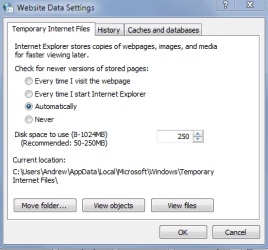
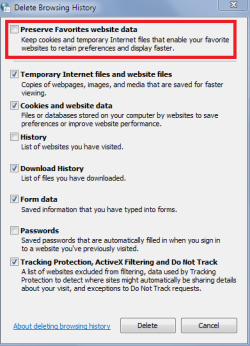
Internet explorer is supposed to only save the data amount indicated below but for some reason this does not work and the computer gets filled to the brim with temp files. I suspect it has to do with the preserve option in the second screenshot. (By default it is checked, I have unchecked it on mine.)
 

Attachments

  • temp.PNG
    temp.PNG
    11 KB · Views: 68
  • preserve.PNG
    preserve.PNG
    13.8 KB · Views: 68

My Computer My Computer

Computer type
PC/Desktop
Computer Manufacturer/Model Number
Custom Built
OS
Windows 10 Pro
CPU
AMD Ryzen 5 2400G Processor with Radeon RX Vega 11 Graphics
Motherboard
ASRock X470 Master SLI/AC AM4 AMD Promontory X470 SATA 6Gb/s
Memory
G.SKILL Ripjaws V Series 16GB (2 x 8GB) 288-Pin DDR4 SDRAM D
Graphics Card(s)
2047MB NVIDIA GeForce GTX 1060 6GB (EVGA)
Sound Card
Motherboard Built in
Monitor(s) Displays
Acer R240HY bidx 23.8-Inch IPS HDMI DVI VGA (1920 x 1080) Wi
Screen Resolution
1920 x 1080
Hard Drives
1TB Sandisk SSD PLUS (Main drive)
500 GB Seagate 7200 RPM (Games)
500 GB Western Digital 7200 RPM (Virtual Machines)
PSU
CORSAIR TX Series TX650M 650W 80+ Gold Modular Power Supply
Case
CORSAIR CARBIDE SPEC-02 Mid-Tower Gaming Case, Red LED Fan
Cooling
220mm, two 120mm, and four 60mm fans
Keyboard
Wired Dell keyboard
Mouse
Wireless Logitech mouse
Internet Speed
250mb down, 30mb up
Antivirus
Panda Cloud Antivirus
Browser
Chrome-ish x64
Other Info
Your awesome for reading this.
I use Firefox, which also seems to take liberties with cache limits. I moved the cache folder and system/user temp folders to a separate partition. These locations are added to the custom folders in CCleaner, accept for FF, that is...would allowing CC to delete all the sub dirs in the cache folder be problematic, or would FF just recreate them?
 

My Computer My Computer

Computer type
PC/Desktop
Computer Manufacturer/Model Number
custom
OS
windows 7 Pro 64 Bit
CPU
i5 4670K
Motherboard
Asus Max Hero 1150 socket
Memory
16GB DDR3@933mhz
Graphics Card(s)
Radeon R9 390 8192mb
Monitor(s) Displays
Dell U2415 x3
Screen Resolution
1920 (5760) x 1200 x3
Hard Drives
System: Kingston 128GB SSD

Installing to Samsung 860 EVO 500GB
WD Black 2 TB & 1 TB
PSU
Corsair CX750M
Cooling
Hyper 312
Internet Speed
50mbps
I do agree that there isn't much of a performance improvement. Years ago, I used to run CCleaner (with CCenhancer for a while, which I do NOT recommend) but got little, if any performance increase. Then, I reformatted my PCs and left CCleaner off. I wanted to let Windows do what it was supposed to do and maintain it the way it was designed to be maintained. A lot of the problems with performance are from five things:
1. Hardware
2. Viruses
3. Too many startup programs
4. Bloated antivirus
5. Bad drivers
If you can fix those top five things, your performance should be good. If not, it is some other issue that you can start a thread about.

I find that windows 7 still doesn't do a good job of dumping temp files. I use it for that and to delete whitelisted cookie accumulation.

@windude99

I agree 100% for the problems with performance.

@msalton1

You are right, it doesn't. I cannot tell you how many times I have run ccleaner and it deleted over 10GB of internet temp files on someones pc. 10GB!!

Windows does need to do better with that. A lot better.

The average customer does not know they should empty that folder out every now and then.

Internet explorer is supposed to only save the data amount indicated below but for some reason this does not work and the computer gets filled to the brim with temp files. I suspect it has to do with the preserve option in the second screenshot. (By default it is checked, I have unchecked it on mine.)
Disk Cleanup has options to clean temporary files and to clean temporary internet files. You can also run Disk Cleanup as an administrator and it will find more stuff. I do think it is crazy that there was 10gb of internet temporary files.
 

My Computer My Computer

Computer type
PC/Desktop
Computer Manufacturer/Model Number
HP Pavilion P7-1010
OS
Windows 7 Professional x64 Service Pack 1
CPU
AMD Athlon X4 645
Motherboard
Foxxcon N-Alvorix RS880
Memory
6GB DDR3 1066
Graphics Card(s)
Sapphire Radeon HD 5670 512MB GDDR5
Sound Card
Realtek Integrated Audio
Monitor(s) Displays
HP 2011x
Screen Resolution
1600x900
Hard Drives
1. Crucial M4 128GB SSD
2. 1TB Seagate Barracuda 7200.12 RPM
3. 1TB Western Digital Caviar Green 5400RPM
PSU
Seasonic S12 II Bronze 380 Watt
Case
HP OEM
Cooling
Coolermaster Heatsink, AVC Case Fan
Keyboard
HP OEM- Made by Chicony
Mouse
HP OEM- Made by Logitech
Internet Speed
20MBit Down/4 Up
Antivirus
Microsoft Security Essentials
Browser
Internet Explorer 10
Go to Internet Options.
Advanced

Scroll down to Empty Temporary Internet files folder when browser is closed. Put a check mark.

I also use Ccleaner before every shut down.
 

My Computer My Computer

Computer type
PC/Desktop
Computer Manufacturer/Model Number
Home made Desktop
OS
Windows 10 Pro. 64/ version 1709 Windows 7 Pro/64
CPU
Intel i7-6800K @ 4.3
Motherboard
ASUS X-99 Deluxe II
Memory
Corsair Platinum 16 gig @2400
Graphics Card(s)
EVGA GTX 1070 OC
Monitor(s) Displays
Asus 27" LED LCD/VE278Q
Screen Resolution
1920-1080 or 1280-720 HDMI
Hard Drives
INTEL SSD 730-240 Gb Sata 3.0/
PSU
EVGA Platium 1200W
Case
Phanteks Luxe Tempered Glass 8 fans/ one radiator
Cooling
XSPC/ Water Cooled CPU
Keyboard
Das 4 Professional
Mouse
Logitech M705/MX Anywhere 2-S
Internet Speed
100 mbits
Antivirus
Microsoft Security Essentials/ Malwarebytes Premium 3.0/ SAS
Browser
I.E. 11 default/Firefox/ ISP Time Warner Cable/Spectrum
Other Info
LG BluRay Burner/
Sound system-KLipsch-THX/
Icy Dock ssd Hot Swap bays.
Go to Internet Options.
Advanced

Scroll down to Empty Temporary Internet files folder when browser is closed. Put a check mark.

I also use Ccleaner before every shut down.

Yes that is an option. Unfortunately though it is not the default. I just want some type of cleaning for windows to do it automatically on that folder after a little while.
 

My Computer My Computer

Computer type
PC/Desktop
Computer Manufacturer/Model Number
Custom Built
OS
Windows 10 Pro
CPU
AMD Ryzen 5 2400G Processor with Radeon RX Vega 11 Graphics
Motherboard
ASRock X470 Master SLI/AC AM4 AMD Promontory X470 SATA 6Gb/s
Memory
G.SKILL Ripjaws V Series 16GB (2 x 8GB) 288-Pin DDR4 SDRAM D
Graphics Card(s)
2047MB NVIDIA GeForce GTX 1060 6GB (EVGA)
Sound Card
Motherboard Built in
Monitor(s) Displays
Acer R240HY bidx 23.8-Inch IPS HDMI DVI VGA (1920 x 1080) Wi
Screen Resolution
1920 x 1080
Hard Drives
1TB Sandisk SSD PLUS (Main drive)
500 GB Seagate 7200 RPM (Games)
500 GB Western Digital 7200 RPM (Virtual Machines)
PSU
CORSAIR TX Series TX650M 650W 80+ Gold Modular Power Supply
Case
CORSAIR CARBIDE SPEC-02 Mid-Tower Gaming Case, Red LED Fan
Cooling
220mm, two 120mm, and four 60mm fans
Keyboard
Wired Dell keyboard
Mouse
Wireless Logitech mouse
Internet Speed
250mb down, 30mb up
Antivirus
Panda Cloud Antivirus
Browser
Chrome-ish x64
Other Info
Your awesome for reading this.
Ccleaner Toolbars

Ccleaner - I always install the Slim version and it contains no toolbars. Then I add CCEnhancer.

See last link on page: CCleaner - Builds

CCEnhancer - SingularLabs

Then I trim the cleaners that I don't need.

As for registry cleaners - I do use them but always find stuff that needs to be excluded from cleaning and always have several system image backups available and have screwed things up numerous times in the past due to letting a registry cleaner run in full auto mode.
 

My Computer My Computer

Computer type
Laptop
Computer Manufacturer/Model Number
ASUS
OS
Microsoft Windows 7 Home Premium 64-bit 7601 Multiprocessor Free Service Pack 1
CPU
AMD C-60 APU with Radeon(tm) HD Graphics
Motherboard
ASUSTeK COMPUTER INC. X501U
Memory
4.00 GB
Graphics Card(s)
AMD Radeon HD 6290 Graphics
Sound Card
(1) AMD High Definition Audio Device (2) Realtek High Defi
Screen Resolution
1366 x 768 x 32 bits (4294967296 colors) @ 60 Hz
Hard Drives
Hitachi HTS545050A7E380 SATA Disk Device
Antivirus
Comodo CIS & FW, SecureAplus App Whitelisting, Threatfire
Browser
Cyberfox 64bit, Opera 64bit, Airfox
Other Info
Spy-The-Spy, HitmanPro.Alert, Norton Connect Safe, MJRegWatcher, BitDefender TrafficLight, Voodoo Shield, Zemana AntiMalware
I always have to disable my virus protection and firewall to download, because they block anything with toolbar crap

what AV and FW you use?
 

My Computer My Computer

Computer type
Laptop
Computer Manufacturer/Model Number
Lenovo
OS
Windows 10 Pro Insider Preview + WSL2
CPU
i5
Motherboard
Lenovo
Memory
8GB
Graphics Card(s)
Intel HD
Sound Card
HD Audio
Monitor(s) Displays
12"
Screen Resolution
1280x800
Hard Drives
500GB SSD
PSU
65W
Keyboard
QWERTY
Mouse
Trackpoint
Internet Speed
100Mb
Antivirus
none
Browser
Vivaldi
Back
Top