Solved GPU Tweak for ASUS 770 2GB

VXER

█║▌│║▌
Member
VIP
Local time
10:33 AM
Messages
158
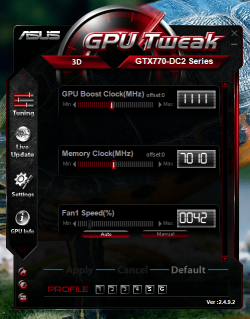
Hey,just when i did a Performance Test i noticed that without running the GPU Tweak software i get a very low score for the 3D Graphics Mark,so i'm guessing that the GPU Tweak has to be running in order to use the max of the GPU ? and what do i set the numbers for the GPU Boost clock and Memory clock ? Fan speed ?

i maxed everything and hit the Apply button then BAM! the screen went black and i got a lil box telling me it has crashed, hope i did not damage anything ?,better stop messing around here...

EDIT : turned out to have more options
Min-Max GPU votage
Power Target
GPU temp target

what do i do here ?
 

Attachments
  • Untitled.png
    Untitled.png
    109.1 KB · Views: 21
Last edited:

My Computer My Computer

Computer type
PC/Desktop
Computer Manufacturer/Model Number
Custom Build
OS
Windows 7 Home Premium
CPU
Intel Core i7 4790
Motherboard
Asus MAXIMUS VII RANGER z97
Memory
Kingston HyperX Beast 16GB 2400Mhz
Graphics Card(s)
Gigabyte 970 4GB G1 GAMING
Monitor(s) Displays
LG 23 Cinema 3D 1080p
Screen Resolution
1920x1080 60Hz
Hard Drives
Samsung 840 EVO 250GB SSD / WD Blue 500GB HDD / Seagate 1TB HDD USB
PSU
EVGA SuperNova 850w G2 Gold
Case
Corsair 300R Custom
Cooling
Corsair Hydro H80i
Keyboard
Alienware TactX
Mouse
Alienware TactX
Antivirus
Bitdefender
Browser
Mozilla FireFox
Other Info
Razer Vespula
Hey,just when i did a Performance Test i noticed that without running the GPU Tweak software i get a very low score for the 3D Graphics Mark,so i'm guessing that the GPU Tweak has to be running in order to use the max of the GPU ? and what do i set the numbers for the GPU Boost clock and Memory clock ? Fan speed ?

i maxed everything and hit the Apply button then BAM! the screen went black and i got a lil box telling me it has crashed, hope i did not damage anything ?,better stop messing around here...

EDIT : turned out to have more options
Min-Max GPU votage
Power Target
GPU temp target

what do i do here ?

With the three red/white buttons bottom left you can have advanced settings. Hit the one in the middle for advanced setting.
Note that First one done not serve any (benchmark).

Numbers and Letters are for saving your settings.

Letter "S" is Power Saving pre-made setting and letter "G" is the pre-made Gaming setting. Numbers are to save your tweaked settings.

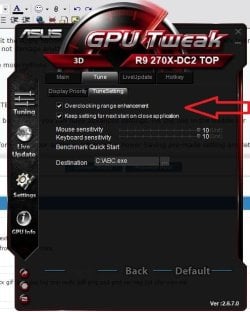
In the main "Settings" tab => "Tune" tab check both boxes to retain your settings. and also all those in "Display Priority" for displaying all options.

At anytime hit "Default" to revert your overclocking safely when in the main "Tuning" tab!!


PS:
For a first use i will suggest you to lock the little "locker" when moving the "GPU Clock" or "GPU Voltage", then if you save to number 1,2,3,4. Unlock it just before saving for it not automaticaly change anything.

Also care of the default card "Memory Clock" and raise it accordingly but not too much as you did at 7010 MHz.

"Power Target" should be max set to 120%.
 

Attachments

  • Capture.JPG
    Capture.JPG
    48.4 KB · Views: 16
Last edited:

My Computer My Computer

Computer type
PC/Desktop
Computer Manufacturer/Model Number
Custom Build
OS
Windows 7 Professional SP1 - x64 [Non-UEFI Boot]
CPU
Ivy Bridge Core i5 3570K (Delidded)
Motherboard
Asus P8Z77-V LE PLUS
Memory
G.Skill "Ares" DDR3 PC3-12800 - 1600MHz (16Gb)
Graphics Card(s)
Asus Dual-RX480-O4G
Sound Card
Creative Sound Blaster Z w/5.1 sound system
Monitor(s) Displays
Asus IPS 23"
Screen Resolution
16/9
Hard Drives
Internal:
500Go Sata 6Gb/s (x2)
500Go Sata 3Gb/s (x2)
SSD 60Go Sata 6Gb/s
PSU
In Win C 900W Series 80+ Platinum
Case
Thermaltake Chaser A71
Cooling
Custom Water Cooling Loop
Keyboard
Cooler Master QuickFire XTi
Mouse
Razer Imperator 2012 (4G)
Antivirus
MSE
Browser
IE 11.0.xxx Rtm
Other Info
"Raid0" with Intel Smart Response Technology (HDD/SSD)
So the G is the best set i can max the GPU with or can i set it to be more powerful ? as for ram 7010 MHz is the default set i did not touch it......
 

My Computer My Computer

Computer type
PC/Desktop
Computer Manufacturer/Model Number
Custom Build
OS
Windows 7 Home Premium
CPU
Intel Core i7 4790
Motherboard
Asus MAXIMUS VII RANGER z97
Memory
Kingston HyperX Beast 16GB 2400Mhz
Graphics Card(s)
Gigabyte 970 4GB G1 GAMING
Monitor(s) Displays
LG 23 Cinema 3D 1080p
Screen Resolution
1920x1080 60Hz
Hard Drives
Samsung 840 EVO 250GB SSD / WD Blue 500GB HDD / Seagate 1TB HDD USB
PSU
EVGA SuperNova 850w G2 Gold
Case
Corsair 300R Custom
Cooling
Corsair Hydro H80i
Keyboard
Alienware TactX
Mouse
Alienware TactX
Antivirus
Bitdefender
Browser
Mozilla FireFox
Other Info
Razer Vespula
So the G is the best set i can max the GPU with or can i set it to be more powerful ? as for ram 7010 MHz is the default set i did not touch it......

G is a preset setting, that you can enable for quickly play a game...handy.

Yes indeed 7010MHz is default...sorry, thought at the same time about mine too.

For example set it to "G" preset.

Lock the little locker then slide (two or three clicks) by clicking the GPU Clock....you will see both (Gpu clock/voltage) are moving at each click you make.

Unlock the locker then remember those values.

Raise a little the memory voltage (MHz) let's say four clicks.

Let your power target % to 110% (or whichever preset gave you).

If your screen doesn't shows artifacts...it could looks Ok...

Hit "Apply" then the tab "save" on profile bottom of gpu tweak, then the numbers you wish to save onto.

You will have to run a benchmark like "Unigine Heaven Benchmark 4.0" or game with those new settings.


You can raise it like that, up the G settings but at your own risk, raise power Target to 120% if you intend to go higher....:)

Maybe you could have some review read here also to better know this card.

ASUS GTX 770 DirectCU II OC 2 GB

Page 30-Overclocking gives you max values not to reach above. Take it as it serves as a guideline.
 
Last edited:

My Computer My Computer

Computer type
PC/Desktop
Computer Manufacturer/Model Number
Custom Build
OS
Windows 7 Professional SP1 - x64 [Non-UEFI Boot]
CPU
Ivy Bridge Core i5 3570K (Delidded)
Motherboard
Asus P8Z77-V LE PLUS
Memory
G.Skill "Ares" DDR3 PC3-12800 - 1600MHz (16Gb)
Graphics Card(s)
Asus Dual-RX480-O4G
Sound Card
Creative Sound Blaster Z w/5.1 sound system
Monitor(s) Displays
Asus IPS 23"
Screen Resolution
16/9
Hard Drives
Internal:
500Go Sata 6Gb/s (x2)
500Go Sata 3Gb/s (x2)
SSD 60Go Sata 6Gb/s
PSU
In Win C 900W Series 80+ Platinum
Case
Thermaltake Chaser A71
Cooling
Custom Water Cooling Loop
Keyboard
Cooler Master QuickFire XTi
Mouse
Razer Imperator 2012 (4G)
Antivirus
MSE
Browser
IE 11.0.xxx Rtm
Other Info
"Raid0" with Intel Smart Response Technology (HDD/SSD)
Thanks for the help, much appreciated :)
 

My Computer My Computer

Computer type
PC/Desktop
Computer Manufacturer/Model Number
Custom Build
OS
Windows 7 Home Premium
CPU
Intel Core i7 4790
Motherboard
Asus MAXIMUS VII RANGER z97
Memory
Kingston HyperX Beast 16GB 2400Mhz
Graphics Card(s)
Gigabyte 970 4GB G1 GAMING
Monitor(s) Displays
LG 23 Cinema 3D 1080p
Screen Resolution
1920x1080 60Hz
Hard Drives
Samsung 840 EVO 250GB SSD / WD Blue 500GB HDD / Seagate 1TB HDD USB
PSU
EVGA SuperNova 850w G2 Gold
Case
Corsair 300R Custom
Cooling
Corsair Hydro H80i
Keyboard
Alienware TactX
Mouse
Alienware TactX
Antivirus
Bitdefender
Browser
Mozilla FireFox
Other Info
Razer Vespula
Back
Top