Extremely little free memory, I don't think this is normal...

Valsako

New member
Member
Local time
1:04 PM
Messages
48
I tried using Google for this, also searched the forum, didn't find anything that answered this question, so I've decided to just open up a topic.

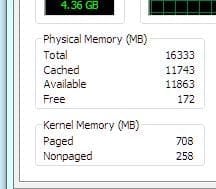
My PC has 16 GB of DDR3 RAM. According to task manager, I have 16,302 MB Total, 12,549 Cached, 13,188 available, and only 692 "free". Should my free RAM be this low? The only applications are use frequently are Firefox, Steam, GIMP, Notepad, Blender, and various video games (Never all of these at once).

Also, would this potentially cause lag in games? As I've noticed that I sometimes get FPS drops at random times, when, with my PC, on the games I'm playing, I shouldn't be seeing any.
 

My Computer My Computer

At a glance

Windows 7 Home Premium 64 bitAMD FX 8350 @ 4.52 GHz16 GB DDR3 Corsair VengeanceAMD Radeon HD 7970 3 GB
Computer type
PC/Desktop
Computer Manufacturer/Model Number
iBuyPower
OS
Windows 7 Home Premium 64 bit
CPU
AMD FX 8350 @ 4.52 GHz
Motherboard
Gigabyte GA-970A-UD3 -- AMD 970
Memory
16 GB DDR3 Corsair Vengeance
Graphics Card(s)
AMD Radeon HD 7970 3 GB
Sound Card
3D Premium Surround Sound Onboard
Screen Resolution
1920x1080
Hard Drives
Dual 1 TB Drives - RAID-0 High Performance
PSU
850 Watt - Corsair CMPSU-850AX
Case
NZXT Source 210 Gaming Case Blue
Cooling
Liquid CPU Cooling System [AMD]
Internet Speed
300 KBps download speed.
Antivirus
Microsoft Security Essentials
Browser
Firefox 20.0.1

My Computer My Computer

At a glance

Windows 10 Pro. 64/ version 1709 Windows 7 Pr...Intel i7-6800K @ 4.3Corsair Platinum 16 gig @2400EVGA GTX 1070 OC
Computer type
PC/Desktop
Computer Manufacturer/Model Number
Home made Desktop
OS
Windows 10 Pro. 64/ version 1709 Windows 7 Pro/64
CPU
Intel i7-6800K @ 4.3
Motherboard
ASUS X-99 Deluxe II
Memory
Corsair Platinum 16 gig @2400
Graphics Card(s)
EVGA GTX 1070 OC
Monitor(s) Displays
Asus 27" LED LCD/VE278Q
Screen Resolution
1920-1080 or 1280-720 HDMI
Hard Drives
INTEL SSD 730-240 Gb Sata 3.0/
PSU
EVGA Platium 1200W
Case
Phanteks Luxe Tempered Glass 8 fans/ one radiator
Cooling
XSPC/ Water Cooled CPU
Keyboard
Das 4 Professional
Mouse
Logitech M705/MX Anywhere 2-S
Internet Speed
100 mbits
Antivirus
Microsoft Security Essentials/ Malwarebytes Premium 3.0/ SAS
Browser
I.E. 11 default/Firefox/ ISP Time Warner Cable/Spectrum
Other Info
LG BluRay Burner/
Sound system-KLipsch-THX/
Icy Dock ssd Hot Swap bays.
My PC has 16 GB of DDR3 RAM. According to task manager, I have 16,302 MB Total, 12,549 Cached, 13,188 available, and only 692 "free". Should my free RAM be this low?

YES. In fact I would like to see it even lower. The optimum value is zero.

The important value to look at is "Available" memory which is 13,188 MB. This memory is immediately available to any application that needs it. By normal standards this is a huge amount. As the saying goes you have memory to burn. I see no possibility of this being the cause of your issues.

The amount of memory labeled as "Free" is really of no consequence. There is no need or benefit in having a large amount (or any) free memory. Modern operating systems (including all versions of Windows, Mac OS and Linux) are designed to work this way. I don't understand why Microsoft chose to display free memory in such a prominent location as it just causes confusion.

Edit: I just looked at Task Manager on my system. It is showing zero free memory and I have no performance issues at all.
 

My Computer My Computer

At a glance

Windows 7 Pro 64 bitXeon W35208 GBNvidia Geforce 210
Computer type
PC/Desktop
Computer Manufacturer/Model Number
HP
OS
Windows 7 Pro 64 bit
CPU
Xeon W3520
Memory
8 GB
Graphics Card(s)
Nvidia Geforce 210
I agree, the less free memory the better. Mine is show below and my system runs fine.
 

Attachments

  • TM snip.JPG
    TM snip.JPG
    14.6 KB · Views: 24

My Computer My Computer

At a glance

Windows 10 Pro x64, Windows 8.1 Pro x64, Wind...INTEL i9-7920X LGA 206664 GB (4 X 16 GB) G-Skill V Series DDR4 3200 ...EVGA GTX 1060 SC 3 GB
Computer type
PC/Desktop
Computer Manufacturer/Model Number
Custom Built
OS
Windows 10 Pro x64, Windows 8.1 Pro x64, Windows 7 Ultimate x64 SP1,
CPU
INTEL i9-7920X LGA 2066
Motherboard
Gigabyte X299-WU8 F3
Memory
64 GB (4 X 16 GB) G-Skill V Series DDR4 3200 Quad Channel
Graphics Card(s)
EVGA GTX 1060 SC 3 GB
Sound Card
Realtek Onboard ALC1220
Monitor(s) Displays
2 x Samsung S27E310
Screen Resolution
1920x1080
Hard Drives
Samsung 2 x 970 EVO Plus 500 GB NVMe
1 x 6TB WD 6003FZBX SATA
1 x 6TB WD 60EFRX SATA
12 x 3TB WD 30EFRX SATA
PSU
Seasonic X-1050
Case
Thermaltake Armor+
Cooling
Corsair H80i V2 Liquid AOI Cooler
Keyboard
Logitech G510s
Mouse
Logitech MX Master 2S
Internet Speed
200 Mb/s
Antivirus
ESET NOD32 13.1
Browser
EDGE (Dev, Canary, Beta), Chrome
Other Info
ASUS RT-AC68U router
Malwarebytes 4.0.4
I did not say using memory is bad. That is what ram is for, to be used.
All I wanted was a picture so I could take a look.

What it indicates to me is a lot of things are using the ram. Finding out what is using the ram might give us some clues.

13 + plus gigs of available ram should be more than enough to run any game I know of.
 

My Computer My Computer

At a glance

Windows 10 Pro. 64/ version 1709 Windows 7 Pr...Intel i7-6800K @ 4.3Corsair Platinum 16 gig @2400EVGA GTX 1070 OC
Computer type
PC/Desktop
Computer Manufacturer/Model Number
Home made Desktop
OS
Windows 10 Pro. 64/ version 1709 Windows 7 Pro/64
CPU
Intel i7-6800K @ 4.3
Motherboard
ASUS X-99 Deluxe II
Memory
Corsair Platinum 16 gig @2400
Graphics Card(s)
EVGA GTX 1070 OC
Monitor(s) Displays
Asus 27" LED LCD/VE278Q
Screen Resolution
1920-1080 or 1280-720 HDMI
Hard Drives
INTEL SSD 730-240 Gb Sata 3.0/
PSU
EVGA Platium 1200W
Case
Phanteks Luxe Tempered Glass 8 fans/ one radiator
Cooling
XSPC/ Water Cooled CPU
Keyboard
Das 4 Professional
Mouse
Logitech M705/MX Anywhere 2-S
Internet Speed
100 mbits
Antivirus
Microsoft Security Essentials/ Malwarebytes Premium 3.0/ SAS
Browser
I.E. 11 default/Firefox/ ISP Time Warner Cable/Spectrum
Other Info
LG BluRay Burner/
Sound system-KLipsch-THX/
Icy Dock ssd Hot Swap bays.
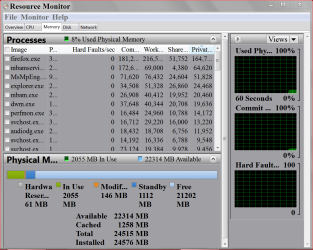
I don't know....I think you guys have memory leaks somewhere. Here's mine with Email, IE11 w/4 Tabs, File Explorer, Notepad and my case display running (along with Windows usual).
 

Attachments

  • Memory Usage.JPG
    Memory Usage.JPG
    20.1 KB · Views: 19

My Computer My Computer

At a glance

Windows 7 Pro-x64i7-2600 3.4GHz - 3.8GHz Turbo8Gb - 2x4GB, Muskin 991770 PC3-1333Integrated Intel HD 2000
Computer type
PC/Desktop
Computer Manufacturer/Model Number
Built 2/11/2011
OS
Windows 7 Pro-x64
CPU
i7-2600 3.4GHz - 3.8GHz Turbo
Motherboard
Intel DH67BL-B3
Memory
8Gb - 2x4GB, Muskin 991770 PC3-1333
Graphics Card(s)
Integrated Intel HD 2000
Sound Card
Integrated Intel 10.1 HD, RealTek ALC892
Monitor(s) Displays
Asus LCD VH222H, Haier HL24XSL2a
Screen Resolution
1920x1080, 1920x1080
Hard Drives
Crucial SSD C300-128Gb,
Western Digital WD5002AALX - 500Gb,
Western Digital WD7501AALS - 750Gb
PSU
Seasonic 650W 80+ Gold Modular
Case
Rosewill Defender
Cooling
Stock CPU, Four 120mm case fans, PCH fan added
Keyboard
Logitech EX100 Y-RBH94 Wireless
Mouse
Logitech EX100 M-RCE95 Wireless
Internet Speed
3.0/1.5 Mbs
Antivirus
Microsoft Security Essentials
Browser
Microsoft Internet Explorer 11
Other Info
Antec Veris Premier-Multimedia IR Station,
Cyber Accoustics-3602 Speakers,
AFT XM-5U Card Reader,
Hauppauge TV-HVR-2250,
Sony LX300 USB Turntable
Ken if people don't reboot for a long time then can get those kind of high readings.
The ram doesn't get a chance to clean itself.
 

My Computer My Computer

At a glance

Windows 10 Pro. 64/ version 1709 Windows 7 Pr...Intel i7-6800K @ 4.3Corsair Platinum 16 gig @2400EVGA GTX 1070 OC
Computer type
PC/Desktop
Computer Manufacturer/Model Number
Home made Desktop
OS
Windows 10 Pro. 64/ version 1709 Windows 7 Pro/64
CPU
Intel i7-6800K @ 4.3
Motherboard
ASUS X-99 Deluxe II
Memory
Corsair Platinum 16 gig @2400
Graphics Card(s)
EVGA GTX 1070 OC
Monitor(s) Displays
Asus 27" LED LCD/VE278Q
Screen Resolution
1920-1080 or 1280-720 HDMI
Hard Drives
INTEL SSD 730-240 Gb Sata 3.0/
PSU
EVGA Platium 1200W
Case
Phanteks Luxe Tempered Glass 8 fans/ one radiator
Cooling
XSPC/ Water Cooled CPU
Keyboard
Das 4 Professional
Mouse
Logitech M705/MX Anywhere 2-S
Internet Speed
100 mbits
Antivirus
Microsoft Security Essentials/ Malwarebytes Premium 3.0/ SAS
Browser
I.E. 11 default/Firefox/ ISP Time Warner Cable/Spectrum
Other Info
LG BluRay Burner/
Sound system-KLipsch-THX/
Icy Dock ssd Hot Swap bays.
For what it's worth, I reboot everyday.

I do not have a memory leak. A memory leak would use up available memory and cached.

The approximate amount of free memory I have shown is normal for all of my systems.
 

My Computer My Computer

At a glance

Windows 10 Pro x64, Windows 8.1 Pro x64, Wind...INTEL i9-7920X LGA 206664 GB (4 X 16 GB) G-Skill V Series DDR4 3200 ...EVGA GTX 1060 SC 3 GB
Computer type
PC/Desktop
Computer Manufacturer/Model Number
Custom Built
OS
Windows 10 Pro x64, Windows 8.1 Pro x64, Windows 7 Ultimate x64 SP1,
CPU
INTEL i9-7920X LGA 2066
Motherboard
Gigabyte X299-WU8 F3
Memory
64 GB (4 X 16 GB) G-Skill V Series DDR4 3200 Quad Channel
Graphics Card(s)
EVGA GTX 1060 SC 3 GB
Sound Card
Realtek Onboard ALC1220
Monitor(s) Displays
2 x Samsung S27E310
Screen Resolution
1920x1080
Hard Drives
Samsung 2 x 970 EVO Plus 500 GB NVMe
1 x 6TB WD 6003FZBX SATA
1 x 6TB WD 60EFRX SATA
12 x 3TB WD 30EFRX SATA
PSU
Seasonic X-1050
Case
Thermaltake Armor+
Cooling
Corsair H80i V2 Liquid AOI Cooler
Keyboard
Logitech G510s
Mouse
Logitech MX Master 2S
Internet Speed
200 Mb/s
Antivirus
ESET NOD32 13.1
Browser
EDGE (Dev, Canary, Beta), Chrome
Other Info
ASUS RT-AC68U router
Malwarebytes 4.0.4
That isn't a "normal" system. You either have some large processes running like video editing, graphics rendering or a pot load of stuff running. I wouldn't call that "normal". If it is for you, you need more memory. Free memory is what Windows uses first when starting new tasks. If there's not enough available, Windows starts shuffling Standby to the pagefile to make room. And paging means hardware I/O--The slowest of all events on the system.

If you don't have such items running, you have memory leaks.
 

Attachments

  • Memory Usage Graph.JPG
    Memory Usage Graph.JPG
    30.5 KB · Views: 1

My Computer My Computer

At a glance

Windows 7 Pro-x64i7-2600 3.4GHz - 3.8GHz Turbo8Gb - 2x4GB, Muskin 991770 PC3-1333Integrated Intel HD 2000
Computer type
PC/Desktop
Computer Manufacturer/Model Number
Built 2/11/2011
OS
Windows 7 Pro-x64
CPU
i7-2600 3.4GHz - 3.8GHz Turbo
Motherboard
Intel DH67BL-B3
Memory
8Gb - 2x4GB, Muskin 991770 PC3-1333
Graphics Card(s)
Integrated Intel HD 2000
Sound Card
Integrated Intel 10.1 HD, RealTek ALC892
Monitor(s) Displays
Asus LCD VH222H, Haier HL24XSL2a
Screen Resolution
1920x1080, 1920x1080
Hard Drives
Crucial SSD C300-128Gb,
Western Digital WD5002AALX - 500Gb,
Western Digital WD7501AALS - 750Gb
PSU
Seasonic 650W 80+ Gold Modular
Case
Rosewill Defender
Cooling
Stock CPU, Four 120mm case fans, PCH fan added
Keyboard
Logitech EX100 Y-RBH94 Wireless
Mouse
Logitech EX100 M-RCE95 Wireless
Internet Speed
3.0/1.5 Mbs
Antivirus
Microsoft Security Essentials
Browser
Microsoft Internet Explorer 11
Other Info
Antec Veris Premier-Multimedia IR Station,
Cyber Accoustics-3602 Speakers,
AFT XM-5U Card Reader,
Hauppauge TV-HVR-2250,
Sony LX300 USB Turntable
The "free" memory and such seems to have changed a bit since I initially made the first post. Not sure what did that, but anyway, here you go:

Taskmanager.png


That's with absolutely no programs open except for Steam.
 

My Computer My Computer

At a glance

Windows 7 Home Premium 64 bitAMD FX 8350 @ 4.52 GHz16 GB DDR3 Corsair VengeanceAMD Radeon HD 7970 3 GB
Computer type
PC/Desktop
Computer Manufacturer/Model Number
iBuyPower
OS
Windows 7 Home Premium 64 bit
CPU
AMD FX 8350 @ 4.52 GHz
Motherboard
Gigabyte GA-970A-UD3 -- AMD 970
Memory
16 GB DDR3 Corsair Vengeance
Graphics Card(s)
AMD Radeon HD 7970 3 GB
Sound Card
3D Premium Surround Sound Onboard
Screen Resolution
1920x1080
Hard Drives
Dual 1 TB Drives - RAID-0 High Performance
PSU
850 Watt - Corsair CMPSU-850AX
Case
NZXT Source 210 Gaming Case Blue
Cooling
Liquid CPU Cooling System [AMD]
Internet Speed
300 KBps download speed.
Antivirus
Microsoft Security Essentials
Browser
Firefox 20.0.1
That isn't a "normal" system. You either have some large processes running like video editing, graphics rendering or a pot load of stuff running. I wouldn't call that "normal". If it is for you, you need more memory. Free memory is what Windows uses first when starting new tasks. If there's not enough available, Windows starts shuffling Standby to the pagefile to make room. And paging means hardware I/O--The slowest of all events on the system.

If you don't have such items running, you have memory leaks.


Believe what you want but you are wrong! Available memory is what Windows uses first.
 

My Computer My Computer

At a glance

Windows 10 Pro x64, Windows 8.1 Pro x64, Wind...INTEL i9-7920X LGA 206664 GB (4 X 16 GB) G-Skill V Series DDR4 3200 ...EVGA GTX 1060 SC 3 GB
Computer type
PC/Desktop
Computer Manufacturer/Model Number
Custom Built
OS
Windows 10 Pro x64, Windows 8.1 Pro x64, Windows 7 Ultimate x64 SP1,
CPU
INTEL i9-7920X LGA 2066
Motherboard
Gigabyte X299-WU8 F3
Memory
64 GB (4 X 16 GB) G-Skill V Series DDR4 3200 Quad Channel
Graphics Card(s)
EVGA GTX 1060 SC 3 GB
Sound Card
Realtek Onboard ALC1220
Monitor(s) Displays
2 x Samsung S27E310
Screen Resolution
1920x1080
Hard Drives
Samsung 2 x 970 EVO Plus 500 GB NVMe
1 x 6TB WD 6003FZBX SATA
1 x 6TB WD 60EFRX SATA
12 x 3TB WD 30EFRX SATA
PSU
Seasonic X-1050
Case
Thermaltake Armor+
Cooling
Corsair H80i V2 Liquid AOI Cooler
Keyboard
Logitech G510s
Mouse
Logitech MX Master 2S
Internet Speed
200 Mb/s
Antivirus
ESET NOD32 13.1
Browser
EDGE (Dev, Canary, Beta), Chrome
Other Info
ASUS RT-AC68U router
Malwarebytes 4.0.4
At the present time my memory. Just a few web pages open, but I keep msconfig/Startup very lean. If I'm not using it it's not running.

I rebooted about a hour ago.

TODAY ONLY.PNG
 

My Computer My Computer

At a glance

Windows 10 Pro. 64/ version 1709 Windows 7 Pr...Intel i7-6800K @ 4.3Corsair Platinum 16 gig @2400EVGA GTX 1070 OC
Computer type
PC/Desktop
Computer Manufacturer/Model Number
Home made Desktop
OS
Windows 10 Pro. 64/ version 1709 Windows 7 Pro/64
CPU
Intel i7-6800K @ 4.3
Motherboard
ASUS X-99 Deluxe II
Memory
Corsair Platinum 16 gig @2400
Graphics Card(s)
EVGA GTX 1070 OC
Monitor(s) Displays
Asus 27" LED LCD/VE278Q
Screen Resolution
1920-1080 or 1280-720 HDMI
Hard Drives
INTEL SSD 730-240 Gb Sata 3.0/
PSU
EVGA Platium 1200W
Case
Phanteks Luxe Tempered Glass 8 fans/ one radiator
Cooling
XSPC/ Water Cooled CPU
Keyboard
Das 4 Professional
Mouse
Logitech M705/MX Anywhere 2-S
Internet Speed
100 mbits
Antivirus
Microsoft Security Essentials/ Malwarebytes Premium 3.0/ SAS
Browser
I.E. 11 default/Firefox/ ISP Time Warner Cable/Spectrum
Other Info
LG BluRay Burner/
Sound system-KLipsch-THX/
Icy Dock ssd Hot Swap bays.
That isn't a "normal" system. You either have some large processes running like video editing, graphics rendering or a pot load of stuff running. I wouldn't call that "normal". If it is for you, you need more memory. Free memory is what Windows uses first when starting new tasks. If there's not enough available, Windows starts shuffling Standby to the pagefile to make room. And paging means hardware I/O--The slowest of all events on the system.

If you don't have such items running, you have memory leaks.


Believe what you want but you are wrong! Available memory is what Windows uses first.
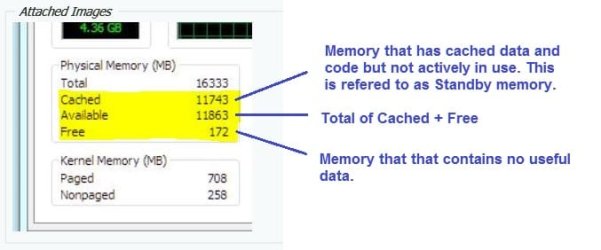
Cached + Free = Available
Free is used first.

Believe what you want. ;)
 

My Computer My Computer

At a glance

Windows 7 Pro-x64i7-2600 3.4GHz - 3.8GHz Turbo8Gb - 2x4GB, Muskin 991770 PC3-1333Integrated Intel HD 2000
Computer type
PC/Desktop
Computer Manufacturer/Model Number
Built 2/11/2011
OS
Windows 7 Pro-x64
CPU
i7-2600 3.4GHz - 3.8GHz Turbo
Motherboard
Intel DH67BL-B3
Memory
8Gb - 2x4GB, Muskin 991770 PC3-1333
Graphics Card(s)
Integrated Intel HD 2000
Sound Card
Integrated Intel 10.1 HD, RealTek ALC892
Monitor(s) Displays
Asus LCD VH222H, Haier HL24XSL2a
Screen Resolution
1920x1080, 1920x1080
Hard Drives
Crucial SSD C300-128Gb,
Western Digital WD5002AALX - 500Gb,
Western Digital WD7501AALS - 750Gb
PSU
Seasonic 650W 80+ Gold Modular
Case
Rosewill Defender
Cooling
Stock CPU, Four 120mm case fans, PCH fan added
Keyboard
Logitech EX100 Y-RBH94 Wireless
Mouse
Logitech EX100 M-RCE95 Wireless
Internet Speed
3.0/1.5 Mbs
Antivirus
Microsoft Security Essentials
Browser
Microsoft Internet Explorer 11
Other Info
Antec Veris Premier-Multimedia IR Station,
Cyber Accoustics-3602 Speakers,
AFT XM-5U Card Reader,
Hauppauge TV-HVR-2250,
Sony LX300 USB Turntable

My Computer My Computer

At a glance

Windows 10 Pro x64, Windows 8.1 Pro x64, Wind...INTEL i9-7920X LGA 206664 GB (4 X 16 GB) G-Skill V Series DDR4 3200 ...EVGA GTX 1060 SC 3 GB
Computer type
PC/Desktop
Computer Manufacturer/Model Number
Custom Built
OS
Windows 10 Pro x64, Windows 8.1 Pro x64, Windows 7 Ultimate x64 SP1,
CPU
INTEL i9-7920X LGA 2066
Motherboard
Gigabyte X299-WU8 F3
Memory
64 GB (4 X 16 GB) G-Skill V Series DDR4 3200 Quad Channel
Graphics Card(s)
EVGA GTX 1060 SC 3 GB
Sound Card
Realtek Onboard ALC1220
Monitor(s) Displays
2 x Samsung S27E310
Screen Resolution
1920x1080
Hard Drives
Samsung 2 x 970 EVO Plus 500 GB NVMe
1 x 6TB WD 6003FZBX SATA
1 x 6TB WD 60EFRX SATA
12 x 3TB WD 30EFRX SATA
PSU
Seasonic X-1050
Case
Thermaltake Armor+
Cooling
Corsair H80i V2 Liquid AOI Cooler
Keyboard
Logitech G510s
Mouse
Logitech MX Master 2S
Internet Speed
200 Mb/s
Antivirus
ESET NOD32 13.1
Browser
EDGE (Dev, Canary, Beta), Chrome
Other Info
ASUS RT-AC68U router
Malwarebytes 4.0.4
You can't believe your own numbers?

Added: Apparently, you didn't read or understand your own reference.
 

Attachments

  • 00-Temp.jpg
    00-Temp.jpg
    31.1 KB · Views: 23
Last edited:

My Computer My Computer

At a glance

Windows 7 Pro-x64i7-2600 3.4GHz - 3.8GHz Turbo8Gb - 2x4GB, Muskin 991770 PC3-1333Integrated Intel HD 2000
Computer type
PC/Desktop
Computer Manufacturer/Model Number
Built 2/11/2011
OS
Windows 7 Pro-x64
CPU
i7-2600 3.4GHz - 3.8GHz Turbo
Motherboard
Intel DH67BL-B3
Memory
8Gb - 2x4GB, Muskin 991770 PC3-1333
Graphics Card(s)
Integrated Intel HD 2000
Sound Card
Integrated Intel 10.1 HD, RealTek ALC892
Monitor(s) Displays
Asus LCD VH222H, Haier HL24XSL2a
Screen Resolution
1920x1080, 1920x1080
Hard Drives
Crucial SSD C300-128Gb,
Western Digital WD5002AALX - 500Gb,
Western Digital WD7501AALS - 750Gb
PSU
Seasonic 650W 80+ Gold Modular
Case
Rosewill Defender
Cooling
Stock CPU, Four 120mm case fans, PCH fan added
Keyboard
Logitech EX100 Y-RBH94 Wireless
Mouse
Logitech EX100 M-RCE95 Wireless
Internet Speed
3.0/1.5 Mbs
Antivirus
Microsoft Security Essentials
Browser
Microsoft Internet Explorer 11
Other Info
Antec Veris Premier-Multimedia IR Station,
Cyber Accoustics-3602 Speakers,
AFT XM-5U Card Reader,
Hauppauge TV-HVR-2250,
Sony LX300 USB Turntable
What I stated was that having no free memory was not a problem. Available memory = cached + free allows the system to make use of the memory when needed and no system degradation occurs if free memory is 0 as long as there is available memory.

You said a system is not normal if free memory is small or zero. I disagree.
 

My Computer My Computer

At a glance

Windows 10 Pro x64, Windows 8.1 Pro x64, Wind...INTEL i9-7920X LGA 206664 GB (4 X 16 GB) G-Skill V Series DDR4 3200 ...EVGA GTX 1060 SC 3 GB
Computer type
PC/Desktop
Computer Manufacturer/Model Number
Custom Built
OS
Windows 10 Pro x64, Windows 8.1 Pro x64, Windows 7 Ultimate x64 SP1,
CPU
INTEL i9-7920X LGA 2066
Motherboard
Gigabyte X299-WU8 F3
Memory
64 GB (4 X 16 GB) G-Skill V Series DDR4 3200 Quad Channel
Graphics Card(s)
EVGA GTX 1060 SC 3 GB
Sound Card
Realtek Onboard ALC1220
Monitor(s) Displays
2 x Samsung S27E310
Screen Resolution
1920x1080
Hard Drives
Samsung 2 x 970 EVO Plus 500 GB NVMe
1 x 6TB WD 6003FZBX SATA
1 x 6TB WD 60EFRX SATA
12 x 3TB WD 30EFRX SATA
PSU
Seasonic X-1050
Case
Thermaltake Armor+
Cooling
Corsair H80i V2 Liquid AOI Cooler
Keyboard
Logitech G510s
Mouse
Logitech MX Master 2S
Internet Speed
200 Mb/s
Antivirus
ESET NOD32 13.1
Browser
EDGE (Dev, Canary, Beta), Chrome
Other Info
ASUS RT-AC68U router
Malwarebytes 4.0.4
That isn't a "normal" system. You either have some large processes running like video editing, graphics rendering or a pot load of stuff running. I wouldn't call that "normal". If it is for you, you need more memory. Free memory is what Windows uses first when starting new tasks. If there's not enough available, Windows starts shuffling Standby to the pagefile to make room. And paging means hardware I/O--The slowest of all events on the system.

Aside from the somewhat high memory usage the screenshot by pbcopter in post #4 is not abnormal or even unusual. Free memory is very low, as it should be. It is consuming power and contributing nothing to system performance. It's only value is the potential to be assigned to a process or system use where it can then make a contribution.

When available memory is plentiful, and with 11863 MB that is certainly the case, the memory manager will allow processes to use whatever RAM they want. This is a good thing. Memory was meant to be used, not sit idle. And at 4.36 GB usage out of 16 GB total usage would be considered light.

The memory situation in post #4 is virtually ideal. It could hardly be better.

When a process needs memory the memory manager first goes to free memory. It is idle and waiting to be put to work. When free memory is insufficient then it is time to go to standby memory. It is fully available and can be used at any time for any purpose with no disk access required. There is certainly no shuffling of standby memory to the pagefile. Only in the event that both free and standby memory is completely drained is there a need for more active measures.

When given the opportunity the memory manager will attempt to deal with a low available memory situation before it becomes a problem. It does this by trimming process working sets, memory that hasn't been recently used being the first to go. This is a complex process and I will not attempt to describe it here. In the event the the process needs access to memory that was trimmed it can normally be accessed with a soft pagefault with no disk access required.

As for the screenshot in post #9:
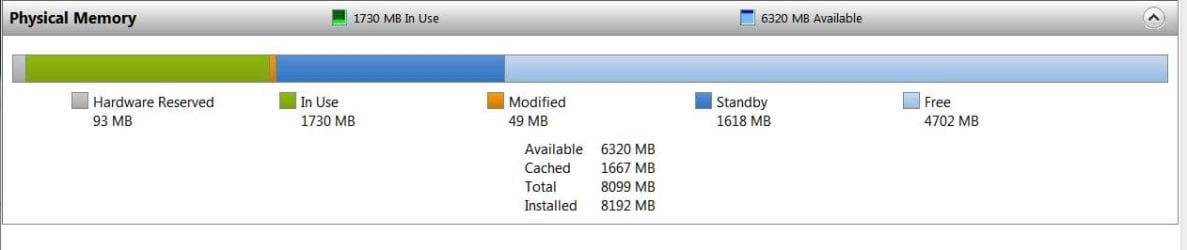
I would not consider this normal at all. With over half of the 8 GB RAM free this is far too high. There are unavoidable situations where this will occur but it is not something you should desire. It was situations like this that prompted the development of technologies like Superfetch.

Edit: In Vista and later.
Available memory = Standby + Free
Cached memory = Standby + Modified. Oddly, the file cache is not included.
This was determined by observation.
 

My Computer My Computer

At a glance

Windows 7 Pro 64 bitXeon W35208 GBNvidia Geforce 210
Computer type
PC/Desktop
Computer Manufacturer/Model Number
HP
OS
Windows 7 Pro 64 bit
CPU
Xeon W3520
Memory
8 GB
Graphics Card(s)
Nvidia Geforce 210
"...and no system degradation occurs if free memory is 0..."

How would you know if you don't have any free memory? :banghead:
 
Last edited by a moderator:

My Computer My Computer

At a glance

Windows 7 Pro-x64i7-2600 3.4GHz - 3.8GHz Turbo8Gb - 2x4GB, Muskin 991770 PC3-1333Integrated Intel HD 2000
Computer type
PC/Desktop
Computer Manufacturer/Model Number
Built 2/11/2011
OS
Windows 7 Pro-x64
CPU
i7-2600 3.4GHz - 3.8GHz Turbo
Motherboard
Intel DH67BL-B3
Memory
8Gb - 2x4GB, Muskin 991770 PC3-1333
Graphics Card(s)
Integrated Intel HD 2000
Sound Card
Integrated Intel 10.1 HD, RealTek ALC892
Monitor(s) Displays
Asus LCD VH222H, Haier HL24XSL2a
Screen Resolution
1920x1080, 1920x1080
Hard Drives
Crucial SSD C300-128Gb,
Western Digital WD5002AALX - 500Gb,
Western Digital WD7501AALS - 750Gb
PSU
Seasonic 650W 80+ Gold Modular
Case
Rosewill Defender
Cooling
Stock CPU, Four 120mm case fans, PCH fan added
Keyboard
Logitech EX100 Y-RBH94 Wireless
Mouse
Logitech EX100 M-RCE95 Wireless
Internet Speed
3.0/1.5 Mbs
Antivirus
Microsoft Security Essentials
Browser
Microsoft Internet Explorer 11
Other Info
Antec Veris Premier-Multimedia IR Station,
Cyber Accoustics-3602 Speakers,
AFT XM-5U Card Reader,
Hauppauge TV-HVR-2250,
Sony LX300 USB Turntable
From post #1


My PC has 16 GB of DDR3 RAM. According to task manager, I have 16,302 MB Total, 12,549 Cached, 13,188 available, and only 692 "free". Should my free RAM be this low? The only applications are use frequently are Firefox, Steam, GIMP, Notepad, Blender, and various video games (Never all of these at once).
What would cause the free ram to be 692?
I'm presuming that is MB.

**That is the question.**
 

My Computer My Computer

At a glance

Windows 10 Pro. 64/ version 1709 Windows 7 Pr...Intel i7-6800K @ 4.3Corsair Platinum 16 gig @2400EVGA GTX 1070 OC
Computer type
PC/Desktop
Computer Manufacturer/Model Number
Home made Desktop
OS
Windows 10 Pro. 64/ version 1709 Windows 7 Pro/64
CPU
Intel i7-6800K @ 4.3
Motherboard
ASUS X-99 Deluxe II
Memory
Corsair Platinum 16 gig @2400
Graphics Card(s)
EVGA GTX 1070 OC
Monitor(s) Displays
Asus 27" LED LCD/VE278Q
Screen Resolution
1920-1080 or 1280-720 HDMI
Hard Drives
INTEL SSD 730-240 Gb Sata 3.0/
PSU
EVGA Platium 1200W
Case
Phanteks Luxe Tempered Glass 8 fans/ one radiator
Cooling
XSPC/ Water Cooled CPU
Keyboard
Das 4 Professional
Mouse
Logitech M705/MX Anywhere 2-S
Internet Speed
100 mbits
Antivirus
Microsoft Security Essentials/ Malwarebytes Premium 3.0/ SAS
Browser
I.E. 11 default/Firefox/ ISP Time Warner Cable/Spectrum
Other Info
LG BluRay Burner/
Sound system-KLipsch-THX/
Icy Dock ssd Hot Swap bays.
Last edited:

My Computer My Computer

At a glance

Windows 10 Pro (x64)Intel Core i7-3930K (3.2GHz - 4.5GHz)4x Samsung 4GB PC3-12800 DDR3 (16GB 1600MHz)Nvidia Geforce GTX 690
Computer type
PC/Desktop
Computer Manufacturer/Model Number
Alienware Aurora ALX R4
OS
Windows 10 Pro (x64)
CPU
Intel Core i7-3930K (3.2GHz - 4.5GHz)
Motherboard
Alienware Aurora-R4 x79
Memory
4x Samsung 4GB PC3-12800 DDR3 (16GB 1600MHz)
Graphics Card(s)
Nvidia Geforce GTX 690
Sound Card
SteelSeries Siberia Elite
Monitor(s) Displays
Dell UltraSharp U3011
Screen Resolution
2560x1600
Hard Drives
Samsung 850 Pro 256 GB, Seagate 1TB Desktop Hybrid HDD, 2x Western Digital 4TB Green HDD
PSU
875W Some Dell PSU <.<
Case
Alienware Aurora ALX
Cooling
Custom Liquid Cooling (EK CPU & GPU blocks) dual EK 480RAD
Keyboard
Logitech G710+ Mechanical
Mouse
Logitech G700s
Internet Speed
Verizon Fios (50 mbps average)
Other Info
Server: Intel NUC D54250WYK: i5-4250U, 16GB, 256 GB mSATA, Windows Server 2012 R2
Back
Top