
You are using an out of date browser. It may not display this or other websites correctly.
You should upgrade or use an alternative browser.
You should upgrade or use an alternative browser.
Reinstalled W-7 Pro:Why is there no O/S without install DVD in drive?
- Thread starter Chaim613
- Start date


You mean you can only boot into win7 if WIN7 INSTALL DVD is still inserted?
Post screenshot of disk management please.
Post screenshot of disk management please.
My Computer
At a glance
Microsoft Windows 7 Home Premium 64-bits 7601...Intel(R) Core(TM) i3 CPU M 370 @ 2.40GHz4,00 GBATI Mobility Radeon HD 5400 Series
- Computer type
- Laptop
- Computer Manufacturer/Model Number
- ACER ASPIRE 5742G
- OS
- Microsoft Windows 7 Home Premium 64-bits 7601 Multiprocessor Free Service Pack 1
- CPU
- Intel(R) Core(TM) i3 CPU M 370 @ 2.40GHz
- Motherboard
- Acer Aspire 5742G
- Memory
- 4,00 GB
- Graphics Card(s)
- ATI Mobility Radeon HD 5400 Series
- Sound Card
- (1) AMD High Definition Audio Device (2) Realtek High Defi
- Screen Resolution
- 1366 x 768 x 32 bits (4294967296 colors) @ 60 Hz
- Hard Drives
- WDC WD5000BEVT-22ZAT0
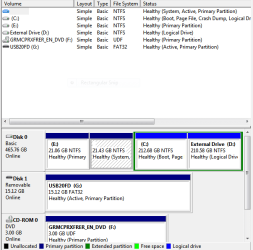
Can you boot to win7 withh USB20FD detached?
Can you boot to win7 DVD not inserted?
--------------------
Just curious (not the cause of the problem):
Why put the bootmenu and bootmgr on the 21.43GB partition? (it's marked ACTIVE)
Why install WIN7 in a logical partition instead of a primary?
Can you boot to win7 DVD not inserted?
--------------------
Just curious (not the cause of the problem):
Why put the bootmenu and bootmgr on the 21.43GB partition? (it's marked ACTIVE)
Why install WIN7 in a logical partition instead of a primary?
My Computer
At a glance
Microsoft Windows 7 Home Premium 64-bits 7601...Intel(R) Core(TM) i3 CPU M 370 @ 2.40GHz4,00 GBATI Mobility Radeon HD 5400 Series
- Computer type
- Laptop
- Computer Manufacturer/Model Number
- ACER ASPIRE 5742G
- OS
- Microsoft Windows 7 Home Premium 64-bits 7601 Multiprocessor Free Service Pack 1
- CPU
- Intel(R) Core(TM) i3 CPU M 370 @ 2.40GHz
- Motherboard
- Acer Aspire 5742G
- Memory
- 4,00 GB
- Graphics Card(s)
- ATI Mobility Radeon HD 5400 Series
- Sound Card
- (1) AMD High Definition Audio Device (2) Realtek High Defi
- Screen Resolution
- 1366 x 768 x 32 bits (4294967296 colors) @ 60 Hz
- Hard Drives
- WDC WD5000BEVT-22ZAT0

- Local time
- 3:13 PM
- Messages
- 50,634
Were you not aware that you are to delete all partitions during the booted http://www.sevenforums.com/tutorials/1649-clean-install-windows-7-a.html? Why would random partitions be left strewn across the OS drive with no plan, so that when the OS is installed to a Logical partition the boot files (which cannot be placed on a Logical partition) are forced onto a 26gb Primary partition with no drive letter leaving most of the space inaccessible.
I would start over and do this competently: Unplug all other drives, boot the Install media, during Steps 7 and 8 of http://www.sevenforums.com/tutorials/1649-clean-install-windows-7-a.html use the Drive Options to delete all partitions, create New as needed, Format and install Win7 to the first partition in order to take advantage of faster read/write speeds on the left hand side of the drive. Ignore the tiny boot partition that is created.
I would also read over these other steps for a http://www.sevenforums.com/tutorials/219487-clean-reinstall-factory-oem-windows-7-a.html#post1839164 which compile everything that works best in tens of thousands of installs we've directly helped with here. The steps are the same for retail.
I would start over and do this competently: Unplug all other drives, boot the Install media, during Steps 7 and 8 of http://www.sevenforums.com/tutorials/1649-clean-install-windows-7-a.html use the Drive Options to delete all partitions, create New as needed, Format and install Win7 to the first partition in order to take advantage of faster read/write speeds on the left hand side of the drive. Ignore the tiny boot partition that is created.
I would also read over these other steps for a http://www.sevenforums.com/tutorials/219487-clean-reinstall-factory-oem-windows-7-a.html#post1839164 which compile everything that works best in tens of thousands of installs we've directly helped with here. The steps are the same for retail.
it seems you have installed win 7 on logical partition.
you must install win 7 on primary partition.
you must install win 7 on primary partition.
My Computer
At a glance
win 7i52 GBno
- Computer type
- Laptop
- Computer Manufacturer/Model Number
- dell
- OS
- win 7
- CPU
- i5
- Memory
- 2 GB
- Graphics Card(s)
- no
- Hard Drives
- 500GB
- Antivirus
- avira
- Browser
- opera
Win 7 can be installed to a logical partition providing its boot files are on a primary partition.it seems you have installed win 7 on logical partition.
you must install win 7 on primary partition.
My Computer
At a glance
Windows 7 Pro 64 bitIntel i58GB KINGSTON DUAL-DDR3 1600MHz2GB AMD RADEON™ R7 250
- Computer type
- PC/Desktop
- Computer Manufacturer/Model Number
- PC Specialist Custom
- OS
- Windows 7 Pro 64 bit
- CPU
- Intel i5
- Motherboard
- ASUS® H81M-PLUS
- Memory
- 8GB KINGSTON DUAL-DDR3 1600MHz
- Graphics Card(s)
- 2GB AMD RADEON™ R7 250
- Hard Drives
- 120GB KINGSTON V300 SSD
1TB WD CAVIAR BLACK WD1003FZEX