does anyone actually have the Sound Stuttering fix?

Jebus23

New member
Local time
4:32 PM
Messages
12
Hey, :)

I have the sound stutter problem when playing music, video and games. It is sometimes incorrectly referred to as a problem with windows media player. Any sound for me stutters every few seconds, sometimes its gone for a few hours and comes back. I have realtek drivers, the latest, and have tried old ones. Ive tried turning off exclusive mode and many other common tricks like changing quality etc.

Obviously I am looking for a fix but im afriad if i ask I will get nothing but all the home remedies that work for a while, or people think it works but the sound problem comes back. If someone had this problem and eliminated it I would love to hear how its done. However, I would like to also know the reason for the problem, does anyone know whats causing it? Maybe moderators or forum members that have seen this problem floating around. This is mainly to avoid the "Maybe your holding your phone to close" type responses from people who have not seen the problem before, that being said, any ideas are nice. This is obviously a windows 7 problem, maybe there is no good realtek drivers out yet, although i hear similar complaints about creative on w7 forums. does w7 handle sound differently. I'm afraid that this is actually a fundemental flaw in the operating system. Does anyone here have windows 7 rtm 64 bit with working sound??? If so do you have any unique sound settings/caching/memory settings?:)
 

My Computer My Computer

At a glance

windows 7core 2 quad40964870
Computer Manufacturer/Model Number
hp pavillion elite m9441uk fr615aa
OS
windows 7
CPU
core 2 quad
Motherboard
g33 express?
Memory
4096
Graphics Card(s)
4870
Sound Card
realtek
Monitor(s) Displays
hpw2216
Screen Resolution
1680
Hard Drives
1 x Serial ATA - integrated
PSU
650 w
Please, do not provide detailed system specs. They will not help at all. OK, go ahead and provide detailed system specs.

The problem with your assessment of a serious flaw in Windows 7 - not all users report or experience the same problem. There are some issues with RealTek though. All of which can be addressed.

Could also turn out to be an I/O issue or even CPU spiking. Can't begin the analysis until we have...

In your case, a detailed model number or service tag will work.
 

Attachments

  • 0 UserCP1.PNG
    0 UserCP1.PNG
    10.8 KB · Views: 118
  • 0 UserCP2.PNG
    0 UserCP2.PNG
    7.3 KB · Views: 73
Are the specs right? will you let me know if there is something missing?
 

My Computer My Computer

At a glance

windows 7core 2 quad40964870
Computer Manufacturer/Model Number
hp pavillion elite m9441uk fr615aa
OS
windows 7
CPU
core 2 quad
Motherboard
g33 express?
Memory
4096
Graphics Card(s)
4870
Sound Card
realtek
Monitor(s) Displays
hpw2216
Screen Resolution
1680
Hard Drives
1 x Serial ATA - integrated
PSU
650 w
I get occasional audio glitches as well. Usually when playing music, not video files. It occurred under Vista as well as 7 (& doesn't matter which music player I use) which makes me think it's likely a hardware issue related to my particular system board/components. But I sure would like to find a fix for it, but I'm pretty resigned that the solution will be a new laptop in my case. But I'll keep an eye on this thread in case there are any good suggestions that might apply to my situation.
 

My Computer My Computer

At a glance

Windows 7 Ultimate x64 (Retail)i7-Q 7206 GBnVidia GeForce GT 230M (1GB)
Computer Manufacturer/Model Number
HP DV8t quad
OS
Windows 7 Ultimate x64 (Retail)
CPU
i7-Q 720
Motherboard
Motherboard Chipset Intel Ibex Peak-M PM55, Intel Lynnfield
Memory
6 GB
Graphics Card(s)
nVidia GeForce GT 230M (1GB)
Sound Card
IDT High Definition Audio CODEC
Monitor(s) Displays
18.4 inch HP Infinity FHD (Samsung 184HT03-001)
Screen Resolution
1920 x 1080
Hard Drives
Hitachi 500GB 7200 rpm (x2)
Seagate FreeAgent 1.5 TB External USB (x2)
Thermaltake BlacX eSATA/USB 2.0 3.5/2.5 HD dock
Cooling
Zalman NC-2000 notebook cooling pad
Keyboard
laptop
Mouse
Logitech VX Revolution
Other Info
Backup Unit: Lenovo T61p
Hey, did you hear of any method to fix the problem. I went back to vista last week because of the problem and there was no problem stuttering at all. I also had build 6801 which worked fine for me. Im still not ruling out hardware related though because maybe w7 handles power differently or something.
 

My Computer My Computer

At a glance

windows 7core 2 quad40964870
Computer Manufacturer/Model Number
hp pavillion elite m9441uk fr615aa
OS
windows 7
CPU
core 2 quad
Motherboard
g33 express?
Memory
4096
Graphics Card(s)
4870
Sound Card
realtek
Monitor(s) Displays
hpw2216
Screen Resolution
1680
Hard Drives
1 x Serial ATA - integrated
PSU
650 w
Hey, did you hear of any method to fix the problem. I went back to vista last week because of the problem and there was no problem stuttering at all. I also had build 6801 which worked fine for me. Im still not ruling out hardware related though because maybe w7 handles power differently or something.
OK, I'm back - cleaning off a root kit for a neighbor.

I'm glad you mentioned 6801. What version (build) of Win 7 do you have?
 
I had a massive audio stuttering problem...and in my case it was some gigabyte utility called Dynamic Energy Saver which I had installed that was causing the issue.
 

My Computer My Computer

At a glance

Windows 7 Ultimate x64Intel Q9550 2.83Ghz OC'd to 3.40Ghz8GB G.Skill PI DDR2-800, 4-4-4-12 timingsEVGA 1280MB Nvidia GeForce GTX570
Computer Manufacturer/Model Number
Self-Built in July 2009
OS
Windows 7 Ultimate x64
CPU
Intel Q9550 2.83Ghz OC'd to 3.40Ghz
Motherboard
Gigabyte GA-EP45-UD3R rev. 1.1, F12 BIOS
Memory
8GB G.Skill PI DDR2-800, 4-4-4-12 timings
Graphics Card(s)
EVGA 1280MB Nvidia GeForce GTX570
Sound Card
Realtek ALC899A 8 channel onboard audio
Monitor(s) Displays
23" Acer x233H
Screen Resolution
1920x1080
Hard Drives
Intel X25-M 80GB Gen 2 SSD
Western Digital 1TB Caviar Black, 32MB cache. WD1001FALS
PSU
Corsair 620HX modular
Case
Antec P182
Cooling
stock
Keyboard
ABS M1 Mechanical
Mouse
Logitech G9 Laser Mouse
Internet Speed
15/2 cable modem
Other Info
Windows and Linux enthusiast. Logitech G35 Headset.
pparks1 - I'm gglad your hhere.

I am cleaning a rootkit - read here, reinstalling everything - for a friend. Not really focused on this thread until the OP returns. I haven't linked out to his driver page yet.

I do not expect this to be a sound card problem at all. Could be wrong.
 
Right now im using 7800 i think its called, its the release canditate one.
 

My Computer My Computer

At a glance

windows 7core 2 quad40964870
Computer Manufacturer/Model Number
hp pavillion elite m9441uk fr615aa
OS
windows 7
CPU
core 2 quad
Motherboard
g33 express?
Memory
4096
Graphics Card(s)
4870
Sound Card
realtek
Monitor(s) Displays
hpw2216
Screen Resolution
1680
Hard Drives
1 x Serial ATA - integrated
PSU
650 w
okay, everything is up tp date driver wise, I cannot update my bios though because im running windows 7 which the update does not support. I dont know if thats important. I ran the system diagnostics and it found nothing wriong at all. How do i look for spikes to see if thats causing the stuttering?
 

My Computer My Computer

At a glance

windows 7core 2 quad40964870
Computer Manufacturer/Model Number
hp pavillion elite m9441uk fr615aa
OS
windows 7
CPU
core 2 quad
Motherboard
g33 express?
Memory
4096
Graphics Card(s)
4870
Sound Card
realtek
Monitor(s) Displays
hpw2216
Screen Resolution
1680
Hard Drives
1 x Serial ATA - integrated
PSU
650 w
While it is stuttering, open Task Manager (rt clk taskbar).

Sort processes by CPU twice, bringing the highest numbers to the top. System idle is usually around 99%
 
I had a stuttering problem too with Windows 7 x64 RTM. Turns out it was Gigabyte's Easy Tune 6. I only use ET to control fan speeds, and it only causes stuttering when ET is open. Fortunately, ET can control fan speed without the ET console running.
 

My Computer My Computer

At a glance

Windows 7 x64Intel Core i7 2600K8 GB ADATA DDR3 1600HIS Hightech Radeon 4670 (fanless)
OS
Windows 7 x64
CPU
Intel Core i7 2600K
Motherboard
Asus P8P67 Deluxe
Memory
8 GB ADATA DDR3 1600
Graphics Card(s)
HIS Hightech Radeon 4670 (fanless)
Sound Card
Creative X-Fi XtremeGamer
Monitor(s) Displays
Samsung 213T
Screen Resolution
1600 x 1200
Hard Drives
Western Digital Black 640GB (boot), Western Digital Black 2TB x 2 (data and scratch), Western Digital Green 2TB (backup)
PSU
Corsair TX650W
Case
Antec P182
Cooling
Prolimatech Megahalems Rev.B
Keyboard
HP Elite wireless
Mouse
Logitech Performance MX
I use the RTM x86 for a laptop and have massively stuttering sound as well. Both using the internal sound card as well as an external usb sound card. Haven't found a solution yet.
 

My Computer My Computer

At a glance

Windows 7 x86AMD Turion 2.0GHzaTi HD3200 & HD3450
Computer Manufacturer/Model Number
Fujitsu Siemens Pa 3553 Laptop
OS
Windows 7 x86
CPU
AMD Turion 2.0GHz
Motherboard
Gigabyte GA-MA78GM
Graphics Card(s)
aTi HD3200 & HD3450
Sound Card
EMU Tracker Pre usb
Screen Resolution
1280x800
okay no spikes or anything like that, I also did a heat test and everything is running okay. I dual bootedfto to buid 6801 and the problem completely went away when using that os. unfortunately that particular build causes a different set of more annoying problems. I'm really at a loss with what to try next
 

My Computer My Computer

At a glance

windows 7core 2 quad40964870
Computer Manufacturer/Model Number
hp pavillion elite m9441uk fr615aa
OS
windows 7
CPU
core 2 quad
Motherboard
g33 express?
Memory
4096
Graphics Card(s)
4870
Sound Card
realtek
Monitor(s) Displays
hpw2216
Screen Resolution
1680
Hard Drives
1 x Serial ATA - integrated
PSU
650 w

My Computer My Computer

At a glance

Windows 7 x86AMD Turion 2.0GHzaTi HD3200 & HD3450
Computer Manufacturer/Model Number
Fujitsu Siemens Pa 3553 Laptop
OS
Windows 7 x86
CPU
AMD Turion 2.0GHz
Motherboard
Gigabyte GA-MA78GM
Graphics Card(s)
aTi HD3200 & HD3450
Sound Card
EMU Tracker Pre usb
Screen Resolution
1280x800
I had a massive audio stuttering problem...and in my case it was some gigabyte utility called Dynamic Energy Saver which I had installed that was causing the issue.

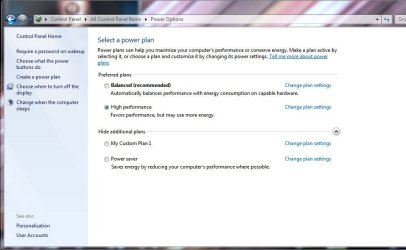
Energy managers, especially if you're overclocking, can often be the culprits here. I never really liked AMD's CoolNQuiet for example as even though it works I found it would choke with certain use such as my audio editors (Ableton Live) and even now when I play an MP3 with WMP it will stutter/static.

Check what your setting is here? If not 'high performance' try that and see if the problem changes.
 

Attachments

  • power.JPG
    power.JPG
    59.8 KB · Views: 1,299

My Computer My Computer

At a glance

Win 7 Ultimate x64Intel i7 950 OC'd @ 4.0Ghz (SpeedStep ON)3x2GB Patriot Extreme Viper II Sector 7 DDR3 ...ATI MSI 5870 900mhz/1300mhz
OS
Win 7 Ultimate x64
CPU
Intel i7 950 OC'd @ 4.0Ghz (SpeedStep ON)
Motherboard
ASUS P6X58D-E BIOS 0303
Memory
3x2GB Patriot Extreme Viper II Sector 7 DDR3 @ 1600mhz
Graphics Card(s)
ATI MSI 5870 900mhz/1300mhz
Sound Card
Onboard Realtek ALC889
Monitor(s) Displays
2 X 24" BenQ G2412HD
Screen Resolution
1920x1080p
Hard Drives
Intel X25-M 80 GB (SSD)
W.D. Caviar Black 1TB (SATA)
Seagate Barricuda 1TB (SATA)
Seagate Barricuda 80GB (SATA)
PSU
Corsair AX850
Case
Antec 1200
Cooling
Lots and Lots of Air!
Keyboard
Razer Lycosa
Mouse
Microsoft Sidewinder
Internet Speed
25Mbps/1Mbps
hey,
thnx jag
I used latency checker and sure enough i got the attached message. This at least is the first instance of a problem being acknowledged on my pc.
I will post back when i test to see if the realtek stuff in device manager, when disabled, fix the problem.
im also trying the high performance power option seperatly to see if that works.
 

My Computer My Computer

At a glance

windows 7core 2 quad40964870
Computer Manufacturer/Model Number
hp pavillion elite m9441uk fr615aa
OS
windows 7
CPU
core 2 quad
Motherboard
g33 express?
Memory
4096
Graphics Card(s)
4870
Sound Card
realtek
Monitor(s) Displays
hpw2216
Screen Resolution
1680
Hard Drives
1 x Serial ATA - integrated
PSU
650 w
HELL YEAH.............
hey guys, okay look at the attachment.
The pic shows a latency checker along with my device manager, the real time latency checker once told me that there was something wrong with my devices

I tried disabaling realtek sound assuming that was the problem (I to have tried a million drivers) but the latency checker still said there was a problem, the spikes (in real time) used to correspond with sound stutter/buzzing/popping. Now i get no spikes because i disabled one of the 2 pcie express cards. Okay, i dont kno what pcie cards are, something about sonnecting motherboard to something, sounds important but so far my computer is working with no buzzin for the first time ever.

Might be wrong but at least this is some kind of lead....maybe...anyway, how come i have 2 drivers for pcie. Do you need 2. i wish I had another pc handy to see if 2 is common, just a guess but maybe having 2 causes a problem. GOOD LUCK. Im still glad mines working, i just hope there is no negative effects of the thing i disabled being disabled.
 

Attachments

  • Capture.PNG
    Capture.PNG
    90.9 KB · Views: 992

My Computer My Computer

At a glance

windows 7core 2 quad40964870
Computer Manufacturer/Model Number
hp pavillion elite m9441uk fr615aa
OS
windows 7
CPU
core 2 quad
Motherboard
g33 express?
Memory
4096
Graphics Card(s)
4870
Sound Card
realtek
Monitor(s) Displays
hpw2216
Screen Resolution
1680
Hard Drives
1 x Serial ATA - integrated
PSU
650 w
Back
Top