@Layback Bear
Nice find on the link about MBAM and CryptoLocker!
Can't rep you right now

@urbanspaceman1
Kudos to you for having Cryptoprevent listed in your SF System Specs. +1
Seems like that info is what got to a solution - MBAM + CP don't play together well.
This is an interesting thread to me.
I'm not a security expert, but here's my thoughts / findings ...
Regarding "Self protection is only an issue if your attempting to remove/ uninstall mbam"
I've used MBAM 2 since the "pre-Beta" release.
With my first MBAM 2 install/test I couldn't even move the MBAM desktop ICON.
I learned it was because "Self Protection" was enabled.
I don't use "Self Protection", I like to be able to change things ...
If you use "Self Protection" and make changes that don't work or stick, turn it off, make changes, reboot, see if they stick, and turn it back on.
If I get attacked that bad, I'll restore an offline system image and data to be sure and get rid of malware.
Regarding "I would recommend checking in Setting/Advance settings that Auto quarantine is unchecked"
For me this is difficult to know what is right.
I was hit by the "MBAM FP definition update" a couple of years ago.
The main HTPC was on, running, and all of a sudden it crashed.
It turned out it was a new (bad) MBAM DB file that loaded and crashed the system because of Auto quarantine and the false-positives.
But if I turn off Auto quarantine and CryptoLocker somehow "hits" the PC, won't that allow CL to do the damage ???
So, to me it's a catch-22, crap-shoot.
Auto quarantine may brick the system because of a bad MBAM DB Update.
But without Auto quarantine, might CryptoLocker (or any malware) cause damage before "it's too late" ???
I still believe an important "Defense/Recovery" approach is to have offline backups.
Preferably the OS and Data separately.
I keep monthly backup images for the
 (OS) drive, and [D] (data) drive as needed ...
That allows restoring either the OS or Data independently, if and when needed.

Some people depend on Windows System Restore.
System Restore points are saved in the [C] drive, and, for whatever reason may disappear or not recover when needed.
Also, malware can infect restore points ... or anything online ...
I wouldn't trust Restore Points.

Again, I'm no security expert (or any expert) but I am security conscious and looking for things I can recommend to people I help ...
I look for the "Best Bang for the Buck".
Most people I help are Senior Citizens, limited income, but they have children/grandchildren that may use the PC and do who knows what.
From what little I know a "Layered Approach" is best.

Given that, here is what I am using for a "Best Bang for the Buck Layered approach"[INDENT] Real-Time security:
ONE free ANTI-VIRUS program - Panda, MSE, or Avast
Malwarebytes (paid) - AntiMalware (the new annual Ver 2 license cost may change that ...)
EMET - Anti Exploit - free from MS
WinPatrol - System changes monitor - free or lifetime license
[/INDENT]@urbanspaceman1
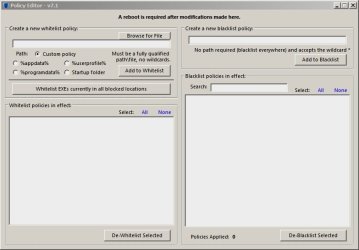
There is a CryptoPrevent Portable version.
I don't know how it compares to using the installed version ...
Anyway, I was curious so I ran the Portable version and it didn't cause me any issues.
I played with this using:
Win 7 32 Bit, MBAM Premium, Panda free, EMET, WinPatrol (free)

Sorry for the long-winded reply :geek: