

Strange DOS behavior - current directory changes out from under me
Hi guys,
OK, first i'll admin i'm a bit of an old f'rt having used Windows and DOS since not long after fire was invented, but the fluoride dumping may be getting to my brain, as I cannot figure out why DOS is behaving this way....
At a DOS prompt, I should always be able to see the current directory, but something seems to be magically changing me to C:\windows\system32 instead (and back again! Hobbits beware!)
I noticed this sometime recently when I was getting a directory list of files and somehow it magically changed directories. I have to say I know this was not the normal behavior, but cannot attribute any changes on the PC to this problem.
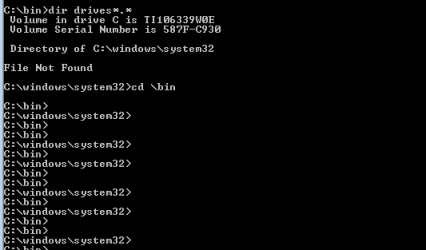
In the attached picture you see I was in the C:\bin folder and performed a dos DIR command when low and behold I get a list of file (file not found in this case) for the c:\windows\system32 folder instead.
I change directory (CD) back to C:\bin and think to myself, strange... what if I just press enter?
Low and behold, pressing enter has the strange behavior of toggling me between these two folders.
WHAT THE Fine operating environment is going on here? SOMETHING needs to be fixed.
Windows 7 Pro 64-bit
UPDATE: This only seems to happen when I configure properties to specify my "start in" directory of C:\bin
Hi guys,
OK, first i'll admin i'm a bit of an old f'rt having used Windows and DOS since not long after fire was invented, but the fluoride dumping may be getting to my brain, as I cannot figure out why DOS is behaving this way....
At a DOS prompt, I should always be able to see the current directory, but something seems to be magically changing me to C:\windows\system32 instead (and back again! Hobbits beware!)
I noticed this sometime recently when I was getting a directory list of files and somehow it magically changed directories. I have to say I know this was not the normal behavior, but cannot attribute any changes on the PC to this problem.
In the attached picture you see I was in the C:\bin folder and performed a dos DIR command when low and behold I get a list of file (file not found in this case) for the c:\windows\system32 folder instead.
I change directory (CD) back to C:\bin and think to myself, strange... what if I just press enter?
Low and behold, pressing enter has the strange behavior of toggling me between these two folders.
WHAT THE Fine operating environment is going on here? SOMETHING needs to be fixed.
Windows 7 Pro 64-bit
UPDATE: This only seems to happen when I configure properties to specify my "start in" directory of C:\bin
Attachments
Last edited:
My Computer
At a glance
Win 7 Pro 64-bitIntel Core i516 GB Dell, 6 GB ToshibaIntel crap on both but Dell also has nVidia G...
- Computer type
- Laptop
- Computer Manufacturer/Model Number
- Dell Insprion 7559 next to a Toshiba Portege
- OS
- Win 7 Pro 64-bit
- CPU
- Intel Core i5
- Motherboard
- Intel
- Memory
- 16 GB Dell, 6 GB Toshiba
- Graphics Card(s)
- Intel crap on both but Dell also has nVidia GeForce GTX960M
- Sound Card
- RealTek
- Monitor(s) Displays
- internal and external ACER KA270H 27"
- Screen Resolution
- 1920x1080
- Hard Drives
- SSD 256 GB plus numerous WD Red or Purple on USB3 docks. Used to buy a lot of Seagate but tossed them the second time I got unrecoverable disc corruption in the midst of use.
- Keyboard
- Garage Mouse SW and some cheap Amazon China made USB device
- Mouse
- Garage Mouse and some cheap Amazon China made USB device
- Internet Speed
- 50 Mbps (allegedly, depends on server)
- Antivirus
- Defender, Malwarebytes Premium and Kaspersky
- Browser
- IE 11, and Chrome something


