
Gigabit nic stuck at 100mbps in Gigabit network.

musiclover7

New member
Power User
Local time
11:59 PM
Messages
210
Location
Stoughton, WI
Cannot get gigabit performance out of Nics in Win 7.. Locked 100 mbps. My motherboard is an Evga 590 Sli Am2 motherboard, with dual gigabit nics. Having established that there is really no benefit to using both nics at the same time in another post, I am now posting because it seems I am only getting 100mbps out of my nics, even though all the cables in the network are cat 5e, and both the router, and switch in the network are gigabit capable.

I started researching this problem some time back on the net, and came across threads where other folks were able to resolve, by installing their specific network driver from mobo maker, as opposed to the network driver bundled with chipset from nvidia. I did some footwork then with drivers, and was able to get my machine running at full gigabit speeds. It ran this way for the past few weeks, then when transfering a 1gb file from one machine on the network to another the other day, noticed that the speed was locked at 100mbps. I went under task manager, network, and noticed that the speed was back to 100mbps.

I am posting here to see if anyone has any advice. The only option on my nic controller config and the one I used to get it working before, is auto negotiate. Gigabit is not listed.

Any help greatly appreciated..
 

My Computer My Computer

At a glance

Windows 7 UltimateAmd 5400+ dual core overclocked to 3.0 ghz8gb 5-5-5-5-15 g-skillNvidia 9800gt 512mb
Computer Manufacturer/Model Number
Custom
OS
Windows 7 Ultimate
CPU
Amd 5400+ dual core overclocked to 3.0 ghz
Motherboard
EVGA 590 sli aM2
Memory
8gb 5-5-5-5-15 g-skill
Graphics Card(s)
Nvidia 9800gt 512mb
Sound Card
M-Audio Delta 2496
Monitor(s) Displays
Acer 22 inch lcd
Screen Resolution
1680 x 1050
Hard Drives
Hmm

4.0 terabytes total..
PSU
650 watts
Case
Antec Sonata II
Cooling
Zallmen Xpu cooler
Keyboard
some rubbish I found in my garage
Mouse
logitech
Internet Speed
caps at about 650kb down, 50kb up . Gigabit local network.
I am guessing you checked this already, but can't hurt to post the info in case not.

Right click your network adapter in the device manager. Choose properties. Then advanced. For the link speed/duplex mode, choose 1000 mbps/full duplex or whatever setting is the closest to that. I don't have gigabit network so I can't say exactly. Also, if an update for the firmware of your router is available, that is always good to install.

If both nics are onboard, try disabling one of them (if not in use) in the bios or device manager.

Here's my settings though, where I'm saying to look. I know you said auto-negotiate is the only option. You're sure about that after checking again, right? Weird problem, heh. Perhaps another machine on the network is set to 100 mbps, thus defaulting your router to work at this speed also?
 

Attachments

  • a.jpg
    a.jpg
    47.2 KB · Views: 203

My Computer My Computer

At a glance

7600.20510 x86P4 550 3.4 GHz HT running at 3.5 GHzOCZ 2 GB(2x1GB) DDR400mHz running @ 414 mHzHIS Radeon HD 3850 IceQ 3 Turbo HDMI Dual DL-...
Computer Manufacturer/Model Number
self built
OS
7600.20510 x86
CPU
P4 550 3.4 GHz HT running at 3.5 GHz
Motherboard
MSI PM8M3-V (MS-7211 v1.x) Micro-ATX mainboard
Memory
OCZ 2 GB(2x1GB) DDR400mHz running @ 414 mHz
Graphics Card(s)
HIS Radeon HD 3850 IceQ 3 Turbo HDMI Dual DL-DVI AGP
Sound Card
MOTU Traveler firewire studio interface 192 kHz 24 bit
Monitor(s) Displays
22" widescreen Acer X223W LCD, 17" Compaq P75 CRT
Screen Resolution
1680x1050 and 1280x1024
Hard Drives
SATA I x2 WD, 400 GB and 120 GB, SATA 2 WD Caviar Black 1 TB
PSU
350W generic
Case
Cybertronpc, it glows blue
Cooling
stock cpu fan, Ice-Q 3 gpu and system, many case fans
Keyboard
Logitch Classical Keyboard 200
Mouse
Logitech Mediaplay cordless
Internet Speed
1792/448 kbits/sec
Other Info
SATA II PCI fake RAID adapter, 1 GB Readyboost, original ATI Remote Wonder (even works with WMC perfectly), Logitech Rumblepad 2 game controller x2
Here is what seemed to fix it.. I unplugged the network cable, and plugged it back in.. walla.. back to gigabit.. very strange indeed..
 

My Computer My Computer

At a glance

Windows 7 UltimateAmd 5400+ dual core overclocked to 3.0 ghz8gb 5-5-5-5-15 g-skillNvidia 9800gt 512mb
Computer Manufacturer/Model Number
Custom
OS
Windows 7 Ultimate
CPU
Amd 5400+ dual core overclocked to 3.0 ghz
Motherboard
EVGA 590 sli aM2
Memory
8gb 5-5-5-5-15 g-skill
Graphics Card(s)
Nvidia 9800gt 512mb
Sound Card
M-Audio Delta 2496
Monitor(s) Displays
Acer 22 inch lcd
Screen Resolution
1680 x 1050
Hard Drives
Hmm

4.0 terabytes total..
PSU
650 watts
Case
Antec Sonata II
Cooling
Zallmen Xpu cooler
Keyboard
some rubbish I found in my garage
Mouse
logitech
Internet Speed
caps at about 650kb down, 50kb up . Gigabit local network.
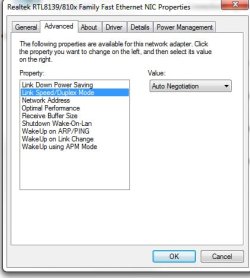
to answer your question though, I did check those settings under the nic config, and gigabit was not listed. auto negotiate was the only option other than locking it in at a lesser speed. I read another post somewhere that recomended the auto-negotiate setting.. Anyways, problem solved for now.. Will post again, if it presents itself again, and unplugging the network cable does not fix..
 

My Computer My Computer

At a glance

Windows 7 UltimateAmd 5400+ dual core overclocked to 3.0 ghz8gb 5-5-5-5-15 g-skillNvidia 9800gt 512mb
Computer Manufacturer/Model Number
Custom
OS
Windows 7 Ultimate
CPU
Amd 5400+ dual core overclocked to 3.0 ghz
Motherboard
EVGA 590 sli aM2
Memory
8gb 5-5-5-5-15 g-skill
Graphics Card(s)
Nvidia 9800gt 512mb
Sound Card
M-Audio Delta 2496
Monitor(s) Displays
Acer 22 inch lcd
Screen Resolution
1680 x 1050
Hard Drives
Hmm

4.0 terabytes total..
PSU
650 watts
Case
Antec Sonata II
Cooling
Zallmen Xpu cooler
Keyboard
some rubbish I found in my garage
Mouse
logitech
Internet Speed
caps at about 650kb down, 50kb up . Gigabit local network.
This issue returned again, soon after I last posted. A couple times, I was able to get it to go back to gigabit, by un-plugging the network cable, and plugging it back in.

Now this is not the case.. It is once again, stuck at 100 down.. Any advice Greatly Appreciated..
 

My Computer My Computer

At a glance

Windows 7 UltimateAmd 5400+ dual core overclocked to 3.0 ghz8gb 5-5-5-5-15 g-skillNvidia 9800gt 512mb
Computer Manufacturer/Model Number
Custom
OS
Windows 7 Ultimate
CPU
Amd 5400+ dual core overclocked to 3.0 ghz
Motherboard
EVGA 590 sli aM2
Memory
8gb 5-5-5-5-15 g-skill
Graphics Card(s)
Nvidia 9800gt 512mb
Sound Card
M-Audio Delta 2496
Monitor(s) Displays
Acer 22 inch lcd
Screen Resolution
1680 x 1050
Hard Drives
Hmm

4.0 terabytes total..
PSU
650 watts
Case
Antec Sonata II
Cooling
Zallmen Xpu cooler
Keyboard
some rubbish I found in my garage
Mouse
logitech
Internet Speed
caps at about 650kb down, 50kb up . Gigabit local network.
I am under the assumption that you do have a gigabyte switch/router correct?

Have you tried to disable IP v6 yet?
 

My Computer My Computer

At a glance

Windows 7 x86/x64, Server 2008r2, Web Server ...i7 v2 3930K Steping stone 2G.SKILL Ripjaws Z Series 32GBAMD HD 5770
Computer Manufacturer/Model Number
SMN-Productions
OS
Windows 7 x86/x64, Server 2008r2, Web Server 2008
CPU
i7 v2 3930K Steping stone 2
Motherboard
ASUS Rampage IV Extreme
Memory
G.SKILL Ripjaws Z Series 32GB
Graphics Card(s)
AMD HD 5770
Monitor(s) Displays
Acer 21" and Samsung 20"
Hard Drives
Patriot Pyro 80GB
PSU
1000 Watt
Case
HAF-X
Cooling
4 Fans
Keyboard
Black Widow Ultimate
Here is what seemed to fix it.. I unplugged the network cable, and plugged it back in.. walla.. back to gigabit.. very strange indeed..

All it takes is a poorly connected cable or frayed wire and presto you are back in the stone age again. I always use HD cat 6 cables with molded ends and test them every 6 months

good luck

ken
 

My Computer My Computer

At a glance

Win 8 Release candidate 8400[email protected]4 gigsNvidia 9600M
Computer Manufacturer/Model Number
HP Pavillion dv-7 1005 Tx
OS
Win 8 Release candidate 8400
CPU
[email protected]
Memory
4 gigs
Graphics Card(s)
Nvidia 9600M
Sound Card
HD built-in
Monitor(s) Displays
17" Wxga
Screen Resolution
1440x900
Cooling
none
Internet Speed
45Mb down 5Mb up
Interesting.. I switched nics to get it back working. In other words, my mobo has 2 nic cards, and I unplugged from one, plugged into the other.. Walla.. Has been gigabit for almost a day running..
 

My Computer My Computer

At a glance

Windows 7 UltimateAmd 5400+ dual core overclocked to 3.0 ghz8gb 5-5-5-5-15 g-skillNvidia 9800gt 512mb
Computer Manufacturer/Model Number
Custom
OS
Windows 7 Ultimate
CPU
Amd 5400+ dual core overclocked to 3.0 ghz
Motherboard
EVGA 590 sli aM2
Memory
8gb 5-5-5-5-15 g-skill
Graphics Card(s)
Nvidia 9800gt 512mb
Sound Card
M-Audio Delta 2496
Monitor(s) Displays
Acer 22 inch lcd
Screen Resolution
1680 x 1050
Hard Drives
Hmm

4.0 terabytes total..
PSU
650 watts
Case
Antec Sonata II
Cooling
Zallmen Xpu cooler
Keyboard
some rubbish I found in my garage
Mouse
logitech
Internet Speed
caps at about 650kb down, 50kb up . Gigabit local network.
I have the same problem as musiclover7 does, but even worse that I unplugged the network cable and plugged back in. It is still saying 100Mbps. Any idea?

Dlink Router/switch: gigabit
Laptop network onboard: gigabit
cable network: cat6

Already tried different ports on the switch.

Thanks a lot.
 

My Computer My Computer

At a glance

win 7
OS
win 7
Like ZigZag said, make sure you are using CAT6 and not CAT5e network cable as that is the most common problem of this sort.
 

My Computer My Computer

At a glance

Windows 7 x64 Ultimatei7-950 x 2OCZ Blade Series DDR3 2133MHz 6GB x 2Gainward GeForce GTX 295 1792MB
OS
Windows 7 x64 Ultimate
CPU
i7-950 x 2
Motherboard
ASUS Z8NA-D6 Intel 5500
Memory
OCZ Blade Series DDR3 2133MHz 6GB x 2
Graphics Card(s)
Gainward GeForce GTX 295 1792MB
Sound Card
Creative X-FI Titanium FATAL1TY Champion
Monitor(s) Displays
Eizo 24" LCD FlexScan S2432WSEK x 2
PSU
Tagan PipeRock Series TG1300-BZ
Case
Lian Li Cube
Should not be a problem though.. Cat 5e is supposed to fully support gigabit, and in fact does. All of the cabling in my little home network is cat5e, and gigabit has been working without trubs for some time..... In fact, I think the nic may have been the problem all along. Would work 100/full, but could not hold at 1000 for very long.. In the other nic, it has been running solid gigabit for almost a week...

nhansam - Did you try checking your nic settings, to see if Gigabit is an option? Mine did not display as an option, but I have found if I set it to auto-negotiate, this other nic seems to pick it up ok.. Good luck!
 

My Computer My Computer

At a glance

Windows 7 UltimateAmd 5400+ dual core overclocked to 3.0 ghz8gb 5-5-5-5-15 g-skillNvidia 9800gt 512mb
Computer Manufacturer/Model Number
Custom
OS
Windows 7 Ultimate
CPU
Amd 5400+ dual core overclocked to 3.0 ghz
Motherboard
EVGA 590 sli aM2
Memory
8gb 5-5-5-5-15 g-skill
Graphics Card(s)
Nvidia 9800gt 512mb
Sound Card
M-Audio Delta 2496
Monitor(s) Displays
Acer 22 inch lcd
Screen Resolution
1680 x 1050
Hard Drives
Hmm

4.0 terabytes total..
PSU
650 watts
Case
Antec Sonata II
Cooling
Zallmen Xpu cooler
Keyboard
some rubbish I found in my garage
Mouse
logitech
Internet Speed
caps at about 650kb down, 50kb up . Gigabit local network.
I have the same problem as musiclover7 does, but even worse that I unplugged the network cable and plugged back in. It is still saying 100Mbps. Any idea?

Dlink Router/switch: gigabit
Laptop network onboard: gigabit
cable network: cat6

Already tried different ports on the switch.

Thanks a lot.
Is there any other devices on the subnet? are they loud talkers (media servers, date bases, etc), are there skower devices like a voip phone? If you have an extra cable, replace one cable at a time and check the speed. then the next, then the nexdt.

ken
 

My Computer My Computer

At a glance

Win 8 Release candidate 8400[email protected]4 gigsNvidia 9600M
Computer Manufacturer/Model Number
HP Pavillion dv-7 1005 Tx
OS
Win 8 Release candidate 8400
CPU
[email protected]
Memory
4 gigs
Graphics Card(s)
Nvidia 9600M
Sound Card
HD built-in
Monitor(s) Displays
17" Wxga
Screen Resolution
1440x900
Cooling
none
Internet Speed
45Mb down 5Mb up
I have the same problem as musiclover7 does, but even worse that I unplugged the network cable and plugged back in. It is still saying 100Mbps. Any idea?

Dlink Router/switch: gigabit
Laptop network onboard: gigabit
cable network: cat6

Already tried different ports on the switch.

Thanks a lot.
Is there any other devices on the subnet? are they loud talkers (media servers, date bases, etc), are there skower devices like a voip phone? If you have an extra cable, replace one cable at a time and check the speed. then the next, then the nexdt.

ken

There are a wireless printer connected to it and a desktop PC. That is it. I will try your suggestion replacing cable at a time and test the speed.

Thanks.
 

My Computer My Computer

At a glance

win 7
OS
win 7
Back
Top