Hi group (my first post).
I've been using PaintShop Pro ver 9 (pre-Corel) for many years. When I open the program in my new computer, I get this message:
"The color scheme has been changed to windows 7 basic."
The program seems to run fine. Is there some setting I should tweak to make Windows happier about PSP9?
I'm not using a Windows theme. My desktop background is a grid (white lines on black; I position my icons within the squares). Please let me know if there are other setting you need to know.
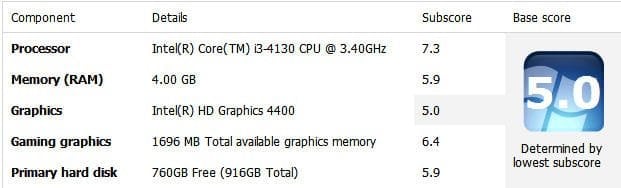
HP Pavilion 500-281 desktop 64 bit; Windows Home Premium.
Thanks,
SBee
P.S. Just noticed something: when PSP is running, websites have a solid-blue border; if I close PSP, the borders instantly become transparent.
I've been using PaintShop Pro ver 9 (pre-Corel) for many years. When I open the program in my new computer, I get this message:
"The color scheme has been changed to windows 7 basic."
The program seems to run fine. Is there some setting I should tweak to make Windows happier about PSP9?
I'm not using a Windows theme. My desktop background is a grid (white lines on black; I position my icons within the squares). Please let me know if there are other setting you need to know.
HP Pavilion 500-281 desktop 64 bit; Windows Home Premium.
Thanks,
SBee
P.S. Just noticed something: when PSP is running, websites have a solid-blue border; if I close PSP, the borders instantly become transparent.
Last edited:
My Computer
At a glance
windows 7 home premium 64 bitINTEL CORE i3-41304 GB
- Computer type
- PC/Desktop
- Computer Manufacturer/Model Number
- HP 500-281
- OS
- windows 7 home premium 64 bit
- CPU
- INTEL CORE i3-4130
- Memory
- 4 GB
- Antivirus
- AVAST FREE
- Browser
- CHROME or FIREFOX