Is there any way to make my mouse driver boot sooner on start up?

Thornton

New member
Power User
Local time
4:12 PM
Messages
597
Location
Orlando Florida
I have a Razer mouse and keyboard, and I have to say, as much as I love the devices to death, the Synapse 2.0 drivers are horrendous. That is one area where I think Cyborg takes the prize. My DPI goes up to 8200, but I only use it at around 1800 when I'm not gaming or working on computer animation work. One of the problems with the driver is that the driver is only running if Synapse is running. That means when synapse is off, my mouse runs full 8200, which I almost never do, even when gaming. Maybe id go as high as 5000 at some times.

It seams like EVERYTHING loads before the Razer Synapse 2.0 service. It will take sometimes 3 or 4 minutes before my mouse isn't moving a thousand miles an hour.

Maybe moving it up on the start order, if that would even work, or help, is the wrong way of going about it, but its all I can think of. I am open to other suggestions. In the mean time, I am curious if there is a way to make it one of the first things to load so that less important things like google drive, media fire, or snagit arent made priority over it. Like I said though, if someone has more experience with issues like this, I am all ears, or, eyes as the case might be.

I appreciate the help.
 

My Computer My Computer

At a glance

windows 7 ProfessionalIntel I7 4790k16gb DDR3 1600mhzDual GTX 780 ASUS
Computer type
PC/Desktop
Computer Manufacturer/Model Number
Custom Build
OS
windows 7 Professional
CPU
Intel I7 4790k
Motherboard
ASUS Hero VII
Memory
16gb DDR3 1600mhz
Graphics Card(s)
Dual GTX 780 ASUS
Monitor(s) Displays
2x HP 2331
Screen Resolution
1080p
Hard Drives
750gb Hitachi 7200rpm
500gb Crucial SSD
PSU
Corsair 800g
Case
NZXT Phantom
Cooling
fan
Keyboard
Razer Deathstalker
Mouse
Razer Ouroboros
Internet Speed
70mbps
Antivirus
MSE + M-Bam
Browser
Chrome
Hiyya Thornton so you are talking of the boot in the Start up (msconfig)?
 

My Computer My Computer

At a glance

Desk1 7 Home Prem / Desk2 10 Pro / Main lap A...Desk1 i5 3750K / Laptop i7 GTX 860M / Desk2 i...Desk1 8GB (1866) / Desk2 16GB (1333) / Laptop...Desk 1& 2NVidia GTX 650 & Laptops on board Intel
Computer type
PC/Desktop
Computer Manufacturer/Model Number
Own build (new) Desk1 / Asus ROG Win 7 / Desk2 1st build
OS
Desk1 7 Home Prem / Desk2 10 Pro / Main lap Asus ROG 10 Pro 2 laptop Toshiba 7 Pro Asus P2520 7 & 10
CPU
Desk1 i5 3750K / Laptop i7 GTX 860M / Desk2 i5 2500
Motherboard
Desk1 Asus P877-V / Desk2 Gigabyte H67 UD3H / Laptop ?
Memory
Desk1 8GB (1866) / Desk2 16GB (1333) / Laptop 8Gb DDR3
Graphics Card(s)
Desk 1& 2NVidia GTX 650 & Laptops on board Intel
Sound Card
Desk 1 & 2 -XONAR DG Realtek High Def audio Laptop
Monitor(s) Displays
Desk 1 Benq HD 2450 / Desk2 Philips 24" / Laptop 17.5"
Screen Resolution
1920x1080 D1 & D2 & Laptop 1
Hard Drives
Desk1 Samsung 120GB 830 SSD
Asus ROG 256GB 850 Pro SSD
Desk2 Samsung 840 256 SSD
Toshiba 120GB EVO
PSU
Desk 1 Corsair HX 1050/ Laptop ? / Desk 2 Corsair HX 650
Case
Desk 1 Cooler HAF XM ? Toshiba laptop / Desk2 Coolermaster
Cooling
Fans on all Desk1 -2 Desk2 - all Coolermasters 5 Laptop ?
Keyboard
Desk 1 MS Sidewinder X6 Desk 2 MS Sidewinder X 4
Mouse
Desk 1&2 - Gigabyte MS 900 gamer - laptop - Logitec wireless
Internet Speed
ADSL2+
Other Info
One other Desktop (tester) and spare Toshba laptop both with SSD's
Running Kaspersky 2016 ISS on all machines config'd identically
Logitec audio stereo systems on each machine (x3)
Canon MG5250MFC
Router/modem TP-Link running WPA2SK
Hiyya Thornton so you are talking of the boot in the Start up (msconfig)?

Yes, I do believe so. I checked MSConf and the Synapse driver is set to run on startup, as it should, but like I said, It might very well be the LAST thing to start, or at least it seems like it is. Perhaps it is starting first and the application just takes that long to load, but to be honest, it seems like a service that should have already started opening before you log in, not 60 seconds after.
 

My Computer My Computer

At a glance

windows 7 ProfessionalIntel I7 4790k16gb DDR3 1600mhzDual GTX 780 ASUS
Computer type
PC/Desktop
Computer Manufacturer/Model Number
Custom Build
OS
windows 7 Professional
CPU
Intel I7 4790k
Motherboard
ASUS Hero VII
Memory
16gb DDR3 1600mhz
Graphics Card(s)
Dual GTX 780 ASUS
Monitor(s) Displays
2x HP 2331
Screen Resolution
1080p
Hard Drives
750gb Hitachi 7200rpm
500gb Crucial SSD
PSU
Corsair 800g
Case
NZXT Phantom
Cooling
fan
Keyboard
Razer Deathstalker
Mouse
Razer Ouroboros
Internet Speed
70mbps
Antivirus
MSE + M-Bam
Browser
Chrome
Oops I got that wrong eh? I should have said Start up eh?:o

Now as a rule I start with an absolute minimum on the Start up tab I set mine to the OS and Microsoft Intelli (keyboard) stuff. On my other machines where the security is listed (have no idea why it is not on this one) I include that.

Now you might just try having the mouse only set on start up - worth a try and nothing to lose if you are concerned re security then set it the OS has to start anyway:)

I shall be offline in just a few minutes so if I don't answer quickly it will mean I am travelling back to where I am staying.
 

My Computer My Computer

At a glance

Desk1 7 Home Prem / Desk2 10 Pro / Main lap A...Desk1 i5 3750K / Laptop i7 GTX 860M / Desk2 i...Desk1 8GB (1866) / Desk2 16GB (1333) / Laptop...Desk 1& 2NVidia GTX 650 & Laptops on board Intel
Computer type
PC/Desktop
Computer Manufacturer/Model Number
Own build (new) Desk1 / Asus ROG Win 7 / Desk2 1st build
OS
Desk1 7 Home Prem / Desk2 10 Pro / Main lap Asus ROG 10 Pro 2 laptop Toshiba 7 Pro Asus P2520 7 & 10
CPU
Desk1 i5 3750K / Laptop i7 GTX 860M / Desk2 i5 2500
Motherboard
Desk1 Asus P877-V / Desk2 Gigabyte H67 UD3H / Laptop ?
Memory
Desk1 8GB (1866) / Desk2 16GB (1333) / Laptop 8Gb DDR3
Graphics Card(s)
Desk 1& 2NVidia GTX 650 & Laptops on board Intel
Sound Card
Desk 1 & 2 -XONAR DG Realtek High Def audio Laptop
Monitor(s) Displays
Desk 1 Benq HD 2450 / Desk2 Philips 24" / Laptop 17.5"
Screen Resolution
1920x1080 D1 & D2 & Laptop 1
Hard Drives
Desk1 Samsung 120GB 830 SSD
Asus ROG 256GB 850 Pro SSD
Desk2 Samsung 840 256 SSD
Toshiba 120GB EVO
PSU
Desk 1 Corsair HX 1050/ Laptop ? / Desk 2 Corsair HX 650
Case
Desk 1 Cooler HAF XM ? Toshiba laptop / Desk2 Coolermaster
Cooling
Fans on all Desk1 -2 Desk2 - all Coolermasters 5 Laptop ?
Keyboard
Desk 1 MS Sidewinder X6 Desk 2 MS Sidewinder X 4
Mouse
Desk 1&2 - Gigabyte MS 900 gamer - laptop - Logitec wireless
Internet Speed
ADSL2+
Other Info
One other Desktop (tester) and spare Toshba laptop both with SSD's
Running Kaspersky 2016 ISS on all machines config'd identically
Logitec audio stereo systems on each machine (x3)
Canon MG5250MFC
Router/modem TP-Link running WPA2SK
Oops I got that wrong eh? I should have said Start up eh?:o

Now as a rule I start with an absolute minimum on the Start up tab I set mine to the OS and Microsoft Intelli (keyboard) stuff. On my other machines where the security is listed (have no idea why it is not on this one) I include that.

Now you might just try having the mouse only set on start up - worth a try and nothing to lose if you are concerned re security then set it the OS has to start anyway:)

I shall be offline in just a few minutes so if I don't answer quickly it will mean I am travelling back to where I am staying.

Thank you for the suggestion. I dont even want to imagine what applications wont work right, but I kicked out all of my updaters, adobe, apple, and akami net stuff from start up. It is certainly a lot fewer start up apps so hopefully that at least helps. I am kindof curious why boot takes so long, though, to be honest. I know I am only using a 7200 RPM drive, for now, and when I upgrade to a solid state, it will help, but I have a very powerful processor and plenty of ram... I wonder why this is even an issue and its not loading faster, regardless of service priority.
 

My Computer My Computer

At a glance

windows 7 ProfessionalIntel I7 4790k16gb DDR3 1600mhzDual GTX 780 ASUS
Computer type
PC/Desktop
Computer Manufacturer/Model Number
Custom Build
OS
windows 7 Professional
CPU
Intel I7 4790k
Motherboard
ASUS Hero VII
Memory
16gb DDR3 1600mhz
Graphics Card(s)
Dual GTX 780 ASUS
Monitor(s) Displays
2x HP 2331
Screen Resolution
1080p
Hard Drives
750gb Hitachi 7200rpm
500gb Crucial SSD
PSU
Corsair 800g
Case
NZXT Phantom
Cooling
fan
Keyboard
Razer Deathstalker
Mouse
Razer Ouroboros
Internet Speed
70mbps
Antivirus
MSE + M-Bam
Browser
Chrome
Well Thornton I have a fairly decent Ivy set up and I clock the RAM to 2400(max it will go to) and the i5 K to 4.2 and I have admittedly a SSD for the boot and it is reallyquick. That board - an Asus P8Z77 - V is a lot less featured than your board, and personally I think your best bet is a SSD and clock the machine a bit.

I also use this my favourite tutorial which I find particularly good.

http://www.sevenforums.com/tutorials/11728-optimize-windows-7-a.html

Now it may sound a bit too obvious but I think a scan with these might be in order and to eliminate those possibilties

http://www.superantispyware.com/

http://www.malwarebytes.org/products/malwarebytes_free/

http://www.bleepingcomputer.com/download/adwcleaner/

download from bleeping computer – delete any rubbishthese find.

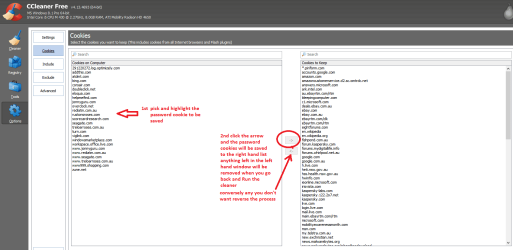
I am wondering and am assuming here that you use CCleaner? if not the it will hasten things up too and just in case you don't use it when you scan and go to clean up go to Options and then cookies - be sure to save the cookies that you have to sites you have a password (login) for:)
https://www.piriform.com/ccleaner/download


My Computer My Computer

At a glance

Desk1 7 Home Prem / Desk2 10 Pro / Main lap A...Desk1 i5 3750K / Laptop i7 GTX 860M / Desk2 i...Desk1 8GB (1866) / Desk2 16GB (1333) / Laptop...Desk 1& 2NVidia GTX 650 & Laptops on board Intel
Computer type
PC/Desktop
Computer Manufacturer/Model Number
Own build (new) Desk1 / Asus ROG Win 7 / Desk2 1st build
OS
Desk1 7 Home Prem / Desk2 10 Pro / Main lap Asus ROG 10 Pro 2 laptop Toshiba 7 Pro Asus P2520 7 & 10
CPU
Desk1 i5 3750K / Laptop i7 GTX 860M / Desk2 i5 2500
Motherboard
Desk1 Asus P877-V / Desk2 Gigabyte H67 UD3H / Laptop ?
Memory
Desk1 8GB (1866) / Desk2 16GB (1333) / Laptop 8Gb DDR3
Graphics Card(s)
Desk 1& 2NVidia GTX 650 & Laptops on board Intel
Sound Card
Desk 1 & 2 -XONAR DG Realtek High Def audio Laptop
Monitor(s) Displays
Desk 1 Benq HD 2450 / Desk2 Philips 24" / Laptop 17.5"
Screen Resolution
1920x1080 D1 & D2 & Laptop 1
Hard Drives
Desk1 Samsung 120GB 830 SSD
Asus ROG 256GB 850 Pro SSD
Desk2 Samsung 840 256 SSD
Toshiba 120GB EVO
PSU
Desk 1 Corsair HX 1050/ Laptop ? / Desk 2 Corsair HX 650
Case
Desk 1 Cooler HAF XM ? Toshiba laptop / Desk2 Coolermaster
Cooling
Fans on all Desk1 -2 Desk2 - all Coolermasters 5 Laptop ?
Keyboard
Desk 1 MS Sidewinder X6 Desk 2 MS Sidewinder X 4
Mouse
Desk 1&2 - Gigabyte MS 900 gamer - laptop - Logitec wireless
Internet Speed
ADSL2+
Other Info
One other Desktop (tester) and spare Toshba laptop both with SSD's
Running Kaspersky 2016 ISS on all machines config'd identically
Logitec audio stereo systems on each machine (x3)
Canon MG5250MFC
Router/modem TP-Link running WPA2SK
Well Thornton I have a fairly decent Ivy set up and I clock the RAM to 2400(max it will go to) and the i5 K to 4.2 and I have admittedly a SSD for the boot and it is reallyquick. That board - an Asus P8Z77 - V is a lot less featured than your board, and personally I think your best bet is a SSD and clock the machine a bit.

I also use this my favourite tutorial which I find particularly good.

http://www.sevenforums.com/tutorials/11728-optimize-windows-7-a.html

Now it may sound a bit too obvious but I think a scan with these might be in order and to eliminate those possibilties

http://www.superantispyware.com/

http://www.malwarebytes.org/products/malwarebytes_free/

http://www.bleepingcomputer.com/download/adwcleaner/

download from bleeping computer – delete any rubbishthese find.

I am wondering and am assuming here that you use CCleaner? if not the it will hasten things up too and just in case you don't use it when you scan and go to clean up go to Options and then cookies - be sure to save the cookies that you have to sites you have a password (login) for:)
https://www.piriform.com/ccleaner/download


Thanks for the suggestions. I love MSE and MBam so those were a few of the first things I did, but I like this optimization list a lot. There were a few things in there I already did but a lot I didn't even realize I could do, or maybe I did but didn't realize it could benefit performance.

Ill try it out. Thanks!
 

My Computer My Computer

At a glance

windows 7 ProfessionalIntel I7 4790k16gb DDR3 1600mhzDual GTX 780 ASUS
Computer type
PC/Desktop
Computer Manufacturer/Model Number
Custom Build
OS
windows 7 Professional
CPU
Intel I7 4790k
Motherboard
ASUS Hero VII
Memory
16gb DDR3 1600mhz
Graphics Card(s)
Dual GTX 780 ASUS
Monitor(s) Displays
2x HP 2331
Screen Resolution
1080p
Hard Drives
750gb Hitachi 7200rpm
500gb Crucial SSD
PSU
Corsair 800g
Case
NZXT Phantom
Cooling
fan
Keyboard
Razer Deathstalker
Mouse
Razer Ouroboros
Internet Speed
70mbps
Antivirus
MSE + M-Bam
Browser
Chrome
also, I do not use CCleaner, but I have been on edge whether or not to give it a try for a while. I hear some people say it works wonders... otherrs say dont use it, it can seriously F up your registry and UI .dlls... others say they never have any problems and it works wonders... Do you have any specific suggestions of what I do with it that might be of benefit me?
 

My Computer My Computer

At a glance

windows 7 ProfessionalIntel I7 4790k16gb DDR3 1600mhzDual GTX 780 ASUS
Computer type
PC/Desktop
Computer Manufacturer/Model Number
Custom Build
OS
windows 7 Professional
CPU
Intel I7 4790k
Motherboard
ASUS Hero VII
Memory
16gb DDR3 1600mhz
Graphics Card(s)
Dual GTX 780 ASUS
Monitor(s) Displays
2x HP 2331
Screen Resolution
1080p
Hard Drives
750gb Hitachi 7200rpm
500gb Crucial SSD
PSU
Corsair 800g
Case
NZXT Phantom
Cooling
fan
Keyboard
Razer Deathstalker
Mouse
Razer Ouroboros
Internet Speed
70mbps
Antivirus
MSE + M-Bam
Browser
Chrome
Sorry late reply mate CCleaner is fine mate the only thing is like I said when you go Options before you run the cleaner you need to highlight the cookies that are used for the sites you have passwords for - you can see what I save in my pic.
The registry you can scan and save the results to a Documents and they can be merged back in afterwards if anything goes south. It is not a final and non repairable thing to do. Those who say it wrecks the registry obviously don't do that and so they end up with problems. I and many others run this program run this program on a regular basis and speaking for myself I have never had a problem with it.
So I can only advise you to do what you feel happy with but seriously you would have to be reckless to muck up the machine with CC.
http://www.sevenforums.com/tutorials/306648-ccleaner-delete-junk-files.html < you need to add what I have just said to save those cookies or you will be forever entering user ID and password for sites. Anyway see my pic - this is after the Analyse has been run and you click on Options > cookies .
Once you get used to it - it becomes second nature and you will be surprised how much junk you have on the machine that is being loaded without you knowing and it really isn't needed lie a cookie for say Jo Blow stores.com that you might have visited once and will never again - it still is being loaded!
 

Attachments

  • CCLEANER COOKIES.PNG
    CCLEANER COOKIES.PNG
    33.5 KB · Views: 1

My Computer My Computer

At a glance

Desk1 7 Home Prem / Desk2 10 Pro / Main lap A...Desk1 i5 3750K / Laptop i7 GTX 860M / Desk2 i...Desk1 8GB (1866) / Desk2 16GB (1333) / Laptop...Desk 1& 2NVidia GTX 650 & Laptops on board Intel
Computer type
PC/Desktop
Computer Manufacturer/Model Number
Own build (new) Desk1 / Asus ROG Win 7 / Desk2 1st build
OS
Desk1 7 Home Prem / Desk2 10 Pro / Main lap Asus ROG 10 Pro 2 laptop Toshiba 7 Pro Asus P2520 7 & 10
CPU
Desk1 i5 3750K / Laptop i7 GTX 860M / Desk2 i5 2500
Motherboard
Desk1 Asus P877-V / Desk2 Gigabyte H67 UD3H / Laptop ?
Memory
Desk1 8GB (1866) / Desk2 16GB (1333) / Laptop 8Gb DDR3
Graphics Card(s)
Desk 1& 2NVidia GTX 650 & Laptops on board Intel
Sound Card
Desk 1 & 2 -XONAR DG Realtek High Def audio Laptop
Monitor(s) Displays
Desk 1 Benq HD 2450 / Desk2 Philips 24" / Laptop 17.5"
Screen Resolution
1920x1080 D1 & D2 & Laptop 1
Hard Drives
Desk1 Samsung 120GB 830 SSD
Asus ROG 256GB 850 Pro SSD
Desk2 Samsung 840 256 SSD
Toshiba 120GB EVO
PSU
Desk 1 Corsair HX 1050/ Laptop ? / Desk 2 Corsair HX 650
Case
Desk 1 Cooler HAF XM ? Toshiba laptop / Desk2 Coolermaster
Cooling
Fans on all Desk1 -2 Desk2 - all Coolermasters 5 Laptop ?
Keyboard
Desk 1 MS Sidewinder X6 Desk 2 MS Sidewinder X 4
Mouse
Desk 1&2 - Gigabyte MS 900 gamer - laptop - Logitec wireless
Internet Speed
ADSL2+
Other Info
One other Desktop (tester) and spare Toshba laptop both with SSD's
Running Kaspersky 2016 ISS on all machines config'd identically
Logitec audio stereo systems on each machine (x3)
Canon MG5250MFC
Router/modem TP-Link running WPA2SK
Sorry late reply mate CCleaner is fine mate the only thing is like I said when you go Options before you run the cleaner you need to highlight the cookies that are used for the sites you have passwords for - you can see what I save in my pic.
The registry you can scan and save the results to a Documents and they can be merged back in afterwards if anything goes south. It is not a final and non repairable thing to do. Those who say it wrecks the registry obviously don't do that and so they end up with problems. I and many others run this program run this program on a regular basis and speaking for myself I have never had a problem with it.
So I can only advise you to do what you feel happy with but seriously you would have to be reckless to muck up the machine with CC.
http://www.sevenforums.com/tutorials/306648-ccleaner-delete-junk-files.html < you need to add what I have just said to save those cookies or you will be forever entering user ID and password for sites. Anyway see my pic - this is after the Analyse has been run and you click on Options > cookies .
Once you get used to it - it becomes second nature and you will be surprised how much junk you have on the machine that is being loaded without you knowing and it really isn't needed lie a cookie for say Jo Blow stores.com that you might have visited once and will never again - it still is being loaded!

Your alright. I ran CCleaner and ir worked beautifully. I ran the registry cleaner also. It did cause problems with applications to I used the backup I made of my reg to revert back. I also ran cookie cleaner and that helped a little. I also popped open my bios (luv you ASUS!) and set my I7 4790k from standard boot time to turbo-boost boot. I also looked at the optimization list you gave me. I appreciate the helpful link. I did not do everything on it, though. Call me a little vain if you want but I have a thing for aesthetic appeal (Im a computer animation student. My love for good looking GUIs is justified. Haha). My boot times might still be a little longer than id like, unfortunately, but canning a few of the animations and boot animation helped a bit. After all is said and done, its a little hit and miss whether Synapse actually loads faster or not, but when it does load faster, which it didn't do at all prior to this, it shaves off about 15-30 seconds out off the normal minute to minute and a half.

Because the drivers success is dependent on this application loading, I can tell that a low latency SSD would benefit me greatly. I am looking at a few Corsair ones right now, but I might have to wait to order it until after my move to Orlando to start my college classes. If I ordered today, it might take 3 days to ship but I don't know that I feel comfortable risking it or not when my move is less than 2 weeks away. Maybe. We'll see.

I appreciate all the great, successful help, and if there is anything else that you or anyone ever thinks to add, please, I am interested in at least hearing it.

In the mean time, I am going to read up on how to clone windows to a SSD and how to set the majority of less comonly used applications data from Program Files, Program Files (x86) and app data to be pulled from my HDD, to conserve space on the SSD.
 

My Computer My Computer

At a glance

windows 7 ProfessionalIntel I7 4790k16gb DDR3 1600mhzDual GTX 780 ASUS
Computer type
PC/Desktop
Computer Manufacturer/Model Number
Custom Build
OS
windows 7 Professional
CPU
Intel I7 4790k
Motherboard
ASUS Hero VII
Memory
16gb DDR3 1600mhz
Graphics Card(s)
Dual GTX 780 ASUS
Monitor(s) Displays
2x HP 2331
Screen Resolution
1080p
Hard Drives
750gb Hitachi 7200rpm
500gb Crucial SSD
PSU
Corsair 800g
Case
NZXT Phantom
Cooling
fan
Keyboard
Razer Deathstalker
Mouse
Razer Ouroboros
Internet Speed
70mbps
Antivirus
MSE + M-Bam
Browser
Chrome
ok now on the clone to the SSD it is quite easy using Macrium (free) Macrium Reflect FREE Edition - Information and download
the only thing is that in general the drive to be cloned to - needs to be the same GB size or larger then the donor drive.
For example if you had a 256GB SSD and the original drive was 500GB the it will not clone to the SSD because of the available space - it would be a bit like trying to tip a five gallon drum of water into a 2 gallon drum it just will not be possible - a ridiculous example but you get my drift.
There is a way of dragging and dropping partitions into the recipient drive but I have never had much luck with that. So if you have a 500GB spinner then you would need a 500GB (usually 516GB) SSD.
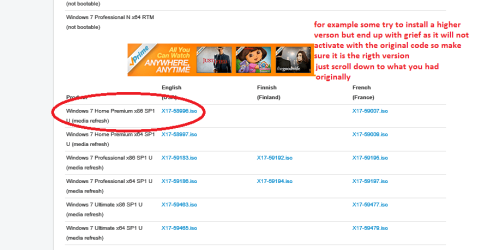
An option is for you to install the OS onto the SSD - (use this http://www.sevenforums.com/tutorials/219487-clean-reinstall-factory-oem-windows-7-a.html#post1839164 make sure you ick only the version you have originally - see pic )
after making a system image with Macrium first -
http://www.sevenforums.com/tutorials/73828-imaging-free-macrium.html
I do that onto an external drive on a weekly basis and then reimage the new install with saved stuff. There is a tutorial for that and I cannot find it right now. But using that ISO you will have the freshest version of your Windows available (usually not so many updates afterwards)

I prefer Samsung SSD's over the rest they are just great and have a really good software program called Samsung magician that will keep the drive in top condition. They are usually quite inexpensive but if you like the Corsair they are good too. Other brand I have used are Crucial and SanDisk which again are very good.

I am glad you liked that tutorial as it is very good and to be honest I don't use all the tips but start up and shut down are brilliant. Glad you sorted the CCleaner stuff too it is good for that and many other tools it has are good stuff too.
 

Attachments

  • ISO.PNG
    ISO.PNG
    22.9 KB · Views: 0

My Computer My Computer

At a glance

Desk1 7 Home Prem / Desk2 10 Pro / Main lap A...Desk1 i5 3750K / Laptop i7 GTX 860M / Desk2 i...Desk1 8GB (1866) / Desk2 16GB (1333) / Laptop...Desk 1& 2NVidia GTX 650 & Laptops on board Intel
Computer type
PC/Desktop
Computer Manufacturer/Model Number
Own build (new) Desk1 / Asus ROG Win 7 / Desk2 1st build
OS
Desk1 7 Home Prem / Desk2 10 Pro / Main lap Asus ROG 10 Pro 2 laptop Toshiba 7 Pro Asus P2520 7 & 10
CPU
Desk1 i5 3750K / Laptop i7 GTX 860M / Desk2 i5 2500
Motherboard
Desk1 Asus P877-V / Desk2 Gigabyte H67 UD3H / Laptop ?
Memory
Desk1 8GB (1866) / Desk2 16GB (1333) / Laptop 8Gb DDR3
Graphics Card(s)
Desk 1& 2NVidia GTX 650 & Laptops on board Intel
Sound Card
Desk 1 & 2 -XONAR DG Realtek High Def audio Laptop
Monitor(s) Displays
Desk 1 Benq HD 2450 / Desk2 Philips 24" / Laptop 17.5"
Screen Resolution
1920x1080 D1 & D2 & Laptop 1
Hard Drives
Desk1 Samsung 120GB 830 SSD
Asus ROG 256GB 850 Pro SSD
Desk2 Samsung 840 256 SSD
Toshiba 120GB EVO
PSU
Desk 1 Corsair HX 1050/ Laptop ? / Desk 2 Corsair HX 650
Case
Desk 1 Cooler HAF XM ? Toshiba laptop / Desk2 Coolermaster
Cooling
Fans on all Desk1 -2 Desk2 - all Coolermasters 5 Laptop ?
Keyboard
Desk 1 MS Sidewinder X6 Desk 2 MS Sidewinder X 4
Mouse
Desk 1&2 - Gigabyte MS 900 gamer - laptop - Logitec wireless
Internet Speed
ADSL2+
Other Info
One other Desktop (tester) and spare Toshba laptop both with SSD's
Running Kaspersky 2016 ISS on all machines config'd identically
Logitec audio stereo systems on each machine (x3)
Canon MG5250MFC
Router/modem TP-Link running WPA2SK
ok now on the clone to the SSD it is quite easy using Macrium (free) Macrium Reflect FREE Edition - Information and download
the only thing is that in general the drive to be cloned to - needs to be the same GB size or larger then the donor drive.
For example if you had a 256GB SSD and the original drive was 500GB the it will not clone to the SSD because of the available space - it would be a bit like trying to tip a five gallon drum of water into a 2 gallon drum it just will not be possible - a ridiculous example but you get my drift.
There is a way of dragging and dropping partitions into the recipient drive but I have never had much luck with that. So if you have a 500GB spinner then you would need a 500GB (usually 516GB) SSD.
An option is for you to install the OS onto the SSD - (use this http://www.sevenforums.com/tutorials/219487-clean-reinstall-factory-oem-windows-7-a.html#post1839164 make sure you ick only the version you have originally - see pic )
after making a system image with Macrium first -
http://www.sevenforums.com/tutorials/73828-imaging-free-macrium.html
I do that onto an external drive on a weekly basis and then reimage the new install with saved stuff. There is a tutorial for that and I cannot find it right now. But using that ISO you will have the freshest version of your Windows available (usually not so many updates afterwards)

I prefer Samsung SSD's over the rest they are just great and have a really good software program called Samsung magician that will keep the drive in top condition. They are usually quite inexpensive but if you like the Corsair they are good too. Other brand I have used are Crucial and SanDisk which again are very good.

I am glad you liked that tutorial as it is very good and to be honest I don't use all the tips but start up and shut down are brilliant. Glad you sorted the CCleaner stuff too it is good for that and many other tools it has are good stuff too.

I looked at the samsung ones and liked them alright, for the product its self. My problem with them in general, though, is that I have had a lot of poor experiences with samsung, lately. Mostly just still angry that they locked down my phones bootloader and then un-rooted it with an update that ran even with updates off..... I just don't care for the business model, even though their mobile departments and PC Hardware departments are likely under completely different management. I am not super attached to corsair, but I have never had a reason do distrust them in the past. I am also looking at the crucial ones, as well as a few Intel ones.

As far as cloning to a different sized disk. My HDD is 750gb but only 400gb is currently in use. Is it possible that I could uninstall any unneeded programs. Defrag. Shrink the partition as much as possible. and then clone the existing partitions? If I uninstall anything that I am not going to be keeping on the SSD, regardless of cloning, that will be maybe, MAYBE, 350gb. I am looking at getting a 480-510gb SSD, so I should have plenty of storage available between the System Reserved, my restoration partition, and my C:\ partitions. I know it is possible, to still make this clone, but I guess my question to you would be, is, provided this worked, what is the chance of success (and the data safety) in using this method? Obviously there is always a risk, every time you manipulate an existing partition or transfer large amounts of data without backups, but is it something that is particularly risky, in your opinion? or do you think it would likely work fine?
 

My Computer My Computer

At a glance

windows 7 ProfessionalIntel I7 4790k16gb DDR3 1600mhzDual GTX 780 ASUS
Computer type
PC/Desktop
Computer Manufacturer/Model Number
Custom Build
OS
windows 7 Professional
CPU
Intel I7 4790k
Motherboard
ASUS Hero VII
Memory
16gb DDR3 1600mhz
Graphics Card(s)
Dual GTX 780 ASUS
Monitor(s) Displays
2x HP 2331
Screen Resolution
1080p
Hard Drives
750gb Hitachi 7200rpm
500gb Crucial SSD
PSU
Corsair 800g
Case
NZXT Phantom
Cooling
fan
Keyboard
Razer Deathstalker
Mouse
Razer Ouroboros
Internet Speed
70mbps
Antivirus
MSE + M-Bam
Browser
Chrome
ok now on the clone to the SSD it is quite easy using Macrium (free) Macrium Reflect FREE Edition - Information and download
the only thing is that in general the drive to be cloned to - needs to be the same GB size or larger then the donor drive.
For example if you had a 256GB SSD and the original drive was 500GB the it will not clone to the SSD because of the available space - it would be a bit like trying to tip a five gallon drum of water into a 2 gallon drum it just will not be possible - a ridiculous example but you get my drift.
There is a way of dragging and dropping partitions into the recipient drive but I have never had much luck with that. So if you have a 500GB spinner then you would need a 500GB (usually 516GB) SSD.
An option is for you to install the OS onto the SSD - (use this http://www.sevenforums.com/tutorials/219487-clean-reinstall-factory-oem-windows-7-a.html#post1839164 make sure you ick only the version you have originally - see pic )
after making a system image with Macrium first -
http://www.sevenforums.com/tutorials/73828-imaging-free-macrium.html
I do that onto an external drive on a weekly basis and then reimage the new install with saved stuff. There is a tutorial for that and I cannot find it right now. But using that ISO you will have the freshest version of your Windows available (usually not so many updates afterwards)

I prefer Samsung SSD's over the rest they are just great and have a really good software program called Samsung magician that will keep the drive in top condition. They are usually quite inexpensive but if you like the Corsair they are good too. Other brand I have used are Crucial and SanDisk which again are very good.

I am glad you liked that tutorial as it is very good and to be honest I don't use all the tips but start up and shut down are brilliant. Glad you sorted the CCleaner stuff too it is good for that and many other tools it has are good stuff too.

I looked at the samsung ones and liked them alright, for the product its self. My problem with them in general, though, is that I have had a lot of poor experiences with samsung, lately. Mostly just still angry that they locked down my phones bootloader and then un-rooted it with an update that ran even with updates off..... I just don't care for the business model, even though their mobile departments and PC Hardware departments are likely under completely different management. I am not super attached to corsair, but I have never had a reason do distrust them in the past. I am also looking at the crucial ones, as well as a few Intel ones.

As far as cloning to a different sized disk. My HDD is 750gb but only 400gb is currently in use. Is it possible that I could uninstall any unneeded programs. Defrag. Shrink the partition as much as possible. and then clone the existing partitions? If I uninstall anything that I am not going to be keeping on the SSD, regardless of cloning, that will be maybe, MAYBE, 350gb. I am looking at getting a 480-510gb SSD, so I should have plenty of storage available between the System Reserved, my restoration partition, and my C:\ partitions. I know it is possible, to still make this clone, but I guess my question to you would be, is, provided this worked, what is the chance of success (and the data safety) in using this method? Obviously there is always a risk, every time you manipulate an existing partition or transfer large amounts of data without backups, but is it something that is particularly risky, in your opinion? or do you think it would likely work fine?

I would like to add a side note, as well. I just installed AOMEI Partition Assistant, because to be honest, I hate windows partition manager. I notice that it already has an option to clone a partition to SSD or HDD. It seems legit. Others seem to have had success with it, so I might give it a try, but still, you seem to have more experience with this and I would like to hear your thoughts.
 

My Computer My Computer

At a glance

windows 7 ProfessionalIntel I7 4790k16gb DDR3 1600mhzDual GTX 780 ASUS
Computer type
PC/Desktop
Computer Manufacturer/Model Number
Custom Build
OS
windows 7 Professional
CPU
Intel I7 4790k
Motherboard
ASUS Hero VII
Memory
16gb DDR3 1600mhz
Graphics Card(s)
Dual GTX 780 ASUS
Monitor(s) Displays
2x HP 2331
Screen Resolution
1080p
Hard Drives
750gb Hitachi 7200rpm
500gb Crucial SSD
PSU
Corsair 800g
Case
NZXT Phantom
Cooling
fan
Keyboard
Razer Deathstalker
Mouse
Razer Ouroboros
Internet Speed
70mbps
Antivirus
MSE + M-Bam
Browser
Chrome
Well in a nutshell I have never tried doing what you are proposing I think the program whatever one you use for cloning - unless there is one I am not aware of - will still :"see the original drive as larger no matter how much you shrink and partition. That is much the same way that the BIOS would see them too.
As I mentioned dragging and dropping the partitions is the only way of getting the partitions to "clone" to another drive but again I have not had much luck even though it can be done. Maybe it was something I was doing wrong but.....


Now the best partition tool that I have used an still do is this Free Partition Manager for Window PC | MiniTool Partition Wizard Free Edition it has a lot more than just partitioning abilities and it is free. For example it has a drive wipe which is just as good as the DISKPART clean all feature.

As for the drive (SSD) Corsair is fine it is just I have a preference for the Samsung - the others I mentioned also are really good. When they first came into general and affordable use lots of the brands suffered from controller problems but now most of that has been sorted.
 

My Computer My Computer

At a glance

Desk1 7 Home Prem / Desk2 10 Pro / Main lap A...Desk1 i5 3750K / Laptop i7 GTX 860M / Desk2 i...Desk1 8GB (1866) / Desk2 16GB (1333) / Laptop...Desk 1& 2NVidia GTX 650 & Laptops on board Intel
Computer type
PC/Desktop
Computer Manufacturer/Model Number
Own build (new) Desk1 / Asus ROG Win 7 / Desk2 1st build
OS
Desk1 7 Home Prem / Desk2 10 Pro / Main lap Asus ROG 10 Pro 2 laptop Toshiba 7 Pro Asus P2520 7 & 10
CPU
Desk1 i5 3750K / Laptop i7 GTX 860M / Desk2 i5 2500
Motherboard
Desk1 Asus P877-V / Desk2 Gigabyte H67 UD3H / Laptop ?
Memory
Desk1 8GB (1866) / Desk2 16GB (1333) / Laptop 8Gb DDR3
Graphics Card(s)
Desk 1& 2NVidia GTX 650 & Laptops on board Intel
Sound Card
Desk 1 & 2 -XONAR DG Realtek High Def audio Laptop
Monitor(s) Displays
Desk 1 Benq HD 2450 / Desk2 Philips 24" / Laptop 17.5"
Screen Resolution
1920x1080 D1 & D2 & Laptop 1
Hard Drives
Desk1 Samsung 120GB 830 SSD
Asus ROG 256GB 850 Pro SSD
Desk2 Samsung 840 256 SSD
Toshiba 120GB EVO
PSU
Desk 1 Corsair HX 1050/ Laptop ? / Desk 2 Corsair HX 650
Case
Desk 1 Cooler HAF XM ? Toshiba laptop / Desk2 Coolermaster
Cooling
Fans on all Desk1 -2 Desk2 - all Coolermasters 5 Laptop ?
Keyboard
Desk 1 MS Sidewinder X6 Desk 2 MS Sidewinder X 4
Mouse
Desk 1&2 - Gigabyte MS 900 gamer - laptop - Logitec wireless
Internet Speed
ADSL2+
Other Info
One other Desktop (tester) and spare Toshba laptop both with SSD's
Running Kaspersky 2016 ISS on all machines config'd identically
Logitec audio stereo systems on each machine (x3)
Canon MG5250MFC
Router/modem TP-Link running WPA2SK
Well in a nutshell I have never tried doing what you are proposing I think the program whatever one you use for cloning - unless there is one I am not aware of - will still :"see the original drive as larger no matter how much you shrink and partition. That is much the same way that the BIOS would see them too.
As I mentioned dragging and dropping the partitions is the only way of getting the partitions to "clone" to another drive but again I have not had much luck even though it can be done. Maybe it was something I was doing wrong but.....


Now the best partition tool that I have used an still do is this Free Partition Manager for Window PC | MiniTool Partition Wizard Free Edition it has a lot more than just partitioning abilities and it is free. For example it has a drive wipe which is just as good as the DISKPART clean all feature.

As for the drive (SSD) Corsair is fine it is just I have a preference for the Samsung - the others I mentioned also are really good. When they first came into general and affordable use lots of the brands suffered from controller problems but now most of that has been sorted.

Ok, well, if it doesn't work and I have to do a clean install on the new disk, it is what it is... Not ideal, by any means, given my lack of time availability with my recent college courses, but if that is what it comes down to then it doesn't sound like there is a whole lot I can do about it anyways.

I appreciate the help and your input. I have only opened up and taken a look at this AOMEI software once. I have not used it, yet (no reason to, yet). I will take a look at mini. From all I can tell, they are not all that different, so I think it will come down to which application I feel more comfortable using and best suits my immediate needs.

Again, thanks so much. Your suggestions have been very helpful. If there is anything else that ever comes to your mind that you think might benefit me even further, I would be very interested in hearing.
 

My Computer My Computer

At a glance

windows 7 ProfessionalIntel I7 4790k16gb DDR3 1600mhzDual GTX 780 ASUS
Computer type
PC/Desktop
Computer Manufacturer/Model Number
Custom Build
OS
windows 7 Professional
CPU
Intel I7 4790k
Motherboard
ASUS Hero VII
Memory
16gb DDR3 1600mhz
Graphics Card(s)
Dual GTX 780 ASUS
Monitor(s) Displays
2x HP 2331
Screen Resolution
1080p
Hard Drives
750gb Hitachi 7200rpm
500gb Crucial SSD
PSU
Corsair 800g
Case
NZXT Phantom
Cooling
fan
Keyboard
Razer Deathstalker
Mouse
Razer Ouroboros
Internet Speed
70mbps
Antivirus
MSE + M-Bam
Browser
Chrome
Back
Top