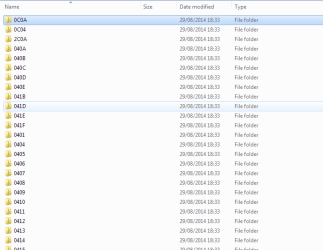
Folders under /system with nusb3co.dll.mui

gabriolinari

New member
Member
VIP
Local time
3:01 PM
Messages
144
hi guys,

I just came across my system32 folder and noticed something odd, there's a handful of folders, 30 to be exact (see screencap) with this file inside nusb3co.dll.mui

I think it had to do to a SFC scan. I launched some time ago, but I couldn't be sure, they all have the same date...

any thoughts?

thanks
gab
 

Attachments

  • cap1.png
    cap1.png
    2.4 KB · Views: 24
  • cap2.png
    cap2.png
    1.9 KB · Views: 25

My Computer My Computer

At a glance

Windows 7 Ultimate x64
Computer type
PC/Desktop
OS
Windows 7 Ultimate x64
can I delete them?
 

My Computer My Computer

At a glance

Windows 7 Ultimate x64
Computer type
PC/Desktop
OS
Windows 7 Ultimate x64
anyone about this?? im thinking to delete all those folders....?????
 

My Computer My Computer

At a glance

Windows 7 Ultimate x64
Computer type
PC/Desktop
OS
Windows 7 Ultimate x64
dll vs dll.mui

Well here's some info:

Some system files/locations are new to Windows 7 and were not present in earlier Windows versions, like XP. If you want to change look of other menus, dialog boxes like RUN, Progress, System Properties, Start menu, Taskbar Properties, etc, you'll have to edit some other system files which you needed to edit in Windows XP. But there is a little difference, now those files don't contain the resources but their .MUI files do.

For example in Windows XP, RUN dialog box resources were present in "%windir%\System32\Shell32.dll" file but in Windows 7, the resources are present in "%windir%\System32\en-US\Shell32.dll.mui" file.

All these .MUI files are present in any of following 2 locations:

%windir%\en-US\
%windir%\System32\en-US\

So in answer to your question if you find a nusb3co.dll in your system32 folder (or anywhere else) then you shouldn't delete the corresponding nusb3co.dll.mui file.
 

My Computer My Computer

At a glance

Microsoft Windows 7 Home Premium 64-bit 7601 ...AMD C-60 APU with Radeon(tm) HD Graphics4.00 GBAMD Radeon HD 6290 Graphics
Computer type
Laptop
Computer Manufacturer/Model Number
ASUS
OS
Microsoft Windows 7 Home Premium 64-bit 7601 Multiprocessor Free Service Pack 1
CPU
AMD C-60 APU with Radeon(tm) HD Graphics
Motherboard
ASUSTeK COMPUTER INC. X501U
Memory
4.00 GB
Graphics Card(s)
AMD Radeon HD 6290 Graphics
Sound Card
(1) AMD High Definition Audio Device (2) Realtek High Defi
Screen Resolution
1366 x 768 x 32 bits (4294967296 colors) @ 60 Hz
Hard Drives
Hitachi HTS545050A7E380 SATA Disk Device
Antivirus
Comodo CIS & FW, SecureAplus App Whitelisting, Threatfire
Browser
Cyberfox 64bit, Opera 64bit, Airfox
Other Info
Spy-The-Spy, HitmanPro.Alert, Norton Connect Safe, MJRegWatcher, BitDefender TrafficLight, Voodoo Shield, Zemana AntiMalware
I would leave them alone. Unless you really understand what you are doing the entire contents of the windows folder should be considered off limits. As the files appear to be only 1 K in size what do you hope to gain?
 

My Computer My Computer

At a glance

Windows 7 Pro 64 bitXeon W35208 GBNvidia Geforce 210
Computer type
PC/Desktop
Computer Manufacturer/Model Number
HP
OS
Windows 7 Pro 64 bit
CPU
Xeon W3520
Memory
8 GB
Graphics Card(s)
Nvidia Geforce 210
ok thanks but why there's so many dupes??? see attachment

they all have the same file inside : nusb3co.dll.mui

also, I just searched c:\windows for nusb3co.dll and I have just one, in

C:\Windows\System32\DriverStore\FileRepository\nusb3xhc.inf_amd64_neutral_0bef1a22bb2463ef

any more clues???

thanks
gab
 

Attachments

  • dupe.png
    dupe.png
    7.5 KB · Views: 3

My Computer My Computer

At a glance

Windows 7 Ultimate x64
Computer type
PC/Desktop
OS
Windows 7 Ultimate x64
I would leave them alone. Unless you really understand what you are doing the entire contents of the windows folder should be considered off limits. As the files appear to be only 1 K in size what do you hope to gain?

well is just for the sake of keeping things clean, windows has a tendency to clog things up!
 

My Computer My Computer

At a glance

Windows 7 Ultimate x64
Computer type
PC/Desktop
OS
Windows 7 Ultimate x64

My Computer My Computer

At a glance

x64 (6.3.9600) Win8.1 Pro & soon dual boot x6...AMD A6-3420M APU with Radeon(tm) HD Graphics6.00 GBAMD Radeon(TM) HD 6520G
Computer type
Laptop
Computer Manufacturer/Model Number
HP Pavilion dv6-6c10us
OS
x64 (6.3.9600) Win8.1 Pro & soon dual boot x64 (6.1.7601) Win7_SP1 HomePrem
CPU
AMD A6-3420M APU with Radeon(tm) HD Graphics
Motherboard
Hewlett-Packard 1805
Memory
6.00 GB
Graphics Card(s)
AMD Radeon(TM) HD 6520G
Sound Card
(1) AMD High Definition Audio Device (2) IDT High Definiti
Monitor(s) Displays
HP W2072a 20" LCD (1600 x 900) @ 60 Hz
Screen Resolution
1366 x 768 x 32 bits (4294967296 colors) @ 60 Hz
Hard Drives
ST640LM0 00 HM641JI SATA Disk Device
Keyboard
Logitech k520 wireless KB
Mouse
Logitech m320 wireless mouse (bundled with KB)
Internet Speed
15/5 | 54 MB Wireless 'n'
Antivirus
Realtime: Defender or Avast | On-demand: Malwarebytes, ESET
Browser
IE 11 on Win8, IE 10 on win 7
Other Info
Media: [Gimp, Audacity, VLC] || Comm: [WEmail 2012, Skype] || Productivity: [OpenOffice,| Textpad] || Utils: [Sysinternals, cCleaner, Speccy, Defraggler]
Driver?

Well it looks like a driver that's installed by the manufacturer so I'd leave it alone.

Read down to the bottom of this page:

Renesas Electronics USB 3.0 Host Controller Driver - Should I Remove It?

As for why there are many folders - I haven't got a clue. Maybe someone who has the same driver installed can confirm that it's normal?

I'd think that it's wise to heed Slartybart's advice.
 

My Computer My Computer

At a glance

Microsoft Windows 7 Home Premium 64-bit 7601 ...AMD C-60 APU with Radeon(tm) HD Graphics4.00 GBAMD Radeon HD 6290 Graphics
Computer type
Laptop
Computer Manufacturer/Model Number
ASUS
OS
Microsoft Windows 7 Home Premium 64-bit 7601 Multiprocessor Free Service Pack 1
CPU
AMD C-60 APU with Radeon(tm) HD Graphics
Motherboard
ASUSTeK COMPUTER INC. X501U
Memory
4.00 GB
Graphics Card(s)
AMD Radeon HD 6290 Graphics
Sound Card
(1) AMD High Definition Audio Device (2) Realtek High Defi
Screen Resolution
1366 x 768 x 32 bits (4294967296 colors) @ 60 Hz
Hard Drives
Hitachi HTS545050A7E380 SATA Disk Device
Antivirus
Comodo CIS & FW, SecureAplus App Whitelisting, Threatfire
Browser
Cyberfox 64bit, Opera 64bit, Airfox
Other Info
Spy-The-Spy, HitmanPro.Alert, Norton Connect Safe, MJRegWatcher, BitDefender TrafficLight, Voodoo Shield, Zemana AntiMalware
Responsible and knowledgeable members of any forum are going to be reluctant to advise that a file or folder is unneeded and can be safely deleted. This is particularly difficult on a system they have no access to and have only limited information regarding. All modern operating systems are very complex, a great deal of which has never been publicly documented. To further complicate matters there are third party drivers and applications to deal with, for which documentation is limited at best and often non-existent. Experience is of limited value in this regard because it can become invalid by a minor change in the OS, application or driver.

No one can be 100% certain that a specific folder or file on your system is safe to delete. The only safe thing to do is advise that it be left alone. That has been done. I can understand the desire that many people have to keep things neat and tidy by deleting unneeded files and folders. Doing that with your personal files is one thing. But for system files and folders that just isn't practical.
 

My Computer My Computer

At a glance

Windows 7 Pro 64 bitXeon W35208 GBNvidia Geforce 210
Computer type
PC/Desktop
Computer Manufacturer/Model Number
HP
OS
Windows 7 Pro 64 bit
CPU
Xeon W3520
Memory
8 GB
Graphics Card(s)
Nvidia Geforce 210
I went ahead and deleted all those weird folders with the .mui file in it, they are in the bin right now as a precaution, system works fine, no yellow signs in the device manager on Renesas Electronics USB 3.0 Host Controller Driver.

thanks all
gab
 

My Computer My Computer

At a glance

Windows 7 Ultimate x64
Computer type
PC/Desktop
OS
Windows 7 Ultimate x64
Back
Top