AHCI and Installing SSD on Mirror RAID 1 Set Up

Magnet

New member
Member
Local time
9:52 AM
Messages
60
Location
Kent UK
Hello
Motherboard: Asus P7P55D-E Pro
Windows 7 64bit
4 Hard Drives, 1 is boot drive (C), 1 is non-RAID and 2 set up as RAID 1

I am about to replace my Boot drive with a Crucial M550 SSD, by cloning the current drive to the SSD. This appeared a fairly straight forward procedure until reading of the problems associated with running in AHCI mode. I've seen the tutorial and the need to modify the registry to allow installation of AHCI drivers.

Because I have RAID 1, the Intel P55 chipset SATA is set to RAID in the BIOS. I'm presuming that if I were to change to AHCI the RAID would be lost and the PC would likely not boot at all.

If possible could you tell me the best procedure to follow to set up my SSD with my current set up. I'd prefer to avoid fresh re-install and clone if possible.

Thanks for any help.
 

My Computer My Computer

At a glance

Windows 7 Home Premium 64bitCore i7 Quad 870 2.9312GB CorsairZotac GeForce GT240 512Mb
Computer type
PC/Desktop
Computer Manufacturer/Model Number
Home-made
OS
Windows 7 Home Premium 64bit
CPU
Core i7 Quad 870 2.93
Motherboard
Asus P7P55D-EPRO
Memory
12GB Corsair
Graphics Card(s)
Zotac GeForce GT240 512Mb
Sound Card
Some cheap Audigy job!
Monitor(s) Displays
Asus PA248Q
Hard Drives
500GB SATA2 x1
500GB Seagate RAID1 SATA2
Seagate 2TB SATA3
PSU
Coolermaster Silent Pro 600w
If you have RAID set up with the same controller that the SSD will use, the RAID drivers have the same functions as the AHCI drivers. You do not need to change to ACHI.

Cloning or using an image of the operating system to the SSD should work just fine.
 

My Computer My Computer

At a glance

Windows 10 Pro x64, Windows 8.1 Pro x64, Wind...INTEL i9-7920X LGA 206664 GB (4 X 16 GB) G-Skill V Series DDR4 3200 ...EVGA GTX 1060 SC 3 GB
Computer type
PC/Desktop
Computer Manufacturer/Model Number
Custom Built
OS
Windows 10 Pro x64, Windows 8.1 Pro x64, Windows 7 Ultimate x64 SP1,
CPU
INTEL i9-7920X LGA 2066
Motherboard
Gigabyte X299-WU8 F3
Memory
64 GB (4 X 16 GB) G-Skill V Series DDR4 3200 Quad Channel
Graphics Card(s)
EVGA GTX 1060 SC 3 GB
Sound Card
Realtek Onboard ALC1220
Monitor(s) Displays
2 x Samsung S27E310
Screen Resolution
1920x1080
Hard Drives
Samsung 2 x 970 EVO Plus 500 GB NVMe
1 x 6TB WD 6003FZBX SATA
1 x 6TB WD 60EFRX SATA
12 x 3TB WD 30EFRX SATA
PSU
Seasonic X-1050
Case
Thermaltake Armor+
Cooling
Corsair H80i V2 Liquid AOI Cooler
Keyboard
Logitech G510s
Mouse
Logitech MX Master 2S
Internet Speed
200 Mb/s
Antivirus
ESET NOD32 13.1
Browser
EDGE (Dev, Canary, Beta), Chrome
Other Info
ASUS RT-AC68U router
Malwarebytes 4.0.4
Thank you pbcopter. That's what I was hoping to hear!

Yes, there are 6 SATA III connectors on the Intel chip and the current HDD boot drive, the 2 RAID drives, and 2 optical drives occupy 5 of them. I will attach the SSD to the remaining connector, clone the boot drive to it, Then (?) connect the SSD (now with the OS on it) to the same comnnector the old boot drive was using...yeah?

While I'm changing the boot drive to the new SSD is it wise to disconnect all other drives and reconnect when completed or is it OK to leave everything as it is?

So setting the SATA to RAID in the BIOS provides the ideal settings for the SSD, including TRIM?
If this is so (and I'm pleased it is) why would you need the IDE option in the BIOS, as you can set it as RAID without actually having a RAID array.

Thanks again for your help. i really appreciate it!:D
 

My Computer My Computer

At a glance

Windows 7 Home Premium 64bitCore i7 Quad 870 2.9312GB CorsairZotac GeForce GT240 512Mb
Computer type
PC/Desktop
Computer Manufacturer/Model Number
Home-made
OS
Windows 7 Home Premium 64bit
CPU
Core i7 Quad 870 2.93
Motherboard
Asus P7P55D-EPRO
Memory
12GB Corsair
Graphics Card(s)
Zotac GeForce GT240 512Mb
Sound Card
Some cheap Audigy job!
Monitor(s) Displays
Asus PA248Q
Hard Drives
500GB SATA2 x1
500GB Seagate RAID1 SATA2
Seagate 2TB SATA3
PSU
Coolermaster Silent Pro 600w
Could I ask another question please?

I understand that data on an SSD should only occupy a max of around 80% of available space to allow it to function more efficiently.

Does this mean the partition created should be about 80% of available capacity, or should the partition fill the SSD, but only fill with data to 80% of it?

Thanks
 

My Computer My Computer

At a glance

Windows 7 Home Premium 64bitCore i7 Quad 870 2.9312GB CorsairZotac GeForce GT240 512Mb
Computer type
PC/Desktop
Computer Manufacturer/Model Number
Home-made
OS
Windows 7 Home Premium 64bit
CPU
Core i7 Quad 870 2.93
Motherboard
Asus P7P55D-EPRO
Memory
12GB Corsair
Graphics Card(s)
Zotac GeForce GT240 512Mb
Sound Card
Some cheap Audigy job!
Monitor(s) Displays
Asus PA248Q
Hard Drives
500GB SATA2 x1
500GB Seagate RAID1 SATA2
Seagate 2TB SATA3
PSU
Coolermaster Silent Pro 600w
Could I ask another question please?

I understand that data on an SSD should only occupy a max of around 80% of available space to allow it to function more efficiently.

Does this mean the partition created should be about 80% of available capacity, or should the partition fill the SSD, but only fill with data to 80% of it?

Thanks

Fill SSD, keep data below 80%. If your cloning it it should show up in the end as your current with less free space if its' smaller than your spinner.
 

My Computer My Computer

At a glance

10 Pro x64Ryzen 9 3900X64GB(4x16GB) DDR4EVGA 1080ti FTW3
Computer type
PC/Desktop
Computer Manufacturer/Model Number
Custom
OS
10 Pro x64
CPU
Ryzen 9 3900X
Motherboard
Asrock x370 Tachi
Memory
64GB(4x16GB) DDR4
Graphics Card(s)
EVGA 1080ti FTW3
Sound Card
ASUS Xonar Essence STX (V4 Bursons), ODAC rev B, NFB-11, O2
Monitor(s) Displays
3xASUS PB278Q/R, Optoma HD142X
Screen Resolution
3x1440p, 1080p
Hard Drives
512GB 850 EVO(OS, Programs)
4TB (Movies)
3TB (Downloads)
3TB (Programs)
1TB HDD (Games)
2x6TB R1 (videos)
PSU
AX760
Case
Fractal Define R5
Cooling
NH-D15S
Keyboard
Massdrop Ctrl with Box Navy's
Mouse
G903, Alioth XXL Mat
Internet Speed
280/40
Antivirus
MBAM, ESET
Browser
Canary 64 Bit
Other Info
I also own a Thinkpad P50 Xeon 4K, X220T, X1C5
Thanks a lot.....so fill SSD with partition, but only use 80% of it.
 

My Computer My Computer

At a glance

Windows 7 Home Premium 64bitCore i7 Quad 870 2.9312GB CorsairZotac GeForce GT240 512Mb
Computer type
PC/Desktop
Computer Manufacturer/Model Number
Home-made
OS
Windows 7 Home Premium 64bit
CPU
Core i7 Quad 870 2.93
Motherboard
Asus P7P55D-EPRO
Memory
12GB Corsair
Graphics Card(s)
Zotac GeForce GT240 512Mb
Sound Card
Some cheap Audigy job!
Monitor(s) Displays
Asus PA248Q
Hard Drives
500GB SATA2 x1
500GB Seagate RAID1 SATA2
Seagate 2TB SATA3
PSU
Coolermaster Silent Pro 600w
Thanks a lot.....so fill SSD with partition, but only use 80% of it.

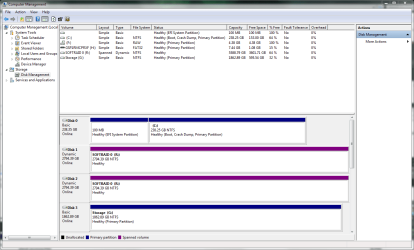
Just make it as big as it will go and try to keep 20% free space on it while in windows. What program are you cloning it with, it should end up like how my disk 0 is with full space after the boot partition used for the OS (it shows that one as 64% free atm).
 

Attachments

  • disks.PNG
    disks.PNG
    42.2 KB · Views: 2

My Computer My Computer

At a glance

10 Pro x64Ryzen 9 3900X64GB(4x16GB) DDR4EVGA 1080ti FTW3
Computer type
PC/Desktop
Computer Manufacturer/Model Number
Custom
OS
10 Pro x64
CPU
Ryzen 9 3900X
Motherboard
Asrock x370 Tachi
Memory
64GB(4x16GB) DDR4
Graphics Card(s)
EVGA 1080ti FTW3
Sound Card
ASUS Xonar Essence STX (V4 Bursons), ODAC rev B, NFB-11, O2
Monitor(s) Displays
3xASUS PB278Q/R, Optoma HD142X
Screen Resolution
3x1440p, 1080p
Hard Drives
512GB 850 EVO(OS, Programs)
4TB (Movies)
3TB (Downloads)
3TB (Programs)
1TB HDD (Games)
2x6TB R1 (videos)
PSU
AX760
Case
Fractal Define R5
Cooling
NH-D15S
Keyboard
Massdrop Ctrl with Box Navy's
Mouse
G903, Alioth XXL Mat
Internet Speed
280/40
Antivirus
MBAM, ESET
Browser
Canary 64 Bit
Other Info
I also own a Thinkpad P50 Xeon 4K, X220T, X1C5
I plan to clone with EaseUS. The SSD will have just one partition for Win 6 64bit and progs, but I'll set a partition size to take size of clone plus a bit, then expand to fill drive later.

Should I be doing something to enable Trim?

Also have seen info on Alignment and using a prog called Aomei Partition Assistant Home Edition to do this.

Is this the right way to go?

Thanks a lot
 

My Computer My Computer

At a glance

Windows 7 Home Premium 64bitCore i7 Quad 870 2.9312GB CorsairZotac GeForce GT240 512Mb
Computer type
PC/Desktop
Computer Manufacturer/Model Number
Home-made
OS
Windows 7 Home Premium 64bit
CPU
Core i7 Quad 870 2.93
Motherboard
Asus P7P55D-EPRO
Memory
12GB Corsair
Graphics Card(s)
Zotac GeForce GT240 512Mb
Sound Card
Some cheap Audigy job!
Monitor(s) Displays
Asus PA248Q
Hard Drives
500GB SATA2 x1
500GB Seagate RAID1 SATA2
Seagate 2TB SATA3
PSU
Coolermaster Silent Pro 600w
what your doing is fine the extending should be fine, TRIM should be automatic especially since your in RAID mode. Just use something like crystal disk info to see if it shows TRIM on it after all is said and done, you can also check with command prompt as well to have double assurance. TRIM Support for SSD - Check and Enable or Disable
 

Attachments

  • trim.PNG
    trim.PNG
    37 KB · Views: 17

My Computer My Computer

At a glance

10 Pro x64Ryzen 9 3900X64GB(4x16GB) DDR4EVGA 1080ti FTW3
Computer type
PC/Desktop
Computer Manufacturer/Model Number
Custom
OS
10 Pro x64
CPU
Ryzen 9 3900X
Motherboard
Asrock x370 Tachi
Memory
64GB(4x16GB) DDR4
Graphics Card(s)
EVGA 1080ti FTW3
Sound Card
ASUS Xonar Essence STX (V4 Bursons), ODAC rev B, NFB-11, O2
Monitor(s) Displays
3xASUS PB278Q/R, Optoma HD142X
Screen Resolution
3x1440p, 1080p
Hard Drives
512GB 850 EVO(OS, Programs)
4TB (Movies)
3TB (Downloads)
3TB (Programs)
1TB HDD (Games)
2x6TB R1 (videos)
PSU
AX760
Case
Fractal Define R5
Cooling
NH-D15S
Keyboard
Massdrop Ctrl with Box Navy's
Mouse
G903, Alioth XXL Mat
Internet Speed
280/40
Antivirus
MBAM, ESET
Browser
Canary 64 Bit
Other Info
I also own a Thinkpad P50 Xeon 4K, X220T, X1C5
That's great. Thanks again...so helpful! Just realised that a prog I already have installed, Mini Tool Partition Wizard has an Partition Alignment option, so I'll use that. Sorry to be stupid, but I do all this following partition creation, but before any data is cloned to it?

Final questions if I may? When I've cloned the SSD will it automatically become the C drive when I set as boot drive in BIOS. Should I disconnect the old C drive before booting with the SSD?

Is it OK to leave other drives including RAID physically connected while I do this? All my data files have been backed up remotely.

Thanks again for the help!
 

My Computer My Computer

At a glance

Windows 7 Home Premium 64bitCore i7 Quad 870 2.9312GB CorsairZotac GeForce GT240 512Mb
Computer type
PC/Desktop
Computer Manufacturer/Model Number
Home-made
OS
Windows 7 Home Premium 64bit
CPU
Core i7 Quad 870 2.93
Motherboard
Asus P7P55D-EPRO
Memory
12GB Corsair
Graphics Card(s)
Zotac GeForce GT240 512Mb
Sound Card
Some cheap Audigy job!
Monitor(s) Displays
Asus PA248Q
Hard Drives
500GB SATA2 x1
500GB Seagate RAID1 SATA2
Seagate 2TB SATA3
PSU
Coolermaster Silent Pro 600w
If you choose to boot with ssd drive it should go into windows and your old drive will show its boot part as a letter and its os as a letter and be called something like local disk (from experience windows likes to use L or K). Only problem I can see is if it is UEFI your using then it might not like having two windows boot mangers in your bios. You can post a screenshot of your disk management window before hand so we can see what type of drive you have atm. If you clone it you can just expand it in windows disk management you don't need partition wizard to do it, you can do it after for sure, before idk i'v never used partition wizard. I use Acronis True Image for this kind of thing.

Hope that answered your questions.
 

My Computer My Computer

At a glance

10 Pro x64Ryzen 9 3900X64GB(4x16GB) DDR4EVGA 1080ti FTW3
Computer type
PC/Desktop
Computer Manufacturer/Model Number
Custom
OS
10 Pro x64
CPU
Ryzen 9 3900X
Motherboard
Asrock x370 Tachi
Memory
64GB(4x16GB) DDR4
Graphics Card(s)
EVGA 1080ti FTW3
Sound Card
ASUS Xonar Essence STX (V4 Bursons), ODAC rev B, NFB-11, O2
Monitor(s) Displays
3xASUS PB278Q/R, Optoma HD142X
Screen Resolution
3x1440p, 1080p
Hard Drives
512GB 850 EVO(OS, Programs)
4TB (Movies)
3TB (Downloads)
3TB (Programs)
1TB HDD (Games)
2x6TB R1 (videos)
PSU
AX760
Case
Fractal Define R5
Cooling
NH-D15S
Keyboard
Massdrop Ctrl with Box Navy's
Mouse
G903, Alioth XXL Mat
Internet Speed
280/40
Antivirus
MBAM, ESET
Browser
Canary 64 Bit
Other Info
I also own a Thinkpad P50 Xeon 4K, X220T, X1C5
Well, job done without mishap....partition aligned and CrystalMark shows TRIM enabled.

Only slight issue is with turning off Defragging on the SSD. Open the Defrag window, SSD (C drive) shown in list of drives. Open schedule configuration window and C drive is not in list of drives, so I can't deselect it. Why could this be?
For now I've turned off scheduled defragging.

Thanks both for your help
 

My Computer My Computer

At a glance

Windows 7 Home Premium 64bitCore i7 Quad 870 2.9312GB CorsairZotac GeForce GT240 512Mb
Computer type
PC/Desktop
Computer Manufacturer/Model Number
Home-made
OS
Windows 7 Home Premium 64bit
CPU
Core i7 Quad 870 2.93
Motherboard
Asus P7P55D-EPRO
Memory
12GB Corsair
Graphics Card(s)
Zotac GeForce GT240 512Mb
Sound Card
Some cheap Audigy job!
Monitor(s) Displays
Asus PA248Q
Hard Drives
500GB SATA2 x1
500GB Seagate RAID1 SATA2
Seagate 2TB SATA3
PSU
Coolermaster Silent Pro 600w
Windows 7 will disable defragmentation for SSD's automatically. It still shows in the list of drives but it will not be scheduled.
 

My Computer My Computer

At a glance

Windows 10 Pro x64, Windows 8.1 Pro x64, Wind...INTEL i9-7920X LGA 206664 GB (4 X 16 GB) G-Skill V Series DDR4 3200 ...EVGA GTX 1060 SC 3 GB
Computer type
PC/Desktop
Computer Manufacturer/Model Number
Custom Built
OS
Windows 10 Pro x64, Windows 8.1 Pro x64, Windows 7 Ultimate x64 SP1,
CPU
INTEL i9-7920X LGA 2066
Motherboard
Gigabyte X299-WU8 F3
Memory
64 GB (4 X 16 GB) G-Skill V Series DDR4 3200 Quad Channel
Graphics Card(s)
EVGA GTX 1060 SC 3 GB
Sound Card
Realtek Onboard ALC1220
Monitor(s) Displays
2 x Samsung S27E310
Screen Resolution
1920x1080
Hard Drives
Samsung 2 x 970 EVO Plus 500 GB NVMe
1 x 6TB WD 6003FZBX SATA
1 x 6TB WD 60EFRX SATA
12 x 3TB WD 30EFRX SATA
PSU
Seasonic X-1050
Case
Thermaltake Armor+
Cooling
Corsair H80i V2 Liquid AOI Cooler
Keyboard
Logitech G510s
Mouse
Logitech MX Master 2S
Internet Speed
200 Mb/s
Antivirus
ESET NOD32 13.1
Browser
EDGE (Dev, Canary, Beta), Chrome
Other Info
ASUS RT-AC68U router
Malwarebytes 4.0.4
Great... Thanks again. All the best!
 

My Computer My Computer

At a glance

Windows 7 Home Premium 64bitCore i7 Quad 870 2.9312GB CorsairZotac GeForce GT240 512Mb
Computer type
PC/Desktop
Computer Manufacturer/Model Number
Home-made
OS
Windows 7 Home Premium 64bit
CPU
Core i7 Quad 870 2.93
Motherboard
Asus P7P55D-EPRO
Memory
12GB Corsair
Graphics Card(s)
Zotac GeForce GT240 512Mb
Sound Card
Some cheap Audigy job!
Monitor(s) Displays
Asus PA248Q
Hard Drives
500GB SATA2 x1
500GB Seagate RAID1 SATA2
Seagate 2TB SATA3
PSU
Coolermaster Silent Pro 600w
Hi Guys
Having successsfully installed the SSD I've come up against a couple of problems using Outlook 2010 and I'd be grateful for any help please.
1) Search function no longer works. either says not found immediately or carries on searching for ever. Clue may be in Indexing? Click on Indexing Status and get "Outlook is currently indexing you items. 2129 items to index" Problem is, this number is increasing, not decreasing! Started around 1600. Should PC be left on and Outlook open, and just be patient, or is something awry?

2)Since SSD installed, all emails with images have lost them. Applies to ones I already have and new ones when opened first time. Red Cross and message in each image frame "Linked Image cannot be displayed. The file may have been moved, renamed or deleted. Verify that the link points to the correct file and location".

Firefox is browser.

I've tried a few things suggested on MS forums without luck. Settings in Outlook seem correct.

Thanks for any suggestions!
 

My Computer My Computer

At a glance

Windows 7 Home Premium 64bitCore i7 Quad 870 2.9312GB CorsairZotac GeForce GT240 512Mb
Computer type
PC/Desktop
Computer Manufacturer/Model Number
Home-made
OS
Windows 7 Home Premium 64bit
CPU
Core i7 Quad 870 2.93
Motherboard
Asus P7P55D-EPRO
Memory
12GB Corsair
Graphics Card(s)
Zotac GeForce GT240 512Mb
Sound Card
Some cheap Audigy job!
Monitor(s) Displays
Asus PA248Q
Hard Drives
500GB SATA2 x1
500GB Seagate RAID1 SATA2
Seagate 2TB SATA3
PSU
Coolermaster Silent Pro 600w
Back
Top