Hard Drive Reliability Update – Sep 2014

I'm assuming you're using drive and partition interchangeably in which case, read LMiller7's post about using folders instead of partitions.

Since the partitions are seen as drives D, G and H by the computer, that's how I refer to them. I also saw the post about folders. I'd rather not dig through a folder tree to get to what I want. If I want a DWG file I created, I click G:, then DWGs.

One additional folder in string is that big a deal? If so, just make a shortcut for your final destination.

I don't like cluttering my desktop up with shortcuts.
 

My Computer My Computer

Computer type
PC/Desktop
Computer Manufacturer/Model Number
Homebuilt
OS
Windows 7 Ultimate 64 bit
CPU
i7-3930K
Motherboard
Gigabyte Socket LGA2011
Memory
16Gb
Graphics Card(s)
2 nVidia GeForce GTX550Ti in SLi
Sound Card
MB Integrated
Monitor(s) Displays
Viewsonic 22" & LG 23" in Extended Desktop
Hard Drives
480Gb SSD OS drive
2Tb secondary drive
Case
Corsair Carbon Series Spec 2
Cooling
Corsair Liquid Cooler
Keyboard
Logitech backlit
Mouse
Microsoft gaming
Internet Speed
20Mbps
Antivirus
ESET Security Suite 7
Browser
IE 11
I don't like cluttering my desktop up with shortcuts.

I don't like cluttering up my hard drive with partitions.

Folders are a far more flexible organizational technique than partitions.

With partitions you must decide up front how many you will have, where they will be placed, and what sizes they will be. Later changes to partitions are problematic, may require third party tools, and are very restricted in scope. Movement of data between partitions is very time consuming for large files.

Folders can be added, moved, and deleted at any time as circumstances change. Files or folders can be quickly moved anywhere within a volume. The data itself doesn't move, only a few pointers in the folders that contain them. NTFS adds some other things I won't go into at this time.
 

My Computer My Computer

Computer type
PC/Desktop
Computer Manufacturer/Model Number
HP
OS
Windows 7 Pro 64 bit
CPU
Xeon W3520
Memory
8 GB
Graphics Card(s)
Nvidia Geforce 210
I don't like cluttering my desktop up with shortcuts.

I don't like cluttering up my hard drive with partitions.

Folders are a far more flexible organizational technique than partitions.

With partitions you must decide up front how many you will have, where they will be placed, and what sizes they will be. Later changes to partitions are problematic, may require third party tools, and are very restricted in scope. Movement of data between partitions is very time consuming for large files.

Folders can be added, moved, and deleted at any time as circumstances change. Files or folders can be quickly moved anywhere within a volume. The data itself doesn't move, only a few pointers in the folders that contain them. NTFS adds some other things I won't go into at this time.

At the risk of sounding repetitious, :ditto:.
 

My Computer My Computer

Computer type
PC/Desktop
Computer Manufacturer/Model Number
Custom Build
OS
Win 7 Ultimate 64 bit
CPU
Intel i7-3930K
Motherboard
ASUS P9X79 WS
Memory
Kingston HyperX Genesis 32GB Kit (8x4GB Modules) 1600MHz DDR
Graphics Card(s)
MSI R7850 Twin Frozr 2GD5/OC Radeon HD 7850 2GB 256-bit GDDR
Sound Card
Asus Xonar Essence STX
Monitor(s) Displays
3x Asus VG248QE 24", Vizio 32" TV
Screen Resolution
1920 x 1080, ?
Hard Drives
Samsung 128GB 840 Pro SSD (1),
Samsung 4TB 850 EVO SSDs (4)
Samsung 4TB 850 EVO SSDs (16) external backup drives used in 2.5" hot swap bays in the computer.
PSU
Corsair HX750w
Case
Antec Two Hundred v2 (modified)
Cooling
Cooler Master GeminII S524 120mm (fan replaced with a 140mm)
Keyboard
Logitech G510s
Mouse
Logitech M525 (two in use)
Internet Speed
=< 32Mbps down, 8Mbps up
Antivirus
AVAST!, MBAM, SAS, Spybot S&D (all but MBAM free) Glary Util
Browser
IE11
Other Info
LSI 9211-8i HBA card (8 SATA III ports), 2.5" & 3.5" Hot Swap Bays, HooToo HT-CR001 PCI-E to USB 3.0 Internal Hub + 6 Slot Card Reader, and LG Model CH12LS28 BD-ROM Optical Drive. Also, ScanSnap S1500 ADF duplexing scanner, Canon 9000F flat bed scanner, Corsair SP2500 2.1 speakers, Samsung CLP 415nw laser color printer, Cyberpower PP2200SW UPS

My Computer My Computer

Computer type
PC/Desktop
Computer Manufacturer/Model Number
Own build (new) Desk1 / Asus ROG Win 7 / Desk2 1st build
OS
Desk1 7 Home Prem / Desk2 10 Pro / Main lap Asus ROG 10 Pro 2 laptop Toshiba 7 Pro Asus P2520 7 & 10
CPU
Desk1 i5 3750K / Laptop i7 GTX 860M / Desk2 i5 2500
Motherboard
Desk1 Asus P877-V / Desk2 Gigabyte H67 UD3H / Laptop ?
Memory
Desk1 8GB (1866) / Desk2 16GB (1333) / Laptop 8Gb DDR3
Graphics Card(s)
Desk 1& 2NVidia GTX 650 & Laptops on board Intel
Sound Card
Desk 1 & 2 -XONAR DG Realtek High Def audio Laptop
Monitor(s) Displays
Desk 1 Benq HD 2450 / Desk2 Philips 24" / Laptop 17.5"
Screen Resolution
1920x1080 D1 & D2 & Laptop 1
Hard Drives
Desk1 Samsung 120GB 830 SSD
Asus ROG 256GB 850 Pro SSD
Desk2 Samsung 840 256 SSD
Toshiba 120GB EVO
PSU
Desk 1 Corsair HX 1050/ Laptop ? / Desk 2 Corsair HX 650
Case
Desk 1 Cooler HAF XM ? Toshiba laptop / Desk2 Coolermaster
Cooling
Fans on all Desk1 -2 Desk2 - all Coolermasters 5 Laptop ?
Keyboard
Desk 1 MS Sidewinder X6 Desk 2 MS Sidewinder X 4
Mouse
Desk 1&2 - Gigabyte MS 900 gamer - laptop - Logitec wireless
Internet Speed
ADSL2+
Other Info
One other Desktop (tester) and spare Toshba laptop both with SSD's
Running Kaspersky 2016 ISS on all machines config'd identically
Logitec audio stereo systems on each machine (x3)
Canon MG5250MFC
Router/modem TP-Link running WPA2SK
I don't like cluttering my desktop up with shortcuts.

I don't like cluttering up my hard drive with partitions.

Folders are a far more flexible organizational technique than partitions.

With partitions you must decide up front how many you will have, where they will be placed, and what sizes they will be. Later changes to partitions are problematic, may require third party tools, and are very restricted in scope. Movement of data between partitions is very time consuming for large files.

Folders can be added, moved, and deleted at any time as circumstances change. Files or folders can be quickly moved anywhere within a volume. The data itself doesn't move, only a few pointers in the folders that contain them. NTFS adds some other things I won't go into at this time.

At the risk of sounding repetitious, :ditto:.

The 2 of you are right ol' grouches aren't you?

All I did was express what worked for me, I didn't belittle or criticize others choices or opinions. But me? You just keep coming back with a "you are so stupid to do it that way" attitude because it doesn't conform to YOUR opinion.

Tell me if I'm wrong, but I thought these forums were for folks to express their experience and opinions to help others. The 2 of you appear to be attempting to shut down any of that which does not agree with what you feel is the proper opinion or experience.

To quote another poster "...That tells me straight away that you have your opinion and woe betide the person who even goes close to disagreeing with you..."
 

My Computer My Computer

Computer type
PC/Desktop
Computer Manufacturer/Model Number
Homebuilt
OS
Windows 7 Ultimate 64 bit
CPU
i7-3930K
Motherboard
Gigabyte Socket LGA2011
Memory
16Gb
Graphics Card(s)
2 nVidia GeForce GTX550Ti in SLi
Sound Card
MB Integrated
Monitor(s) Displays
Viewsonic 22" & LG 23" in Extended Desktop
Hard Drives
480Gb SSD OS drive
2Tb secondary drive
Case
Corsair Carbon Series Spec 2
Cooling
Corsair Liquid Cooler
Keyboard
Logitech backlit
Mouse
Microsoft gaming
Internet Speed
20Mbps
Antivirus
ESET Security Suite 7
Browser
IE 11
   Warning
Let's keep this discussion friendly shall we. :sarc:


My Computer My Computer

Computer type
PC/Desktop
Computer Manufacturer/Model Number
Self built custom
OS
64-bit Windows 11 Pro for Workstations
CPU
Intel i7-8700K OC'd to 5 GHz
Motherboard
ASUS ROG Maximus XI Formula Z390
Memory
64 GB (4x16GB) G.SKILL TridentZ RGB DDR4 3600 MHz
Graphics Card(s)
ASUS ROG-STRIX-GTX1080TI-O11G-GAMING
Sound Card
Integrated
Monitor(s) Displays
2 x Samsung Odyssey G7 27"
Screen Resolution
2560x1440
Hard Drives
1TB Samsung 990 PRO M.2,
4TB Samsung 990 PRO PRO M.2,
TerraMaster F8 SSD Plus NAS
PSU
Seasonic Prime Titanium 850W
Case
Thermaltake Core P3
Cooling
Corsair Hydro H115i
Keyboard
Logitech wireless K800
Mouse
Logitech MX Master 4
Internet Speed
2 Gb/s Download and 100 Mb/s Upload
Antivirus
Malwarebyte Anti-Malware Premium
Browser
Google Chrome
Other Info
Logitech Z625 speaker system,
Logitech BRIO 4K Pro webcam,
HP Color LaserJet Pro MFP M477fdn,
APC SMART-UPS RT 1000 XL - SURT1000XLI,
Galaxy S23 Plus phone
I never said or meant to imply that anyone was stupid. If using multiple partitions works for you, great. I myself use 2 partitions, one for the OS and applications and one for my own files. I have been doing this for many years and it works well for me. But this isn't something I would recommend to others for general use. I have seen many cases where multiple partitions are created but the user accepts defaults for everything and the C drive becomes full while D is almost empty.

Also be aware that this is a public forum where all posts will be accessible for years to come by anyone with an Internet connection. Most doing so will not be members of this forum. I wanted to be sure that all readers understood that the use of partitions was not the normal organizational method but one that has some serious problems. The use of folders is usually preferred. This had nor been previously mentioned in this thread and I thought an important point. I did say that there were legitimate exceptions.
 

My Computer My Computer

Computer type
PC/Desktop
Computer Manufacturer/Model Number
HP
OS
Windows 7 Pro 64 bit
CPU
Xeon W3520
Memory
8 GB
Graphics Card(s)
Nvidia Geforce 210
Careful Planning

I wanted to be sure that all readers understood that the use of partitions was not the normal organizational method but one that has some serious problems. The use of folders is usually preferred.
Perhaps it would be better to say, "creating partitions requires careful planning." :)

I have multiple Windows partitions spread over three HDDs (C to K) .
On top of that there are 4 other drives; 2x DVD, a virtual optical, and a RAMDisk (L to O).

I also have 3 more Linux partitions mixed amongst them.

I spent 4 or 5 hours working out different partition combinations, before I installed my new HDD and then I restored my backup HDD images.

I actually regret not including a Programs partition (which I normally do) when I did a complete reinstall in September 2012. :(
 

My Computer My Computer

Computer type
PC/Desktop
Computer Manufacturer/Model Number
n/a
OS
W7 Ultimate SP1, LM19.2 MATE, W10 Home 1703, W10 Pro 1703 VM, #All 64 bit
CPU
AMD Phenom II x6 1100T, 3.3 GHz
Motherboard
ASUS M4A88T-M/USB3 (AM3)
Memory
12GB DDR3 1333 G-Skill (4GB x 2), G-Skill (2GB x 2)
Graphics Card(s)
NVIDIA GeForce GTX 660
Sound Card
Realtek?
Monitor(s) Displays
Samsung S23B350
Screen Resolution
1920x1080
Hard Drives
WD Green 2TB (SATA), WD Green 3TB (SATA), WD Blue 4TB (SATA), WD Blue 6TB (SATA)
PSU
Cooler Master
Case
Antec GX300 Tower
Cooling
3x Antec TRICOOL 120mm Fans
Mouse
Wired Optical
Internet Speed
DSL
Antivirus
Avast
Browser
Pale Moon (64 bit)
Other Info
2018-12-27 Upgraded HDDs
2015-12-10 Upgraded case, graphics card, storage
2015-08-15 Upgraded motherboard & RAM
2015-07-15 Upgraded LM17.1 to LM17.2
All I said was my own personal preference and no more and because I have had nothing but trouble with large drives it got blown out of all proportion in my mind.
 

My Computer My Computer

Computer type
PC/Desktop
Computer Manufacturer/Model Number
Own build (new) Desk1 / Asus ROG Win 7 / Desk2 1st build
OS
Desk1 7 Home Prem / Desk2 10 Pro / Main lap Asus ROG 10 Pro 2 laptop Toshiba 7 Pro Asus P2520 7 & 10
CPU
Desk1 i5 3750K / Laptop i7 GTX 860M / Desk2 i5 2500
Motherboard
Desk1 Asus P877-V / Desk2 Gigabyte H67 UD3H / Laptop ?
Memory
Desk1 8GB (1866) / Desk2 16GB (1333) / Laptop 8Gb DDR3
Graphics Card(s)
Desk 1& 2NVidia GTX 650 & Laptops on board Intel
Sound Card
Desk 1 & 2 -XONAR DG Realtek High Def audio Laptop
Monitor(s) Displays
Desk 1 Benq HD 2450 / Desk2 Philips 24" / Laptop 17.5"
Screen Resolution
1920x1080 D1 & D2 & Laptop 1
Hard Drives
Desk1 Samsung 120GB 830 SSD
Asus ROG 256GB 850 Pro SSD
Desk2 Samsung 840 256 SSD
Toshiba 120GB EVO
PSU
Desk 1 Corsair HX 1050/ Laptop ? / Desk 2 Corsair HX 650
Case
Desk 1 Cooler HAF XM ? Toshiba laptop / Desk2 Coolermaster
Cooling
Fans on all Desk1 -2 Desk2 - all Coolermasters 5 Laptop ?
Keyboard
Desk 1 MS Sidewinder X6 Desk 2 MS Sidewinder X 4
Mouse
Desk 1&2 - Gigabyte MS 900 gamer - laptop - Logitec wireless
Internet Speed
ADSL2+
Other Info
One other Desktop (tester) and spare Toshba laptop both with SSD's
Running Kaspersky 2016 ISS on all machines config'd identically
Logitec audio stereo systems on each machine (x3)
Canon MG5250MFC
Router/modem TP-Link running WPA2SK
Hi there

I've given up using Discrete volumes such as "D","E","F" etc apart from "C" which is an SSD and where I have my OS installed.

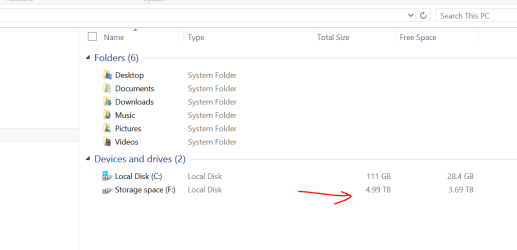
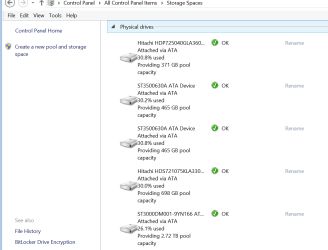
I'm simply using pools of volumes as "Storage Spaces" so I don't care where the data physically resides. HDD's are plenty reliable these days - and if you've got backup then it's no problem either to recover / re-create your data.

The advantage with "Storage spaces" also is that you can have very large libraries / data spaces for data bases - for example you can have say a library of several TB of music files / video files even if you only have several discrete 500 GB and 320 GB HDD's.

With Storage spaces you can dynamically ADD more volumes if you want to.

The Storage spaces I think is a Windows 8 / 8.1 feature - but you can use Libraries in W7 to achieve the same result - I think the Storage spaces though is far better implemented and it really is seamless - Windows explorer just treats the storage space as one big HDD.

(You can have several storage spaces if you want too).

Cheers
jimbo
 

Attachments

  • storagespace1.png
    storagespace1.png
    14.4 KB · Views: 2
  • storagespace2.png
    storagespace2.png
    29.6 KB · Views: 2

My Computer My Computer

Computer type
PC/Desktop
Computer Manufacturer/Model Number
Custom built, several laptops HP/ASUS
OS
Linux CENTOS 7 / various Windows OS'es and servers
CPU
Intel i7 Intel i5
Memory
8GB, 16GB
Graphics Card(s)
On Motherboard
Sound Card
Realtek HD audio
Monitor(s) Displays
Apple Cinema display, Samsung LCD
Screen Resolution
1920 X 1080
Hard Drives
4 X 1TB SATA
Mouse
Toshiba wireless laser
Internet Speed
> 20MB up
Last edited:

My Computer My Computer

Computer type
PC/Desktop
Computer Manufacturer/Model Number
n/a
OS
W7 Ultimate SP1, LM19.2 MATE, W10 Home 1703, W10 Pro 1703 VM, #All 64 bit
CPU
AMD Phenom II x6 1100T, 3.3 GHz
Motherboard
ASUS M4A88T-M/USB3 (AM3)
Memory
12GB DDR3 1333 G-Skill (4GB x 2), G-Skill (2GB x 2)
Graphics Card(s)
NVIDIA GeForce GTX 660
Sound Card
Realtek?
Monitor(s) Displays
Samsung S23B350
Screen Resolution
1920x1080
Hard Drives
WD Green 2TB (SATA), WD Green 3TB (SATA), WD Blue 4TB (SATA), WD Blue 6TB (SATA)
PSU
Cooler Master
Case
Antec GX300 Tower
Cooling
3x Antec TRICOOL 120mm Fans
Mouse
Wired Optical
Internet Speed
DSL
Antivirus
Avast
Browser
Pale Moon (64 bit)
Other Info
2018-12-27 Upgraded HDDs
2015-12-10 Upgraded case, graphics card, storage
2015-08-15 Upgraded motherboard & RAM
2015-07-15 Upgraded LM17.1 to LM17.2
Again, Backblaze proves that Hitachi drives are really good! I'm glad that I chose a 4TB Hitachi hard drive for my music collection. :-)

And I'm also a suscriber to Backblaze for my backups.
 

My Computer My Computer

Computer type
PC/Desktop
Computer Manufacturer/Model Number
Custom build
OS
Windows 10 Professional 64-bit
CPU
Ryzen 9 5900X
Motherboard
Gigabyte X570 Aorus Master
Memory
G.Skill 3600Mhz CL16 16GB × 4
Graphics Card(s)
EVGA GeForce RTX 3070 Ti FTW3 Ultra Gaming
Sound Card
On-board
Monitor(s) Displays
Dell Alienware AW3418DW
Screen Resolution
3440x1440
Hard Drives
1×Sabrent Rocket 4 Plus 2TB nvme SSD (System, internal)
2x4TB Western Digital Blue (Internal)
1x4TB HDST 7200RPM (Internal)
PSU
Seasonic Focus Plus 850W Platinum
Case
Corsair 680X
Cooling
Stock fans + 3× Corsair QL120, Corsair H100i Platinum
Keyboard
Logitech K350
Mouse
Logitech M510
Internet Speed
120Mbits dl - 20Mbits up
Antivirus
ESET NOD32 Antivirus
Browser
Firefox (latest version)
Other Info
Headphones : Audio-Technica ATH-M50x
Scanner : Canon Canoscan LiDE 220 + Plustek OptiBook 4800
With Storage spaces you can dynamically ADD more volumes if you want to.
How do you image an "aggregate" partition?


Hi there

You back it up in "Data Mode" - you can either back up as an "Entire Logical Volume" or do it in Data mode. In "Volume mode" Windows treats it as an entire Disc --you won't be able to back it up as an "Image" though when using programs like FREE MACRIUM in stand alone (boot) mode. Your Backup program will need to be able to handle this in DATA mode.

The disadvantage is that currently you won't be able to do a "bare metal" recovery of the data space - that's not normally an issue since you can recover the OS via the "classical Imaging method" if you need to do a bare metal recovery and then from Windows run your backup software to recover the data.

IMO since the "Aggregate partition" is DATA and not OS + pgms there is no point in "Imaging" an entire data space as a disk -- things like Music libraries don't change much so once they are backed up you only really need to do "Incrementals" or "Differentials" on this type of data.

That's largely the problem with the FREE backup products --great for Imaging things like your OS but for this type of purpose a better commercial product is to be recommended --the decent backup programs are only about 45 - 50 USD in any case --usually a WELL WROTHWHILE investment - both in time (recovering from Windows failures etc) and saving data - which for a lot of people is MORE VALUABLE than their ENTIRE MACHINE !!!.

Imagine re-ripping 2,000 CD's (or more) / finding old music from iTunes etc (to say nothing of music you might have got from "alternative sources". Same with photos, important scanned documents, office spreadsheets / presentations etc.

Added -- If you create a bootable ACRONIS backup based on WINPE then Acronis WILL support data spaces as "Disks" so you can "image" them as "Disks" with the bootable version -- the standard bootable version based on Linux doesn't support storage spaces but can backup the disks sector by sector.

Here's how to create the WINPE 4 version of Acronis 2014

https://kb.acronis.com/content/46255

Cheers
jimbo
 

My Computer My Computer

Computer type
PC/Desktop
Computer Manufacturer/Model Number
Custom built, several laptops HP/ASUS
OS
Linux CENTOS 7 / various Windows OS'es and servers
CPU
Intel i7 Intel i5
Memory
8GB, 16GB
Graphics Card(s)
On Motherboard
Sound Card
Realtek HD audio
Monitor(s) Displays
Apple Cinema display, Samsung LCD
Screen Resolution
1920 X 1080
Hard Drives
4 X 1TB SATA
Mouse
Toshiba wireless laser
Internet Speed
> 20MB up
Seems unnecessarily painful.
Unless you are about to run out of drive letters, you may as well just add another drive.

I can see some benefit to a server having this ability assuming you can "hot plug" (Novell was one of the setups I studied in my Network course)
 

My Computer My Computer

Computer type
PC/Desktop
Computer Manufacturer/Model Number
n/a
OS
W7 Ultimate SP1, LM19.2 MATE, W10 Home 1703, W10 Pro 1703 VM, #All 64 bit
CPU
AMD Phenom II x6 1100T, 3.3 GHz
Motherboard
ASUS M4A88T-M/USB3 (AM3)
Memory
12GB DDR3 1333 G-Skill (4GB x 2), G-Skill (2GB x 2)
Graphics Card(s)
NVIDIA GeForce GTX 660
Sound Card
Realtek?
Monitor(s) Displays
Samsung S23B350
Screen Resolution
1920x1080
Hard Drives
WD Green 2TB (SATA), WD Green 3TB (SATA), WD Blue 4TB (SATA), WD Blue 6TB (SATA)
PSU
Cooler Master
Case
Antec GX300 Tower
Cooling
3x Antec TRICOOL 120mm Fans
Mouse
Wired Optical
Internet Speed
DSL
Antivirus
Avast
Browser
Pale Moon (64 bit)
Other Info
2018-12-27 Upgraded HDDs
2015-12-10 Upgraded case, graphics card, storage
2015-08-15 Upgraded motherboard & RAM
2015-07-15 Upgraded LM17.1 to LM17.2
As for the original topic ... Hard Drive Reliability. Not much is being said.
 

My Computer My Computer

Computer type
PC/Desktop
Computer Manufacturer/Model Number
Dell
OS
Windows 10 x64
CPU
i7-7700K
Memory
16 GB 2400 MHz
Graphics Card(s)
GTX 1060
Sound Card
Integrated, plus external Presonus Audiobox USB
Monitor(s) Displays
2x AOC 27"
Screen Resolution
1920x1080
Hard Drives
512 GB M.2 SSD
2 TB 7200 RPM disk
Internet Speed
110 Mbps
Browser
Firefox

My Computer My Computer

Computer type
PC/Desktop
Computer Manufacturer/Model Number
Custom Build
OS
Windows 10 Pro x64
CPU
Core2Quad Q9550 @2.83GHz (o/c @3.82GHz)
Motherboard
ASUS P5K Premium WiFi
Memory
8GB (4x2GB DDR2)
Graphics Card(s)
ASUS ROG STRIX GTX1050 Ti O4G Gaming
Sound Card
Creative Soundblaster X-Fi Platinum
Monitor(s) Displays
ACER ED273WIDX 27"
Screen Resolution
1920 x 1080
Hard Drives
SAMSUNG SSD 840 Series 120GB
SAMSUNG 500GB SATA 7200 rpm
2xWD Velociraptor 150GB 10000 rpm
PSU
600W
Case
CoolerMaster Centurion
Cooling
Cooler Master V8
Keyboard
VPRO V700
Mouse
Logitech G602
Antivirus
Norton IS
Browser
Firefox x64
Back
Top