Laptop display blinks after every 5-30 seconds

starsplash

New member
Local time
12:42 PM
Messages
14
So my client told me that he has a problem with his laptop ASUS Vivobook S301LA (Windows 8 64 bit, Intel HD Graphics 4000, Intel i3 4010U 1,7GHz, 4GB 1600MHz DDR3 RAM)
He described me a scenario, when the screen would start blinking:
"I was watching a TV show on VoD [probably Flash then], and then the screen would blink with a 30 second interval."

Then the scenario, when it'd blink after every 5 seconds: "I had three Firefox windows on taskbar, one of them was playing a YouTube video. And then the screen blinked every 5 seconds."

Thought maybe it's a Flash issue, so I uninstalled it through TeamViewer. But the problem persisted. And what suggests that it isn't a Flash issue, is that the screen blinks even on the Windows' password-entering prompt, when you're booting.
I'm not sure where should I even start fixing the problem. I've googled for quite a while, tried the recommendations given by people, and nothing seems to be working.
 

My Computer My Computer

Computer type
PC/Desktop
OS
Windows 7 Pro 32bit
Hi starsplash, how old is the laptop, or have you no idea? I've had a look on the asus website and it looks like a driver update was released for the graphics card about 2 months ago, here is the link to the page Notebooks & Ultrabooks - ASUS VivoBook S301LA - ASUS
 

My Computer My Computer

Computer type
PC/Desktop
Computer Manufacturer/Model Number
Custom Build
OS
Windows 7 Ultimate x64 SP1
CPU
Intel Q6600 @ 2.6Ghz
Motherboard
Evga NF78-CK-132-A 3-Way SLI
Memory
4Gb DDR2 Corsair Dominator @ 800Mhz 5-5-5-15
Graphics Card(s)
EVGA 560 GTX SC FTW 1GB
Sound Card
Realtek HD 7.1 Audio, Plantronics GameCom780 7.1 Headset
Monitor(s) Displays
Dell S2409W
Screen Resolution
1920 x 1080
Hard Drives
SanDisk SDSSDHII-120G-G25 120GB SSD
Samsung 7200RPM 750Gb SATA
Samsung 850 EVO 120GB SSD
Western Digital Green 1TB 7200RPM
PSU
Xigmatek 750W Quad sli quad core 80% eff
Case
Antec 900 Gaming Case
Cooling
Zalman CNPS9700-NT NVIDIA Tritium
Keyboard
Logitech generic keyboard, MS wireless keyboard
Mouse
Razor Lachesis Banshee V2 Blue, 4000DPI, MS wireless mouse
Internet Speed
152Mb Virgin Media Fibre Optic
Antivirus
Microsoft Security Essentials
Browser
Google Chrome
Other Info
Wireless Gaming Receiver for Windows, Wireless Xbox 360 Pad
Laptop is only a month old. By coincidence my other friend bought the same exact laptop from the same shop, and also around a month ago. He immediately changed to Windows 7 64 bit though, and he hasn't reported any problems (which is funny, because this laptop seems to have support for Windows 8 only - since ASUS' website does not have drivers for Windows 7).

You mentioned drivers update. On the website I chose Windows 8 as an OS, headed to VGA and the latest Intel Graphics Driver has a release date of 2013/07/24 and version V9.18.10.3204.01. I logged in to my friend's computer through TeamViewer and checked the laptop's graphics driver version in Device Manager, and it's identical to what the ASUS' website has to offer.
 

My Computer My Computer

Computer type
PC/Desktop
OS
Windows 7 Pro 32bit
Helpful person Journeyman Geek on Superuser.com (https://superuser.com/questions/819291/laptop-display-blinks-after-every-5-30-seconds) asked, if the blinking occurs, when I'm connected to the computer through TeamViewer - and the answer is that, no, I don't see any blinking, while my client is desperately tells me that his display keeps blinking. So if I don't see any blinking through TeamViewer, could it be that the issue is hardware-related?
Should he return the laptop, since he does have a 36 month warranty?

When I see him online again, I'll tell him to test his laptop with an external monitor, to see if the blinking still occurs. We'll see how that goes...

Cheers!
 

My Computer My Computer

Computer type
PC/Desktop
OS
Windows 7 Pro 32bit
Sounds like a hardware failure to me, but I wouldn't jump to conclusions just yet, teamviewer is a handy tool to find issues(underlying ones), it maybe that the driver reports to the screen incorrectly or if it's a hardware issue, a different monitor would definitely check if this is the case.

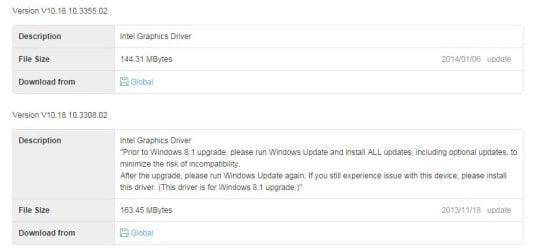
meanwhile, I checked the driver version and it's showing newest driver is 06/01/2014 (dd/mm/yyyy) with version V10.18.10.3355.02
Asus vga driver.jpg


direct link is http://dlcdnet.asus.com/pub/ASUS/nb/DriversForWin8.1/VGA/VGA_Intel_Win81_64_VER1018103355.zip
 
Last edited:

My Computer My Computer

Computer type
PC/Desktop
Computer Manufacturer/Model Number
Custom Build
OS
Windows 7 Ultimate x64 SP1
CPU
Intel Q6600 @ 2.6Ghz
Motherboard
Evga NF78-CK-132-A 3-Way SLI
Memory
4Gb DDR2 Corsair Dominator @ 800Mhz 5-5-5-15
Graphics Card(s)
EVGA 560 GTX SC FTW 1GB
Sound Card
Realtek HD 7.1 Audio, Plantronics GameCom780 7.1 Headset
Monitor(s) Displays
Dell S2409W
Screen Resolution
1920 x 1080
Hard Drives
SanDisk SDSSDHII-120G-G25 120GB SSD
Samsung 7200RPM 750Gb SATA
Samsung 850 EVO 120GB SSD
Western Digital Green 1TB 7200RPM
PSU
Xigmatek 750W Quad sli quad core 80% eff
Case
Antec 900 Gaming Case
Cooling
Zalman CNPS9700-NT NVIDIA Tritium
Keyboard
Logitech generic keyboard, MS wireless keyboard
Mouse
Razor Lachesis Banshee V2 Blue, 4000DPI, MS wireless mouse
Internet Speed
152Mb Virgin Media Fibre Optic
Antivirus
Microsoft Security Essentials
Browser
Google Chrome
Other Info
Wireless Gaming Receiver for Windows, Wireless Xbox 360 Pad
"a different monitor would definitely check if this is the case."

I tried with an external monitor, and turns out that only laptop's display blinked, the external monitor didn't.

"meanwhile, I checked the driver version and it's showing newest driver is 06/01/2014 (dd/mm/yyyy) with version V10.18.10.3355.02"

If you check the link, you can clearly see that the driver is meant for Windows 8.1 (DriversForWin8.1), but my client's laptop has Windows 8:
http://dlcdnet.asus.com/pub/ASUS/nb/DriversForWin8.1/VGA/VGA_Intel_Win81_64_VER1018103355.zip
 

My Computer My Computer

Computer type
PC/Desktop
OS
Windows 7 Pro 32bit
"a different monitor would definitely check if this is the case."

I tried with an external monitor, and turns out that only laptop's display blinked, the external monitor didn't.

"meanwhile, I checked the driver version and it's showing newest driver is 06/01/2014 (dd/mm/yyyy) with version V10.18.10.3355.02"

If you check the link, you can clearly see that the driver is meant for Windows 8.1 (DriversForWin8.1), but my client's laptop has Windows 8:
http://dlcdnet.asus.com/pub/ASUS/nb/DriversForWin8.1/VGA/VGA_Intel_Win81_64_VER1018103355.zip

Windows 8.1 drivers will work with 8, it's just a service pack upgrade with some added features, the driver will still work but.... I would get the laptop back to the shop and get a replacement, this is a hardware issue, specifically with the panel that ships with the laptop. Have a word with the client and discuss backup options and let us know how things turn out.
 

My Computer My Computer

Computer type
PC/Desktop
Computer Manufacturer/Model Number
Custom Build
OS
Windows 7 Ultimate x64 SP1
CPU
Intel Q6600 @ 2.6Ghz
Motherboard
Evga NF78-CK-132-A 3-Way SLI
Memory
4Gb DDR2 Corsair Dominator @ 800Mhz 5-5-5-15
Graphics Card(s)
EVGA 560 GTX SC FTW 1GB
Sound Card
Realtek HD 7.1 Audio, Plantronics GameCom780 7.1 Headset
Monitor(s) Displays
Dell S2409W
Screen Resolution
1920 x 1080
Hard Drives
SanDisk SDSSDHII-120G-G25 120GB SSD
Samsung 7200RPM 750Gb SATA
Samsung 850 EVO 120GB SSD
Western Digital Green 1TB 7200RPM
PSU
Xigmatek 750W Quad sli quad core 80% eff
Case
Antec 900 Gaming Case
Cooling
Zalman CNPS9700-NT NVIDIA Tritium
Keyboard
Logitech generic keyboard, MS wireless keyboard
Mouse
Razor Lachesis Banshee V2 Blue, 4000DPI, MS wireless mouse
Internet Speed
152Mb Virgin Media Fibre Optic
Antivirus
Microsoft Security Essentials
Browser
Google Chrome
Other Info
Wireless Gaming Receiver for Windows, Wireless Xbox 360 Pad
Does the screen blink if the client moves the screen back and forth to other positions? Sounds like software as MrNeeds has said or bad invertor/loose-pinched cable.
 

My Computer My Computer

Computer type
PC/Desktop
Computer Manufacturer/Model Number
Custom
OS
10 Pro x64
CPU
Ryzen 9 3900X
Motherboard
Asrock x370 Tachi
Memory
64GB(4x16GB) DDR4
Graphics Card(s)
EVGA 1080ti FTW3
Sound Card
ASUS Xonar Essence STX (V4 Bursons), ODAC rev B, NFB-11, O2
Monitor(s) Displays
3xASUS PB278Q/R, Optoma HD142X
Screen Resolution
3x1440p, 1080p
Hard Drives
512GB 850 EVO(OS, Programs)
4TB (Movies)
3TB (Downloads)
3TB (Programs)
1TB HDD (Games)
2x6TB R1 (videos)
PSU
AX760
Case
Fractal Define R5
Cooling
NH-D15S
Keyboard
Massdrop Ctrl with Box Navy's
Mouse
G903, Alioth XXL Mat
Internet Speed
280/40
Antivirus
MBAM, ESET
Browser
Canary 64 Bit
Other Info
I also own a Thinkpad P50 Xeon 4K, X220T, X1C5
Windows 8.1 drivers will work with 8, it's just a service pack upgrade with some added features, the driver will still work but.... I would get the laptop back to the shop and get a replacement, this is a hardware issue, specifically with the panel that ships with the laptop. Have a word with the client and discuss backup options and let us know how things turn out.


I had a physical access to the laptop for a few days (he needs the laptop for school, which is in another town).
So I installed the new graphics drivers from your given link. And after that I tried hard to get the screen to blink, but without results. So I let my client to do his every day tasks - open a few browsers, few Flash live streams, a word processor, YouTube, etc. And, the screen just wouldn't blink. There seems to be no logic in the occurrence of blinking. He mentioned that sometimes all he has to do, is open a browser window and a word processor, and it'd start blinking.
I'm very pessimistic that the driver update helped, but we'll see. Hope it did though. I'll let you know of the situation during the next week.


Does the screen blink if the client moves the screen back and forth to other positions? Sounds like software as MrNeeds has said or bad invertor/loose-pinched cable.

So I tried different positions and this did not generate blinking. But the thing that I'll let my client try later is to move the lid to a different position and then execute his daily operations - maybe it's a specific position when the blinking starts.
 

My Computer My Computer

Computer type
PC/Desktop
OS
Windows 7 Pro 32bit
Windows 8.1 drivers will work with 8, it's just a service pack upgrade with some added features, the driver will still work but.... I would get the laptop back to the shop and get a replacement, this is a hardware issue, specifically with the panel that ships with the laptop. Have a word with the client and discuss backup options and let us know how things turn out.


I had a physical access to the laptop for a few days (he needs the laptop for school, which is in another town).
So I installed the new graphics drivers from your given link. And after that I tried hard to get the screen to blink, but without results. So I let my client to do his every day tasks - open a few browsers, few Flash live streams, a word processor, YouTube, etc. And, the screen just wouldn't blink. There seems to be no logic in the occurrence of blinking. He mentioned that sometimes all he has to do, is open a browser window and a word processor, and it'd start blinking.
I'm very pessimistic that the driver update helped, but we'll see. Hope it did though. I'll let you know of the situation during the next week.

It sounds very promising, however if it is fine then we're all good. Keep us updated.
 

My Computer My Computer

Computer type
PC/Desktop
Computer Manufacturer/Model Number
Custom Build
OS
Windows 7 Ultimate x64 SP1
CPU
Intel Q6600 @ 2.6Ghz
Motherboard
Evga NF78-CK-132-A 3-Way SLI
Memory
4Gb DDR2 Corsair Dominator @ 800Mhz 5-5-5-15
Graphics Card(s)
EVGA 560 GTX SC FTW 1GB
Sound Card
Realtek HD 7.1 Audio, Plantronics GameCom780 7.1 Headset
Monitor(s) Displays
Dell S2409W
Screen Resolution
1920 x 1080
Hard Drives
SanDisk SDSSDHII-120G-G25 120GB SSD
Samsung 7200RPM 750Gb SATA
Samsung 850 EVO 120GB SSD
Western Digital Green 1TB 7200RPM
PSU
Xigmatek 750W Quad sli quad core 80% eff
Case
Antec 900 Gaming Case
Cooling
Zalman CNPS9700-NT NVIDIA Tritium
Keyboard
Logitech generic keyboard, MS wireless keyboard
Mouse
Razor Lachesis Banshee V2 Blue, 4000DPI, MS wireless mouse
Internet Speed
152Mb Virgin Media Fibre Optic
Antivirus
Microsoft Security Essentials
Browser
Google Chrome
Other Info
Wireless Gaming Receiver for Windows, Wireless Xbox 360 Pad
If the blinking continues, I def think it is a gpu problem. Or possibly a loose wire. Laptop hardware issues are hard to diagnose as they are not as easy to work on like a desktop.
 

My Computer My Computer

Computer type
PC/Desktop
Computer Manufacturer/Model Number
Custom Built
OS
Windows 10 Pro
CPU
AMD Ryzen 5 2400G Processor with Radeon RX Vega 11 Graphics
Motherboard
ASRock X470 Master SLI/AC AM4 AMD Promontory X470 SATA 6Gb/s
Memory
G.SKILL Ripjaws V Series 16GB (2 x 8GB) 288-Pin DDR4 SDRAM D
Graphics Card(s)
2047MB NVIDIA GeForce GTX 1060 6GB (EVGA)
Sound Card
Motherboard Built in
Monitor(s) Displays
Acer R240HY bidx 23.8-Inch IPS HDMI DVI VGA (1920 x 1080) Wi
Screen Resolution
1920 x 1080
Hard Drives
1TB Sandisk SSD PLUS (Main drive)
500 GB Seagate 7200 RPM (Games)
500 GB Western Digital 7200 RPM (Virtual Machines)
PSU
CORSAIR TX Series TX650M 650W 80+ Gold Modular Power Supply
Case
CORSAIR CARBIDE SPEC-02 Mid-Tower Gaming Case, Red LED Fan
Cooling
220mm, two 120mm, and four 60mm fans
Keyboard
Wired Dell keyboard
Mouse
Wireless Logitech mouse
Internet Speed
250mb down, 30mb up
Antivirus
Panda Cloud Antivirus
Browser
Chrome-ish x64
Other Info
Your awesome for reading this.
Back
Top