Solved Sound Blaster Audigy Rx Microphone Not Working

TopNotch115

New member
Local time
4:33 PM
Messages
15
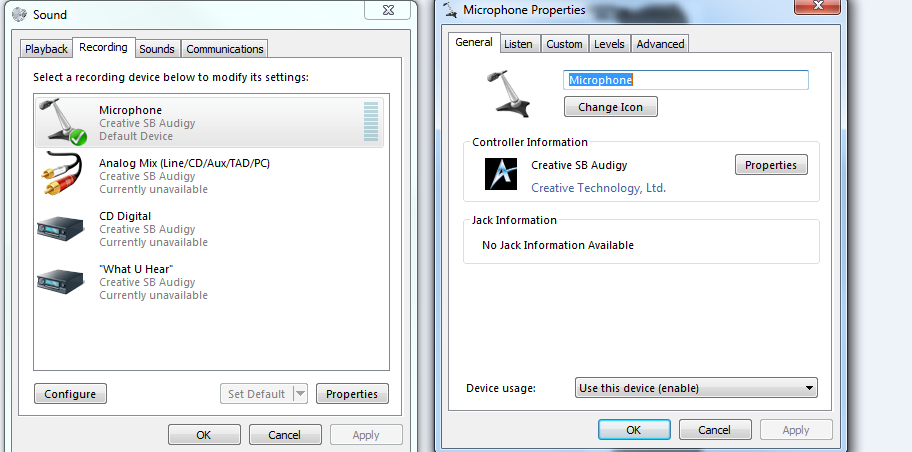
Hello!I am using the turtle beaches X12 headset. I have just recently installed the Sound Blaster Audigy Rx to my PCs motherboard. And stoped using Realtek Audio Manager and using the Creative SB drivers. After a week, the microphone stoped working(Sound still works) and said "Currently Unavalable" (Gyazo - 69d8b3ce9a7751943853c88fddad0772.png)
And I when I go and try to set up a microphone it say "Wizard could not start"
Please help me with this situation I am tired of not having a working microphone!
http://gyazo.com/84b3685014c67972a2efd00e37c7678d

And other information you need just ask. And I'll answer it.
 
Last edited:

My Computer My Computer

At a glance

Windows Seven87870
Computer type
PC/Desktop
OS
Windows Seven
Motherboard
MSI
Memory
8
Graphics Card(s)
7870
Antivirus
Norton
Browser
Google Chrome
Did you move the front panel headset/mic connection from the Motherboard to the SoundBlaster? If not give that a try.

Since you are using the SoundBlaster, disable the RealTek on board audio in the Device Manager, to avoid any conflicts. Windows only allows one default audio playback device, anyway.

Also, here is how to post screenshots on this forum.
http://www.sevenforums.com/tutorials/9733-screenshots-files-upload-post-seven-forums.html
 

My Computer My Computer

At a glance

Windows 10 64 bitIntel i7 6700K16GB Corsair DominatorIntel CPU Graphics
Computer type
PC/Desktop
Computer Manufacturer/Model Number
My Own Build
OS
Windows 10 64 bit
CPU
Intel i7 6700K
Motherboard
ASUS ROG Maximus VIII Hero
Memory
16GB Corsair Dominator
Graphics Card(s)
Intel CPU Graphics
Sound Card
RealTek
Monitor(s) Displays
27" Dell S2719dgf
Screen Resolution
2560X1440
Hard Drives
1 TB Samsung 850 EVO SSD for Win 10 Pro
500GB Samsung 850 EVO SSD for Win 10 Insider
2 TB drive for backup
PSU
EVGA Supernova 750G2
Case
BeQuiet Silent Base 600
Cooling
Deepcool Captain 120EX
Keyboard
Microsoft Wireless 2000
Mouse
Microsoft wireless
Internet Speed
100 MB/sec (Cable)
Antivirus
Microsoft Defender and Malwarebytes
Browser
Edge/Firefox
Other Info
Cakewalk (Sonar) by BandLab and Studio One 4.1 Pro recording studio software. MOTU 896Mk3 Hybrid recording interface, Frontier Tranzport wireless control unit, Behringer X-Touch Control Surface.
Five USB connected optical drives for CD Audio production using Nero BurningROM
Did you move the front panel headset/mic connection from the Motherboard to the SoundBlaster? If not give that a try.

Since you are using the SoundBlaster, disable the RealTek on board audio in the Device Manager, to avoid any conflicts. Windows only allows one default audio playback device, anyway.

Also, here is how to post screenshots on this forum.
http://www.sevenforums.com/tutorials/9733-screenshots-files-upload-post-seven-forums.html

Yes, the headset is indeed plugged into the sound card. And I just disabled Realtek audio device (I couldn't remove it b/c it would just re install the drivers for it after my pc would restart). And restarted my PC, now the Creative SB Audiology mic is now enabled.
463c41c31d.png


It is enabled, but my microphone, but nothing is going through when I talk into the mic.

Thanks for the help! And if you know how to fix this please help.

------------------------
Oh yeah, and just a quick question if you or anyone els would know. There's a lot of audio jacks on the sound card, and I was just wondering if you knew the correct ones I should be using.
6e0cd262fe.png
 

My Computer My Computer

At a glance

Windows Seven87870
Computer type
PC/Desktop
OS
Windows Seven
Motherboard
MSI
Memory
8
Graphics Card(s)
7870
Antivirus
Norton
Browser
Google Chrome
First, the "What You Hear" (what SoundBlaster calls System Mixer) needs to be enabled and set as the default recording device.

Second, it looks like the third jack from the top is for the speakers. Normal convention, the speaker (or headset) jack is colored green. The top two are mic jacks from what I can tell. There are other analog jacks if you have a surround sound speaker system and one should be a "Line In" (standard convention is BLUE color). The bottom is an Optical (digital) output (for use with external systems that will work with optical (TOS) digital audio.
 

My Computer My Computer

At a glance

Windows 10 64 bitIntel i7 6700K16GB Corsair DominatorIntel CPU Graphics
Computer type
PC/Desktop
Computer Manufacturer/Model Number
My Own Build
OS
Windows 10 64 bit
CPU
Intel i7 6700K
Motherboard
ASUS ROG Maximus VIII Hero
Memory
16GB Corsair Dominator
Graphics Card(s)
Intel CPU Graphics
Sound Card
RealTek
Monitor(s) Displays
27" Dell S2719dgf
Screen Resolution
2560X1440
Hard Drives
1 TB Samsung 850 EVO SSD for Win 10 Pro
500GB Samsung 850 EVO SSD for Win 10 Insider
2 TB drive for backup
PSU
EVGA Supernova 750G2
Case
BeQuiet Silent Base 600
Cooling
Deepcool Captain 120EX
Keyboard
Microsoft Wireless 2000
Mouse
Microsoft wireless
Internet Speed
100 MB/sec (Cable)
Antivirus
Microsoft Defender and Malwarebytes
Browser
Edge/Firefox
Other Info
Cakewalk (Sonar) by BandLab and Studio One 4.1 Pro recording studio software. MOTU 896Mk3 Hybrid recording interface, Frontier Tranzport wireless control unit, Behringer X-Touch Control Surface.
Five USB connected optical drives for CD Audio production using Nero BurningROM
First, the "What You Hear" (what SoundBlaster calls System Mixer) needs to be enabled and set as the default recording device.

Second, it looks like the third jack from the top is for the speakers. Normal convention, the speaker (or headset) jack is colored green. The top two are mic jacks from what I can tell. There are other analog jacks if you have a surround sound speaker system and one should be a "Line In" (standard convention is BLUE color). The bottom is an Optical (digital) output (for use with external systems that will work with optical (TOS) digital audio.

Okay, the "What U Hear" has always been enabled, it just says "Currently Unavailable". So I don't know how to make it "Ready". And I currently am using the third one down for audio, and the first jack for microphone. Another question I have is; is there a audio manager specifically just for Creative SB Audigy?
 

My Computer My Computer

At a glance

Windows Seven87870
Computer type
PC/Desktop
OS
Windows Seven
Motherboard
MSI
Memory
8
Graphics Card(s)
7870
Antivirus
Norton
Browser
Google Chrome
Try RIGHT click on the What you Hear and see if you can enable it.

All the Audigy sound cards I've had or worked with were older cards. I don't recall what they had. I had an Audigy SE sound card in an old XP PC. I upgraded it to Vista but that was as far as I went with it. I upgraded to a different (home built) desktop PC and the RealTek was as good as the SoundBlaster for what I did.
 

My Computer My Computer

At a glance

Windows 10 64 bitIntel i7 6700K16GB Corsair DominatorIntel CPU Graphics
Computer type
PC/Desktop
Computer Manufacturer/Model Number
My Own Build
OS
Windows 10 64 bit
CPU
Intel i7 6700K
Motherboard
ASUS ROG Maximus VIII Hero
Memory
16GB Corsair Dominator
Graphics Card(s)
Intel CPU Graphics
Sound Card
RealTek
Monitor(s) Displays
27" Dell S2719dgf
Screen Resolution
2560X1440
Hard Drives
1 TB Samsung 850 EVO SSD for Win 10 Pro
500GB Samsung 850 EVO SSD for Win 10 Insider
2 TB drive for backup
PSU
EVGA Supernova 750G2
Case
BeQuiet Silent Base 600
Cooling
Deepcool Captain 120EX
Keyboard
Microsoft Wireless 2000
Mouse
Microsoft wireless
Internet Speed
100 MB/sec (Cable)
Antivirus
Microsoft Defender and Malwarebytes
Browser
Edge/Firefox
Other Info
Cakewalk (Sonar) by BandLab and Studio One 4.1 Pro recording studio software. MOTU 896Mk3 Hybrid recording interface, Frontier Tranzport wireless control unit, Behringer X-Touch Control Surface.
Five USB connected optical drives for CD Audio production using Nero BurningROM
I did, and all it says is "Disable" because it's already enabled.
baa1941e0e.png
 

My Computer My Computer

At a glance

Windows Seven87870
Computer type
PC/Desktop
OS
Windows Seven
Motherboard
MSI
Memory
8
Graphics Card(s)
7870
Antivirus
Norton
Browser
Google Chrome
All those devices "currently unavailable" suggests either the device has a problem or possibly needs drivers reinstalled.

First thing, go to the Device Manager, RIGHT click on the entry for the SoundBlaster and then LEFT click "Uninstall". DO NOT uninstall the drivers. Restart the PC and when Windows starts it will detect and reinstall the SoundBlaster. If there were any Window corruptions with the device this will fix it.

If the uninstall/reinstall does not fix it, download and install the latest driver from SoundBlaster.


BTW, the SoundBlaster site details what each jack is on the rear of the card.
Sound Blaster Audigy Rx - Sound Blaster - Creative Labs (United States of America)
 

My Computer My Computer

At a glance

Windows 10 64 bitIntel i7 6700K16GB Corsair DominatorIntel CPU Graphics
Computer type
PC/Desktop
Computer Manufacturer/Model Number
My Own Build
OS
Windows 10 64 bit
CPU
Intel i7 6700K
Motherboard
ASUS ROG Maximus VIII Hero
Memory
16GB Corsair Dominator
Graphics Card(s)
Intel CPU Graphics
Sound Card
RealTek
Monitor(s) Displays
27" Dell S2719dgf
Screen Resolution
2560X1440
Hard Drives
1 TB Samsung 850 EVO SSD for Win 10 Pro
500GB Samsung 850 EVO SSD for Win 10 Insider
2 TB drive for backup
PSU
EVGA Supernova 750G2
Case
BeQuiet Silent Base 600
Cooling
Deepcool Captain 120EX
Keyboard
Microsoft Wireless 2000
Mouse
Microsoft wireless
Internet Speed
100 MB/sec (Cable)
Antivirus
Microsoft Defender and Malwarebytes
Browser
Edge/Firefox
Other Info
Cakewalk (Sonar) by BandLab and Studio One 4.1 Pro recording studio software. MOTU 896Mk3 Hybrid recording interface, Frontier Tranzport wireless control unit, Behringer X-Touch Control Surface.
Five USB connected optical drives for CD Audio production using Nero BurningROM
All those devices "currently unavailable" suggests either the device has a problem or possibly needs drivers reinstalled.

First thing, go to the Device Manager, RIGHT click on the entry for the SoundBlaster and then LEFT click "Uninstall". DO NOT uninstall the drivers. Restart the PC and when Windows starts it will detect and reinstall the SoundBlaster. If there were any Window corruptions with the device this will fix it.

If the uninstall/reinstall does not fix it, download and install the latest driver from SoundBlaster.


BTW, the SoundBlaster site details what each jack is on the rear of the card.
Sound Blaster Audigy Rx - Sound Blaster - Creative Labs (United States of America)


Done. When I started up and looked at the recording devices. The where all "Ready". But after like five minutes. It changed to "unavailable"
 

My Computer My Computer

At a glance

Windows Seven87870
Computer type
PC/Desktop
OS
Windows Seven
Motherboard
MSI
Memory
8
Graphics Card(s)
7870
Antivirus
Norton
Browser
Google Chrome
Power off the PC and then reseat (unplug then plug back in) the SoundBlaster Card. And/or try a different slot.
 

My Computer My Computer

At a glance

Windows 10 64 bitIntel i7 6700K16GB Corsair DominatorIntel CPU Graphics
Computer type
PC/Desktop
Computer Manufacturer/Model Number
My Own Build
OS
Windows 10 64 bit
CPU
Intel i7 6700K
Motherboard
ASUS ROG Maximus VIII Hero
Memory
16GB Corsair Dominator
Graphics Card(s)
Intel CPU Graphics
Sound Card
RealTek
Monitor(s) Displays
27" Dell S2719dgf
Screen Resolution
2560X1440
Hard Drives
1 TB Samsung 850 EVO SSD for Win 10 Pro
500GB Samsung 850 EVO SSD for Win 10 Insider
2 TB drive for backup
PSU
EVGA Supernova 750G2
Case
BeQuiet Silent Base 600
Cooling
Deepcool Captain 120EX
Keyboard
Microsoft Wireless 2000
Mouse
Microsoft wireless
Internet Speed
100 MB/sec (Cable)
Antivirus
Microsoft Defender and Malwarebytes
Browser
Edge/Firefox
Other Info
Cakewalk (Sonar) by BandLab and Studio One 4.1 Pro recording studio software. MOTU 896Mk3 Hybrid recording interface, Frontier Tranzport wireless control unit, Behringer X-Touch Control Surface.
Five USB connected optical drives for CD Audio production using Nero BurningROM
Power off the PC and then reseat (unplug then plug back in) the SoundBlaster Card. And/or try a different slot.

Did that, and nothing changed.
 

My Computer My Computer

At a glance

Windows Seven87870
Computer type
PC/Desktop
OS
Windows Seven
Motherboard
MSI
Memory
8
Graphics Card(s)
7870
Antivirus
Norton
Browser
Google Chrome
With what has been done, either the SoundBlaster has a problem or possibly driver. Maybe if you completely uninstalled all the SoundBlaster drivers and software and started over it MAY work.
 

My Computer My Computer

At a glance

Windows 10 64 bitIntel i7 6700K16GB Corsair DominatorIntel CPU Graphics
Computer type
PC/Desktop
Computer Manufacturer/Model Number
My Own Build
OS
Windows 10 64 bit
CPU
Intel i7 6700K
Motherboard
ASUS ROG Maximus VIII Hero
Memory
16GB Corsair Dominator
Graphics Card(s)
Intel CPU Graphics
Sound Card
RealTek
Monitor(s) Displays
27" Dell S2719dgf
Screen Resolution
2560X1440
Hard Drives
1 TB Samsung 850 EVO SSD for Win 10 Pro
500GB Samsung 850 EVO SSD for Win 10 Insider
2 TB drive for backup
PSU
EVGA Supernova 750G2
Case
BeQuiet Silent Base 600
Cooling
Deepcool Captain 120EX
Keyboard
Microsoft Wireless 2000
Mouse
Microsoft wireless
Internet Speed
100 MB/sec (Cable)
Antivirus
Microsoft Defender and Malwarebytes
Browser
Edge/Firefox
Other Info
Cakewalk (Sonar) by BandLab and Studio One 4.1 Pro recording studio software. MOTU 896Mk3 Hybrid recording interface, Frontier Tranzport wireless control unit, Behringer X-Touch Control Surface.
Five USB connected optical drives for CD Audio production using Nero BurningROM
With what has been done, either the SoundBlaster has a problem or possibly driver. Maybe if you completely uninstalled all the SoundBlaster drivers and software and started over it MAY work.

Alright, O have done that and now my microphone works! Thank you so much for your help!
 

My Computer My Computer

At a glance

Windows Seven87870
Computer type
PC/Desktop
OS
Windows Seven
Motherboard
MSI
Memory
8
Graphics Card(s)
7870
Antivirus
Norton
Browser
Google Chrome
Back
Top